Feeds:
Posts
Comments

Archive for the ‘Solutions’ Category

I was working on “How to recover truncated data from SQL Server” from last couple of weeks and finally I was successful.

Now, it is very easy to recover truncated data from your SQL server 2005 or above.(Note: This script can recover following data types & compatible with CS collation.Also, your database recovery model should be FULL).

  • tinyint
  • smallint
  • int
  • bigint
  • bit
  • char
  • varchar
  • nchar
  • nvarchar
  • datetime
  • smalldatetime
  • money
  • smallmoney
  • decimal
  • numeric
  • real
  • float
  • binary
  • varbinary
  • uniqueidentifier

Let me explain this issue demonstrating simple example.

--Create Table
CREATE TABLE [dbo].[Student](
[Sno] [int] NOT NULL,
[Student ID] nvarchar(6) Not NULL ,
[Student name] [varchar](50) NOT NULL,
[Date of Birth]  datetime not null,
[Weight] [int] NULL)
--Insert data into table
Insert into dbo.[Student] values (1,'STD001','Bob','2003-12-31',40)
Insert into dbo.[Student] values (2,'STD002','Alexander','2004-11-15',35)
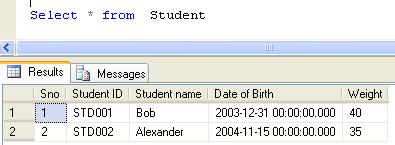
--Check the existence of the data
Select * from dbo.[Student]
--truncate data
Truncate Table dbo.Student
--Verify the data has been truncated
Select * from dbo.[Student]

Now, you need to create this procedure to recover your truncated data

Create PROCEDURE Recover_Truncated_Data_Proc
@Database_Name NVARCHAR(MAX),
@SchemaName_n_TableName NVARCHAR(MAX),
@Date_From datetime='1900/01/01',
@Date_To datetime ='9999/12/31'
AS
DECLARE @Fileid INT
DECLARE @Pageid INT
DECLARE @Slotid INT

DECLARE @ConsolidatedPageID VARCHAR(MAX)
Declare @AllocUnitID as bigint
Declare @TransactionID as VARCHAR(MAX)

/*  Pick The actual data
*/
declare @temppagedata table
(
[ParentObject] sysname,
[Object] sysname,
[Field] sysname,
[Value] sysname)

declare @pagedata table
(
[Page ID] sysname,
[AllocUnitId] bigint,
[ParentObject] sysname,
[Object] sysname,
[Field] sysname,
[Value] sysname)

DECLARE Page_Data_Cursor CURSOR FOR
/*We need to filter LOP_MODIFY_ROW,LOP_MODIFY_COLUMNS from log for modified records & Get its Slot No, Page ID & AllocUnit ID*/
SELECT LTRIM(RTRIM(Replace([Description],'Deallocated',''))) AS [PAGE ID]
,[Slot ID],[AllocUnitId]
FROM    sys.fn_dblog(NULL, NULL)
WHERE
AllocUnitId IN
(Select [Allocation_unit_id] from sys.allocation_units allocunits
INNER JOIN sys.partitions partitions ON (allocunits.type IN (1, 3)
AND partitions.hobt_id = allocunits.container_id) OR (allocunits.type = 2
AND partitions.partition_id = allocunits.container_id)
Where object_id=object_ID('' + @SchemaName_n_TableName + ''))
AND Operation IN ('LOP_MODIFY_ROW') AND [Context] IN ('LCX_PFS')
AND Description Like '%Deallocated%'
/*Use this subquery to filter the date*/

AND [TRANSACTION ID] IN (SELECT DISTINCT [TRANSACTION ID] FROM    sys.fn_dblog(NULL, NULL)
WHERE Context IN ('LCX_NULL') AND Operation in ('LOP_BEGIN_XACT')
AND [Transaction Name]='TRUNCATE TABLE'
AND  CONVERT(NVARCHAR(11),[Begin Time]) BETWEEN @Date_From AND @Date_To)

/****************************************/

GROUP BY [Description],[Slot ID],[AllocUnitId]
ORDER BY [Slot ID]

OPEN Page_Data_Cursor

FETCH NEXT FROM Page_Data_Cursor INTO @ConsolidatedPageID, @Slotid,@AllocUnitID

WHILE @@FETCH_STATUS = 0
BEGIN
DECLARE @hex_pageid AS VARCHAR(Max)
/*Page ID contains File Number and page number It looks like 0001:00000130.
In this example 0001 is file Number &  00000130 is Page Number & These numbers are in Hex format*/
SET @Fileid=SUBSTRING(@ConsolidatedPageID,0,CHARINDEX(':',@ConsolidatedPageID)) -- Seperate File ID from Page ID
SET @hex_pageid ='0x'+ SUBSTRING(@ConsolidatedPageID,CHARINDEX(':',@ConsolidatedPageID)+1,Len(@ConsolidatedPageID))  ---Seperate the page ID
SELECT @Pageid=Convert(INT,cast('' AS XML).value('xs:hexBinary(substring(sql:variable("@hex_pageid"),sql:column("t.pos")) )', 'varbinary(max)')) -- Convert Page ID from hex to integer
FROM (SELECT CASE substring(@hex_pageid, 1, 2) WHEN '0x' THEN 3 ELSE 0 END) AS t(pos)

DELETE @temppagedata
-- Now we need to get the actual data (After truncate) from the page

INSERT INTO @temppagedata EXEC( 'DBCC PAGE(' + @DataBase_Name + ', ' + @fileid + ', ' + @pageid + ', 1) with tableresults,no_infomsgs;');
---Check if any index page is there
If (Select Count(*) From @temppagedata Where [Field]='Record Type' And [Value]='INDEX_RECORD')=0
Begin
DELETE @temppagedata
INSERT INTO @temppagedata EXEC( 'DBCC PAGE(' + @DataBase_Name + ', ' + @fileid + ', ' + @pageid + ', 3) with tableresults,no_infomsgs;');
End
Else
Begin
DELETE @temppagedata
End

INSERT INTO @pagedata SELECT @ConsolidatedPageID,@AllocUnitID,[ParentObject],[Object],[Field] ,[Value] FROM @temppagedata
FETCH NEXT FROM Page_Data_Cursor INTO  @ConsolidatedPageID, @Slotid,@AllocUnitID
END

CLOSE Page_Data_Cursor
DEALLOCATE Page_Data_Cursor

DECLARE @Newhexstring VARCHAR(MAX);

DECLARE @ModifiedRawData TABLE
(
[ID] INT IDENTITY(1,1),
[PAGE ID] VARCHAR(MAX),
[Slot ID] INT,
[AllocUnitId] BIGINT,
[RowLog Contents 0_var] VARCHAR(MAX),
[RowLog Contents 0] VARBINARY(8000)
)
--The truncated data is in multiple rows in the page, so we need to convert it into one row as a single hex value.
--This hex value is in string format

INSERT INTO @ModifiedRawData ([PAGE ID],[Slot ID],[AllocUnitId]
,[RowLog Contents 0_var])
SELECT [Page ID],Substring([ParentObject],CHARINDEX('Slot', [ParentObject])+4, (CHARINDEX('Offset', [ParentObject])-(CHARINDEX('Slot', [ParentObject])+4)) ) as [Slot ID]
,[AllocUnitId]
,(
SELECT REPLACE(STUFF((SELECT REPLACE(SUBSTRING([Value],CHARINDEX(':',[Value])+1,CHARINDEX('†',[Value])-CHARINDEX(':',[Value])),'†','')
FROM @pagedata C  WHERE B.[Page ID]= C.[Page ID] And Substring(B.[ParentObject],CHARINDEX('Slot', B.[ParentObject])+4, (CHARINDEX('Offset', B.[ParentObject])-(CHARINDEX('Slot', B.[ParentObject])+4)) )=Substring(C.[ParentObject],CHARINDEX('Slot', C.[ParentObject])+4, (CHARINDEX('Offset', C.[ParentObject])-(CHARINDEX('Slot', C.[ParentObject])+4)) ) And
[Object] Like '%Memory Dump%'
FOR XML PATH('') ),1,1,'') ,' ','')
) AS [Value]
From @pagedata B
Where [Object] Like '%Memory Dump%'
Group By [Page ID],[ParentObject],[AllocUnitId]
Order By [Slot ID]

-- Convert the hex value data in string, convert it into Hex value as well.
UPDATE @ModifiedRawData  SET [RowLog Contents 0] = cast('' AS XML).value('xs:hexBinary(substring(sql:column("[RowLog Contents 0_var]"), 0) )', 'varbinary(max)')
FROM @ModifiedRawData

DECLARE @RowLogContents VARBINARY(8000)
Declare @AllocUnitName NVARCHAR(Max)
Declare @SQL NVARCHAR(Max)
DECLARE @bitTable TABLE
(
[ID] INT,
[Bitvalue] INT
)
----Create table to set the bit position of one byte.

INSERT INTO @bitTable
SELECT 0,2 UNION ALL
SELECT 1,2 UNION ALL
SELECT 2,4 UNION ALL
SELECT 3,8 UNION ALL
SELECT 4,16 UNION ALL
SELECT 5,32 UNION ALL
SELECT 6,64 UNION ALL
SELECT 7,128

--Create table to collect the row data.
DECLARE @DeletedRecords TABLE
(
[RowLogContents]	VARBINARY(8000),
[AllocUnitID]		BIGINT,
[Transaction ID]	NVARCHAR(Max),
[Slot ID]           INT,
[FixedLengthData]	SMALLINT,
[TotalNoOfCols]		SMALLINT,
[NullBitMapLength]	SMALLINT,
[NullBytes]			VARBINARY(8000),
[TotalNoofVarCols]	SMALLINT,
[ColumnOffsetArray]	VARBINARY(8000),
[VarColumnStart]	SMALLINT,
[NullBitMap]		VARCHAR(MAX)
)
--Create a common table expression to get all the row data plus how many bytes we have for each row.
;WITH RowData AS (
SELECT

[RowLog Contents 0] AS [RowLogContents]

,[AllocUnitID] AS [AllocUnitID]

,[ID] AS [Transaction ID]

,[Slot ID] as [Slot ID]
--[Fixed Length Data] = Substring (RowLog content 0, Status Bit A+ Status Bit B + 1,2 bytes)
,CONVERT(SMALLINT, CONVERT(BINARY(2), REVERSE(SUBSTRING([RowLog Contents 0], 2 + 1, 2)))) AS [FixedLengthData]  --@FixedLengthData

--[TotalnoOfCols] =  Substring (RowLog content 0, [Fixed Length Data] + 1,2 bytes)
,CONVERT(INT, CONVERT(BINARY(2), REVERSE(SUBSTRING([RowLog Contents 0], CONVERT(SMALLINT, CONVERT(BINARY(2)
,REVERSE(SUBSTRING([RowLog Contents 0], 2 + 1, 2)))) + 1, 2)))) as  [TotalNoOfCols]

--[NullBitMapLength]=ceiling([Total No of Columns] /8.0)
,CONVERT(INT, ceiling(CONVERT(INT, CONVERT(BINARY(2), REVERSE(SUBSTRING([RowLog Contents 0], CONVERT(SMALLINT, CONVERT(BINARY(2)
,REVERSE(SUBSTRING([RowLog Contents 0], 2 + 1, 2)))) + 1, 2))))/8.0)) as [NullBitMapLength]

--[Null Bytes] = Substring (RowLog content 0, Status Bit A+ Status Bit B + [Fixed Length Data] +1, [NullBitMapLength] )
,SUBSTRING([RowLog Contents 0], CONVERT(SMALLINT, CONVERT(BINARY(2), REVERSE(SUBSTRING([RowLog Contents 0], 2 + 1, 2)))) + 3,
CONVERT(INT, ceiling(CONVERT(INT, CONVERT(BINARY(2), REVERSE(SUBSTRING([RowLog Contents 0], CONVERT(SMALLINT, CONVERT(BINARY(2)
,REVERSE(SUBSTRING([RowLog Contents 0], 2 + 1, 2)))) + 1, 2))))/8.0))) as [NullBytes]

--[TotalNoofVarCols] = Substring (RowLog content 0, Status Bit A+ Status Bit B + [Fixed Length Data] +1, [Null Bitmap length] + 2 )
,(CASE WHEN SUBSTRING([RowLog Contents 0], 1, 1) In (0x30,0x70) THEN
CONVERT(INT, CONVERT(BINARY(2), REVERSE(SUBSTRING([RowLog Contents 0],
CONVERT(SMALLINT, CONVERT(BINARY(2), REVERSE(SUBSTRING([RowLog Contents 0], 2 + 1, 2)))) + 3
+ CONVERT(INT, ceiling(CONVERT(INT, CONVERT(BINARY(2), REVERSE(SUBSTRING([RowLog Contents 0], CONVERT(SMALLINT, CONVERT(BINARY(2)
,REVERSE(SUBSTRING([RowLog Contents 0], 2 + 1, 2)))) + 1, 2))))/8.0)), 2))))  ELSE null  END) AS [TotalNoofVarCols]

--[ColumnOffsetArray]= Substring (RowLog content 0, Status Bit A+ Status Bit B + [Fixed Length Data] +1, [Null Bitmap length] + 2 , [TotalNoofVarCols]*2 )
,(CASE WHEN SUBSTRING([RowLog Contents 0], 1, 1) In (0x30,0x70) THEN
SUBSTRING([RowLog Contents 0]
, CONVERT(SMALLINT, CONVERT(BINARY(2), REVERSE(SUBSTRING([RowLog Contents 0], 2 + 1, 2)))) + 3
+ CONVERT(INT, ceiling(CONVERT(INT, CONVERT(BINARY(2), REVERSE(SUBSTRING([RowLog Contents 0], CONVERT(SMALLINT, CONVERT(BINARY(2)
,REVERSE(SUBSTRING([RowLog Contents 0], 2 + 1, 2)))) + 1, 2))))/8.0)) + 2
, (CASE WHEN SUBSTRING([RowLog Contents 0], 1, 1) In (0x30,0x70) THEN
CONVERT(INT, CONVERT(BINARY(2), REVERSE(SUBSTRING([RowLog Contents 0],
CONVERT(SMALLINT, CONVERT(BINARY(2), REVERSE(SUBSTRING([RowLog Contents 0], 2 + 1, 2)))) + 3
+ CONVERT(INT, ceiling(CONVERT(INT, CONVERT(BINARY(2), REVERSE(SUBSTRING([RowLog Contents 0], CONVERT(SMALLINT, CONVERT(BINARY(2)
,REVERSE(SUBSTRING([RowLog Contents 0], 2 + 1, 2)))) + 1, 2))))/8.0)), 2))))  ELSE null  END)
* 2)  ELSE null  END) AS [ColumnOffsetArray]

--	Variable column Start = Status Bit A+ Status Bit B + [Fixed Length Data] + [Null Bitmap length] + 2+([TotalNoofVarCols]*2)
,CASE WHEN SUBSTRING([RowLog Contents 0], 1, 1)In (0x30,0x70)
THEN  (
CONVERT(SMALLINT, CONVERT(BINARY(2), REVERSE(SUBSTRING([RowLog Contents 0], 2 + 1, 2)))) + 4

+ CONVERT(INT, ceiling(CONVERT(INT, CONVERT(BINARY(2), REVERSE(SUBSTRING([RowLog Contents 0], CONVERT(SMALLINT, CONVERT(BINARY(2)
,REVERSE(SUBSTRING([RowLog Contents 0], 2 + 1, 2)))) + 1, 2))))/8.0))

+ ((CASE WHEN SUBSTRING([RowLog Contents 0], 1, 1) In (0x30,0x70) THEN
CONVERT(INT, CONVERT(BINARY(2), REVERSE(SUBSTRING([RowLog Contents 0],
CONVERT(SMALLINT, CONVERT(BINARY(2), REVERSE(SUBSTRING([RowLog Contents 0], 2 + 1, 2)))) + 3
+ CONVERT(INT, ceiling(CONVERT(INT, CONVERT(BINARY(2), REVERSE(SUBSTRING([RowLog Contents 0], CONVERT(SMALLINT, CONVERT(BINARY(2)
,REVERSE(SUBSTRING([RowLog Contents 0], 2 + 1, 2)))) + 1, 2))))/8.0)), 2))))  ELSE null  END) * 2))

ELSE null End AS [VarColumnStart]
From @ModifiedRawData
),

---Use this technique to repeate the row till the no of bytes of the row.
N1 (n) AS (SELECT 1 UNION ALL SELECT 1),
N2 (n) AS (SELECT 1 FROM N1 AS X, N1 AS Y),
N3 (n) AS (SELECT 1 FROM N2 AS X, N2 AS Y),
N4 (n) AS (SELECT ROW_NUMBER() OVER(ORDER BY X.n)
FROM N3 AS X, N3 AS Y)

insert into @DeletedRecords
Select	 RowLogContents
,[AllocUnitID]
,[Transaction ID]
,[Slot ID]
,[FixedLengthData]
,[TotalNoOfCols]
,[NullBitMapLength]
,[NullBytes]
,[TotalNoofVarCols]
,[ColumnOffsetArray]
,[VarColumnStart]
--Get the Null value against each column (1 means null zero means not null)
,[NullBitMap]=(REPLACE(STUFF((SELECT ',' +
(CASE WHEN [ID]=0 THEN CONVERT(NVARCHAR(1),(SUBSTRING(NullBytes, n, 1) % 2))  ELSE CONVERT(NVARCHAR(1),((SUBSTRING(NullBytes, n, 1) / [Bitvalue]) % 2)) END) --as [nullBitMap]
FROM
N4 AS Nums
Join RowData AS C ON n<=NullBitMapLength
Cross Join @bitTable WHERE C.[RowLogContents]=D.[RowLogContents] ORDER BY [RowLogContents],n ASC FOR XML PATH('')),1,1,''),',',''))
FROM RowData D

CREATE TABLE [#temp_Data]
(
[FieldName]  VARCHAR(MAX) COLLATE database_default NOT NULL,
[FieldValue] VARCHAR(MAX) COLLATE database_default NOT NULL,
[Rowlogcontents] VARBINARY(8000),
[Transaction ID] VARCHAR(MAX) COLLATE database_default NOT NULL,
[Slot ID] int
)
---Create common table expression and join it with the rowdata table
--to get each column details
;With CTE AS (
/*This part is for variable data columns*/
SELECT Rowlogcontents,
[Transaction ID],
[Slot ID],
NAME ,
cols.leaf_null_bit AS nullbit,
leaf_offset,
ISNULL(syscolumns.length, cols.max_length) AS [length],
cols.system_type_id,
cols.leaf_bit_position AS bitpos,
ISNULL(syscolumns.xprec, cols.precision) AS xprec,
ISNULL(syscolumns.xscale, cols.scale) AS xscale,
SUBSTRING([nullBitMap], cols.leaf_null_bit, 1) AS is_null,
--Calculate the variable column size from the variable column offset array
(CASE WHEN leaf_offset<1 and SUBSTRING([nullBitMap], cols.leaf_null_bit, 1)=0 THEN
CONVERT(SMALLINT, CONVERT(BINARY(2), REVERSE (SUBSTRING ([ColumnOffsetArray], (2 * leaf_offset*-1) - 1, 2)))) ELSE 0 END) AS [Column value Size],

---Calculate the column length
(CASE WHEN leaf_offset<1 and SUBSTRING([nullBitMap], cols.leaf_null_bit, 1)=0 THEN  CONVERT(SMALLINT, CONVERT(BINARY(2), REVERSE (SUBSTRING ([ColumnOffsetArray], (2 * (leaf_offset*-1)) - 1, 2))))
- ISNULL(NULLIF(CONVERT(SMALLINT, CONVERT(BINARY(2), REVERSE (SUBSTRING ([ColumnOffsetArray], (2 * ((leaf_offset*-1) - 1)) - 1, 2)))), 0), [varColumnStart])
ELSE 0 END) AS [Column Length]

--Get the Hexa decimal value from the RowlogContent
--HexValue of the variable column=Substring([Column value Size] - [Column Length] + 1,[Column Length])
--This is the data of your column but in the Hexvalue
,CASE WHEN SUBSTRING([nullBitMap], cols.leaf_null_bit, 1)=1 THEN NULL ELSE
SUBSTRING(Rowlogcontents,((CASE WHEN leaf_offset<1 and SUBSTRING([nullBitMap], cols.leaf_null_bit, 1)=0 THEN CONVERT(SMALLINT, CONVERT(BINARY(2), REVERSE (SUBSTRING ([ColumnOffsetArray], (2 * leaf_offset*-1) - 1, 2)))) ELSE 0 END)
- ((CASE WHEN leaf_offset<1 and SUBSTRING([nullBitMap], cols.leaf_null_bit, 1)=0 THEN  CONVERT(SMALLINT, CONVERT(BINARY(2), REVERSE (SUBSTRING ([ColumnOffsetArray], (2 * (leaf_offset*-1)) - 1, 2))))
- ISNULL(NULLIF(CONVERT(SMALLINT, CONVERT(BINARY(2), REVERSE (SUBSTRING ([ColumnOffsetArray], (2 * ((leaf_offset*-1) - 1)) - 1, 2)))), 0), [varColumnStart])
ELSE 0 END))) + 1,((CASE WHEN leaf_offset<1 and SUBSTRING([nullBitMap], cols.leaf_null_bit, 1)=0 THEN  CONVERT(SMALLINT, CONVERT(BINARY(2), REVERSE (SUBSTRING ([ColumnOffsetArray], (2 * (leaf_offset*-1)) - 1, 2))))
- ISNULL(NULLIF(CONVERT(SMALLINT, CONVERT(BINARY(2), REVERSE (SUBSTRING ([ColumnOffsetArray], (2 * ((leaf_offset*-1) - 1)) - 1, 2)))), 0), [varColumnStart])
ELSE 0 END))) END AS hex_Value

FROM @DeletedRecords A
Inner Join sys.allocation_units allocunits On A.[AllocUnitId]=allocunits.[Allocation_Unit_Id]
INNER JOIN sys.partitions partitions ON (allocunits.type IN (1, 3)
AND partitions.hobt_id = allocunits.container_id) OR (allocunits.type = 2 AND partitions.partition_id = allocunits.container_id)
INNER JOIN sys.system_internals_partition_columns cols ON cols.partition_id = partitions.partition_id
LEFT OUTER JOIN syscolumns ON syscolumns.id = partitions.object_id AND syscolumns.colid = cols.partition_column_id
WHERE leaf_offset<0

UNION
/*This part is for fixed data columns*/
SELECT  Rowlogcontents,
[Transaction ID],
[Slot ID],
NAME ,
cols.leaf_null_bit AS nullbit,
leaf_offset,
ISNULL(syscolumns.length, cols.max_length) AS [length],
cols.system_type_id,
cols.leaf_bit_position AS bitpos,
ISNULL(syscolumns.xprec, cols.precision) AS xprec,
ISNULL(syscolumns.xscale, cols.scale) AS xscale,
SUBSTRING([nullBitMap], cols.leaf_null_bit, 1) AS is_null,
(SELECT TOP 1 ISNULL(SUM(CASE WHEN C.leaf_offset >1 THEN max_length ELSE 0 END),0) FROM
sys.system_internals_partition_columns C WHERE cols.partition_id =C.partition_id And C.leaf_null_bit<cols.leaf_null_bit)+5 AS [Column value Size],
syscolumns.length AS [Column Length]

,CASE WHEN SUBSTRING([nullBitMap], cols.leaf_null_bit, 1)=1 THEN NULL ELSE
SUBSTRING
(
Rowlogcontents,(SELECT TOP 1 ISNULL(SUM(CASE WHEN C.leaf_offset >1 THEN max_length ELSE 0 END),0) FROM
sys.system_internals_partition_columns C where cols.partition_id =C.partition_id And C.leaf_null_bit<cols.leaf_null_bit)+5
,syscolumns.length) END AS hex_Value
FROM @DeletedRecords A
Inner Join sys.allocation_units allocunits ON A.[AllocUnitId]=allocunits.[Allocation_Unit_Id]
INNER JOIN sys.partitions partitions ON (allocunits.type IN (1, 3)
AND partitions.hobt_id = allocunits.container_id) OR (allocunits.type = 2 AND partitions.partition_id = allocunits.container_id)
INNER JOIN sys.system_internals_partition_columns cols ON cols.partition_id = partitions.partition_id
LEFT OUTER JOIN syscolumns ON syscolumns.id = partitions.object_id AND syscolumns.colid = cols.partition_column_id
WHERE leaf_offset>0 )

--Converting data from Hexvalue to its orgional datatype.
--Implemented datatype conversion mechanism for each datatype
--Select * from sys.columns Where [object_id]=object_id('' + @SchemaName_n_TableName + '')

INSERT INTO #temp_Data
SELECT NAME,
CASE
WHEN system_type_id IN (231, 239) THEN  LTRIM(RTRIM(CONVERT(NVARCHAR(max),hex_Value)))  --NVARCHAR ,NCHAR
WHEN system_type_id IN (167,175) THEN  LTRIM(RTRIM(CONVERT(VARCHAR(max),REPLACE(hex_Value, 0x00, 0x20))))  --VARCHAR,CHAR
WHEN system_type_id = 48 THEN CONVERT(VARCHAR(MAX), CONVERT(TINYINT, CONVERT(BINARY(1), REVERSE (hex_Value)))) --TINY INTEGER
WHEN system_type_id = 52 THEN CONVERT(VARCHAR(MAX), CONVERT(SMALLINT, CONVERT(BINARY(2), REVERSE (hex_Value)))) --SMALL INTEGER
WHEN system_type_id = 56 THEN CONVERT(VARCHAR(MAX), CONVERT(INT, CONVERT(BINARY(4), REVERSE(hex_Value)))) -- INTEGER
WHEN system_type_id = 127 THEN CONVERT(VARCHAR(MAX), CONVERT(BIGINT, CONVERT(BINARY(8), REVERSE(hex_Value))))-- BIG INTEGER
WHEN system_type_id = 61 Then CONVERT(VARCHAR(MAX),CONVERT(DATETIME,CONVERT(VARBINARY(8000),REVERSE (hex_Value))),100) --DATETIME
WHEN system_type_id =58 Then CONVERT(VARCHAR(MAX),CONVERT(SMALLDATETIME,CONVERT(VARBINARY(8000),REVERSE(hex_Value))),100) --SMALL DATETIME
WHEN system_type_id = 108 THEN CONVERT(VARCHAR(MAX),CONVERT(NUMERIC(38,20), CONVERT(VARBINARY,CONVERT(VARBINARY(1),xprec)+CONVERT(VARBINARY(1),xscale))+CONVERT(VARBINARY(1),0) + hex_Value)) --- NUMERIC
WHEN system_type_id In(60,122) THEN CONVERT(VARCHAR(MAX),Convert(MONEY,Convert(VARBINARY(8000),Reverse(hex_Value))),2) --MONEY,SMALLMONEY
WHEN system_type_id =106 THEN CONVERT(VARCHAR(MAX), CAST(CONVERT(Decimal(38,34), CONVERT(VARBINARY,Convert(VARBINARY,xprec)+CONVERT(VARBINARY,xscale))+CONVERT(VARBINARY(1),0) + hex_Value) as FLOAT)) --- DECIMAL
WHEN system_type_id = 104 THEN CONVERT(VARCHAR(MAX),CONVERT (BIT,CONVERT(BINARY(1), hex_Value)%2))  -- BIT
WHEN system_type_id =62 THEN  RTRIM(LTRIM(STR(CONVERT(FLOAT,SIGN(CAST(CONVERT(VARBINARY(8000),Reverse(hex_Value)) AS BIGINT)) * (1.0 + (CAST(CONVERT(VARBINARY(8000),Reverse(hex_Value)) AS BIGINT) & 0x000FFFFFFFFFFFFF) * POWER(CAST(2 AS FLOAT), -52)) * POWER(CAST(2 AS FLOAT),((CAST(CONVERT(VARBINARY(8000),Reverse(hex_Value)) AS BIGINT) & 0x7ff0000000000000) / EXP(52 * LOG(2))-1023))),53,LEN(hex_Value)))) --- FLOAT
When system_type_id =59 THEN  Left(LTRIM(STR(CAST(SIGN(CAST(Convert(VARBINARY(8000),REVERSE(hex_Value)) AS BIGINT))* (1.0 + (CAST(CONVERT(VARBINARY(8000),Reverse(hex_Value)) AS BIGINT) & 0x007FFFFF) * POWER(CAST(2 AS Real), -23)) * POWER(CAST(2 AS Real),(((CAST(CONVERT(VARBINARY(8000),Reverse(hex_Value)) AS INT) )& 0x7f800000)/ EXP(23 * LOG(2))-127))AS REAL),23,23)),8) --Real
WHEN system_type_id In (165,173) THEN (CASE WHEN CHARINDEX(0x,cast('' AS XML).value('xs:hexBinary(sql:column("hex_Value"))', 'VARBINARY(8000)')) = 0 THEN '0x' ELSE '' END) +cast('' AS XML).value('xs:hexBinary(sql:column("hex_Value"))', 'varchar(max)') -- BINARY,VARBINARY
WHEN system_type_id =36 THEN CONVERT(VARCHAR(MAX),CONVERT(UNIQUEIDENTIFIER,hex_Value)) --UNIQUEIDENTIFIER
END AS FieldValue
,[Rowlogcontents]
,[Transaction ID]
,[Slot ID]
FROM CTE ORDER BY nullbit

--Create the column name in the same order to do pivot table.

DECLARE @FieldName VARCHAR(max)
SET @FieldName = STUFF(
(
SELECT ',' + CAST(QUOTENAME([Name]) AS VARCHAR(MAX)) FROM syscolumns WHERE id=object_id('' + @SchemaName_n_TableName + '')

FOR XML PATH('')
), 1, 1, '')

--Finally did pivot table and got the data back in the same format.
--The [Update Statement] column will give you the query that you can execute in case of recovery.
SET @sql = 'SELECT ' + @FieldName  + ' FROM #temp_Data
PIVOT (Min([FieldValue]) FOR FieldName IN (' + @FieldName  + ')) AS pvt
ORDER BY Convert(int,[Transaction ID],Convert(int,[Slot ID]))'

EXEC sp_executesql @sql

GO
--Execute the procedure like
--Recover_Truncated_Data_Proc 'Database name''Schema.table name','Date from' ,'Date to'

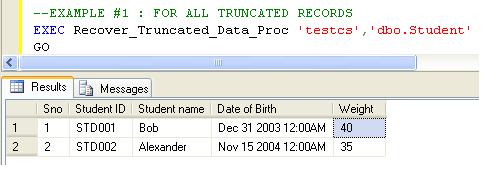
--EXAMPLE #1 : FOR ALL TRUNCATED RECORDS
EXEC Recover_Truncated_Data_Proc 'testcs','dbo.Student'
GO
--EXAMPLE #2 : FOR ANY SPECIFIC DATE RANGE
EXEC Recover_Truncated_Data_Proc  'testcs','dbo.Student','2000/01/01','2012/04/08'
--It will give you the result of all Truncated records.
Explanation

Let’s go through it step by step. The process requires few easy steps:

Step-1:

The first step is to pick the truncated records using sys.fn_dblog(SQL Log)..Given below is the sample query.

SELECT LTRIM(RTRIM(Replace([Description],'Deallocated',''))) AS [PAGE ID]
,[Slot ID],[AllocUnitId]
FROM    sys.fn_dblog(NULL, NULL)
WHERE
AllocUnitId IN
(Select [Allocation_unit_id] from sys.allocation_units allocunits
INNER JOIN sys.partitions partitions ON (allocunits.type IN (1, 3)
AND partitions.hobt_id = allocunits.container_id) OR (allocunits.type = 2
AND partitions.partition_id = allocunits.container_id)
Where object_id=object_ID('' + 'dbo.Student' + ''))
AND Operation IN ('LOP_MODIFY_ROW') AND [Context] IN ('LCX_PFS')
AND Description Like '%Deallocated%'

Step-2:

In the above sample query, the [Page ID] contains file ID and Page ID in a merge and hex format e.g ‘0001:0000005e’, where the actual data resides after truncate.So in this step we need to separate File ID and page ID than convert it into integer and enter these values in DBCC Page to get the truncated data page.

SET @Fileid=SUBSTRING(@ConsolidatedPageID,0,CHARINDEX(':',@ConsolidatedPageID)) -- Seperate File ID from Page ID

SET @hex_pageid ='0x'+ SUBSTRING(@ConsolidatedPageID,CHARINDEX(':',@ConsolidatedPageID)+1,Len(@ConsolidatedPageID))  ---Seperate the page ID
SELECT @Pageid=Convert(INT,cast('' AS XML).value('xs:hexBinary(substring(sql:variable("@hex_pageid"),sql:column("t.pos")) )', 'varbinary(max)')) -- Convert Page ID from hex to integer
FROM (SELECT CASE substring(@hex_pageid, 1, 2) WHEN '0x' THEN 3 ELSE 0 END) AS t(pos)
INSERT INTO @temppagedata EXEC( 'DBCC PAGE(' + @DataBase_Name + ', ' + @fileid + ', ' + @pageid + ', 1) with tableresults,no_infomsgs;');
INSERT INTO @pagedata SELECT @ConsolidatedPageID,@AllocUnitID,[ParentObject],[Object],[Field] ,[Value] FROM @temppagedata

Step-3:

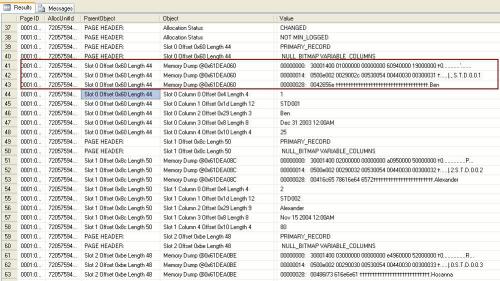
Now, we have truncated data in @pagedata table but in hex values and it contains the entire page data, most of the data we don’t need. So, we will filter our required data via this query. In this query we filter all the records containing ‘Memory Dump ‘in [object] column. But the issue is, we need the data from [value] column and in this column single row data is in multiple rows like.

00000000: 30001400 01000000 00000000 60940000 28000000 †0………..`…(…
00000014: 0500e002 0029002d 00530054 00440030 00300031 †…..).-.S.T.D.0.0.1
00000028: 00426f62 31†††††††††††††††††††††††††††††††††††.Bob1

But, we need to convert it like this in single row.
30001400010000000000000060940000280000000500e0020029002d00
530054004400300030003100426f6231


INSERT INTO @ModifiedRawData ([PAGE ID],[Slot ID],[AllocUnitId]
,[RowLog Contents 0_var])
SELECT [Page ID],Substring([ParentObject],CHARINDEX('Slot', [ParentObject])+4, (CHARINDEX('Offset', [ParentObject])-(CHARINDEX('Slot', [ParentObject])+4)) ) as [Slot ID]
,[AllocUnitId]
,(
SELECT REPLACE(STUFF((SELECT REPLACE(SUBSTRING([Value],CHARINDEX(':',[Value])+1,CHARINDEX('†',[Value])-CHARINDEX(':',[Value])),'†','')
--REPLACE(SUBSTRING([Value],CHARINDEX(':',[Value])+1,48),'†','')
FROM @pagedata C  WHERE B.[Page ID]= C.[Page ID] And Substring(B.[ParentObject],CHARINDEX('Slot', B.[ParentObject])+4, (CHARINDEX('Offset', B.[ParentObject])-(CHARINDEX('Slot', B.[ParentObject])+4)) )=Substring(C.[ParentObject],CHARINDEX('Slot', C.[ParentObject])+4, (CHARINDEX('Offset', C.[ParentObject])-(CHARINDEX('Slot', C.[ParentObject])+4)) ) And
[Object] Like '%Memory Dump%'
FOR XML PATH('') ),1,1,'') ,' ','')
) AS [Value]
From @pagedata B
Where [Object] Like '%Memory Dump%'
Group By [Page ID],[ParentObject],[AllocUnitId]
Order By [Slot ID]

Now, we have each row record in hex format, so the rest of the step we will follow the same as in How to recover deleted data from SQl server to convert it into actual data.

Appreciate your feedback on my posts. Please do comment.

Read Full Post »

We use split function in our development frequently. The purpose of this function is to split single string having delimiters (comma, semicolon etc.) to convert into multiple strings. Many developers have designed it in different ways.
Given below is the split function, developed with the help of XQuery.
Let me explain this function demonstrating simple example.

Split the @variable:

--Create this user deinfed function.
Create Function dbo.[UDF_Split]
(
@String VARCHAR(MAX),  -- Variable for string
@delimiter VARCHAR(50) -- Delimiter in the string
)
RETURNS @Table TABLE(        --Return type of the function
Splitcolumn VARCHAR(MAX)
)
BEGIN
Declare @Xml AS XML
-- Replace the delimiter to the opeing and closing tag
--to make it an xml document
SET @Xml = cast(('<A>'+replace(@String,@delimiter,'</A><A>')+'</A>') AS XML)
--Query this xml document via xquery to split rows
--and insert it into table to return.
INSERT INTO @Table SELECT A.value('.', 'varchar(max)') as [Column] FROM @Xml.nodes('A') AS FN(A)
RETURN
END
GO
-- For Example :
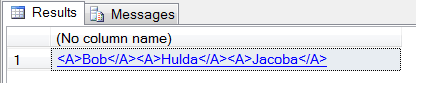
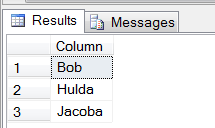
SELECT * FROM dbo.[UDF_Split] ('Bob,Hulda,Jacoba',',')
-- We can use this function to split table's column as well
--but the issue is, if we have 5 rows in a table
--This function will be executed 5 times.
--I have another solution to split table's column
GO

Split the Table’s Column:

CREATE TABLE [dbo].[Student](
[Student ID]   [varchar] (6) NOT NULL ,
[Student Name] [varchar](50) NOT NULL,
[Code] [varchar] (MAX))
GO
Insert into dbo.[Student] values ('STD001','Bob','E1,E2,E3')
Insert into dbo.[Student] values ('STD002','Alexander','X1,X2,X3')
Insert into dbo.[Student] values ('STD003','Hosanna','A1,A2,A3')
GO
-- Here is the sample query to split table's column.
Declare @delimiter VARCHAR(50)
Set @delimiter=','
;WITH Cte AS
(
SELECT
[Student ID],
[Student Name],
-- Replace the delimiter to the opeing and closing tag
--to make it an xml document
CAST('<M>' + REPLACE([Code], @delimiter , '</M><M>') + '</M>' AS XML) AS [Code]
FROM  [Student]
)
Select
[Student ID],
[Student Name],
--Query this xml document via xquery to split rows
Split.a.value('.', 'VARCHAR(MAX)') AS [Code]
FROM Cte
CROSS APPLY [Code].nodes('/M')Split(a)

I’d really appreciate your comments on my posts. Please feel free to comment.

Read Full Post »

The source code of how to recover the modified data is given here. But how does it work to recover modified data is explained here. Let’s go through it step by step. The process requires nine easy steps:
Before proceeding to step one, let us use the example given below for explanation :

--Example -1 --Update [Student] Set [Student Name]='Ben' Where [SNO]=1
--Operation type will be 'LOP_MODIFY_ROW'

--Example -2 --Update [Student] Set [Student Name]='Ben',[Weight]=25 Where [SNO]=1
--Operation type will be 'LOP_MODIFY_COLUMNS'

Step-1:

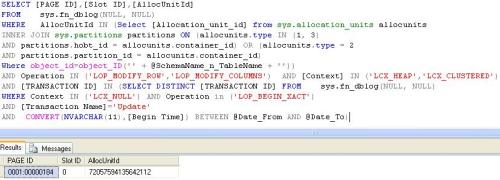
The first step is to pick the Slot ID and Page ID from the modified records using sys.fn_dblog(SQL Log). The reason behind this is to pass these slot IDs and page IDs in the DBCC Page function to get the modified records. But this modified records is available in hex format.
Note : SQL Server keeps each record of table in separate slot in a particular page number meaning if you have a slot ID and page number, you can trace the records.

But, the Page ID is a combination of File ID and Page number. So we need to separate it and then we need to pass it to DBCC Page function to filter the records.

SELECT [PAGE ID],[Slot ID],[AllocUnitId]
FROM    sys.fn_dblog(NULL, NULL)
WHERE   AllocUnitId IN (Select [Allocation_unit_id] from sys.allocation_units allocunits INNER JOIN sys.partitions partitions ON (allocunits.type IN (1, 3) AND partitions.hobt_id = allocunits.container_id) OR (allocunits.type = 2
AND partitions.partition_id = allocunits.container_id)
Where object_id=object_ID('' + @SchemaName_n_TableName + ''))
AND Operation IN ('LOP_MODIFY_ROW','LOP_MODIFY_COLUMNS')  AND [Context] IN ('LCX_HEAP','LCX_CLUSTERED')
AND [TRANSACTION ID] IN (SELECT DISTINCT [TRANSACTION ID] FROM    sys.fn_dblog(NULL, NULL)
WHERE Context IN ('LCX_NULL') AND Operation in ('LOP_BEGIN_XACT')
AND [Transaction Name]='Update'
AND  CONVERT(NVARCHAR(11),[Begin Time]) BETWEEN @Date_From AND @Date_To)

In example -1 & 2 :
Slot ID=0
And Page ID =0001:00000184
And the break up of Page ID : 0001 is file ID And
00000184 is page No. But both of them are in Hex format. So we need to convert it into integer and then pass it to DBCC Page to filter this record.

Select Convert(int,0x0001) = 1 (In Integer)
Select Convert(int,0x00000184) = 388 (In Integer)
--We need to pass this file ID and Page ID in DBCC page function to get the page data along with
--the modified data.
DBCC Page ('test',1,388) with tableresults,no_infomsgs;
OPEN Page_Data_Cursor

FETCH NEXT FROM Page_Data_Cursor INTO @ConsolidatedPageID, @Slotid,@AllocUnitID

WHILE @@FETCH_STATUS = 0
BEGIN
DECLARE @hex_pageid AS VARCHAR(Max)
SET @Fileid=SUBSTRING(@ConsolidatedPageID,0,CHARINDEX(':',@ConsolidatedPageID))		SET @hex_pageid ='0x'+ SUBSTRING(@ConsolidatedPageID,CHARINDEX(':',@ConsolidatedPageID)+1,Len(@ConsolidatedPageID))

SELECT @Pageid=Convert(INT,cast('' AS XML).value('xs:hexBinary(substring(sql:variable("@hex_pageid"),sql:column("t.pos")) )', 'varbinary(max)'))		FROM (SELECT CASE substring(@hex_pageid, 1, 2) WHEN '0x' THEN 3 ELSE 0 END) AS t(pos)

DELETE @temppagedata
INSERT INTO @temppagedata EXEC( 'DBCC PAGE(' + @DataBase_Name + ', ' + @fileid + ', ' + @pageid + ', 3) with tableresults,no_infomsgs;');
INSERT INTO @pagedata SELECT @ConsolidatedPageID,@AllocUnitID,[ParentObject],[Object],[Field] ,[Value] FROM @temppagedata

FETCH NEXT FROM Page_Data_Cursor INTO  @ConsolidatedPageID, @Slotid,@AllocUnitID
END

Now, we have particular page data in one table along with Page ID and Alloc Unit Id. So, we can easily filter it according to the slot number to get the required data (modified data row).

Step-2:

When we filter the slot data, it is normally in multiple rows (Depends upon the amount of data), but the target is to convert it into single row for further processing.

Here is the source code to achieve this target.

DECLARE @ModifiedRawData TABLE
(
[ID] INT IDENTITY(1,1),
[PAGE ID] VARCHAR(MAX),
[Slot ID] INT,
[AllocUnitId] BIGINT,
[RowLog Contents 0_var] VARCHAR(MAX),
[RowLog Contents 0] VARBINARY(8000)
)
--This hex value is in string format
INSERT INTO @ModifiedRawData ([PAGE ID],[Slot ID],[AllocUnitId]
,[RowLog Contents 0_var])
SELECT B.[PAGE ID],A.[Slot ID],A.[AllocUnitId]
,(
SELECT REPLACE(STUFF((SELECT REPLACE(SUBSTRING([VALUE],CHARINDEX(':',[Value])+1,48),'†','')
FROM @pagedata C  WHERE B.[Page ID]= C.[Page ID] And A.[Slot ID] =LTRIM(RTRIM(SUBSTRING(C.[ParentObject],5,3))) And [Object] Like '%Memory Dump%'
FOR XML PATH('') ),1,1,'') ,' ','')
) AS [Value]

FROM sys.fn_dblog(NULL, NULL) A
INNER JOIN @pagedata B On A.[PAGE ID]=B.[PAGE ID]
AND A.[AllocUnitId]=B.[AllocUnitId]
AND A.[Slot ID] =LTRIM(RTRIM(Substring(B.[ParentObject],5,3)))
AND B.[Object] Like '%Memory Dump%'
WHERE A.AllocUnitId IN
(Select [Allocation_unit_id] from sys.allocation_units allocunits
INNER JOIN sys.partitions partitions ON (allocunits.type IN (1, 3)
AND partitions.hobt_id = allocunits.container_id) OR (allocunits.type = 2
AND partitions.partition_id = allocunits.container_id)
Where object_id=object_ID('' + @SchemaName_n_TableName + ''))
AND Operation in ('LOP_MODIFY_ROW','LOP_MODIFY_COLUMNS') AND [Context] IN ('LCX_HEAP','LCX_CLUSTERED')
/*Use this sub query to filter the date*/

AND [TRANSACTION ID] IN (Select DISTINCT [TRANSACTION ID] FROM sys.fn_dblog(NULL, NULL)
Where Context IN ('LCX_NULL') AND Operation IN ('LOP_BEGIN_XACT')
AND [Transaction Name]='Update'
AND  CONVERT(NVARCHAR(11),[Begin Time]) BETWEEN @Date_From AND @Date_To)

/****************************************/
GROUP BY B.[PAGE ID],A.[Slot ID],A.[AllocUnitId]--,[Transaction ID]
ORDER BY [Slot ID]
--But the issue is, this modified data is in string format, we need to convert it into hex format.

UPDATE @ModifiedRawData  SET [RowLog Contents 0] = cast('' AS XML).value('xs:hexBinary(substring(sql:column("[RowLog Contents 0_var]"), 0) )', 'varbinary(max)')
FROM @ModifiedRawData

Step-3:

The next step is to get the modified records from sql server. By using the standard SQL Server function fn_blog. We need only the selected modified records from the transaction log. So we included three filters in select statement(Context, Operation & AllocUnitId).

  • Context (‘LCX_CLUSTERED’and ‘LCX_HEAP’)
  • Operation (‘LOP_MODIFY_ROW’,’LOP_MODIFY_COLUMNS’)
  • AllocUnitId

Here is the code snippet:

Select [PAGE ID],[Slot ID],[AllocUnitId],[Transaction ID],[RowLog Contents 0], [RowLog Contents 1],[RowLog Contents 3],[RowLog Contents 4]
,[Log Record]
FROM    sys.fn_dblog(NULL, NULL)
WHERE    AllocUnitId IN
(Select [Allocation_unit_id] from sys.allocation_units allocunits
INNER JOIN sys.partitions partitions ON (allocunits.type IN (1, 3)
AND partitions.hobt_id = allocunits.container_id) OR (allocunits.type = 2
AND partitions.partition_id = allocunits.container_id)
Where object_id=object_ID('' + 'dbo.student' + ''))
AND Operation in ('LOP_MODIFY_ROW','LOP_MODIFY_COLUMNS') And [Context] IN ('LCX_HEAP','LCX_CLUSTERED')

AllocUnitId : Allocation Unit ID of the table name.

We filtered two types of Operation type from sql log. Given below are the details, Why SQL server create these operation types in Log and what is the difference ?:
1-LOP_MODIFY_ROW
If there is an update that might impact in variable length column values (offset) then the type will be LOP_MODIFY_ROW.
For example -1:
Update [Student] Set [Student Name]=’Ben Where [SNO]=1

2-LOP_MODIFY_COLUMNS
If there is an update that might not impact in variable length column values (offset) and the update should impact in both fixed and variable length columns then the type will be LOP_MODIFY_COLUMNS.

For example -2:
Update [Student] Set [Student Name]=’Ben’ , [Weight]=25 Where [SNO]=1

Step-4:

Before proceeding further, we need to understand that how SQL Server keeps modified records in logs.
In both operation type cases, SQL Server keeps the modified data in the form of data chunks (only the portion that is modified and its previous state). But the question is where it is located ?

1-‘LOP_MODIFY_ROW’
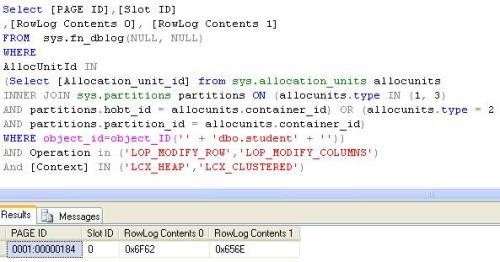
If the operation type is ‘LOP_MODIFY_ROW’ then we need to select [RowLog Contents 0] (contains old data (before modification)) And [RowLog Contents 1] (contains Modified data) from the sys.fn_dblog function. But these data chunks are in hex format.

For example -1:

Select [PAGE ID],[Slot ID]
,[RowLog Contents 0], [RowLog Contents 1]
FROM    sys.fn_dblog(NULL, NULL)
WHERE AllocUnitId IN
(Select [Allocation_unit_id] from sys.allocation_units allocunits
INNER JOIN sys.partitions partitions ON (allocunits.type IN (1, 3)
AND partitions.hobt_id = allocunits.container_id) OR (allocunits.type = 2
AND partitions.partition_id = allocunits.container_id)
Where object_id=object_ID('' + 'dbo.student' + ''))
AND Operation in ('LOP_MODIFY_ROW') And [Context] IN ('LCX_HEAP','LCX_CLUSTERED')

[RowLog Contents 0]= 0x6F62 --Select Convert (varchar(max),0x6F62)
[RowLog Contents 1]= 0x656E --Select Convert (varchar(max),0x656E)

2-‘LOP_MODIFY_COLUMNS’
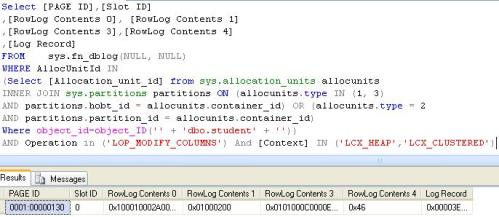
If the operation type is ‘LOP_MODIFY_COLUMNS’ then actual data (before modification) And modified data is available in [Log Record] column in the sys.fn_dblog function. But this data in merge format and in one hex data chunk.
For example -2:

Select [PAGE ID],[Slot ID]
,[RowLog Contents 0], [RowLog Contents 1]
,[RowLog Contents 3],[RowLog Contents 4]
,[Log Record]
FROM    sys.fn_dblog(NULL, NULL)
WHERE AllocUnitId IN
(Select [Allocation_unit_id] from sys.allocation_units allocunits
INNER JOIN sys.partitions partitions ON (allocunits.type IN (1, 3)
AND partitions.hobt_id = allocunits.container_id) OR (allocunits.type = 2
AND partitions.partition_id = allocunits.container_id)
Where object_id=object_ID('' + 'dbo.student' + ''))
AND Operation in ('LOP_MODIFY_COLUMNS') And [Context] IN ('LCX_HEAP','LCX_CLUSTERED')

But, if the data is in the column [Log Record] then why we need to select other columns, basically other columns info will help us to select and separate the merge data chunk into modified and actual data from [log record] column.

Step-5:

In case of operation type ‘LOP_MODIFY_ROW’, It is very simple to recover. Now we have the modified row (we prepare it in step 2) in hex format and modified and actual data chunks. Given below is the Modified Data is in Hex format.
0x30001400010000000000000060940000460000000500E0020029002C0
053005400440030003000310042656E
And data chunks
Before Modification data : 0x6F62
After Modification data : 0x656E
Now we need to replace the matching portion of the data from modified to actual one to recover actual data.
So, after replacement we will get the old (actual values before modification) values.
0x30001400010000000000000060940000460000000500E0020029002C0
0530054004400300030003100426F62

INSERT INTO @ModifiedRawData ([PAGE ID],[Slot ID],[AllocUnitId],[RowLog Contents 0_var])
SELECT TOP 1  @ConsolidatedPageID AS [PAGE ID],@Slotid AS [Slot ID],@AllocUnitID AS [AllocUnitId],REPLACE ([RowLog Contents 0_var],CAST('' AS XML).value('xs:hexBinary(sql:variable("@RowLogContents1") )', 'varchar(max)'),cast('' AS XML).value('xs:hexBinary(sql:variable("@RowLogContents0") )', 'varchar(max)')) AS [RowLog Contents 0_var]
FROM  @ModifiedRawData WHERE [PAGE ID]=@ConsolidatedPageID And [Slot ID]=@Slotid And [AllocUnitId]=@AllocUnitID ORDER BY [ID] DESC

UPDATE @ModifiedRawData  SET [RowLog Contents 0] = cast('' AS XML).value('xs:hexBinary(substring(sql:column("[RowLog Contents 0_var]"), 0) )', 'varbinary(max)')
FROM @ModifiedRawData

Finally, we recovered the data. Now we need to convert this hex values into their original data types.(readable format).
But, still the recovery is not finished because, we have operation type ‘LOP_MODIFY_COLUMNS’ to discuss.

Step-6:

If operation type is ‘LOP_MODIFY_COLUMNS’, we need to follow a different mechanism to recover the modified data.

     Step-6.1:

As we discussed, the data for this operation type is in the [Log record] but in merge format, so we need to get the [log record] field data. Here is the query.

Select [PAGE ID],[Slot ID],[AllocUnitId],[Transaction ID],[RowLog Contents 0], [RowLog Contents 1],[RowLog Contents 3],[RowLog Contents 4]
,Substring ([Log Record],[Log Record Fixed Length],([Log Record Length]+1)-([Log Record Fixed Length])) as [Log Record]
,Operation
FROM    sys.fn_dblog(NULL, NULL)
WHERE    --AllocUnitName =@SchemaName_n_TableName --'dbo.STUDENT'
AllocUnitId IN
(Select [Allocation_unit_id] from sys.allocation_units allocunits
INNER JOIN sys.partitions partitions ON (allocunits.type IN (1, 3)
AND partitions.hobt_id = allocunits.container_id) OR (allocunits.type = 2
AND partitions.partition_id = allocunits.container_id)
Where object_id=object_ID('' + @SchemaName_n_TableName + ''))
AND Operation in ('LOP_MODIFY_ROW','LOP_MODIFY_COLUMNS') And [Context] IN ('LCX_HEAP','LCX_CLUSTERED')
/*Use this subquery to filter the date*/

AND [TRANSACTION ID] IN (Select DISTINCT [TRANSACTION ID] FROM    sys.fn_dblog(NULL, NULL)
WHERE Context IN ('LCX_NULL') AND Operation IN ('LOP_BEGIN_XACT')
AND [Transaction Name]='Update'
AND  CONVERT(NVARCHAR(11),[Begin Time]) BETWEEN @Date_From AND @Date_To)

     Step-6.2:

We reduced [log record] field data, because we ignored till the length of the fixed lenght data and pick the rest of the values. But still we don’t have our required data. On this log data we need to search [RowLog Contents 3] column data in Log record because exactly after [RowLog Contents 3] column data our required data is there.

SET @RowLogData_Var = SUBSTRING(@LogRecord_Var, CHARINDEX(@RowLogContents3_Var,@LogRecord_Var) +LEN(@RowLogContents3_Var) ,LEN(@LogRecord_Var))

SELECT @RowLogData_Hex=CAST('' AS XML).value('xs:hexBinary( substring(sql:variable("@RowLogData_Var"),0) )', 'varbinary(max)') FROM (SELECT CASE SUBSTRING(@RowLogData_Var, 1, 2) WHEN '0x' THEN 3 ELSE 0 END) AS t(pos)

Example -2 :
Log record =0x00080008000400000014000100010002000200100010002A002A0001000
2000101000C00002364944E00000102000402030004
464A61631962616D6F62000C656E2364
[RowLog Contents3]= 0x0101000C00002364944E00000102000402030004
Our required Data : 0x464A61631962616D6F62000C656E2364
Structure of our required data is : Actual Fixed length data chunk + Modified Fixed length data chunks + Actual Variable length data chunk + Modified Variable length data chunks
Now, we have our required data and we also know the structure of the required data but still we do not know to separate the chunks.

     Step-6.3:

The required data is in @RowLogData_Hex variable. The target is to separate both fixed data and variable data with respect to actual and modified data chunks.
To achieve this, we need to know the length and start position of the chunks to separate the data.
In the [RowLog Contents 1] field, we have the length of fixed length and variable length data.

--For Fixed Length Data Chunks (The length of actual and modified data chunks will be same)
SET @FixedLength_Loc= CONVERT(INT,SUBSTRING(@RowLogContents1,1,1))
Select  CONVERT(INT,SUBSTRING(0x01000200,1,1))
--@FixedLength_Loc=1 Means Fixed Length is 1.

-- For Variable Length Data Chunks (The length of actual and modified data chunks will be same)
SET @VariableLength_Loc =CONVERT(INT,SUBSTRING(@RowLogContents1,3,1))
Select CONVERT(INT,SUBSTRING(0x01000200,3,1))
--@VariableLength_Loc=2 Means variable Length is 2.

--In the [RowLog Contents 0] field, we have the start position of fixed length & variable length data --modification.
-- These fixed length and variable length start positions, we will use at the time of replacement.
SET @FixedLength_Offset= CONVERT(BINARY(2),REVERSE(CONVERT(BINARY(4),(@RowLogContents0))))--)
Select CONVERT(int,CONVERT(BINARY(2),REVERSE(CONVERT(BINARY(4),(0x100010002A002A00)))))
--@FixedLength_Offset =16 Means Start Position of modification in Fixed Length is 16.

SET @VariableLength_Offset=CONVERT(int,CONVERT(BINARY(2),REVERSE(@RowLogContents0)))
Select CONVERT(int,CONVERT(BINARY(2),REVERSE(0x100010002A002A00)))
--@VariableLength_Offset42 Means Start Position of modification in variable Length is 42.

     Step-6.4:

Now, we have the length and the start position so we can easily get the actual and modified data chunks

-- Actual Fixed length data chunk
SET @FixedOldValues = SUBSTRING(@RowLogData_Hex,1,@FixedLength_Loc)
Select Substring(0x464A61631962616D6F62000C656E2364,1,1)= 0x46

--One more thing we need to find out that what is the reminder in the  @FixedOldValues because if there --is remaindar we need to add it to find the modified chunk.
SET @FixedLengthIncrease = (CASE WHEN (Len(@FixedOldValues)%4)=0 THEN 1 ELSE (4-(LEN(@FixedOldValues)%4))+1  END)

@FixedLengthIncrease=4

--Modified Fixed length data chunks
SET @FixedNewValues =SUBSTRING(@RowLogData_Hex,@FixedLength_Loc+@FixedLengthIncrease,@FixedLength_Loc)
Select SUBSTRING(0x464A61631962616D6F62000C656E2364,1+4,1) =0x19

-- Actual Variable length data chunk
SET @VariableOldValues =SUBSTRING(@RowLogData_Hex,@FixedLength_Loc+@FixedLengthIncrease+@FixedLength_Loc+(@FixedLengthIncrease-1),@VariableLength_Loc)
Select SUBSTRING(0x464A61631962616D6F62000C656E2364,1+4+1+(4-1),2)=0x6F62

--Modified Fixed length data chunks
--Same for variable increase.
SET @VariableLengthIncrease =  (CASE WHEN (LEN(@VariableOldValues)%4)=0 THEN 1 ELSE (4-(Len(@VariableOldValues)%4))  END)

Select SUBSTRING(SUBSTRING(0x464A61631962616D6F62000C656E2364,1+4+1+(4-1)+2+2,2+1),1,LEN(0x6F62))
=0x656E

     Step-6.5:

In step 2, we have the modified data
0x30001400010000000000000060940000190000000500E0020029002C0053005400440030003000310042656E and in the step 6.5 we received the chunks of actual and modifed data. Now we need to do simple replacement as per the start positions we found from [RowLog Contents 0] field.

SELECT TOP 1  @ConsolidatedPageID AS [PAGE ID],@Slotid AS [Slot ID],@AllocUnitID AS [AllocUnitId],NULL
,SUBSTRING([RowLog Contents 0] ,0,@FixedLength_Offset+1)
+ CAST(REPLACE(SUBSTRING([RowLog Contents 0],@FixedLength_Offset+1,(@TotalFixedLengthData+4)-@FixedLength_Offset),@FixedNewValues, @FixedOldValues) AS VARBINARY(max))
+ SUBSTRING([RowLog Contents 0],@TotalFixedLengthData+5,(@VariableLength_Offset+1)-(@TotalFixedLengthData+5))
+ CAST(REPLACE(SUBSTRING([RowLog Contents 0],@VariableLength_Offset+1,Len(@VariableNewValues))
, @VariableNewValues
, @VariableOldValues) AS VARBINARY)+ SUBSTRING([RowLog Contents 0],@VariableLength_Offset+1+Len(@VariableNewValues),Len([RowLog Contents 0])-(@VariableLength_Offset+LEN(@VariableNewValues)))

So it will be like Modified Data : 0x30001400010000000000000060940000190000000500E002002900
2C0053005400440030003000310042656E
Actual Data : 0x30001400010000000000000060940000460000000500E002002900
2C00530054004400300030003100426F62

Step-7:

Now, we have both actual and modified data in hex values, we need to follow the same steps followed under ‘how to recover deleted records’ to convert it into readable data format.

Step-8:

We have the data in actual format, Now we can identify which column has been updated and which is same. On the basis we can create an update statement that can help you to recover the modified data.

;With CTE AS (SELECT(CASE
WHEN system_type_id In (167,175,189) THEN QUOTENAME([Name]) + '=' + ISNULL(+ '''' + A.[FieldValue]+ '''','NULL')+ ' ,'+' '
WHEN system_type_id In (231,239) THEN  QUOTENAME([Name]) + '='  + ISNULL(+ 'N''' +A.[FieldValue]+ '''','NULL')+ ' ,'+''
WHEN system_type_id In (58,61,36) THEN QUOTENAME([Name]) + '='  + ISNULL(+  ''''+A.[FieldValue]+ '''','NULL') + '  ,'+' '
WHEN system_type_id In (48,52,56,59,60,62,104,106,108,122,127) THEN QUOTENAME([Name]) + '='  + ISNULL(A.[FieldValue],'NULL')+ ' ,'+' '
END) as [Field]
,A.[Slot ID]
,A.[Transaction ID] as [Transaction ID]
,'D' AS [Type]
,[A].Rowlogcontents
FROM #temp_Data AS [A]
INNER JOIN #temp_Data AS [B] ON [A].[FieldName]=[B].[FieldName]
AND [A].[Slot ID]=[B].[Slot ID]
AND [B].[Transaction ID]=  (SELECT Min(Cast([Transaction ID] as int)) as [Transaction ID]  FROM [B] AS [C]
WHERE [A].[Slot ID]=[C].[Slot ID]
GROUP BY [Slot ID])
INNER JOIN sys.columns [D] On  [object_id]=object_id('' + @SchemaName_n_TableName + '')
AND A.[Fieldname]=D.[name]
WHERE ISNULL([A].[FieldValue],'')<>ISNULL([B].[FieldValue],'')

UNION ALL

SELECT(CASE
WHEN system_type_id In (167,175,189) THEN QUOTENAME([Name]) + '=' + ISNULL(+ '''' + A.[FieldValue]+ '''','NULL')+ ' AND '+''
WHEN system_type_id In (231,239) THEN  QUOTENAME([Name]) + '='+ ISNULL(+ 'N''' +A.[FieldValue]+ '''','NULL')+ ' AND '+''
WHEN system_type_id In (58,61,36) THEN QUOTENAME([Name]) + '=' + ISNULL(+  ''''+A.[FieldValue]+ '''','NULL') + ' AND '+''
WHEN system_type_id In (48,52,56,59,60,62,104,106,108,122,127) THEN QUOTENAME([Name]) + '='  + ISNULL(A.[FieldValue],'NULL') + ' AND '+''
END) AS [Field]
,A.[Slot ID]
,A.[Transaction ID] AS [Transaction ID]
,'S' AS [Type]
,[A].Rowlogcontents
FROM #temp_Data AS [A]
INNER JOIN #temp_Data AS [B] ON [A].[FieldName]=[B].[FieldName]
AND [A].[Slot ID]=[B].[Slot ID]
AND [B].[Transaction ID]=  (SELECT Min(Cast([Transaction ID] as int)) as [Transaction ID] FROM [B] AS [C]
WHERE [A].[Slot ID]=[C].[Slot ID]
GROUP BY [Slot ID])
INNER JOIN sys.columns [D] ON  [object_id]=object_id('' + @SchemaName_n_TableName + '')
AND A.[Fieldname]=D.[name]
WHERE ISNULL([A].[FieldValue],'')=ISNULL([B].[FieldValue],'')
AND A.[Transaction ID] NOT IN (SELECT Min(Cast([Transaction ID] as int)) as [Transaction ID] FROM [B] AS [C]
WHERE [A].[Slot ID]=[C].[Slot ID]
GROUP BY [Slot ID])
)

,CTEUpdateQuery AS (SELECT 'UPDATE ' +  @SchemaName_n_TableName +  ' SET ' + LEFT(
STUFF((SELECT ' ' + ISNULL([Field],'')+ ' ' FROM CTE B
WHERE A.[Slot ID]=B.[Slot ID] AND A.[Transaction ID]=B.[Transaction ID] And B.[Type]='D' FOR XML PATH('') ),1,1,''),

LEN(STUFF((SELECT ' ' +ISNULL([Field],'')+ ' ' FROM CTE B
WHERE A.[Slot ID]=B.[Slot ID] AND A.[Transaction ID]=B.[Transaction ID] And B.[Type]='D' FOR XML PATH('') ),1,1,'') )-3)

+ '  WHERE  ' +

LEFT(STUFF((SELECT ' ' +ISNULL([Field],'')+ ' ' FROM CTE C
WHERE A.[Slot ID]=C.[Slot ID] AND A.[Transaction ID]=C.[Transaction ID] And C.[Type]='S' FOR XML PATH('') ),1,1,'') ,

LEN(STUFF((SELECT ' ' +ISNULL([Field],'')+ ' ' FROM CTE C
WHERE A.[Slot ID]=C.[Slot ID] AND A.[Transaction ID]=C.[Transaction ID] And C.[Type]='S' FOR XML PATH('') ),1,1,''))-5)
AS [Update Statement],
[Slot ID]
,[Transaction ID]
,Rowlogcontents
FROM CTE A
GROUP BY [Slot ID]
,[Transaction ID]
,Rowlogcontents )

INSERT INTO #temp_Data SELECT 'UPDATE STATEMENT',[Update Statement],[Rowlogcontents],[Transaction ID],[Slot ID] FROM CTEUpdateQuery

Your observations on my posts are very much appreciated. Therefore please do comment.

Read Full Post »

In my previous post “How to recover deleted records from SQL Server”, I received requests to “develop a mechanism that can recover the modified records from SQL Server”

Now, it is very easy to recover modified data from your SQL server 2005 or above.(Note: This script can recover following data types & compatible with CS collation).

  • tinyint
  • smallint
  • int
  • bigint
  • bit
  • char
  • varchar
  • nchar
  • nvarchar
  • datetime
  • smalldatetime
  • money
  • smallmoney
  • decimal
  • numeric
  • real
  • float
  • binary
  • varbinary
  • uniqueidentifier

Let me explain this issue demonstrating simple example.

--Create Table
CREATE TABLE [dbo].[Student](
[Sno] [int] NOT NULL,
[Student ID] nvarchar(6) Not NULL ,
[Student name] [varchar](50) NOT NULL,
[Date of Birth]  datetime not null,
[Weight] [int] NULL)
--Inserting data into table
Insert into dbo.[Student] values (1,'STD001','Bob','2003-12-31',40)
Insert into dbo.[Student] values (2,'STD002','Alexander','2004-11-15',35)
--Check the existence of the data
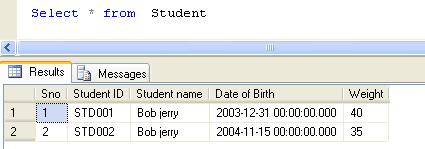
Select * from dbo.[Student]

--By mistake if all records are updated instead of one record
Update [Student] Set [Student Name]='Bob jerry' --Where [SNO]=1 forget to use where clause
--Verify the data has been modified
Select * from dbo.[Student]

Now, you need to create this procedure to recover your modified data

Create PROCEDURE Recover_Modified_Data_Proc
@Database_Name NVARCHAR(MAX),
@SchemaName_n_TableName NVARCHAR(MAX),
@Date_From datetime='1900/01/01',
@Date_To datetime ='9999/12/31'
AS
DECLARE @parms nvarchar(1024)
DECLARE @Fileid INT
DECLARE @Pageid INT
DECLARE @Slotid INT
DECLARE @RowLogContents0 VARBINARY(8000)
DECLARE @RowLogContents1 VARBINARY(8000)
DECLARE @RowLogContents3 VARBINARY(8000)
DECLARE @RowLogContents3_Var VARCHAR(MAX)

DECLARE @RowLogContents4 VARBINARY(8000)
DECLARE @LogRecord VARBINARY(8000)
DECLARE @LogRecord_Var VARCHAR(MAX)

DECLARE @ConsolidatedPageID VARCHAR(MAX)
Declare @AllocUnitID as bigint
Declare @TransactionID as VARCHAR(MAX)
Declare @Operation as VARCHAR(MAX)
Declare @DatabaseCollation VARCHAR(MAX)

/*  Pick The actual data
*/
declare @temppagedata table
(
[ParentObject] sysname,
[Object] sysname,
[Field] sysname,
[Value] sysname)

declare @pagedata table
(
[Page ID] sysname,
[AllocUnitId] bigint,
[ParentObject] sysname,
[Object] sysname,
[Field] sysname,
[Value] sysname)

DECLARE Page_Data_Cursor CURSOR FOR
/*We need to filter LOP_MODIFY_ROW,LOP_MODIFY_COLUMNS from log for modified records & Get its Slot No, Page ID & AllocUnit ID*/
SELECT [PAGE ID],[Slot ID],[AllocUnitId]
FROM    sys.fn_dblog(NULL, NULL)
WHERE
AllocUnitId IN
(Select [Allocation_unit_id] from sys.allocation_units allocunits
INNER JOIN sys.partitions partitions ON (allocunits.type IN (1, 3)
AND partitions.hobt_id = allocunits.container_id) OR (allocunits.type = 2
AND partitions.partition_id = allocunits.container_id)
Where object_id=object_ID('' + @SchemaName_n_TableName + ''))
AND Operation IN ('LOP_MODIFY_ROW','LOP_MODIFY_COLUMNS')  AND [Context] IN ('LCX_HEAP','LCX_CLUSTERED')
/*Use this subquery to filter the date*/

AND [TRANSACTION ID] IN (SELECT DISTINCT [TRANSACTION ID] FROM    sys.fn_dblog(NULL, NULL)
WHERE Context IN ('LCX_NULL') AND Operation in ('LOP_BEGIN_XACT')
AND [Transaction Name]='UPDATE'
AND  CONVERT(NVARCHAR(11),[Begin Time]) BETWEEN @Date_From AND @Date_To)

/****************************************/

GROUP BY [PAGE ID],[Slot ID],[AllocUnitId]
ORDER BY [Slot ID]

OPEN Page_Data_Cursor

FETCH NEXT FROM Page_Data_Cursor INTO @ConsolidatedPageID, @Slotid,@AllocUnitID

WHILE @@FETCH_STATUS = 0
BEGIN
DECLARE @hex_pageid AS VARCHAR(Max)
/*Page ID contains File Number and page number It looks like 0001:00000130.
In this example 0001 is file Number &  00000130 is Page Number & These numbers are in Hex format*/
SET @Fileid=SUBSTRING(@ConsolidatedPageID,0,CHARINDEX(':',@ConsolidatedPageID)) -- Seperate File ID from Page ID
SET @hex_pageid ='0x'+ SUBSTRING(@ConsolidatedPageID,CHARINDEX(':',@ConsolidatedPageID)+1,Len(@ConsolidatedPageID))  ---Seperate the page ID

SELECT @Pageid=Convert(INT,cast('' AS XML).value('xs:hexBinary(substring(sql:variable("@hex_pageid"),sql:column("t.pos")) )', 'varbinary(max)')) -- Convert Page ID from hex to integer
FROM (SELECT CASE substring(@hex_pageid, 1, 2) WHEN '0x' THEN 3 ELSE 0 END) AS t(pos)

DELETE @temppagedata
-- Now we need to get the actual data (After modification) from the page
INSERT INTO @temppagedata EXEC( 'DBCC PAGE(' + @DataBase_Name + ', ' + @fileid + ', ' + @pageid + ', 3) with tableresults,no_infomsgs;');
-- Add Page Number and allocUnit ID in data to identity which one page it belongs to.
INSERT INTO @pagedata SELECT @ConsolidatedPageID,@AllocUnitID,[ParentObject],[Object],[Field] ,[Value] FROM @temppagedata

FETCH NEXT FROM Page_Data_Cursor INTO  @ConsolidatedPageID, @Slotid,@AllocUnitID
END

CLOSE Page_Data_Cursor
DEALLOCATE Page_Data_Cursor

DECLARE @Newhexstring VARCHAR(MAX);

DECLARE @ModifiedRawData TABLE
(
[ID] INT IDENTITY(1,1),
[PAGE ID] VARCHAR(MAX),
[Slot ID] INT,
[AllocUnitId] BIGINT,
[RowLog Contents 0_var] VARCHAR(MAX),
[RowLog Contents 0] VARBINARY(8000)
)
--The modified data is in multiple rows in the page, so we need to convert it into one row as a single hex value.
--This hex value is in string format
INSERT INTO @ModifiedRawData ([PAGE ID],[Slot ID],[AllocUnitId]
,[RowLog Contents 0_var])
SELECT B.[PAGE ID],A.[Slot ID],A.[AllocUnitId]
,(
SELECT REPLACE(STUFF((SELECT REPLACE(SUBSTRING([VALUE],CHARINDEX(':',[Value])+1,48),'†','')
FROM @pagedata C  WHERE B.[Page ID]= C.[Page ID] And A.[Slot ID] =LTRIM(RTRIM(SUBSTRING(C.[ParentObject],5,3))) And [Object] Like '%Memory Dump%'
Group By [Value] FOR XML PATH('') ),1,1,'') ,' ','')
) AS [Value]

FROM sys.fn_dblog(NULL, NULL) A
INNER JOIN @pagedata B On A.[PAGE ID]=B.[PAGE ID]
AND A.[AllocUnitId]=B.[AllocUnitId]
AND A.[Slot ID] =LTRIM(RTRIM(Substring(B.[ParentObject],5,3)))
AND B.[Object] Like '%Memory Dump%'
WHERE A.AllocUnitId IN
(Select [Allocation_unit_id] from sys.allocation_units allocunits
INNER JOIN sys.partitions partitions ON (allocunits.type IN (1, 3)
AND partitions.hobt_id = allocunits.container_id) OR (allocunits.type = 2
AND partitions.partition_id = allocunits.container_id)
Where object_id=object_ID('' + @SchemaName_n_TableName + ''))
AND Operation in ('LOP_MODIFY_ROW','LOP_MODIFY_COLUMNS') AND [Context] IN ('LCX_HEAP','LCX_CLUSTERED')
/*Use this subquery to filter the date*/

AND [TRANSACTION ID] IN (Select DISTINCT [TRANSACTION ID] FROM sys.fn_dblog(NULL, NULL)
Where Context IN ('LCX_NULL') AND Operation IN ('LOP_BEGIN_XACT')
AND [Transaction Name]='UPDATE'
AND  CONVERT(NVARCHAR(11),[Begin Time]) BETWEEN @Date_From AND @Date_To)

/****************************************/
GROUP BY B.[PAGE ID],A.[Slot ID],A.[AllocUnitId]--,[Transaction ID]
ORDER BY [Slot ID]

-- Convert the hex value data in string, convert it into Hex value as well.
UPDATE @ModifiedRawData  SET [RowLog Contents 0] = cast('' AS XML).value('xs:hexBinary(substring(sql:column("[RowLog Contents 0_var]"), 0) )', 'varbinary(max)')
FROM @ModifiedRawData

---Now we have modifed data plus its slot ID , page ID and allocunit as well.
--After that we need to get the old values before modfication, these datas are in chunks.
DECLARE Page_Data_Cursor CURSOR FOR

Select [PAGE ID],[Slot ID],[AllocUnitId],[Transaction ID],[RowLog Contents 0], [RowLog Contents 1],[RowLog Contents 3],[RowLog Contents 4]
,Substring ([Log Record],[Log Record Fixed Length],([Log Record Length]+1)-([Log Record Fixed Length])) as [Log Record]
,Operation
FROM    sys.fn_dblog(NULL, NULL)
WHERE   AllocUnitId IN
(Select [Allocation_unit_id] from sys.allocation_units allocunits
INNER JOIN sys.partitions partitions ON (allocunits.type IN (1, 3)
AND partitions.hobt_id = allocunits.container_id) OR (allocunits.type = 2
AND partitions.partition_id = allocunits.container_id)
Where object_id=object_ID('' + @SchemaName_n_TableName + ''))
AND Operation in ('LOP_MODIFY_ROW','LOP_MODIFY_COLUMNS') And [Context] IN ('LCX_HEAP','LCX_CLUSTERED')
/*Use this sub query to filter the date*/

AND [TRANSACTION ID] IN (Select DISTINCT [TRANSACTION ID] FROM    sys.fn_dblog(NULL, NULL)
WHERE Context IN ('LCX_NULL') AND Operation IN ('LOP_BEGIN_XACT')
AND [Transaction Name]='UPDATE'
AND  CONVERT(NVARCHAR(11),[Begin Time]) BETWEEN @Date_From AND @Date_To)

/****************************************/
Order By [Slot ID],[Transaction ID] DESC

OPEN Page_Data_Cursor

FETCH NEXT FROM Page_Data_Cursor INTO @ConsolidatedPageID, @Slotid,@AllocUnitID,@TransactionID,@RowLogContents0,@RowLogContents1,@RowLogContents3,@RowLogContents4,@LogRecord,@Operation
WHILE @@FETCH_STATUS = 0
BEGIN
IF @Operation ='LOP_MODIFY_ROW'
BEGIN
/* If it is @Operation Type is 'LOP_MODIFY_ROW' then it is very simple to recover the modified data. The old data is in [RowLog Contents 0] Field and modified data is in [RowLog Contents 1] Field. Simply replace it with the modified data and get the old data.
*/
INSERT INTO @ModifiedRawData ([PAGE ID],[Slot ID],[AllocUnitId],[RowLog Contents 0_var])
SELECT TOP 1  @ConsolidatedPageID AS [PAGE ID],@Slotid AS [Slot ID],@AllocUnitID AS [AllocUnitId]
,REPLACE (UPPER([RowLog Contents 0_var]),UPPER(CAST('' AS XML).value('xs:hexBinary(sql:variable("@RowLogContents1") )', 'varchar(max)')),UPPER(cast('' AS XML).value('xs:hexBinary(sql:variable("@RowLogContents0") )', 'varchar(max)'))) AS [RowLog Contents 0_var]
FROM  @ModifiedRawData WHERE [PAGE ID]=@ConsolidatedPageID And [Slot ID]=@Slotid And [AllocUnitId]=@AllocUnitID ORDER BY [ID] DESC

--- Convert the old data which is in string format to hex format.
UPDATE @ModifiedRawData  SET [RowLog Contents 0] = cast('' AS XML).value('xs:hexBinary(substring(sql:column("[RowLog Contents 0_var]"), 0) )', 'varbinary(max)')
FROM @ModifiedRawData Where [Slot ID]=@SlotID

END
IF @Operation ='LOP_MODIFY_COLUMNS'
BEGIN

/* If it is @Operation Type is 'LOP_MODIFY_ROW' then we need to follow a different procedure to recover modified
.Because this time the data is also in chunks but merge with the data log.
*/
--First, we need to get the [RowLog Contents 3] Because in [Log Record] field the modified data is available after the [RowLog Contents 3] data.
SET @RowLogContents3_Var=cast('' AS XML).value('xs:hexBinary(sql:variable("@RowLogContents3") )', 'varchar(max)')
SET @LogRecord_Var =cast('' AS XML).value('xs:hexBinary(sql:variable("@LogRecord"))', 'varchar(max)')

DECLARE @RowLogData_Var VARCHAR(Max)
DECLARE @RowLogData_Hex VARBINARY(Max)
---First get the modifed data chunks in string format
SET @RowLogData_Var = SUBSTRING(@LogRecord_Var, CHARINDEX(@RowLogContents3_Var,@LogRecord_Var) +LEN(@RowLogContents3_Var) ,LEN(@LogRecord_Var))
--Then convert it into the hex values.
SELECT @RowLogData_Hex=CAST('' AS XML).value('xs:hexBinary( substring(sql:variable("@RowLogData_Var"),0) )', 'varbinary(max)')
FROM (SELECT CASE SUBSTRING(@RowLogData_Var, 1, 2) WHEN '0x' THEN 3 ELSE 0 END) AS t(pos)
DECLARE @TotalFixedLengthData INT
DECLARE @FixedLength_Offset INT
DECLARE @VariableLength_Offset INT
DECLARE @VariableLength_Offset_Start INT
DECLARE @VariableLengthIncrease INT
DECLARE @FixedLengthIncrease INT
DECLARE @OldFixedLengthStartPosition INT
DECLARE @FixedLength_Loc INT
DECLARE @VariableLength_Loc INT
DECLARE @FixedOldValues VARBINARY(MAX)
DECLARE @FixedNewValues VARBINARY(MAX)
DECLARE @VariableOldValues VARBINARY(MAX)
DECLARE @VariableNewValues VARBINARY(MAX)

-- Before recovering the modfied data we need to get the total fixed length data size and start position of the varaible data

SELECT TOP 1 @TotalFixedLengthData=CONVERT(SMALLINT, CONVERT(BINARY(2), REVERSE(SUBSTRING([RowLog Contents 0] , 2 + 1, 2))))
,@VariableLength_Offset_Start=CONVERT(SMALLINT, CONVERT(BINARY(2), REVERSE(SUBSTRING([RowLog Contents 0] , 2 + 1, 2))))+5+CONVERT(INT, ceiling(CONVERT(INT, CONVERT(BINARY(2), REVERSE(SUBSTRING([RowLog Contents 0] , CONVERT(SMALLINT, CONVERT(BINARY(2), REVERSE(SUBSTRING([RowLog Contents 0] , 2 + 1, 2)))) + 1, 2))))/8.0))
FROM @ModifiedRawData
ORDER BY [ID] DESC

SET @FixedLength_Offset= CONVERT(BINARY(2),REVERSE(CONVERT(BINARY(4),(@RowLogContents0))))--)
SET @VariableLength_Offset=CONVERT(int,CONVERT(BINARY(2),REVERSE(@RowLogContents0)))

/* We already have modified data chunks in @RowLogData_Hex but this data is in merge format (modified plus actual data)
So , here we need [Row Log Contents 1] field , because in this field we have the data length both the modified and actual data
so this length will help us to break it into original and modified data chunks.
*/
SET @FixedLength_Loc= CONVERT(INT,SUBSTRING(@RowLogContents1,1,1))
SET @VariableLength_Loc =CONVERT(INT,SUBSTRING(@RowLogContents1,3,1))

/*First , we need to break Fix length data actual with the help of data length  */
SET @OldFixedLengthStartPosition= CHARINDEX(@RowLogContents4,@RowLogData_Hex)
SET @FixedOldValues = SUBSTRING(@RowLogData_Hex,@OldFixedLengthStartPosition,@FixedLength_Loc)
SET @FixedLengthIncrease = (CASE WHEN (Len(@FixedOldValues)%4)=0 THEN 1 ELSE (4-(LEN(@FixedOldValues)%4))  END)
/*After that , we need to break Fix length data modified data with the help of data length  */
SET @FixedNewValues =SUBSTRING(@RowLogData_Hex,@OldFixedLengthStartPosition+@FixedLength_Loc+@FixedLengthIncrease,@FixedLength_Loc)

/*Same we need to break the variable data with the help of data length*/
SET @VariableOldValues =SUBSTRING(@RowLogData_Hex,@OldFixedLengthStartPosition+@FixedLength_Loc+@FixedLengthIncrease+@FixedLength_Loc+(@FixedLengthIncrease),@VariableLength_Loc)
SET @VariableLengthIncrease =  (CASE WHEN (LEN(@VariableOldValues)%4)=0 THEN 1 ELSE (4-(Len(@VariableOldValues)%4))+1  END)
SET @VariableOldValues =(Case When @VariableLength_Loc =1 Then  @VariableOldValues+0x00 else @VariableOldValues end)

SET @VariableNewValues =SUBSTRING(SUBSTRING(@RowLogData_Hex,@OldFixedLengthStartPosition+@FixedLength_Loc+@FixedLengthIncrease+@FixedLength_Loc+(@FixedLengthIncrease-1)+@VariableLength_Loc+@VariableLengthIncrease,Len(@RowLogData_Hex)+1),1,Len(@RowLogData_Hex)+1) --LEN(@VariableOldValues)

/*here we need to replace the fixed length &  variable length actaul data with modifed data
*/

Select top 1 @VariableNewValues=Case
When Charindex(Substring(@VariableNewValues,0,Len(@VariableNewValues)+1),[RowLog Contents 0])<>0 Then Substring(@VariableNewValues,0,Len(@VariableNewValues)+1)
When Charindex(Substring(@VariableNewValues,0,Len(@VariableNewValues)),[RowLog Contents 0])<>0 Then  Substring(@VariableNewValues,0,Len(@VariableNewValues))
When Charindex(Substring(@VariableNewValues,0,Len(@VariableNewValues)-1),[RowLog Contents 0])<>0 Then Substring(@VariableNewValues,0,Len(@VariableNewValues)-1)--3 --Substring(@VariableNewValues,0,Len(@VariableNewValues)-1)
When Charindex(Substring(@VariableNewValues,0,Len(@VariableNewValues)-2),[RowLog Contents 0])<>0 Then Substring(@VariableNewValues,0,Len(@VariableNewValues)-2)
When Charindex(Substring(@VariableNewValues,0,Len(@VariableNewValues)-3),[RowLog Contents 0])<>0 Then Substring(@VariableNewValues,0,Len(@VariableNewValues)-3) --5--Substring(@VariableNewValues,0,Len(@VariableNewValues)-3)
End
FROM @ModifiedRawData  Where [Slot ID]=@SlotID  ORDER BY [ID] DESC

INSERT INTO @ModifiedRawData ([PAGE ID],[Slot ID],[AllocUnitId],[RowLog Contents 0_var],[RowLog Contents 0])
SELECT TOP 1  @ConsolidatedPageID AS [PAGE ID],@Slotid AS [Slot ID],@AllocUnitID AS [AllocUnitId],NULL
,CAST(REPLACE(SUBSTRING([RowLog Contents 0],0,@TotalFixedLengthData+1),@FixedNewValues, @FixedOldValues) AS VARBINARY(max))
+ SUBSTRING([RowLog Contents 0], @TotalFixedLengthData + 1, 2)
+ SUBSTRING([RowLog Contents 0], @TotalFixedLengthData + 3, CONVERT(INT, ceiling(CONVERT(INT, CONVERT(BINARY(2), REVERSE(SUBSTRING([RowLog Contents 0], @TotalFixedLengthData + 1, 2))))/8.0)))
+ SUBSTRING([RowLog Contents 0], @TotalFixedLengthData + 3 + CONVERT(INT, ceiling(CONVERT(INT, CONVERT(BINARY(2), REVERSE(SUBSTRING([RowLog Contents 0], @TotalFixedLengthData + 1, 2))))/8.0)), 2)
+ Substring([RowLog Contents 0],@VariableLength_Offset_Start,(@VariableLength_Offset-(@VariableLength_Offset_Start-1)))
+ CAST(REPLACE(SUBSTRING([RowLog Contents 0],@VariableLength_Offset+1,Len(@VariableNewValues))
, @VariableNewValues
, @VariableOldValues) AS VARBINARY)
+ Substring([RowLog Contents 0],@VariableLength_Offset+Len(@VariableNewValues)+1,LEN([RowLog Contents 0]))
FROM @ModifiedRawData  Where [Slot ID]=@SlotID  ORDER BY [ID] DESC

END

FETCH NEXT FROM Page_Data_Cursor INTO   @ConsolidatedPageID, @Slotid,@AllocUnitID,@TransactionID,@RowLogContents0,@RowLogContents1,@RowLogContents3,@RowLogContents4,@LogRecord,@Operation
END

CLOSE Page_Data_Cursor
DEALLOCATE Page_Data_Cursor

DECLARE @RowLogContents VARBINARY(8000)
Declare @AllocUnitName NVARCHAR(Max)
Declare @SQL NVARCHAR(Max)

DECLARE @bitTable TABLE
(
[ID] INT,
[Bitvalue] INT
)
----Create table to set the bit position of one byte.

INSERT INTO @bitTable
SELECT 0,2 UNION ALL
SELECT 1,2 UNION ALL
SELECT 2,4 UNION ALL
SELECT 3,8 UNION ALL
SELECT 4,16 UNION ALL
SELECT 5,32 UNION ALL
SELECT 6,64 UNION ALL
SELECT 7,128

--Create table to collect the row data.
DECLARE @DeletedRecords TABLE
(
[ID] INT IDENTITY(1,1),
[RowLogContents]	VARBINARY(8000),
[AllocUnitID]		BIGINT,
[Transaction ID]	NVARCHAR(Max),
[Slot ID]           INT,
[FixedLengthData]	SMALLINT,
[TotalNoOfCols]		SMALLINT,
[NullBitMapLength]	SMALLINT,
[NullBytes]			VARBINARY(8000),
[TotalNoofVarCols]	SMALLINT,
[ColumnOffsetArray]	VARBINARY(8000),
[VarColumnStart]	SMALLINT,
[NullBitMap]		VARCHAR(MAX)
)
--Create a common table expression to get all the row data plus how many bytes we have for each row.
;WITH RowData AS (
SELECT

[RowLog Contents 0] AS [RowLogContents]

,@AllocUnitID AS [AllocUnitID]

,[ID] AS [Transaction ID]

,[Slot ID] as [Slot ID]
--[Fixed Length Data] = Substring (RowLog content 0, Status Bit A+ Status Bit B + 1,2 bytes)
,CONVERT(SMALLINT, CONVERT(BINARY(2), REVERSE(SUBSTRING([RowLog Contents 0], 2 + 1, 2)))) AS [FixedLengthData]  --@FixedLengthData

--[TotalnoOfCols] =  Substring (RowLog content 0, [Fixed Length Data] + 1,2 bytes)
,CONVERT(INT, CONVERT(BINARY(2), REVERSE(SUBSTRING([RowLog Contents 0], CONVERT(SMALLINT, CONVERT(BINARY(2)
,REVERSE(SUBSTRING([RowLog Contents 0], 2 + 1, 2)))) + 1, 2)))) as  [TotalNoOfCols]

--[NullBitMapLength]=ceiling([Total No of Columns] /8.0)
,CONVERT(INT, ceiling(CONVERT(INT, CONVERT(BINARY(2), REVERSE(SUBSTRING([RowLog Contents 0], CONVERT(SMALLINT, CONVERT(BINARY(2)
,REVERSE(SUBSTRING([RowLog Contents 0], 2 + 1, 2)))) + 1, 2))))/8.0)) as [NullBitMapLength]

--[Null Bytes] = Substring (RowLog content 0, Status Bit A+ Status Bit B + [Fixed Length Data] +1, [NullBitMapLength] )
,SUBSTRING([RowLog Contents 0], CONVERT(SMALLINT, CONVERT(BINARY(2), REVERSE(SUBSTRING([RowLog Contents 0], 2 + 1, 2)))) + 3,
CONVERT(INT, ceiling(CONVERT(INT, CONVERT(BINARY(2), REVERSE(SUBSTRING([RowLog Contents 0], CONVERT(SMALLINT, CONVERT(BINARY(2)
,REVERSE(SUBSTRING([RowLog Contents 0], 2 + 1, 2)))) + 1, 2))))/8.0))) as [NullBytes]

--[TotalNoofVarCols] = Substring (RowLog content 0, Status Bit A+ Status Bit B + [Fixed Length Data] +1, [Null Bitmap length] + 2 )
,(CASE WHEN SUBSTRING([RowLog Contents 0], 1, 1) In (0x30,0x70) THEN
CONVERT(INT, CONVERT(BINARY(2), REVERSE(SUBSTRING([RowLog Contents 0],
CONVERT(SMALLINT, CONVERT(BINARY(2), REVERSE(SUBSTRING([RowLog Contents 0], 2 + 1, 2)))) + 3
+ CONVERT(INT, ceiling(CONVERT(INT, CONVERT(BINARY(2), REVERSE(SUBSTRING([RowLog Contents 0], CONVERT(SMALLINT, CONVERT(BINARY(2)
,REVERSE(SUBSTRING([RowLog Contents 0], 2 + 1, 2)))) + 1, 2))))/8.0)), 2))))  ELSE null  END) AS [TotalNoofVarCols]

--[ColumnOffsetArray]= Substring (RowLog content 0, Status Bit A+ Status Bit B + [Fixed Length Data] +1, [Null Bitmap length] + 2 , [TotalNoofVarCols]*2 )
,(CASE WHEN SUBSTRING([RowLog Contents 0], 1, 1) In (0x30,0x70) THEN
SUBSTRING([RowLog Contents 0]
, CONVERT(SMALLINT, CONVERT(BINARY(2), REVERSE(SUBSTRING([RowLog Contents 0], 2 + 1, 2)))) + 3
+ CONVERT(INT, ceiling(CONVERT(INT, CONVERT(BINARY(2), REVERSE(SUBSTRING([RowLog Contents 0], CONVERT(SMALLINT, CONVERT(BINARY(2)
,REVERSE(SUBSTRING([RowLog Contents 0], 2 + 1, 2)))) + 1, 2))))/8.0)) + 2
, (CASE WHEN SUBSTRING([RowLog Contents 0], 1, 1) In (0x30,0x70) THEN
CONVERT(INT, CONVERT(BINARY(2), REVERSE(SUBSTRING([RowLog Contents 0],
CONVERT(SMALLINT, CONVERT(BINARY(2), REVERSE(SUBSTRING([RowLog Contents 0], 2 + 1, 2)))) + 3
+ CONVERT(INT, ceiling(CONVERT(INT, CONVERT(BINARY(2), REVERSE(SUBSTRING([RowLog Contents 0], CONVERT(SMALLINT, CONVERT(BINARY(2)
,REVERSE(SUBSTRING([RowLog Contents 0], 2 + 1, 2)))) + 1, 2))))/8.0)), 2))))  ELSE null  END)
* 2)  ELSE null  END) AS [ColumnOffsetArray]

--	Variable column Start = Status Bit A+ Status Bit B + [Fixed Length Data] + [Null Bitmap length] + 2+([TotalNoofVarCols]*2)
,CASE WHEN SUBSTRING([RowLog Contents 0], 1, 1)In (0x30,0x70)
THEN  (
CONVERT(SMALLINT, CONVERT(BINARY(2), REVERSE(SUBSTRING([RowLog Contents 0], 2 + 1, 2)))) + 4

+ CONVERT(INT, ceiling(CONVERT(INT, CONVERT(BINARY(2), REVERSE(SUBSTRING([RowLog Contents 0], CONVERT(SMALLINT, CONVERT(BINARY(2)
,REVERSE(SUBSTRING([RowLog Contents 0], 2 + 1, 2)))) + 1, 2))))/8.0))

+ ((CASE WHEN SUBSTRING([RowLog Contents 0], 1, 1) In (0x30,0x70) THEN
CONVERT(INT, CONVERT(BINARY(2), REVERSE(SUBSTRING([RowLog Contents 0],
CONVERT(SMALLINT, CONVERT(BINARY(2), REVERSE(SUBSTRING([RowLog Contents 0], 2 + 1, 2)))) + 3
+ CONVERT(INT, ceiling(CONVERT(INT, CONVERT(BINARY(2), REVERSE(SUBSTRING([RowLog Contents 0], CONVERT(SMALLINT, CONVERT(BINARY(2)
,REVERSE(SUBSTRING([RowLog Contents 0], 2 + 1, 2)))) + 1, 2))))/8.0)), 2))))  ELSE null  END) * 2))

ELSE null End AS [VarColumnStart]
From @ModifiedRawData

),

---Use this technique to repeate the row till the no of bytes of the row.
N1 (n) AS (SELECT 1 UNION ALL SELECT 1),
N2 (n) AS (SELECT 1 FROM N1 AS X, N1 AS Y),
N3 (n) AS (SELECT 1 FROM N2 AS X, N2 AS Y),
N4 (n) AS (SELECT ROW_NUMBER() OVER(ORDER BY X.n)
FROM N3 AS X, N3 AS Y)

insert into @DeletedRecords
Select	 RowLogContents
,[AllocUnitID]
,[Transaction ID]
,[Slot ID]
,[FixedLengthData]
,[TotalNoOfCols]
,[NullBitMapLength]
,[NullBytes]
,[TotalNoofVarCols]
,[ColumnOffsetArray]
,[VarColumnStart]
--Get the Null value against each column (1 means null zero means not null)
,[NullBitMap]=(REPLACE(STUFF((SELECT ',' +
(CASE WHEN [ID]=0 THEN CONVERT(NVARCHAR(1),(SUBSTRING(NullBytes, n, 1) % 2))  ELSE CONVERT(NVARCHAR(1),((SUBSTRING(NullBytes, n, 1) / [Bitvalue]) % 2)) END) --as [nullBitMap]
FROM
N4 AS Nums
Join RowData AS C ON n<=NullBitMapLength
Cross Join @bitTable WHERE C.[RowLogContents]=D.[RowLogContents] ORDER BY [RowLogContents],n ASC FOR XML PATH('')),1,1,''),',',''))
FROM RowData D

CREATE TABLE [#temp_Data]
(

[FieldName]  VARCHAR(MAX) COLLATE database_default NOT NULL,
[FieldValue] VARCHAR(MAX) COLLATE database_default NULL,
[Rowlogcontents] VARBINARY(8000),
[Transaction ID] VARCHAR(MAX) COLLATE database_default NOT NULL,
[Slot ID] INT,
[NonID] INT,
--[System_type_id] int

)
---Create common table expression and join it with the rowdata table
--to get each column details
;With CTE AS (
/*This part is for variable data columns*/
SELECT
A.[ID],
Rowlogcontents,
[Transaction ID],
[Slot ID],
NAME ,
cols.leaf_null_bit AS nullbit,
leaf_offset,
ISNULL(syscolumns.length, cols.max_length) AS [length],
cols.system_type_id,
cols.leaf_bit_position AS bitpos,
ISNULL(syscolumns.xprec, cols.precision) AS xprec,
ISNULL(syscolumns.xscale, cols.scale) AS xscale,
SUBSTRING([nullBitMap], cols.leaf_null_bit, 1) AS is_null,
--Calculate the variable column size from the variable column offset array
(CASE WHEN leaf_offset<1 and SUBSTRING([nullBitMap], cols.leaf_null_bit, 1)=0 THEN
CONVERT(SMALLINT, CONVERT(BINARY(2), REVERSE (SUBSTRING ([ColumnOffsetArray], (2 * leaf_offset*-1) - 1, 2)))) ELSE 0 END) AS [Column value Size],

---Calculate the column length
(CASE WHEN leaf_offset<1 and SUBSTRING([nullBitMap], cols.leaf_null_bit, 1)=0 THEN  CONVERT(SMALLINT, CONVERT(BINARY(2), REVERSE (SUBSTRING ([ColumnOffsetArray], (2 * (leaf_offset*-1)) - 1, 2))))
- ISNULL(NULLIF(CONVERT(SMALLINT, CONVERT(BINARY(2), REVERSE (SUBSTRING ([ColumnOffsetArray], (2 * ((leaf_offset*-1) - 1)) - 1, 2)))), 0), [varColumnStart])
ELSE 0 END) AS [Column Length]

--Get the Hexa decimal value from the RowlogContent
--HexValue of the variable column=Substring([Column value Size] - [Column Length] + 1,[Column Length])
--This is the data of your column but in the Hexvalue
,CASE WHEN SUBSTRING([nullBitMap], cols.leaf_null_bit, 1)=1 THEN NULL ELSE
SUBSTRING(Rowlogcontents,((CASE WHEN leaf_offset<1 and SUBSTRING([nullBitMap], cols.leaf_null_bit, 1)=0 THEN CONVERT(SMALLINT, CONVERT(BINARY(2), REVERSE (SUBSTRING ([ColumnOffsetArray], (2 * leaf_offset*-1) - 1, 2)))) ELSE 0 END)
- ((CASE WHEN leaf_offset<1 and SUBSTRING([nullBitMap], cols.leaf_null_bit, 1)=0 THEN  CONVERT(SMALLINT, CONVERT(BINARY(2), REVERSE (SUBSTRING ([ColumnOffsetArray], (2 * (leaf_offset*-1)) - 1, 2))))
- ISNULL(NULLIF(CONVERT(SMALLINT, CONVERT(BINARY(2), REVERSE (SUBSTRING ([ColumnOffsetArray], (2 * ((leaf_offset*-1) - 1)) - 1, 2)))), 0), [varColumnStart])
ELSE 0 END))) + 1,((CASE WHEN leaf_offset<1 and SUBSTRING([nullBitMap], cols.leaf_null_bit, 1)=0 THEN  CONVERT(SMALLINT, CONVERT(BINARY(2), REVERSE (SUBSTRING ([ColumnOffsetArray], (2 * (leaf_offset*-1)) - 1, 2))))
- ISNULL(NULLIF(CONVERT(SMALLINT, CONVERT(BINARY(2), REVERSE (SUBSTRING ([ColumnOffsetArray], (2 * ((leaf_offset*-1) - 1)) - 1, 2)))), 0), [varColumnStart])
ELSE 0 END))) END AS hex_Value

FROM @DeletedRecords A
Inner Join sys.allocation_units allocunits On A.[AllocUnitId]=allocunits.[Allocation_Unit_Id]
INNER JOIN sys.partitions partitions ON (allocunits.type IN (1, 3)
AND partitions.hobt_id = allocunits.container_id) OR (allocunits.type = 2 AND partitions.partition_id = allocunits.container_id)
INNER JOIN sys.system_internals_partition_columns cols ON cols.partition_id = partitions.partition_id
LEFT OUTER JOIN syscolumns ON syscolumns.id = partitions.object_id AND syscolumns.colid = cols.partition_column_id
WHERE leaf_offset<0

UNION
/*This part is for fixed data columns*/
SELECT
A.[ID],
Rowlogcontents,
[Transaction ID],
[Slot ID],
NAME ,
cols.leaf_null_bit AS nullbit,
leaf_offset,
ISNULL(syscolumns.length, cols.max_length) AS [length],
cols.system_type_id,
cols.leaf_bit_position AS bitpos,
ISNULL(syscolumns.xprec, cols.precision) AS xprec,
ISNULL(syscolumns.xscale, cols.scale) AS xscale,
SUBSTRING([nullBitMap], cols.leaf_null_bit, 1) AS is_null,
(SELECT TOP 1 ISNULL(SUM(CASE WHEN C.leaf_offset >1 THEN max_length ELSE 0 END),0) FROM
sys.system_internals_partition_columns C WHERE cols.partition_id =C.partition_id And C.leaf_null_bit<cols.leaf_null_bit)+5 AS [Column value Size],
syscolumns.length AS [Column Length]

,CASE WHEN SUBSTRING([nullBitMap], cols.leaf_null_bit, 1)=1 THEN NULL ELSE
SUBSTRING
(
Rowlogcontents,(SELECT TOP 1 ISNULL(SUM(CASE WHEN C.leaf_offset >1 THEN max_length ELSE 0 END),0) FROM
sys.system_internals_partition_columns C where cols.partition_id =C.partition_id And C.leaf_null_bit<cols.leaf_null_bit)+5
,syscolumns.length) END AS hex_Value
FROM @DeletedRecords A
Inner Join sys.allocation_units allocunits ON A.[AllocUnitId]=allocunits.[Allocation_Unit_Id]
INNER JOIN sys.partitions partitions ON (allocunits.type IN (1, 3)
AND partitions.hobt_id = allocunits.container_id) OR (allocunits.type = 2 AND partitions.partition_id = allocunits.container_id)
INNER JOIN sys.system_internals_partition_columns cols ON cols.partition_id = partitions.partition_id
LEFT OUTER JOIN syscolumns ON syscolumns.id = partitions.object_id AND syscolumns.colid = cols.partition_column_id
WHERE leaf_offset>0 )

--Converting data from Hexvalue to its orgional datatype.
--Implemented datatype conversion mechanism for each datatype
--Select * from sys.columns Where [object_id]=object_id('' + @SchemaName_n_TableName + '')
--Select * from CTE

INSERT INTO #temp_Data
SELECT
NAME,
CASE
WHEN system_type_id IN (231, 239) THEN  LTRIM(RTRIM(CONVERT(NVARCHAR(max),hex_Value)))  --NVARCHAR ,NCHAR
WHEN system_type_id IN (167,175) THEN  LTRIM(RTRIM(CONVERT(VARCHAR(max),REPLACE(hex_Value, 0x00, 0x20))))  --VARCHAR,CHAR
WHEN system_type_id = 48 THEN CONVERT(VARCHAR(MAX), CONVERT(TINYINT, CONVERT(BINARY(1), REVERSE (hex_Value)))) --TINY INTEGER
WHEN system_type_id = 52 THEN CONVERT(VARCHAR(MAX), CONVERT(SMALLINT, CONVERT(BINARY(2), REVERSE (hex_Value)))) --SMALL INTEGER
WHEN system_type_id = 56 THEN CONVERT(VARCHAR(MAX), CONVERT(INT, CONVERT(BINARY(4), REVERSE(hex_Value)))) -- INTEGER
WHEN system_type_id = 127 THEN CONVERT(VARCHAR(MAX), CONVERT(BIGINT, CONVERT(BINARY(8), REVERSE(hex_Value))))-- BIG INTEGER
WHEN system_type_id = 61 Then CONVERT(VARCHAR(MAX),CONVERT(DATETIME,CONVERT(VARBINARY(8000),REVERSE (hex_Value))),100) --DATETIME
--WHEN system_type_id IN( 40) Then CONVERT(VARCHAR(MAX),CONVERT(DATE,CONVERT(VARBINARY(8000),(hex_Value))),100) --DATE This datatype only works for SQL Server 2008
WHEN system_type_id =58 Then CONVERT(VARCHAR(MAX),CONVERT(SMALLDATETIME,CONVERT(VARBINARY(8000),REVERSE(hex_Value))),100) --SMALL DATETIME
WHEN system_type_id = 108 THEN CONVERT(VARCHAR(MAX), CAST(CONVERT(NUMERIC(38,30), CONVERT(VARBINARY,CONVERT(VARBINARY,xprec)+CONVERT(VARBINARY,xscale))+CONVERT(VARBINARY(1),0) + hex_Value) as FLOAT)) --- NUMERIC
WHEN system_type_id In(60,122) THEN CONVERT(VARCHAR(MAX),Convert(MONEY,Convert(VARBINARY(8000),Reverse(hex_Value))),2) --MONEY,SMALLMONEY
WHEN system_type_id =106 THEN CONVERT(VARCHAR(MAX), CAST(CONVERT(Decimal(38,34), CONVERT(VARBINARY,Convert(VARBINARY,xprec)+CONVERT(VARBINARY,xscale))+CONVERT(VARBINARY(1),0) + hex_Value) as FLOAT)) --- DECIMAL
WHEN system_type_id = 104 THEN CONVERT(VARCHAR(MAX),CONVERT (BIT,CONVERT(BINARY(1), hex_Value)%2))  -- BIT
WHEN system_type_id =62 THEN  RTRIM(LTRIM(STR(CONVERT(FLOAT,SIGN(CAST(CONVERT(VARBINARY(8000),Reverse(hex_Value)) AS BIGINT)) * (1.0 + (CAST(CONVERT(VARBINARY(8000),Reverse(hex_Value)) AS BIGINT) & 0x000FFFFFFFFFFFFF) * POWER(CAST(2 AS FLOAT), -52)) * POWER(CAST(2 AS FLOAT),((CAST(CONVERT(VARBINARY(8000),Reverse(hex_Value)) AS BIGINT) & 0x7ff0000000000000) / EXP(52 * LOG(2))-1023))),53,LEN(hex_Value)))) --- FLOAT
When system_type_id =59 THEN  Left(LTRIM(STR(CAST(SIGN(CAST(Convert(VARBINARY(8000),REVERSE(hex_Value)) AS BIGINT))* (1.0 + (CAST(CONVERT(VARBINARY(8000),Reverse(hex_Value)) AS BIGINT) & 0x007FFFFF) * POWER(CAST(2 AS Real), -23)) * POWER(CAST(2 AS Real),(((CAST(CONVERT(VARBINARY(8000),Reverse(hex_Value)) AS INT) )& 0x7f800000)/ EXP(23 * LOG(2))-127))AS REAL),23,23)),8) --Real
WHEN system_type_id In (165,173) THEN (CASE WHEN CHARINDEX(0x,cast('' AS XML).value('xs:hexBinary(sql:column("hex_Value"))', 'VARBINARY(8000)')) = 0 THEN '0x' ELSE '' END) +cast('' AS XML).value('xs:hexBinary(sql:column("hex_Value"))', 'varchar(max)') -- BINARY,VARBINARY
WHEN system_type_id =36 THEN CONVERT(VARCHAR(MAX),CONVERT(UNIQUEIDENTIFIER,hex_Value)) --UNIQUEIDENTIFIER
END AS FieldValue
,[Rowlogcontents]
,[Transaction ID]
,[Slot ID]
,[ID]
FROM CTE ORDER BY nullbit

/*Create Update statement*/
/*Now we have the modified and actual data as well*/
/*We need to create the update statement in case of recovery*/

;With CTE AS (SELECT
(CASE
WHEN system_type_id In (167,175,189) THEN QUOTENAME([Name]) + '=' + ISNULL(+ '''' + [A].[FieldValue]+ '''','NULL')+ ' ,'+' '
WHEN system_type_id In (231,239) THEN  QUOTENAME([Name]) + '='  + ISNULL(+ 'N''' +[A].[FieldValue]+ '''','NULL')+ ' ,'+''
WHEN system_type_id In (58,40,61,36) THEN QUOTENAME([Name]) + '='  + ISNULL(+  ''''+[A].[FieldValue]+ '''','NULL') + '  ,'+' '
WHEN system_type_id In (48,52,56,59,60,62,104,106,108,122,127) THEN QUOTENAME([Name]) + '='  + ISNULL([A].[FieldValue],'NULL')+ ' ,'+' '
END) as [Field]
,A.[Slot ID]
,A.[Transaction ID] as [Transaction ID]
,'D' AS [Type]
,[A].Rowlogcontents
,[A].[NonID]
FROM #temp_Data AS [A]
INNER JOIN #temp_Data AS [B] ON [A].[FieldName]=[B].[FieldName]
AND [A].[Slot ID]=[B].[Slot ID]
--And [A].[Transaction ID]=[B].[Transaction ID]+1
AND [B].[Transaction ID]=  (SELECT Min(Cast([Transaction ID] as int)) as [Transaction ID]  FROM #temp_Data AS [C]
WHERE [A].[Slot ID]=[C].[Slot ID]
GROUP BY [Slot ID])
INNER JOIN sys.columns [D] On  [object_id]=object_id('' + @SchemaName_n_TableName + '')
AND A.[Fieldname] = D.[name]
WHERE ISNULL([A].[FieldValue],'')<>ISNULL([B].[FieldValue],'')
UNION ALL

SELECT(CASE
WHEN system_type_id In (167,175,189) THEN QUOTENAME([Name]) + '=' + ISNULL(+ '''' + [A].[FieldValue]+ '''','NULL')+ ' AND '+''
WHEN system_type_id In (231,239) THEN  QUOTENAME([Name]) + '='+ ISNULL(+ 'N''' +[A].[FieldValue]+ '''','NULL')+ ' AND '+''
WHEN system_type_id In (58,40,61,36) THEN QUOTENAME([Name]) + '=' + ISNULL(+  ''''+[A].[FieldValue]+ '''','NULL') + ' AND '+''
WHEN system_type_id In (48,52,56,59,60,62,104,106,108,122,127) THEN QUOTENAME([Name]) + '='  + ISNULL([A].[FieldValue],'NULL') + ' AND '+''
END) AS [Field]
,A.[Slot ID]
,A.[Transaction ID] AS [Transaction ID]
,'S' AS [Type]
,[A].Rowlogcontents
,[A].[NonID]
FROM #temp_Data AS [A]
INNER JOIN #temp_Data AS [B] ON [A].[FieldName]=[B].[FieldName]
AND [A].[Slot ID]=[B].[Slot ID]
--And [A].[Transaction ID]=[B].[Transaction ID]+1
AND [B].[Transaction ID]=  (SELECT Min(Cast([Transaction ID] as int)) as [Transaction ID] FROM #temp_Data AS [C]
WHERE [A].[Slot ID]=[C].[Slot ID]
GROUP BY [Slot ID])
INNER JOIN sys.columns [D] ON  [object_id]=object_id('' + @SchemaName_n_TableName + '')
AND [A].[Fieldname]=D.[name]
WHERE ISNULL([A].[FieldValue],'')=ISNULL([B].[FieldValue],'')
AND A.[Transaction ID] NOT IN (SELECT Min(Cast([Transaction ID] as int)) as [Transaction ID] FROM #temp_Data AS [C]
WHERE [A].[Slot ID]=[C].[Slot ID]
GROUP BY [Slot ID])
)

,CTEUpdateQuery AS (SELECT 'UPDATE ' +  @SchemaName_n_TableName +  ' SET ' + LEFT(
STUFF((SELECT ' ' + ISNULL([Field],'')+ ' ' FROM CTE B
WHERE A.[Slot ID]=B.[Slot ID] AND A.[Transaction ID]=B.[Transaction ID] And B.[Type]='D' FOR XML PATH('') ),1,1,''),

LEN(STUFF((SELECT ' ' +ISNULL([Field],'')+ ' ' FROM CTE B
WHERE A.[Slot ID]=B.[Slot ID] AND A.[Transaction ID]=B.[Transaction ID] And B.[Type]='D' FOR XML PATH('') ),1,1,'') )-2)

+ '  WHERE  ' +

LEFT(STUFF((SELECT ' ' +ISNULL([Field],'')+ ' ' FROM CTE C
WHERE A.[Slot ID]=C.[Slot ID] AND A.[Transaction ID]=C.[Transaction ID] And C.[Type]='S' FOR XML PATH('') ),1,1,'') ,

LEN(STUFF((SELECT ' ' +ISNULL([Field],'')+ ' ' FROM CTE C
WHERE A.[Slot ID]=C.[Slot ID] AND A.[Transaction ID]=C.[Transaction ID] And C.[Type]='S' FOR XML PATH('') ),1,1,''))-4)
AS [Update Statement],
[Slot ID]
,[Transaction ID]
,Rowlogcontents
,[A].[NonID]
FROM CTE A
GROUP BY [Slot ID]
,[Transaction ID]
,Rowlogcontents
,[A].[NonID] )

INSERT INTO #temp_Data
SELECT 'Update Statement',ISNULL([Update Statement],''),[Rowlogcontents],[Transaction ID],[Slot ID],[NonID] FROM CTEUpdateQuery

/**************************/
--Create the column name in the same order to do pivot table.
DECLARE @FieldName VARCHAR(max)
SET @FieldName = STUFF(
(
SELECT ',' + CAST(QUOTENAME([Name]) AS VARCHAR(MAX)) FROM syscolumns WHERE id=object_id('' + @SchemaName_n_TableName + '')

FOR XML PATH('')
), 1, 1, '')

--Finally did pivot table and got the data back in the same format.
--The [Update Statement] column will give you the query that you can execute in case of recovery.
SET @sql = 'SELECT ' + @FieldName  + ',[Update Statement] FROM #temp_Data
PIVOT (Min([FieldValue]) FOR FieldName IN (' + @FieldName  + ',[Update Statement])) AS pvt
Where [Transaction ID] NOT In (Select Min(Cast([Transaction ID] as int)) as [Transaction ID] from #temp_Data
Group By [Slot ID]) ORDER BY Convert(int,[Slot ID]),Convert(int,[Transaction ID])'
Print @sql
EXEC sp_executesql @sql

GO
--Execute the procedure like
--Recover_Modified_Data_Proc 'Database name''Schema.table name','Date from' ,'Date to'

----EXAMPLE #1 : FOR ALL MODIFIED RECORDS
EXEC Recover_Modified_Data_Proc 'test','dbo.Student'
GO
--EXAMPLE #2 : FOR ANY SPECIFIC DATE RANGE
EXEC Recover_Modified_Data_Proc  'test','dbo.Student','2000/01/01','9999/12/31'
--It will give you the result of all modified records.


Estimated execution time for this stored procedure is 1-3 minutes.

How does it work is explained in Article -2.

Appreciate your feedback on my posts. Please do comment.

Read Full Post »

In all my years of working SQL server, one of the most commonly asked questions has always been “How can we recover deleted record?”

Now, it is very easy to recover deleted data from your SQL server 2000.(Note: This script can recover following data types & compatible with CS collation).

  • tinyint
  • smallint
  • int
  • bigint
  • bit
  • char
  • varchar
  • nchar
  • nvarchar
  • datetime
  • smalldatetime
  • money
  • smallmoney
  • decimal
  • numeric
  • real
  • float
  • binary
  • varbinary
  • uniqueidentifier

Let me explain this issue demonstrating simple example.

--Create Table
CREATE TABLE [dbo].[Student](
[Sno] [int] NOT NULL,
[Student name] [varchar](50) NOT NULL,
[Date of Birth]  datetime not null,
[Grade] [char] (4) not null,
[Marks] [int] NULL)
--Inserting data into table
Insert into dbo.[Student] values (1,'Bob jerry','1974-12-31','VI',89)
--Check the existence of the data
Select * from dbo.[Student]
--Delete the record
Delete from dbo.[Student]
--Verify the data has been deleted
Select * from dbo.[Student]

Now, you need to create this procedure to recover your deleted data

CREATE PROCEDURE Recover_Deleted_Data_Proc
@SchemaName_n_TableName NVARCHAR(Max),
@Date_From datetime='1900/01/01',
@Date_To datetime ='9999/12/31'
as

DECLARE @RowLogContents VARBINARY(8000)
DECLARE @TransactionID NVARCHAR(Max)
DECLARE @AllocUnitID BIGINT
Declare @AllocUnitName NVARCHAR(Max)
Declare @SQL NVARCHAR(Max)

DECLARE @bitTable TABLE
(
[ID] INT,
[Bitvalue] INT
)
--Create table to set the bit position of one byte.

INSERT INTO @bitTable
SELECT 0,2 UNION ALL
SELECT 1,2 UNION ALL
SELECT 2,4 UNION ALL
SELECT 3,8 UNION ALL
SELECT 4,16 UNION ALL
SELECT 5,32 UNION ALL
SELECT 6,64 UNION ALL
SELECT 7,128

--Create table to collect the row data.
DECLARE @DeletedRecords TABLE
(
[RowLogContents]	VARBINARY(8000),
[AllocUnitID]		BIGINT,
[Transaction ID]	NVARCHAR(Max),
[FixedLengthData]	SMALLINT,
[TotalNoOfCols]		SMALLINT,
[NullBitMapLength]	SMALLINT,
[NullBytes]			VARBINARY(8000),
[TotalNoofVarCols]	SMALLINT,
[ColumnOffsetArray]	VARBINARY(8000),
[VarColumnStart]	SMALLINT,
[NullBitMap]		VARCHAR(MAX)
)
--Create a common table expression to get all the row data plus how many bytes we have for each row.
;WITH RowData AS (
SELECT

[RowLog Contents 0] AS [RowLogContents]

,[AllocUnitID] AS [AllocUnitID]

,[Transaction ID] AS [Transaction ID]

--[Fixed Length Data] = Substring (RowLog content 0, Status Bit A+ Status Bit B + 1,2 bytes)
,CONVERT(SMALLINT, CONVERT(BINARY(2), REVERSE(SUBSTRING([RowLog Contents 0], 2 + 1, 2)))) AS [FixedLengthData]  --@FixedLengthData

-- [TotalnoOfCols] =  Substring (RowLog content 0, [Fixed Length Data] + 1,2 bytes)
,CONVERT(INT, CONVERT(BINARY(2), REVERSE(SUBSTRING([RowLog Contents 0], CONVERT(SMALLINT, CONVERT(BINARY(2)
,REVERSE(SUBSTRING([RowLog Contents 0], 2 + 1, 2)))) + 1, 2)))) as  [TotalNoOfCols]

--[NullBitMapLength]=ceiling([Total No of Columns] /8.0)
,CONVERT(INT, ceiling(CONVERT(INT, CONVERT(BINARY(2), REVERSE(SUBSTRING([RowLog Contents 0], CONVERT(SMALLINT, CONVERT(BINARY(2)
,REVERSE(SUBSTRING([RowLog Contents 0], 2 + 1, 2)))) + 1, 2))))/8.0)) as [NullBitMapLength]

--[Null Bytes] = Substring (RowLog content 0, Status Bit A+ Status Bit B + [Fixed Length Data] +1, [NullBitMapLength] )
,SUBSTRING([RowLog Contents 0], CONVERT(SMALLINT, CONVERT(BINARY(2), REVERSE(SUBSTRING([RowLog Contents 0], 2 + 1, 2)))) + 3,
CONVERT(INT, ceiling(CONVERT(INT, CONVERT(BINARY(2), REVERSE(SUBSTRING([RowLog Contents 0], CONVERT(SMALLINT, CONVERT(BINARY(2)
,REVERSE(SUBSTRING([RowLog Contents 0], 2 + 1, 2)))) + 1, 2))))/8.0))) as [NullBytes]

--[TotalNoofVarCols] = Substring (RowLog content 0, Status Bit A+ Status Bit B + [Fixed Length Data] +1, [Null Bitmap length] + 2 )
,(CASE WHEN SUBSTRING([RowLog Contents 0], 1, 1) In (0x30,0x70) THEN
CONVERT(INT, CONVERT(BINARY(2), REVERSE(SUBSTRING([RowLog Contents 0],
CONVERT(SMALLINT, CONVERT(BINARY(2), REVERSE(SUBSTRING([RowLog Contents 0], 2 + 1, 2)))) + 3
+ CONVERT(INT, ceiling(CONVERT(INT, CONVERT(BINARY(2), REVERSE(SUBSTRING([RowLog Contents 0], CONVERT(SMALLINT, CONVERT(BINARY(2)
,REVERSE(SUBSTRING([RowLog Contents 0], 2 + 1, 2)))) + 1, 2))))/8.0)), 2))))  ELSE null  END) AS [TotalNoofVarCols]

--[ColumnOffsetArray]= Substring (RowLog content 0, Status Bit A+ Status Bit B + [Fixed Length Data] +1, [Null Bitmap length] + 2 , [TotalNoofVarCols]*2 )
,(CASE WHEN SUBSTRING([RowLog Contents 0], 1, 1) In (0x30,0x70) THEN
SUBSTRING([RowLog Contents 0]
, CONVERT(SMALLINT, CONVERT(BINARY(2), REVERSE(SUBSTRING([RowLog Contents 0], 2 + 1, 2)))) + 3
+ CONVERT(INT, ceiling(CONVERT(INT, CONVERT(BINARY(2), REVERSE(SUBSTRING([RowLog Contents 0], CONVERT(SMALLINT, CONVERT(BINARY(2)
,REVERSE(SUBSTRING([RowLog Contents 0], 2 + 1, 2)))) + 1, 2))))/8.0)) + 2
, (CASE WHEN SUBSTRING([RowLog Contents 0], 1, 1) In (0x30,0x70) THEN
CONVERT(INT, CONVERT(BINARY(2), REVERSE(SUBSTRING([RowLog Contents 0],
CONVERT(SMALLINT, CONVERT(BINARY(2), REVERSE(SUBSTRING([RowLog Contents 0], 2 + 1, 2)))) + 3
+ CONVERT(INT, ceiling(CONVERT(INT, CONVERT(BINARY(2), REVERSE(SUBSTRING([RowLog Contents 0], CONVERT(SMALLINT, CONVERT(BINARY(2)
,REVERSE(SUBSTRING([RowLog Contents 0], 2 + 1, 2)))) + 1, 2))))/8.0)), 2))))  ELSE null  END)
* 2)  ELSE null  END) AS [ColumnOffsetArray]

--	Variable column Start = Status Bit A+ Status Bit B + [Fixed Length Data] + [Null Bitmap length] + 2+([TotalNoofVarCols]*2)
,CASE WHEN SUBSTRING([RowLog Contents 0], 1, 1)In (0x30,0x70)
THEN  (
CONVERT(SMALLINT, CONVERT(BINARY(2), REVERSE(SUBSTRING([RowLog Contents 0], 2 + 1, 2)))) + 4

+ CONVERT(INT, ceiling(CONVERT(INT, CONVERT(BINARY(2), REVERSE(SUBSTRING([RowLog Contents 0], CONVERT(SMALLINT, CONVERT(BINARY(2)
,REVERSE(SUBSTRING([RowLog Contents 0], 2 + 1, 2)))) + 1, 2))))/8.0))

+ ((CASE WHEN SUBSTRING([RowLog Contents 0], 1, 1) In (0x30,0x70) THEN
CONVERT(INT, CONVERT(BINARY(2), REVERSE(SUBSTRING([RowLog Contents 0],
CONVERT(SMALLINT, CONVERT(BINARY(2), REVERSE(SUBSTRING([RowLog Contents 0], 2 + 1, 2)))) + 3
+ CONVERT(INT, ceiling(CONVERT(INT, CONVERT(BINARY(2), REVERSE(SUBSTRING([RowLog Contents 0], CONVERT(SMALLINT, CONVERT(BINARY(2)
,REVERSE(SUBSTRING([RowLog Contents 0], 2 + 1, 2)))) + 1, 2))))/8.0)), 2))))  ELSE null  END) * 2))

ELSE null End AS [VarColumnStart]

FROM    sys.fn_dblog(NULL, NULL)
WHERE    AllocUnitName ='' + @SchemaName_n_TableName + '' --'dbo.Student'
AND Context IN ('LCX_MARK_AS_GHOST', 'LCX_HEAP') AND Operation in ('LOP_DELETE_ROWS')
And SUBSTRING([RowLog Contents 0], 1, 1)In (0x30,0x70)

/*Use this subquery to filter the date*/
AND [TRANSACTION ID] IN (Select DISTINCT [TRANSACTION ID] FROM    sys.fn_dblog(NULL, NULL)
Where Context IN ('LCX_NULL') AND Operation in ('LOP_BEGIN_XACT')
And [Transaction Name]='DELETE'
And  CONVERT(NVARCHAR(11),[Begin Time]) BETWEEN @Date_From AND @Date_To)),

--Use this technique to repeate the row till the no of bytes of the row.
N1 (n) AS (SELECT 1 UNION ALL SELECT 1),
N2 (n) AS (SELECT 1 FROM N1 AS X, N1 AS Y),
N3 (n) AS (SELECT 1 FROM N2 AS X, N2 AS Y),
N4 (n) AS (SELECT ROW_NUMBER() OVER(ORDER BY X.n)
FROM N3 AS X, N3 AS Y)

insert into @DeletedRecords
Select	RowLogContents
,[AllocUnitID]
,[Transaction ID]
,[FixedLengthData]
,[TotalNoOfCols]
,[NullBitMapLength]
,[NullBytes]
,[TotalNoofVarCols]
,[ColumnOffsetArray]
,[VarColumnStart]
---Get the Null value against each column (1 means null zero means not null)
,[NullBitMap]=(REPLACE(STUFF((SELECT ',' +
(CASE WHEN [ID]=0 THEN CONVERT(NVARCHAR(1),(SUBSTRING(NullBytes, n, 1) % 2))  ELSE CONVERT(NVARCHAR(1),((SUBSTRING(NullBytes, n, 1) / [Bitvalue]) % 2)) END) --as [nullBitMap]
FROM N4 AS Nums
Join RowData AS C ON n<=NullBitMapLength
Cross Join @bitTable WHERE C.[RowLogContents]=D.[RowLogContents] ORDER BY [RowLogContents],n ASC FOR XML PATH('')),1,1,''),',',''))
FROM RowData D

CREATE TABLE [#temp_Data]
(
[FieldName]  VARCHAR(MAX),
[FieldValue] VARCHAR(MAX),
[Rowlogcontents] VARBINARY(8000)

)
--Create common table expression and join it with the rowdata table
-- to get each column details
;With CTE AS (
/*This part is for variable data columns*/
SELECT Rowlogcontents,
NAME ,
cols.leaf_null_bit AS nullbit,
leaf_offset,
ISNULL(syscolumns.length, cols.max_length) AS [length],
cols.system_type_id,
cols.leaf_bit_position AS bitpos,
ISNULL(syscolumns.xprec, cols.precision) AS xprec,
ISNULL(syscolumns.xscale, cols.scale) AS xscale,
SUBSTRING([nullBitMap], cols.leaf_null_bit, 1) AS is_null,
--Calculate the variable column size from the variable column offset array
(CASE WHEN leaf_offset<1 and SUBSTRING([nullBitMap], cols.leaf_null_bit, 1)=0 THEN
CONVERT(SMALLINT, CONVERT(BINARY(2), REVERSE (SUBSTRING ([ColumnOffsetArray], (2 * leaf_offset*-1) - 1, 2)))) ELSE 0 END) AS [Column value Size],

---Calculate the column length
(CASE WHEN leaf_offset<1 and SUBSTRING([nullBitMap], cols.leaf_null_bit, 1)=0 THEN  CONVERT(SMALLINT, CONVERT(BINARY(2), REVERSE (SUBSTRING ([ColumnOffsetArray], (2 * (leaf_offset*-1)) - 1, 2))))
- ISNULL(NULLIF(CONVERT(SMALLINT, CONVERT(BINARY(2), REVERSE (SUBSTRING ([ColumnOffsetArray], (2 * ((leaf_offset*-1) - 1)) - 1, 2)))), 0), [varColumnStart])
ELSE 0 END) AS [Column Length]

--Get the Hexa decimal value from the RowlogContent
--HexValue of the variable column=Substring([Column value Size] - [Column Length] + 1,[Column Length])
--This is the data of your column but in the Hexvalue
,CASE WHEN SUBSTRING([nullBitMap], cols.leaf_null_bit, 1)=1 THEN NULL ELSE
SUBSTRING(Rowlogcontents,((CASE WHEN leaf_offset<1 and SUBSTRING([nullBitMap], cols.leaf_null_bit, 1)=0 THEN CONVERT(SMALLINT, CONVERT(BINARY(2), REVERSE (SUBSTRING ([ColumnOffsetArray], (2 * leaf_offset*-1) - 1, 2)))) ELSE 0 END)
- ((CASE WHEN leaf_offset<1 and SUBSTRING([nullBitMap], cols.leaf_null_bit, 1)=0 THEN  CONVERT(SMALLINT, CONVERT(BINARY(2), REVERSE (SUBSTRING ([ColumnOffsetArray], (2 * (leaf_offset*-1)) - 1, 2))))
- ISNULL(NULLIF(CONVERT(SMALLINT, CONVERT(BINARY(2), REVERSE (SUBSTRING ([ColumnOffsetArray], (2 * ((leaf_offset*-1) - 1)) - 1, 2)))), 0), [varColumnStart])
ELSE 0 END))) + 1,((CASE WHEN leaf_offset<1 and SUBSTRING([nullBitMap], cols.leaf_null_bit, 1)=0 THEN  CONVERT(SMALLINT, CONVERT(BINARY(2), REVERSE (SUBSTRING ([ColumnOffsetArray], (2 * (leaf_offset*-1)) - 1, 2))))
- ISNULL(NULLIF(CONVERT(SMALLINT, CONVERT(BINARY(2), REVERSE (SUBSTRING ([ColumnOffsetArray], (2 * ((leaf_offset*-1) - 1)) - 1, 2)))), 0), [varColumnStart])
ELSE 0 END))) END AS hex_Value

FROM @DeletedRecords A
Inner Join sys.allocation_units allocunits On A.[AllocUnitId]=allocunits.[Allocation_Unit_Id]
INNER JOIN sys.partitions partitions ON (allocunits.type IN (1, 3)
AND partitions.hobt_id = allocunits.container_id) OR (allocunits.type = 2 AND partitions.partition_id = allocunits.container_id)
INNER JOIN sys.system_internals_partition_columns cols ON cols.partition_id = partitions.partition_id
LEFT OUTER JOIN syscolumns ON syscolumns.id = partitions.object_id AND syscolumns.colid = cols.partition_column_id
WHERE leaf_offset<0

UNION
/*This part is for fixed data columns*/
SELECT  Rowlogcontents,
NAME ,
cols.leaf_null_bit AS nullbit,
leaf_offset,
ISNULL(syscolumns.length, cols.max_length) AS [length],
cols.system_type_id,
cols.leaf_bit_position AS bitpos,
ISNULL(syscolumns.xprec, cols.precision) AS xprec,
ISNULL(syscolumns.xscale, cols.scale) AS xscale,
SUBSTRING([nullBitMap], cols.leaf_null_bit, 1) AS is_null,
(SELECT TOP 1 ISNULL(SUM(CASE WHEN C.leaf_offset >1 THEN max_length ELSE 0 END),0) FROM
sys.system_internals_partition_columns C WHERE cols.partition_id =C.partition_id And C.leaf_null_bit<cols.leaf_null_bit)+5 AS [Column value Size],
syscolumns.length AS [Column Length]

,CASE WHEN SUBSTRING([nullBitMap], cols.leaf_null_bit, 1)=1 THEN NULL ELSE
SUBSTRING
(
Rowlogcontents,(SELECT TOP 1 ISNULL(SUM(CASE WHEN C.leaf_offset >1 THEN max_length ELSE 0 END),0) FROM
sys.system_internals_partition_columns C where cols.partition_id =C.partition_id And C.leaf_null_bit<cols.leaf_null_bit)+5
,syscolumns.length) END AS hex_Value

FROM @DeletedRecords A
Inner Join sys.allocation_units allocunits ON A.[AllocUnitId]=allocunits.[Allocation_Unit_Id]
INNER JOIN sys.partitions partitions ON (allocunits.type IN (1, 3)
AND partitions.hobt_id = allocunits.container_id) OR (allocunits.type = 2 AND partitions.partition_id = allocunits.container_id)
INNER JOIN sys.system_internals_partition_columns cols ON cols.partition_id = partitions.partition_id
LEFT OUTER JOIN syscolumns ON syscolumns.id = partitions.object_id AND syscolumns.colid = cols.partition_column_id
WHERE leaf_offset>0 )

--Converting data from Hexvalue to its orgional datatype.
--Implemented datatype conversion mechanism for each datatype

INSERT INTO #temp_Data
SELECT NAME,
CASE
WHEN system_type_id IN (231, 239) THEN  LTRIM(RTRIM(CONVERT(NVARCHAR(max),hex_Value)))  --NVARCHAR ,NCHAR
WHEN system_type_id IN (167,175) THEN  LTRIM(RTRIM(CONVERT(VARCHAR(max),REPLACE(hex_Value, 0x00, 0x20))))  --VARCHAR,CHAR
WHEN system_type_id = 48 THEN CONVERT(VARCHAR(MAX), CONVERT(TINYINT, CONVERT(BINARY(1), REVERSE (hex_Value)))) --TINY INTEGER
WHEN system_type_id = 52 THEN CONVERT(VARCHAR(MAX), CONVERT(SMALLINT, CONVERT(BINARY(2), REVERSE (hex_Value)))) --SMALL INTEGER
WHEN system_type_id = 56 THEN CONVERT(VARCHAR(MAX), CONVERT(INT, CONVERT(BINARY(4), REVERSE(hex_Value)))) -- INTEGER
WHEN system_type_id = 127 THEN CONVERT(VARCHAR(MAX), CONVERT(BIGINT, CONVERT(BINARY(8), REVERSE(hex_Value))))-- BIG INTEGER
WHEN system_type_id = 61 Then CONVERT(VARCHAR(MAX),CONVERT(DATETIME,CONVERT(VARBINARY(8000),REVERSE (hex_Value))),100) --DATETIME
WHEN system_type_id =58 Then CONVERT(VARCHAR(MAX),CONVERT(SMALLDATETIME,CONVERT(VARBINARY(8000),REVERSE(hex_Value))),100) --SMALL DATETIME
WHEN system_type_id = 108 THEN CONVERT(VARCHAR(MAX), CAST(CONVERT(NUMERIC(38,30), CONVERT(VARBINARY,CONVERT(VARBINARY,xprec)+CONVERT(VARBINARY,xscale))+CONVERT(VARBINARY(1),0) + hex_Value) as FLOAT)) --- NUMERIC
WHEN system_type_id In(60,122) THEN CONVERT(VARCHAR(MAX),Convert(MONEY,Convert(VARBINARY(8000),Reverse(hex_Value))),2) --MONEY,SMALLMONEY
WHEN system_type_id =106 THEN CONVERT(VARCHAR(MAX), CAST(CONVERT(Decimal(38,34), CONVERT(VARBINARY,Convert(VARBINARY,xprec)+CONVERT(VARBINARY,xscale))+CONVERT(VARBINARY(1),0) + hex_Value) as FLOAT)) --- DECIMAL
WHEN system_type_id = 104 THEN CONVERT(VARCHAR(MAX),CONVERT (BIT,CONVERT(BINARY(1), hex_Value)%2))  -- BIT
WHEN system_type_id =62 THEN  RTRIM(LTRIM(STR(CONVERT(FLOAT,SIGN(CAST(CONVERT(VARBINARY(8000),Reverse(hex_Value)) AS BIGINT)) * (1.0 + (CAST(CONVERT(VARBINARY(8000),Reverse(hex_Value)) AS BIGINT) & 0x000FFFFFFFFFFFFF) * POWER(CAST(2 AS FLOAT), -52)) * POWER(CAST(2 AS FLOAT),((CAST(CONVERT(VARBINARY(8000),Reverse(hex_Value)) AS BIGINT) & 0x7ff0000000000000) / EXP(52 * LOG(2))-1023))),53,LEN(hex_Value)))) --- FLOAT
When system_type_id =59 THEN  Left(LTRIM(STR(CAST(SIGN(CAST(Convert(VARBINARY(8000),REVERSE(hex_Value)) AS BIGINT))* (1.0 + (CAST(CONVERT(VARBINARY(8000),Reverse(hex_Value)) AS BIGINT) & 0x007FFFFF) * POWER(CAST(2 AS Real), -23)) * POWER(CAST(2 AS Real),(((CAST(CONVERT(VARBINARY(8000),Reverse(hex_Value)) AS INT) )& 0x7f800000)/ EXP(23 * LOG(2))-127))AS REAL),23,23)),8) --Real
WHEN system_type_id In (165,173) THEN (CASE WHEN CHARINDEX(0x,cast('' AS XML).value('xs:hexBinary(sql:column("hex_Value"))', 'VARBINARY(8000)')) = 0 THEN '0x' ELSE '' END) +cast('' AS XML).value('xs:hexBinary(sql:column("hex_Value"))', 'varchar(max)') -- BINARY,VARBINARY
WHEN system_type_id =36 THEN CONVERT(VARCHAR(MAX),CONVERT(UNIQUEIDENTIFIER,hex_Value)) --UNIQUEIDENTIFIER

END AS FieldValue
,[Rowlogcontents]
FROM CTE ORDER BY nullbit

--Create the column name in the same order to do pivot table.

SET @SQL = STUFF(
(
SELECT ', (Case when [FieldName]=''' + CAST([Name] AS VARCHAR(MAX)) + ''' Then [FieldValue] else NULL End) AS ' + CAST(QUOTENAME([Name]) AS VARCHAR(MAX))  FROM syscolumns WHERE id=object_id('' + @SchemaName_n_TableName + '')
FOR XML PATH('')), 1, 1, '')

DECLARE @FieldNameMin VARCHAR(max)
SET @FieldNameMin = STUFF(
(
SELECT ', Min(' + CAST(QUOTENAME([Name]) AS VARCHAR(MAX)) + ') AS ' + CAST(QUOTENAME([Name]) AS VARCHAR(MAX)) FROM syscolumns WHERE id=object_id('' + @SchemaName_n_TableName + '')
FOR XML PATH('')), 1, 1, '')

--Finally did pivot table and get the data back in the same format.

Set @SQL=';WITH CTE AS (SELECT ' + @SQL + ',[Rowlogcontents] as [Rowlogcontents] FROM #temp_Data) SELECT ' + @FieldNameMin + ' FROM CTE GROUP BY [Rowlogcontents]'

EXEC  (@SQL)

GO
--Execute the procedure like
--Recover_Deleted_Data_Proc 'Schema.table name'
--EXAMPLE #1 : FOR ALL DELETED RECORDS
EXEC Recover_Deleted_Data_Proc 'dbo.Student'

--EXAMPLE #2 : FOR ANY SPECIFIC DATE RANGE
EXEC Recover_Deleted_Data_Proc 'dbo.Student' ,'2011/12/23','2011/12/25'

--It will give you the result of all deleted records.

Explanation:

How does it work? Let’s go through it step by step. The process requires seven easy steps:

Step-1:

We need to get the deleted records from sql server. By using the standard SQL Server function fn_blog, we can easily get all transaction log (Including deleted data. But, we need only the selected deleted records from the transaction log. So we included three filters (Context, Operation & AllocUnitName).

  • Context (‘LCX_MARK_AS_GHOST’and ‘LCX_HEAP’)
  • Operation (‘LOP_DELETE_ROWS’)
  • AllocUnitName(‘dbo.Student’) –- Schema + table Name

Here is the code snippet:

Select [RowLog Contents 0] FROM sys.fn_dblog(NULL,NULL)WHERE AllocUnitName =‘dbo.Student’ AND Context IN (‘LCX_MARK_AS_GHOST’, ‘LCX_HEAP’) AND Operation in (‘LOP_DELETE_ROWS’)

This query will return number of columns providing different information, but we only need to select the column “RowLog content o, to get the deleted data.

The Column “RowLog content 0″ will look like this:

“0x300018000100000000000000006B0000564920205900000

00500E001002800426F62206A65727279″

Step-2:

Now,we have deleted data but in Hex values but SQL keeps this data in a specific sequence so we can easily recover it.But before recovering the data we need to understand the format. This format is defined in detail in Kalen Delaney’s SQL Internal’s book.

  • 1 Byte : Status Bit A
  • 1 Byte : Status Bit B
  • 2 Bytes : Fixed length size
  • n Bytes : Fixed length data
  • 2 Bytes : Total Number of Columns
  • n Bytes : NULL Bitmap (1 bit for each column as 1 indicates that the column is null and 0 indicate that the column is not null)
  • 2 Bytes : Number of variable-length columns
  • n Bytes : Column offset array (2x variable length column)
  • n Bytes : Data for variable length columns

So, the Hex data“RowLog content 0″ is equal to:

“Status Bit A + Status Bit B + Fixed length size + Fixed length data + Total Number of Columns + NULL Bitmap + Number of variable-length columns + NULL Bitmap+ Number of variable-length columns + Column offset array + Data for variable length columns.”

Step-3:

Now, we need to break the RowLog Content o (Hex value of our deleted data) into the above defined structure.[Color codes are used for reference only]

  • [Fixed Length Data] = Substring (RowLog content 0, Status Bit A+ Status Bit B + 1,2 bytes)
  • [Total No of Columns]= Substring (RowLog content 0, [Fixed Length Data] + 1,2 bytes)
  • [Null Bitmap length] = Ceiling ([Total No of Columns]/8.0)
  • [Null Bytes]= Substring (RowLog content 0, Status Bit A+ Status Bit B + [Fixed Length Data] +1, [Null Bitmap length] )
  • Total no of variable columns = Substring (RowLog content 0, Status Bit A+ Status Bit B + [Fixed Length Data] +1, [Null Bitmap length] + 2 )
  • Column Offset Array= Substring (RowLog content 0, Status Bit A+ Status Bit B + [Fixed Length Data] +1, [Null Bitmap length] + 2 , Total no of variable columns*2 )
  • Variable Column Start = Status Bit A+ Status Bit B + [Fixed Length Data] + [Null Bitmap length] + 2+( Total no of variable columns*2)

Step-4:

Now, we have the split of data as well,so we can find that which one column value is null or not by using Null Bytes. To achieve this convert Null Bytes (Hex value) into Binary format (As discussed, 1 indicates null for the column and 0 means there is some data).Here in this data, the Null Bitmap values are 00000111.We have only five column in student table (used as sample) and first five value of null bitmap is 00000.It means there is no null values.

Step-5:

Now, we have the primary data split (Step-3) and null values (Step-4) as well. After that we need to use this code snippet to get the column data like column name, column size, precision, scale and most importantly the leaf null bit (to ensure that the column is fixed data (<=-1) or variable data sizes (>=1)) of the table.

Select * from sys.allocation_units allocunits INNER JOIN sys.partitions partitions ON (allocunits.type IN (1, 3) AND partitions.hobt_id = allocunits.container_id) OR (allocunits.type = 2 AND partitions.partition_id = allocunits.container_id) INNER JOIN sys.system_internals_partition_columns cols ON cols.partition_id = partitions.partition_id LEFT OUTER JOIN syscolumns ON syscolumns.id = partitions.object_id AND syscolumns.colid = cols.partition_column_id

And join it with our collected data table (Step-1,2,3,4) on the basis of allocunits.[Allocation_Unit_Id].Till now we know the information about the table and data,so we need to utilize this data to break [RowLog Contents 0] into table column data but in hex value. Here we need to take care as the data is either in fixed column size or in variable column size. .

Step-6:

We collected data in hex value (Step-5) with respect to each column. Now we need to convert the data with respect to its data type defined as [System_type_id]. Each type is having different mechanism
for data conversion.


--NVARCHAR ,NCHAR
WHEN system_type_id IN (231, 239) THEN  LTRIM(RTRIM(CONVERT(NVARCHAR(max),hex_Value)))

--VARCHAR,CHAR
WHEN system_type_id IN (167,175) THEN  LTRIM(RTRIM(CONVERT(VARCHAR(max),REPLACE(hex_Value, 0x00, 0x20))))

--TINY INTEGER
WHEN system_type_id = 48 THEN CONVERT(VARCHAR(MAX), CONVERT(TINYINT, CONVERT(BINARY(1), REVERSE (hex_Value))))

--SMALL INTEGER
WHEN system_type_id = 52 THEN CONVERT(VARCHAR(MAX), CONVERT(SMALLINT, CONVERT(BINARY(2), REVERSE (hex_Value))))

-- INTEGER
WHEN system_type_id = 56 THEN CONVERT(VARCHAR(MAX), CONVERT(INT, CONVERT(BINARY(4), REVERSE(hex_Value))))

-- BIG INTEGER
WHEN system_type_id = 127 THEN CONVERT(VARCHAR(MAX), CONVERT(BIGINT, CONVERT(BINARY(8), REVERSE(hex_Value))))

--DATETIME
WHEN system_type_id = 61 Then CONVERT(VARCHAR(Max),CONVERT(DATETIME,Convert(VARBINARY(max),REVERSE (hex_Value))),100)

--SMALL DATETIME
WHEN system_type_id =58 Then CONVERT(VARCHAR(Max),CONVERT(SMALLDATETIME,CONVERT(VARBINARY(MAX),REVERSE(hex_Value))),100) --SMALL DATETIME

--- NUMERIC
WHEN system_type_id = 108 THEN CONVERT(VARCHAR(MAX), CAST(CONVERT(NUMERIC(18,14), CONVERT(VARBINARY,CONVERT(VARBINARY,xprec)+CONVERT(VARBINARY,xscale))+CONVERT(VARBINARY(1),0) + hex_Value) as FLOAT))

--MONEY,SMALLMONEY
WHEN system_type_id In(60,122) THEN CONVERT(VARCHAR(MAX),Convert(MONEY,Convert(VARBINARY(MAX),Reverse(hex_Value))),2)

--- DECIMAL
WHEN system_type_id = 106 THEN CONVERT(VARCHAR(MAX), CAST(CONVERT(Decimal(38,34), Convert(VARBINARY,Convert(VARBINARY,xprec)+CONVERT(VARBINARY,xscale))+CONVERT(VARBINARY(1),0) + hex_Value) as FLOAT))

-- BIT
WHEN system_type_id = 104 THEN CONVERT(VARCHAR(MAX),CONVERT (BIT,CONVERT(BINARY(1), hex_Value)%2))

--- FLOAT
WHEN system_type_id = 62 THEN  RTRIM(LTRIM(Str(Convert(FLOAT,SIGN(CAST(Convert(VARBINARY(max),Reverse(hex_Value)) AS BIGINT)) * (1.0 + (CAST(CONVERT(VARBINARY(max),Reverse(hex_Value)) AS BIGINT) & 0x000FFFFFFFFFFFFF) * POWER(CAST(2 AS FLOAT), -52)) * POWER(CAST(2 AS FLOAT),((CAST(CONVERT(VARBINARY(max),Reverse(hex_Value)) AS BIGINT) & 0x7ff0000000000000) / EXP(52 * LOG(2))-1023))),53,LEN(hex_Value))))

--REAL
When  system_type_id =59 THEN  Left(LTRIM(STR(Cast(SIGN(CAST(Convert(VARBINARY(max),Reverse(hex_Value)) AS BIGINT))* (1.0 + (CAST(CONVERT(VARBINARY(max),Reverse(hex_Value)) AS BIGINT) & 0x007FFFFF) * POWER(CAST(2 AS Real), -23)) * POWER(CAST(2 AS Real),(((CAST(CONVERT(VARBINARY(max),Reverse(hex_Value)) AS INT) )& 0x7f800000)/ EXP(23 * LOG(2))-127))AS REAL),23,23)),8)

--BINARY,VARBINARY
WHEN system_type_id In (165,173) THEN (CASE WHEN Charindex(0x,cast('' AS XML).value('xs:hexBinary(sql:column("hex_value"))', 'varbinary(max)')) = 0 THEN '0x' ELSE '' END) +cast('' AS XML).value('xs:hexBinary(sql:column("hex_value"))', 'varchar(max)')

--UNIQUEIDENTIFIER
WHEN system_type_id =36 THEN CONVERT(VARCHAR(MAX),CONVERT(UNIQUEIDENTIFIER,hex_Value))

Step-7:

Finally we do a pivot table over the data and you will see the result. THE DELETED DATA IS BACK.

Note: This data will only for display. It is not available in your selected table but you can insert this data in your table.

I’d really appreciate your comments on my posts, whether you agree or not, do comment.

Read Full Post »

I have been using IN clause with multiple values from a long time. But I was always using it with string concatenation along with single quotes to make it string and then process it.
Recently, I found another solution , it works without string concatenation.

Let me explain this issue demonstrating simple example.

CREATE TABLE [dbo].[Student](
[Student ID]   [varchar] (6) Not NULL ,
[Student Name] [varchar](50) NOT NULL)
GO

Insert into dbo.[Student] values ('STD001','Bob')
Insert into dbo.[Student] values ('STD002','Alexander')
Insert into dbo.[Student] values ('STD003','Hosanna')
Insert into dbo.[Student] values ('STD004','William')
Insert into dbo.[Student] values ('STD005','Hulda')
Insert into dbo.[Student] values ('STD006','Jacoba')

Old Approach :

Declare  @SQL         VARCHAR(MAX)
Declare  @WhereClause VARCHAR(MAX)
Set @WhereClause='Bob,Hulda,Jacoba'

SET @WhereClause=REPLACE(@WhereClause,',',''',''')
Set @SQL='Select *
from dbo.[Student]
Where  [Student Name] In (''' + @WhereClause + ''')'

EXEC (@SQL)

New Approach :

Declare  @Xml AS XML
Declare  @WhereClause VARCHAR(MAX)
Set @WhereClause='Bob,Hulda,Jacoba'
SET @Xml = cast(('<A>'+replace(@WhereClause,',' ,'</A><A>')+'</A>') AS XML)
Select *
from dbo.[Student]
Where  [Student Name] In (
SELECT A.value('.', 'varchar(max)') as [Column] FROM @Xml.nodes('A') AS FN(A)
)

Explanation :

In the new approach, I need to explain these two important lines of code.

SET @Xml = cast(('<A>'+replace(@WhereClause,',' ,'</A><A>')+'</A>') AS XML)
Select @Xml 

This code snippet will convert string into XML, replacing the delimiter with start and end XML tag.

(Here, It is used as <A></A>).

Output :

SELECT A.value('.', 'varchar(max)') as [Column] FROM @Xml.nodes('A') AS FN(A)

Once the string is converted into XML,By using this code snippet, we can easily query it via xquery.
Output :

I’d really appreciate your comments on my posts, whether you agree or not, do comment.

Read Full Post »

Sometimes, we need to create insert into statements from a table (SQL Server) data for support ,testing or updating multiple instances etc. Given below stored procedure can generate the data from a table.
In this stored procedure, we will not create a traditional insert into … Values ().Instead of this statement we will use Insert into … select * …. The advantage is we can select the records before insertion to see what we will insert into the table.
(Note: This script can generate “insert into statement” for any table (SQL Server 2005 and above) having 296 or less columns & compatible with CS collation.
Given below are the datatype supported by this stored procedure).

  • tinyint
  • smallint
  • int
  • bigint
  • bit
  • char
  • varchar
  • nchar
  • nvarchar
  • datetime
  • smalldatetime
  • money
  • smallmoney
  • decimal
  • numeric
  • real
  • float
  • binary
  • varbinary
  • uniqueidentifier
  • This procedure will create different “insert into statement” for different scenarios.

    -- For less than 500 records. We will use this statement.(If we use this statement for more than 500 records, It might reduce the performance.)
    Insert into ...
    Select .... Union ALL
    Select .... Union ALL
    

    OR

    -- For more than 500 records seperate queries for seperate select statements.
    Insert into ...
    Select ....
    

    Other features of this scripts are :

    • You can use a where clause to generate only filtered data.
    • You can provide a top Number to filter a top number of records.

    Let me explain this issue demonstrating simple example.

    CREATE TABLE [dbo].[Student](
    [Sno] [int] NOT NULL,
    [Student ID] nvarchar(6) Not NULL ,
    [Student name] [varchar](50) NOT NULL,
    [Date of Birth]  datetime not null,
    [Weight] [int] NULL)
    GO
    
    Insert into dbo.[Student] values (1,'STD001','Bob','2003-12-31',70)
    Insert into dbo.[Student] values (2,'STD002','Alexander','2004-11-15',80)
    Insert into dbo.[Student] values (3,'STD003','Hosanna','2005-10-05',82)
    Insert into dbo.[Student] values (4,'STD004','William','2006-09-03',55)
    Insert into dbo.[Student] values (5,'STD005','Hulda','2007-08-01',35)
    Insert into dbo.[Student] values (6,'STD006','Jacoba','2008-07-18',30)


    Now, you need to create this procedure to generate “insert into statement” from table data.

    CREATE PROCEDURE SAMPLE_DATA_PROC
    @SchemaName VARCHAR(MAX),
    @TableName VARCHAR(Max),
    @WhereClause NVARCHAR(Max),
    @TopNo INT
    AS
    
    DECLARE @SQL VARCHAR(max)
    DECLARE @nSQL NVARCHAR(Max)
    DECLARE @RecordCount INT
    DECLARE @FirstColumn NVARCHAR(Max)
    
    --SET @TableName=QUOTENAME(@TableName) -- Quote the table name
    SET @TableName =@SchemaName + '.' + QUOTENAME(@TableName)
    Print @TableName
    
    /*We need to find the record count in order to remove Union ALL from the last row*/
    SET @nSQL=''
    SET @nSQL= N'SELECT @RecordCount=COUNT(*) FROM ' + @TableName + (CASE WHEN ISNULL(@Whereclause,'') <>'' THEN ' Where ' + @Whereclause ELSE '' END)
    Print @nSQL
    EXEC sp_executesql @query = @nSQL, @params = N'@RecordCount INT OUTPUT', @RecordCount = @RecordCount OUTPUT
    /*****************************************************************/
    
    /*Need to check either top No of record is less than record count
    in order to remove union all from the last row */
    IF @TopNo IS NOT NULL And @TopNo<@RecordCount
    BEGIN
    SET @RecordCount=@TopNo
    END
    /***************************************************************/
    /*** Here we need to find the first column name to generate a serial number and insert an "Insert into statement" in the first row ***/
    SET @nSQL=''
    SET @nSQL= N'SELECT @FirstColumn=[name] FROM sys.columns WHERE [Column_id]=1 And object_ID=object_ID('''+ @TableName + ''')'
    Print @nSQL
    EXEC sp_executesql @query = @nSQL, @params = N'@FirstColumn nvarchar(Max) OUTPUT', @FirstColumn = @FirstColumn OUTPUT
    /**************************************************************/
    
    DECLARE @FieldName VARCHAR(max)
    SET @FieldName=''
    
    If (Select Count(*) FROM sys.columns WHERE object_id=object_id('' + @TableName + '') And is_identity<>0)=1
    
    BEGIN
    SET @FieldName = STUFF(
    (
    SELECT ',' + QUOTENAME([Name]) FROM sys.columns WHERE object_id=object_id('' + @TableName + '') Order By [column_id]
    FOR XML PATH('')), 1, 1, '')
    Set @FieldName ='(' + @FieldName + ')'
    Print @FieldName
    Print len(@FieldName)
    END
    
    /*******Create list of comma seperated columns *******/
    SET @SQL= (SELECT STUFF((SELECT(CASE
    WHEN system_type_id In (167,175,189) THEN + ' Cast(ISNULL(LTRIM(RTRIM(''N''''''+Replace(' + QUOTENAME([Name])+ ','''''''','''''''''''')+'''''''''+ ')),''NULL'') as varchar(max)) + '' AS ' + QUOTENAME([Name]) + ''' + '' ,'''+'+ '
    WHEN system_type_id In (231,239) THEN + ' Cast(ISNULL(LTRIM(RTRIM(''N''''''+Replace(' + QUOTENAME([Name])+ ','''''''','''''''''''')+'''''''''+ ')),''NULL'') as nvarchar(max)) + '' AS ' + QUOTENAME([Name]) + ''' + '' ,'''+'+ '
    WHEN system_type_id In (58,61,36) THEN + ' ISNULL(LTRIM(RTRIM(''N'''''' + Cast(' + QUOTENAME([Name])+ ' as varchar(max))+''''''''' + ')),''NULL'') + '' AS ' + QUOTENAME([Name]) + '''+ '' ,'''+' + '
    WHEN system_type_id In (48,52,56,59,60,62,104,106,108,122,127) THEN + ' ISNULL(Cast(' + QUOTENAME([Name])+ ' as varchar(max)),''NULL'')+ '' AS ' + QUOTENAME([Name]) + ''' + '' ,'''+'+ '
    END
    )
    FROM
    sys.columns WHERE object_ID=object_ID(''+ @TableName + '') FOR XML PATH('')),1,1,' '))
    
    /*******************************************************/
    
    /* Here 500 means if the record count is 500 or top no 500 then it will generate "Insert into select ..Union All "
    Because more than 500 might reduce its performance. */
    IF @TopNo <500 or @RecordCount<500
    BEGIN
    IF @TopNo IS NULL
    BEGIN
    SET @SQl='SELECT (Case When ROW_NUMBER() OVER (ORDER BY ' + QUOTENAME(@FirstColumn) + ') =1 THEN '' INSERT INTO ' + @TableName + ' ' + ' '+ @FieldName + ' ''' + ' ELSE '''' END) + ''SELECT ''+' + Left(@SQL,Len(@SQL)-8) + ' + (CASE WHEN ROW_NUMBER() OVER (ORDER BY ' + QUOTENAME(@FirstColumn) + ') <>' + CONVERT(VARCHAR(10),@RecordCount) + ' THEN '' UNION ALL'' ELSE '''' END) AS [DATA] ' + ' FROM ' + @TableName +(CASE WHEN ISNULL(@Whereclause,'') <>'' THEN ' WHERE ' + @Whereclause ELSE '' END)
    END
    ELSE
    BEGIN
    SET @SQl= 'SELECT TOP ' + CONVERT(VARCHAR(10),@TopNo) + ' (CASE WHEN ROW_NUMBER() OVER (ORDER BY ' + QUOTENAME(@FirstColumn) + ') =1 THEN '' INSERT INTO ' + @TableName + ' ' + ' '+ @FieldName + '''' + ' ELSE '''' END) + ''SELECT ''+' + LEFT(@SQL,LEN(@SQL)-8) + ' + (CASE WHEN ROW_NUMBER() OVER (ORDER BY ' + QUOTENAME(@FirstColumn) + ') <>' + CONVERT(VARCHAR(10),@RecordCount) + ' THEN '' Union All'' ELSE '''' END) AS [DATA]' + ' FROM ' + @TableName + (CASE WHEN ISNULL(@Whereclause,'') <>'' THEN ' WHERE ' + @Whereclause ELSE '' END)
    END
    END
    ELSE
    --- Greator then 500 will generate "insert into select *" ... for each record.
    BEGIN
    IF @TopNo IS NULL
    BEGIN
    SET @SQl='SELECT '' INSERT INTO ' + @TableName + ' ' + ' '+ @FieldName + ' '' + ''SELECT ''+' + Left(@SQL,Len(@SQL)-8) + ' AS [DATA] ' + ' FROM ' + @TableName +(CASE WHEN ISNULL(@Whereclause,'') <>'' THEN ' WHERE ' + @Whereclause ELSE '' END)
    END
    ELSE
    BEGIN
    SET @SQl='SELECT TOP ' + CONVERT(VARCHAR(10),@TopNo) + ''' INSERT INTO ' + @TableName + ' ' + ' '+ @FieldName + ' '' + ''SELECT ''+' + Left(@SQL,Len(@SQL)-8) + ' AS [DATA] ' + ' FROM ' + @TableName +(CASE WHEN ISNULL(@Whereclause,'') <>'' THEN ' WHERE ' + @Whereclause ELSE '' END)
    END
    END
    EXEC (@SQL)
    GO
    

    How to use this stored procedure

    
    --Example 1 : When you need to generate "insert into statement" from all records within a table.
    SAMPLE_DATA_PROC 'dbo','Student',NULL,NULL
    GO
    --Example 2 : When you need to generate "insert into statement" from top 5 records within a table.
    SAMPLE_DATA_PROC 'dbo','Student',NULL,3
    GO
    --Example 3 : When you need to generate "insert into statement" with a specific filter (Single filter) within a table.
    SAMPLE_DATA_PROC 'dbo','Student','[SNO]=1',NULL
    GO
    --Example 4 : When you need to generate "insert into statement" with a specific filter (Multiple filters) within a table.
    SAMPLE_DATA_PROC 'dbo','Student','[SNO]=1  And [Student Name]=''Bob''',NULL
    GO


    If you execute example 1 : you will get all the date in the specified table like this

    Now, you can comment “INSERT INTO [Student]” to view the data and uncomment it to insert data into the table.

    -- INSERT INTO [Student]
    SELECT 1 AS [Sno] ,N'STD001' AS [Student ID] ,N'Bob' AS [Student name] ,N'Dec 31 2003 12:00AM' AS [Date of Birth] ,70 AS [Weight] UNION ALL
    SELECT 2 AS [Sno] ,N'STD002' AS [Student ID] ,N'Alexander' AS [Student name] ,N'Nov 15 2004 12:00AM' AS [Date of Birth] ,80 AS [Weight] UNION ALL
    SELECT 3 AS [Sno] ,N'STD003' AS [Student ID] ,N'Hosanna' AS [Student name] ,N'Oct  5 2005 12:00AM' AS [Date of Birth] ,82 AS [Weight] UNION ALL
    SELECT 4 AS [Sno] ,N'STD004' AS [Student ID] ,N'William' AS [Student name] ,N'Sep  3 2006 12:00AM' AS [Date of Birth] ,55 AS [Weight] UNION ALL
    SELECT 5 AS [Sno] ,N'STD005' AS [Student ID] ,N'Hulda' AS [Student name] ,N'Aug  1 2007 12:00AM' AS [Date of Birth] ,35 AS [Weight] UNION ALL
    SELECT 6 AS [Sno] ,N'STD006' AS [Student ID] ,N'Jacoba' AS [Student name] ,N'Jul 18 2008 12:00AM' AS [Date of Birth] ,30 AS [Weight]
    

    If you have an identity column in the table, you need to add these two lines.

    SET IDENTITY_INSERT Student ON  --(Before insert into statement)
    GO
    SET IDENTITY_INSERT Student OFF --(In the end of the statement)
    GO
    

    I’d really appreciate your comments on my posts, whether you agree or not, do comment.

Read Full Post »

In all my years of working SQL server, one of the most commonly asked questions has always been “How can we recover deleted record?”

Now, it is very easy to recover deleted data from your SQL server 2005 or above.(Note: This script can recover following data types & compatible with CS collation).

  • image
  • text
  • uniqueidentifier
  • tinyint
  • smallint
  • int
  • smalldatetime
  • real
  • money
  • datetime
  • float
  • sql_variant
  • ntext
  • bit
  • decimal
  • numeric
  • smallmoney
  • bigint
  • varbinary
  • varchar
  • binary
  • char
  • timestamp
  • nvarchar
  • nchar
  • xml
  • sysname

Let me explain this issue demonstrating simple example.

--Create Table
Create Table [Test_Table]
(
[Col_image] image,
[Col_text] text,
[Col_uniqueidentifier] uniqueidentifier,
[Col_tinyint] tinyint,
[Col_smallint] smallint,
[Col_int] int,
[Col_smalldatetime] smalldatetime,
[Col_real] real,
[Col_money] money,
[Col_datetime] datetime,
[Col_float] float,
[Col_Int_sql_variant] sql_variant,
[Col_numeric_sql_variant] sql_variant,
[Col_varchar_sql_variant] sql_variant,
[Col_uniqueidentifier_sql_variant] sql_variant,
[Col_Date_sql_variant] sql_variant,
[Col_varbinary_sql_variant] sql_variant,
[Col_ntext] ntext,
[Col_bit] bit,
[Col_decimal] decimal(18,4),
[Col_numeric] numeric(18,4),
[Col_smallmoney] smallmoney,
[Col_bigint] bigint,
[Col_varbinary] varbinary(Max),
[Col_varchar] varchar(Max),
[Col_binary] binary(8),
[Col_char] char,
[Col_timestamp] timestamp,
[Col_nvarchar] nvarchar(Max),
[Col_nchar] nchar,
[Col_xml] xml,
[Col_sysname] sysname
)

GO
--Insert data into it
INSERT INTO [Test_Table]
([Col_image]
,[Col_text]
,[Col_uniqueidentifier]
,[Col_tinyint]
,[Col_smallint]
,[Col_int]
,[Col_smalldatetime]
,[Col_real]
,[Col_money]
,[Col_datetime]
,[Col_float]
,[Col_Int_sql_variant]
,[Col_numeric_sql_variant]
,[Col_varchar_sql_variant]
,[Col_uniqueidentifier_sql_variant]
,[Col_Date_sql_variant]
,[Col_varbinary_sql_variant]
,[Col_ntext]
,[Col_bit]
,[Col_decimal]
,[Col_numeric]
,[Col_smallmoney]
,[Col_bigint]
,[Col_varbinary]
,[Col_varchar]
,[Col_binary]
,[Col_char]
,[Col_nvarchar]
,[Col_nchar]
,[Col_xml]
,[Col_sysname])
VALUES
(CONVERT(IMAGE,REPLICATE('A',4000))
,REPLICATE('B',8000)
,NEWID()
,10
,20
,3000
,GETDATE()
,4000
,5000
,getdate()+15
,66666.6666
,777777
,88888.8888
,REPLICATE('C',8000)
,newid()
,getdate()+30
,CONVERT(VARBINARY(8000),REPLICATE('D',8000))
,REPLICATE('E',4000)
,1
,99999.9999
,10101.1111
,1100
,123456
,CONVERT(VARBINARY(MAX),REPLICATE('F',8000))
,REPLICATE('G',8000)
,0x4646464
,'H'
,REPLICATE('I',4000)
,'J'
,CONVERT(XML,REPLICATE('K',4000))
,REPLICATE('L',100)
)

GO
--Delete the data
Delete from Test_Table
Go
--Verify the data
Select * from Test_Table
Go
--Recover the deleted data without date range
EXEC Recover_Deleted_Data_Proc 'test','dbo.Test_Table'
GO
--Recover the deleted data it with date range
EXEC Recover_Deleted_Data_Proc 'test','dbo.Test_Table','2012-06-01','2012-06-30'

Download Stored Procedure :

Now, you need to create the procedure to recover your deleted data

Watch on Youtube : How to recover the deleted Data in SQL Server

Explanation:

How does it work? Let’s go through it step by step. The process requires seven easy steps:

Step-1:

We need to get the deleted records from sql server. By using the standard SQL Server function fn_blog, we can easily get all transaction log (Including deleted data. But, we need only the selected deleted records from the transaction log. So we included three filters (Context, Operation & AllocUnitName).

  • Context (‘LCX_MARK_AS_GHOST’and ‘LCX_HEAP’)
  • Operation (‘LOP_DELETE_ROWS’)
  • AllocUnitName(‘dbo.Student’) –- Schema + table Name

Here is the code snippet:

Select [RowLog Contents 0] FROM sys.fn_dblog(NULL,NULL)WHERE AllocUnitName =‘dbo.Student’ AND Context IN (‘LCX_MARK_AS_GHOST’, ‘LCX_HEAP’) AND Operation in (‘LOP_DELETE_ROWS’)

This query will return number of columns providing different information, but we only need to select the column “RowLog content o, to get the deleted data.

The Column “RowLog content 0″ will look like this:

“0x300018000100000000000000006B0000564920205900000

00500E001002800426F62206A65727279″

Step-2:

Now,we have deleted data but in Hex values but SQL keeps this data in a specific sequence so we can easily recover it.But before recovering the data we need to understand the format. This format is defined in detail in Kalen Delaney’s SQL Internal’s book.

  • 1 Byte : Status Bit A
  • 1 Byte : Status Bit B
  • 2 Bytes : Fixed length size
  • n Bytes : Fixed length data
  • 2 Bytes : Total Number of Columns
  • n Bytes : NULL Bitmap (1 bit for each column as 1 indicates that the column is null and 0 indicate that the column is not null)
  • 2 Bytes : Number of variable-length columns
  • n Bytes : Column offset array (2x variable length column)
  • n Bytes : Data for variable length columns

So, the Hex data“RowLog content 0″ is equal to:

“Status Bit A + Status Bit B + Fixed length size + Fixed length data + Total Number of Columns + NULL Bitmap + Number of variable-length columns + NULL Bitmap+ Number of variable-length columns + Column offset array + Data for variable length columns.”

Step-3:

Now, we need to break the RowLog Content o (Hex value of our deleted data) into the above defined structure.[Color codes are used for reference only]

  • [Fixed Length Data] = Substring (RowLog content 0, Status Bit A+ Status Bit B + 1,2 bytes)
  • [Total No of Columns]= Substring (RowLog content 0, [Fixed Length Data] + 1,2 bytes)
  • [Null Bitmap length] = Ceiling ([Total No of Columns]/8.0)
  • [Null Bytes]= Substring (RowLog content 0, Status Bit A+ Status Bit B + [Fixed Length Data] +1, [Null Bitmap length] )
  • Total no of variable columns = Substring (RowLog content 0, Status Bit A+ Status Bit B + [Fixed Length Data] +1, [Null Bitmap length] + 2 )
  • Column Offset Array= Substring (RowLog content 0, Status Bit A+ Status Bit B + [Fixed Length Data] +1, [Null Bitmap length] + 2 , Total no of variable columns*2 )
  • Variable Column Start = Status Bit A+ Status Bit B + [Fixed Length Data] + [Null Bitmap length] + 2+( Total no of variable columns*2)

Step-4:

Now, we have the split of data as well,so we can find that which one column value is null or not by using Null Bytes. To achieve this convert Null Bytes (Hex value) into Binary format (As discussed, 1 indicates null for the column and 0 means there is some data).Here in this data, the Null Bitmap values are 00000111.We have only five column in student table (used as sample) and first five value of null bitmap is 00000.It means there is no null values.

Step-5:

Now, we have the primary data split (Step-3) and null values (Step-4) as well. After that we need to use this code snippet to get the column data like column name, column size, precision, scale and most importantly the leaf null bit (to ensure that the column is fixed data (<=-1) or variable data sizes (>=1)) of the table.

Select * from sys.allocation_units allocunits INNER JOIN sys.partitions partitions ON (allocunits.type IN (1, 3) AND partitions.hobt_id = allocunits.container_id) OR (allocunits.type = 2 AND partitions.partition_id = allocunits.container_id) INNER JOIN sys.system_internals_partition_columns cols ON cols.partition_id = partitions.partition_id LEFT OUTER JOIN syscolumns ON syscolumns.id = partitions.object_id AND syscolumns.colid = cols.partition_column_id

And join it with our collected data table (Step-1,2,3,4) on the basis of allocunits.[Allocation_Unit_Id].Till now we know the information about the table and data,so we need to utilize this data to break [RowLog Contents 0] into table column data but in hex value. Here we need to take care as the data is either in fixed column size or in variable column size. .

Step-6:

We collected data in hex value (Step-5) with respect to each column. Now we need to convert the data with respect to its data type defined as [System_type_id]. Each type is having different mechanism
for data conversion.


--NVARCHAR ,NCHAR
WHEN system_type_id IN (231, 239) THEN  LTRIM(RTRIM(CONVERT(NVARCHAR(max),hex_Value)))

--VARCHAR,CHAR
WHEN system_type_id IN (167,175) THEN  LTRIM(RTRIM(CONVERT(VARCHAR(max),REPLACE(hex_Value, 0x00, 0x20))))

--TINY INTEGER
WHEN system_type_id = 48 THEN CONVERT(VARCHAR(MAX), CONVERT(TINYINT, CONVERT(BINARY(1), REVERSE (hex_Value))))

--SMALL INTEGER
WHEN system_type_id = 52 THEN CONVERT(VARCHAR(MAX), CONVERT(SMALLINT, CONVERT(BINARY(2), REVERSE (hex_Value))))

-- INTEGER
WHEN system_type_id = 56 THEN CONVERT(VARCHAR(MAX), CONVERT(INT, CONVERT(BINARY(4), REVERSE(hex_Value))))

-- BIG INTEGER
WHEN system_type_id = 127 THEN CONVERT(VARCHAR(MAX), CONVERT(BIGINT, CONVERT(BINARY(8), REVERSE(hex_Value))))

--DATETIME
WHEN system_type_id = 61 Then CONVERT(VARCHAR(Max),CONVERT(DATETIME,Convert(VARBINARY(max),REVERSE (hex_Value))),100)

--SMALL DATETIME
WHEN system_type_id =58 Then CONVERT(VARCHAR(Max),CONVERT(SMALLDATETIME,CONVERT(VARBINARY(MAX),REVERSE(hex_Value))),100) --SMALL DATETIME

--- NUMERIC
WHEN system_type_id = 108 THEN CONVERT(VARCHAR(MAX), CAST(CONVERT(NUMERIC(18,14), CONVERT(VARBINARY,CONVERT(VARBINARY,xprec)+CONVERT(VARBINARY,xscale))+CONVERT(VARBINARY(1),0) + hex_Value) as FLOAT))

--MONEY,SMALLMONEY
WHEN system_type_id In(60,122) THEN CONVERT(VARCHAR(MAX),Convert(MONEY,Convert(VARBINARY(MAX),Reverse(hex_Value))),2)

--- DECIMAL
WHEN system_type_id = 106 THEN CONVERT(VARCHAR(MAX), CAST(CONVERT(Decimal(38,34), Convert(VARBINARY,Convert(VARBINARY,xprec)+CONVERT(VARBINARY,xscale))+CONVERT(VARBINARY(1),0) + hex_Value) as FLOAT))

-- BIT
WHEN system_type_id = 104 THEN CONVERT(VARCHAR(MAX),CONVERT (BIT,CONVERT(BINARY(1), hex_Value)%2))

--- FLOAT
WHEN system_type_id = 62 THEN  RTRIM(LTRIM(Str(Convert(FLOAT,SIGN(CAST(Convert(VARBINARY(max),Reverse(hex_Value)) AS BIGINT)) * (1.0 + (CAST(CONVERT(VARBINARY(max),Reverse(hex_Value)) AS BIGINT) & 0x000FFFFFFFFFFFFF) * POWER(CAST(2 AS FLOAT), -52)) * POWER(CAST(2 AS FLOAT),((CAST(CONVERT(VARBINARY(max),Reverse(hex_Value)) AS BIGINT) & 0x7ff0000000000000) / EXP(52 * LOG(2))-1023))),53,LEN(hex_Value))))

--REAL
When  system_type_id =59 THEN  Left(LTRIM(STR(Cast(SIGN(CAST(Convert(VARBINARY(max),Reverse(hex_Value)) AS BIGINT))* (1.0 + (CAST(CONVERT(VARBINARY(max),Reverse(hex_Value)) AS BIGINT) & 0x007FFFFF) * POWER(CAST(2 AS Real), -23)) * POWER(CAST(2 AS Real),(((CAST(CONVERT(VARBINARY(max),Reverse(hex_Value)) AS INT) )& 0x7f800000)/ EXP(23 * LOG(2))-127))AS REAL),23,23)),8)

--BINARY,VARBINARY
WHEN system_type_id In (165,173) THEN (CASE WHEN Charindex(0x,cast('' AS XML).value('xs:hexBinary(sql:column("hex_value"))', 'varbinary(max)')) = 0 THEN '0x' ELSE '' END) +cast('' AS XML).value('xs:hexBinary(sql:column("hex_value"))', 'varchar(max)')

--UNIQUEIDENTIFIER
WHEN system_type_id =36 THEN CONVERT(VARCHAR(MAX),CONVERT(UNIQUEIDENTIFIER,hex_Value))

Step-7:

Finally we do a pivot table over the data and you will see the result. THE DELETED DATA IS BACK.

Note: This data will only for display. It is not available in your selected table but you can insert this data in your table.

I’d really appreciate your comments on my posts, whether you agree or not, do comment.

Read Full Post »

« Newer Posts