Feeds:
Posts
Comments

In SQL server, we use “Convert” function very frequently.Whenever, we need to convert one expression data type to another, we use this function. But there is a problem with this function, if you pass any invalid data to this function and try to convert it. It will generate an error and can impact you application.
For Example :

Select Convert (datetime2,'2012-08-32')
--Result

Msg 241, Level 16, State 1, Line 1
Conversion failed when converting date and/or time from character string.

To resolve this issue, Microsoft has introduced a new function in SQL SERVER 2012, namely “TRY_CONVERT”.
It requires three parameters data type, expression & style. Data type and expression are mandatory but the style is optional.
Lets discuss this function syntax , purpose and examples in detail.

TRY_CONVERT

Syntax :

TRY_CONVERT ( data_type [ ( length ) ], expression [, style ] )

Purpose :
This function converts expression from one data type to another data type and if it fails to convert it will return a NULL value as a results.

Example-1 : TRY_CONVERT – Passed

Select TRY_Convert(datetime,'2012-09-30',101) as [Result]
--Result
2012-09-30 00:00:00.000

Example-2 : TRY_CONVERT – Failed
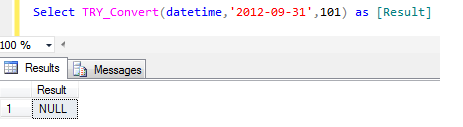
If try _convert Failed,  it will return NULL value.
Lets say we don’t have 31 days in September. Now, try to convert it

Select TRY_Convert(datetime,'2012-09-31',101) as [Result]
--Result
NULL
Example-3 : TRY_CONVERT WITH IIF STATEMENT
In this example , we will try to convert a valid and invalid expression to Integer.

Select IIF(Try_Convert(int, 'test') is NULL , 'Invalid Integer', 'Valid Integer') as [Result]
--Result
Invalid Integer

Select IIF(Try_Convert(int, 2) is NULL , 'Invalid Integer', 'Valid Integer') as [Result]
--Result
Valid Integer

Example-4 : TRY_CONVERT WITH CASE STATEMENT
In this example , we will try to convert a valid and invalid expression to Integer.

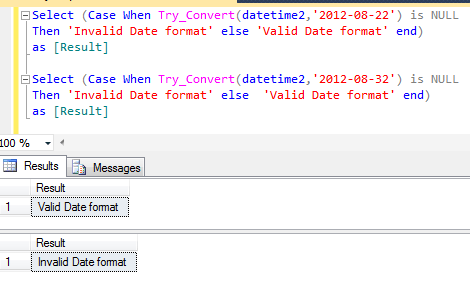
Select (Case When Try_Convert(datetime2,'2012-08-22') is NULL Then 'Invalid Date format' else 'Valid Date format' end) as [Result]
--Result
Valid Date format

Select (Case When Try_Convert(datetime2,'2012-08-32') is NULL Then 'Invalid Date format' else  'Valid Date format' end) as [Result]
--Result
Invalid Date format
Reference : MSDN

In my previous post, I discussed about PARSE function. In this function, if the data type is not compatible and could not be parsed then this function will generate an error. Now, we have the solution for it namely “TRY_PARSE”. SQL SERVER has introduced this (TRY_PARSE) built in conversion function in 2012. This function is very useful because most of the time due to the incorrect data , your system may generate errors. And if you use this function it will return NULL in case of error.
Lets discuss its syntax , purpose and examples in detail.

TRY_PARSE

Syntax :

TRY_PARSE ( string_value AS data_type [ USING culture ] )

Purpose :
This function tries to parse string value (nvarchar(4000) data type) to datetime or numeric data types. But if it fails to parse, it will return NULL value. We need to provide three parameters to this function string value , data type & culture parameter respectively. String value & data type parameter are mandatory but the culture parameter is optional . As the culture parameter is option so, by default it picks up the culture from the session.It uses the .NET Framework Common Language Run time(CLR). Before using this function, we should also know, that it cost extra overhead in the performance.

Example-1 : TRY_PARSE – Successful

SELECT TRY_PARSE('2012-08-22' AS datetime2 USING 'en-US')
--Result
2012-08-22 00:00:00.0000000

Example-2 : TRY_PARSE – Unsuccessful
If the parsing will be unsuccessful, it will return NULL value.

SELECT TRY_PARSE('datetime2' AS datetime2 USING 'en-US')
--Result
NULL

Example-3 : TRY_PARSE – Real World Example with culture keyword
In this example, we will try to parse a valid and invalid date.

Select IIF(TRY_PARSE('2012-08-22' AS datetime2 USING 'en-US') is NULL
,'Invalid Date format' ,'Valid Date format')
--Result
Valid Date format

Select IIF(TRY_PARSE('2012-08-222' AS datetime2 USING 'en-US') is NULL
,'Invalid Date format' ,'Valid Date format')
--Result
Invalid Date format

Example-4 : TRY_PARSE – Real World Example with Language keyword
In this example, we will try to parse a valid and invalid date with the language keyword instead of culture.

Set Language 'English'
Select IIF(TRY_PARSE('2012-08-22' AS datetime2) is NULL
,'Invalid Date format' ,'Valid Date format')
--Result
Valid Date format

Select IIF(TRY_PARSE('2012-08-222' AS datetime2) is NULL
,'Invalid Date format' ,'Valid Date format')
--Result
Invalid Date format

Reference : MSDN

SQL SERVER 2012 has a new built in function namely “PARSE”. Lets discuss its syntax , purpose and examples in detail.

PARSE

Syntax :

PARSE ( string_value AS data_type [ USING culture ] )

Purpose :
This function converts the string value (nvarchar(4000) data type) to datetime or numeric data types.
We need to provide three parameters to this function string value , data type & culture parameter respectively. String value & data type parameter are mandatory but the culture parameter is optional . As the culture parameter is option so, by default it picks up the culture from the session.It uses the .NET Framework Common Language Run time(CLR). Before using this function, we should also know, that it cost extra overhead in the performance.

Example-1 : PARSE -Varchar to Numeric

SELECT PARSE('123.45' AS NUMERIC(18,2)) AS Output
--Result
123.45

Example-2 : PARSE – Varchar to Int
Lets use the same example of numeric and cast it to integer.

SELECT PARSE('123.45' AS INT) AS Output
--Result

Msg 9819, Level 16, State 1, Line 1
Error converting string value ‘123.45’ into data type int using culture .
Note : The above line of code will generate error because whatever we want to parse should be compatible with the parse data type.

Now, lets do the same without scale.

SELECT PARSE('123' AS INT) AS Output
--Result
123

Example-3 : PARSE – Varchar to Datetime with Default culture.

Select Parse('Aug 26 2012' as datetime)
Select Parse('08/26/2012' as datetime )
Select Parse('2012.08.26' as datetime)
Select Parse('26 Aug 2012' as datetime)
Select Parse('Aug 26, 2012' as datetime)
Select Parse('08-26-2012' as datetime)
Select Parse('2012/08/26' as datetime)
--Result of the above statements
2012-08-26 00:00:00.000

Example-4 : PARSE – Varchar to Datetime with culture

Select Parse('26/08/2012' as datetime using 'fr-FR')  --French
Select Parse('26.08.2012' as datetime using 'de-DE')  --German
Select Parse('26-08-2012' as datetime using 'it-IT')  --Italian
--Result of the above statements
2012-08-26 00:00:00.000

Example-5 : PARSE – Varchar to Currency with culture

Select Parse('$123.45' as money using 'en-US')
Select Parse('€123,45' AS money using 'de-DE')
--Result of the above statements
123.45

Example-6 : PARSE – Language Setting Instead of Culture

SET LANGUAGE 'French'
Select Parse('26/08/2012' as datetime)

SET LANGUAGE 'German'
Select Parse('26.08.2012' AS datetime2) AS Result

SET LANGUAGE 'Italian'
Select Parse('26-08-2012' as datetime)
--Result of the above statements
2012-08-26 00:00:00.000

Error :
If the string value is invalid to convert it into date time, numeric & any specific culture format, then it will generate an error.

Reference : MSDN

SQL Server 2012 introduced new logical function namely “IIF”. Lets discuss the syntax and purpose of this function in detail.

IIF:

Syntax :

IIF ( boolean_expression, true_value, false_value )

Purpose :
The purpose of this logical function is to check the Boolean condition and if the condition is true it will return true value otherwise false value.
This function is available in SSRS and now, it is available in SQL SERVER 2012. By using this function, you don’t need to use if else , you can validate and return value in a single line of code.

Examples :

Example-1

DECLARE @int1 int = 100;
DECLARE @int2 int = 200;
SELECT IIF ( @int1> @int2, 'TRUE', 'FALSE' ) AS Result;
--Result
FALSE

Example 2

DECLARE @int1 int = 100;
DECLARE @int2 int = 200;
SELECT IIF ( @int1> @int2, NULL, NULL ) AS Result;
--Result

Msg 8133, Level 16, State 1, Line 3</span>
At least one of the result expressions in a CASE specification must be an expression other than the NULL constant.
Reason : Because both the constant are NULL, even if one constant is not NULL it will not give this error as explained in example 3.
But, you can pass NULL parameter in both true and false value and SQL server will accept it as explained in example 4.
Example 3

DECLARE @int1 int = 100;
DECLARE @int2 int = 200;
SELECT IIF ( @int1> @int2, NULL, 'False' ) AS Result;
--Result
False

Example 4

DECLARE @int1 int = 100;
DECLARE @int2 int = 200;
DECLARE @Condition_True int = NULL;
DECLARE @Condition_False int = NULL;
SELECT IIF ( @int1> @int2, @Condition_True, @Condition_False) AS Result;
--Result
NULL

Example 5 :
Real world example of IIF function

In this example, we will enter marks in IIF condition and will get different grades as per the marks.

DECLARE @Marks int = 95;
SELECT IIF ( @Marks> 90, 'A Grade', IIF(@Marks>=80 And @Marks<=90,'B Grade','C Grade')) AS Result;
--Result
A Grade

GO
DECLARE @Marks int = 80;
SELECT IIF ( @Marks> 90, 'A Grade', IIF(@Marks>=80 And @Marks<=90,'B Grade','C Grade')) AS Result;
GO
--Result
B Grade

DECLARE @Marks int = 70;
SELECT IIF ( @Marks> 90, 'A Grade', IIF(@Marks>=80 And @Marks<=90,'B Grade','C Grade')) AS Result;
--Result
C Grade

Reference : MSDN

SQL Server 2012 introduced new logical function namely “Choose”. Lets discuss the syntax and purpose of this function in detail.

Syntax:

CHOOSE ( index, val_1, val_2 [, val_n ] )

Purpose:

The purpose of this logical function is to return the value from the list as per the index (1 based index). For example, we have four quarters (QUARTER-1 on 1st, QUARTER-2 on 2nd , QUARTER-3 on 3rd and QUARTER-4 on 4th index respectively) and would like to pick the values (Quarters) as per the index.

Note : If choose function will not find any value in a given index, it will return NULL value.

Examples:

Select CHOOSE(0,'QUARTER-1','QUARTER-2','QUARTER-3','QUARTER-4') AS [ANNUAL QUARTER]
--OUTPUT
--NULL

Select CHOOSE(1,'QUARTER-1','QUARTER-2','QUARTER-3','QUARTER-4') AS [ANNUAL QUARTER]
--OUTPUT
--QUARTER-1

Select CHOOSE(2,'QUARTER-1','QUARTER-2','QUARTER-3','QUARTER-4') AS [ANNUAL QUARTER]
--OUTPUT
--QUARTER-2

Select CHOOSE(3,'QUARTER-1','QUARTER-2','QUARTER-3','QUARTER-4') AS [ANNUAL QUARTER]
--OUTPUT
--QUARTER-3

Select CHOOSE(4,'QUARTER-1','QUARTER-2','QUARTER-3','QUARTER-4') AS [ANNUAL QUARTER]
--OUTPUT
--QUARTER-4

Select CHOOSE(5,'QUARTER-1','QUARTER-2','QUARTER-3','QUARTER-4') AS [ANNUAL QUARTER]
--OUTPUT
--NULL

In this article we will discuss the new dynamic management function namely “sys.dm_exec_describe_first_result_set”. The functionality of this function is almost similar  to “sp_describe_first_result_set” system stored procedure, but the implementation (Syntax) and usage is different.

Syntax :

sys.dm_exec_describe_first_result(@tsql, @params, @include_browse_information)

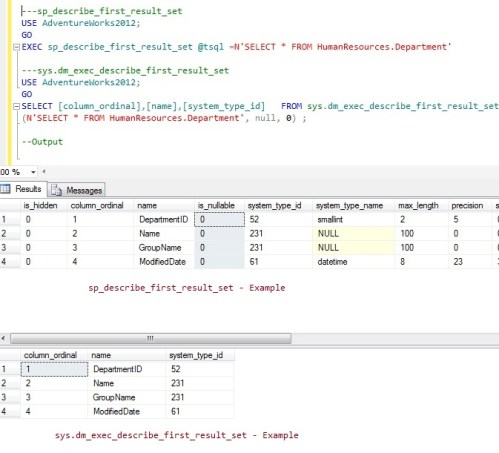
“sp_describe_first_result_set” provides the detailed meta data on the basis of different@include_browse_information parameters. But lets say if we need only two columns from this meta data info and you would like to query it like a table, both requirements are not fulfilled by “sp_describe_first_result_set” stored procedure, because it does not return the data as a tabular form and also you cannot query only few columns. In this case you can use “sys.dm_exec_describe_first_result_set” function to fulfill both your requirements in addition to the “sp_describe_first_result_set” functionality.

Let me explain the difference with the help of simple example :


---sp_describe_first_result_set
USE AdventureWorks2012;
GO
EXEC sp_describe_first_result_set @tsql =N'SELECT * FROM HumanResources.Department'

---sys.dm_exec_describe_first_result_set
USE AdventureWorks2012;
GO
SELECT [column_ordinal],[name],[system_type_id]   FROM sys.dm_exec_describe_first_result_set
(N'SELECT * FROM HumanResources.Department', null, 0) ;

--Output

Summary :
This function has the same functionality as “sp_describe_first_result_set” but the two main differences are given below :

  1. This function can filter the meta data column as per the requirement.
  2. This function returns the data in a tabular form, so you can utilize it in any other function or procedure.

Reference : MSDN

In SQL Server 2012 , Microsoft has provided a very helpful new system stored procedure namely “sp_describe_first_result_set”. Like name, like Work.. As the name goes, so is the performance. It gives the detailed meta data(Schema) information for the first possible result set. Note that it works only in SQL Server 2012. If you need to get the meta data info in SQL Server 2005/2008, you need to use “SP_help” and with very limited info availability.

Syntax :

sp_describe_first_result_set [ @tsql = ] N'Transact-SQL_batch'
[ , [ @params = ] N'parameters' ]
[ , [ @browse_information_mode = ]  ] ]

Lets make some simple examples to check its functionality  :

EXEC sp_describe_first_result_set @tsql =N'SELECT * FROM HumanResources.Department'
GO
--OUTPUT

As I discussed, you can view the  output as a detailed meta data.

Now, let me explain why “first possible result set,” name is given to this procedure, with the help of a simple example.
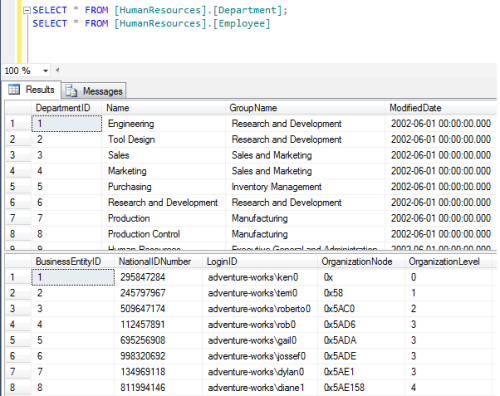
Given below are two queries and it will return two sets of result as well.

SELECT * FROM [HumanResources].[Department];
SELECT * FROM [HumanResources].[Employee];

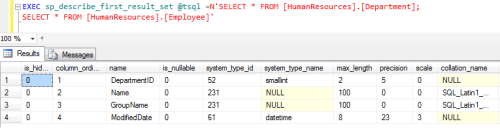
But, if we pass both the queries to “sp_describe_first_result_set” to provide meta data, it will provide the meta data of the first query only and according to this functionality this name (sp_describe_first_result_set) is given to this stored procedure. Lets execute this scenario.

EXEC sp_describe_first_result_set @tsql =N'SELECT * FROM [HumanResources].[Department];
SELECT * FROM [HumanResources].[Employee];'
--Output

Now, lets look at the different option of @browse_information_mode in sp_describe_first_result_set

Lets create a view to explain the different option of @browse_information_mode.

Use AdventureWorks2012
GO
Create View [HumanResources].[vDepartment]
AS
SELECT [DepartmentID] as [ID]
,[Name] as [Department Name]
FROM [HumanResources].[Department]
--Output

Now, lets execute sp_describe_first_result_set with the different option of @browse_information_mode.

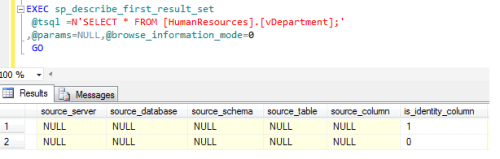
@browse_information_mode=0

Use AdventureWorks2012
GO
EXEC sp_describe_first_result_set
@tsql =N'SELECT * FROM [HumanResources].[vDepartment];'
,@params=NULL,@browse_information_mode=0
GO
-- When @browse_information_mode=0, it will give you the meta data but no source data available in this option.

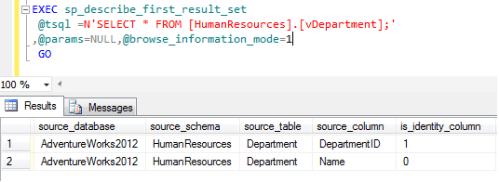
@browse_information_mode=1

Use AdventureWorks2012
GO
EXEC sp_describe_first_result_set
@tsql =N'SELECT * FROM [HumanResources].[vDepartment];'
,@params=NULL,@browse_information_mode=1
GO
-- When @browse_information_mode=1, it will give you the meta data along with the source info but the source details will be based on this view's table.

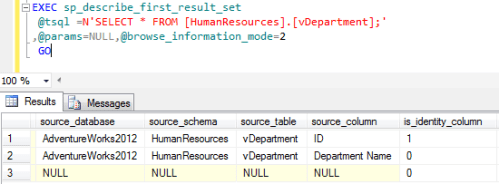
@browse_information_mode=2

Use AdventureWorks2012
GO
EXEC sp_describe_first_result_set
@tsql =N'SELECT * FROM [HumanResources].[vDepartment];'
,@params=NULL,@browse_information_mode=2
GO
-- When @browse_information_mode=2, it will give you the meta data along with the source info but the source details will be based on this view.

Reference : MSDN

Whenever we write a code, we need to do the error handling in it and as much as the handling is strong, it is as simple to trap the bug in the system. SQL Server 2012 provided a new and a flexible way of doing the error handling with the additional features to make it effective and efficient.

First, I will discuss how we were doing error handling in 2005/2008 and what was missing in RAISERROR and why we need this new functionality of THROW.

-- Error HANDLING in SQL Server 2005/2008
BEGIN TRY
DECLARE @VALUE INT
SET @VALUE = 1 / 0
END TRY
BEGIN CATCH
DECLARE @ErrorMessage NVARCHAR(4000);
DECLARE @ErrorSeverity INT;
DECLARE @ErrorState INT;

Print ERROR_NUMBER() --Actuall Error Number
Print ERROR_LINE()   --Actuall ErrorLine

SELECT
@ErrorMessage = ERROR_MESSAGE(),
@ErrorSeverity = ERROR_SEVERITY(),
@ErrorState = ERROR_STATE();

RAISERROR (@ErrorMessage, -- Message.
@ErrorSeverity, -- Severity.
@ErrorState -- State.
);
END CATCH;
--OUTPUT

8134  — Actual Error Number
4     — Actual Error Line Number
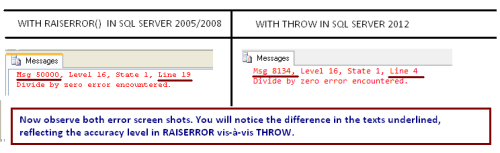
Msg 50000, Level 16, State 1, Line 19
Divide by zero error encountered.

If you look at the error detail, you get the feeling that RAISERROR detail is unable to handle the error properly. It displays the information message like  Divide by zero error encountered which is correct but the rest of the info like error number 50000 & line number 19 is incorrect because these are not the actual error & line numbers respectively.

Now, lets try the same in SQL SERVER 2012 with THROW and notice the accuracy.

-- Error HANDLING in SQL Server 2012
BEGIN TRY
DECLARE @VALUE INT
SET @VALUE = 1 / 0
END TRY
BEGIN CATCH
THROW
END CATCH;

--OUTPUT

Msg 8134, Level 16, State 1, Line 4
Divide by zero error encountered.

So, what is it that I did in SQL Server 2012 ? I just replaced all error handling with one keyword “THROW” and it returns more accurate result Like error number 8134 and line number to the caller, than the RAISERROR. Also, it reduces the number of codes.

In Sql server 2012,  Microsoft has introduced a very nice and interesting feature and that is execute stored procedure with result set.  With the help of feature, now we can change the column name & data type of the stored procedure result set.

Before SQL server 2012, we were doing the same but it was a lengthy procedure. First we had to create a temporary table and then execute the stored procedure and insert the result set in the temporary table and then select it.

Today, we will discuss the different aspects of this new feature.

Let me explain it with simple examples:

Example 1: (Stored procedure with Single Result set)

Use AdventureWorks2012
GO
Create PROCEDURE SP_ResultSet_Example1
as
Select [DepartmentID]
,[Name]
,[ModifiedDate]
from  [HumanResources].[Department]
GO
EXEC SP_ResultSet_Example1
GO

In the above example, we have three columns in the result set
[DeprtmentID],[Name],[ModifiedDate]

But, I would like to rename the column name and change the data type of Modified Date column in the result set like this
[Deprtment ID],[Department Name], [Modified Date]

Use AdventureWorks2012
GO
EXEC SP_ResultSet_Example1
WITH RESULT SETS
(
( [Department ID] int NOT NULL,
[Department name] Name NOT NULL,
[Modified Date] varchar(11) NOT NULL
));
GO
--Result

Example 2: (Stored procedure with Multiple Result set)

The same way we can do it for multiple result sets also. Given below is the example.

--Without resultset
Use AdventureWorks2012
GO
Create PROCEDURE SP_ResultSet_Example2
as
Select [DepartmentID]
,[Name]
,ModifiedDate
from  [HumanResources].[Department]
Select 'Total' as [Total] ,Count(*) as [Count] from [HumanResources].[Department]
GO
EXEC SP_ResultSet_Example2
GO
--With resultset
Use AdventureWorks2012
GO
EXEC SP_ResultSet_Example2
WITH RESULT SETS
(
( [Department ID] int NOT NULL,
[Department name] Name NOT NULL,
[Modified Date] varchar(11) NOT NULL
),
(
[Total] varchar(5) NOT NULL,
[Department Count] Int NOT NULL
));

Limitations :

  1. You cannot change the data type to any incompatible data type.

For example: Cannot change from varchar to int.

  1. You cannot reduce or increase the number of columns in result set.


Summary:

In this article, we discussed how we can rename and change the data type of the stored procedure output. This feature is very handy especially for SQL Server Integration Services (SSIS) developers when they need to rename/ change the column name and data type respectively in the result  set.

Reference : MSDN

In SQL Server 2012, Microsoft has introduced a lot of new T-SQL features and enhancements and one of the best features is Paging. We have been doing this data paging in previous versions of SQL server by writing a stored procedure or a complex query.
Here is a sample, how we were using data paging in SQL Server 2005/ 2008.

USE AdventureWorks
GO
SELECT *
FROM   (SELECT ROW_NUMBER() OVER(ORDER BY EmployeeID) AS
rownumber, [FirstName], [LastName],[JobTitle] FROM HumanResources.vEmployee) AS Salaries1
WHERE  rownumber >= 10 AND rownumber = 10 AND rownumber 

But, now it is very easy to use and implement paging in SQL Server 2012. We only need to set two keywords (OFFSET, FETCH NEXT) with Order By Clause and we can get our required records.

Lets Proceed first with each keyword.

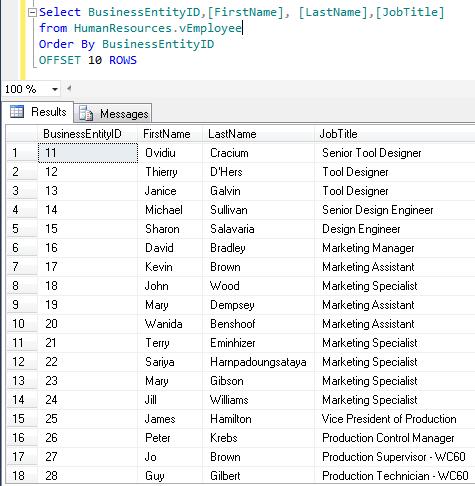
Order By Offset :

USE AdventureWorks2012
GO
Select BusinessEntityID,[FirstName], [LastName],[JobTitle]
from HumanResources.vEmployee
Order By BusinessEntityID
OFFSET 10 ROWS

If we use offset with order by clause, the query excludes the number of records we mentioned in OFFSET n Rows. In the above example, we used OFFSET 10 ROWS so, SQL will exclude first 10 records from the result and display the rest of all records in the defined order.

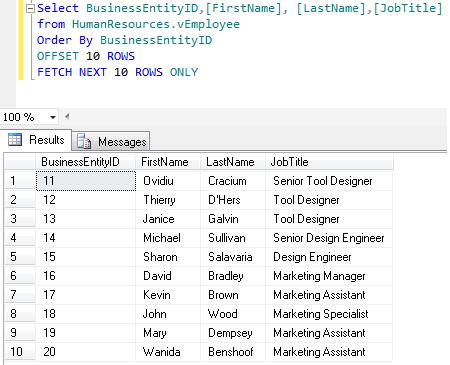
Order By Offset With FETCH NEXT :

USE AdventureWorks2012
GO
Select BusinessEntityID,[FirstName], [LastName],[JobTitle]
from HumanResources.vEmployee
Order By BusinessEntityID

OFFSET 10 ROWS
FETCH NEXT 10 ROWS ONLY

If we use offset with fetch next, we can define how many records we need to exclude. Also we can define that after exclusion how many records we need to pick up. In the above example, SQL excludes first 10 records and will pick up 10 records afterwards.
In other words, we can say that whenever we need to do paging we need 2 things. 1st, the page no. and 2nd the no. of records in each page. Here OFFSET is used for page number and FETCH NEXT is the number of records in each page.

Order By Fetch Next Rows Only:
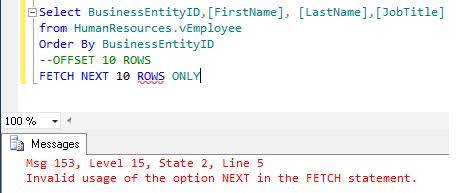
If, we use Fetch Next with order by clause only without Offset, SQL will generate an error. We cannot use Fetch Next without Offset.

USE AdventureWorks2012
go
Select BusinessEntityID,[FirstName], [LastName],[JobTitle]
from HumanResources.vEmployee
Order By BusinessEntityID
--OFFSET 10 ROWS
FETCH NEXT 10 ROWS ONLY

Given below is a simple stored procedure to perform paging in SQL server 2012.

USE AdventureWorks2012
go
Create Procedure dbo.Sp_Data_Paging
@PageNo int,
@RecordsPerPage int
AS

Select BusinessEntityID,[FirstName], [LastName],[JobTitle]
from HumanResources.vEmployee
Order By BusinessEntityID
OFFSET (@PageNo-1)*@RecordsPerPage ROWS
FETCH NEXT @RecordsPerPage ROWS ONLY
GO
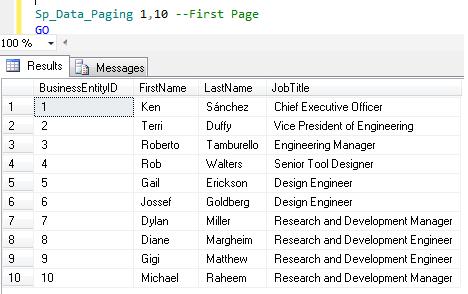
Sp_Data_Paging 1,10 --First Page
GO
--Result

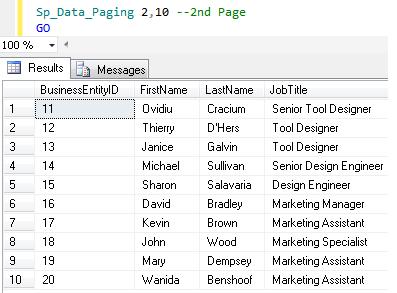
Sp_Data_Paging 2,10 --2nd Page
--Result
GO

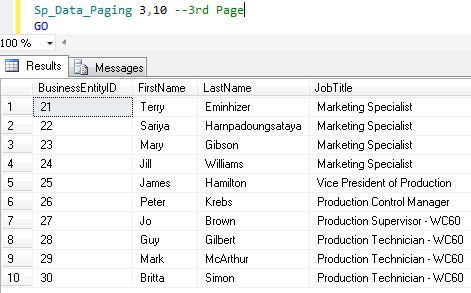
Sp_Data_Paging 3,10 --3rd Page
--Result
GO

Conclusion :

These two keywords OFFSET and FETCH NEXT clause give boost to data pagination in SQL server 2012.
It also improves performance (because it picks up only certain records from the database) and reduces the number of codes and effort. Now the developers can do the data paging not only from front end (. NET) but also from the back end.