I have been using IN clause with multiple values from a long time. But I was always using it with string concatenation along with single quotes to make it string and then process it.
Recently, I found another solution , it works without string concatenation.
Let me explain this issue demonstrating simple example.
CREATE TABLE [dbo].[Student](
[Student ID]   [varchar] (6) Not NULL ,
[Student Name] [varchar](50) NOT NULL)
GO

Insert into dbo.[Student] values ('STD001','Bob')
Insert into dbo.[Student] values ('STD002','Alexander')
Insert into dbo.[Student] values ('STD003','Hosanna')
Insert into dbo.[Student] values ('STD004','William')
Insert into dbo.[Student] values ('STD005','Hulda')
Insert into dbo.[Student] values ('STD006','Jacoba')
Old Approach :
Declare  @SQL         VARCHAR(MAX)
Declare  @WhereClause VARCHAR(MAX)
Set @WhereClause='Bob,Hulda,Jacoba'

SET @WhereClause=REPLACE(@WhereClause,',',''',''')
Set @SQL='Select *
from dbo.[Student]
Where  [Student Name] In (''' + @WhereClause + ''')'

EXEC (@SQL)
New Approach :
Declare  @Xml AS XML
Declare  @WhereClause VARCHAR(MAX)
Set @WhereClause='Bob,Hulda,Jacoba'
SET @Xml = cast(('<A>'+replace(@WhereClause,',' ,'</A><A>')+'</A>') AS XML)
Select *
from dbo.[Student]
Where  [Student Name] In (
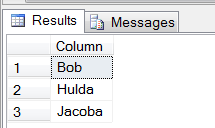
SELECT A.value('.', 'varchar(max)') as [Column] FROM @Xml.nodes('A') AS FN(A)
)
Explanation :
In the new approach, I need to explain these two important lines of code.
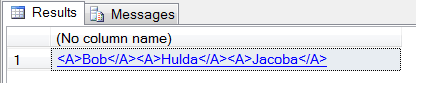
SET @Xml = cast(('<A>'+replace(@WhereClause,',' ,'</A><A>')+'</A>') AS XML)
Select @Xml
This code snippet will convert string into XML, replacing the delimiter with start and end XML tag.
(Here, It is used as <A></A>).
Output :
SELECT A.value('.', 'varchar(max)') as [Column] FROM @Xml.nodes('A') AS FN(A)
Once the string is converted into XML,By using this code snippet, we can easily query it via xquery.
Output :
I’d really appreciate your comments on my posts, whether you agree or not, do comment.


 SQL Server Portal