Feeds:
Posts
Comments

Archive for the ‘SQL SERVER’ Category

In my previous Posts, I discussed about DATETIMEFROMPARTS. Today, we will discuss one more function introduced in SQL SERVER 2012 namely “DATETIME2FROMPARTS“.

Let me explain its syntax, parameters, purpose and examples in detail.

Syntax :

DATETIME2FROMPARTS ( year, month, day, hour, minute, seconds, fractions, precision )

Parameters :
@Year : A valid integer for year.
@Month : A valid integer for month range from 1-12.
@Day : A valid integer for day range from 1-31. (Depends upon the total number of days in a month)
@Hour : A valid integer for Hour range from 0-23.
@Minutes : A valid integer for Minutes range from 0-59.
@Seconds: A valid integer for Seconds range from 0-59.
@Fractions : A valid integer for Fractions range from 0-9999999.
@Precision : A valid integer for Precision range from 0-7.

Purpose :
This function requires year, month, day, hour, minute, seconds, fractions & precision as a parameter (All parameters are mandatory) and returns a valid datetime2 as a result. If we pass any invalid date and time parts, it will generate an error. Also if we pass NULL values to any of its parameters except Precision parameter, it returns NULL value. If we pass NULL value to Precision parameter it will generate an error.
Let me explain this with simple examples.

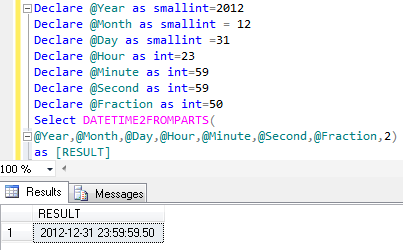
Example-1 : DATETIME2FROMPARTS

Declare @Year as smallint=2012
Declare @Month as smallint = 12
Declare @Day as smallint =31
Declare @Hour as int=23
Declare @Minute as int=59
Declare @Second as int=59
Declare @Fraction as int=50
Select DATETIME2FROMPARTS( @Year,@Month,@Day,@Hour,@Minute,@Second,@Fraction,2)
as [RESULT]
--RESULT
2012-12-31 23:59:59.50
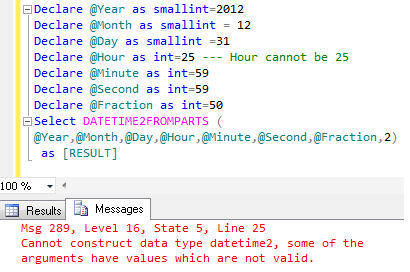
Example-2 : DATETIME2FROMPARTS- With Invalid Date and Time Parts
It will generate an error because only valid date and time parts are allowed as a parameter.

Declare @Year as smallint=2012
Declare @Month as smallint = 12
Declare @Day as smallint =31
Declare @Hour as int=25 --- Hour cannot be 25
Declare @Minute as int=59
Declare @Second as int=59
Declare @Fraction as int=50
Select DATETIME2FROMPARTS (@Year,@Month,@Day,@Hour,@Minute,@Second,@Fraction,2)
as [RESULT]
--RESULT

Msg 289, Level 16, State 5, Line 23
Cannot construct data type datetime2, some of the arguments have values which are not valid.
Example-3 : DATETIME2FROMPARTS- With NULL Date and Time Parts except Precision parameter
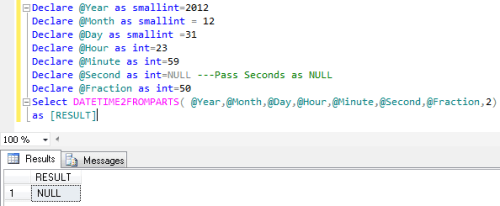
If we pass NULL value to any of its parameter except Precision parameter, it will return NULL value

Declare @Year as smallint=2012
Declare @Month as smallint = 12
Declare @Day as smallint =31
Declare @Hour as int=23
Declare @Minute as int=59
Declare @Second as int=NULL ---Pass Seconds as NULL
Declare @Fraction as int=50
Select DATETIME2FROMPARTS( @Year,@Month,@Day,@Hour,@Minute,@Second,@Fraction,2)
as [RESULT]
--RESULT
Example-4 : DATETIME2FROMPARTS- @Precision as NULL value
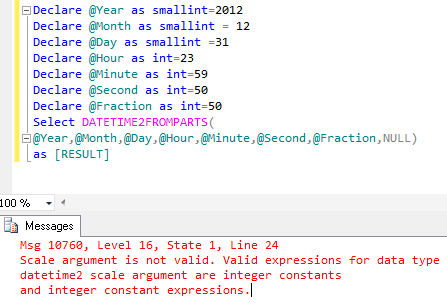
If we pass NULL value to precision parameter of this function, it will generate an error.

Declare @Year as smallint=2012
Declare @Month as smallint = 12
Declare @Day as smallint =31
Declare @Hour as int=23
Declare @Minute as int=59
Declare @Second as int=50
Declare @Fraction as int=50
Select DATETIME2FROMPARTS( @Year,@Month,@Day,@Hour,@Minute,@Second,@Fraction,NULL)
as [RESULT]
--Result

Msg 10760, Level 16, State 1, Line 23
Scale argument is not valid. Valid expressions for data type datetime2 scale argument are integer constants and integer constant expressions.
Example-5 : DATETIME2FROMPARTS- With Null and Invalid parameters
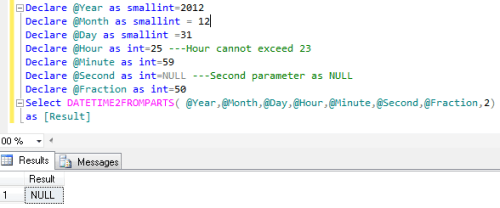
If we pass NULL and Invalid value to its parameter, it will return NULL as a result.

Declare @Year as smallint=2012
Declare @Month as smallint = 12
Declare @Day as smallint =31
Declare @Hour as int=25 ---Hour cannot exceed 23
Declare @Minute as int=59
Declare @Second as int=NULL ---Second parameter as NULL
Declare @Fraction as int=50
Select DATETIME2FROMPARTS( @Year,@Month,@Day,@Hour,@Minute,@Second,@Fraction,2)
as [Result]
--Result
NULL
Example-6: DATETIME2FROMPARTS- With missing Fraction if precision is defined
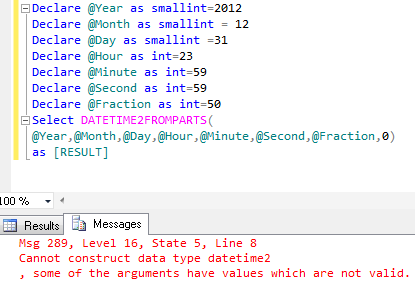
If precision is zero , we cannot define the fraction as well. It should be zero.

Declare @Year as smallint=2012
Declare @Month as smallint = 12
Declare @Day as smallint =31
Declare @Hour as int=23
Declare @Minute as int=59
Declare @Second as int=59
Declare @Fraction as int=50
Select DATETIME2FROMPARTS( @Year,@Month,@Day,@Hour,@Minute,@Second,@Fraction,0) as [RESULT]
as [Result]
--Result

Msg 289, Level 16, State 5, Line 8
Cannot construct data type datetime2, some of the arguments have values which are not valid.
Reference : MSDN
Read Full Post »

In my previous Posts, I discussed about DATETIMEFROMPARTS function in SQL SERVER 2012. Today we will discuss one more important function introduced in SQL SERVER 2012 namely “SMALLDATETIMEFROMPARTS“.

Let me explain its syntax, parameters, purpose and examples in detail.

Syntax :

SMALLDATETIMEFROMPARTS ( year, month, day, hour, minute )

Parameters :
@Year : A valid integer for year.
@Month : A valid integer for month range from 1-12.
@Day : A valid integer for day range from 1-31. (Depends upon the total number of days in a month)
@hour : A valid integer for the hour range from 0-23
@Minute : A valid integer for the minute range from 0-59
Purpose :
This function requires year, month, day, hour, minute as a parameter (All parameters are mandatory) and return small date & time as a result. If we pass any invalid date and time parts, it will generate an error. Also if we pass NULL date and time parts to this function it will return NULL value.
Let me explain this with simple examples.

Example-1 : SMALLDATETIMEFROMPARTS

Declare @Year as smallint=2012
Declare @Month as smallint = 12
Declare @Day as smallint =31
Declare @hour as smallint = 23
Declare @Minute as smallint =58
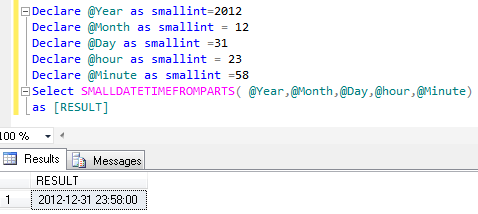
Select SMALLDATETIMEFROMPARTS( @Year,@Month,@Day,@hour,@Minute)
as [RESULT]
--RESULT
2012-12-31 23:58:00

Example-2 : SMALLDATETIMEFROMPARTS- With Invalid Date and Time Parts
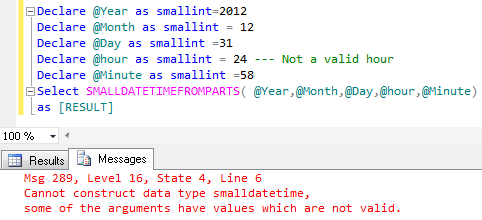
It will generate an error because only valid date and time parts are allowed as a parameter.

Declare @Year as smallint=2012
Declare @Month as smallint = 12
Declare @Day as smallint =31
Declare @hour as smallint = 24 --- Not a valid hour
Declare @Minute as smallint =58
Select SMALLDATETIMEFROMPARTS( @Year,@Month,@Day,@hour,@Minute)
as [RESULT]
--RESULT

Msg 289, Level 16, State 4, Line 6
Cannot construct data type smalldatetime, some of the arguments have values which are not valid.

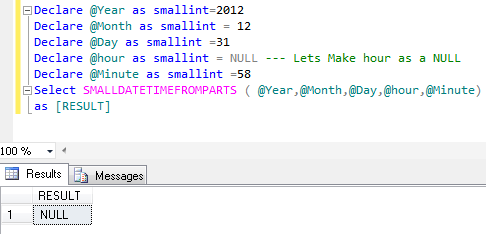
Example-3 : SMALLDATETIMEFROMPARTS- With NULL Date and Time Parts
It will return NULL even if only one part is NULL.

Declare @Year as smallint=2012
Declare @Month as smallint = 12
Declare @Day as smallint =31
Declare @hour as smallint = NULL --- Lets Make hour as a NULL
Declare @Minute as smallint =58
Select SMALLDATETIMEFROMPARTS ( @Year,@Month,@Day,@hour,@Minute)
as [RESULT]
--RESULT

Reference : MSDN

Read Full Post »

In my previous Posts, I discussed about DATEFROMPARTS and TIMEFROMPARTS function in SQL SERVER 2012. Today we will discuss one more function introduced in SQL SERVER 2012 namely “DATETIMEFROMPARTS“.

Let me explain its syntax, parameters, purpose and examples in detail.

Syntax :

DATETIMEFROMPARTS ( year, month, day, hour, minute, seconds, milliseconds )

Parameters :
@Year : A valid integer for year.
@Month : A valid integer for month range from 1-12.
@Day : A valid integer for day range from 1-31. (Depends upon the total number of days in a month)
@hour : A valid integer for the hour range from 0-23
@Minutes : A valid integer for the minute range from 0-59
@Seconds : A valid integer for the second range from 0-59
@milliseconds : A valid integer for the millisecond range from 0-999.

Purpose :
This function requires year, month, day, hour, minute, seconds & milliseconds as a parameter (All parameters are mandatory) and return date and time as a result. If we pass any invalid date and time parts, it will generate an error. Also if we pass NULL date and time parts to this function it will return NULL value.
Let me explain this with simple examples.

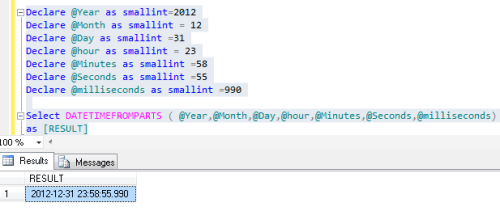
Example-1 : DATETIMEFROMPARTS

Declare @Year as smallint=2012
Declare @Month as smallint = 12
Declare @Day as smallint =31
Declare @hour as smallint = 23
Declare @Minutes as smallint =58
Declare @Seconds as smallint =55
Declare @milliseconds as smallint =990
Select DATETIMEFROMPARTS ( @Year,@Month,@Day,@hour,@Minutes,@Seconds,@milliseconds)
as [RESULT]
--RESULT
2012-12-31 23:58:55.990

Example-2 : DATETIMEFROMPARTS – With Invalid Date and Time Parts
It will generate an error becuase only valid date and time parts are allowed as a parameter.

Declare @Year as smallint=2012
Declare @Month as smallint = 12
Declare @Day as smallint =31
Declare @hour as smallint = 24 --- Not a valid hour
Declare @Minutes as smallint =58
Declare @Seconds as smallint =55
Declare @milliseconds as smallint =990
Select DATETIMEFROMPARTS ( @Year,@Month,@Day,@hour,@Minutes,@Seconds,@milliseconds) as [RESULT]
--RESULT

Msg 289, Level 16, State 3, Line 26
Cannot construct data type datetime, some of the arguments have values which are not valid.

Example-3 : DATETIMEFROMPARTS – With NULL Date and Time Parts
It will return NULL even if only one part is NULL.

Declare @Year as smallint=2012
Declare @Month as smallint = 12
Declare @Day as smallint =31
Declare @hour as smallint = NULL --- Lets Make hour as a NULL
Declare @Minutes as smallint =58
Declare @Seconds as smallint =55
Declare @milliseconds as smallint =990
Select DATETIMEFROMPARTS ( @Year,@Month,@Day,@hour,@Minutes,@Seconds,@milliseconds)
as [RESULT]
--RESULT

Reference : MSDN

Read Full Post »

In my previous post, I discussed about DATEFROMPARTS. Today we will discuss TIMEFROMPARTS(). In earlier version of SQL SERVER, there was no built in function to convert time parts (hours, minutes & seconds) to time. Lets have a look, how we were doing in earlier version of SQL server.

For Example :

--SQL Server 2008
Declare @Hour as int=4
Declare @Minute as int=20
Declare @Second as int=30
Declare @Fraction as int=55

Select Convert(time,Convert(varchar(4), @Hour)
+ ':' +
Convert(varchar(2), @Minute)
+ ':' +
Convert(varchar(2), @Second)
+ ':' +
Convert(varchar(2), @Fraction))
--Result
--04:20:30.0550000

But in SQL Server 2012, the solution came as a new built in function namely TIMEFROMPARTS().
Lets discuss this function syntax, parameters, purpose and examples in detail.

Syntax :

TIMEFROMPARTS ( hour, minute, seconds, fractions, precision )

Parameters :
@Hour : A valid integer for Hour range from 0-23.
@Minutes : A valid integer for Minutes range from 0-59.
@Seconds: A valid integer for Seconds range from 0-59.
@Fractions : A valid integer for Fractions range from 0-9999999.
@Precision : A valid integer for Precision range from 0-7.

Purpose :
This function requires a valid hour, minute, seconds, fractions & precision as a parameter and returns a valid time. If we pass any invalid time parts to this function it will return an error. Also if we pass NULL values to any of its parameters except Precision parameter, it returns NULL value . If we pass NULL value to Precision parameter it will generate an error.

Let me explain this with simple examples.

Example-1 : TIMEFROMPARTS – With Valid time parts

Declare @Hour as int=23
Declare @Minute as int=59
Declare @Second as int=59
Declare @Fraction as int=50
Select TIMEFROMPARTS(@Hour,@Minute,@Second,@Fraction,2) as [Result]
--Result
23:59:59.50

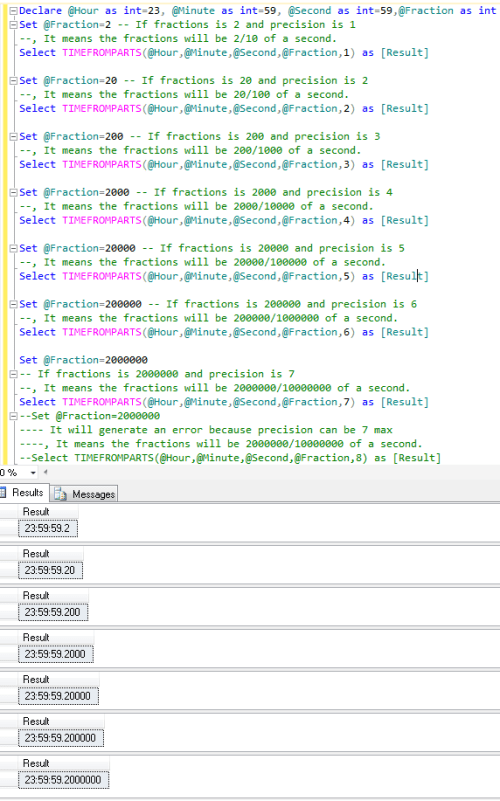
Example-2 : TIMEFROMPARTS – With Valid & Invalid precision

Declare @Hour as int=23, @Minute as int=59, @Second as int=59,@Fraction as int
Set @Fraction=2 -- If fractions is 2 and precision is 1
--, It means the fractions will be 2/10 of a second.
Select TIMEFROMPARTS(@Hour,@Minute,@Second,@Fraction,1) as [Result]

Set @Fraction=20 -- If fractions is 20 and precision is 2
--, It means the fractions will be 20/100 of a second.
Select TIMEFROMPARTS(@Hour,@Minute,@Second,@Fraction,2) as [Result]

Set @Fraction=200 -- If fractions is 200 and precision is 3
--, It means the fractions will be 200/1000 of a second.
Select TIMEFROMPARTS(@Hour,@Minute,@Second,@Fraction,3) as [Result]

Set @Fraction=2000 -- If fractions is 2000 and precision is 4
--, It means the fractions will be 2000/10000 of a second.
Select TIMEFROMPARTS(@Hour,@Minute,@Second,@Fraction,4) as [Result]

Set @Fraction=20000 -- If fractions is 20000 and precision is 5
--, It means the fractions will be 20000/100000 of a second.
Select TIMEFROMPARTS(@Hour,@Minute,@Second,@Fraction,5) as [Result]

Set @Fraction=200000 -- If fractions is 200000 and precision is 6
--, It means the fractions will be 200000/1000000 of a second.
Select TIMEFROMPARTS(@Hour,@Minute,@Second,@Fraction,6) as [Result]

Set @Fraction=2000000
-- If fractions is 2000000 and precision is 7
--, It means the fractions will be 2000000/10000000 of a second.
Select TIMEFROMPARTS(@Hour,@Minute,@Second,@Fraction,7) as [Result]

Set @Fraction=2000000
--It will generate an error because precision can be 7 maximum
--, It means the fractions will be 2000000/10000000 of a second.
--Select TIMEFROMPARTS(@Hour,@Minute,@Second,@Fraction,8) as [Result]
--Result

If precision is 8 then it will generate this error.

Msg 1002, Level 16, State 2, Line 33
Line 33: Specified scale 8 is invalid.

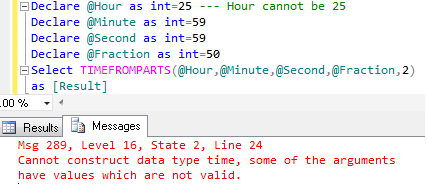
Example-3 : TIMEFROMPARTS – With Invalid time parts
If we provide an invalid time part to this function, it will generate an error because only valid time parts are allowed as a parameter.

Declare @Hour as int=25 --- Hour cannot be 25
Declare @Minute as int=59
Declare @Second as int=59
Declare @Fraction as int=50

Select TIMEFROMPARTS(@Hour,@Minute,@Second,@Fraction,2) as [Result]
--Result

Msg 289, Level 16, State 2, Line 24
Cannot construct data type time, some of the arguments have values which are not valid.

Example-4 : TIMEFROMPARTS- NULL as a parameter except Precision parameter
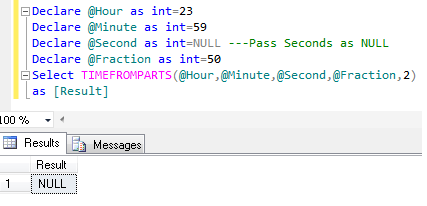
If we pass NULL value to any of its parameter except Precision parameter, It will return NULL value .

Declare @Hour as int=23
Declare @Minute as int=59
Declare @Second as int=NULL ---Pass Seconds as NULL
Declare @Fraction as int=50
Select TIMEFROMPARTS(@Hour,@Minute,@Second,@Fraction,2) as [Result]
--Result

Example-5 : TIMEFROMPARTS- @Precision as NULL value
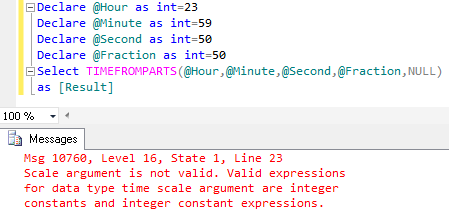
If we pass NULL value to precision parameter of this function, It will generate an error.

Declare @Hour as int=23
Declare @Minute as int=59
Declare @Second as int=50
Declare @Fraction as int=50
Select TIMEFROMPARTS(@Hour,@Minute,@Second,@Fraction,NULL) as [Result]
--Result

Msg 10760, Level 16, State 1, Line 23
Scale argument is not valid. Valid expressions for data type time scale argument are integer constants and integer constant expressions.

Example-6 : TIMEFROMPARTS- With Null and Invalid parameters
If we pass NULL and Invalid value to its parameter, It will return NULL as a result.

Declare @Hour as int=25 ---Hour cannot exceed 23
Declare @Minute as int=59
Declare @Second as int=NULL ---Second parameter as NULL
Declare @Fraction as int=50
Select TIMEFROMPARTS(@Hour,@Minute,@Second,@Fraction,2)
as [Result]
--Result
NULL

Example-7: TIMEFROMPARTS- With missing Fraction if precision is defined
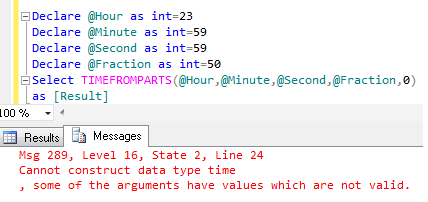
If precision is zero , we cannot define the fraction as well. It should be zero.

Declare @Hour as int=23
Declare @Minute as int=59
Declare @Second as int=59
Declare @Fraction as int=50
Select TIMEFROMPARTS(@Hour,@Minute,@Second,@Fraction,0)
as [Result]
--Result

Msg 289, Level 16, State 2, Line 24
Cannot construct data type time, some of the arguments have values which are not valid.

Example-8: TIMEFROMPARTS- With missing parameters
As I have mentioned above, all parameters(5) are mandatory for TIMEFROMPARTS function. Lets try to pass less than 5 parameters.

Declare @Hour as int=23
Declare @Minute as int=59
Declare @Second as int=59
Declare @Fraction as int=50
Select TIMEFROMPARTS(@Hour,@Minute,@Fraction,2) as [Result]
--Result

Msg 10760, Level 16, State 1, Line 23
The timefromparts function requires 5 argument(s).

Reference : MSDN
Read Full Post »

Before SQL SERVER 2012, If we have a scenario that Year, Month & day are given to us and we need to convert it into date and return it. In this case we need to do a lot of conversion and then we can get our desired results.

For Example :

--SQL Server 2008
Declare @Year as int=2012
Declare @Month as int=12
Declare @Day as int=31

Select Convert(Date,Convert(varchar(4), @Year)
+
Convert(varchar(2), @Month)
+
Convert(varchar(2), @Day))
--Result
2012-12-31

But In SQL Server 2012, the solution came as a new built in function namely DATEFROMPARTS().
Lets discuss this function syntax, parameters, purpose and examples in detail.

Syntax :

DATEFROMPARTS ( year, month, day )

Parameters :
@Year : A valid integer for year.
@Month : A valid integer for month range from 1-12.
@Day : A valid integer for day range from 1-31 (depends upon the total number of days in a month)

Purpose :
This function requires a valid Year, Month & day as a parameter and returns  a valid date. If we pass any invalid date part to this function it will return an error. Also if we pass NULL to any of its parameter, it returns NULL value.

Let me explain this with simple examples.

Example-1 : DATEFROMPARTS – With valid date parts

Declare @Year as int=2012
Declare @Month as int = 12
Declare @Day as int =31

Select DATEFROMPARTS(@Year,@Month,@Day) as [Result]
--Result

Example-2 : DATEFROMPARTS – With Invalid date parts
If we provide an invalid date part to this function, it will generate an error because only valid date parts are allowed as a parameter.

Declare @Year as int=2012
Declare @Month as int = 13 -- 13 is not a Valid month
Declare @Day as int =31

Select DATEFROMPARTS(@Year,@Month,@Day) as [Result]
--Result

Msg 289, Level 16, State 1, Line 5
Cannot construct data type date, some of the arguments have values which are not valid.

Example-3 : DATEFROMPARTS – With NULL Date Parts
If we pass NULL value to any parameter of this function, It will return NULL value.

Declare @Year as int=2012
Declare @Month as int = NULL -- Passed NULL as a Month
Declare @Day as int =31

Select DATEFROMPARTS(@Year,@Month,@Day) as [Result]
--Result

Example-4 : DATEFROMPARTS – With missing parameters
As I have mentioned above that all parameters(3) are mandatory for DATEFROMPARTS function. Lets try to pass less than 3 parameters.

Declare @Year as int=2012
Declare @Month as int = 12
Declare @Day as int =31

Select DATEFROMPARTS(@Year,@Month) as [Result]
--Result

Reference : MSDN
Read Full Post »

In my previous Post, I discussed about FIRST_VALUE.Today, we will discuss another important analytical function namely “LAST_VALUE”. We can also say this is the reverse of FIRST_VALUE analytical function.

Lets discuss this function syntax, purpose and examples in detail.

Syntax :

LAST_VALUE ( [scalar_expression ) OVER ( [ partition_by_clause ] order_by_clause rows_range_clause )

Purpose :
It returns the Last value from a list in a specified order. Also we can define partition & rows range parameter in this function, but these are optional parameters. By default Row range is between unbounded preceding and current row or range unbounded preceding.
It is better to define “row range” parameter in the LAST_Value function. Later in this article, we will also discuss the importance of “row range” parameter in LAST_VALUE.

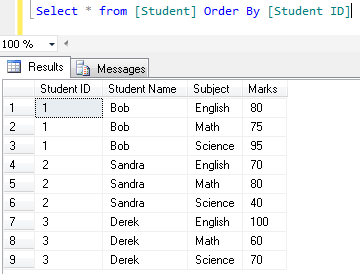
Lets create a student table and insert few records in it to demonstrate LAST_VALUE.

Create Table [Student]
(
[Student ID] int,
[Student Name] varchar(50),
[Subject] varchar(50),
[Marks] int
)
GO

Insert into [Student] values (3,'Derek','English',100)
Insert into [Student] values (3,'Derek','Math',60)
Insert into [Student] values (3,'Derek','Science',90)

Insert into [Student] values (1,'Bob','English',80)
Insert into [Student] values (1,'Bob','Math',75)
Insert into [Student] values (1,'Bob','Science',60)

Insert into [Student] values (2,'Sandra','English',70)
Insert into [Student] values (2,'Sandra','Math',80)
Insert into [Student] values (2,'Sandra','Science',40)
Select * from [Student] Order By [Student ID]

Example-1 :
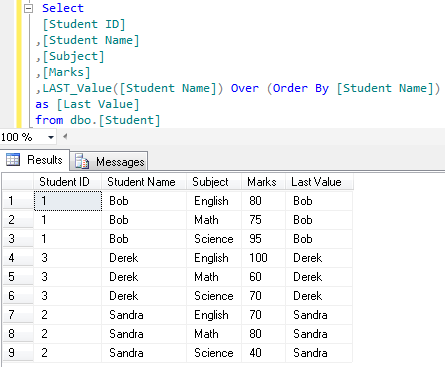
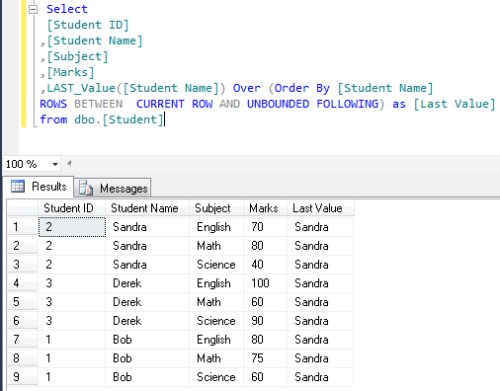
In this example, LAST_VALUE returns the Last Name of the student in the class (In alphabetical order) . And the expected result is “Sandra”.

Select
[Student ID]
,[Student Name]
,[Subject]
,[Marks]
,LAST_Value([Student Name]) Over (Order By [Student Name])
as [Last Value]
from dbo.[Student]
--Result

But Unfortunately, this is not our expected result, It is the same row value in Last Value &  student name column.

Here “row range ” optional parameters of LAST_VALUE comes to solve this problem. Now, we need to change the “row range” value from default to CURRENT ROW AND UNBOUNDED FOLLOWING.

Lets make another example with row range CURRENT ROW AND UNBOUNDED FOLLOWING.

Select
[Student ID]
,[Student Name]
,[Subject]
,[Marks]
,LAST_Value([Student Name]) Over (Order By [Student Name]
ROWS BETWEEN  CURRENT ROW AND UNBOUNDED FOLLOWING) as [Last Value]
from dbo.[Student]
--Result

Now, we got our expected result by defining “row range”.

Example-2 :
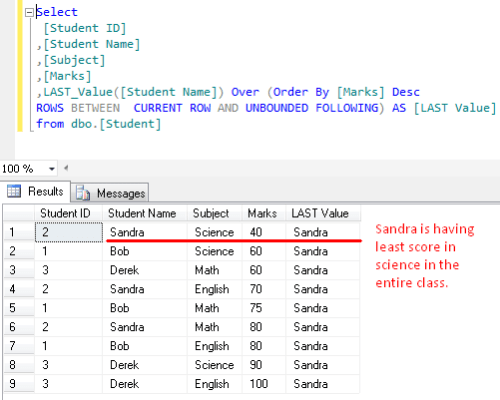
In this example, LAST_VALUE returns the student name having least score in the class. Expected result is : “Sandra”. Because she is having least score (40) in science in the entire class.

Select
[Student ID]
,[Student Name]
,[Subject]
,[Marks]
,LAST_Value([Student Name]) Over (Order By [Marks] Desc
ROWS BETWEEN  CURRENT ROW AND UNBOUNDED FOLLOWING) AS [LAST Value]
from dbo.[Student]
--Result

Example-3 :
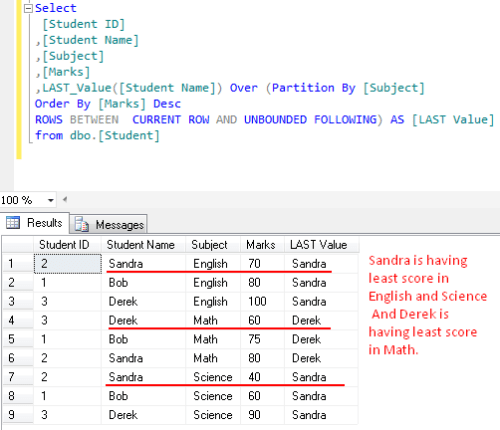
In this example, LAST_VALUE returns the student name having least score in each subject in the class. Expected result is : Sandra in “English & Science” & Derek in “Maths”.

Select
[Student ID]
,[Student Name]
,[Subject]
,[Marks]
,LAST_Value([Student Name]) Over (Partition By [Subject]
Order By [Marks] Desc
ROWS BETWEEN  CURRENT ROW AND UNBOUNDED FOLLOWING) AS [LAST Value]
from dbo.[Student]
--Result

Reference : MSDN
Read Full Post »

In SQL server 2012, Microsoft has introduced some new analytical functions and one of the most important functions in it is FIRST_VALUE. As It name implies, it does the same.

Lets discuss this function syntax, purpose and examples in detail.

Syntax :

FIRST_VALUE ( [scalar_expression )
OVER ( [ partition_by_clause ] order_by_clause [ rows_range_clause ] )

Purpose :
It returns the first value from a list in a specified order (By default ascending order). Also we can do the partition in it but it is optional.

Lets create a student table and insert few records in it to demonstrate FIRST_VALUE.

Create Table [Student]
(
[Student ID] int,
[Student Name] varchar(50),
[Subject] varchar(50),
[Marks] int
)
GO

Insert into [Student] values (3,'Derek','English',100)
Insert into [Student] values (3,'Derek','Math',60)
Insert into [Student] values (3,'Derek','Science',90)

Insert into [Student] values (1,'Bob','English',80)
Insert into [Student] values (1,'Bob','Math',75)
Insert into [Student] values (1,'Bob','Science',60)

Insert into [Student] values (2,'Sandra','English',70)
Insert into [Student] values (2,'Sandra','Math',80)
Insert into [Student] values (2,'Sandra','Science',40)
Select * from [Student] Order By [Student ID]

Example-1 :
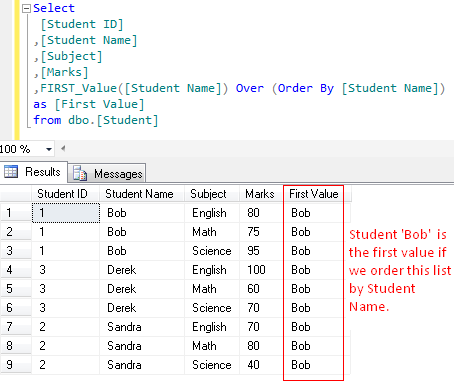
In this example, FIRST_VALUE returns the First Name of the student in the class (In ascending order) .

Select
[Student ID]
,[Student Name]
,[Subject]
,[Marks]
,FIRST_Value([Student Name]) Over (Order By [Student Name]) as [First Value]
from dbo.[Student]
--Result

Example-2 :
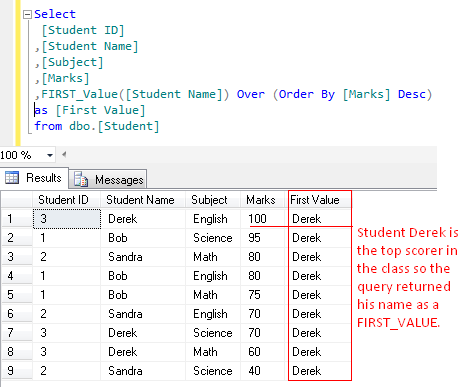
In this example, FIRST_VALUE returns the student name having high score in the class.

Select
[Student ID]
,[Student Name]
,[Subject]
,[Marks]
,FIRST_Value([Student Name]) Over (Order By [Marks] Desc) as [First Value]
from dbo.[Student]
--Result

Example-3 :
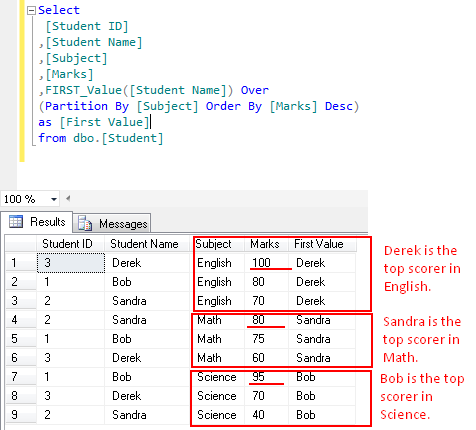
In this example, FIRST_VALUE returns the student name having high score in each subject in the class.

Select
[Student ID]
,[Student Name]
,[Subject]
,[Marks]
,FIRST_Value([Student Name]) Over (Partition By [Subject] Order By [Marks] Desc) as [First Value]
from dbo.[Student]
--Result

Reference : MSDN
Read Full Post »

In my previous post, I discussed about TRY_CONVERT. Today, we will discuss one more excellent conversion function of SQL server namely “TRY_CAST”. Before SQL server 2012, we use “Cast” function very frequently. whenever we need to cast expression from one data type to another data type, we use this function. But there is a problem with this function, if you pass any invalid data to this function and try to cast it into incompatible data type. It will generate an error. TRY_CAST is the solution of this problem.
For Example :

Select Cast ('test' as int)
--Result

Msg 245, Level 16, State 1, Line 1
Conversion failed when converting the varchar value ‘test’ to data type int.

TRY_CAST requires three parameters expression, data type & Length. Expression and Data type are mandatory but the Length is optional.
Lets discuss this function syntax, purpose and examples in detail.

Syntax :

TRY_CAST ( expression AS data_type [ ( length ) ] )

Purpose :
This function cast expression from one data type to another data type and if it fails to cast, it give result as NULL.

Example-1 : TRY_CAST – Without Error

Select TRY_Cast(123 as int) as [Result]
--Result
123

Example-2 : TRY_CAST – With Error
If TRY_CAST fails, it will return NULL value.

Select TRY_Cast ('test' as int) as [Result]
--Result
NULL

Example-3 : TRY_Cast WITH IIF STATEMENT

In this example , we will try to convert a valid and invalid expression to Integer by using IIF statement.

Select IIF(Try_Cast('test' as int) is NULL , 'Invalid Integer', 'Valid Integer')
--Result
Invalid Integer

Select IIF(Try_Cast(2 as int) is NULL , 'Invalid Integer', 'Valid Integer')
--Result
Valid Integer

Example-4 : TRY_Cast WITH CASE STATEMENT
In this example , we will try to cast a valid and invalid expression to Integer by using case statement.

Select (Case When Try_Cast(123 as int  ) is NULL Then 'Invalid Integer' else 'Valid Integer' end)
--Result
Valid Integer

Select (Case When Try_Cast(123.45 as int) is NULL Then 'Invalid Integer' else  'Valid Integer' end)
--Result
Invalid Integer

Reference : MSDN
Read Full Post »

In SQL server, we use “Convert” function very frequently.Whenever, we need to convert one expression data type to another, we use this function. But there is a problem with this function, if you pass any invalid data to this function and try to convert it. It will generate an error and can impact you application.
For Example :

Select Convert (datetime2,'2012-08-32')
--Result

Msg 241, Level 16, State 1, Line 1
Conversion failed when converting date and/or time from character string.

To resolve this issue, Microsoft has introduced a new function in SQL SERVER 2012, namely “TRY_CONVERT”.
It requires three parameters data type, expression & style. Data type and expression are mandatory but the style is optional.
Lets discuss this function syntax , purpose and examples in detail.

TRY_CONVERT

Syntax :

TRY_CONVERT ( data_type [ ( length ) ], expression [, style ] )

Purpose :
This function converts expression from one data type to another data type and if it fails to convert it will return a NULL value as a results.

Example-1 : TRY_CONVERT – Passed

Select TRY_Convert(datetime,'2012-09-30',101) as [Result]
--Result
2012-09-30 00:00:00.000

Example-2 : TRY_CONVERT – Failed
If try _convert Failed,  it will return NULL value.
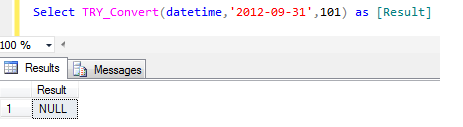
Lets say we don’t have 31 days in September. Now, try to convert it

Select TRY_Convert(datetime,'2012-09-31',101) as [Result]
--Result
NULL

Example-3 : TRY_CONVERT WITH IIF STATEMENT
In this example , we will try to convert a valid and invalid expression to Integer.

Select IIF(Try_Convert(int, 'test') is NULL , 'Invalid Integer', 'Valid Integer') as [Result]
--Result
Invalid Integer

Select IIF(Try_Convert(int, 2) is NULL , 'Invalid Integer', 'Valid Integer') as [Result]
--Result
Valid Integer

Example-4 : TRY_CONVERT WITH CASE STATEMENT
In this example , we will try to convert a valid and invalid expression to Integer.

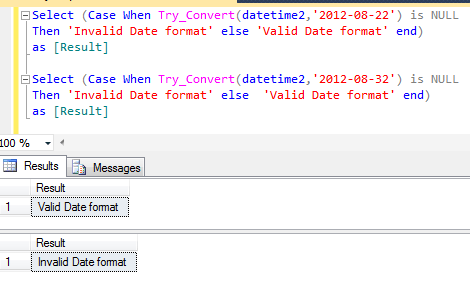
Select (Case When Try_Convert(datetime2,'2012-08-22') is NULL Then 'Invalid Date format' else 'Valid Date format' end) as [Result]
--Result
Valid Date format

Select (Case When Try_Convert(datetime2,'2012-08-32') is NULL Then 'Invalid Date format' else  'Valid Date format' end) as [Result]
--Result
Invalid Date format

Reference : MSDN
Read Full Post »

In my previous post, I discussed about PARSE function. In this function, if the data type is not compatible and could not be parsed then this function will generate an error. Now, we have the solution for it namely “TRY_PARSE”. SQL SERVER has introduced this (TRY_PARSE) built in conversion function in 2012. This function is very useful because most of the time due to the incorrect data , your system may generate errors. And if you use this function it will return NULL in case of error.
Lets discuss its syntax , purpose and examples in detail.

TRY_PARSE

Syntax :

TRY_PARSE ( string_value AS data_type [ USING culture ] )

Purpose :
This function tries to parse string value (nvarchar(4000) data type) to datetime or numeric data types. But if it fails to parse, it will return NULL value. We need to provide three parameters to this function string value , data type & culture parameter respectively. String value & data type parameter are mandatory but the culture parameter is optional . As the culture parameter is option so, by default it picks up the culture from the session.It uses the .NET Framework Common Language Run time(CLR). Before using this function, we should also know, that it cost extra overhead in the performance.

Example-1 : TRY_PARSE – Successful

SELECT TRY_PARSE('2012-08-22' AS datetime2 USING 'en-US')
--Result
2012-08-22 00:00:00.0000000

Example-2 : TRY_PARSE – Unsuccessful
If the parsing will be unsuccessful, it will return NULL value.

SELECT TRY_PARSE('datetime2' AS datetime2 USING 'en-US')
--Result
NULL

Example-3 : TRY_PARSE – Real World Example with culture keyword
In this example, we will try to parse a valid and invalid date.

Select IIF(TRY_PARSE('2012-08-22' AS datetime2 USING 'en-US') is NULL
,'Invalid Date format' ,'Valid Date format')
--Result
Valid Date format

Select IIF(TRY_PARSE('2012-08-222' AS datetime2 USING 'en-US') is NULL
,'Invalid Date format' ,'Valid Date format')
--Result
Invalid Date format

Example-4 : TRY_PARSE – Real World Example with Language keyword
In this example, we will try to parse a valid and invalid date with the language keyword instead of culture.

Set Language 'English'
Select IIF(TRY_PARSE('2012-08-22' AS datetime2) is NULL
,'Invalid Date format' ,'Valid Date format')
--Result
Valid Date format

Select IIF(TRY_PARSE('2012-08-222' AS datetime2) is NULL
,'Invalid Date format' ,'Valid Date format')
--Result
Invalid Date format

Reference : MSDN

Read Full Post »

« Newer Posts - Older Posts »