In SQL Server 2022, a new backup compression algorithm was introduced known as QAT_DEFLATE. This article demonstrates the installation of the Intel® Quick Assist Technology Driver, which is required to use this algorithm.
Let me demonstrate the installation step by step.
Installation:
Step 1:
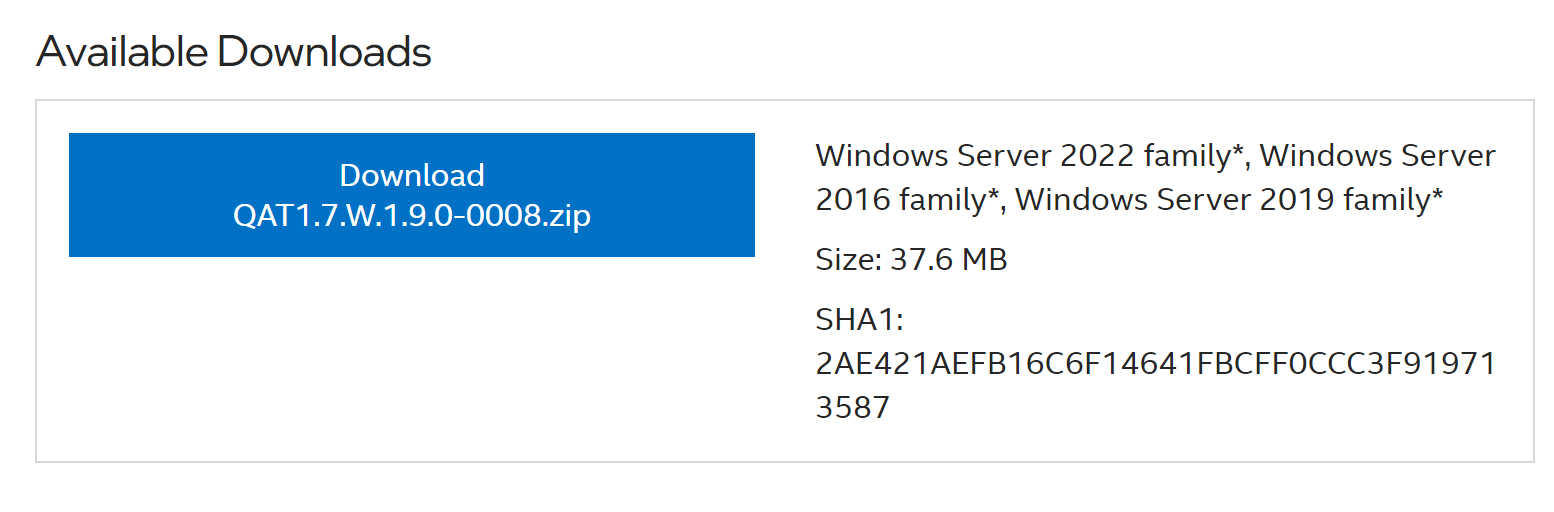
The first step is to download the driver, which can be downloaded from here. Currently, QAT 1.7 version is available for download. You need to download whatever latest version is available. It will be downloaded as a zip file.
Step 2:
Once it is downloaded, you just need to extract it and you will get below files in the respective folder.
Step 3:
You need to run QatSetup file in order to install it, a warning message as shown below will appear which is fine, since you are installing it on a server which does not have any Intel QAT supported hardware, so you just need to click Yes to proceed.
Step :4
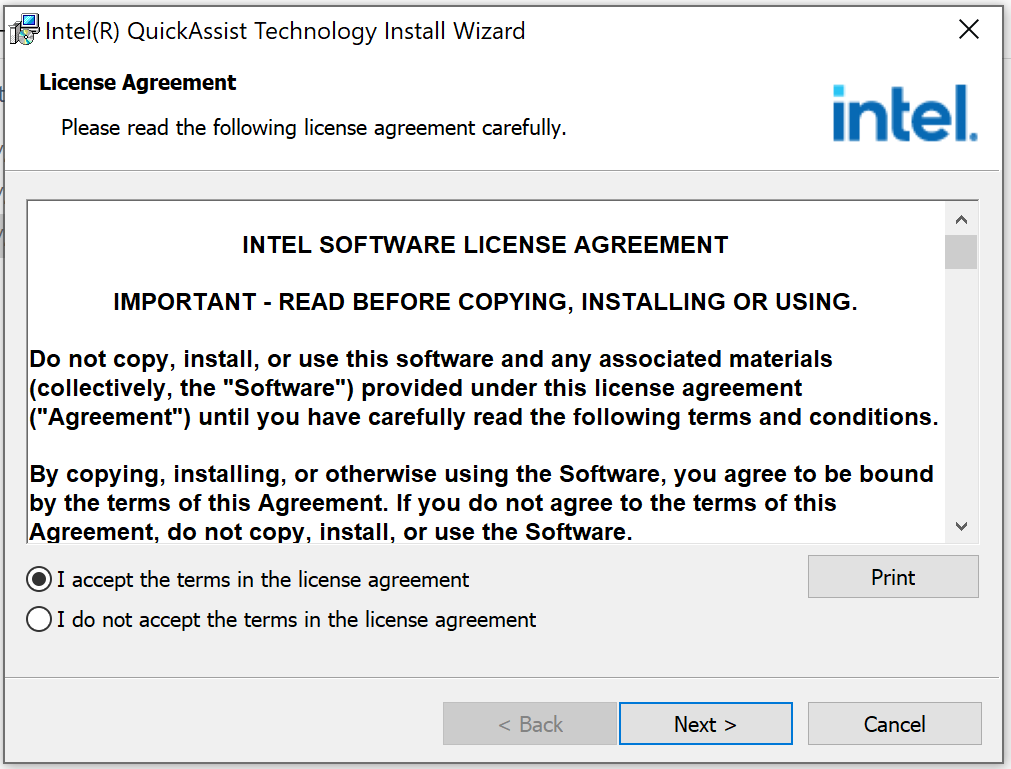
Click on accept the terms and then click Next button to proceed.
Step 5:
Now, it’s ready to be installed, click on Install button to proceed the installation.
Step 6:
Once the installation is completed, “install wizard completed” will appear and QuickAssist Technology is ready to be used.
Step 7:
Once you click on Finish button, installation summary will pop up, which shows the status of the installed components. Some of the components are not installed, since you don’t have any QAT supported hardware on this server as mentioned earlier.
Conclusion:
I found the installation pretty simple & easy; do let me, how did you find it.
Taking backup is the core responsibility of Database Administrator, either he takes the backup manually or he automates it but it does not matter. What actually matters is the database size because if it is very big then obviously it will take too much time in taking backup & occupy lot’s of disk space as well.
In this article, we are going to discuss one of the compression algorithms namely MS_XPRESS, which compresses backup size & reduce backup time drastically. We can use this compression algorithm for any types of database backup which are Full, Differential & Log backup. This algorithm will take less disk space and will reduce the backup time as well.
Let me demonstrate, how to implement this algorithm step by step.
Step 1:
Let’s check the database file size by using sys.database_files and as you can see the database size is ~10 GB.
USE SampleDB;
GO

SELECT DB_NAME()  AS DatabaseName
     , name       AS FileName
	 , size/128.0 AS CurrentSizeInMBs
FROM sys.database_files;
GO
Step 2:
Let’s take full backup of SampleDB to see how much disk space & time it takes:
BACKUP DATABASE [SampleDB]
TO  DISK = 'D:\Backup\FullBackupSampleDB.BAK';
GO
Step 3:
Let’s check the backup details especially the backup size and time. As we can see below, it took ~50 seconds to take Full backup and a disk space of ~10 GB.
SELECT bs.database_name,
    backuptype = CASE
        WHEN bs.type = 'D' AND bs.is_copy_only = 0 THEN 'Full Database'
        WHEN bs.type = 'D' AND bs.is_copy_only = 1 THEN 'Full Copy-Only Database'
        WHEN bs.type = 'I' THEN 'Differential database backup'
        WHEN bs.type = 'L' THEN 'Transaction Log'
        WHEN bs.type = 'F' THEN 'File or filegroup'
        WHEN bs.type = 'G' THEN 'Differential file'
        WHEN bs.type = 'P' THEN 'Partial'
        WHEN bs.type = 'Q' THEN 'Differential partial'
        END + ' Backup',
	BS.compression_algorithm,
    backup_size_mb = CONVERT(DECIMAL(10, 2), bs.backup_size / 1024. / 1024.),
    compressed_backup_size_mb = CONVERT(DECIMAL(10, 2), bs.compressed_backup_size / 1024. / 1024.),
	bs.backup_start_date ,
	bs.backup_finish_date,
	DATEDIFF(second, backup_start_date, backup_finish_date) AS time_in_seconds
FROM msdb.dbo.backupset bs
LEFT JOIN msdb.dbo.backupmediafamily bf
    ON bs.[media_set_id] = bf.[media_set_id]
INNER JOIN msdb.dbo.backupmediaset bms
    ON bs.[media_set_id] = bms.[media_set_id]
WHERE bs.backup_start_date > DATEADD(MONTH, - 2, sysdatetime()) --only look at last two months
ORDER BY bs.database_name ASC,
    bs.Backup_Start_Date DESC;
Step 4:
Let’s configure MS_XPRESS compression algorithm as a default in SQL Server as shown below.
EXEC sp_configure 'backup compression algorithm', 1;
RECONFIGURE;
GO
Step 5:
Let’s check the configuration of backup compression by using sys.configuration. As we can see below, the value is 1 which means MS_XPRESS is successfully setup
SELECT configuration_id
     , name
     , description
     , value
FROM sys.configurations
WHERE name = 'backup compression algorithm' ;
GO
Step 6:
Let’s take the full backup of our database with compression but since we setup the default compression algorithm as MS_XPRESS in earlier step then by default it takes full back with MS_XPRESS backup compression algorithm, so NO need to write the name of the backup compression algorithm in the script as shown below.
BACKUP DATABASE [SampleDB]
TO  DISK = 'D:\Backup\FullBackupSampleDBWithCompression.BAK'
WITH COMPRESSION;
GO
Step 7:
Once the backup is taken, let’s check the backup details by using given below query. As we can see below, the backup compression algorithm is MS_XPRESS, the backup compression size is 1.3 GB & it took 27 seconds to take back up only. It is almost reducing the size by ~87% and time by ~46% as compared to original backup and which is a big achievement.
SELECT bs.database_name,
    backuptype = CASE
        WHEN bs.type = 'D' AND bs.is_copy_only = 0 THEN 'Full Database'
        WHEN bs.type = 'D' AND bs.is_copy_only = 1 THEN 'Full Copy-Only Database'
        WHEN bs.type = 'I' THEN 'Differential database backup'
        WHEN bs.type = 'L' THEN 'Transaction Log'
        WHEN bs.type = 'F' THEN 'File or filegroup'
        WHEN bs.type = 'G' THEN 'Differential file'
        WHEN bs.type = 'P' THEN 'Partial'
        WHEN bs.type = 'Q' THEN 'Differential partial'
        END + ' Backup',
    CASE bf.device_type
        WHEN 2 THEN 'Disk'
        WHEN 5 THEN 'Tape'
        WHEN 7 THEN 'Virtual device'
        WHEN 9 THEN 'Azure Storage'
        WHEN 105 THEN 'A permanent backup device'
        ELSE 'Other Device'
        END AS DeviceType,

	BS.compression_algorithm,
    backup_size_mb = CONVERT(DECIMAL(10, 2), bs.backup_size / 1024. / 1024.),
    compressed_backup_size_mb = CONVERT(DECIMAL(10, 2), bs.compressed_backup_size / 1024. / 1024.),
	bs.backup_start_date ,
	bs.backup_finish_date
FROM msdb.dbo.backupset bs
LEFT JOIN msdb.dbo.backupmediafamily bf
    ON bs.[media_set_id] = bf.[media_set_id]
INNER JOIN msdb.dbo.backupmediaset bms
    ON bs.[media_set_id] = bms.[media_set_id]
WHERE bs.backup_start_date > DATEADD(MONTH, - 2, sysdatetime()) --only look at last two months
ORDER BY bs.database_name ASC,
    bs.Backup_Start_Date DESC;
Conclusion:
I used MS_XPRESS backup compression algorithm & its results are quite good. Do let me know, which backup compression algorithm are you using and what is the outcome.
In SQL Server 2022, an enhancement came in STRING_SPLIT() function, which was a long awaited functionality. This enhancement provides a new column name ordinal. I have written an article about it in detail.
Recently, I was using STRING_SPLIT() function and came across an error as mentioned below.
Error:
Invalid column name ‘ordinal’.
Example:
In the given below example, I wrote a simple script by using STRING_SPLIT() function and placed an ordinal column in the select statement. This ordinal column provides the row number for each split string which is a very handy functionality but I got an error as shown below.
USE Northwind
GO

SELECT CategoryID
     , CategoryName
	 , Value AS Description
     , Ordinal
FROM   Categories
CROSS APPLY STRING_SPLIT(CONVERT(VARCHAR(100),Description), ',');
GO
--OUTPUT
Solution:
Remember, whenever you place ordinal column in select statement, you MUST pass “1” as third argument in STRING_SPLIT() function. By default, it takes third argument as “0” which was the case in the above example and in such cases, this function does NOT enable ordinal column in the select statement and resulted in error.
Let’s place ordinal column in the select statement and the MOST important thing, we MUST pass “1” in the third argument of STRING_SPLIT() function. This time, it will run sucessfully as shown below.
USE Northwind
GO

SELECT CategoryID
     , CategoryName
     , Value AS Description
     , Ordinal
FROM   Categories
CROSS APPLY STRING_SPLIT(CONVERT(VARCHAR(100),Description), ',', 1);
GO
--OUTPUT
Conclusion:
Whenever you place ordinal column in select statement, you MUST pass “1” as third argument in STRING_SPLIT() in order to avoid this error.
In SQL Server 2022, an enhancement came in STRING_SPLIT() function, which was a long awaited functionality. This enhancement provides a new column name ordinal, which has row number for each string split by this function.
Let me create a sample to demonstrate the functionality of new ordinal column in STRING_SPLIT() function as shown below.
Sample:
USE tempdb
GO

CREATE TABLE #Employee
(
 EmployeeID     INT IDENTITY(1,1),
 EmployeeName   VARCHAR(500),
 EmailAddresses VARCHAR(500)
);
GO

INSERT INTO #Employee(EmployeeName, EmailAddresses)
VALUES
('John', 'John_1@gmail.com;John_2@gmail.com;John_3@hotmail.com'),
('Sarah', 'Sarah_1@gmail.com;Sarah_2@hotmail.com;Sarah_3@gmail.com'),
('Aaron', 'Aaron_1@gmail@com;Aaron_2@hotmail.com'),
('Ackerman', 'Ackerman_1@gmail.com;Ackerman_2@hotmail.com');
GO

SELECT * FROM #Employee;
GO
--OUTPUT
Example 1:
In the below example, I will split the string in email addresses column based on a separator as usual. Also, I will pass the third argument (which came in SQL 2022 as an ehancement) as 1 in STRING_SPLIT() function which means that STRING_SPLIT() will not only split the string but also provide a serial number (ordinal column) against each split string as shown below.
USE tempdb
GO

SELECT EmployeeID
     , EmployeeName
 , value AS EmailAddress
 , Ordinal
FROM   #Employee
CROSS APPLY STRING_SPLIT(EmailAddresses, ';', 1);
GO
--OUTPUT
Example 2:
In this example, I will show you how important is this new column ordinal and how we used to struggle in earlier version of SQL Server (Earlier than 2022) to mimic the same functionality with the help of common table expression & other functions.
Let me grab the first two email addresses for each employee using old and new approach. Both approaches will return the same result but new approach is simple & efficient.
Old Approach:(Using ROW_NUMBER() & common table expression)
USE tempdb
GO

;WITH CTE AS
(SELECT EmployeeID
      , EmployeeName
      , value AS EmailAddress
      , ROW_NUMBER() OVER(PARTITION BY EmployeeID
						  ORDER BY EmployeeID ASC) AS Ordinal
FROM    #Employee
CROSS APPLY STRING_SPLIT(EmailAddresses, ';'))
SELECT * FROM CTE WHERE Ordinal<3;
GO
--OUTPUT
New Approach:(Using ordinal column)
USE tempdb
GO

SELECT EmployeeID
     , EmployeeName
     , value AS EmailAddress
	 , Ordinal
FROM   #Employee
CROSS APPLY STRING_SPLIT (EmailAddresses, ';', 1)
WHERE ordinal<3;
GO
--OUTPUT
Conclusion:
I found the new enhancement of STRING_SPLIT() function very useful, earlier we used common table expression & ROW_NUMBER() functions to find the row number of each split string but now we can easily achieve with the help of STRING_SPLIT() ordinal column. Do let me know if you use ordinal column and how did you find it.
Sometimes, we come across a case where we have given one date and we need to calculate multiple dates based on this date. This can be achieved in the earlier versions of the SQL Server (earlier than 2022), but we had to use multiple functions like CONVERT(), DATEADD(), DATEDIFF() etc with lots of complexity.
Fortunately, a new function shipped in SQL Server 2022 namely DATETRUNC() which helps us to achieve this scenario easily.
Compatibility Level:
Your database compatibility level MUST be 160 or higher to use this new function.
ALTER DATABASE tempdb SET COMPATIBILITY_LEVEL = 160
Prerequisite:
In order to set the first day of the week as Monday, we need to run the below script.
SET DATEFIRST 1;
GO
First Date of Previous Week
Old Approach
In the old approach, we have to extract first date of the previous week using multiple functions (CONVERT(), DATEADD(), DATEDIFF()) as shown below.
DECLARE @Date DATE;
SET @Date = GETDATE();

SELECT  @Date							 AS [Current Date]
	  , CONVERT(DATE
	  , DATEADD(WEEK
	  , DATEDIFF(WEEK, 0, @Date) -1, 0)) AS [First Date Of Previous Week];
GO
--OUTPUT
New Approach
In the new approach, we can extract the first date of the previous week using DATETRUNC() & DATEADD() function as shown below.
DECLARE @Date Date;
SET @Date = GETDATE();

SELECT  @Date					  AS [Current Date]
	  , DATEADD(WEEK, -1
	  , DATETRUNC(WEEK, @Date))   AS [First Date Of Previous Week];
GO
--OUTPUT
Last Date of Previous Week
Old Approach
In the old approach, we have to extract last date of the previous week using multiple functions (CONVERT(), DATEADD(), DATEDIFF()) as shown below.
DECLARE @Date DATE;
SET @Date = GETDATE();

SELECT  @Date							  AS [Current Date]
      , CONVERT(DATE
	  , DATEADD(WEEK
	  , DATEDIFF(WEEK, 0, @Date) +0, -1)) AS [Last Date Of Previous Week];
GO
--OUTPUT
New Approach
In the new approach, we can extract the last date of the previous week using DATETRUNC() & DATEADD() function as shown below.
DECLARE @Date DATE;
SET @Date = GETDATE();

SELECT  @Date					  AS [Current Date]
	  , DATEADD(DAY, -1
	  , DATEADD(WEEK, 0
	  , DATETRUNC(WEEK, @Date)))  AS [Last Date Of Previous Week];
GO
--OUTPUT
First Date of Current Week
Old Approach
In the old approach, we have to extract first date of the current week using multiple functions (CONVERT(), DATEADD(), DATEDIFF()) as shown below.
DECLARE @Date DATE;
SET @Date = GETDATE();

SELECT  @Date							 AS [Current Date]
	  , CONVERT(DATE
	  , DATEADD(WEEK
	  , DATEDIFF(WEEK, 0, @Date) +0, 0)) AS [First Date Of Current Week];
GO
--OUTPUT
New Approach
In the new approach, we can extract the first date of the current week using DATETRUNC() function as shown below.
DECLARE @Date Date;
SET @Date = GETDATE();

SELECT  @Date				   AS [Current Date]
	  , DATETRUNC(WEEK, @Date) AS [First Date of Current Week];
GO
--OUTPUT
Last Date of Current Week
Old Approach
In the old approach, we have to extract last date of the current week using multiple functions (CONVERT(), DATEADD(), DATEDIFF()) as shown below.
DECLARE @Date DATE;
SET @Date = GETDATE();

SELECT  @Date							  AS [Current Date]
      , CONVERT(DATE
	  , DATEADD(WEEK
	  , DATEDIFF(WEEK, 0, @Date) +1, -1)) AS [Last Date Of Current Week];
GO
--OUTPUT
New Approach
In the new approach, we can extract the last date of the current week using DATETRUNC() & DATEADD() function as shown below.
DECLARE @Date DATE;
SET @Date = GETDATE()

SELECT  @Date					 AS [Current Date]
      , DATEADD(DAY, -1
	  , DATEADD(WEEK, 1
	  , DATETRUNC(WEEK, @Date))) AS [Last Date Of Current Week];
GO
--OUTPUT
First Date of Next Week
Old Approach
In the old approach, we have to extract first date of the next week using multiple functions (CONVERT(), DATEADD(), DATEDIFF()) as shown below.
DECLARE @Date DATE;
SET @Date = GETDATE();

SELECT  @Date							 AS [Current Date]
	  , CONVERT(DATE
	  , DATEADD(WEEK
	  , DATEDIFF(WEEK, 0, @Date) +1, 0)) AS [First Date Of Next Week];
GO
--OUTPUT
New Approach
In the new approach, we can extract the first date of the next week using DATETRUNC() & DATEADD() function as shown below.
DECLARE @Date DATE;
SET @Date = GETDATE();

SELECT  @Date					 AS [Current Date]
	  , DATEADD(WEEK, 1
	  , DATETRUNC(WEEK, @Date))  AS [First Date Of Next Week];
GO

--OUTPUT
Last Date of Next Week
Old Approach
In the old approach, we have to extract last date of the next week using multiple functions (CONVERT(), DATEADD(), DATEDIFF()) as shown below.
DECLARE @Date DATE;
SET @Date = GETDATE();

SELECT  @Date							  AS [Current Date]
      , CONVERT(DATE
	  , DATEADD(WEEK
	  , DATEDIFF(WEEK, 0, @Date) +2, -1)) AS [Last Date Of Next Week];
GO
--OUTPUT
New Approach
In the new approach, we can extract the last date of the next week using DATETRUNC() & DATEADD() function as shown below.
DECLARE @Date DATE;
SET @Date = GETDATE();

SELECT  @Date					 AS [Current Date]
      , DATEADD(DAY, -1
	  , DATEADD(WEEK, 2
	  , DATETRUNC(WEEK, @Date))) AS [Last Date Of Next Week];
GO
--OUTPUT
Conclusion:
We used DATETRUNC() function to achieve it and found it easier & simpler as compared to earlier version of SQL Server.
Sometimes, we come across a case where we have given one date and we need to calculate multiple dates based on this date. This can be achieved in the earlier versions of the SQL Server (earlier than 2022), but we had to use multiple functions like CONVERT(), DATEADD(), DATEDIFF() etc with lots of complexity.
Fortunately, a new function shipped in SQL Server 2022 namely DATETRUNC() which helps us to achieve this scenario easily.
Compatibility Level:
Your database compatibility level MUST be 160 or higher to use this new function.
ALTER DATABASE tempdb SET COMPATIBILITY_LEVEL = 160
First Date of Previous Month
Old Approach
In the old approach, we have to extract first date of the previous month using multiple functions (CONVERT(), DATEADD(), DATEDIFF()) as shown below.
DECLARE @Date DATE;
SET @Date = GETDATE();

SELECT  @Date							  AS [Current Date]
	  , CONVERT(DATE
	  , DATEADD(MONTH
	  , DATEDIFF(MONTH, 0, @Date) -1, 0)) AS [First Date Of Previous Month];
GO
--OUTPUT
New Approach
In the new approach, we can extract the first date of the previous month using DATETRUNC() & DATEADD() function as shown below.
DECLARE @Date DATE;
SET @Date = GETDATE();

SELECT  @Date					 AS [Current Date]
	  , DATEADD(MONTH, -1
	  , DATETRUNC(MONTH, @Date)) AS [First Date Of Previous Month];
GO
--OUTPUT
Last Date of Previous Month
Old Approach
In the old approach, we have to extract last date of the previous month using multiple functions (CONVERT(), DATEADD(), DATEDIFF()) as shown below.
DECLARE @Date DATE;
SET @Date = GETDATE();

SELECT  @Date							   AS [Current Date]
      , CONVERT(DATE
	  , DATEADD(MONTH
	  , DATEDIFF(MONTH, 0, @Date) +0, -1)) AS [Last Date Of Previous Month];
GO
--OUTPUT
New Approach
In the new approach, we can extract the last date of the previous month using DATETRUNC() & DATEADD() function as shown below.
DECLARE @Date DATE;
SET @Date = GETDATE();

SELECT  @Date					 AS [Current Date]
      , DATEADD(DAY, -1
	  , DATETRUNC(MONTH, @Date)) AS [Last Date Of Previous Month];
GO
--OUTPUT
First Date of Current Month
Old Approach
In the old approach, we have to extract first date of the current month using multiple functions (CONVERT(), DATEADD(), DATEDIFF()) as shown below.
DECLARE @Date DATE;
SET @Date = GETDATE();

SELECT  @Date							  AS [Current Date]
	  , CONVERT(DATE
	  , DATEADD(MONTH
	  , DATEDIFF(MONTH, 0, @Date) +0, 0)) AS [First Date Of Current Month];
GO
--OUTPUT
New Approach
In the new approach, we can extract the first date of the current month using DATETRUNC() function as shown below.
DECLARE @Date DATE;
SET @Date = GETDATE();

SELECT  @Date					AS [Current Date]
	  , DATETRUNC(MONTH, @Date) AS [First Date of Current Month];
GO
--OUTPUT
Last Date of Current Month
Old Approach
In the old approach, we have to extract last date of the current month using multiple functions (CONVERT(), DATEADD(), DATEDIFF()) as shown below.
DECLARE @Date DATE;
SET @Date = GETDATE();

SELECT  @Date							   AS [Current Date]
      , CONVERT(DATE
	  , DATEADD(MONTH
	  , DATEDIFF(MONTH, 0, @Date) +1, -1)) AS [Last Date Of Current Month];
GO
--OUTPUT
New Approach
In the new approach, we can extract the last date of the current month using DATETRUNC() & DATEADD() function as shown below.
DECLARE @Date DATE;
SET @Date = GETDATE();

SELECT  @Date					  AS [Current Date]
      , DATEADD(DAY, -1
	  , DATEADD(MONTH, 1
	  , DATETRUNC(MONTH, @Date))) AS [Last Date Of Current Month];
GO
--OUTPUT
First Date of Next Month
Old Approach
In the old approach, we have to extract first date of the next month using multiple functions (CONVERT(), DATEADD(), DATEDIFF()) as shown below.
DECLARE @Date DATE;
SET @Date = GETDATE();

SELECT  @Date							  AS [Current Date]
	  , CONVERT(DATE
	  , DATEADD(MONTH
	  , DATEDIFF(MONTH, 0, @Date) +1, 0)) AS [First Date Of Next Month];
GO
--OUTPUT
New Approach
In the new approach, we can extract the first date of the next month using DATETRUNC() & DATEADD() function as shown below.
DECLARE @Date DATE;
SET @Date = GETDATE();

SELECT  @Date					 AS [Current Date]
	  , DATEADD(MONTH, 1
	  , DATETRUNC(MONTH, @Date)) AS [First Date of Next Month];
GO
--OUTPUT
Last Date of Next Month
Old Approach
In the old approach, we have to extract last date of the next month using multiple functions (CONVERT(), DATEADD(), DATEDIFF()) as shown below.
DECLARE @Date DATE;
SET @Date = GETDATE();

SELECT  @Date							   AS [Current Date]
      , CONVERT(DATE
	  , DATEADD(MONTH
	  , DATEDIFF(MONTH, 0, @Date) +2, -1)) AS [Last Date Of Next Month];
GO
--OUTPUT
New Approach
In the new approach, we can extract the last date of the next month using DATETRUNC() & DATEADD() function as shown below.
DECLARE @Date DATE;
SET @Date = GETDATE();

SELECT  @Date					  AS [Current Date]
      , DATEADD(DAY, -1
	  , DATEADD(MONTH, 2
	  , DATETRUNC(MONTH, @Date))) AS [Last Date Of Next Month];
GO
--OUTPUT
Conclusion:
We used DATETRUNC() function to achieve it and found it easier & simpler as compared to earlier version of SQL Server.
Sometimes, we come across a case where we have given one date and we need to calculate multiple dates based on this date. This can be achieved in the earlier versions of the SQL Server (earlier than 2022), but we had to use multiple functions like CONVERT(), DATEADD(), DATEDIFF() etc with lots of complexity.
Fortunately, a new function shipped in SQL Server 2022 namely DATETRUNC() which helps us to achieve this scenario easily.
Compatibility Level:
Your database compatibility level MUST be 160 or higher to use this new function.
ALTER DATABASE tempdb SET COMPATIBILITY_LEVEL = 160
First Date of Previous Year
Old Approach
In the old approach, we had to extract first date of the previous year using multiple functions (CONVERT(), DATEADD(), DATEDIFF()) as shown below.
DECLARE @Date DATE;
SET @Date = GETDATE();

SELECT @Date                            AS [Current Date]
     , CONVERT(DATE
     , DATEADD(Year
     , DATEDIFF(Year, 0, @Date) -1, 0)) AS [First Date Of Previous Year];
GO
--OUTPUT
New Approach
In the new approach, we can extract the first date of the previous year using DATETRUNC() & DATEADD() function as shown below.
DECLARE @Date DATE;
SET @Date = GETDATE();

SELECT @Date                   AS [Current Date]
     , DATEADD(YEAR, -1
     , DATETRUNC(YEAR, @Date)) AS [First Date Of Previous Year];
GO
--OUTPUT
Last Date of Previous Year
Old Approach
In the old approach, we had to extract last date of the previous year using multiple functions (CONVERT(), DATEADD(), DATEDIFF()) as shown below.
DECLARE @Date DATE;
SET @Date = GETDATE();

SELECT @Date                             AS [Current Date]
     , CONVERT(DATE
     , DATEADD(YEAR
     , DATEDIFF(YEAR, 0, @Date) +0, -1)) AS [Last Date Of Previous Year];
GO
--OUTPUT
New Approach
In the new approach, we can extract the last date of the previous year using DATETRUNC() & DATEADD() function as shown below.
DECLARE @Date DATE;
SET @Date = GETDATE();

SELECT @Date                    AS [Current Date]
     , DATEADD(DAY, -1
     , DATETRUNC(YEAR, @Date))  AS [Last Date Of Previous Year];
GO
--OUTPUT
First Date of Current Year
Old Approach
In the old approach, we had to extract first date of the current year using multiple functions (CONVERT(), DATEADD(), DATEDIFF()) as shown below.
DECLARE @Date DATE;
SET @Date = GETDATE();

SELECT @Date                         AS [Current Date]
     , CONVERT(DATE
     , DATEADD(YEAR
     , DATEDIFF(YEAR, 0, @Date), 0)) AS [First Date of Current Year];
GO
--OUTPUT
New Approach
In the new approach, we can extract the first date of current year using DATETRUNC() & DATEADD() function as shown below.
DECLARE @Date DATE;
SET @Date = GETDATE();

SELECT @Date                  AS [Current Date]
     , DATETRUNC(YEAR, @Date) AS [First Date of Current Year];
GO
--OUTPUT
Last Date of Current Year
Old Approach
In the old approach, we had to extract last date of the current year using multiple functions (CONVERT(), DATEADD(), DATEDIFF()) as shown below.
DECLARE @Date DATE;
SET @Date = GETDATE();

SELECT @Date                             AS [Current Date]
     , CONVERT(DATE
	 , DATEADD(YEAR
	 , DATEDIFF(YEAR, 0, @Date) +1, -1)) AS [Last Date Of Current Year];
GO
--OUTPUT
New Approach
In the new approach, we can extract the last date of current year using DATETRUNC() & DATEADD() function as shown below.
DECLARE @Date DATE
SET @Date = GETDATE()

SELECT @Date                    AS [Current Date]
     , DATEADD(DAY, -1
     , DATEADD(YEAR, 1
     , DATETRUNC(YEAR, @Date))) AS [Last Date of Current Year];
GO
--OUTPUT
First Date of Next Year
Old Approach
In the old approach, we had to extract first date of the next year using multiple functions (CONVERT(), DATEADD(), DATEDIFF()) as shown below.
DECLARE @Date DATE;
SET @Date = GETDATE();

SELECT @Date                            AS [Current Date]
     , CONVERT(DATE
     , DATEADD(Year
     , DATEDIFF(Year, 0, @Date) +1, 0)) AS [First Date Of Next Year];
GO
--OUTPUT
New Approach
In the new approach, we can extract the first date of the next year using DATETRUNC() & DATEADD() function as shown below.
DECLARE @Date DATE;
SET @Date = GETDATE();

SELECT @Date				   AS [Current Date]
	 , DATEADD(YEAR, 1
	 , DATETRUNC(YEAR, @Date)) AS [First Date Of Next Year];
GO
--OUTPUT
Last Date of Next Year
Old Approach
In the old approach, we had to extract last date of the next year using multiple functions (CONVERT(), DATEADD(), DATEDIFF()) as shown below.
DECLARE @Date DATE;
SET @Date = GETDATE();

SELECT @Date                             AS [Current Date]
     , CONVERT(DATE
     , DATEADD(Year
     , DATEDIFF(Year, 0, @Date) +2, -1)) AS [Last Date Of Next Year];
GO
--OUTPUT
New Approach
In the new approach, we can extract the last date of the next year using DATETRUNC() & DATEADD() function as shown below.
DECLARE @Date DATE
SET @Date = GETDATE();

SELECT @Date                    AS [Current Date]
     , DATEADD(DAY, -1
	 , DATEADD(YEAR, 2
	 , DATETRUNC(YEAR, @Date))) AS [Last Date Of Next Year];
GO
--OUTPUT
Conclusion:
We used DATETRUNC() function to achieve above mentioned dates and found it easier and simpler as compared to earlier version of SQL Server.
Sometimes, we come across a case where we are given one date and we need to calculate multiple dates based on this date. This could be achieved in the earlier versions of the SQL Server (earlier than 2022), but we had to use multiple functions like CONVERT(), DATEADD(), DATEDIFF() etc with lots of complexity.
Fortunately, a new function shipped in SQL Server 2022 namely DATETRUNC() which helps us to achieve this scenario easily.
Compatibility Level:
Your database compatibility level MUST be 160 or higher to use this new function.
ALTER DATABASE tempdb SET COMPATIBILITY_LEVEL = 160
First Date of Previous Quarter
Old Approach
In the old approach, we had to extract first date of the previous quarter using multiple functions (CONVERT(), DATEADD(), DATEDIFF()) as shown below.
DECLARE @Date DATE;
SET @Date = GETDATE();

SELECT @Date							   AS [Current Date]
	 , CONVERT(DATE
	 , DATEADD(QUARTER
	 , DATEDIFF(QUARTER, 0, @Date) -1, 0)) AS [First Date Of Previous Quarter];
GO
--OUTPUT
New Approach
In the new approach, we can extract the first date of the previous quarter using DATETRUNC() & DATEADD() function as shown below.
DECLARE @Date DATE;
SET @Date = GETDATE();

SELECT @Date                      AS [Current Date]
     , DATEADD(QUARTER, -1
     , DATETRUNC(QUARTER, @Date)) AS [First Date Of Previous Quarter];
GO
--OUTPUT
Last Date of Previous Quarter
Old Approach
In the old approach, we had to extract last date of the previous quarter using multiple functions (CONVERT(), DATEADD(), DATEDIFF()) as shown below.
DECLARE @Date DATE;
SET @Date = GETDATE();

SELECT @Date								AS [Current Date]
     , CONVERT(DATE
	 , DATEADD(QUARTER
	 , DATEDIFF(QUARTER, 0, @Date) +0, -1)) AS [Last Date Of Previous Quarter];
GO
--OUTPUT
New Approach
In the new approach, we can extract last date of the previous quarter using DATETRUNC() & DATEADD() function as shown below.
DECLARE @Date DATE;
SET @Date = GETDATE();

SELECT @Date                      AS [Current Date]
     , DATEADD(DAY, -1
     , DATETRUNC(QUARTER, @Date)) AS [Last Date Of Previous Quarter];
GO
--OUTPUT
First Date of Current Quarter
Old Approach
In the old approach, we had to extract first date of the current quarter using multiple functions (CONVERT(), DATEADD(), DATEDIFF()) as shown below.
DECLARE @Date DATE;
SET @Date = GETDATE()

SELECT @Date							   AS [Current Date]
	 , CONVERT(DATE
	 , DATEADD(QUARTER
	 , DATEDIFF(QUARTER, 0, @Date) +0, 0)) AS [First Date Of Current Quarter];
GO
--OUTPUT
New Approach
In the new approach, we can extract the first date of the current quarter using DATETRUNC() function as shown below.
DECLARE @Date DATE;
SET	@Date = GETDATE()

SELECT @Date					 AS [Current Date]
	 , DATETRUNC(QUARTER, @Date) AS [First Date of Current Quarter];
GO
--OUTPUT
Last Date of Current Quarter
Old Approach
In the old approach, we had to extract last date of the current quarter using multiple functions (CONVERT(), DATEADD(), DATEDIFF()) as shown below.
DECLARE @Date DATE;
SET @Date = GETDATE();

SELECT @Date								AS [Current Date]
     , CONVERT(DATE
	 , DATEADD(QUARTER
	 , DATEDIFF(QUARTER, 0, @Date) +1, -1)) AS [Last Date Of Current Quarter];
GO
--OUTPUT
New Approach
In the new approach, we can extract the last date of the current quarter using DATETRUNC() & DATEADD() function as shown below.
DECLARE @Date DATE;
SET @Date = GETDATE();

SELECT @Date					   AS [Current Date]
     , DATEADD(DAY, -1
	 , DATEADD(QUARTER, 1
	 , DATETRUNC(QUARTER, @Date))) AS [Last Date Of Current Quarter];
GO
--OUTPUT
First Date of Next Quarter
Old Approach
In the old approach, we had to extract first date of the next quarter using multiple functions (CONVERT(), DATEADD(), DATEDIFF()) as shown below.
DECLARE @Date DATE;
SET @Date = GETDATE();

SELECT @Date							   AS [Current Date]
	 , CONVERT(DATE
	 , DATEADD(QUARTER
	 , DATEDIFF(QUARTER, 0, @Date) +1, 0)) AS [First Date Of Next Quarter];
GO
--OUTPUT
New Approach
In the new approach, we can extract the first date of the next quarter using DATETRUNC() & DATEADD() function as shown below.
DECLARE @Date DATE;
SET @Date = GETDATE();

SELECT @Date                      AS [Current Date]
     , DATEADD(QUARTER, 1
     , DATETRUNC(QUARTER, @Date)) AS [First Date Of Next Quarter];
GO
--OUTPUT
Last Date of Next Quarter
Old Approach
In the old approach, we had to extract last date of the next quarter using multiple functions (CONVERT(), DATEADD(), DATEDIFF()) as shown below.
DECLARE @Date DATE;
SET @Date = GETDATE();

SELECT @Date								AS [Current Date]
     , CONVERT(DATE
	 , DATEADD(QUARTER
	 , DATEDIFF(QUARTER, 0, @Date) +2, -1)) AS [Last Date Of Next Quarter];
GO
--OUTPUT
New Approach
In the new approach, we can extract the last date of the next quarter using DATETRUNC() & DATEADD() function as shown below.
DECLARE @Date DATE;
SET @Date = GETDATE();

SELECT @Date					   AS [Current Date]
     , DATEADD(DAY, -1
	 , DATEADD(QUARTER, 2
	 , DATETRUNC(QUARTER, @Date))) AS [Last Date Of Next Quarter];
GO
--OUTPUT
Conclusion:
We used DATETRUNC() function to achieve it and found it easier & simpler compared to earlier version of SQL Server.
STRING_SPLIT() is one of the most used string functions, which splits the string based on one character separator. Earlier I have written an article about it in detail.
Recently, I was using STRING_SPLIT() function and I came across given below error and the reason is I used two characters separator which is NOT valid for STRING_SPLIT() function:
Error :
Procedure expects parameter ‘separator’ of type ‘nchar(1)/nvarchar(1)’.
DECLARE @String AS VARCHAR(50);
SET     @String  = '1:30PM2:30PM3:30PM4:30PM5:30PM6:30PM7:30PM';

SELECT * FROM STRING_SPLIT(@String, 'PM');
GO
--OUTPUT
Solution:
As per SQL documentation, STRING_SPLIT() function can take only one character in the separator argument.
Now, in order to solve this issue, we are going to use REPLACE() function to replace the two characters separator “PM” to one character separator “|“. Also, make sure that you MUST replace with a separator which is NOT available in your data, I used “|” which is not available in my entire data. After that, we can simply split the string using STRING_SPLIT() function as shown in the below example.
--Declare a variable
DECLARE @String AS VARCHAR(50);

--Set variable value
SET @String  = '1:30PM2:30PM3:30PM4:30PM5:30PM6:30PM7:30PM';

--Replace PM with another single character separator '|'
SET @String  = LEFT(REPLACE(@String,'PM','|'),LEN(REPLACE(@String,'PM','|'))-1);

--Apply String_Split function
SELECT * FROM STRING_SPLIT(@String, '|');
GO
--OUTPUT
Conclusion:
Try to use one character separator in STRING_SPLIT() function, then you will not get above error.
Creating a comma separated list from a table or converting multiple rows into single row along with delimiter was never been easier in earlier (before SQL Server 2017) version of SQL Server. I have written a detailed article back in 2012 regarding this issue, where I used CURSOR, COALESCE() function, STUFF() function & XML format etc. to achieve it.
In SQL Server 2017, a new function shipped namely STRING_AGG() which can help you to achieve above mentioned functionality by using this function ONLY. By the way, instead of comma ( , ) you can use semi-colon ( ; ) or any other delimiters, it works like a charm with all delimiters.
Let me demonstrate STRING_AGG() functionality by giving some examples. I am going to use Customers table in Northwind database as shown below, which can be downloaded from here.
Sample:
As you can see in below sample table that there are many companies in each country.
USE Northwind
GO

SELECT [Country]
     , [CompanyName]
FROM   [dbo].[Customers]
ORDER BY [Country];
GO
--OUTPUT
Example 1:
In the below example, I created a company list separated by comma (delimiter) for each country. You can use any delimiter based on your requirement.
USE Northwind
GO

SELECT [Country]
     , STRING_AGG(CompanyName,', ') AS [CompanyName]
FROM   [dbo].[Customers]
GROUP BY [Country]
ORDER BY [Country];
GO
--OUTPUT
Example 2:
In the above example 1, I got comma-separated list of companies for each country but the issue is those company names do NOT display in an alphabetical sort order. To resolve it we are going to use WITHIN GROUP ORDER BY clause within function as shown below:
USE Northwind
GO

SELECT [Country]
       ,STRING_AGG(CompanyName,', ') WITHIN GROUP (ORDER BY CompanyName) AS [CompanyName]
FROM   [dbo].[Customers]
GROUP BY [Country]
ORDER BY [Country];
GO
--OUTPUT
Example 3:
In this example, I want to get list of comma separated OrderID(s) for each Company but the data does NOT exists in one table, so I will join two tables (Customers, Orders) to be able to retrieve the data as shown below.
USE Northwind
GO

SELECT [CompanyName]
	  , STRING_AGG(OrderID,',') AS OrderIDs
FROM   [Customers]
INNER JOIN [Orders] ON [Customers].[CustomerID]=[Orders].[CustomerID]
GROUP BY [CompanyName];
GO
--OUTPUT
Conclusion:
I use STRING_AGG() function in my day to day SQL scripting quite frequently, I found it very handy. Do let me know if you use this function in your development and how did you find it?
This blog/website is a personal blog/website and all articles, postings and opinions contained herein are my own. The contents of this blog/website are not intended to defame, purge or humiliate anyone should they decide to act upon or reuse any information provided by me. Comments left by any independent reader are the sole responsibility of that person. Should you identify any content that is harmful, malicious, sensitive or unnecessary, please contact me via email (imran@raresql.com) so I may rectify the problem.




 SQL Server Portal