Feeds:
Posts
Comments

Posts Tagged ‘SQL’

Whenever you open a new tab on Internet Explorer, it automatically opens it on the right side of the existing tab. So, as many tabs as you open, it keeps growing on the right side.

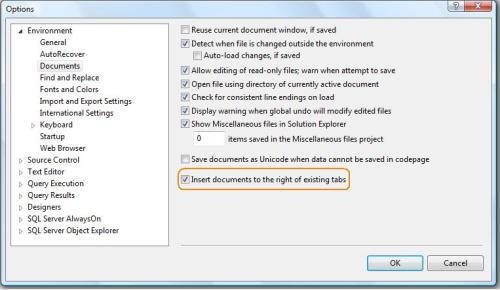
But, if you open new documents in SQL Server, it opens new documents on the left side of the existing tab and keep growing on left side. However, SQL Server 2012 gives you the option to change it from left to right, same as Internet Explorer.

First, lets open 3 documents and view its behavior in SQL Server.

Now, lets change its behavior.

Go to SSMS then Tools >> Options >> Environment >> Documents and check the option “Insert documents to the right of existing tabs”. By default it is unchecked.

Now, lets open new documents and view the behavior.

You can see that SQL Server documents has changed the behavior and now it opens on right side of the existing documents.

Read Full Post »

Today, I was working with the trigger and I wanted to get the list of all triggers in the database. It is either enabled or disabled with its details. Finally I developed a script to get all the details in one shot.

For Example : If the trigger is for insert/update/delete or for any other operations, then the given below script will give you all the information related to triggers :

Create PROCEDURE [Get_All_Details_Of_Trigger]
as
Select A.[name] as [Table Name]
,B.[name] as [Trigger Name]
,(CASE WHEN OBJECTPROPERTY(B.[object_id], 'ExecIsTriggerDisabled') =1
then 'DISABLED' else 'ENABLED' end) as [Trigger Status]

,(CASE WHEN OBJECTPROPERTY(B.[object_id], 'ExecIsInsertTrigger') =1
then 'No' else 'Yes' end) as [IsInsertTrigger]

,(CASE WHEN OBJECTPROPERTY(B.[object_id], 'ExecIsFirstInsertTrigger') =1
then 'No' else 'Yes' end) as [IsFirstInsertTrigger]

,(CASE WHEN OBJECTPROPERTY(B.[object_id], 'ExecIsLastInsertTrigger') =1
then 'No' else 'Yes' end) as [IsLastInsertTrigger]

,(CASE WHEN OBJECTPROPERTY(B.[object_id], 'ExecIsDeleteTrigger') =1
then 'No' else 'Yes' end) as [IsDeleteTrigger]

,(CASE WHEN OBJECTPROPERTY(B.[object_id], 'ExecIsFirstDeleteTrigger') =1
then 'No' else 'Yes' end) as [IsFirstDeleteTrigger]

,(CASE WHEN OBJECTPROPERTY(B.[object_id], 'ExecIsLastDeleteTrigger') =1
then 'No' else 'Yes' end) as [IsLastDeleteTrigger]

,(CASE WHEN OBJECTPROPERTY(B.[object_id], 'ExecIsUpdateTrigger') =1
then 'No' else 'Yes' end) as [IsUpdateTrigger]

,(CASE WHEN OBJECTPROPERTY(B.[object_id], 'ExecIsFirstUpdateTrigger') =1
then 'No' else 'Yes' end) as [IsFirstUpdateTrigger]

,(CASE WHEN OBJECTPROPERTY(B.[object_id], 'ExecIsLastUpdateTrigger') =1
then 'No' else 'Yes' end) as [IsLastUpdateTrigger]

,(CASE WHEN OBJECTPROPERTY(B.[object_id], 'ExecIsAfterTrigger') =1
then 'No' else 'Yes' end) as [IsAfterTrigger]

,(CASE WHEN OBJECTPROPERTY(B.[object_id], 'ExecIsInsteadOfTrigger') =1
then 'No' else 'Yes' end) as [IsInsteadOfTrigger]

,(CASE WHEN OBJECTPROPERTY(B.[object_id], 'ExecIsTriggerNotForRepl') =1
then 'No' else 'Yes' end) as [IsTriggerNotForReplication]

from sys.tables A
Inner Join sys.triggers B
On A.[object_id]=B.[parent_id]
GO
EXEC [Get_All_Details_Of_Trigger]

Read Full Post »

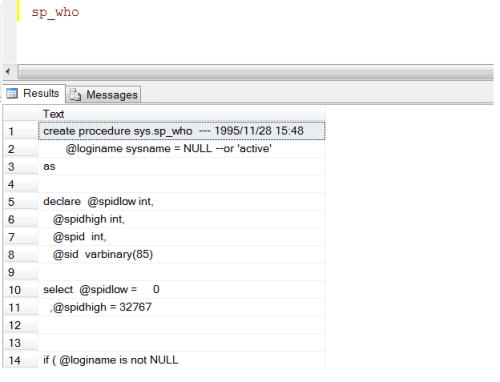
Today, I received a task to alter a number of stored procedures and create its “alter” script. So if you need to alter the script, you need to either right click on database>> stored procedure and filter the stored procedure and then create its alter script or add sp_helptext before any stored procedure to get its script. I normally prefer to go with the second option.

However, if you need to get the script of stored procedure, you need to write “sp_helptext” as many times as you need the script of stored procedure. Here is the solution.

You simply need to add a shortcut in SQL Server and have fun.

But the question is how to do it?

Lets proceed step by step.

Step 1 :
Go to Tools >> Options >> and in the Options you need to go to Environment >> Keyboard
and set “Sp_helptext” in front of “Ctrl+F1”. Meaning, whenever you press “Ctrl+F1” it will work like “Sp_helptext”

Step 2 :
Now, write any stored procedure and press “Ctrl+F1”. Ooops….. It’s not working.
So, it will not work in the already opened window. Open a new window, then connect the SSMS again and try to use it. This time it will work.

For example : Write any stored procedure and press “Ctrl+F1”. It will give you its script.

Now, my purpose is resolved but I was thinking that whenever I need to browse a table I need to write “Select * from” + TableName.
So why not we add this one also in the shortcut.

Lets do it and review the impact.
Now add “Select * from” in front of “Ctrl+3”

Now, open a new window again and type any table name and press “Ctrl+3”

Now you can browse any table without writing “Select * from”

Read Full Post »

Today, I was reading Pinal Dave Blog and found “SQL SERVER – Recover the Accidentally Renamed Table” very interesting. I would like to add one more solution to recover accidentally renamed table via SQL Server Log.

Note : It will only recover the table name if you rename it through SSMS.

Lets create a table for example and rename it through SSMS.

Create Table Table_test
([SNO] int)
GO

After that, I renamed it to “Table_test2”, “Table_test3″,”Table_test4” respectively via SSMS.

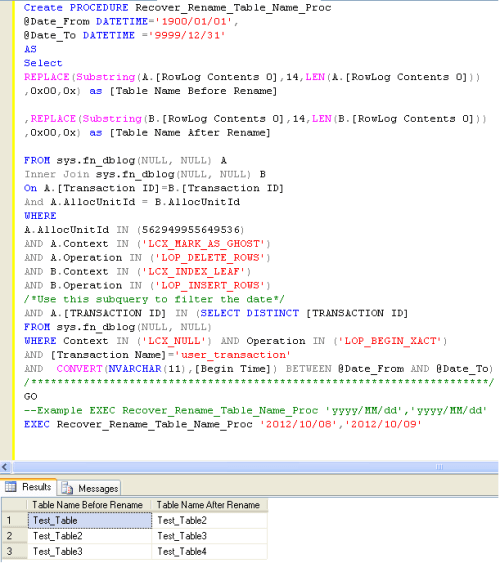
Lets create the procedure for recovery as given below:

CREATE PROCEDURE Recover_Rename_Table_Name_Proc
@Date_From DATETIME='1900/01/01',
@Date_To DATETIME ='9999/12/31'
AS
Select REPLACE(Substring(A.[RowLog Contents 0],14,LEN(A.[RowLog Contents 0])),0x00,0x) as [Table Name Before Rename]
,REPLACE(Substring(B.[RowLog Contents 0],14,LEN(B.[RowLog Contents 0])),0x00,0x) as [Table Name After Rename]
FROM sys.fn_dblog(NULL, NULL) A
Inner Join sys.fn_dblog(NULL, NULL) B On A.[Transaction ID]=B.[Transaction ID]
And A.AllocUnitId = B.AllocUnitId
WHERE
A.AllocUnitId IN (562949955649536)
AND A.Context IN ('LCX_MARK_AS_GHOST')
AND A.Operation IN ('LOP_DELETE_ROWS')
AND B.Context IN ('LCX_INDEX_LEAF')
AND B.Operation IN ('LOP_INSERT_ROWS')
/*Use this subquery to filter the date*/
AND A.[TRANSACTION ID] IN (SELECT DISTINCT [TRANSACTION ID] FROM    sys.fn_dblog(NULL, NULL)
WHERE Context IN ('LCX_NULL') AND Operation IN ('LOP_BEGIN_XACT')
AND [Transaction Name]='user_transaction'
AND  CONVERT(NVARCHAR(11),[Begin Time]) BETWEEN @Date_From AND @Date_To)
/**********************************************************************/
GO
--Example EXEC Recover_Rename_Table_Name_Proc 'yyyy/MM/dd','yyyy/MM/dd'
EXEC Recover_Rename_Table_Name_Proc '2012/10/08','2012/10/09'

In case, if you do not know the modified date & time of the table, you can write given below query and use [modify_date] column.

Select [Name],[modify_date] from sys.tables

Read Full Post »

I received a question from a blog reader “how to convert varbinary to numeric & vice versa & How SQL Server keeps the structure of numeric data type in varbinary format ?”

First lets take an example to convert from varbinary to numeric & vice versa”

Example :

--Convert from varbinary to numeric
Declare @varbinary2 as varbinary(max)
Set @varbinary2=0x08040001B471BC00
Select Convert(numeric(8,4),@varbinary2) as [Varbinary to Numeric]

--Convert from numeric to varbinary
Declare @Numeric2 as numeric(8,4)
Set @Numeric2 =1234.9876
Select Convert(varbinary(max),@Numeric2) as [Numeric to Varbinary]
--RESULT

Varbinary to Numeric
—————————————
1234.9876

(1 row(s) affected)

Numeric to Varbinary
—————————————
0x08040001B471BC00

(1 row(s) affected)

Explanation :
It is a simple conversion, but one thing you need to remember is, whenever you convert from varbinary to numeric, you must be exact in the Precision & Scale. If Precision & Scale are wrong, it will give you wrong result. But the question is how ascertain that the Precision & Scale are in varbinary format ?

Lets take an example from above and first get the Precision & Scale and then convert it into numeric data type.

--Convert from varbinary to numeric
Declare @varbinary1 as varbinary(max)
Set @varbinary1=0x08040001B471BC00

Select Convert(int,0x08) as [Precision]
Select Convert(int,0x04) as [Scale]

Select @varbinary1 as [Varbinary]
,Convert(numeric(18,4),@varbinary1) as [Varbinary to Numeric]
--RESULT

Precision
———–
8

(1 row(s) affected)

Scale
———–
4

(1 row(s) affected)

Varbinary | Varbinary to Numeric
———————– | —————————————
0x08040001B471BC00 | 1234.9876

(1 row(s) affected)

Given below is the screen image that will show how SQL keeps numeric data type in varbinary format.

Read Full Post »

Today, I was searching one stored procedure in the entire SQL server databases. To find this, I need to go to each database right click on procedure and then filter the name. It is little bit time consuming and boring work if you have more  number of Databases and you need to repeat this process number of times. Given below is the solution designed with the help of  a sys.procedures(system table).

Note : This solution is compatible with SQL SERVER 2005 and above.

-- Script Name: Sp_Search_Procedure_Across_Databases
-- Script Type : Search Stored Procedure Across all SQL Server databases.
-- Develop By: Muhammad Imran
-- Date Created: 03 Oct 2012

Create Procedure Sp_Search_Procedure_Across_Databases
@ProcedureName nvarchar(Max)
As
BEGIN
DECLARE @SQL nvarchar(MAX)     --Declare variable to store dynamic query result
DECLARE @DB_NAME nvarchar(200) --Declare variable to store Database name

SET @SQL=''

--Create table to store the result of each database
CREATE TABLE #SearchResult
(
[DB_Name] nvarchar(max),
[Procedure Name] nvarchar(max),
[Status] varchar(50)
)

--Declare cusrsor to loop across all databases
DECLARE DB_Cursor CURSOR FOR
--Pick the list of all database
SELECT QUOTENAME([name]) from sys.databases order by [name]

OPEN DB_Cursor
FETCH NEXT FROM DB_Cursor INTO @DB_NAME

WHILE @@FETCH_STATUS = 0
BEGIN
--In this dynamic query, two select statements are built because
--one statement will check the unavailability and the
--second statement will check the availability of the
--procedure in the database and insert the result in the #SearchResult table

SET @SQL= 'Insert into #SearchResult
SELECT ''' + @DB_NAME + ''' as [Database Name],'''',''Not Available''
from ' + @DB_NAME + '. sys.procedures
Where [name] like ''%' + @ProcedureName + '%'' Having Count(*)=0
UNION ALL
SELECT ''' + @DB_NAME + ''' as [Database Name],[name],''Available''
from ' + @DB_NAME + '.sys.procedures
Where [name] like ''%' + @ProcedureName + '%'' Group By [name]
Having Count(*)>0'

EXEC(@SQL)

FETCH NEXT FROM DB_Cursor INTO @DB_NAME
END
CLOSE DB_Cursor
DEALLOCATE DB_Cursor
--We can browse the table to view the results
Select * from #SearchResult Order by [DB_Name],[Procedure Name]
END
GO
--Syntax
--Sp_Search_Procedure_Across_Databases 'Stored Procedure Name'

--Example
Sp_Search_Procedure_Across_Databases 'SP_Employee'

Read Full Post »

Few months back, I published an article namely How to generate Insert Statements from Table Data using SQL Server. In this article, I have developed a tool that can help you to generate insert into statement from table data.

Today, we will discuss one more tool namely “Microsoft SQL Server Database Publishing Wizard” that will help you not only to generate the insert into statement but also you can generate script for all objects in SQL server. You can download this tool from here

Lets proceed step by step to generate it.

Step 1 :

Run this utility and this will be the welcome screen.

Step 2 :

Once you click on next, you need to give the server name and its credentials. You can also provide it as a connection string.

Step 3 :
In this step you need to select the database. There is no multi selection option, so you need to select one database at a time.
Also, if you check “script all objects in the selected database” then in the next step it will not give you the option to select the objects.

Step 4 :
If you did not check “script all objects in the selected database” then this tool will allow you to select multiple object of the SQL server. ‘Select All’ option is also available.

Step 5 :
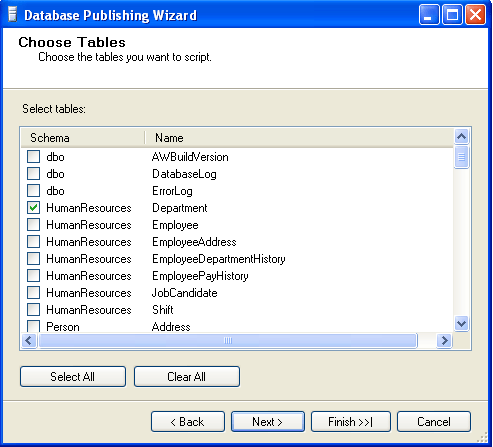
In the previous step, I selected the ‘Tables’ so in this step, I need to define which table(s) should be scripted.
Step 6 :
In this step , you can define the path where the script should be generated or you can define the server where the script should be deployed.

Step 7 :
In this step, you need to define your requirement. Select one of the options ‘Data only’ or ‘Schema only’ or ‘Schema & data’.

Step 8 :
In this step, you can see the summary of your selection. If it is not correct, you can go back and change the selection.

Step 9 :
In this step, you can view the result of process, whether it is executed successfully or not.

Step 10 :
Now, the script has been generated successfully and you can get the file from your defined location.
For Example:

/****** Object:  Table [HumanResources].[Department]    Script Date: 09/24/2012 10:48:11 ******/
DELETE FROM [HumanResources].[Department]
GO
/****** Object:  Table [HumanResources].[Department]    Script Date: 09/24/2012 10:48:11 ******/
SET IDENTITY_INSERT [HumanResources].[Department] ON
INSERT [HumanResources].[Department] ([DepartmentID], [Name], [GroupName], [ModifiedDate])
VALUES (1, N'Engineering', N'Research and Development', CAST(0x00008C6900000000 AS DateTime))

INSERT [HumanResources].[Department] ([DepartmentID], [Name], [GroupName], [ModifiedDate])
VALUES (2, N'Tool Design', N'Research and Development', CAST(0x00008C6900000000 AS DateTime))

INSERT [HumanResources].[Department] ([DepartmentID], [Name], [GroupName], [ModifiedDate])
VALUES (3, N'Sales', N'Sales and Marketing', CAST(0x00008C6900000000 AS DateTime))

INSERT [HumanResources].[Department] ([DepartmentID], [Name], [GroupName], [ModifiedDate])
VALUES (4, N'Marketing', N'Sales and Marketing', CAST(0x00008C6900000000 AS DateTime))

INSERT [HumanResources].[Department] ([DepartmentID], [Name], [GroupName], [ModifiedDate])
VALUES (5, N'Purchasing', N'Inventory Management', CAST(0x00008C6900000000 AS DateTime))

INSERT [HumanResources].[Department] ([DepartmentID], [Name], [GroupName], [ModifiedDate])
VALUES (6, N'Research and Development', N'Research and Development', CAST(0x00008C6900000000 AS DateTime))

INSERT [HumanResources].[Department] ([DepartmentID], [Name], [GroupName], [ModifiedDate])
VALUES (7, N'Production', N'Manufacturing', CAST(0x00008C6900000000 AS DateTime))

INSERT [HumanResources].[Department] ([DepartmentID], [Name], [GroupName], [ModifiedDate])
VALUES (8, N'Production Control', N'Manufacturing', CAST(0x00008C6900000000 AS DateTime))

INSERT [HumanResources].[Department] ([DepartmentID], [Name], [GroupName], [ModifiedDate])
VALUES (9, N'Human Resources', N'Executive General and Administration', CAST(0x00008C6900000000 AS DateTime))

INSERT [HumanResources].[Department] ([DepartmentID], [Name], [GroupName], [ModifiedDate])
VALUES (10, N'Finance', N'Executive General and Administration', CAST(0x00008C6900000000 AS DateTime))

INSERT [HumanResources].[Department] ([DepartmentID], [Name], [GroupName], [ModifiedDate])
VALUES (11, N'Information Services', N'Executive General and Administration', CAST(0x00008C6900000000 AS DateTime))

INSERT [HumanResources].[Department] ([DepartmentID], [Name], [GroupName], [ModifiedDate])
VALUES (12, N'Document Control', N'Quality Assurance', CAST(0x00008C6900000000 AS DateTime))

INSERT [HumanResources].[Department] ([DepartmentID], [Name], [GroupName], [ModifiedDate])
VALUES (13, N'Quality Assurance', N'Quality Assurance', CAST(0x00008C6900000000 AS DateTime))

INSERT [HumanResources].[Department] ([DepartmentID], [Name], [GroupName], [ModifiedDate])
VALUES (14, N'Facilities and Maintenance', N'Executive General and Administration', CAST(0x00008C6900000000 AS DateTime))

INSERT [HumanResources].[Department] ([DepartmentID], [Name], [GroupName], [ModifiedDate])
VALUES (15, N'Shipping and Receiving', N'Inventory Management', CAST(0x00008C6900000000 AS DateTime))

INSERT [HumanResources].[Department] ([DepartmentID], [Name], [GroupName], [ModifiedDate])
VALUES (16, N'Executive', N'Executive General and Administration', CAST(0x00008C6900000000 AS DateTime))

SET IDENTITY_INSERT [HumanResources].[Department] OFF

Read Full Post »

Format function is one the important functions in SQL Server 2012. This function is very useful to format data in a specified format.

Today, we will discuss each and every aspect of this function. Also we will discuss the need/importance of this function in SQL server.

By using this function, we do not need to do a lot of scripting to format the data.

Let me explain its syntax, parameters, purpose and examples in detail.
Syntax :

FORMAT ( value, format [, culture ] )

Parameters :

@value : Data to be converted in other format. (Mandatory)
@format : To define a format in nvarchar datatype. (Mandatory)
@culture : To define a culture. By default, it picks up culture from session. (Optional)

Purpose :
This function converts value from one format to another format by using culture. If culture is not available it will pick up the culture from the session. It will return value either in nvarchar data type or NULL.

Let me explain this with simple examples.

Example-1 : FORMAT – DATE WITH DEFAULT CULTURE

DECLARE @Date AS datetime=Getdate()

Select @Date AS [DATE]
SELECT FORMAT (@Date, 'dd/MM/yyyy') as [Result (dd/MM/yyyy)]
SELECT FORMAT (@Date, 'MM/dd/yyyy') as [Result (MM/dd/yyyy)]
SELECT FORMAT (@Date, 'yyyy/MM/dd') as [Result (yyyy/MM/dd)]

Example-2 : FORMAT – TIME WITH DEFAULT CULTURE

DECLARE @TIME AS DATETIME=Getdate()

Select @TIME AS [TIME]
SELECT FORMAT (@TIME, 'h:mm:ss tt') as [Result (h:mm:ss tt)]
SELECT FORMAT (@TIME, 'hh:mm:ss tt') as [Result (hh:mm:ss tt)]
SELECT FORMAT (@TIME, 'h:mm:ss') as [Result (h:mm:ss)]
SELECT FORMAT (@TIME, 'hh:mm:ss') as [Result (hh:mm:ss)]

Example-3 : FORMAT – NUMBER WITH DEFAULT CULTURE

DECLARE @NUMBER AS NUMERIC(18,4)=12345.789

Select @NUMBER as [NUMBER]
SELECT FORMAT (@NUMBER, '####0.00') as [Result (####0.00)]
SELECT FORMAT (@NUMBER, '####0.000') as [Result (####0.000)]
SELECT FORMAT (@NUMBER, '##,##0.00') as [Result (##,##0.00)]
SELECT FORMAT (@NUMBER, '#') as [Result (#)]

Example-4 : FORMAT – CURRENCY WITH DEFAULT CULTURE

DECLARE @CURRENCY MONEY = '24500.50';
SELECT FORMAT (@CURRENCY, 'C') AS  [RESULT]

Example-5 : FORMAT – DATE & TIME WITH MULTIPLE CULTURE

DECLARE @Date AS datetime=Getdate()

Select @Date as [DATE]
SELECT FORMAT ( @Date,'dddd, MMMM dd, yyyy hh:mm:ss tt','en-US')
AS [English Culture]

SELECT FORMAT ( @Date,'dddd, MMMM dd, yyyy hh:mm:ss tt','de-DE')
AS [German Culture]

SELECT FORMAT ( @Date,'dddd, MMMM dd, yyyy hh:mm:ss tt','ja-JP')
AS [Japanese Culture]

SELECT FORMAT ( @Date,'dddd, MMMM dd, yyyy hh:mm:ss tt','ar-SA')
AS [Arabic Culture]

SELECT FORMAT ( @Date,'dddd, MMMM dd, yyyy hh:mm:ss tt','ur-PK')
AS [Urdu Culture]

Example-6 : FORMAT – CURRENCY WITH MULTIPLE CULTURE

DECLARE @CURRENCY MONEY = '24500.50';
SELECT FORMAT (@CURRENCY, 'C','en-US' ) AS [English Culture]
SELECT FORMAT (@CURRENCY, 'C','de-DE' ) AS [German Culture]
SELECT FORMAT (@CURRENCY, 'C','ja-JP' ) AS [Japanese Culture]
SELECT FORMAT (@CURRENCY, 'C','ar-SA' ) AS [Arabic Culture]
SELECT FORMAT (@CURRENCY, 'C', 'ur-PK' ) AS [Urdu Culture]

Example-7 : FORMAT – VALUE BY USING LANGUAGE INSTEAD OF CULTURE

SET LANGUAGE 'ENGLISH'

SELECT FORMAT (245000, 'C') AS [Currency]
SELECT FORMAT (GETDATE(),'D') AS [DATE]
SELECT FORMAT (24500.282, '#,###,###0.00') AS [Currency]

Reference : MSDN

Read Full Post »

« Newer Posts