Feeds:
Posts
Comments

Archive for the ‘Errors’ Category

String or binary data would be truncated (Error number 8152) is a very common error. It usually happens when we try to insert any data in string (varchar,nvarchar,char,nchar) data type column which is more than size of the column. So you need to check the data size with respect to the column width and identify which column is creating problem and fix it. It is very simple if you are dealing with less columns in a table. But it becomes nightmare if you are dealing with inert into query with huge number of columns and you need to check one by one column. I received this query from one of my Blog readers Mr Ram Kumar asking if there is a shortcut to resolve this issue and give the column name along with the data creating problems. I started searching for the solution but could not get proper one. So I started developing this solution.
Before proceeding with the solution, I would like to create a sample to demonstrate the problem.

SAMPLE :

--This script is compatible with SQL Server 2005 and above.
--DROP TABLE tbl_sample
--GO
CREATE TABLE tbl_sample
(
[ID] INT,
[NAME] VARCHAR(10),
)
GO
INSERT INTO tbl_sample VALUES (1,'Bob Jack Creasey')
GO
INSERT INTO tbl_sample ([ID],[NAME]) VALUES (2,'Frank Richard Wedge')
GO
--OUTPUT

Msg 8152, Level 16, State 14, Line 1
String or binary data would be truncated.
The statement has been terminated.
Msg 8152, Level 16, State 14, Line 2
String or binary data would be truncated.
The statement has been terminated.

SOLTUION :
Given below is the stored procedure that can find the exact column name and its data which is exceeding the limit of column width.

--DROP PROCEDURE usp_String_or_binary_data_truncated
--GO
CREATE PROCEDURE usp_String_or_binary_data_truncated
@String VARCHAR(MAX)
AS

DECLARE @VARCHAR AS VARCHAR(MAX)
DECLARE @Xml AS XML
DECLARE @TCount AS INT
SET @String= REPLACE(REPLACE(REPLACE(REPLACE(@String,'''','')
,'[',''),']',''),CHAR(13) + CHAR(10),'')
SET @Xml = CAST(('<a>'+REPLACE(@String,'(','</a><a>')
+'</a>') AS XML)

SELECT @TCount=COUNT(*)
FROM @Xml.nodes('A') AS FN(A)

;WITH CTE AS
(SELECT
(CASE
WHEN (CHARINDEX('INSERT INTO',A.value('.', 'varchar(max)'))>0)
THEN 1
WHEN CHARINDEX('VALUES',A.value('.', 'varchar(max)'))>0
THEN 2
WHEN (CHARINDEX('INSERT INTO',A.value('.', 'varchar(max)'))=0
AND CHARINDEX('VALUES',A.value('.', 'varchar(max)'))=0)
AND @TCount=2  THEN 2
WHEN (CHARINDEX('INSERT INTO',A.value('.', 'varchar(max)'))=0
AND CHARINDEX('VALUES',A.value('.', 'varchar(max)'))=0)
AND @TCount=3  THEN 3
END) AS[Batch Number],
REPLACE(REPLACE(A.value('.', 'varchar(max)')
,'INSERT INTO',''),'VALUES ','') AS [Column]
FROM @Xml.nodes('A') AS FN(A))

, [CTE2] AS
(
SELECT
[Batch Number],
CAST('' + REPLACE([Column], ',' , '')
+ '' AS XML)
AS [Column name And Data]
FROM  [CTE]
)
,[CTE3] AS
(
SELECT [Batch Number],
ROW_NUMBER() OVER(PARTITION BY [Batch Number]
ORDER BY [Batch Number] DESC) AS [Row Number],
Split.a.value('.', 'VARCHAR(MAX)') AS [Column name And Data]
FROM [CTE2]
CROSS APPLY [Column name And Data].nodes('/M')Split(A))

SELECT
ISNULL(B.[Column name And Data],C.name) AS [Column Name]
,A.[Column name And Data] AS [Column Data]
,C.max_length As [Column Length]
,DATALENGTH(A.[Column name And Data])
AS [Column Data Length]

FROM [CTE3] A
LEFT JOIN [CTE3] B
ON A.[Batch Number]=2 AND B.[Batch Number]=3
AND A.[Row Number] =B.[Row Number]
LEFT JOIN sys.columns C
ON C.object_id =(
SELECT object_ID(LTRIM(RTRIM([Column name And Data])))
FROM [CTE3] WHERE [Batch Number]=1
)
AND (C.name = B.[Column name And Data]
OR  (C.column_id =A.[Row Number]
And A.[Batch Number]<>1))
WHERE a.[Batch Number] <>1
AND DATALENGTH(A.[Column name And Data]) >C.max_length
AND C.system_type_id IN (167,175,231,239)
AND C.max_length>0

GO

EXAMPLE :
Now, you simply need to replace all single quotes of your insert into query to double quotes and pass it into the stored procedure.
Given below is the sample.

EXEC usp_String_or_binary_data_truncated 'INSERT INTO tbl_sample VALUES (1,''Bob Jack Creasey'')'
GO
EXEC usp_String_or_binary_data_truncated 'INSERT INTO tbl_sample ([ID],[NAME]) VALUES (2,''Frank Richard Wedge'')'
GO
--OUTPUT

string or binary data truncated.1.1

As you can see above, it returned only the column name(s) whose data sizes exceed the limit of the column width.
Do let me know if you come across situation like that and resolve it in a different ways.

Read Full Post »

I came across this error message when I created full-text index on one of the file tables (a new table concept came in SQL Server 2012) and tried to create a full text index. Most likely this error is related to semantic search (a new type of search concept came in SQL Server 2012).
Let me explain this error in detail :

Message Number: 41209

Severity : 10
Error Message: A semantic language statistics database is not registered. Full-text indexes using ‘STATISTICAL_SEMANTICS’ cannot be created or populated.

Error Generation:
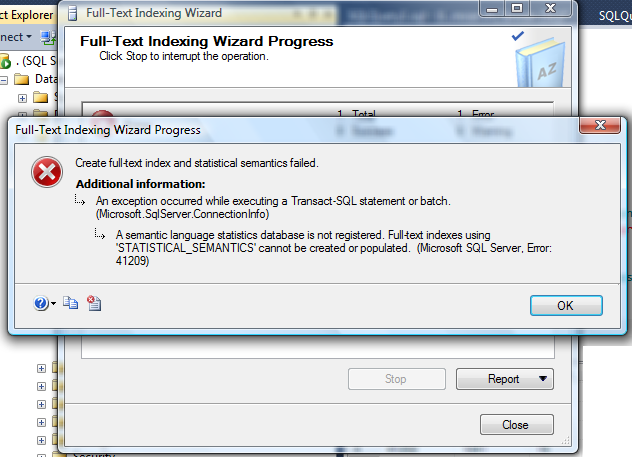
I tried to create full-text index on file table and received given below error message.

errormessage41209.1.1

RESOLUTION :
The resolution is very simple for this error. Basically, you have attached semantic language statistics database in your SQL Server but most probably you’ve forgotten to register it.
Lets debug this error step by step.

Step 1:
First of all, lets check whether you registered the semantic database or not. Given below is the script.

USE master
GO
SELECT * FROM
sys.fulltext_semantic_language_statistics_database
GO
--OUTPUT

Install Semantic 1.3

As you can see that the above query result set is blank, which means semantic database is not registered.

Step 2:
Now, you just need to register semantic database, given below is the script.

USE master
GO
EXEC sp_fulltext_semantic_register_language_statistics_db @dbname = N'semanticsdb'
GO

Step 3 :
Once you registered the semantic database, execute the Step 1 again and check whether it is registered or not.
Given below is the same script but result set would be different because you registered the semantic database.

USE master
GO
SELECT * FROM
sys.fulltext_semantic_language_statistics_database
GO
--OUTPUT

Install Semantic 1.6

You can view the above result set and see that semantic database has been registered. You can create full text indexes on file tables without any errors.

HAPPY NEW YEAR πŸ™‚

Read Full Post »

A Few days ago, I was working on resource governor implementation on my test server. Once I implemented & tested, I had to delete the resource governor settings from the test server. But Unfortunately, I got stuck because of the given below error. It did not allow me to delete the resource governor properly. Let me explain the error and its solution in details.

Message Number: 10920

Severity : 16

Error Message:Β Cannot %S_MSG user-defined function ‘%.*ls’. It is being used as a resource governor classifier.

Error Generation:

Given below is the script that I tried to execute but it resulted with the following error.

 DROP FUNCTION dbo.rgclassifier_MAX_CPU

Msg 10920, Level 16, State 1, Line 1
Cannot drop user-defined function ‘rgclassifier_MAX_CPU’. It is being used as a resource governor classifier.

Ooopps…… I am unable to drop the above classifier function.

Resolution:
If you look at the error description, it seems that classifier function is in use of resource governor, so you cannot drop this function. Then I thought of disabling it and tried to drop after that but I could not :(.

So what is the solution? Basically, you need to assign all new sessions to the default workload by eliminating the classifier function from the resource governor configuration of your server. When there is no user defined classifier function assigned as a classifier function, you can easily drop the classifier function. Given below is the script.

ALTER RESOURCE GOVERNOR WITH (CLASSIFIER_FUNCTION = NULL);
GO
ALTER RESOURCE GOVERNOR RECONFIGURE;
GO

Now, you can easily drop the classifier function.


DROP FUNCTION dbo.rgclassifier_MAX_CPU

Read Full Post »

In SQL Server, alias are very helpful, because you do not need to write the long table names again and again. I usually use ALIAS in my development to speed up the work. Yesterday, I was working on a complex query and I used a lot of alias to minimize the line of code and finally I came across an error.

Let’s discuss this in detail:
Message Number: 1011

Severity : 16

Error Message:Β The correlation name ‘%.*ls’ is specified multiple times in a FROM clause.

Error Generation:

Given below is the script that I tried to execute but it resulted with the following error.

Use AdventureWorks2012
GO

SELECT
p.[BusinessEntityID]
,p.[Title]
,p.[FirstName]
,p.[MiddleName]
,p.[LastName]
,p.[Suffix]
,p.[JobTitle]
FROM [HumanResources].[Employee] p
INNER JOIN [Person].[Person] p
ON p.[BusinessEntityID] = e.[BusinessEntityID]

GO

Msg 1011, Level 16, State 1, Line 2
The correlation name ‘p’ is specified multiple times in FROM clause.

Ooopps…… I am unable to execute the above qquery.

Resolution:
The resolution is very simple. Basically, you aliased more than one table with the same name, so SQL Server is unable to relate alias with table name. In the above table, I ALIASED both tables with p while I can assign one name (p) as an alias to one table only and I must change the alias of other table name (p) to something else. (That make sense also). Lets rewrite the script with the different alias and it works…….

USE [AdventureWorks2012]
GO
SELECT
e.[BusinessEntityID]
,p.[Title]
,p.[FirstName]
,p.[MiddleName]
,p.[LastName]
,p.[Suffix]
,e.[JobTitle]
FROM [HumanResources].[Employee] e
INNER JOIN [Person].[Person] p
ON p.[BusinessEntityID] = e.[BusinessEntityID]
GO
--OUTPUT

error_message_1011.1.1

Read Full Post »

Recently, I was working on semantic search and tried to create a database having filestream and got an error FILESTREAM feature is disabled. After some research, I found the solution.

Let’s discuss this in detail:

Message Number: 5591

Severity : 16

Error Message:Β FILESTREAM feature is disabled.

Error Generation:

Given below is the script that I tried to execute but it resulted with the following error.

USE master
GO
CREATE DATABASE [SampleDB]
ON PRIMARY
( NAME = N'SampleDB',
FILENAME = N'C:\DATA\SampleDB.mdf'
),
FILEGROUP SampleFileGroup CONTAINS FILESTREAM
(NAME = SampleFileTableFS,
FILENAME='C:\Data\SampleFileTable'
)
LOG ON
( NAME = N'SampleDB_log',
FILENAME = N'C:\DATA\SampleDB_log.ldf'
)
WITH FILESTREAM
( NON_TRANSACTED_ACCESS = FULL,
DIRECTORY_NAME = N'SampleFileTableDB'
)
GO
--OUTPUT

Msg 5591, Level 16, State 1, Line 1
FILESTREAM feature is disabled.

Ooopps…… I am unable to create a database having FILESTREAM. So what is the solution ?

Solution:
Let me explain the solution step by step.

Step 1 :
Click on the Start >>All Programs >>Microsoft SQL Server 2012 >>Configuration Tools >> SQL Server Configuration Manager, as shown in the image below.

filestream_disabled.1.1

Step 2 :
Once you click on SQL Server configuration manager, it will open SQL Server configuration manager options. It has two panes. Now you need to select SQL Server Services from the left hand pane and select the SQL Server Instance on which you need to enable the FILESTREAM. Just right click on it and select PROPERTIES as shown in the image below.

filestream_disabled.1.2

Step 3 :
Once you select the PROPERTIES, it will open SQL Server properties dialogue box. Now you need to find FILESTREAM Tab and select it.
Once you select it, you will find given below options:

    1. Enable FILESTREAM for Transact-SQL access (You need to enable this to enableΒ FILESTREAM).
    2. Enable FILESTREAM for file I/O access. (If you need to read and write data (FILESTREAM) from windows then enable it and provide a windows share name)
    3. Allow remote clients to have streaming access to FILESTREAM data. (If you need to give access to remote clients on FILESTREAM data then enable it)

And Click APPLY button as shown in the picture below.

filestream_disabled.1.3

Step 4 :Β 

Once you are done with SQL Server Configuration Manager, open SQL Server Management Studio and open a new query window.

Step 5 :

Now, you are in the new query window, just execute the given below script. And after that DO NOT forget to restart the SQL Server SERVICE.

EXEC sp_configure filestream_access_level, 2
RECONFIGURE
GO

Step 6 :
FILESTREAM is enabled now. You can execute any script having FILESTREAM. It will be executed successfully.

Read Full Post »

The sp_configure value ‘contained database authentication’ must be set to 1 in order to %S_MSG a contained database. You may need to use RECONFIGURE to set the value_in_use is one of the new error messages come in SQL Server 2012. This error message is related to Contained database, a new database feature shipped with SQL Server 2012.

Let’s discuss this in detail:
Message Number: 12824

Severity : 16

Error Message: The sp_configure value ‘contained database authentication’ must be set to 1 in order to %S_MSG a contained database. You may need to use RECONFIGURE to set the value_in_use.

Error Generation:

Basically, I re-installed my test database server, and I had plenty of database to attach it back to the server. So I was attaching one by one and this process was performing well. Suddenly, in one database it gave me this error. Given below are the error details.

errormessage12824.1.1

Ooopps…… I am unable to attach this database.

Resolution:
Basically, the database I was trying to attach is a contained database and please note that whenever you need to create or attach any contained database, you must enable the contained database authentication in the database server. But how ?
Given below is the script to enable it.

sp_configure 'contained database authentication', 1;
GO
RECONFIGURE;
GO
--OUTPUT

Configuration option ‘contained database authentication’ changed from 0 to 1. Run the RECONFIGURE statement to install.

Once you receive the above output saying  ‘contained database authentication’ has been changed from 0 to 1, you can attach or create any contained database in your database server.

Reference : MSDN

Read Full Post »

Today I was working on Maintenance Plans of SQL Server and I had to schedule a database backup on daily basis for a client. But once I right clicked on Management >> Maintenance Plan and selected New Maintenance Plan using SSMS, it gave me given below error.

Let’s discuss this in detail:

Error Message:Β ‘Agent XPs’ component is turned off as part of the security configuration for this server. A system administrator can enable the use of ‘Agent XPs’ by using sp_configure. For more information about enabling ‘Agent XPs’, see “Surface Area Configuration” in SQL Server Books Online. (Microsoft.SqlServer.Management.MaintenancePlanWizard)

Agent Xps component is turned off.1.1

Reason:

Basically,Β Agent XPsΒ option enables the SQL Server Agent extended stored procedures on the SQL Server and the reason why this error occurs is because Agent XPs is not enabled in SQL Server. Also, if this option is not enabled, SQL Server Agent node will not display in SQL Server Management Studio Object Explorer.

Resolution:
There are twoΒ methods to resolve it.

Method 1:
In this method, we will execute the script to enable Agent XPs. You need to execute the given below script in Query window.

sp_configure 'show advanced options', 1;
GO
RECONFIGURE;
GO
sp_configure 'Agent XPs', 1;
GO
RECONFIGURE
GO

Agent Xps component is turned off.1.2

Method 2:
In this method, you do not need to write any script, you just need to open the SQL Server configuration Manager and start the SQL Server Agent as shown in the image below. It will automatically enableΒ Agent XPs.

Agent Xps component is turned off.1.3

Note : There is no need to stop and restart the server, these settings take immediate effect.

Read Full Post »

I usually create the samples and test cases on tempdb database. Today, I came a across an issue while working on Sequence object, a new database feature shipped with SQL Server 2012. I tried to use Sequence object from some other database in tempdb database and it gave me given below error message.

Let’s discuss this in detail:

Message Number: 11730

Severity : 16

Error Message: Database name cannot be specified for the sequence object in default constraints.

Error Generation:

In the given below script, I tried to make sequence object (resides in another database (Adventureworks2012)) as a default value of a column in a table. This table resides in tempdb database. Let me create a sample to demonstrate the issue.

--This script is compatible with SQL Server 2012 and above
--Create a sequence object in AdventureWorks2012 database.
USE [AdventureWorks2012]
GO
CREATE SEQUENCE [dbo].[Seq_sample]
AS [int]
START WITH 1
INCREMENT BY 1
GO

USE tempdb
GO
CREATE TABLE dbo.tbl_sample
(
[ID] int,
[Name] varchar(100)
)
GO

ALTER TABLE dbo.tbl_sample
ADD CONSTRAINT Const_tbl_sample DEFAULT
(NEXT VALUE FOR AdventureWorks2012.[dbo].[Seq_Sample])
FOR [ID];
GO
--OUTPUT

Msg 11730, Level 15, State 1, Line 2
Database name cannot be specified for the sequence object in default constraints.

Ooopps…… I am unable to make a sequence as a default value in a table if Sequence already resides in another database.

Resolution:
This is the limitiation of a sequence object, that you cannot make any sequence as a default value of a column if it resides in any other database. But there is a way around that you can use to achieve it. So, how can we do it ? You cannot make it as a default but you can still access the sequence even if it is outside your database boundary, using three part name (AdventureWorks2012.[dbo].[Seq_Sample]
). So, using this three part name, you can insert the sequence value in any database. Given below is the sample.

USE tempdb
GO
CREATE TABLE dbo.tbl_sample
(
[ID] int,
[Name] varchar(100)
)
GO
INSERT INTO tbl_sample
VALUES (NEXT VALUE FOR AdventureWorks2012.[dbo].[Seq_Sample],'raresql')
GO

Read Full Post »

I came across this error message while I was working on one of the file tables (A new table concept came in SQL Server 2012) and tried to create a full text index. Most likely this error is related to semantic search (A new type of search concept came in SQL Server 2012).
Let me explain this error in detail :

Message Number: 41202

Severity : 16
Error Message: The source table ‘%.*ls’ specified in the SEMANTICSIMILARITYTABLE, SEMANTICKEYPHRASETABLE or SEMANTICSIMILARITYDETAILSTABLE function doesn’t have a full-text index that uses the STATISTICAL_SEMANTICS option. A full-text index using the STATISTICAL_SEMANTICS option is required to use this function.

Error Generation:
I tried to create full text index on file table and received given below error message.

errormessage41202.1.1

Lets resolve this issue step by step :

Step 1 :
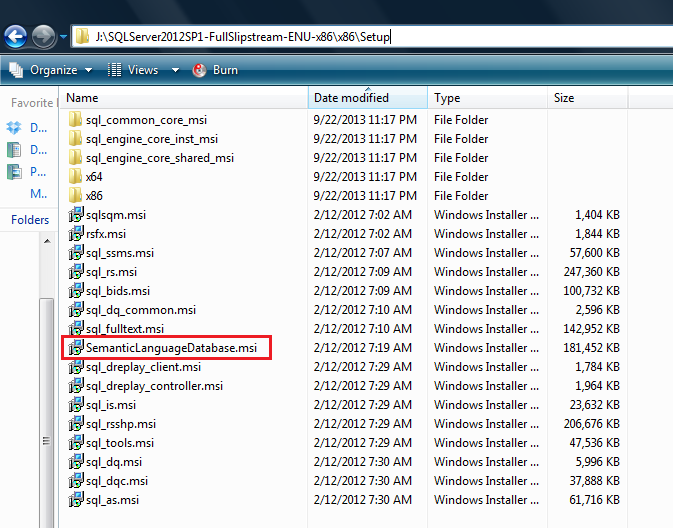
First of all you need to browse the SQL Server installation media and select the given below folder. Here you will find a file namely SemanticLanguageDatabase.msi, just execute this file.
Given below are the different paths for x86 & x64 machines.

β€’ For x86 : …\x86\Setup\SemanticLanguageDatabase.msi
β€’ For x64 : …\x64\Setup\SemanticLanguageDatabase.msi

Given below is the screen image of this folder.

errormessage41202.1.2

Step 2:
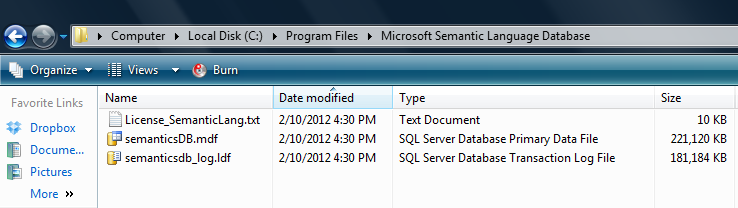
Once you run the above SemanticLanguageDatabase.msi and install it, it will give you two database files (semanticsDB, semanticsdb_log) in a location (C:\Program Files\Microsoft Semantic Language Database), if you install it in the default location.
Given below is the image.

errormessage41202.1.3

Step 3:
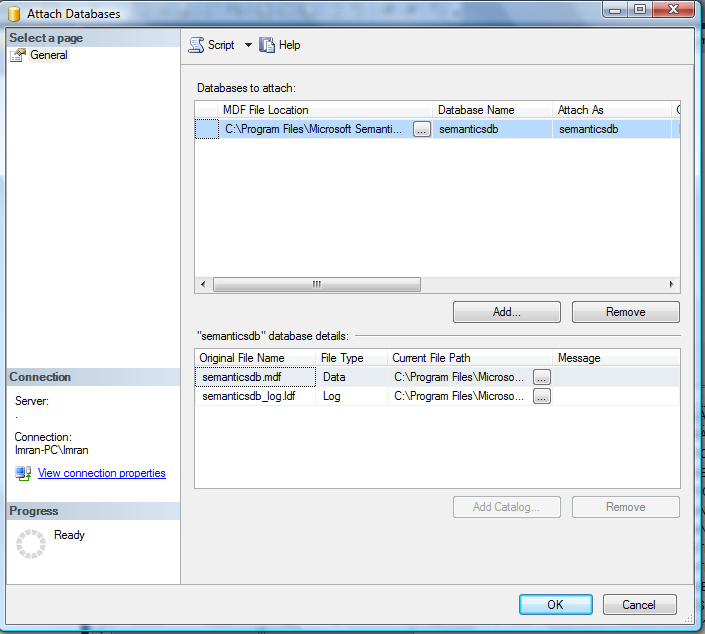
Once we extract the semantic database files (semanticsDB, semanticsdb_log), attach in your database server. Given below is the image.

errormessage41202.1.4

Step 4:
Once you attach the file in your database, just register the semantic database. Given below is the script.

EXEC sp_fulltext_semantic_register_language_statistics_db @dbname = N'semanticsdb'
GO

Now your semantic database has been registered. You can create full text indexes on file tables without any errors.

Read Full Post »

« Newer Posts - Older Posts »