Feeds:
Posts
Comments

Archive for the ‘Errors’ Category

IF… ELSE clause is very handy and whenever you need to perform any conditional operation, you can achieve your results using it. But there are some limitations in IF… ELSE,  and one of the limitations is that you cannot use it in WHERE clause.

Let me demonstrate the limitations.

USE AdventureWorks2012
GO
DECLARE @City AS VARCHAR(50)
SELECT
BusinessEntityID
, FirstName
, LastName
, City
FROM [HumanResources].[vEmployee]
WHERE
IF @City IS NULL
City='Renton'
ELSE
City=@City
--OUTPUT

Msg 156, Level 15, State 1, Line 9
Incorrect syntax near the keyword ‘IF’.
Msg 102, Level 15, State 1, Line 10
Incorrect syntax near ‘City’.

Nevertheless, there are solutions which are given below:

SOLUTION 1 :
You can use CASE statement instead of IF..ELSE clause to do conditional where clause.
Given below is the script.

--This script is compatible with SQL Server 2005 and above.
USE AdventureWorks2012
GO
DECLARE @City AS VARCHAR(50)
SELECT
BusinessEntityID
, FirstName
, LastName
, City
FROM [HumanResources].[vEmployee]
WHERE City =
(CASE WHEN @City IS NULL THEN 'Renton' ELSE @City END)
ORDER BY BusinessEntityID
--OUTPUT

ifelse1.1

SOLUTION 2 :
In this solution, you can use IIF clause instead of IF..ELSE  to do conditional where clause.
Given below is the script.

--This script is compatible with SQL Server 2012 and above
USE AdventureWorks2012
GO
DECLARE @City AS VARCHAR(50)
SELECT
BusinessEntityID
, FirstName
, LastName
, City
FROM [HumanResources].[vEmployee]
WHERE City = IIF (@City IS NULL, 'Renton', @City)
ORDER BY BusinessEntityID
--OUTPUT

ifelse1.1

Read Full Post »

EXECUTE statement failed because its WITH RESULT SETS clause specified %d column(s) for result set number %d, but the statement sent %d column(s) at run time is one of the new error messages seen in SQL Server 2012. This error message is due to the invalid use of new feature EXEC WITH RESULT SETS.

Let’s discuss this in detail:
Message Number: 11537

Severity : 16

Error Message: EXECUTE statement failed because its WITH RESULT SETS clause specified %d column(s) for result set number %d, but the statement sent %d column(s) at run time.

Error Generation:
Let me create a sample stored procedure to generate this error.

CREATE PROCEDURE usp_Resultset
AS
SELECT 'A' AS [First Letter],
'B' as [Second Letter]
GO
EXEC usp_Resultset

errormessage11537.1.2

You can see that the above stored procedure is executed successfully and it has ONE result sets with TWO columns.
Lets try to execute it using WITH RESULT SETS clause.

USE tempdb
GO
EXEC usp_Resultset
WITH RESULT SETS
(([1st Letter] VARCHAR(1)
));
--OUTPUT
Msg 11537, Level 16, State 1, Procedure usp_Resultset, Line 3
EXECUTE statement failed because its WITH RESULT SETS clause specified 1 column(s) for result set number 1, but the statement sent 2 column(s) at run time.

Ooops…… I am unable to execute it properly. It returned the error message.

errormessage11537.1.3

Resolution:
Why this error ? Because, the above stored procedure returns ONE result sets with TWO columns but we defined WITH RESULT SETS clause for ONE column ONLY. Lets rewrite the script and define TWO columns in the result sets (the same number of columns in the result sets returned by stored procedure) to avoid this error.

USE tempdb
GO
EXEC usp_Resultset
WITH RESULT SETS
(([1st Letter] VARCHAR(1)
, [2nd Letter] VARCHAR(1)
));
--OUTPUT

errormessage11537.1.4

Conclusion :
Remember, whenever you use any stored procedure using WITH RESULT SETS clause, make sure you use exactly the same number of columns in result set returned by stored procedure to avoid such errors.

Read Full Post »

Sequence is one of the nice features shipped with SQL Server 2012 and it enhances a lot of identity column features and provides hands on a lot of things that identity does not support. But on the other hand it has its own limitations as well. Today, I was working on one of the user defined functions in my application using SEQUENCE and I came across an error.

Let me explain this error in detail :

Message Number: 11724

Severity : 15

Error Message: An expression that contains a NEXT VALUE FOR function cannot be passed as an argument to a table-valued function.

Error Generation:

Let me create a User defined function and a Sequence to demonstrate this error.

USE tempdb
GO

--Create a sequence
CREATE SEQUENCE [dbo].[Seq_Sequence]
AS [int]
START WITH 1
GO

--Create a user defined function
CREATE FUNCTION [dbo].[fn_Sample]
(
@SequenceID INT
)
RETURNS TABLE AS RETURN
(
SELECT 'RCP' + TRY_Convert(varchar(10),@SequenceID) AS [ID]
, GETDATE() AS [CREATION DATETIME]
)
GO

The purpose to create the Sequence object and the user defined function is basically I want to get the new ID from sequence and pass it to the user defined function to FORMAT and return it with creation date time.
It seems very simple, lets do it.

USE tempdb
GO
SELECT * FROM [dbo].[fn_Sample]
(
NEXT VALUE FOR [Seq_Sequence]
)
--OUTPUT

Msg 11724, Level 15, State 1, Line 1
An expression that contains a NEXT VALUE FOR function cannot be passed as an argument to a table-valued function

Ooopps…… I am unable to execute it.

Resolution:

The resolution is very simple, NEVER pass the NEXT VALUE of sequence directly to table value user defined function. Just introduce a variable, store the NEXT VALUE in it and pass the variable into the user defined function.
Lets do it.

USE tempdb
GO
DECLARE @ID AS BIGINT = NEXT VALUE FOR [Seq_Sequence]
SELECT * FROM [dbo].[fn_Sample](@ID)
--OUTPUT

errormsg11724.1

Conclusion :

Remember, whenever you use SEQUENCE object with any other object always be careful about the limitations of sequence object.

Read Full Post »

This error message is shipped with SQL Server 2005 and it occurs due to one of the nice functions namely COALESCE . Lets discus the cause and resolution for this error message.

Let me explain this error in detail :

Message Number: 4127

Severity : 16

Error Message: At least one of the arguments to COALESCE must be a typed NULL

Error Generation:

Let me create a sample to demonstrate this error.

Select COALESCE(NULL,NULL,NULL)
--OUTPUT

Msg 4127, Level 16, State 1, Line 1
At least one of the arguments to COALESCE must be a typed NULL.

Ooopps…… I am unable to execute it.

Resolution:

The reason behind this error is that COALESCE returns the first nonnull expression among its arguments and if you look at above expression, there is no nonnull expression. Given below are the two solutions to resolve it.

Solution 1 :
You need to convert any one of the arguments as typed datatype.

SELECT COALESCE(NULL,NULL,CONVERT(INT,NULL))
--OUTPUT

NULL
Solution 2 :
You need to add an additional argument as ‘N/A’ (meaning not applicable).

SELECT COALESCE(NULL,NULL,NULL,'N/A')
--OUTPUT

N/A

Conclusion :
Remember, whenever you use COALESCE make sure that at least one argument is nonnull or data typed or add one more variable N/A (‘Not Applicable’) as an argument.

Read Full Post »

UNION operator is one of the most frequent operators used in SQL Server scripting. As per MSDN  it is used to combine the results of two or more queries into a single result set that includes all the rows that belong to all queries in the union . But there is an issue with Union operator which prohibits order by for each table separately while using UNION / UNION ALL. It generates an error.

Let me explain this error in detail :

Message Number: 156

Severity : 15

Error Message: Incorrect syntax near the keyword ‘UNION’.

Error Generation:

Let me create a sample to demonstrate this error.

USE tempdb
GO

CREATE TABLE tbl_Sample1
(
 [ID] INT,
 [Grade] VARCHAR(50)
)
GO
CREATE TABLE tbl_Sample2
(
 [ID] INT,
 [Grade] VARCHAR(50)
)

INSERT INTO tbl_Sample1 VALUES (1,'Grade A')
INSERT INTO tbl_Sample1 VALUES (2,'Grade B')
INSERT INTO tbl_Sample1 VALUES (3,'Grade C')
INSERT INTO tbl_Sample1 VALUES (4,'Grade D')
INSERT INTO tbl_Sample1 VALUES (5,'Grade E')
INSERT INTO tbl_Sample1 VALUES (6,'Grade F')
GO
INSERT INTO tbl_Sample2 VALUES (1,'1st')
INSERT INTO tbl_Sample2 VALUES (2,'2nd')
INSERT INTO tbl_Sample2 VALUES (3,'3rd')
INSERT INTO tbl_Sample2 VALUES (4,'4th')
INSERT INTO tbl_Sample2 VALUES (5,'5th')

Once you created the above sample, lets make a UNION ALL query and try to ORDER BY each table separately.

USE tempdb
GO
SELECT [ID],[Grade]
FROM tbl_Sample1
Order By [ID]

UNION ALL

SELECT [ID],[Grade]
FROM tbl_Sample2
Order By [ID]

Msg 156, Level 15, State 1, Line 5
Incorrect syntax near the keyword ‘UNION’.

Ooopps…… I am unable to execute it.

Resolution:
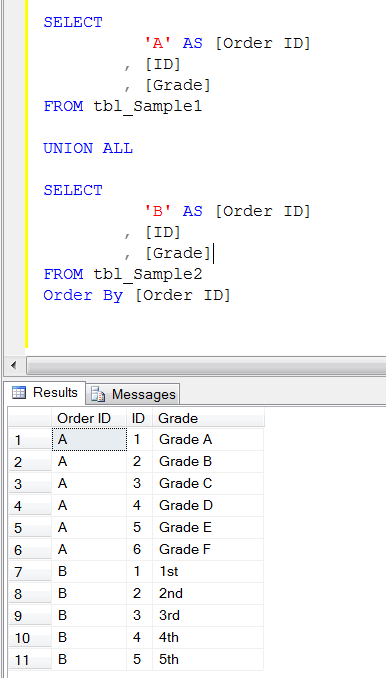
It is very simple to resolve, just add one more column with any sorting number… either 1,2,3 or A,B,C and order on the basis of this column. Let me demonstrate it.

USE tempdb
GO
SELECT
		  'A' AS [Order ID]
		, [ID]
		, [Grade]
FROM tbl_Sample1

UNION ALL

SELECT
		  'B' AS [Order ID]
		, [ID]
		, [Grade]
FROM tbl_Sample2
Order By [Order ID]
--OUTPUT

errormsg156.1.1
Conclusion :

Remember, whenever you use UNION / UNION ALL and have to order by each table separately, just add one more column with any sorting value and order by on the basis of this column.

Read Full Post »

A few months ago, I wrote an article about THROW a new technique to raise an exception and transfer execution to a CATCH block shipped with SQL Server 2012. I also compared throw with Raiserror in that article partially. Later on I found a lot of differences and found that THROW is much better than RAISERROR. Let me create a sample error message to demonstrate the difference.

EXEC sys.sp_addmessage
@msgnum   = 80000
,@severity = 10
,@msgtext  = N'This is a test message.'
,@lang = 'us_english';
GO

Let me explain the differences:

No

RAISERROR

THROW

1

If you pass any message_id to RAISERROR, the message_id must be available in sys.messages.

Example :

RAISERROR (51000, -- Message id.
10, -- Severity,
1, -- State,
N'This is a test message');

–OUTPUT
Msg 18054, Level 16, State 1, Line 1
Error 51000, severity 10, state 1 was raised, but no message
with that error number was found in sys.messages.
If error is larger than 50000, make sure the user-defined
message is added using sp_addmessage.

If you pass any message_id to THROW, the message_id is not necessary to be available in sys.messages.
Example :

THROW 51000
, 'This is a test message'
, 1
;

–OUTPUT
Msg 51000, Level 16, State 1, Line 1
This is a test message

2

If you pass any message_id to RAISERROR, the message_id range must be between 13000 and 2147483647 and it cannot be 50000.
Example :

RAISERROR (49913, -- Message id.
10, -- Severity,
1, -- State,
N'This is a test message');

–OUTPUT
The server could not load DCOM. Software Usage Metrics cannot be started without DCOM.

If you pass any message_id to THROW, the message_id range must be between 50000 and 2147483647.
Example :

THROW 49913
, N'This is a test message'
, 1
;

–OUTPUT
Msg 35100, Level 16
State 10, Line 1
Error number 49913 in
the THROW statement
is outside the valid range.
Specify an error number
in the valid range of
50000 to 2147483647.

3

If you pass any existing message_id to RAISERROR, it will act upon the same Severity level.

Example :

RAISERROR (80000, -- Message id.
10, -- Severity,
1, -- State,
N'This is a test message');

–OUTPUT
This is a test message.

If you pass any message_id to THROW, whatever the Severity level is, it will always show Severity level 16.
Example :

THROW 80000
, N'This is a test message'
, 1
;

–OUTPUT
Msg 80000, Level 16
State 16, Line 1
This is a test message

4

If you use RAISERROR to trap the bug, it will raise the error but with the incorrect error number.
Example :

BEGIN TRY
DECLARE @VALUE INT
SET @VALUE = 1 / 0
END TRY
BEGIN CATCH

DECLARE @ErrorMessage NVARCHAR(4000);
DECLARE @ErrorSeverity INT;
DECLARE @ErrorState INT;

SELECT
@ErrorMessage = ERROR_MESSAGE(),
@ErrorSeverity = ERROR_SEVERITY(),
@ErrorState = ERROR_STATE();

RAISERROR (
@ErrorMessage, -- Message.
@ErrorSeverity, -- Severity.
@ErrorState -- State.
);
END CATCH;

–OUTPUT
Msg 50000, Level 16
State 1, Line 15
Divide by zero error encountered.

If you try to use THROW to raise the error, it will give you the exact error number.
Example :

BEGIN TRY
DECLARE @VALUE INT
SET @VALUE = 1 / 0
END TRY

BEGIN CATCH
THROW;
END
CATCH

;

–OUTPUT
Msg 8134, Level 16
State 16, Line 4
Divide by zero error encountered.

5

RAISERROR can contain printf formatting styles
Example :

RAISERROR (
N'@@@%*.*s@@@',
10,
1,
0,
30,
N'This is a test message
For SQL Server 2012');
GO

–OUTPUT
@@@This is a test message For SQL@@@

THROW cannot contain printf formatting styles.
Example :

THROW 80000
,N'@@@%*.*s
@@@This is a test message'
, 1

;

–OUTPUT
Msg 80000, Level 16
State 1, Line 1

Conclusion :
As per the above differences THROW function leads over RAISERROR and in my opinion also THROW is better to raise an exception and transfer execution to a CATCH block but again it depends upon the requirements.

Read Full Post »

In my earlier article, I wrote about one of the new system stored procedure sp_describe_undeclared_parameters shipped with SQL Server 2012. This is very handy system stored procedure whenever you need to find undeclared parameters in a SQL query.
I was trying to find undeclared parameters in a query using this system stored procedure and came across with a new error message. I did some research and fixed it.

Let me explain this error in detail :

Message Number: 11508

Severity : 16

Error Message: The undeclared parameter ‘%.*ls’ is used more than once in the batch being analyzed.

Error Generation:

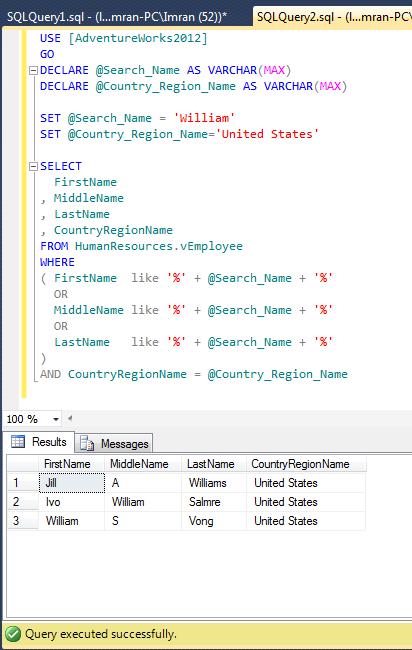
In the given below example, I need to search country region name and a portion of a name in First name, Middle Name & Last Name columns of the employee view. So I wrote a query and it works perfectly. Given below is the script.

USE [AdventureWorks2012]
GO
DECLARE @Search_Name AS VARCHAR(MAX)
DECLARE @Country_Region_Name AS VARCHAR(MAX)

SET @Search_Name = 'William'
SET @Country_Region_Name='United States'

SELECT
FirstName
, MiddleName
, LastName
, CountryRegionName
FROM HumanResources.vEmployee
WHERE
( FirstName  like '%' + @Search_Name + '%'
OR
MiddleName like '%' + @Search_Name + '%'
OR
LastName   like '%' + @Search_Name + '%'
)
AND CountryRegionName = @Country_Region_Name
--OUTPUT

errormsg11508.1

Once the query is executed successfully, lets pass the above query to sp_describe_undeclared_parameters to find undeclared parameters.

USE AdventureWorks2012
GO
sp_describe_undeclared_parameters @tsql =
N'SELECT * FROM HumanResources.vEmployee
WHERE
( FirstName  like ''%'' + @Search_Name + ''%''
OR
MiddleName like ''%'' + @Search_Name + ''%''
OR
LastName   like ''%'' + @Search_Name + ''%''
) AND CountryRegionName = @Country_Region_Name'
--OUTPUT

Msg 11508, Level 16, State 1, Line 5
The undeclared parameter ‘@Search_Name’ is used more than once in the batch being analyzed.

Ooopps…… I am unable to execute it.

Resolution:

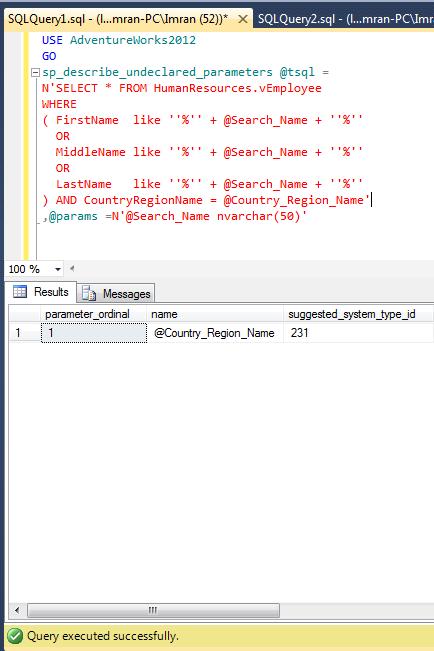
If you look at the ERROR, you will easily realize that @Search_Name is used as a parameter in the query multiple times. But if you remove @Search_Name from the query, the purpose of the query would be dead. So what is the remedy? It is very simple to fix, just pass @Search_Name parameter in the sp_describe_undeclared_parameters as an input parameter, and the error message will be gone. Lets do it.

USE AdventureWorks2012
GO
sp_describe_undeclared_parameters @tsql =
N'SELECT * FROM HumanResources.vEmployee
WHERE
( FirstName  like ''%'' + @Search_Name + ''%''
OR
MiddleName like ''%'' + @Search_Name + ''%''
OR
LastName   like ''%'' + @Search_Name + ''%''
) AND CountryRegionName = @Country_Region_Name'
,@params =N'@Search_Name nvarchar(50)'
--OUTPUT

errormsg11508.2

Conclusion :

Remember, whenever you come across this error message just search for that particular parameter name causing error in the query and pass it into the sp_describe_undeclared_parameters as an input parameter. There is a possibility that multiple parameters can be placed in the query in multiple times. So to fix this error just pass all the parameters mentioned in the error message and run sp_describe_undeclared_parameters again.

Read Full Post »

I came across this Default FILESTREAM filegroup is not available in database ‘%.*ls’ error today, while I was working on a table using filestream. This error message is part of SQL Server since 2005 version.

Let me explain this error in detail :

Message Number: 1969

Severity : 16

Error Message: Default FILESTREAM filegroup is not available in database ‘%.*ls’.

Error Generation:

Let me create a database and table to demonstrate this error message.

--Create a database
USE master ;
GO
CREATE DATABASE Musicdb
ON
(NAME = Musicdb_dat,
FILENAME = 'C:\Program Files\Microsoft SQL Server\MSSQL11.MSSQLSERVER\MSSQL\DATA\Musicdbdat.mdf')
LOG ON
( NAME = Musicdb_log,
FILENAME = 'C:\Program Files\Microsoft SQL Server\MSSQL11.MSSQLSERVER\MSSQL\DATA\Musicdblog.ldf') ;
GO

--Create a table
USE Musicdb
GO
CREATE TABLE tbl_music
(
[ID] uniqueidentifier not null rowguidcol
constraint PK_music primary key clustered,
[Music_files] varbinary(max) filestream
)
--OUTPUT

Msg 1969, Level 16, State 1, Line 1
Default FILESTREAM filegroup is not available in database ‘Musicdb’.

Ooopps…… I am unable to create the table. Lets fix it.

Resolution:

If you look at the error, it says that there is no default filestream in the filegroup but there is a possibility that even filestream is not available in the filegroup. Lets now resolve this issue step by step.

Step 1 :
In this step, lets check in the Musicdb database if filestream is available in the filegroup or NOT.

SELECT database_id,type_desc,name,physical_name
FROM sys.master_files WHERE database_id=DB_ID('Musicdb')
--OUTPUT

Errormsg1969.1.1

Step 2 :
In step 1, you can see that not a single filestream is available in the filegroup. So first lets create a filestream in filegroup. Given below is the script.
Note : if filestream is already available in the filegroup then do not proceed with Step 2 . Go to Step 3 directly.

USE [master]
GO
ALTER DATABASE Musicdb
ADD FILEGROUP [MyMusicAlbum]
CONTAINS FILESTREAM
GO
ALTER DATABASE Musicdb
ADD FILE
(
NAME = N'Album01',
FILENAME = N'C:\music\Album01.ndf'
)
TO FILEGROUP [MyMusicAlbum]
GO

Step 3 :
In step 1 if filestream is available in filegroup then without going to step 2, just execute the given below script and it will make your filestream as a default filestream in the filegorup.

USE Musicdb
GO
IF NOT EXISTS (SELECT name FROM sys.filegroups WHERE is_default=1 AND name = N'MyMusicAlbum')
ALTER DATABASE Musicdb MODIFY FILEGROUP [MyMusicAlbum] DEFAULT
GO

Step 4 :
Lets create the table again.

--Create a table
USE Musicdb
GO
CREATE TABLE tbl_music
(
[ID] uniqueidentifier not null rowguidcol
constraint PK_music primary key clustered,
[Music_files] varbinary(max) filestream
)
--OUTPUT

Command(s) completed successfully.

Conclusion :
Remember, whenever you come across this error, you just need to either create a filestream in a filegroup or make the existing filestream as a default in filegroup.

Read Full Post »

In my earlier articles, I wrote about new enhancement of FORCESEEK table hint. It is a very handy feature when you have more than one index on the table and you want to select not only the index but also the column name of the index in FORCESEEK table hint. But you should be very careful about the syntax and parameters of this table hint. Recently, I came across a new error message related to FORCESEEK table hint.

Let me explain this error in detail :

Message Number: 365

Severity : 16

Error Message: The query processor could not produce a query plan because the FORCESEEK hint on table or view ‘%.*ls’ specified more seek columns than the number of key columns in index ‘%.*ls’.

Error Generation:

Let me create a NONCLUSTERED INDEX to demonstrate this error.

USE [AdventureWorks2012]
GO
CREATE NONCLUSTERED INDEX [IX_PurchaseOrderDetail_Sample]
ON Purchasing.[PurchaseOrderDetail]
([PurchaseOrderID]
,[ProductID] ASC)
WITH (DROP_EXISTING = OFF) ON [PRIMARY]

Once you create the index, lets write a query using the above index and forceseek table hint.

USE [AdventureWorks2012]
GO
SELECT * FROM Purchasing.PurchaseOrderHeader AS H
INNER JOIN Purchasing.PurchaseOrderDetail AS D
WITH (FORCESEEK
(IX_PurchaseOrderDetail_Sample
(PurchaseOrderID
,ProductID
,OrderQty
)))
ON H.PurchaseOrderID =D.PurchaseOrderID
WHERE
D.ProductID>100
AND D.PurchaseOrderID>10
AND D.OrderQty>0

Msg 365, Level 16, State 1, Line 1
The query processor could not produce a query plan because the FORCESEEK hint on table or view ‘PurchaseOrderDetail’ specified more seek columns than the number of key columns in index ‘IX_PurchaseOrderDetail_Sample’.

Ooopps…… I am unable to execute it.

Resolution:

If you look at the above query, you will realize that there are two key columns ([PurchaseOrderID], [ProductID]) available in IX_PurchaseOrderDetail_Sample index. But what you are trying to do in the above query is that you included an additional column [OrderQty] that is not part of the index.

Lets remove the Order Qty (line # 7) column from the FORCESEEK table hint and execute the query again.

USE [AdventureWorks2012]
GO
SELECT * FROM Purchasing.PurchaseOrderHeader AS H
INNER JOIN Purchasing.PurchaseOrderDetail AS D
WITH (FORCESEEK
(IX_PurchaseOrderDetail_Sample
(PurchaseOrderID
,ProductID

)))
ON H.PurchaseOrderID =D.PurchaseOrderID
WHERE
D.ProductID>100
AND D.PurchaseOrderID>10
AND D.OrderQty>0
--OUTPUT

erromessage365.1.1

Conclusion :

Remember, whenever you use FORCESEEK hint on a table and define the index name and column name as well, the column name must be part of the Index key columns.

Read Full Post »

« Newer Posts - Older Posts »