Feeds:
Posts
Comments

Archive for the ‘Errors’ Category

EXECUTE statement failed because its WITH RESULT SETS clause specified %d result set(s), and the statement tried to send more result sets than this is one of the new error messages introduced in SQL Server 2012. This error message is due to the invalid use of new feature EXEC WITH RESULT SETS.

Let’s discuss this in detail:
Message Number: 11535

Severity : 16

Error Message: EXECUTE statement failed because its WITH RESULT SETS clause specified %d result set(s), and the statement tried to send more result sets than this.

Error Generation:

Let me create a sample stored procedure to generate this error.

Create Procedure UDP_Resultset
As
Select 'A' as [First Letter]
Select 'B' as [Second Letter]
GO
EXEC UDP_Resultset

exec resultset1.1

You can view that the above stored procedure is executed successfully, and it has two result sets.

Lets try to execute it with WITH RESULT SETS clause.

EXEC UDP_Resultset
WITH RESULT SETS
(([1st Letter] varchar(50)
));
--OUTPUT

Msg 11535, Level 16, State 1, Procedure UDP_Resultset, Line 5
EXECUTE statement failed because its WITH RESULT SETS
clause specified 1 result set(s), and the statement tried
to send more result sets than this.
Ooopps…… I am unable to execute it properly. It returned the first result set and the error message.

exec resultset1.2

Resolution:
Why this error ? Because, the above stored procedure returns two result sets but we defined WITH RESULT SETS clause for only one result set. Lets rewrite the script and define two result sets (The same number of result sets returned by stored procedure) to avoid this error.

EXEC UDP_Resultset
WITH RESULT SETS
(([1st Letter] varchar(50)
)
,([2nd Letter] varchar(50)
));
--OUTPUT

exec resultset1.3

Conclusion :
Remember, whenever you use any stored procedure WITH RESULT SETS clause, make sure you use exactly the same number of result set returned by stored procedure to avoid such errors.

Read Full Post »

DBCC SHRINKFILE for FILESTREAM containers requires EMPTYFILE option and does not allow any other options is one of the error messages shipped with SQL Server 2012. It happens due to the new feature File table (File stream) introduced in SQL Server 2012. Lets explore this error message.
Message Number: 2563
Severity : 16
Error Message: DBCC SHRINKFILE for FILESTREAM containers requires EMPTYFILE option and does not allow any other options.

Error Generation:
This error message looks as if something is wrong with the “DBCC SHRINKFILE”. Lets generate this error step by step.
Step 1 :
First of all create a database having File stream.

CREATE DATABASE [MyFileTableDB]
ON PRIMARY
( NAME = N'MyFileTableDB', FILENAME = N'C:\DATA\MyFileTableDB.mdf'),
FILEGROUP MyFileGroup CONTAINS FILESTREAM (NAME = MyFileTableFS,FILENAME='C:\Data\MyFileTable')
LOG ON
( NAME = N'MyFileTableDB_log', FILENAME = N'C:\DATA\MyFileTableDB_log.ldf')
WITH FILESTREAM ( NON_TRANSACTED_ACCESS = FULL, DIRECTORY_NAME = N'MyFileTableDB' )
GO

Step 2 :
Shrink the data file.

-- Shrink the data file
USE My_FileTableDB
GO
DBCC SHRINKFILE (N'MyFileTableDB' , 0, TRUNCATEONLY)

msg25631.1

Step 3 :
Shrink the log file.

-- Shrink the log file
USE My_FileTableDB
GO
DBCC SHRINKFILE (N'MyFileTableDB_log' , 0, TRUNCATEONLY)

msg25631.2

Step 4 :
Shrink the filestream file.

-- Shrink the FileStream file
USE My_FileTableDB
GO
DBCC SHRINKFILE (N'MyFileTableFS' , 0, TRUNCATEONLY)

Oooops……………
Msg 2563, Level 16, State 1, Line 1
DBCC SHRINKFILE for FILESTREAM containers requires EMPTYFILE option and does not allow any other options.

Resolution:
You cannot shrink FileStream files like data file or log file. The correct syntax to shrink file stream is given below :

DBCC SHRINKFILE (N'MyFileTableFS' , EMPTYFILE)

msg25631.3

Conclusion:
Remember, whenever you shrink the FILESTREAM files follow the exact syntax given above to avoid this error.

Read Full Post »

In this article we will discuss about an error message (DROP ASSEMBLY failed because ‘%ls’ is referenced by object ‘%ls’) related to Assembly.

Let’s discuss this in detail:
Message Number: 6590

Severity : 16

Error Message: DROP ASSEMBLY failed because ‘%ls’ is referenced by object ‘%ls’.

Error Generation:
I was working on CLR functions development and implementations in SQL, using Visual Studio 2005. After sometime, I had to go to SSMS to drop assembly to create a new one. So I went to SQL Server and wrote a query.

Drop assembly CLRExcelFV
--OUTPUT

Msg 6590, Level 16, State 1, Line 1
DROP ASSEMBLY failed because ‘CLRExcelFV’ is referenced by object ‘FV’.

Ooopps…… I am unable to drop it.

Resolution:

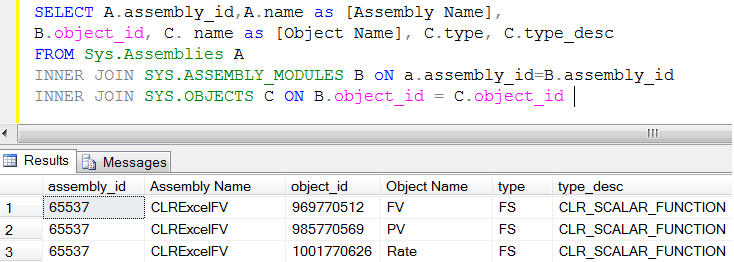
SELECT A.assembly_id,A.name as [Assembly Name],
B.object_id, C. name as [Object Name], C.type, C.type_desc
FROM Sys.Assemblies A
INNER JOIN SYS.ASSEMBLY_MODULES B oN a.assembly_id=B.assembly_id
INNER JOIN SYS.OBJECTS C ON B.object_id = C.object_id
--OUTPUT

dropassembly1.2

Now, in the above result set, you have the assembly name along with its dependent’s objects names (CLR functions).
First lets drop CLR functions and then drop Assembly.

Drop Function FV
Drop Function PV
Drop Function Rate
Drop assembly CLRExcelFV
--OUTPUT

Conclusion :
You cannot drop assembly without dropping its object. Preferably, you should alter the assembly not to drop. But if you need to drop, first drop  all its objects and then you can drop Assembly.

Read Full Post »

In this article we will discuss about a new error message (A TOP cannot be used in the same query or sub-query as an OFFSET) introduced in SQL SERVER 2012.

Let’s discuss it in detail:

Message Number: 10741

Severity : 15

Error Message: “A TOP cannot be used in the same query or sub-query as an OFFSET.”

Error Generation:
Let me create an example to generate this error:

USE AdventureWorks2012
GO
Select top 5 BusinessEntityID,[FirstName]
, [LastName],[JobTitle] as [JT]
from HumanResources.vEmployee A
Order By [JobTitle]
OFFSET 10 ROWS
FETCH NEXT 10 ROWS ONLY
--OUTPUT

Msg 10741, Level 15, State 2, Line 4
A TOP cannot be used in the same query or sub-query as an OFFSET.

Resolution:

In the above example, you can see, I upgraded my query from sql server 2008 to 2012 and used new data paging technique introduced in SQL Server 2012, but I did not (deliberately) remove TOP Keyword from the query. Remember, whenever you use data paging  (OFFSET ROWS), make sure you don’t use TOP keyword in the query to avoid this error. According to MSDN : TOP cannot be combined with OFFSET and FETCH in the same query expression (in the same query scope).

Reference : MSDN

Read Full Post »

In this article we will discuss a new error message (The batch could not be analyzed because of compile errors) that appears in SQL SERVER 2012.

Let’s discuss it in detail:

Message Number: 11501

Severity : 16

Error Message: “The batch could not be analyzed because of compile errors”

Error Generation:

In my previous article, I discussed about sp_describe_undeclared_parameters, this error message is somehow related to sp_describe_undeclared_parameters (because of the batch processing).  But it can also be generated wherever batch processing is involved.

Let me create an example to generate this error:

USE AdventureWorks2012
GO
sp_describe_undeclared_parameters @tSQL=
N'SELECT @BusinessID=[BusinessEntityID]
from [HumanResources].[vEmployee] Where [FirstName]=@FName'
,@params =N'@FName nvarchar(50),, @BusinessID INT OUTPUT'
--OUTPUT

Msg 102, Level 15, State 1, Line 1
Incorrect syntax near ‘,’.
Msg 11501, Level 16, State 2, Line 1
The batch could not be analyzed because of compile errors.

errormsg11501.1.

Resolution:

The reason behind this error is whenever you pass any incorrect input parameter to process any batch and if there is any error in the input parameter, it will generate this error with the combination of actual error. In the above example, I placed two commas instead of one in the parameter and then it generated two errors 1st one to notify actual error Incorrect syntax near ‘,’  also  it notifies that  The batch could not be analyzed because of compile errors. Whenever you are using any batch processing command, make sure that the input parameters are correct.

Please let me know if you have other samples to regenerate such error.

Read Full Post »

In my previous article, I wrote about Executing Stored Procedure with Result Sets. I utilized this new feature introduced in SQL Server 2012 many times and it is very handy, when it comes to manipulate stored procedure result sets.

Today, I was reading a question related to this topic in a forum where a community member tried to manipulate stored procedure result set with result sets keyword and then insert it into a temporary table. But it gives an error.

Let me create few examples to explain the problem :

Example 1 :
In this example, we will insert the result set of a stored procedure in a temporary table without using result set keyword and it works fine.

Use AdventureWorks2012
GO
Create Table #temp
(
[DepartmentID] int,
[Name] varchar(50)
)
GO
Create PROCEDURE SP_ResultSet_Example1
as
Select [DepartmentID]
,[Name]
from [HumanResources].[Department]
GO
Insert into #temp EXEC SP_ResultSet_Example1
GO
Select * from #temp order by [DepartmentID]

resultseterror1.1

Example 2 :
In this example, we will insert the result set of a stored procedure in a temporary table with result sets keyword. It gives an error .

Use AdventureWorks2012
GO
Create Table #temp
(
[DepartmentID] int,
[Name] varchar(50)
)
GO
Create PROCEDURE SP_ResultSet_Example1
as
Select [DepartmentID]
,[Name]
from [HumanResources].[Department]
GO

Insert into #temp EXEC SP_ResultSet_Example1 WITH RESULT SETS
(
([Department ID] int NOT NULL,
[Department name] Name NOT NULL));
GO
Select * from #temp order by [DepartmentID]

resultseterror1.2

Explanation :
We cannot use result sets keyword, when we need to insert any stored procedure result set into a table. The reason behind this is if we use result sets keyword we can return multiple results with different columns and with different data types from a single stored procedure and this functionality cannot be handled in a single table. As per MSDN ” WITH
Possible execute options. The RESULT SETS options cannot be specified in an INSERT…EXEC statement.”
.

Read Full Post »

In this article we will discuss a new error message (Window frame with ROWS or RANGE must have an ORDER BY clause) introduced in SQL SERVER 2012.

Let’s discuss it in detail:

Message Number: 10756

Severity : 15

Error Message: “Window frame with ROWS or RANGE must have an ORDER BY clause.”

Error Generation:
Let me create an example to generate this error:

USE AdventureWorks2012
GO
SELECT SalesOrderID, ProductID, OrderQty
,SUM(OrderQty) OVER (PARTITION BY SalesOrderID
--ORDER BY SalesOrderID, ProductID
ROWS BETWEEN UNBOUNDED PRECEDING AND CURRENT ROW
) AS 'total'
FROM Sales.SalesOrderDetail
Where SalesOrderID IN(43659,43664)
Order By SalesOrderID

--OUTPUT

Msg 10756, Level 15, State 1, Line 2
Window frame with ROWS or RANGE must have an ORDER BY clause.

Resolution:
In the above example, you can see, I used Window frame with ROWS in the OVER clause but forgot to provide order by clause. Remember, whenever you use Window frame with rows or range, make sure you use it along with order by clause to avoid this error.

Please let me know if you have other samples to regenerate such error.

Read Full Post »

SQL Server 2012 is equipped with many new features and functions. The same ways it is equipped with its new error messages as well. In this article we will discuss one of the new error messages (Cannot construct data type %ls, some of the arguments have values which are not valid) introduced in SQL SERVER 2012.

Let’s discuss it in detail:

Error Number: 289

Error Message: “Cannot construct data type %ls, some of the arguments have values which are not valid.”

Error Generation:
Let me create few examples to generate this error:

Declare @Year as int=2012
Declare @Month as int = 12
Declare @Day as int =32 --Invalid Day
Declare @Hour as int=25 --Invalid Hour
Declare @Minute as int=59
Declare @Second as int=59
Declare @Fraction as int=50

Example 1:

Select DATEFROMPARTS(@Year,@Month,@Day) as [Result]
--OUTPUT

Msg 289, Level 16, State 1, Line 9
Cannot construct data type date, some of the arguments have values which are not valid.

Example 2:

Select TIMEFROMPARTS(@Hour,@Minute,@Second,@Fraction,2) as [Result]
--OUTPUT

Msg 289, Level 16, State 2, Line 15
Cannot construct data type time, some of the arguments have values which are not valid.

Example 3:

Select SMALLDATETIMEFROMPARTS(@Year,@Month,@Day,@hour,@Minute) AS [RESULT]
--OUTPUT

Msg 289, Level 16, State 4, Line 21
Cannot construct data type smalldatetime, some of the arguments have values which are not valid.

Example 4:

Select DATETIME2FROMPARTS( @Year,@Month,@Day,@Hour,@Minute,@Second,@Fraction,2) as [RESULT]
--OUTPUT

Msg 289, Level 16, State 5, Line 27
Cannot construct data type datetime2, some of the arguments have values which are not valid.

Resolution:
In the above examples, you can see, I passed an invalid argument (day cannot be 32 in a month & hour cannot be 25 in a day) to above functions. So the constructor of this function cannot create a date from these arguments, so it generates the error.

Whenever you come across this error, please check the arguments passed in the function. The arguments must be valid to avoid this error.

Please let me know if you have other samples to regenerate such error.

Read Full Post »

Whenever we write a code, we need to do the error handling in it and as much as the handling is strong, it is as simple to trap the bug in the system. SQL Server 2012 provided a new and a flexible way of doing the error handling with the additional features to make it effective and efficient.

First, I will discuss how we were doing error handling in 2005/2008 and what was missing in RAISERROR and why we need this new functionality of THROW.

-- Error HANDLING in SQL Server 2005/2008
BEGIN TRY
DECLARE @VALUE INT
SET @VALUE = 1 / 0
END TRY
BEGIN CATCH
DECLARE @ErrorMessage NVARCHAR(4000);
DECLARE @ErrorSeverity INT;
DECLARE @ErrorState INT;

Print ERROR_NUMBER() --Actuall Error Number
Print ERROR_LINE()   --Actuall ErrorLine

SELECT
@ErrorMessage = ERROR_MESSAGE(),
@ErrorSeverity = ERROR_SEVERITY(),
@ErrorState = ERROR_STATE();

RAISERROR (@ErrorMessage, -- Message.
@ErrorSeverity, -- Severity.
@ErrorState -- State.
);
END CATCH;
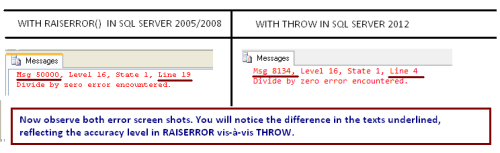
--OUTPUT

8134  — Actual Error Number
4     — Actual Error Line Number
Msg 50000, Level 16, State 1, Line 19
Divide by zero error encountered.

If you look at the error detail, you get the feeling that RAISERROR detail is unable to handle the error properly. It displays the information message like  Divide by zero error encountered which is correct but the rest of the info like error number 50000 & line number 19 is incorrect because these are not the actual error & line numbers respectively.

Now, lets try the same in SQL SERVER 2012 with THROW and notice the accuracy.

-- Error HANDLING in SQL Server 2012
BEGIN TRY
DECLARE @VALUE INT
SET @VALUE = 1 / 0
END TRY
BEGIN CATCH
THROW
END CATCH;

--OUTPUT

Msg 8134, Level 16, State 1, Line 4
Divide by zero error encountered.

So, what is it that I did in SQL Server 2012 ? I just replaced all error handling with one keyword “THROW” and it returns more accurate result Like error number 8134 and line number to the caller, than the RAISERROR. Also, it reduces the number of codes.

Read Full Post »

« Newer Posts