Feeds:
Posts
Comments

Archive for the ‘Functions’ Category

DATETIMEOFFSETFROMPARTS is one of the important sql server functions required when we need to make date and time from offset and precision.

Let me explain its syntax, parameters, purpose and examples in detail.

Syntax :

DATETIMEOFFSETFROMPARTS ( year, month, day, hour, minute, seconds, fractions, hour_offset, minute_offset, precision )

Parameters :
@Year : A valid integer for year.
@Month : A valid integer for month range from 1-12.
@Day : A valid integer for day range from 1-31. (Depends upon the total number of days in a month)
@Hour : A valid integer for Hour range from 0-23.
@Minutes : A valid integer for Minutes range from 0-59.
@Seconds: A valid integer for Seconds range from 0-59.
@Fractions : A valid integer for Fractions range from 0-9999999.
@hour_offset : A valid integer for hour portion of the offset range from -14 – +14.
@minute_offset : A valid integer for minute portion of the offset should be 0 or 30
@Precision : A valid integer for Precision range from 0-7.

Purpose :
This function requires year, month, day, hour, minute, seconds, fractions,hour portion of offset, minute portion of offset & precision as a parameter (All parameters are mandatory) and returns a valid datetimeoffset as a result. If we pass any invalid date, time or offset parts, it will generate an error. Also if we pass NULL values to any of its parameters except Precision parameter, it returns NULL value.
Let me explain this with simple examples.

Example-1 : DATETIMEOFFSETFROMPARTS – With valid offset Parts

Declare @Year as smallint=2012
Declare @Month as smallint = 12
Declare @Day as smallint =31
Declare @Hour as int=23
Declare @Minute as int=59
Declare @Second as int=59
Declare @Fraction as int=50
Declare @Hour_offset as int=12
Declare @Minute_offset as int=00

Select DATETIMEOFFSETFROMPARTS( @Year,@Month,@Day,@Hour,@Minute,@Second,@Fraction,@Hour_offset,@Minute_offset,2)
as [RESULT]
--RESULT
2012-12-31 23:59:59.50 +12:00

datetimeoffset1.1

Example-2 : DATETIMEOFFSETFROMPARTS – With Invalid offset Parts
It will generate an error because only valid offset parts are allowed as a parameter.

Declare @Year as smallint=2012
Declare @Month as smallint = 12
Declare @Day as smallint =31
Declare @Hour as int=23
Declare @Minute as int=59
Declare @Second as int=59
Declare @Fraction as int=50
Declare @Hour_offset as int=15 -- Invalid Hour offset
Declare @Minute_offset as int=00

Select DATETIMEOFFSETFROMPARTS( @Year,@Month,@Day,@Hour,@Minute,@Second,@Fraction,@Hour_offset,@Minute_offset,2)
as [RESULT]
--RESULT

Msg 289, Level 16, State 6, Line 12
Cannot construct data type datetimeoffset, some of the arguments have values which are not valid.

datetimeoffset1.2
Example-3 : DATETIMEOFFSETFROMPARTS- With NULL offset parts
If we pass NULL value to any of its parameter except Precision parameter, it will return NULL value

Declare @Year as smallint=2012
Declare @Month as smallint = 12
Declare @Day as smallint =31
Declare @Hour as int=23
Declare @Minute as int=59
Declare @Second as int=59
Declare @Fraction as int=50
Declare @Hour_offset as int=NULL -- Hour offset as NULL
Declare @Minute_offset as int=00

Select DATETIMEOFFSETFROMPARTS( @Year,@Month,@Day,@Hour,@Minute,@Second,@Fraction,@Hour_offset,@Minute_offset,2)
as [RESULT]
--RESULT

NULL

datetimeoffset1.3
Reference : MSDN

Read Full Post »

sys.dm_db_database_page_allocations is one of the dynamic management functions shipped with SQL Server 2012. As its name implies, it does the same; it gives the information as to how objects keep data in different pages and its allocation in the databases.

This function is somehow same as undocumented DBCC IND command but it provides much more information than DBCC IND that we will discuss later in this article.

Syntax :

sys.dm_db_database_page_allocations
(@DatabaseId , @TableId , @IndexId , @PartionID , @Mode)

Parameters :
@DatabaseId :You need to pass the required database ID. This parameter is mandatory and data type of this argument is small integer.
@TableId:You need to pass the required table ID. This parameter is optional and data type of this argument is integer.
@IndexId:You need to pass the required Index ID. This parameter is optional and data type of this argument is integer.
@PartionID:You need to pass the required Partion ID. This parameter is optional and data type of this argument is integer.
@Mode:You need to pass the required Mode. This parameter is mandatory and data type of this argument is nvarchar(64). In this argument we must pass only ‘DETAILED’ OR ‘LIMITED’.

Purpose :

As we know that SQL Server stores data in the pages and whenever we need to view this information in earlier versions (2005, 2008) of SQL Server we need to invoke an undocumented command DBCC IND to get the info. The problem with this command is that if you want to further manipulate its result set you need to insert its record set in a temporary table and it also has a limited level of information.
In SQL SERVER 2012, sys.dm_db_database_page_allocations came as a replacement for the DBCC IND command and it gives more information about the internal storage of the data.

Given below are the major differences between sys.dm_db_database_page_allocations and DBCC IND.

S.No sys.dm_db_database_page_allocations DBCC IND
1 It is an in line function, so you can easily manipulate its result set without using any temporary table. You need temporary table to manipulate its result set.
2 It gives you the information about unallocated pages of the object as well. It gives you the information about allocated pages of the object only.
3 It gives you the complete details of internal storage including allocated unit details. It does not give you the complete details of internal storage including allocated unit details.
4 You can query all the database objects allocation at a time. You can query only one object at a time.

Given are column comparisons between sys.dm_db_database_page_allocations and DBCC IND command.  Also highlighted are the new fields introduced in this function.

dm_db_database_page_allocation

Let me explain few examples to explain this function :

Example 1 :
In this example, this function will give you the page allocation of “Sales” table only.

Select * from sys.dm_db_database_page_allocations(DB_ID(), object_id('Sales'),NULL,NULL,'DETAILED')

Example 2 :
In this example, this function will give you the page allocation for all objects including system objects.

Select * from sys.dm_db_database_page_allocations(DB_ID(), NULL ,NULL,NULL,'DETAILED')

Reference : CONNECT

Read Full Post »

sys.dm_exec_describe_first_result_set_for_object is one of the dynamic management functions introduced in SQL server 2012. This function also displays the first result set metadata information like “dm_exec_describe_first_result_set”  dynamic management function, but the major difference is“dm_exec_describe_first_result_set” use for SQL queries and “sys.dm_exec_describe_first_result_set_for_object” use for objects like stored procedure, triggers.

Syntax :

sys.dm_exec_describe_first_result_set_for_object
( @object_id , @include_browse_information )

Parameters :
@object_id : Object ID of stored procedure and trigger only. Data type is integer.
@include_browse_information : It can be from 0 to 2. using this parameter, function returns the additional information. Data type is bit.

Purpose :

The purpose of sys.dm_exec_describe_first_result_set_for_object  is to view the metadata information of first result set of any stored procedure or trigger. Lets say, if any procedure or trigger having more than one result set then the meta data information will be displayed for the first result set only.

Note : sys.dm_exec_describe_first_result_set_for_object can not display the meta data of other than “stored procedure or trigger”.

Let me explain it with simple examples :

Example 1 : (View metadata information of first result set of the Stored Procedure) when @include_browse_information=0

Use AdventureWorks2012
GO
Select * from
sys.dm_exec_describe_first_result_set_for_object
(object_id('[dbo].[UDP_Employee]'),0)
--OUTPUT
--Given below are the few columns from the result set. Other than that, there are other important information also available to give you complete details of metadata.
--But if the @include_browse_information=0 then this function will not give you the source data (Source Database, Source Schema, Source Table, Source Column) information.

Example 2 : (View metadata information of first result set of the Stored Procedure) when @include_browse_information=1

Use AdventureWorks2012
GO
Select * from
sys.dm_exec_describe_first_result_set_for_object
(object_id('[dbo].[UDP_Employee]'),1)
--OUTPUT
--If the @include_browse_information=1 then this function will give you the source data (Source database, Source Schema, Source table, Source column) information including the information available in @include_browse_information=0

Example 3 : (View metadata information of first result set of the Stored Procedure having two result set) when @include_browse_information=0
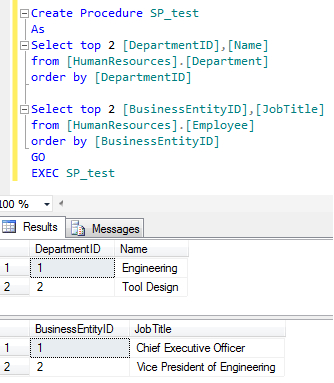
Lets create a stored procedure having two result set.

Create Procedure SP_test
As
Select top 2 [DepartmentID],[Name] from [HumanResources].[Department] order by [DepartmentID]

Select top 2 [BusinessEntityID],[JobTitle] from [HumanResources].[Employee] order by [BusinessEntityID]
GO
EXEC SP_test

Lets view the meta data information of the first result set of “SP_test” stored procedure using “sys.dm_exec_describe_first_result_set_for_object”

Use AdventureWorks2012
GO
Select * from
sys.dm_exec_describe_first_result_set_for_object
(object_id('[dbo].[SP_test]'),0)
--OUTPUT
--Given below are the few columns from the first result set Only.

Example 4 : View metadata information of View
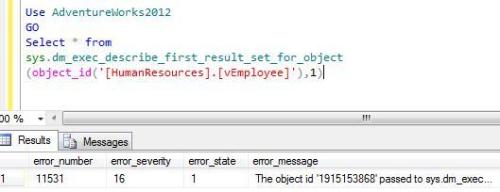
In this example, “sys.dm_exec_describe_first_result_set_for_object” will generate an error because nothing except stored procedure or triggers is allowed.

Use AdventureWorks2012
GO
Select * from
sys.dm_exec_describe_first_result_set_for_object
(object_id('[HumanResources].[vEmployee]'),1)
--OUTPUT
--In this case all values will be NULL expect error information columns in the end of the result set.
--Given below is the screen images of the last columns.

Summary :
sys.dm_exec_describe_first_result_set_for_object gives the meta data information of the first result set of any stored procedure and trigger, but it differs from different @include_browse_information parameter.

  1. This function can filter the meta data column as per the requirement.
  2. This function returns the data in a tabular form, so you can utilize it in any other function or procedure.

Reference : MSDN

Read Full Post »

In my previous article I discussed about CUME_DIST. In this artcile we will discuss another important analytical function introduced in SQL SERVER 2012 and that is similar to CUME_DIST namely PERCENT_RANK. Lets discuss PERCENT_RANK syntax, purpose, return type, simple examples.

Syntax

PERCENT_RANK( )
OVER ( [ partition_by_clause ] order_by_clause )

Purpose
The purpose of this function is to calculate the relative rank of a row within a group of rows. PERCENT_RANK of any set of First row value will be 0. PERCENT_RANK includes NULL values but they are treated as the lowest possible values.

Return Type
The return type is float(53) and the values are always between 0 and 1.

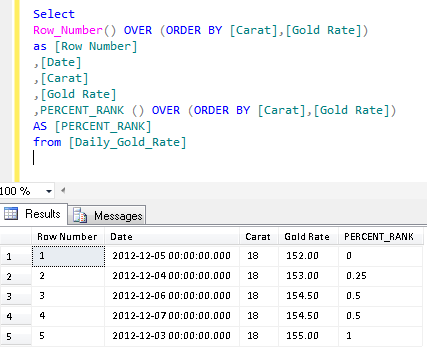
Example 1 :  Simple PERCENT_RANK()

Lets take gold rates as an example to check their relative rank in one week.

Create table [Daily_Gold_Rate]
(
(
[S.No] int,
[Date] datetime,
[Carat] int,
[Gold Rate] numeric(18,2)
)
Insert into [Daily_Gold_Rate] values(1,'2013-01-03',18,155.00)
Insert into [Daily_Gold_Rate] values(4,'2013-01-04',18,153.00)
Insert into [Daily_Gold_Rate] values(7,'2013-01-05',18,152.00)
Insert into [Daily_Gold_Rate] values(10,'2013-01-06',18,154.50)
Insert into [Daily_Gold_Rate] values(13,'2013-01-07',18,154.50)

GO

Select
Row_Number() OVER (ORDER BY [Carat],[Gold Rate]) as [Row Number]
,[Date]
,[Carat]
,[Gold Rate]
,PERCENT_RANK () OVER (ORDER BY [Carat],[Gold Rate]) AS [PERCENT_RANK]
from [Daily_Gold_Rate]

Explanation :


If you look at Column E and Column H, Column E is calculated by SQL Server and Column H is calculated manually to understand how it works. To calculate PERCENT_RANK() manually, you need two values.

1. Row Number based on the values (meaning less than or equal to value) (Column F). But first value will always be 0.
2. Total Number of Records – 1 (Column G)

Column G: It is simple; you need to calculate the total number of records and reduce 1 from it.
Column F: You simply need to get the row number based on the values. But first row number will be 0 as well, so you need start counting it from row number 2. You can observe that it is simple row number till row number 2 but in row number 3 & 4 we found the same Gold rate, so it picked up 2 (due to less than or equal to value criteria) as row number.

Finally, you need to divide Column F by Column G to get the PERCENT_RANK() manually. The same functionality PERCENT_RANK() does automatically in SQL.

Example 2 : PERCENT_RANK() with Partition By Clause

Lets insert other Gold rates to proceed with this example.

Insert into [Daily_Gold_Rate] values(2,'2013-01-03',22,190.50)
Insert into [Daily_Gold_Rate] values(3,'2013-01-03',24,202.23)

Insert into [Daily_Gold_Rate] values(5,'2013-01-04',22,191.00)
Insert into [Daily_Gold_Rate] values(6,'2013-01-04',24,202.25)

Insert into [Daily_Gold_Rate] values(8,'2013-01-05',22,190.00)
Insert into [Daily_Gold_Rate] values(9,'2013-01-05',24,203.25)

Insert into [Daily_Gold_Rate] values(11,'2013-01-06',22,189.50)
Insert into [Daily_Gold_Rate] values(12,'2013-01-06',24,201.50)

Insert into [Daily_Gold_Rate] values(14,'2013-01-07',22,189.00)
Insert into [Daily_Gold_Rate] values(15,'2013-01-07',24,201.00)

Select
Row_Number() OVER (Partition by [Carat] ORDER BY [Carat],[Gold Rate])
as [Row Number]
,[Date]
,[Carat]
,[Gold Rate]
,PERCENT_RANK () OVER (Partition by [Carat] ORDER BY [Carat],[Gold Rate])
AS [PERCENT_RANK]
from [Daily_Gold_Rate]

Reference :MSDN

Read Full Post »

Today, I came across a situation where I needed to parse HTML tags and get plain text from it, and we do not have a built-in function in SQL SERVER to do it. So, I searched the solution over the internet but most of the solutions are designed from the loop.
So, I thought of doing it without loop and with the help of XQuery.
Given below is the user defined function to remove all HTML tags (“< >”) from any HTML string and return plain text.

CREATE FUNCTION dbo.[UDF_Parse_HTML_From_String]
(
@HTML_STRING VARCHAR(MAX) -- Variable for string
)
RETURNS VARCHAR(MAX)
BEGIN

DECLARE @STRING VARCHAR(MAX)
Declare @Xml AS XML
SET @Xml = CAST(('<A>'+ REPLACE(REPLACE(REPLACE(REPLACE(@HTML_STRING
,'<','@*'),'>','!'),'@','</A><A>'),'!','</A><A>') +'</A>') AS XML)

;WITH CTE AS (SELECT A.value('.', 'VARCHAR(MAX)') [A]
FROM @Xml.nodes('A') AS FN(A) WHERE CHARINDEX('*',
A.value('.', 'VARCHAR(MAX)'))=0
AND ISNULL(A.value('.', 'varchar(max)'),'')<>'')

SELECT @STRING=STUFF((SELECT ' ' + [A] FROM CTE FOR XML PATH('')),1,1,'')
RETURN @STRING
END
GO
SELECT dbo.[UDF_Parse_HTML_From_String] ('<b>This is raresql.com</b><h2>HTML Parse User Defined Function</h2><a href="http://raresql.com"></a>') as [Text]
--OUTPUT

Read Full Post »

I had to migrate data from old system to new system and I found that we have one field called ‘comments’ having contact details of the customers. The next stage was to extract the numbers (Contact details) from string (Comments column).

We can develop this solution via cursor as well but I developed it without cursor.

Given below is the solution.

CREATE FUNCTION dbo.[UDF_Extract_Numbers_From_String]
(
@String VARCHAR(MAX)  -- Variable for string
)
RETURNS VARCHAR(MAX)
BEGIN
DECLARE @RETURN_STRING VARCHAR(MAX)

;WITH N1 (n) AS (SELECT 1 UNION ALL SELECT 1),
N2 (n) AS (SELECT 1 FROM N1 AS X, N1 AS Y),
N3 (n) AS (SELECT 1 FROM N2 AS X, N2 AS Y),
N4 (n) AS (SELECT ROW_NUMBER() OVER(ORDER BY X.n)
FROM N3 AS X, N3 AS Y)

SELECT @RETURN_STRING=ISNULL(@RETURN_STRING,'')+ SUBSTRING(@String,Nums.n,1)
FROM N4 Nums
WHERE Nums.n<=LEN(@String) AND  PATINDEX('%[0-9.+-]%',SUBSTRING(@String,Nums.n,1))>0

RETURN @RETURN_STRING
END
GO

SELECT dbo.UDF_Extract_Numbers_From_String
('Mobile No +49 4879 17835 is activated') as [Numbers]
GO
SELECT dbo.UDF_Extract_Numbers_From_String
('New Fax No is +2-213-8764243') as [Numbers]

--RESULT

Read Full Post »

Today, I was cleaning data for upload in the live database. I found few discrepancies in customer names. The names did not have a standard pattern, some of them in proper case, while few others in small / upper case and also some in sentence case.

However, the client wanted these names to be converted to Proper Case. As usual, I started the easy way… the web search. But almost all solutions use loop to convert it into PROPER CASE.

I normally avoid loop to perform any operation until unless it is the last option due to performance issue.

So, I designed the solution via Xquery and converted the string to Proper Case without loop.

Let me create sample to explain it.

Create Table Student
(
[Student ID] int Identity(1,1),
[Student Name] varchar(50)
)

Go
Insert into Student Values ('Steve Masters')
Insert into Student Values ('david ortiz')
Insert into Student Values ('Michael sean ray')
Insert into Student Values ('Steven SElikoff')
Insert into Student Values ('Carole POLAND')
Insert into Student Values ('bjorn rettig')
Insert into Student Values ('Michiko OSAda')
Insert into Student Values ('carOL Philips')
Insert into Student Values ('Merav Netz')

GO
Create Function dbo.[UDF_PROPER_CASE]
(
@String VARCHAR(MAX)  -- Variable for string
)
RETURNS varchar(MAX)
BEGIN
Declare @Xml XML
Declare @ProperCase Varchar(Max)
Declare @delimiter Varchar(5)
Set @delimiter=' '
SET @Xml = cast(('<A>'+replace(@String,@delimiter,'</A><A>')+'</A>') AS XML)

;With CTE AS (SELECT A.value('.', 'varchar(max)') as [Column]
FROM @Xml.nodes('A') AS FN(A) )
Select @ProperCase =Stuff((Select ' ' + UPPER(LEFT([Column],1))
+ LOWER(SUBSTRING([Column], 2 ,LEN([Column]))) from CTE
for xml path('') ),1,1,'')

RETURN (@ProperCase)
END
GO
-- For Example :
SELECT dbo.[UDF_PROPER_CASE]([Student Name]) as [Student Name]
from Student
GO

Read Full Post »

CUME_DIST is a very nice & helpful analytical function introduced in SQL SERVER 2012. In this article, we will discuss its syntax, purpose, return type, simple examples and real world examples also.

syntax

CUME_DIST( )
OVER ( [ partition_by_clause ] order_by_clause )

purpose
The purpose of this function is to calculate the cumulative distribution of value in a group of values.

Return Type
The return type is float(53) and the values are always between 0 and 1.

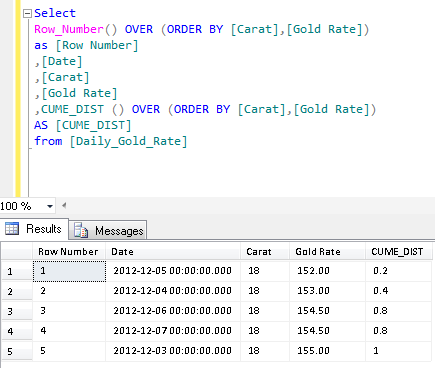
Example 1 :  Simple CUME_DIST ()

Lets take gold rates as an example to check their cumulative distribution in one week.

Create table [Daily_Gold_Rate]
(
(
[S.No] int,
[Date] datetime,
[Carat] int,
[Gold Rate] numeric(18,2)
)

Insert into [Daily_Gold_Rate] values(1,'2012-12-03',18,155.00)
Insert into [Daily_Gold_Rate] values(4,'2012-12-04',18,153.00)
Insert into [Daily_Gold_Rate] values(7,'2012-12-05',18,152.00)
Insert into [Daily_Gold_Rate] values(10,'2012-12-06',18,154.50)
Insert into [Daily_Gold_Rate] values(13,'2012-12-07',18,154.50)

GO

Select
Row_Number() OVER (ORDER BY [Carat],[Gold Rate]) as [Row Number]
,[Date]
,[Carat]
,[Gold Rate]
,CUME_DIST () OVER (ORDER BY [Carat],[Gold Rate]) AS [CUME_DIST]
from [Daily_Gold_Rate]

Explanation :


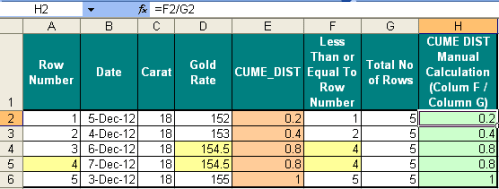
If you look at Column E and Column H, Column E is calculated by SQL Server and Column H is calculated manually to understand how it works. To calculate CUME_DIST manually, you need two values.

1. Row Number based on the values (Meaning less than or equal to value) (Column F)
2. Total Number of Records (Column G)

Column G is simple; you need to calculate the total number of records.
Column F: You simply need to get the row number based on the values. You can observe that it is simple row number till row number 2 but in row number 3 & 4 we found the same Gold rate, so it picked up 4 (due to less than or equal to value criteria) as row number.

Finally, you need to divide Column F by Column G to get the CUME_DIST manually. The same functionality CUME_DIST does automatically in SQL.

Example 2 : CUME_DIST () with Partition By Clause

Lets insert other Gold rates to proceed with this example.

Insert into [Daily_Gold_Rate] values(2,'2012-12-03',22,190.50)
Insert into [Daily_Gold_Rate] values(3,'2012-12-03',24,202.23)

Insert into [Daily_Gold_Rate] values(5,'2012-12-04',22,191.00)
Insert into [Daily_Gold_Rate] values(6,'2012-12-04',24,202.25)

Insert into [Daily_Gold_Rate] values(8,'2012-12-05',22,190.00)
Insert into [Daily_Gold_Rate] values(9,'2012-12-05',24,203.25)

Insert into [Daily_Gold_Rate] values(11,'2012-12-06',22,189.50)
Insert into [Daily_Gold_Rate] values(12,'2012-12-06',24,201.50)

Insert into [Daily_Gold_Rate] values(14,'2012-12-07',22,189.00)
Insert into [Daily_Gold_Rate] values(15,'2012-12-07',24,201.00)

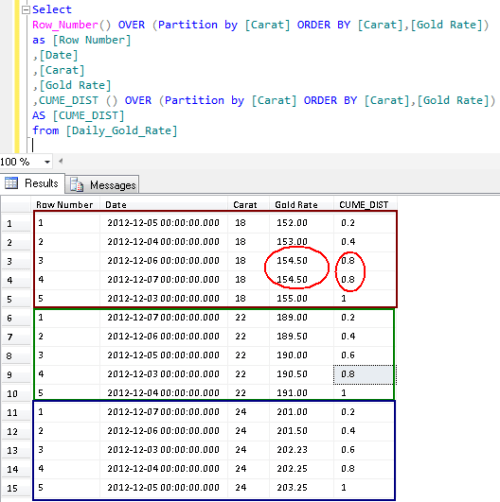
Select
Row_Number() OVER (Partition by [Carat] ORDER BY [Carat],[Gold Rate])
as [Row Number]
,[Date]
,[Carat]
,[Gold Rate]
,CUME_DIST () OVER (Partition by [Carat] ORDER BY [Carat],[Gold Rate])
AS [CUME_DIST]
from [Daily_Gold_Rate]

Reference :MSDN

Read Full Post »

In my previous article, I discussed about LAG. Today, we will discuss another analytical function namely“LEAD” in SQL SERVER 2012. This function performs exactly opposite functionality of LAG. In simple words we can say that if we need to pick up any value from the next row(s) of the current row, we can use this function and get it, instead of using self joins.

Let me explain its syntax, parameters, purpose and examples in detail.
Syntax :

LEAD ( scalar_expression [ ,offset ] , [ default ] )
OVER ( [ partition_by_clause ] order_by_clause )

Parameters :

@scalar_expression :The value to be returned based on the offset. (Mandatory)
@offset : The number of rows ahead of the rows from where we need to pick the value. Default value is 1 (Optional)
@default : If @scalar_expression is NULL, then you can define any default value here to be returned (Optional)

Purpose :
The purpose of this function is to get the next row in front of the current row in the same result without using any self joins. And once you get the next row parallel to current, you can easily compare their values and perform any analytical task.

Lets create an example to explain “LEAD” function in SQL SERVER 2012.

USE tempdb
GO
Create Table [Test_Table]
(
[S.No] int,
[Letters] varchar(50)
)
GO
Insert into [Test_Table] values (1,'LETTER A')
Insert into [Test_Table] values (2,'LETTER B')
Insert into [Test_Table] values (3,'LETTER C')
Insert into [Test_Table] values (5,'LETTER D')
Insert into [Test_Table] values (6,'LETTER E')
Insert into [Test_Table] values (7,'LETTER F')
Insert into [Test_Table] values (8,'LETTER G')
Insert into [Test_Table] values (9,'LETTER H')
Insert into [Test_Table] values (10,'LETTER I')

Let me explain this with simple examples.

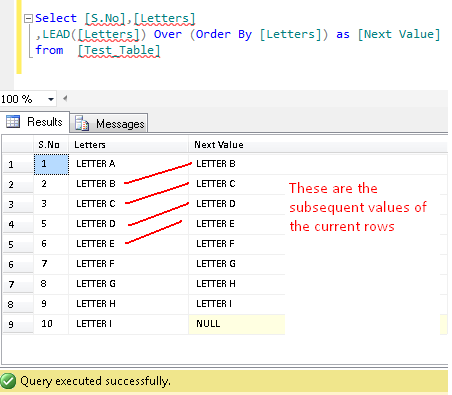
Example-1 : LEAD- WITH DEFAULT VALUES

Select [S.No],[Letters]
,LEAD([Letters]) Over (Order By [Letters]) as [Next Value]
from  [Test_Table]

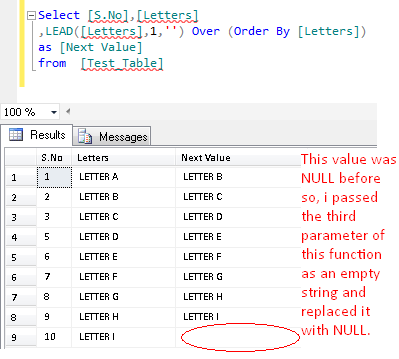
Example-2 : LEAD – REPLACE DEFAULT VALUE NULL WITH EMPTY STRING
In the above example, you can view that if LEAD could not find the value it gives you NULL. In order to avoid NULL, you can pass the third parameter and it will be replaced by NULL.
In the example given below, I replaced NULL with empty spaces (”).

Select [S.No],[Letters]
,LEAD([Letters],1,'') Over (Order By [Letters]) as [Next Value]
from  [Test_Table]

Example-3 : LEAD – CHANGE OFFSET VALUE FROM DEFAULT TO 2
In the above examples, you can view that LEAD function picks one row subsequent value than current row.
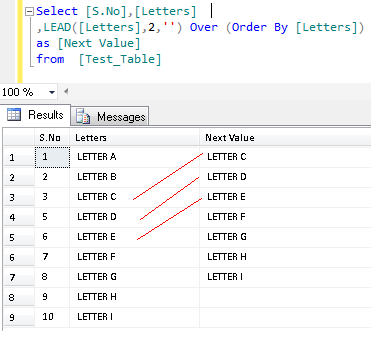
In this example, we will set the offset value to 2 to pick up two rows’ next value than current.

Select [S.No],[Letters]
,LEAD([Letters],2,'') Over (Order By [Letters]) as [Next Value]
from  [Test_Table]

Example-4 : LEAD – REAL WORLD – FIND Promotions of Employees
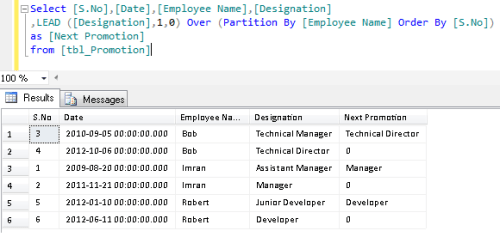
In the earlier version of SQL SERVER, if you need to find current designation with the promotion of any employee in the same result set , you need to use the self join to achieve it. But in SQL SERVER 2012, you can use the LEAD function to achieve it.

Lets create an example to explain this.

Use tempdb
Create table [tbl_Promotion]
(
[S.No] int,
[Date] datetime,
[Employee Name] varchar(50),
[Designation]  varchar(50)
)

Insert into [tbl_Promotion] values(1,'2009-08-20','Imran','Assistant Manager')
Insert into [tbl_Promotion] values(2,'2011-11-21','Imran','Manager')

Insert into [tbl_Promotion] values(3,'2010-09-05','Bob','Technical Manager')
Insert into [tbl_Promotion] values(4,'2012-10-06','Bob','Technical Director')

Insert into [tbl_Promotion] values(5,'2012-01-10','Robert','Junior Developer')
Insert into [tbl_Promotion] values(6,'2012-06-11','Robert','Developer')

GO
Select * from [tbl_Promotion]

GO

Select [S.No],[Date],[Employee Name],[Designation]
,LEAD ([Designation],1,0) Over (Partition By [Employee Name] Order By [S.No]) as [Next Promotion]
from [tbl_Promotion]
Go
Drop Table [tbl_Promotion]

Reference :MSDN

Read Full Post »

Today, we will discuss one of the important analytical functions namely “LAG” in SQL SERVER 2012. In simple words we can say that if we need to pick up any value from the previous rows in the current row, we can use this function and get it, instead of using self joins.

Lets discuss each and every aspect of this function. Also we will discuss the need/importance of this function in SQL server.

By using this function, we can reduce the number of codes because in the previous versions of SQL SERVER, to do the same, we had to use self joins to achieve it.

Let me explain its syntax, parameters, purpose and examples in detail.
Syntax :

LAG (scalar_expression [,offset] [,default])
OVER ( [ partition_by_clause ] order_by_clause )

Parameters :

@scalar_expression :The value to returned based on the offset. (Mandatory)
@offset : The number of rows back from the rows from where we need to pick the value. Default value is 1 (Optional)
@default : If @scalar_expression is NULL, then you can define any default value here to be returned.(Optional)

Purpose :
The purpose of this function is to get the previous row next to current row in the same result without using any self joins. And once you will get the previous row parallel to current, you can easily compare their values and perform any analytical task.

Lets create an example to explain “LAG” function in SQL SERVER 2012.

USE tempdb
GO
Create Table [Test_Table]
(
[S.No] int,
[Letters] varchar(50)
)
GO
Insert into [Test_Table] values (1,'LETTER A')
Insert into [Test_Table] values (2,'LETTER B')
Insert into [Test_Table] values (3,'LETTER C')
Insert into [Test_Table] values (5,'LETTER D')
Insert into [Test_Table] values (6,'LETTER E')
Insert into [Test_Table] values (7,'LETTER F')
Insert into [Test_Table] values (8,'LETTER G')
Insert into [Test_Table] values (9,'LETTER H')
Insert into [Test_Table] values (10,'LETTER I')

Let me explain this with simple examples.

Example-1 : LAG – WITH DEFAULT VALUES

Select [S.No],[Letters]
,LAG([Letters]) Over (Order By [Letters]) as [Previous Value]
from  [Test_Table]

Example-2 : LAG – REPLACE DEFAULT VALUE NULL WITH EMPTY STRING
In the above example, you can view that if LAG could not find the value it gives you NULL. In order to avoid NULL, you can pass the third parameter and it will be replaced by NULL.
Given below example, I replaced NULL with empty spaces (”).

Select [S.No],[Letters]
,LAG([Letters],1,'') Over (Order By [Letters]) as [Previous Value]
from  [Test_Table]

Example-3 : LAG – CHANGE OFFSET VALUE FROM DEFAULT OF 2
In the above examples, you can view that LAG function picks one row previous value than current row.
In this example, we will set the offset value to 2 to pick up two rows previous value than current.

Select [S.No],[Letters]
,LAG([Letters],2,'') Over (Order By [Letters]) as [Previous Value]
from  [Test_Table]

Example-4 : LAG – REAL WORLD – FIND PREVIOUS DAY EXCHANGE RATE
In the earlier version of SQL SERVER, if you need to find previous day exchange rate, you need to use the self join to achieve it. But in SQL SERVER 2012, you can use the LAG function to achieve it.

Lets create an example to explain this.

Use tempdb
GO
Create table [Daily_Currency_Rate]
(
[S.No] int,
[Date] datetime,
[Currency] varchar(50),
[Exchange Rate] numeric(18,4)
)

Insert into [Daily_Currency_Rate] values(1,'2012-11-20','Indian Rupee (INR)',14.86)
Insert into [Daily_Currency_Rate] values(2,'2012-11-21','Indian Rupee (INR)',14.87)

Insert into [Daily_Currency_Rate] values(3,'2012-11-20','Pakistani Rupee (PKR)',25.84)
Insert into [Daily_Currency_Rate] values(4,'2012-11-21','Pakistani Rupee (PKR)',25.83)

Insert into [Daily_Currency_Rate] values(5,'2012-11-20','Sri Lankan Rupee (LKR)',35.38)
Insert into [Daily_Currency_Rate] values(6,'2012-11-21','Sri Lankan Rupee (LKR)',35.44)

GO
Select * from [Daily_Currency_Rate]

GO

Select [S.No],[Date],[Currency],[Exchange Rate]
,LAG([Exchange Rate],1,0) Over (Partition By [Currency] Order By [Currency]) as [Yesterday Rate]
from [Daily_Currency_Rate]

GO
Drop Table [Daily_Currency_Rate]

Reference :MSDN

Read Full Post »

« Newer Posts - Older Posts »