Feeds:
Posts
Comments

Archive for the ‘SQL SERVER’ Category

Few days ago, I created some users in my development environment and gave them access to use my development database. After sometime, I received a complaint that when they run a normal query it is working fine but when they try to run a query along with execution plan (Ctrl + M), SQL server generates given below error.

Let me explain this error in detail :

Message Number: 262

Severity : 14

Error Message: SHOWPLAN permission denied in database ‘AdventureWorks2012’.

Error Generation:

Let me create a sample to demonstrate this error.

USE AdventureWorks2012
GO

--Create a user
CREATE USER Imran WITHOUT LOGIN;
GO
--Grant select permission to Imran user
GRANT SELECT ON [HumanResources].[Department] TO Imran;
GO

-- Press Ctl+M to Include Actual Execution Plan
EXECUTE AS USER = 'Imran';
SELECT * FROM [HumanResources].[Department] ;
REVERT;

Msg 262, Level 14, State 4, Line 12
SHOWPLAN permission denied in database ‘AdventureWorks2012’.

ShowPlan error.1.1

Ooopps…… I am unable to show the actual execution plan (Ctrl + M) of the select query as shown above.

Resolution:

The resolution is very simple, actually, once you created the user you did not grant SHOWPLAN access to the USER (Imran). Lets give this user the SHOWPLAN access. Given below is the script.

Grant SHOWPLAN access

USE AdventureWorks2012
GO
GRANT SHOWPLAN TO Imran
GO
-OUTPUT

Command(s) completed successfully.

Now, the SHOWPLAN access has been granted, lets re-run the above query with execution plan and it works as shown below.

ShowPlan error.1.2

Conclusion :

Remember, whenever you want any user to include the execution plan in the query, you MUST give him SHOWPLAN access.

Read Full Post »

Temporal Table is one of the best features available in SQL Server 2016. It actually provides your data stored in the table at any point in time. In other words, if you execute any update or delete statement on a table then the old data will be over written and after that if you query the table you will get the latest data (after update or delete), but using temporal table you can view the latest data as well as old data but how ? Let me explain how it works first.

  • How Temporal Table works ?
      • What happens when you Insert record(s) in Temporal Table ?

When you insert the data in temporal table, the data will remain in temporal table like a normal table but it will NOT affect the history table as shown below.

Temporal Table.1.7

      • What happens when you Update/Delete record(s) in Temporal Table ?

When you update/delete the data in temporal table, the existing records will be MOVED FIRST into the history table to record the changes before the data is changed in the temporal table.

Temporal Table.1.8

      • What happens when you Query record(s) in Temporal Table ?

When you Query the records from the temporal table, Temporal table is smart enough to decide whether to return the data from the temporal table or from the history table, you do NOT have to apply any joins or any sub query between temporal table and history table.

Temporal Table.1.9

  • Create Temporal Table

When you create a temporal table it automatically creates a history table (if you already have an existing history table you can link it to temporal table). As you can see below is a usual table creation script with additional columns. These additional column (fields) are specific for temporal table period definition and it will be hidden as well. So when you query the table these columns will not appear in the result. Also, I turned on the system versioning and declared the history table name “dbo.tbl_Product_History”, in this case the temporal table will create the history table as defined. If you do not declare the history table name, SQL will create a history table for the temporal table by default.

CREATE DATABASE SampleDB
GO
USE SampleDB
GO
--DROP TABLE tbl_Product
--GO
CREATE TABLE tbl_Product
(
Product_ID int NOT NULL PRIMARY KEY CLUSTERED,
Product_Name varchar(50) NOT NULL,
Rate numeric(18,2),

/*Temporal Specific Fields - Period Definition */
[Valid From] datetime2 GENERATED ALWAYS AS ROW START HIDDEN NOT NULL,
[Valid Till] datetime2 GENERATED ALWAYS AS ROW END HIDDEN NOT NULL,
PERIOD FOR SYSTEM_TIME ([Valid From] ,[Valid Till])
)
WITH
/* Temporal Specific - System-Versioning Configuration*/
(SYSTEM_VERSIONING = ON
(HISTORY_TABLE = dbo.tbl_Product_History, DATA_CONSISTENCY_CHECK = ON)
);
GO

Create Temporal Table

  • Data Manipulation Language (DML) Statements on Temporal Table ?
    Lets execute some Data Manipulation (DML) Statement on temporal table and view the impact on temporal table as well as history table.

      • INSERT STATEMENT

    As I explained earlier, when you execute INSERT statement on temporal table there will be NO Impact on history table. Lets execute INSERT statements and observe the results accordingly.

    USE SampleDB
    GO
    INSERT INTO dbo.tbl_Product VALUES
    (1,'Product A', 300)
    ,(2,'Product B', 400)
    GO
    
    SELECT * FROM tbl_Product
    GO
    SELECT * FROM dbo.tbl_Product_History
    GO
    

    Temporal Table.1.1

      • UPDATE STATEMENT

As I explained earlier, when you execute UPDATE statement on temporal table then the OLD version of data will be moved to history table and temporal table will have latest data ONLY. Lets execute UPDATE statements and observe the results accordingly.

USE SampleDB
GO
UPDATE tbl_Product SET Rate =Rate/2
WHERE Product_ID IN (1,2)
GO

SELECT * FROM tbl_Product
GO
SELECT * FROM dbo.tbl_Product_History
GO

Temporal Table.1.2

      • DELETE STATEMENT

As I explained earlier, when you execute DELETE statement on temporal table then the OLD version of data will be moved to history table and temporal table will have latest data ONLY. Lets execute DELETE statement and observe the results accordingly.

USE SampleDB
GO
DELETE FROM tbl_Product WHERE Product_ID = 2
GO

SELECT * FROM tbl_Product
GO
SELECT * FROM dbo.tbl_Product_History
GO

Temporal Table.1.3

      • SELECT STATEMENT

Select Statement is interesting in temporal table because it knows what you exactly want from temporal table and it internally links to history table to fulfill your requirement. Given below are some queries that we will run on temporal table and you will observe that temporal table (NOT history table) will return the current state and earlier state of the table as well. Isn’t in it amazing ?

Lets browse the TEMPORAL TABLE and it will show the latest state of the table like a NORMAL TABLE.

USE SampleDB
GO
--Current State of the table
SELECT * FROM tbl_Product
GO

Temporal Table.1.4

Lets browse the TEMPORAL TABLE FOR SYSTEM_TIME ‘2015-06-27 21:33:50.9002439’. It will give you the state of the table at ‘2015-06-27 21:33:50.9002439’ and you will be shocked to see that temporal table returned the result what was available exactly BEFORE the UPDATE statements. Wow !!!

USE SampleDB
GO
SELECT * FROM tbl_Product
FOR SYSTEM_TIME AS OF '2015-06-27 21:33:50.9002439'
GO

Temporal Table.1.5

Lets browse the TEMPORAL TABLE FOR SYSTEM_TIME at ‘2015-06-27 21:43:31.2982847’. You will be AGAIN shocked to see that temporal table returns the result what was available exactly available BEFORE the DELETE statements. Wow !!!

USE SampleDB
GO
SELECT * FROM tbl_Product
FOR SYSTEM_TIME AS OF '2015-06-27 21:43:31.2982847'
GO

Temporal Table.1.6

Conclusion :
I quickly reviewed temporal table and found it very interesting and exciting. I am sure it will change the way databases will be designed specially data warehouses because now we do not need to create separate audit tables to record each state manually by using stored procedure or triggers etc while TEMPORAL TABLE is doing it for us behind the scene automatically.

Let me know your experience about temporal table.

Reference : Channel9

Read Full Post »

Truncate table is always my preference when I need to delete all the records from any table. The reason for the preference is, actually Truncate Table is faster than delete and it takes less system and transaction log resources. However, there is a problem with TRUNCATE TABLE and that is when you EXECUTE TRUNCATE TABLE, it actually deletes all the records in the table and you cannot specify any criteria (WHERE CLAUSE) for deletion like Delete.

The Good News is in SQL Server 2016 you can specify the partition you want to delete using Truncate Table.

Let me create a sample partition table and insert some sample data in that table and then demonstrate how it works in few easy steps.

Sample :


USE master
GO
ALTER DATABASE [Sample_DB] SET SINGLE_USER WITH ROLLBACK IMMEDIATE
GO
USE [master]
GO
--Drop Sample database
DROP DATABASE [Sample_DB]
GO
--Create Sample database
CREATE DATABASE Sample_DB
GO

-- Create Filegroups
ALTER DATABASE Sample_DB ADD FILEGROUP [2014]
GO
ALTER DATABASE Sample_DB ADD FILEGROUP [2015]
GO

--Create one file for each filegroup and
--so that you can store partition data

ALTER DATABASE Sample_DB
ADD FILE
(NAME = N'FG_2014',
FILENAME = N'C:\Data\FG_2014.ndf'
)
TO FILEGROUP [2014]
GO

ALTER DATABASE Sample_DB
ADD FILE
(NAME = N'FG_2015',
FILENAME = N'C:\Data\FG_2015.ndf'
)
TO FILEGROUP [2015]
GO

USE Sample_DB
GO

-- Drop the partition function if it exists
IF( EXISTS( SELECT * FROM sys.partition_functions
WHERE name = 'OrderDateRangePFN' ) )
BEGIN
DROP PARTITION FUNCTION OrderDateRangePFN
END
GO

--Create partition function
CREATE PARTITION FUNCTION OrderDateRangePFN(DATETIME)  AS
RANGE LEFT FOR VALUES
('2014-12-31',
'2015-12-31'
)
GO

-- Drop the partition Scheme if it exists
IF( EXISTS( SELECT * FROM sys.partition_schemes
WHERE name = 'OrderDateRangePScheme' ) )
BEGIN
DROP PARTITION SCHEME OrderDateRangePScheme
END
GO

--Create partition scheme
CREATE PARTITION SCHEME OrderDateRangePScheme AS
PARTITION OrderDateRangePFN  TO
([2014],
[2015],
[PRIMARY]  )
GO

-- Drop sample table if exists
IF( OBJECT_ID( 'tbl_Sample', 'U' ) IS NOT NULL )
BEGIN
DROP TABLE tbl_Sample
END
GO

-- Create sample table
CREATE TABLE tbl_Sample
(OrderID INT NOT NULL,
[OrderDate] DATETIME)
ON OrderDateRangePScheme ([OrderDate]);
GO

-- Insert some sample data
insert into tbl_Sample Values (1,'2014-01-01')
insert into tbl_Sample Values (2,'2014-02-01')
insert into tbl_Sample Values (3,'2014-03-01')
insert into tbl_Sample Values (4,'2015-01-01')
insert into tbl_Sample Values (5,'2015-02-01')
insert into tbl_Sample Values (6,'2015-03-01')
insert into tbl_Sample Values (7,'2015-04-01')
insert into tbl_Sample Values (8,'2016-01-01')
insert into tbl_Sample Values (9,'2016-02-01')
GO

SELECT * FROM tbl_Sample
GO

Truncate Table 1.1

Step 1 :
Lets find out if the data exists in the partitions properly. Given below is the script.

USE Sample_DB
GO
-- Check if data exists in the partition properly
SELECT OBJECT_NAME(OBJECT_ID) AS [Table Name]
, partition_number AS [Partition Number]
, rows AS [Number of rows]
FROM sys.partitions
WHERE OBJECT_NAME(OBJECT_ID)='tbl_Sample';
GO

Truncate Table 1.2

Step 2 :
Lets TRUNCATE TABLE the data of PARTITION 2 in the sample table. Given below is the script.

USE Sample_DB
GO
TRUNCATE TABLE tbl_Sample
WITH (PARTITIONS (2));
GO

Truncate Table 1.3

Step 3 :
Lets find out if the data of partition 2 has been deleted in the sample table or as usual TRUNCATE TABLE has deleted all the data in the table. Given below is the script.

USE Sample_DB
GO
-- Check if data exists in the partition properly
SELECT OBJECT_NAME(OBJECT_ID) AS [Table Name]
, partition_number AS [Partition Number]
, rows AS [Number of rows]
FROM sys.partitions
WHERE OBJECT_NAME(OBJECT_ID)='tbl_Sample';
GO

Truncate Table 1.4

Wow, as expected only partition 2 data has been deleted from sample data. This feature is very helpful for the DBAs handling lots of partition in a single table and if they want to delete any particular partition(s) data quickly.

Reference : MSDN

Read Full Post »

Problem :
There is a common problem in SQL Server, when you give access of any table to any USER then the USER can view the entire table data and after giving access to the table if you would like to restrict this user NOT to view some critical data in that table, out of the box it is not possible in SQL Server, however there are some workarounds but those workarounds can make your life difficult as DBA. The GOOD NEWS is that it is POSSIBLE in SQL Server 2016 as out of the box solution and the name of this feature is Row Level Security (RLS). In this article, I will demonstrate how to implement RLS in your database environment step by step.

Before proceeding to the solution, I would like to create a sample.

Sample :
I will create two branches (Branch A & B) data in the sample table and later on restrict branch Administrator to view their own branch data and ONLY db_owner (or you can select any other role to give full access to the above table) can view all the data in the table.

CREATE DATABASE Sample_DB
GO
USE Sample_DB
GO
--DROP TABLE tbl_Sample
GO
CREATE TABLE tbl_Sample
(
[ID] int,
[Name] varchar(50),
[BranchName] varchar(50)
)
GO
INSERT INTO tbl_Sample VALUES (1,'Ken','Branch A')
INSERT INTO tbl_Sample VALUES (2,'Selena','Branch A')
INSERT INTO tbl_Sample VALUES (3,'Mae','Branch B')
INSERT INTO tbl_Sample VALUES (4,'Tom','Branch B')
INSERT INTO tbl_Sample VALUES (5,'Thomas','Branch B')
GO
SELECT * FROM tbl_Sample
GO
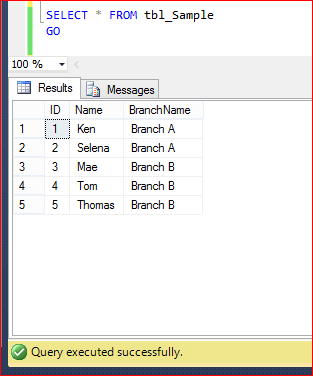
Row Level Security (RLS) 1.1

Solution :

Step 1 :
Let me create the Branch A and Branch B administrator role in the respective databases. Given below is the script.

USE Sample_DB
GO
EXEC sp_addrole 'Branch A Admin'
GO
EXEC sp_addrole 'Branch B Admin'
GO
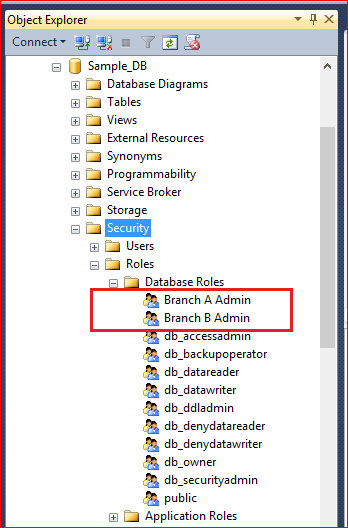
Row Level Security (RLS) 1.2

Step 2 :
In the above step, I created the role for branches A & B, now let me create two users for respective branches, who can view only respective branch data in the table. Given below is the script.

USE Sample_DB
GO
CREATE USER USER_A WITHOUT LOGIN; -- Branch A Admin
GO
CREATE USER USER_B WITHOUT LOGIN; -- Branch B Admin
GO
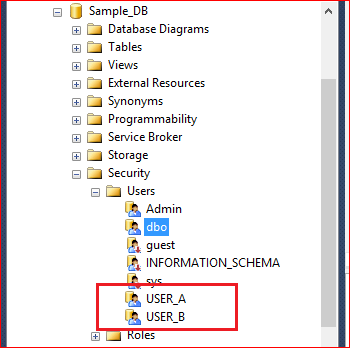
Row Level Security (RLS) 1.3

Step 3 :
Lets add User A & B (created in step 2) as a member in the respective roles (created in step 1). Given below is the script.

USE Sample_DB
GO
EXEC sp_addrolemember 'Branch A Admin', 'USER_A'
GO
EXEC sp_addrolemember 'Branch B Admin', 'USER_B'
GO

Step 4:
Grant the SELECT access of table (tbl_Sample) to the users (User_A & User_B). After granting the Select access they (USER_A, USER_B) can view the entire data in the table (tbl_Sample). Given below is the script.

USE Sample_DB
GO
GRANT SELECT ON tbl_Sample TO USER_A;
GO
GRANT SELECT ON tbl_Sample TO USER_B;
GO

Step 5:
Lets find out the member principal ID. This is a unique ID corresponding to each member of the role. Using member principal ID, we will allow users to view the respective data ONLY in the table, later in the article. Given below is the script.

USE Sample_DB
GO
SELECT role_principal_id,
USER_NAME(role_principal_id) As [Role],
member_principal_id,
USER_NAME(member_principal_id) As [Member]
FROM sys.database_role_members
WHERE USER_NAME(role_principal_id)
IN ('Branch A Admin','Branch B Admin')
GO
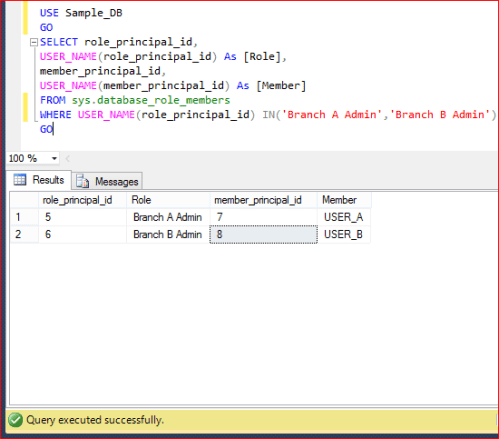
Row Level Security (RLS) 1.4

Step 6:
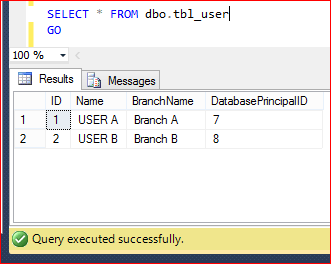
Lets create a user defined table where we must enter the receptive Branch Name and member Principal ID which we found in the previous step (Step 5). Actually, now we are trying to assign each branch access to respective users using Database Principal ID (Member Principal ID). Given below is the script.

USE Sample_DB
GO
DROP TABLE dbo.tbl_user
GO
CREATE TABLE dbo.tbl_user
(
[ID] int,
[Name] varchar(50),
[BranchName] varchar(50),
[DatabasePrincipalID] int
)
GO
INSERT INTO dbo.tbl_user VALUES (1,'USER A','Branch A',7)
INSERT INTO dbo.tbl_user VALUES (2,'USER B','Branch B',8)
GO

SELECT * FROM dbo.tbl_user
GO
Row Level Security (RLS) 1.5

Step 7:
Lets create a separate scheme (Security) which we will use to create RLS object (predicate function & security object) later in this article. Note : It is a best practice to create RLS object in a separate scheme. Given below is the script.

USE Sample_DB
GO
CREATE SCHEMA Security;
GO

Step 8:
Now, it is time to create a predicate function (inline table valued function) to make restricted access for each branch data & for each user. However, db_owner will have full access on the table. Given below is the script.

USE Sample_DB
GO
--DROP FUNCTION [Security].fn_securitypredicate
--GO
CREATE FUNCTION [Security].fn_securitypredicate(@BranchName varchar(50))
RETURNS TABLE
WITH SCHEMABINDING
AS
RETURN SELECT 1 AS fn_securitypredicate_result
FROM dbo.tbl_user a Where  (a.DatabasePrincipalID = DATABASE_PRINCIPAL_ID()
And a.BranchName = @BranchName) OR IS_MEMBER('db_owner')=1
GO

Step 9:
Once predicate function (inline table valued function) has been created, lets create a security policy and add the predicate function (created in the above step) as a filter predicate. Please make sure that the STATE must be ON. Given below is the script.

USE Sample_DB
GO
--DROP SECURITY POLICY [Security].[BranchSecurityPolicy]
--GO
CREATE SECURITY POLICY [Security].[BranchSecurityPolicy]
ADD FILTER PREDICATE [Security].fn_securitypredicate([BranchName])
ON [dbo].[tbl_Sample]
WITH (STATE= ON);
GO

Step 10:
Now, we are done with the setup. Lets test the access of each user on the table (tbl_Sample). Given below is the script.

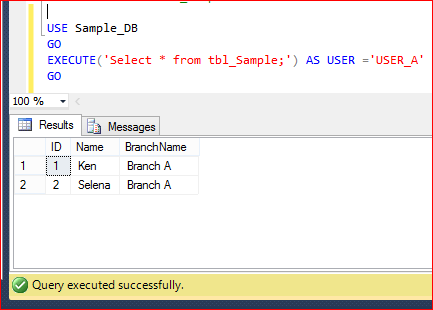
  • USER_A can view ONLY Branch A data as shown below.
USE Sample_DB
GO
EXECUTE('Select * from tbl_Sample;') AS USER ='USER_A'
GO
Row Level Security (RLS) 1.6

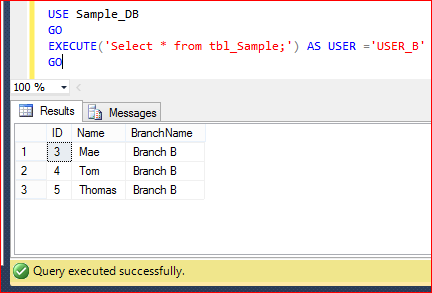
  • USER_B can view ONLY Branch B data as shown below.
USE Sample_DB
GO
EXECUTE('Select * from tbl_Sample;') AS USER ='USER_B'
GO

Row Level Security (RLS) 1.7

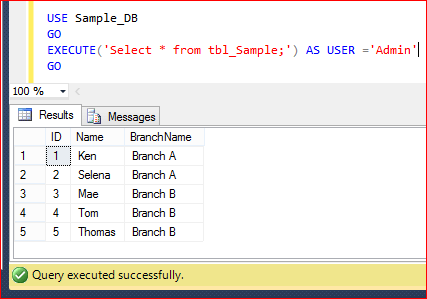
  • Admin, whose is member of db_owner can view Entire Table data as shown below.
USE Sample_DB
GO
EXECUTE('Select * from tbl_Sample;') AS USER ='Admin'
GO
Row Level Security (RLS) 1.8

Conclusion :
As you can see above by creating few RLS objects we can restrict each user access at the row level even though the user has Select access on the respective table.

Reference : MSDN

Read Full Post »

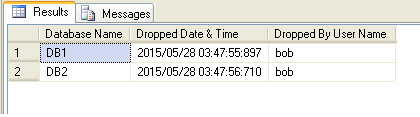
Sometimes, it is very important to know when your database has been dropped as well who dropped it. Obviously, if you setup the database backup properly, you can easily recover it from the last backup but how to find who dropped/ deleted the database ? Today, I came across this issue and I started my research and found some solutions to recover this info using trace, however, I developed a script that will help you find who dropped database, at what time, by using SQL Server Log.

Note : Please do not use this script for any negative purpose.

Script :

--This script is compatible with SQL Server 2005 and above.
USE master
GO
DROP PROCEDURE Recover_Dropped_Database_Detail_Proc
GO
CREATE PROCEDURE Recover_Dropped_Database_Detail_Proc
@Date_From DATETIME='1900/01/01',
@Date_To DATETIME ='9999/12/31'
AS
;WITH CTE AS (
Select REPLACE(SUBSTRING(A.[RowLog Contents 0],9
,LEN(A.[RowLog Contents 0])),0x00,0x) AS [Database Name]
,[Transaction ID]
FROM fn_dblog(NULL,NULL) A
WHERE A.[AllocUnitName] ='sys.sysdbreg.nc1'AND
A.[Transaction ID] IN (
SELECT DISTINCT [TRANSACTION ID] FROM  sys.fn_dblog(NULL, NULL)
WHERE Context IN ('LCX_NULL') AND Operation IN ('LOP_BEGIN_XACT')
AND [Transaction Name] LIKE '%dbdestroy%'
AND CONVERT(NVARCHAR(11),[Begin Time]) BETWEEN @Date_From AND @Date_To))

SELECT
A.[Database Name]
,B.[Begin Time] AS [Dropped Date & Time]
,C.[name] AS [Dropped By User Name]
FROM CTE A
INNER JOIN fn_dblog(NULL,NULL) B
ON A.[Transaction ID] =B.[Transaction ID]
AND Context IN ('LCX_NULL') AND Operation IN ('LOP_BEGIN_XACT')
AND [Transaction Name] LIKE '%dbdestroy%'
INNER JOIN sys.sysusers C ON B.[Transaction SID]=C.[Sid]

GO
EXEC Recover_Dropped_Database_Detail_Proc
GO

1

Let me know if you came across this issue and its solution as well.

Read Full Post »
On 26th May, we had a very informative session presented by Mr. Mohammed Owais (CTO at CAZAR) in SQL Server User Group meetup about Backups – not as simple as you think. He covered almost each and every aspect from full backup till tail log backup, however, a very nice question has been raised by an audience – ‘how to check the status of the backup / recovery along with the percentage via TSQL ?’. Because in most cases we have more than one DBA in an organization and sometimes they are geographically dispersed and if one of them takes backup / restore, how the others will come to know that he is performing any backup / restore using T-SQL.

Given below is the script which will give you the backup / restore progress along with the exact percentage and the user name (who is taking the backup).

USE master
GO
SELECT
A.session_id As [Session ID]
, login_name As [Login Name]
, [command] As [Command]
, [text] AS [Script]
, [start_time] As [Start Time]
, [percent_complete] AS [Percentage]
, DATEADD(SECOND,estimated_completion_time/1000, GETDATE())
as [Estimated Completion time]
, [program_name] As [Program Name]
FROM sys.dm_exec_requests A
CROSS APPLY sys.dm_exec_sql_text(A.sql_handle) B
INNER JOIN sys.dm_exec_sessions C ON A.session_id=C.session_id
WHERE A.command in ('BACKUP DATABASE','RESTORE DATABASE')
GO

1 : While Taking Backup

USE master;
GO
BACKUP DATABASE AdventureWorks2012
TO DISK = 'C:\Data\AdventureWorks2012.Bak'
WITH FORMAT,
MEDIANAME = 'SQLServerBackups',
NAME = 'Full Backup of AdventureWorks2012';
GO

raresql-Backup-Restore.1.2

2 : While Restoring Backup

USE master;
GO
RESTORE DATABASE AdventureWorks2012
FROM DISK = 'C:\Data\AdventureWorks2012.BAK'
WITH NORECOVERY
GO

raresql-Backup-Restore.1.1

Let me know if you came across this issue and its solution as well.

Read Full Post »

Yet again I had another opportunity to present Introduction to Policy Based Management yesterday (26 May 2015) at SQL Server User Group meet-up @ Microsoft Office, Dubai, UAE. As mentioned earlier, this event is normally held every last Tuesday of the month. Meet-up was organised by SQL Server User group (www.uaessug.com) and usually consists of two comprehensive and informative sessions that focus on the SQL Server latest technology, best practice, user experience, tips & tricks. This is a good platform to network with SQL Server experts face to face. I was the speaker for yesterday’s meet up along with Mr. Mohammed Owais (CTO at CAZAR).

Following topics were covered in yesterday’s session:

  • Backups – not as simple as you think presented by Mr. Mohammed Owais
  • Introduction to policy based management was by me

We focused on how you can make your restore strategy instead of backup strategy 🙂 and discussed different types of backup and how can it be handy in case of disaster. Also we discussed, how can you manage your policies across the servers by just click of a button.

I hope yesterday’s session was factual as usual. Our next meetup will be held in June 2015. Hope the coming sessions would witness more participants.

Some glimpses of the session:

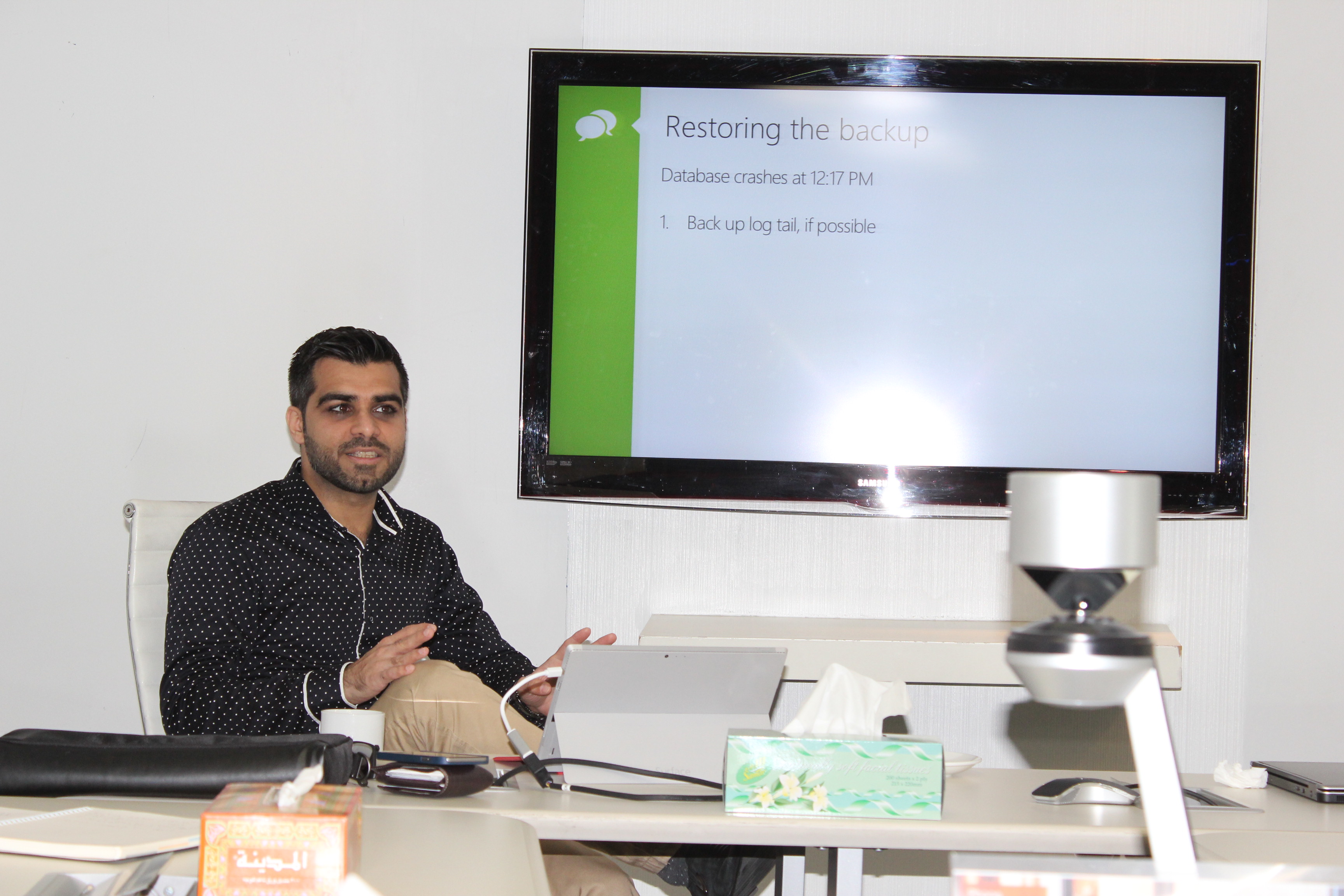
Mr. Owais busy explaining Backup :

IMG_9815_U

He explained us why tail log backup is important :

IMG_9816_U

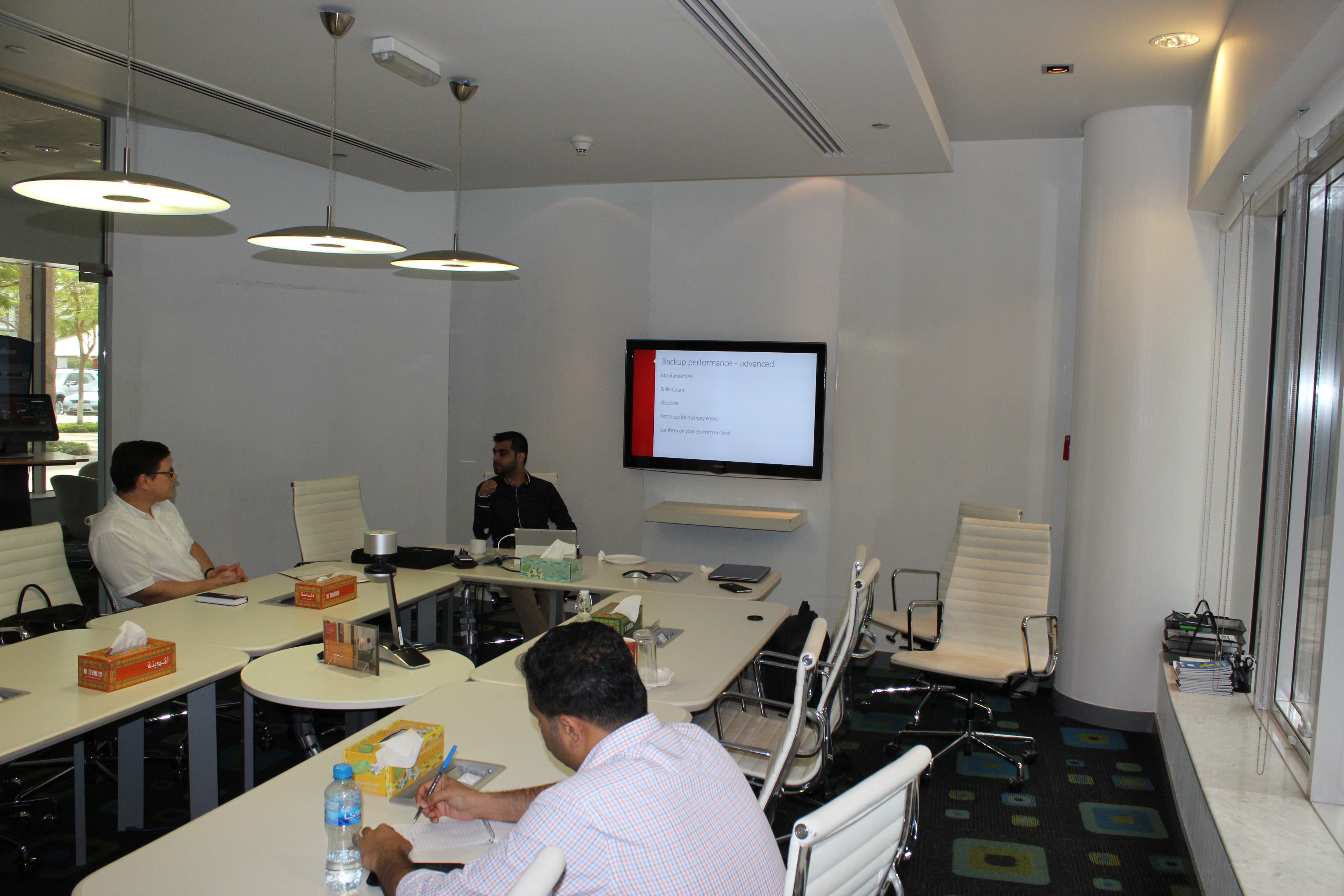
Further he explained, how to boast performance of backup :

IMG_9818_U

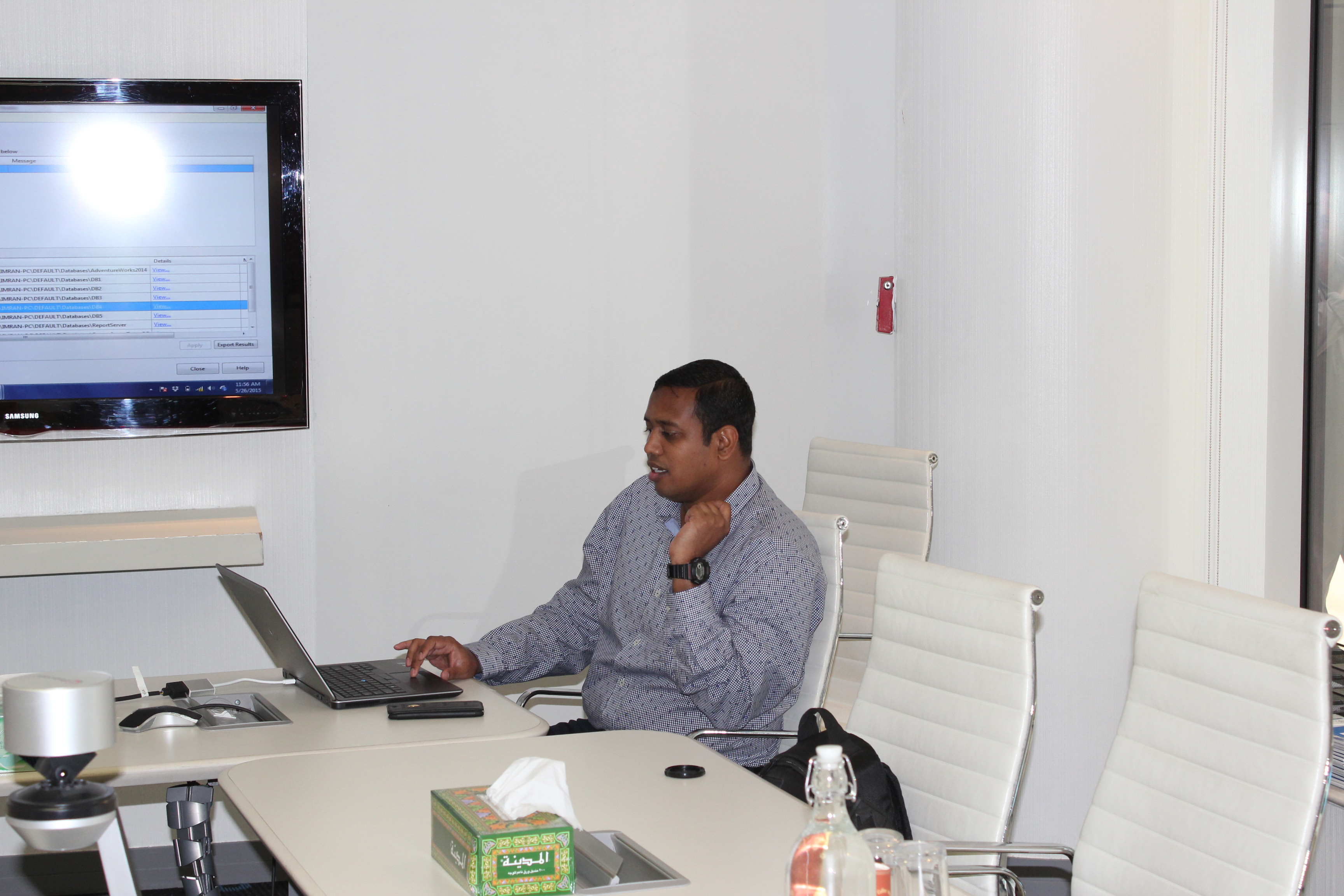
Me presenting Introduction to policy based management :

IMG_9820_U

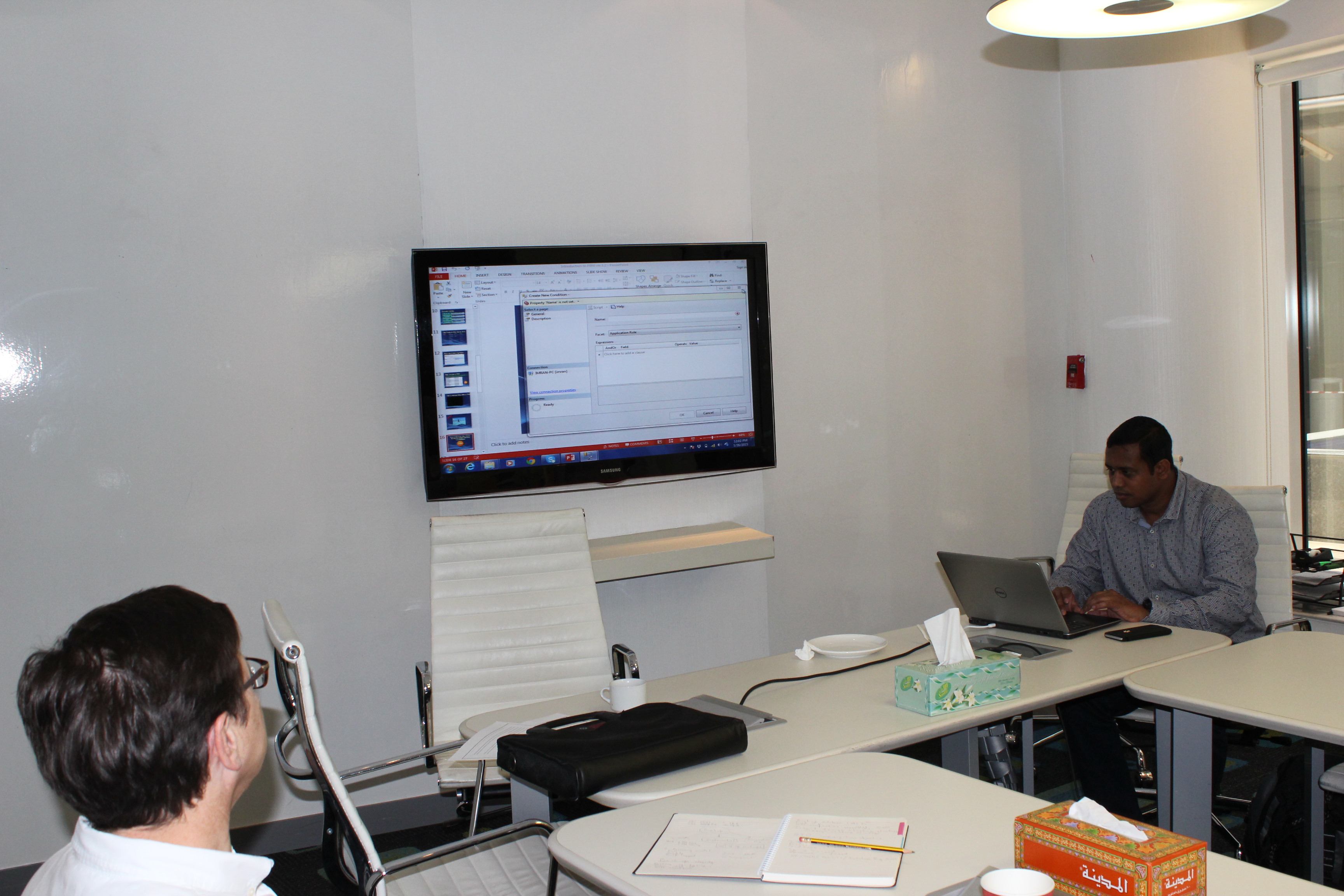
Explaining PBM with the help of demos :

IMG_9821_U

IMG_9826_U

Last but not least, lunch 🙂

IMG_9828_U

IMG_9829_U

IMG_9831_U

Thank you guys. See you next month.

Read Full Post »
TRY_CONVERT is one of the new conversion functions shipped with SQL Server. This function converts expression from one data type to another data type. The beauty of this function is that if it fails to convert, it returns NULL value as a results and due to this functionality, it has an edge over CONVERT function. I started using this function wherever conversion required since SQL Server 2012, however, I received an error message this morning when I was trying to use TRY_CONVERT function in SQL Server 2014 as shown below.

Let me explain this error in detail :

Message Number: 195

Severity : 15

Error Message: ‘TRY_Convert’ is not a recognized built-in function name.

Error Generation:

Let me create a sample using TRY_Convert  function to demonstrate this error.

USE SampleDB
GO
SELECT TRY_CONVERT(datetime2, '12/31/2010') AS Result;
GO
SELECT @@VERSION
GO

Msg 195, Level 15, State 10, Line 5
‘TRY_CONVERT’ is not a recognized built-in function name.

Microsoft SQL Server 2014 – 12.0.2000.8 (X64)

Try_Convert .1.2

Ooopps…… I am unable to use TRY_CONVERT even though I am using SQL Server 2014 as shown above.

Resolution:

The resolution is very simple, actually, what you are trying to do is to use TRY_CONVERT function in one of the databases having compatibility less than 110 even though you are using SQL Server 2014. Lets fix this issue step by step.

Step 1: Check compatibility

USE SampleDB;
GO
SELECT compatibility_level
FROM sys.databases WHERE name = 'SampleDB';
GO
--OUTPUT

compatibility_level
——————-
100

(1 row(s) affected)

Step 2: Change compatibility
As you can see above the compatibility of the database is below 110, lets change it to enjoy the core functionality of SQL Server 2014.
Note : Test the compatibility change of your database on your test/development database first, before proceeding to production database.

USE master
GO
ALTER DATABASE SampleDB
SET COMPATIBILITY_LEVEL = 120;
GO

Step 3: Use TRY_CONVERT

USE SampleDB
GO
SELECT TRY_CONVERT(datetime2, '12/31/2010') AS Result;
GO
--OUTPUT

Try_Convert .1.1

Conclusion :

Remember, whenever you use NEW SQL Server functions that are compatible with specific versions / compatibility level, you MUST check the version/ compatibility before implementing those functions.

Read Full Post »

SET NOEXEC is one of my favorite SET statements. I am sure, when I explain it in detail you will love it too. Mostly, we come across in situations when we need to execute batch SQL statements (insert, update, delete) on production databases for the deployment / troubleshooting etc. Sometimes due to the syntax error, some parts of the batch statements execute and the remaining DO NOT and it creates the mess/headache for you to correct the data. And you are left with no option, but to restore the latest backup and fix the script and execute it again.

The solution for this problem is SET NOEXEC. It actually compiles the SQL Query and validate the syntax. The best/fun part is that it DOES NOT EXECUTE the SQL Query. So even if SQL Query is having errors, it DOES NOT affect the data and you are SAFE.

Let me create a sample to demonstrate, how it works.
Sample :

USE AdventureWorks2014
GO
--DROP TABLE tbl_sample
--GO
--Create a sample table
CREATE TABLE tbl_sample
(
 [ID] INT,
 [Letter] VARCHAR(1)
)
GO
--Insert a record in the table
INSERT INTO tbl_sample VALUES (1,'A')
GO
--Browse the data
SELECT * FROM tbl_sample
GO

NoEXEC.1.1

Now, let me turn on the NOEXEC and execute few statements and view the result-set.

USE AdventureWorks2014
GO
-- SET NOEXEC to ON
SET NOEXEC ON;

--Update the table
UPDATE tbl_sample SET [Letter]='B' WHERE [ID]=1
GO
--Delete the table
DELETE FROM tbl_sample  WHERE [ID]=1
GO
-- SET NOEXEC to OFF
SET NOEXEC OFF;
GO

NoEXEC.1.2

The output shows Command(s) completed successfully. It seems, that it not ONLY compiles but executes as well. Lets browse and check the impact of above queries on the data.

USE AdventureWorks2014
GO
--Browse the data to check the impact.
SELECT * FROM tbl_sample
GO

NoEXEC.1.1

As you can see above, the SQL Statements (Update & Delete) DID NOT IMPACT sample table data because NOEXEC was TURNED ON. Hence, it is PROVED that it ONLY compiles the SQL Statements and gives you either an error or Command(s) completed successfully message but it DOES NOT execute SQL Statements.

Note : Once you compiled the statement, DO NOT FORGET to turn NOEXEC off.

Read Full Post »

Paging became quite simpler & easy to script and manage by using OFFSET & FETCH NEXT keywords in SQL Server 2012 & above. I have written quite a detailed article earlier about it and implemented it in my most of the solutions wherever required. However, when you implement/use paging in your script, you face a big challenge, that is, to find the total number of records in that particular result-set.

Given below are the three methods which you can use to get the total row count from OFFSET / FETCH NEXT.
Before proceeding with the solutions, let me create a sample.

Sample :

USE AdventureWorks2014
GO
-- Create Sample Table Table
CREATE TABLE [dbo].[SalesOrderDetail](
[SalesOrderID] [int] NOT NULL,
[SalesOrderDetailID] [int] NOT NULL,
[CarrierTrackingNumber] [nvarchar](25) NULL,
[OrderQty] [smallint] NOT NULL,
[ProductID] [int] NOT NULL,
[SpecialOfferID] [int] NOT NULL,
[UnitPrice] [money] NOT NULL,
[UnitPriceDiscount] [money] NOT NULL,
[LineTotal] [numeric](38, 6) NOT NULL,
[rowguid] [uniqueidentifier] NOT NULL,
[ModifiedDate] [datetime] NOT NULL
) ON [PRIMARY]
GO

-- Insert bulk data into sample table
-- It may take few minutes depends upon the server performance
INSERT INTO [dbo].[SalesOrderDetail]
SELECT * FROM [SALES].[SalesOrderDetail]
GO 100

-- Verfiy the data
Select * from [dbo].[SalesOrderDetail]
GO

Method 1 : Using COUNT(*) OVER()

USE AdventureWorks2014
GO
DECLARE
@PageSize INT = 10,
@PageNum  INT = 1;

SELECT
[SalesOrderID]
, [SalesOrderDetailID]
, [CarrierTrackingNumber]
, [OrderQty]
, [ProductID]
, [SpecialOfferID]
, [TotalCount]= COUNT(*) OVER()
FROM [dbo].[SalesOrderDetail]
ORDER BY SalesOrderID
OFFSET (@PageNum-1)*@PageSize ROWS
FETCH NEXT @PageSize ROWS ONLY;
GO
--OUTPUT

row count using Offset 1.1

Method 2 : Using Common Table Expression

USE AdventureWorks2014
GO
DECLARE
@PageSize INT = 10,
@PageNum  INT = 1;

;WITH Main_CTE AS(
SELECT [SalesOrderID]
, [SalesOrderDetailID]
, [CarrierTrackingNumber]
, [OrderQty]
, [ProductID]
, [SpecialOfferID]
FROM [dbo].[SalesOrderDetail]
)
, Count_CTE AS (
SELECT COUNT(*) AS [TotalCount]
FROM Main_CTE
)
SELECT *
FROM Main_CTE, Count_CTE
ORDER BY Main_CTE.SalesOrderID
OFFSET (@PageNum-1)*@PageSize ROWS
FETCH NEXT @PageSize ROWS ONLY
GO
--OUTPUT

row count using Offset 1.1

Method 3 : Using Cross Apply

USE AdventureWorks2014
GO
DECLARE @PageSize INT = 10,
@PageNum  INT = 1;

SELECT
[SalesOrderID]
, [SalesOrderDetailID]
, [CarrierTrackingNumber]
, [OrderQty]
, [ProductID]
, [SpecialOfferID]
, [TotalCount]
FROM [dbo].[SalesOrderDetail]

CROSS APPLY (SELECT COUNT(*) TotalCount
FROM [dbo].[SalesOrderDetail] ) [Count]
ORDER BY SalesOrderID
OFFSET (@PageNum-1)*@PageSize ROWS
FETCH NEXT @PageSize ROWS ONLY
GO
--OUTPUT

row count using Offset 1.1

All of the above methods give you the same result-sets. Lets view their performance given below.

S.No

Method

CPU Time

Elapsed Time

1

COUNT(*) OVER()

30654 ms

40372 ms

2

Common Table Expression

11762 ms

7665 ms

3

Cross Apply

11794 ms

7373 ms

Conclusion :
On the basis of above results, I would recommend that you either use Common Table Expression or Cross Apply to get the faster results.

Note : The above queries have been tested on ~12 Million records.

Read Full Post »

« Newer Posts - Older Posts »