Feeds:
Posts
Comments

Archive for the ‘Solutions’ Category

In my earlier article, I explained how to create memory optimized table. However, once I created memory optimized tables, I came across a problem segregating the disk based tables, file tables & memory optimized tables.

SQL Server Hekaton comes to the rescue with an addition of a field(column) namely is_memory_optimized in sys.tables (system table) which facilitates segregation. Given below is the script.

USE hkNorthwind
GO
SELECT
object_id
, name  As [Table Name]
,(CASE WHEN is_filetable=0 AND is_memory_optimized=0
THEN 'DISK BASED TABLE'
WHEN is_filetable=1
THEN 'FILE TABLE'
WHEN is_memory_optimized=1
THEN 'MEMORY OPTIMIZED TABLE' END)
AS [Table Type]
FROM sys.tables
--OUTPUT

memoryoptimizedtables1.1

Note : You can download the hkNorthwind database from here.

Let me know if you know a better solution.

Read Full Post »

In my earlier article, I posted a solution how to calculate weekdays between weekends. Today I came across a situation where I need to calculate the weekends between two dates and the criterion is that weekend can be any day (not necessary Sunday only) of the week.

Given below is the function that calculates the weekends between two dates including the dates provided as input parameter. In some parts of the world weekends are on ‘Fridays’, ‘Saturdays’ and in other parts ‘Saturdays’ and ‘Sundays’.
In this function, you need to pass weekend as a parameter.

CREATE FUNCTION dbo.GetWeekendDays
( @StartDate DATETIME,
@EndDate DATETIME ,
@Weekend VARCHAR(50)
)
RETURNS INT
BEGIN

DECLARE @Xml AS XML
DECLARE @WEEKEND_DAYS AS INT
SET @Xml =CAST(('<a>'+replace(@Weekend,',' ,'</a><a>')+'</a>') AS XML)

;WITH N1 (n) AS (SELECT 1 UNION ALL SELECT 1),
N2 (n) AS (SELECT 1 FROM N1 AS X, N1 AS Y),
N3 (n) AS (SELECT 1 FROM N2 AS X, N2 AS Y),
N4 (n) AS (SELECT ROW_NUMBER() OVER(ORDER BY X.n)
FROM N3 AS X, N3 AS Y)

SELECT @WEEKEND_DAYS=SUM(1) FROM n4
WHERE DATEADD(day,n-1,@startdate)<=@Enddate
AND DATENAME(dw,DateAdd(day,n-1,@startdate)) In (
SELECT A.value('.', 'varchar(max)') as [Column]
FROM @Xml.nodes('A') AS FN(A)
)

RETURN @WEEKEND_DAYS
END
GO
SELECT dbo.GetWeekendDays
('02/01/2013','02/28/2013','Saturday,Sunday')
as [Weekend Days]

GO
SELECT dbo.GetWeekendDays
('02/01/2013','02/28/2013','Friday,Saturday')
as [Weekend Days]

--OUTPUT
Weekend Days
------------
8

(1 row(s) affected)

Weekend Days
------------
8

(1 row(s) affected)

Have a better solution ?

Read Full Post »

In my earlier article, I had discussed about the omitted leading zeros in excel and I received a very nice solution from Mr. Harsh, one of my blog readers. (This solution works in Excel 2010 and above).

Let me explain his solution step by step.

Step A :
Let me create a sample to demonstrate the error.

USE tempdb
GO
CREATE TABLE [dbo].[tbl_Employee](
[Employee ID] [varchar](5) NULL,
[Employee Name] [varchar](50) NOT NULL
) ON [PRIMARY]

GO
INSERT [dbo].[tbl_Employee] ([Employee ID], [Employee Name])
VALUES (N'00001', N'A. Scott')

INSERT [dbo].[tbl_Employee] ([Employee ID], [Employee Name])
VALUES (N'00002', N'Alan')

INSERT [dbo].[tbl_Employee] ([Employee ID], [Employee Name])
VALUES (N'00003', N'Alejandro')

INSERT [dbo].[tbl_Employee] ([Employee ID], [Employee Name])
VALUES (N'00004', N'Alex')

INSERT [dbo].[tbl_Employee] ([Employee ID], [Employee Name])
VALUES (N'00005', N'Alice')
GO
SELECT [Employee ID], [Employee Name] FROM [tbl_Employee]
GO
--OUTPUT

Remove_zeros_in_excel.1.1

Step B :
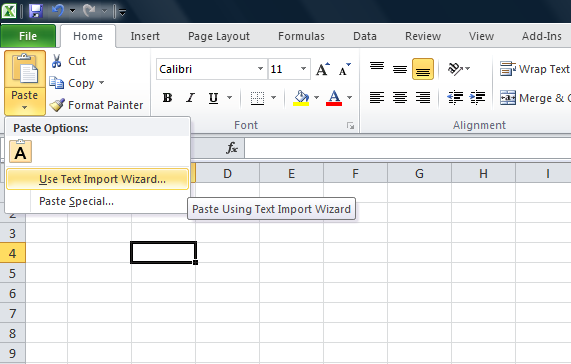
Copy the data from SQL Server, open an excel sheet, click on Paste Button and select Use Text Import Wizard (as shown in the picture below).

omittingleadingzeros1.1

Step C :
It then takes you to 3 steps of Text Import Wizard. Under Text Import Wizard – Step 1 of 3, you need to determine the data type. Select Delimited and press Next (as shown in the picture below).

omittingleadingzeros1.2

Step D :
Text Import Wizard – Step 2 of 3 lets you to set the delimiters your data contains. Select Tab and press Next (as shown in the picture below).
omittingleadingzeros1.3

Step E :
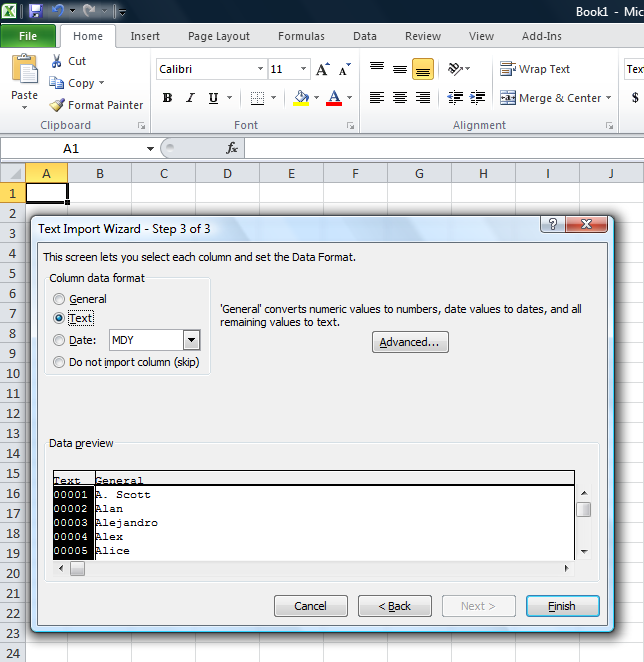
Text Import Wizard – Step 3 of 3 lets you set the column data format. Select Text and press Finish (as shown in the picture below).

omittingleadingzeros1.6

Step F :
Once finished, the data would be pasted in the required format, meaning along with the zeros as shown in the picture below.

omittingleadingzeros1.5

Let me know if you know any better solution.

Read Full Post »

In my earlier article, I had discussed about how to sort month names in month order instead of alphabetical order . In that article, we had given the date and we had to convert into month and sort it. But, in today’s case we have month & year in the table and we need to sort it in month & year order instead of alphabetical order. To achieve this, we usually use lots of case statements and sort it.

Let me create an example to demonstrate it.

USE tempdb
GO
CREATE TABLE tbl_MonthName
(
[ID] INT,
[MONTH_NAME] VARCHAR(50),
[YEAR] VARCHAR(4)
)
GO

INSERT INTO tbl_MonthName
SELECT 1, N'January',2014 UNION ALL
SELECT 2, N'July',2013 UNION ALL
SELECT 3, N'February',2014 UNION ALL
SELECT 4, N'September',2013 UNION ALL
SELECT 5, N'March',2014 UNION ALL
SELECT 6, N'April',2014 UNION ALL
SELECT 7, N'November',2013 UNION ALL
SELECT 8, N'May',2014 UNION ALL
SELECT 9, N'June',2014 UNION ALL
SELECT 10, N'August',2013 UNION ALL
SELECT 11, N'October',2013 UNION ALL
SELECT 12, N'December',2013
GO

SELECT * FROM tbl_MonthName
GO
--OUTPUT

Monthnameandyear1.1

As you can see, the above result set is not sorted properly.

Given below is a simple solution to sort data in month and year order.

--This script is compatible with SQL Server 2005 and above
USE tempdb
GO
SELECT * FROM tbl_MonthName
ORDER BY [YEAR],MONTH('1' + [MONTH_NAME] +'00')
--OUTPUT

Monthnameandyear1.2

Read Full Post »

In most of the applications, we create some multipurpose stored procedure that we use for multiple forms, reports, exports, etc. The challenge we usually face with this kind of stored procedure is that whatever columns are available in the result set, stored procedure will return the same number of columns as an output and not the selected/required information.

Let me take a sample stored procedure from AdventureWorks2012 database and view its result set.

USE AdventureWorks2012
GO
EXEC [dbo].[uspGetManagerEmployees] 16
GO
--OUTPUT

selectcolumn1.1

As you can see that a number of columns are available in the above stored procedure result set but I need to select [BusinessEntityID], [FirstName], [LastName] ONLY.

Given below are the two methods to achieve it.

Method 1 :
In this method, we need to follow three steps :

Step 1:
Create a temporary table according to the number of columns in the result set of the stored procedure.

USE AdventureWorks2012
GO
CREATE TABLE #TEMP
(
[RecursionLevel] INT
, [OrganizationNode] VARCHAR(50)
, [ManagerFirstName] NVARCHAR(50)
, [ManagerLastName]  NVARCHAR(50)
, [BusinessEntityID] INT
, [FirstName] NVARCHAR(50)
, [LastName] NVARCHAR(50)
)
GO

Step 2:
Insert the complete result set of the stored procedure in the table.

USE AdventureWorks2012
GO
INSERT INTO #TEMP EXEC [dbo].[uspGetManagerEmployees] 16
GO

Step 3:
Select the required columns from the temporary table.

USE AdventureWorks2012
GO
SELECT
[BusinessEntityID]
, [FirstName]
, [LastName]
FROM #TEMP
GO
--OUTPUT

selectcolumn1.2

Method 2 :
In this method, we need to use OPENROWSET and can select the column of the stored procedure result set directly.

SELECT
[BusinessEntityID]
, [FirstName]
, [LastName]
FROM OPENROWSET('SQLNCLI', 'Server=(local);uid=test;pwd=test',
'EXEC AdventureWorks2012.[dbo].[uspGetManagerEmployees] 16') ;
GO
--OUTPUT

selectcolumn1.3

Read Full Post »

How to sort month names in month order instead of alphabetical order is a common problem and has been discussed on multiple forums. But what encourages me to write this post is, I found new methods to do it.

Let me create a sample to explain multiple methods to achieve it.

USE tempdb
GO
CREATE TABLE tbl_Sample
(
[ID] INT,
[Date] DATETIME
)
GO
INSERT INTO tbl_Sample VALUES (1,'2013-04-04')
INSERT INTO tbl_Sample VALUES (2,'2013-07-07')
INSERT INTO tbl_Sample VALUES (3,'2013-10-10')
INSERT INTO tbl_Sample VALUES (4,'2013-01-01')
INSERT INTO tbl_Sample VALUES (5,'2013-02-02')
INSERT INTO tbl_Sample VALUES (6,'2013-03-03')
INSERT INTO tbl_Sample VALUES (7,'2013-05-05')
INSERT INTO tbl_Sample VALUES (8,'2013-06-06')
INSERT INTO tbl_Sample VALUES (9,'2013-08-08')
INSERT INTO tbl_Sample VALUES (10,'2013-09-09')
INSERT INTO tbl_Sample VALUES (11,'2013-11-11')
INSERT INTO tbl_Sample VALUES (12,'2013-12-12')
GO

Method 1 :
This is the simplest method, wherein you just need to sort on the basis of column [date] instead of DATENAME(month,Date).
Given below is the script.

--This script is compatible with SQL Server 2005 and above
USE tempdb
GO
SELECT
DATENAME(month,Date) AS [Month Name]
, [Date]
FROM tbl_Sample
ORDER BY [Date]
--OUTPUT

monthnumberorder1.1

Method 2 :
In this method, you need to get the month number using Month function and sort it on month number.
Given below is the script.

--This script is compatible with SQL Server 2005 and above
USE tempdb
GO
SELECT
DATENAME(month,Date) AS [Month Name]
, [Date]
FROM tbl_Sample
ORDER BY Month(Date)
--OUTPUT

monthnumberorder1.1

Method 3 :
In this method, you need to get the month number using DatePart function and sort it on month number.
Given below is the script.

--This script is compatible with SQL Server 2005 and above
USE tempdb
GO
SELECT
DATENAME(month,Date) AS [Month Name]
, [Date]
FROM tbl_Sample
ORDER BY DATEPART(m,Date)
--OUTPUT

monthnumberorder1.1

Method 4 :
In this method, you need to get the month number using Format function and sort it on month number.
Given below is the script.

--This script is compatible with SQL Server 2012 and above
USE tempdb
GO
SELECT
DATENAME(month,Date) AS [Month Name]
, [Date]
FROM tbl_Sample
Order By FORMAT([Date],'MM')
--OUTPUT

monthnumberorder1.1

Read Full Post »

Sequence object is one of the new additions in SQL Server 2012. It has lot of functionality plus identity column functionality as well. However, there are certain limitations and one of the limitations is, you can only create sequence object in number datatype. Given below is the screen image.

varcharsequence1.1

So, how can we create a sequence object with varchar datatype ?
Lets do it step by step.

Step 1 :
In this step, we need to create a sample table and a sequence to demonstrate it.

-- This script is compatibile with SQL Server 2012 and above.
-- CREATE TABLE
USE tempdb
GO
CREATE TABLE dbo.tbl_sample
( [ID] VARCHAR(8) ,
[Name] varchar(50)
CONSTRAINT PK_Employee_EmployeeID
PRIMARY KEY CLUSTERED ([ID] ASC) )
GO

--CREATE SEQUENCE
USE tempdb
GO
CREATE SEQUENCE dbo.Sample_Seq AS
INT START WITH 1
INCREMENT BY 1 ;
GO

Step 2 :
In this step, we need to create a default value for the [ID] column of the above table, and the default value of the [ID] column should be SEQUENCE and add a custom script to make it varchar.

Given below is the script.

-- This script is compatibile with SQL Server 2012 and above.
-- CREATE DEFAULT VALUE OF SEQUENCE
USE tempdb
GO
ALTER TABLE dbo.tbl_sample
ADD CONSTRAINT Const_Sample_Seq
DEFAULT FORMAT((NEXT VALUE FOR dbo.Sample_Seq),'CUS0000#') FOR [ID];
GO

Step 3 :
Lets insert few records into the table.

-- This script is compatibile with SQL Server 2012 and above.
-- Insert records into the table
USE tempdb
GO
INSERT INTO dbo.tbl_sample ([Name])
VALUES ('Imran'),('Bob'),('Sandra')
GO

Step 4 :
Once the data has been inserted, you can browse the table and view the [ID] column data that it is either a number or varchar only.

--Browse Table
USE tempdb
GO
SELECT * FROM tbl_sample
GO
--OUTPUT

varcharsequence1.2

Conclusion :
As you can see, the [ID] column has varchar data instead of number. Remember, whenever you need to do generate sequence in varchar format, you must format the sequence object.

Read Full Post »

Datetime conversion from one format to another format is sometimes very critical. You should be very careful while doing it, since even a single digit can mess up everything. Recently, I was working on a Report and I needed to convert datetime to a short date format in SQL Server. Given below are three different methods we can use to achieve it.

Method 1 :
In this method, we will convert the datetime value to short date format, using CONVERT function. Here goes the script.

--This script is compatible with SQL Server 2005 and above.
DECLARE @datetime DATETIME
SET @datetime = GETDATE()

SELECT @datetime AS [DATE TIME],
CONVERT(VARCHAR(11), @datetime, 100) AS [SHORT DATE TIME]
GO
--OUTPUT

date2shortdate

Method 2 :
In this method, we will convert the datetime to short date format using CAST function. Script given below.

--This script is compatible with SQL Server 2005 and above.
DECLARE @datetime DATETIME
SET @datetime = GETDATE()

SELECT @datetime AS [DATE TIME],
CAST(@datetime AS VARCHAR(11)) AS [SHORT DATE TIME]
GO
--OUTPUT

date2shortdate

Method 3 :
In this method, we will convert the datetime to short date format using FORMAT function. Script as follows:

--This script is compatible with SQL Server 2012 and above.
DECLARE @datetime DATETIME
SET @datetime = GETDATE()

SELECT @datetime AS [DATE TIME],
FORMAT(@datetime, 'MMM dd yyyy') AS [SHORT DATE TIME]
GO
--OUTPUT

date2shortdate

Conclusion :
As you can see, we used three different methods (CONVERT, CAST & FORMAT functions)  to convert datetime to short date format and all of them gave the same result set. Nonetheless, I usually use Method 1 (CONVERT function) because it is compatible with different versions of SQL SERVER and also the performance is better than other two.

What do you prefer? Do write to me.

Read Full Post »

How to insert a string value with an apostrophe (single quote) in a column is a general problem? Mostly, it happens when you insert any name with apostrophe. One of my colleagues faced this issue this morning. He had to upload a list of customers and some of the customers had apostrophe in the name and he was getting error during insertion. After a while, he emailed me stating he fixed it. So  I inquired him how he did it and I received a very interesting reply, he said he copied the name then opened the table and pasted it ;). Opsssssssss. Never try this method.

Lets now resolve it step by step.

Step 1 :
Create a sample table.

USE tempdb
GO
CREATE TABLE tbl_sample
(
[ID] INT,
[Name] VARCHAR(50)
)
GO

Step 2 :
Insert the name with apostrophe. This step is just to demonstrate the error.

USE tempdb
GO
INSERT INTO tbl_sample VALUES (1,'Irwin D'Mello')
GO
--OUTPUT

Msg 102, Level 15, State 1, Line 1
Incorrect syntax near ‘Mello’.
Msg 105, Level 15, State 1, Line 1
Unclosed quotation mark after the character string ‘)
‘.
Ooopps…… I am unable to insert it.

Step 3 :
Just replace the single apostrophe with double apostrophe and insert the record again.

USE tempdb
GO
INSERT INTO tbl_sample VALUES (1,'Irwin D''Mello')
GO
--OUTPUT

(1 row(s) affected)

Step 4 :
Lets check if the data is inserted or not.

USE tempdb
GO
SELECT * FROM tbl_sample
GO
--OUTPUT

singlequotes1.1

You can now see the name in the right format.

Conclusion :
Remember, whenever you come across such cases, just replace apostrophe (single quote) with double apostrophe (double quotes) and it works fine.

Read Full Post »

I came across with a new issue related to the legacy system. The situation is that, I have a varchar column in a table having numeric data with the currency and I need to segregate the numeric data and currency symbol. I spent sometime to figure it out and finally did it.

Before proceeding with the solution, let me create a sample to demonstrate the issue.

USE tempdb
GO
CREATE TABLE tbl_sample
(
[ID] INT,
[Curreny] VARCHAR(10)
)
GO
INSERT INTO tbl_sample VALUES (1,'£ 12.95')
INSERT INTO tbl_sample VALUES (2,'$ 20.38')
INSERT INTO tbl_sample VALUES (3,'Rs176.34')
INSERT INTO tbl_sample VALUES (4,'€58')
INSERT INTO tbl_sample VALUES (5,'¥ 33.3')
INSERT INTO tbl_sample VALUES (6,'97800')
GO
SELECT * FROM tbl_sample
GO
--OUTPUT

extractsymbols1.1

Now, lets segregate the numbers and symbols. Given below is the solution.

USE tempdb
GO
SELECT
[ID]
, [Curreny]
, LEFT([Curreny],PATINDEX('%[0-9]%',[Curreny])-1)
AS [Currency Symbol]
, SUBSTRING([Curreny],PATINDEX('%[0-9]%',[Curreny]),LEN([Curreny]))
AS [Numbers]
FROM tbl_sample
--OUTPUT

extractsymbols1.2

Read Full Post »

« Newer Posts - Older Posts »