Feeds:
Posts
Comments

Archive for the ‘Solutions’ Category

I received a query from one of the community members, before discussing his query I would like to discuss his environment first. He is working in an environment where multiple users shares the same machines and the same credentials to work on SQL Server Management Studio 2005. He asked me, if I could help him to remove the recent files activity from the menu, to restrict any other user from viewing his activities.

Given below is the screen image in SQL server 2005 with the recent files history.

Recent activity 1.2

I started searching the solution in SSMS and found few solutions :

Solution 1
You need to go to Tools \ Options \ Environment \ General
Here you can change the display files in recently used list from 10 (By default it is 10) to 1.
There are two issues with this solution :

  • You cannot make it 0.
  • If you make it 10 again, it will show you the history again.

Recent activity 1.1

Solution 2
You can delete the recent file activity history through registry. Open the registry via “regedit.exe” and go to the given below path with respect to the SQL Server version you are using and delete the key related to your files as shown in below image.
SQL SERVER 2005
HKEY_CURRENT_USER\Software\Microsoft\Microsoft SQL Server\90\Tools\Shell\FileMRUList

SQL SERVER 2008
HKEY_CURRENT_USER\Software\Microsoft\Microsoft SQL Server\100\Tools\Shell\FileMRUList

SQL Server 2012
HKEY_CURRENT_USER\Software\Microsoft\SQL Server Management Studio\11.0\FileMRUList

Recent activity 1.3

After that close the SSMS and open it again, there will be no recent files activities.

Recent activity 1.4

Let me know if you know a better solution.

Read Full Post »

sys.dm_exec_query_stats is very helpful dynamic management view when it comes to query recovery.
Sometimes we write queries to perform some operations in the database and after that close the script window without saving. Later on realize, if only had I saved it, it would have saved some time. Here the solution comes namely sys.dm_exec_query_stats.
This view can recover your query from sql server. Let me create an example to explain it.

First open a new query window and execute the given below script and close the query without saving it.

USE AdventureWorks2012
GO
Select * from Sales.vStoreWithContacts
Select * from Production.ScrapReason
Select * from Sales.vStoreWithAddresses
Select * from Purchasing.vVendorWithContacts
Select * from HumanResources.Shift
Select * from Purchasing.vVendorWithAddresses
Select * from Production.ProductCategory
Select * from Purchasing.ShipMethod
Select * from Production.ProductCostHistory
Select * from Production.ProductDescription
Select * from Sales.ShoppingCartItem

After that, just execute the given below script, it will recover your query.

SELECT Distinct qt.TEXT AS [Queries]
FROM sys.dm_exec_query_stats AS qs
CROSS APPLY sys.dm_exec_sql_text(qs.sql_handle) AS qt

dm_exec_query_stats1.1

The reason why we used distinct in the above query is, there are queries that we have executed multiple times that will appear as well.

Still, I am searching for a solution that can link these queries to the user who executed it so the recovery would be easier. Will update you on this in the upcoming post.

Reference : MSDN

Read Full Post »

Recently, I came across with a nice question in a forum, how to mass/bulk rename sql tables. The issue was, some tables were imported from some sources but their names were not as per the database standards. Therefore standardization was required.

Let me explain this with an example :

Given below are the table names after imports :

  1. dbo.test_Item
  2. dbo.test_Purchase
  3. dbo.test_Inventory
  4. dbo.test_Sales etc.

But the table name should be like this :

  1. dbo.Item
  2. dbo.Purchase
  3. dbo.Inventory
  4. dbo.Sales etc.

SOLUTION :
Given below is the solution that will dynamically make sql statements to rename the tables. And if you execute the result set of the below query it will rename all your tables having “_” in the name.
You can use replace “_” with any other character as per the requirement.

Declare @char varchar(1)
Set @char='_'
SELECT 'EXEC sp_rename ''' + NAME +  ''', ' + ''''
+ Substring(name ,CharIndex(@char,name)+1,LEN(name)) + ''''
As [Script]
FROM dbo.sysobjects
WHERE xtype = 'U' And CharIndex(@char,name)>0
Order By [Name]
--OUTPUT

sp_rename1.1

Let me know if you have better solution.

Read Full Post »

“How to view the column information of table or view without executing any query ?” One of my colleagues questioned me and it became more interesting when he declared that I need to show all the column name of a table including its data type, without using any t-sql or object explorer either.

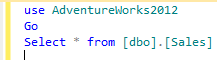
Given below is the query :

use AdventureWorks2012
Go
Select * from [dbo].[Sales]

sqlserverblog_83_1.1

Answer :

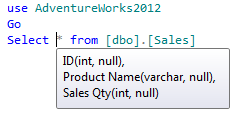
The answer is very simple, you just need to move your mouse and keep it over * and the SQL SERVER will display the column name along with data type shown in the picture below.
Note : This solution will work on sql server 2008 and above.

sqlserverblog_83_1.2

Have a better solution?

Read Full Post »

I was working on statistical reports and I had to display whether the given year was leap year or not in a field. So, I developed few ways using SQL SERVER 2012 functions to detect whether leap year or not.

Given below are the multiple ways to detect leap year:

Method 1 :
In method 1, I made a date (2012-02-28) using DATEFROMPARTS function then used EOMONTH function to find the last date (2012-02-29) of February. Then to find the last day (29), used DAY function and after that used IIF to check whether it is 29 or not, to detect if its a leap year or not.

DECLARE @Year INT =2012
SELECT IIF(DAY(EOMONTH(DATEFROMPARTS(@Year,2,28)))=29 ,'YES','NO') AS [LEAP YEAR]
--RESULT

LEAP YEAR
———
YES

(1 row(s) affected)
Method 2 :
In method 2, I simply made 2 dates using DATEFROMPARTS function. First is the 1st date of the year and 2nd date is the last date of the year and then used DATEDIFF function to find total no of days in a year and finally used IIF function to check if it is 366 or 365 days. If 366, then leap year and if 365 then it is not.

DECLARE @Year INT =2012
SELECT IIF(DATEDIFF(DAY,DATEFROMPARTS(@Year,1,1), DATEFROMPARTS(@year,12,31))+1=366 ,'YES','NO') AS [LEAP YEAR]
--RESULT

LEAP YEAR
———
YES

(1 row(s) affected)
Method 3 :
In method 3, I first made a date(2012-02-28) using DATEFROMPARTS function then added one day to it. After addition I took the day and checked it using IIF function. If it is 29, then leap year, else, it is not.

DECLARE @Year INT =2012
SELECT IIF(DAY(DATEADD(DAY,1,DATEFROMPARTS(@Year,2,28)))=29 ,'YES','NO') AS [LEAP YEAR]
--RESULT

LEAP YEAR
———
YES

(1 row(s) affected)

Method 4 :
In method 4, I made 2 dates (2012-02-28, 2012-03-01) using DATEFROMPARTS function and then found the date difference using DATEDIFF function, and finally used IIF function to check the difference. If it is 2 days, means the year is leap, else not.

DECLARE @Year INT =2012
SELECT IIF(DATEDIFF(DAY,DATEFROMPARTS(@Year,2,28), DATEFROMPARTS(@year,3,01))=2 ,'YES','NO') AS [LEAP YEAR]
--RESULT

LEAP YEAR
———
YES

(1 row(s) affected)

Note : Try @Year as 2013 and all the result set will return that 2013 is not a leap year using any above methods.

Let me know if you know a better method to detect leap year.

Read Full Post »

Given below is the function that calculates the weekdays between two dates including the dates provided as input parameter. In some parts of the world weekends are on ‘Fridays’, ‘Saturdays’ and in other parts ‘Saturdays’, ‘Sundays’.
In this function, you can pass your weekend as a parameter.

CREATE FUNCTION dbo.GetWorkingDays
( @StartDate DATETIME,
@EndDate DATETIME ,
@Weekend VARCHAR(50)
)
RETURNS INT
BEGIN

DECLARE @Xml AS XML
DECLARE @WEEKDAYS_DAY AS INT
SET @Xml = cast(('<A>'+replace(@Weekend,',' ,'</A><A>')+'</A>') AS XML)

;WITH N1 (n) AS (SELECT 1 UNION ALL SELECT 1),
N2 (n) AS (SELECT 1 FROM N1 AS X, N1 AS Y),
N3 (n) AS (SELECT 1 FROM N2 AS X, N2 AS Y),
N4 (n) AS (SELECT ROW_NUMBER() OVER(ORDER BY X.n)
FROM N3 AS X, N3 AS Y)

Select @WEEKDAYS_DAY=SUM(1) from n4
Where DateAdd(day,n-1,@startdate)<=@Enddate
And datename(dw,DateAdd(day,n-1,@startdate)) NOT In (
SELECT A.value('.', 'varchar(max)') as [Column] FROM @Xml.nodes('A') AS FN(A)
)

RETURN @WEEKDAYS_DAY
END
GO
SELECT dbo.GetWorkingDays ('02/01/2013', '02/28/2013','Saturday,Sunday')
as [Weekday Days]

GO
SELECT dbo.GetWorkingDays ('02/01/2013', '02/28/2013','Friday,Saturday')
as [Weekday Days]

--OUTPUT
Weekday Days
------------
20

(1 row(s) affected)

Weekday Days
------------
20

(1 row(s) affected)

Read Full Post »

In my previous article I discussed about “How to split string based on single delimiter”. In this article, we will discuss how to split the string based on multiple delimiters and also remove the spaces around the string.

Given below is the user defined function to achieve this result.

--Create this user deinfed function.
CREATE FUNCTION dbo.[UDF_Split_Based_On_Multiple_Delimiters]
(
@String VARCHAR(MAX),  -- Variable for string
@delimiter VARCHAR(50) -- Delimiter in the string
)
RETURNS @Table TABLE(        --Return type of the function
Splitcolumn VARCHAR(MAX)
)
BEGIN

DECLARE @Xml AS XML
DECLARE @REVISED_STRING VARCHAR(MAX)

;WITH N1 (n) AS (SELECT 1 UNION ALL SELECT 1),
N2 (n) AS (SELECT 1 FROM N1 AS X, N1 AS Y),
N3 (n) AS (SELECT 1 FROM N2 AS X, N2 AS Y),
N4 (n) AS (SELECT ROW_NUMBER() OVER(ORDER BY X.n)
FROM N3 AS X, N3 AS Y)

SELECT @REVISED_STRING=STUFF((SELECT '' + (Case When
PATINDEX('%[' + @delimiter + ']%',SUBSTRING(@String,Nums.n,1)) >0
Then ',' else LTRIM(RTRIM(SUBSTRING(@String,Nums.n,1))) end)
FROM N4 Nums WHERE Nums.n<=LEN(@String)  FOR XML PATH('')),1,0,'')

SET @Xml = cast(('<a>'+replace(@REVISED_STRING,
',','</a><a>')+'</a>') AS XML)

INSERT INTO @Table SELECT A.value('.', 'varchar(max)')
as [Column] FROM @Xml.nodes('a') AS FN(a)

RETURN
END
GO
--Syntax SELECT * FROM dbo.[UDF_Split_Based_On_Multiple_Delimiters] (String , multiple delimiter)
SELECT * FROM dbo.[UDF_Split_Based_On_Multiple_Delimiters]
('abc,def ; ghij ; kl',',;:')
GO
--OUTPUT

Splitcolumn
———–
abc
def
ghij
kl

(4 row(s) affected)

This may not be the best solution. Let me know if you have better solution than this to split it.

Read Full Post »

I had to migrate data from old system to new system and I found that we have one field called ‘notes’ having duplicated comma separated IDs. The next stage was to remove the duplicated (IDs) from string (notes column).
We can develop this solution via while Loop but I developed it without Loop.

Given below is the solution that can remove duplicate entry from comma, semi colon or any other delimited string .

Create Function dbo.[UDF_Remove_Duplicate_Entry]
(
@Duplicate_String VARCHAR(MAX),
@delimiter VARCHAR(2)
)
RETURNS VARCHAR(MAX)
BEGIN
DECLARE @Xml XML
DECLARE @Removed_Duplicate_String VARCHAR(Max)
SET @Duplicate_String=REPLACE(@Duplicate_String,'&','And')
SET @delimiter=REPLACE(@delimiter,'&','And')

SET @Xml = CAST(('<A>'+REPLACE(@Duplicate_String,@delimiter,'</A><A>')+'</A>') AS XML)

;WITH CTE AS (SELECT A.value('.', 'varchar(max)') AS [Column]
FROM @Xml.nodes('A') AS FN(A))

SELECT @Removed_Duplicate_String =Stuff((SELECT '' + @delimiter + '' + [Column]  FROM CTE GROUP BY [column]
FOR XML PATH('') ),1,1,'')

SET @Removed_Duplicate_String=REPLACE(@Removed_Duplicate_String,'And','&')
RETURN (@Removed_Duplicate_String)
END
GO

--For Example :
SELECT dbo.[UDF_Remove_Duplicate_Entry] ('1,2,2,3,4,1,1,2,3,5',',') AS [Comma Delimited]
GO
SELECT dbo.[UDF_Remove_Duplicate_Entry] ('1;2;2;3;4;1;1;2;3;5',';') AS [Semi Colon Delimited]
GO
--OUTPUT

Comma Delimited
——————
1,2,3,4,5

(1 row(s) affected)

Semi Colon Delimited
——————
1;2;3;4;5

(1 row(s) affected)

Read Full Post »

In my previous article, I discussed about the easiest way to calculate the last date of any month in SQL SERVER 2012.
Today, we will discuss the easiest way to calculate the total number of days in a month in SQL SERVER 2012.
But before that, I would like to discuss how we were calculating the total number of days in a month in the previous versions of SQL SERVER (2005 & 2008)

In SQL Server 2005/2008

For Example :

DECLARE @DATE DATETIME
SET @DATE='2012-12-10'

SELECT DAY(DATEADD(ms,-2,DATEADD(MONTH, DATEDIFF(MONTH,0,@DATE)+1,0)))
AS [Current Month]

--RESULT
Current Month
-------------
29

(1 row(s) affected)

In SQL Server 2012

For Example :

DECLARE @DATE DATETIME
SET @DATE='2012-02-10'

Select Day(EOMONTH(@DATE)) AS [Current Month]
--RESULT
Current Month
-------------
29

(1 row(s) affected)

Read Full Post »

I was preparing a statistical report and was stuck in one place where I needed to convert certain rows to comma separated values and put into a single row.

Lets say I have multiple currencies in a table and I would like to display in a single comma separated rows.

I found few options to resolve this.

  1. USING CURSOR
  2. USING COALESCE
  3. USING STUFF

Let me create a simple example to explain these methods in detail.

Create Table tbl_Currency
(
[Currency] varchar(50)
)
GO
Insert into tbl_Currency Values ('US dollar')
Insert into tbl_Currency Values ('European euro')
Insert into tbl_Currency Values ('Indian rupee')
Insert into tbl_Currency Values ('Pakistani rupee')
Insert into tbl_Currency Values ('Philippine peso')
Insert into tbl_Currency Values ('UAE dirham')
Insert into tbl_Currency Values ('British pound')

Let me explain these methods in detail :

    • USING CURSOR:

This is a simple way for development but performance wise it will cost a lot for your application.

Given below is a CURSOR example :

CREATE PROCEDURE Cursor_Example1_Proc
AS
DECLARE @Currency varchar(Max)
DECLARE @Consolidated_Currency varchar(Max)
DECLARE Cur_Cursor CURSOR FOR
SELECT [Currency] FROM tbl_Currency

OPEN Cur_Cursor

FETCH NEXT FROM Cur_Cursor INTO @Currency

WHILE @@FETCH_STATUS = 0
BEGIN
Set @Consolidated_Currency =ISNULL(@Consolidated_Currency,'')
+ ISNULL(@Currency + ', ','')

FETCH NEXT FROM Cur_Cursor INTO  @Currency
END
Select Left(@Consolidated_Currency,LEN(@Consolidated_Currency)-1) as [Currency]

CLOSE Cur_Cursor
DEALLOCATE Cur_Cursor
GO
EXEC Cursor_Example1_Proc
GO
    • USING COALESCE:

We can also achieve the same using COALESCE function. Given below is an example.

Declare @Currency varchar(Max)
Set @Currency=''
Select @Currency=@Currency + Coalesce([Currency]+ ', ','') from tbl_Currency
Select Left(@Currency,LEN(@Currency)-1) as [Currency]
GO
    • USING STUFF:

This is the recommended / best way to do this because you can achieve the same result without any variable and less lines of code. Given below is an example.

SELECT STUFF((SELECT ', ' + [Currency] FROM tbl_Currency FOR XML PATH('')),1,1,'') as [Currency]
GO

RESULT :
The result of all of the above methods is the same. Given below is the result.

  • REAL WORLD EXAMPLE :

As mentioned above, I was working on a report where multiple Bank A/C # should be displayed next to the customer name like a comma separated field.

Let me create an example to explain this :

Create Table tbl_Customer_Bank_Details
(
[Customer ID] int,
[Customer Name] varchar(50),
[Bank Account No] varchar(50)
)
GO
Insert into tbl_Customer_Bank_Details Values (1,'Imran','A001')
Insert into tbl_Customer_Bank_Details Values (1,'Imran','A002')
Insert into tbl_Customer_Bank_Details Values (1,'Imran','A003')
Insert into tbl_Customer_Bank_Details Values (2,'Bob','B001')
Insert into tbl_Customer_Bank_Details Values (2,'Bob','B002')
GO
Select * from tbl_Customer_Bank_Details
--RESULT

Lets combine the account number (comma separated values) with respect to the customer.

SELECT [Customer ID], [Customer Name]
, STUFF((SELECT ', ' + A.[Bank Account No] FROM tbl_Customer_Bank_Details A
Where A.[Customer ID]=B.[Customer ID] FOR XML PATH('')),1,1,'') As [Bank Accounts]
From tbl_Customer_Bank_Details B
Group By [Customer ID], [Customer Name]

Read Full Post »

« Newer Posts - Older Posts »