Feeds:
Posts
Comments

Archive for the ‘Solutions’ Category

Today, we will discuss the efficient way to count records of any table. Lets suppose you have millions of records in a table. How will you calculate the record count quickly ?

Let me explain this with simple examples :

Example 1 :
First, lets use the traditional way to count records from the table.

SET STATISTICS TIME ON

Select Count(*) as [Total Records]
from [tbl_Sample]

--Result
SQL Server parse and compile time:
CPU time = 2 ms, elapsed time = 2 ms.

SQL Server Execution Times:
CPU time = 0 ms,  elapsed time = 1 ms.

Total Records
-------------
44040192

(1 row(s) affected)

SQL Server Execution Times:
CPU time = 5046 ms,  elapsed time = 26518 ms.

As per the results, the above query took almost 26 seconds.

Example 2 :
Lets go to SSMS to view how SQL Server calculates the record count.

Right click on the table and go to properties. It will give you a lot of information including record count in a fraction of seconds.

Now, we need to find out what query is running behind these properties. So lets open the SQL Server profiler. A lot of queries were running to calculate different information but I grabbed the query that calculates record count.

Given below is the query that SQL Server uses to calculate the record count of any table.

SET STATISTICS TIME ON

select SUM([rows]) as [Total records] from sys.partitions
where object_id=object_ID('tbl_Sample') And [index_id] =1

SQL Server parse and compile time:
CPU time = 0 ms, elapsed time = 3 ms.

SQL Server Execution Times:
CPU time = 0 ms,  elapsed time = 1 ms.
Total records
--------------------
44040192

(1 row(s) affected)

SQL Server Execution Times:
CPU time = 0 ms,  elapsed time = 1 ms.

Conclusion :
You can view a remarkable difference between both queries.
In Example 1 , the SQL needs to calculate the record count from the table but in Example 2, the Information is already calculated and you just need to query it.

Read Full Post »

“Can you add one column in the middle of the table via script, (if yes) how would you do it ?
The answer to this question is “No”. Either you need to add the column in the end of the table or you need to do it via SSMS.
But the question is why you can do it through Sql Server Management Studio (SSMS) not from the script. So Lets go through SSMS to find out how SSMS can do it.

Lets proceed it step by step :
Step -1
Lets Create a Sample table.

Create Table Test_Table
(
[Customer ID] int,
[Customer Name] varchar(50)
)

Step -2
Now, open the Table in a design mode.

Step -3
Add one column namely “Customer Code” in the middle of the table.

Step -4
Click on “generate change script” button and view the script.

Step -5
Now, we have change script.

In this script, SQL create a new temporary table insert all data in it and then drop the original table and then rename it to the original name.

/* To prevent any potential data loss issues, you should review this script in
detail before running it outside the context of the database designer.*/
BEGIN TRANSACTION
SET QUOTED_IDENTIFIER ON
SET ARITHABORT ON
SET NUMERIC_ROUNDABORT OFF
SET CONCAT_NULL_YIELDS_NULL ON
SET ANSI_NULLS ON
SET ANSI_PADDING ON
SET ANSI_WARNINGS ON
COMMIT
BEGIN TRANSACTION
GO
CREATE TABLE dbo.Tmp_Test_Table
(
[Customer ID] int NULL,
[Customer Code] int NULL,
[Customer Name] varchar(50) NULL
)  ON [PRIMARY]
GO
IF EXISTS(SELECT * FROM dbo.Test_Table)
EXEC('INSERT INTO dbo.Tmp_Test_Table ([Customer ID], [Customer Name])
SELECT [Customer ID], [Customer Name] FROM dbo.Test_Table WITH (HOLDLOCK TABLOCKX)')
GO
DROP TABLE dbo.Test_Table
GO
EXECUTE sp_rename N'dbo.Tmp_Test_Table', N'Test_Table', 'OBJECT'
GO
COMMIT

Conclusion :
In the above script, you can see how SQL added column in the middle of the table, So you can also add the column in the middle of the table via script as well.

Read Full Post »

Today, I received an email from one of my blog readers, who would like to match test and production databases. Here is a basic script to compare two databases.

Given below are the objects, script will compare in source and target databases.

  • Tables
  • Views
  • Stored Procedures
  • User Defined Functions
  • Triggers
  • Primary Keys
  • Indexes
  • Missing column in table or view
  • Mismatch data type in table or view
  • Missing Parameter in the stored procedure
Create Procedure Sp_Compare_two_database_Schema
@Source_DB_Name nvarchar(Max),
@Target_DB_Name varchar(Max)

As
BEGIN
DECLARE @SQL nvarchar(MAX)

SET @Source_DB_Name=QUOTENAME(@Source_DB_Name)
SET @Target_DB_Name=QUOTENAME(@Target_DB_Name)

SET @SQL=''

CREATE TABLE #Result
(
[Main Object Type] nvarchar(max),
[Main Object Name] nvarchar(max),
[Type] varchar(50),
[Sub Object Type] nvarchar(max),
[Sub Object Name] nvarchar(max)
)

--Match Main Objects Like Tables, view, Stored Procedure , triggers.
SET @SQL= 'Insert into #Result Select A.[type_desc] as [Main Object Type],A.[name],''Object Missing'' as [Type]
,A.[type_desc] as [Sub Object Type]
,A.[name] as [Sub Object Name]
from ' + @Source_DB_Name + '.sys.objects A
Where [Parent_object_id]=0 And A.[name] NOT IN(
Select [name] from ' +  @Target_DB_Name + '.sys.objects)
Order By A.[type_desc]'
Print @SQL
EXEC (@SQL)

--Match Sub Objects Like Foreign Keys.
SET @SQL= 'Insert into #Result Select A.[type_desc] as [Main Object Type],A.[name],''Object Missing'' as [Type]
,B.[type_desc] as [Sub Object Type]
,B.[name] as [Sub Object Name]
from ' + @Source_DB_Name + '.sys.objects A
Inner Join ' + @Source_DB_Name + '.sys.objects B
On A.[object_id]=B.[Parent_object_id]
Where B.[name] NOT IN(
Select [name] from ' +  @Target_DB_Name + '.sys.objects)
Order By A.[type_desc]'
Print @SQL
EXEC (@SQL)

--Find if any column is missing in target database.

SET @SQL= ';With CteA AS (Select A.[type_desc] as [Main Object Type],A.[Name] as [Main Object Name],''Column Missing'' as [Type],B.[Name] as [Column Name]
from  ' + @Source_DB_Name + '.sys.objects A
Inner Join  ' + @Source_DB_Name + '.sys.columns B
On A.[object_id] =B.[object_id]
Where A.[Type] In (''U'',''V'')
)
,CteB AS (Select A.[type_desc] as [Main Object Type],A.[Name] as [Main Object Name],''Column Missing'' as [Type],B.[Name] as [Column Name]
from ' +  @Target_DB_Name + '.sys.objects A
Inner Join ' +  @Target_DB_Name + '.sys.columns B
On A.[object_id] =B.[object_id]
Where A.[Type] In (''U'',''V'')
)
Insert into #Result
Select A.[Main Object Type],A.[Main Object Name],A.[Type], ''Column'' as [Sub Object Type],A.[Column Name] from CTEA A
Left Join CTEB B On
A.[Main Object Type]=B.[Main Object Type]
And A.[Main Object Name]=B.[Main Object Name]
And A.[Column Name]=B.[Column Name]
Where (B.[Main Object Name] is NULL OR B.[Column Name] is NULL)
And A.[Main Object Name]  Not In (Select [Main Object Name] from #Result A
Where A.[Type]=''Object Missing'')
Order By A.[Main Object Type],A.[Main Object Name], A.[Column Name]'
Print @SQL
EXEC (@SQL)

--Find if any column data type is not sync with target database.

SET @SQL= ';With CteA AS (Select A.[type_desc] as [Main Object Type],A.[Name] as [Main Object Name]
,''Data Type Difference'' as [Type],B.[Name]  as [Column Name]
,B.[system_type_id]
from ' + @Source_DB_Name + '.sys.objects A
Inner Join ' + @Source_DB_Name + '.sys.columns B
On A.[object_id] =B.[object_id]
Where A.[Type] In (''U'',''V'')
)
,CteB AS (Select A.[type_desc] as [Main Object Type],A.[Name] as [Main Object Name],''Data Type Difference'' as [Type],B.[Name] as [Column Name],B.[system_type_id]
from ' +  @Target_DB_Name + '.sys.objects A
Inner Join ' +  @Target_DB_Name + '.sys.columns B
On A.[object_id] =B.[object_id]
Where A.[Type] In (''U'',''V'')
)

Insert into #Result Select A.[Main Object Type],A.[Main Object Name],A.[Type], ''Column'' as [Sub Object Type], A.[Column Name] from CTEA A
Inner Join CTEB B On
A.[Main Object Type]=B.[Main Object Type]
And A.[Main Object Name]=B.[Main Object Name]
And A.[Column Name]=B.[Column Name]
Where A.[system_type_id]<>B.[system_type_id]
And A.[Main Object Name]  Not In (Select [Main Object Name] from #Result A
Where A.[Type]=''Object Missing'')
Order By A.[Main Object Type],A.[Main Object Name], A.[Column Name]'

Print @SQL
EXEC (@SQL)

--Find if any parameter of the procedure is missing in target database.

SET @SQL= ';With CteA AS (Select A.[type_desc] as [Main Object Type]
,A.[Name] as [Main Object Name],''Parameter Missing'' as [Type],B.[name] as [Parameter Name]
from' + @Source_DB_Name + '.sys.objects  A
Inner Join ' + @Source_DB_Name + '.sys.all_parameters B On A.[object_id] =B.[Object_id]
)
,CteB AS (
Select A.[type_desc] as [Main Object Type]
,A.[Name] as [Main Object Name],''Parameter Missing'' as [Type],B.[name] as [Parameter Name]
from ' +  @Target_DB_Name + '.sys.objects  A
Inner Join ' +  @Target_DB_Name + '.sys.all_parameters B On A.[object_id] =B.[Object_id]
)

Insert into #Result Select A.[Main Object Type],A.[Main Object Name],A.[Type]
, ''Parameter'' as [Sub Object Type]
, A.[Parameter Name] from CTEA A
Left Join CTEB B On
A.[Main Object Type]=B.[Main Object Type]
And A.[Main Object Name]=B.[Main Object Name]
And A.[Parameter Name]=B.[Parameter Name]
Where (B.[Main Object Name] IS NULL OR  B.[Parameter Name] IS NULL)
And A.[Main Object Name]  Not In (Select [Main Object Name] from #Result A
Where A.[Type]=''Object Missing'')
Order By A.[Main Object Type],A.[Main Object Name], A.[Parameter Name]'
Print @SQL
EXEC (@SQL
)
Select * from #Result A Order By A.[Main Object Type] DESC, A.[Main Object Name] ASC ,[Type] DESC
END
GO

--Syntax
--Sp_Compare_two_database_Schema 'Source DatabaseName','Target DatbaseName'

--Example
Sp_Compare_two_database_Schema 'Source_DB','Target_DB'

Read Full Post »

In this article, we will convert text to number in multiple versions of SQL Server and will see the difference. I will use four different Data conversion functions (Convert, Cast, Try_ConvertTry_Cast) to convert Text to Number.

Let me explain this with simple examples.

In SQL Server 2005/2008 :

Example 1 : (Convert Text to integer if text having numeric data only)

Declare @string as varchar(5)
Set @string ='12345'

Select Convert(int,@string) as [Convert Text to Integer]
Select Cast(@string as int) as [Cast Text to Integer]

--RESULT
Convert Text to Integer
-----------------------
12345

(1 row(s) affected)

Cast Text to Integer
--------------------
12345

(1 row(s) affected)

Example 2 : (Convert Text to integer if text having string data)


Declare @string as varchar(7)
Set @string ='raresql'

Select Convert(int,@string) as [Convert Text to Integer]
Select Cast(@string as int) as [Cast Text to Integer]
--RESULT
Convert Text to Integer
-----------------------

Msg 245, Level 16, State 1, Line 4
Conversion failed when converting the varchar value ‘raresql’ to data type int.

In SQL Server 2012 :

Example 3 : (Convert Text to integer if text having numeric data only)

Declare @string as varchar(5)
Set @string ='12345'

Select Try_Convert(int,@string) as [Convert Text to Integer]
Select Try_Cast(@string as int) as [Cast Text to Integer]

--RESULT
Convert Text to Integer
-----------------------
12345

(1 row(s) affected)

Cast Text to Integer
--------------------
12345

(1 row(s) affected)

Example 4 : (Convert Text to integer if text having string data)


Declare @string as varchar(7)
Set @string ='raresql'

Select Try_Convert(int,@string) as [Convert Text to Integer]
Select Try_Cast(@string as int) as [Cast Text to Integer]
--RESULT
Convert Text to Integer
-----------------------
NULL

(1 row(s) affected)

Cast Text to Integer
--------------------
NULL

(1 row(s) affected)

Conclusion :
If we compare Examples 1 & 3, we can easily find out that there is no difference, but we can see that Examples 2 and 4 having much difference because Cast & Convert generates an error if there is a compatibility issue with data type, but Try_Convert & Try_Cast (SQL Server 2012) will return NULL instead of error.

Read Full Post »

Whenever you open a new tab on Internet Explorer, it automatically opens it on the right side of the existing tab. So, as many tabs as you open, it keeps growing on the right side.

But, if you open new documents in SQL Server, it opens new documents on the left side of the existing tab and keep growing on left side. However, SQL Server 2012 gives you the option to change it from left to right, same as Internet Explorer.

First, lets open 3 documents and view its behavior in SQL Server.

Now, lets change its behavior.

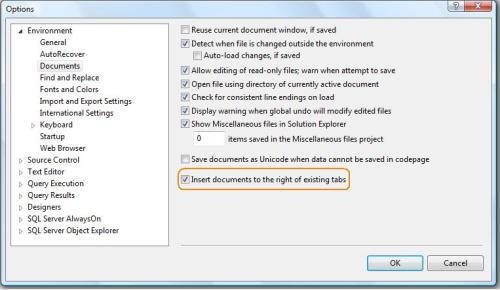
Go to SSMS then Tools >> Options >> Environment >> Documents and check the option “Insert documents to the right of existing tabs”. By default it is unchecked.

Now, lets open new documents and view the behavior.

You can see that SQL Server documents has changed the behavior and now it opens on right side of the existing documents.

Read Full Post »

Today, I was working with the trigger and I wanted to get the list of all triggers in the database. It is either enabled or disabled with its details. Finally I developed a script to get all the details in one shot.

For Example : If the trigger is for insert/update/delete or for any other operations, then the given below script will give you all the information related to triggers :

Create PROCEDURE [Get_All_Details_Of_Trigger]
as
Select A.[name] as [Table Name]
,B.[name] as [Trigger Name]
,(CASE WHEN OBJECTPROPERTY(B.[object_id], 'ExecIsTriggerDisabled') =1
then 'DISABLED' else 'ENABLED' end) as [Trigger Status]

,(CASE WHEN OBJECTPROPERTY(B.[object_id], 'ExecIsInsertTrigger') =1
then 'No' else 'Yes' end) as [IsInsertTrigger]

,(CASE WHEN OBJECTPROPERTY(B.[object_id], 'ExecIsFirstInsertTrigger') =1
then 'No' else 'Yes' end) as [IsFirstInsertTrigger]

,(CASE WHEN OBJECTPROPERTY(B.[object_id], 'ExecIsLastInsertTrigger') =1
then 'No' else 'Yes' end) as [IsLastInsertTrigger]

,(CASE WHEN OBJECTPROPERTY(B.[object_id], 'ExecIsDeleteTrigger') =1
then 'No' else 'Yes' end) as [IsDeleteTrigger]

,(CASE WHEN OBJECTPROPERTY(B.[object_id], 'ExecIsFirstDeleteTrigger') =1
then 'No' else 'Yes' end) as [IsFirstDeleteTrigger]

,(CASE WHEN OBJECTPROPERTY(B.[object_id], 'ExecIsLastDeleteTrigger') =1
then 'No' else 'Yes' end) as [IsLastDeleteTrigger]

,(CASE WHEN OBJECTPROPERTY(B.[object_id], 'ExecIsUpdateTrigger') =1
then 'No' else 'Yes' end) as [IsUpdateTrigger]

,(CASE WHEN OBJECTPROPERTY(B.[object_id], 'ExecIsFirstUpdateTrigger') =1
then 'No' else 'Yes' end) as [IsFirstUpdateTrigger]

,(CASE WHEN OBJECTPROPERTY(B.[object_id], 'ExecIsLastUpdateTrigger') =1
then 'No' else 'Yes' end) as [IsLastUpdateTrigger]

,(CASE WHEN OBJECTPROPERTY(B.[object_id], 'ExecIsAfterTrigger') =1
then 'No' else 'Yes' end) as [IsAfterTrigger]

,(CASE WHEN OBJECTPROPERTY(B.[object_id], 'ExecIsInsteadOfTrigger') =1
then 'No' else 'Yes' end) as [IsInsteadOfTrigger]

,(CASE WHEN OBJECTPROPERTY(B.[object_id], 'ExecIsTriggerNotForRepl') =1
then 'No' else 'Yes' end) as [IsTriggerNotForReplication]

from sys.tables A
Inner Join sys.triggers B
On A.[object_id]=B.[parent_id]
GO
EXEC [Get_All_Details_Of_Trigger]

Read Full Post »

Today, we will discuss, how to recover the deleted data from SQL Server. We have two methods to do it.

  1. Through SQL SERVER LOG
  2. Through Backup

The first method I have already discussed in my previous article “How to recover deleted data from SQL Server”.

Today we will discuss how to recover it via database backup.
Mostly, we have a perception that if we have a FULL BACKUP before deletion we can easily restore it and can get the old data.
But this is wrong perception, even if you have an earlier full backup was taken about 4 to 8 hours before, you can still recover your deleted records.
I presume your database is in FULL Recovery model.

Let proceed this with the Step by Step approach. But remember date and time is very important in all the recovery process.

Step 1 :
First of all, take a full backup of the database.

BACKUP DATABASE test
TO DISK = 'c:\TEST_FULL_BACKUP.bak'
GO

Lets say, we took this full back up at 6:00 AM.

Step 2 :
Lets create one table and insert few records in it. But remember we took the full backup before doing all these transactions.

Create Table Test_Table
(
[ID] int,
[Designation] varchar(50)
)
Insert into Test_Table ([ID],[Designation]) Values(1,'Officer')
Insert into Test_Table ([ID],[Designation]) Values(2,'Manager')
Insert into Test_Table ([ID],[Designation]) Values(3,'Director')

We did all these transaction at 9:00 AM.

Step 3 :
Lets Delete the record. Lets say at 10.00 AM

Delete from Test_Table

Step 4 :
Lets check the records in the table

Select * from Test_Table

Step 5 :
Now, lets start the process of recovery.

First take a transaction log backup after deletion.

BACKUP LOG TEST
TO DISK = 'C:\TEST_TRANSACTION_LOG.bak'
WITH NORECOVERY;
GO

Step 6 :
After that restore the database FULL BACKUP, that we took at 6.00 AM

RESTORE DATABASE test
FROM DISK = 'c:\TEST_FULL_BACKUP.bak'
WITH NORECOVERY;
GO

Step 7 :
After that, lets restore the transaction log backup (we took after deletion) and specify the time. In the above example we deleted records at 10.00 AM. So we will restore the transaction log by 9:59 AM.

RESTORE LOG test
FROM DISK = 'C:\TEST_TRANSACTION_LOG.bak'
WITH RECOVERY,
STOPAT = 'Oct 09, 2012 09:59:00 AM'

Step 7 :
In the final step, you can browse the table and view the records what you have deleted. Now the records are recovered.

Select * from Test_Table

Read Full Post »

Today, we are going to discuss a most frequent issue with number and that is Leading zero with numbers or we can say that right padding of numbers with zeros in SQL server 2005,2008 & 2012.
In SQL Server 2012, it became very simple with the help of “format” function.

Lets create a sample table to demonstrate it.

Create Table tbl_Sample
(
[SNo] int
,[Values] int
)

Insert into tbl_Sample Values (1,1)
Insert into tbl_Sample Values (2,22)
Insert into tbl_Sample Values (3,333)
Insert into tbl_Sample Values (4,4444)
Insert into tbl_Sample Values (5,55555)
Insert into tbl_Sample Values (6,666666)
Insert into tbl_Sample Values (7,7777777)
Insert into tbl_Sample Values (8,88888888)
Insert into tbl_Sample Values (9,999999999)
GO

Lets browse the table without any formatting.

Select * from tbl_Sample

Now, if you browse the table, you can view the unformated view of column values.

Lets create a function to format it.

FOR SQL SERVER 2005 / 2008

CREATE FUNCTION [dbo].[FN_LPAD_LEADING_ZERO](@Lenght int,@String varchar(Max))
RETURNS Varchar(Max)
AS
Begin
Declare @LPAD_STRING as varchar(Max)
Select @LPAD_STRING =(Case When Len(@String)<=@Lenght THEN
Stuff(SPACE(@Lenght -Len(@String))+@String,1, @Lenght -Len(@String),Replicate(0,@Lenght -Len(@String)))
ELSE @String END)
Return @LPAD_STRING
End
GO

Now, lets browse the table and format it with the Function [FN_LPAD_LEADING_ZERO]

Select [SNO],dbo.[FN_LPAD_LEADING_ZERO] (10,[Values]) as [RPAD_Values] from tbl_Sample

Lets discuss how we will do the same in SQL SERVER 2012, and here “Format” the new function of SQL SERVER 2012 rocks and due to this function, it will be just one line of code.
Let me explain this with simple example.
FOR SQL SERVER 2012

Select [SNO],FORMAT ([Values], '000000000#') as [RPAD_Values] from tbl_Sample

Read Full Post »

Today, I was reading Pinal Dave Blog and found “SQL SERVER – Recover the Accidentally Renamed Table” very interesting. I would like to add one more solution to recover accidentally renamed table via SQL Server Log.

Note : It will only recover the table name if you rename it through SSMS.

Lets create a table for example and rename it through SSMS.

Create Table Table_test
([SNO] int)
GO

After that, I renamed it to “Table_test2”, “Table_test3″,”Table_test4” respectively via SSMS.

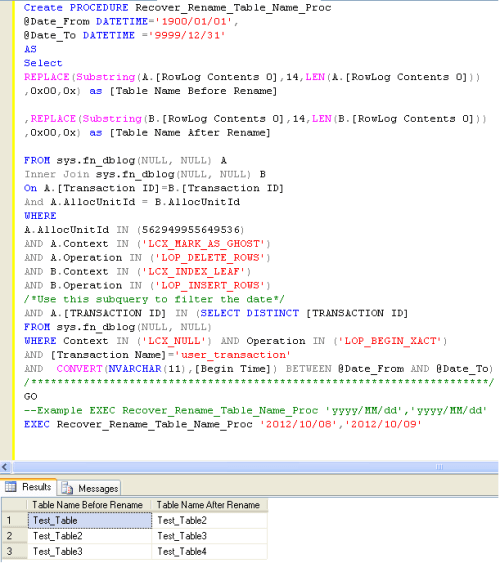
Lets create the procedure for recovery as given below:

CREATE PROCEDURE Recover_Rename_Table_Name_Proc
@Date_From DATETIME='1900/01/01',
@Date_To DATETIME ='9999/12/31'
AS
Select REPLACE(Substring(A.[RowLog Contents 0],14,LEN(A.[RowLog Contents 0])),0x00,0x) as [Table Name Before Rename]
,REPLACE(Substring(B.[RowLog Contents 0],14,LEN(B.[RowLog Contents 0])),0x00,0x) as [Table Name After Rename]
FROM sys.fn_dblog(NULL, NULL) A
Inner Join sys.fn_dblog(NULL, NULL) B On A.[Transaction ID]=B.[Transaction ID]
And A.AllocUnitId = B.AllocUnitId
WHERE
A.AllocUnitId IN (562949955649536)
AND A.Context IN ('LCX_MARK_AS_GHOST')
AND A.Operation IN ('LOP_DELETE_ROWS')
AND B.Context IN ('LCX_INDEX_LEAF')
AND B.Operation IN ('LOP_INSERT_ROWS')
/*Use this subquery to filter the date*/
AND A.[TRANSACTION ID] IN (SELECT DISTINCT [TRANSACTION ID] FROM    sys.fn_dblog(NULL, NULL)
WHERE Context IN ('LCX_NULL') AND Operation IN ('LOP_BEGIN_XACT')
AND [Transaction Name]='user_transaction'
AND  CONVERT(NVARCHAR(11),[Begin Time]) BETWEEN @Date_From AND @Date_To)
/**********************************************************************/
GO
--Example EXEC Recover_Rename_Table_Name_Proc 'yyyy/MM/dd','yyyy/MM/dd'
EXEC Recover_Rename_Table_Name_Proc '2012/10/08','2012/10/09'

In case, if you do not know the modified date & time of the table, you can write given below query and use [modify_date] column.

Select [Name],[modify_date] from sys.tables

Read Full Post »

I received a question from a blog reader “how to convert varbinary to numeric & vice versa & How SQL Server keeps the structure of numeric data type in varbinary format ?”

First lets take an example to convert from varbinary to numeric & vice versa”

Example :

--Convert from varbinary to numeric
Declare @varbinary2 as varbinary(max)
Set @varbinary2=0x08040001B471BC00
Select Convert(numeric(8,4),@varbinary2) as [Varbinary to Numeric]

--Convert from numeric to varbinary
Declare @Numeric2 as numeric(8,4)
Set @Numeric2 =1234.9876
Select Convert(varbinary(max),@Numeric2) as [Numeric to Varbinary]
--RESULT

Varbinary to Numeric
—————————————
1234.9876

(1 row(s) affected)

Numeric to Varbinary
—————————————
0x08040001B471BC00

(1 row(s) affected)

Explanation :
It is a simple conversion, but one thing you need to remember is, whenever you convert from varbinary to numeric, you must be exact in the Precision & Scale. If Precision & Scale are wrong, it will give you wrong result. But the question is how ascertain that the Precision & Scale are in varbinary format ?

Lets take an example from above and first get the Precision & Scale and then convert it into numeric data type.

--Convert from varbinary to numeric
Declare @varbinary1 as varbinary(max)
Set @varbinary1=0x08040001B471BC00

Select Convert(int,0x08) as [Precision]
Select Convert(int,0x04) as [Scale]

Select @varbinary1 as [Varbinary]
,Convert(numeric(18,4),@varbinary1) as [Varbinary to Numeric]
--RESULT

Precision
———–
8

(1 row(s) affected)

Scale
———–
4

(1 row(s) affected)

Varbinary | Varbinary to Numeric
———————– | —————————————
0x08040001B471BC00 | 1234.9876

(1 row(s) affected)

Given below is the screen image that will show how SQL keeps numeric data type in varbinary format.

Read Full Post »

« Newer Posts - Older Posts »