Feeds:
Posts
Comments

We usually see this kind of problem in a legacy system wherein the datatype of a table’s column is something but the data stored in it belongs to some different datatypes. And most of the time these datatypes are compatible with each other so it does not create any issues at the time of insertion. But, when it comes to data manipulation you feel handicapped. However, you can resolve these issues using some scripting. But you must remember that before doing any manipulation you must know the actual data is in which datatype (small integer, integer, bigint, numeric, decimal, money, float) and according to that, you need to convert and then manipulate it.

Lets resolve this issue step by step :

Step 1 :
Let me create a table to demonstrate the solution.

USE tempdb
GO
CREATE TABLE tbl_sample
(
[ID] INT,
[Column_varchar] VARCHAR(10)
)
GO

Step 2 :
Insert some dummy data to perform aggregate SUM on column ([Column_varchar]). Given below is the script.

USE tempdb
GO
INSERT INTO tbl_sample VALUES (1,12345)
INSERT INTO tbl_sample VALUES (2,1.234)
INSERT INTO tbl_sample VALUES (3,'a64')
INSERT INTO tbl_sample VALUES (4,'1,200')

Step 3 :
Browse the data from the table and check the datatypes. Given below is the script.

USE tempdb
GO
SELECT * FROM tbl_sample

sumvarcharcolumn1.1

Step 4 :
As you can see there is a ‘,’ (Comma) in ID no 4 in the table. If you find cases like this, you need to use money datatype to convert.
Given below is the script to convert it.

USE tempdb
GO
SELECT
(CASE WHEN ISNUMERIC([Column_varchar])=1
THEN CONVERT(MONEY
,[Column_varchar]) ELSE 0 END)
AS [Converted to Numeric]
FROM tbl_sample
GO

sumvarcharcolumn1.3

Step 5 :
Once you convert it into any number datatype after that just perform any aggregate function on it. Lets SUM the column ([column varchar]) in the table (tbl_sample).
Given below is the script.

SELECT
SUM((CASE WHEN ISNUMERIC([Column_varchar])=1
THEN CONVERT(MONEY,[Column_varchar]) ELSE 0 END)
)
AS [Converted to Numeric]
FROM tbl_sample
GO

sumvarcharcolumn1.2

I received an inquiry from one of my blog readers “Mr. Arun” and he wanted to store more than 8,000 characters in a column. Generally the length of  a varchar(Max) data type consider it as a 8000 characters and above. So I suggested him to use VARCHAR(MAX). But even if you use VARCHAR(MAX), you should be careful while working on more than 8000 characters.
Let me explain the solution step by step.

Step 1 :
Let me create a table to demonstrate the solution.

USE tempdb
GO
CREATE TABLE tbl_sample
(
[ID] INT,
[Column_varchar] VARCHAR(MAX)
)
GO

Step 2 :
Insert 10,000 characters in the column ([Column_varchar]). Given below is the script.

USE tempdb
GO
INSERT INTO tbl_sample VALUES (1, REPLICATE('A',10000))

Step 3 :
Check the length of column ([Column_varchar]) to see if 10,000 characters are inserted or not. Given below is the script.

USE tempdb
GO
SELECT DATALENGTH([Column_varchar]) AS [Column Length]
FROM tbl_sample
--OUTPUT

morethan80001.1

Step 4 :
Ooopps…… It only inserted 8000 characters even though I passed 10,000. Basically the solution is that you need to cast the characters as VARCHAR(MAX) before insertion and insert it again.

USE tempdb
GO
INSERT INTO tbl_sample VALUES
(2, REPLICATE(CAST('A' AS VARCHAR(MAX)),10000))

Step 5 :
Check the length of column ([Column_varchar]) AGAIN and see whether 10,000 characters are inserted or not. Given below is the script.

USE tempdb
GO
SELECT DATALENGTH([Column_varchar]) AS [Column Length]
FROM tbl_sample
--OUTPUT

morethan80001.2

As you can see, this time it has inserted more than 8000 characters.

Conclusion :
Remember, whenever you are planning to insert more than 8000 characters to any varchar column, you must cast it as varchar(max) before insertion.

This error message is shipped with SQL Server 2005 and it occurs due to one of the nice functions namely COALESCE . Lets discus the cause and resolution for this error message.

Let me explain this error in detail :

Message Number: 4127

Severity : 16

Error Message: At least one of the arguments to COALESCE must be a typed NULL

Error Generation:

Let me create a sample to demonstrate this error.

Select COALESCE(NULL,NULL,NULL)
--OUTPUT

Msg 4127, Level 16, State 1, Line 1
At least one of the arguments to COALESCE must be a typed NULL.

Ooopps…… I am unable to execute it.

Resolution:

The reason behind this error is that COALESCE returns the first nonnull expression among its arguments and if you look at above expression, there is no nonnull expression. Given below are the two solutions to resolve it.

Solution 1 :
You need to convert any one of the arguments as typed datatype.

SELECT COALESCE(NULL,NULL,CONVERT(INT,NULL))
--OUTPUT

NULL
Solution 2 :
You need to add an additional argument as ‘N/A’ (meaning not applicable).

SELECT COALESCE(NULL,NULL,NULL,'N/A')
--OUTPUT

N/A

Conclusion :
Remember, whenever you use COALESCE make sure that at least one argument is nonnull or data typed or add one more variable N/A (‘Not Applicable’) as an argument.

Developers mostly prefer the shortest possible code and they frequently use it in their applications. I have written a shortest possible code for RAISERROR in this article but unfortunately this shortest code has been discontinued from SQL Server 2012. The most important concern is not that the shortest possible code is discontinued but what is the replacement of that code.

Given below is the shortest possible code, we use in the earlier versions of SQL Server 2005/2008.

--This script is compatible with SQL Server 2005/ 2008.
USE tempdb
GO
RAISERROR 14243 'This is a test message'
GO
--OUTPUT

Msg 14243, Level 16, State 1, Line 1
This is a test message

As you can see that above script is executed successfully. Now lets execute the above script in SQL Server 2012.

--This script is NOT compatible with SQL Server 2012.
USE tempdb
GO
RAISERROR 14243 'This is a test message'
GO
--OUTPUT

Msg 102, Level 15, State 1, Line 1
Incorrect syntax near ‘14243’.

Ooopps…… I am unable to execute it in SQL Server 2012. As per MSDN, we need to rewrite the statement using the current RAISERROR syntax.

Lets rewrite it step by step.

Step 1 :
This step is not mandatory, in case if your error message is already available in sys.messages.
Given below is a script to add error messages in sys.messages.

EXEC sys.sp_addmessage
@msgnum   = 80000
,@severity = 10
,@msgtext  = N'This is a test message.'
,@lang = 'us_english';

Step 2 :
In this step we need to execute the RAISERROR using new syntax.
Given below is the script.

USE tempdb
GO
RAISERROR (80000, -- Message id,
10, -- Severity,
1) -- State
GO
--OUTPUT

This is a test message.

Cleaning :

sp_dropmessage @msgnum = 80000;
GO

Few days ago, I was working on a report and came across with an issue regarding conversion of Short month name to Month name and we do not have any built-in function to do it in SQL Server. So I commenced my research and finally found few solutions.

Before proceeding with the solutions, let me create a sample to demonstrate this solution.

USE tempdb
GO
CREATE TABLE tbl_MonthName
(
[ID] INT,
[SHORT_MONTH_NAME] VARCHAR(3)
)
GO

INSERT INTO tbl_MonthName
SELECT 1, N'Jan' UNION ALL
SELECT 2, N'Feb' UNION ALL
SELECT 3, N'Mar' UNION ALL
SELECT 4, N'Apr' UNION ALL
SELECT 5, N'May' UNION ALL
SELECT 6, N'Jun' UNION ALL
SELECT 7, N'Jul' UNION ALL
SELECT 8, N'Aug' UNION ALL
SELECT 9, N'Sep' UNION ALL
SELECT 10, N'Oct' UNION ALL
SELECT 11, N'Nov' UNION ALL
SELECT 12, N'Dec'
GO

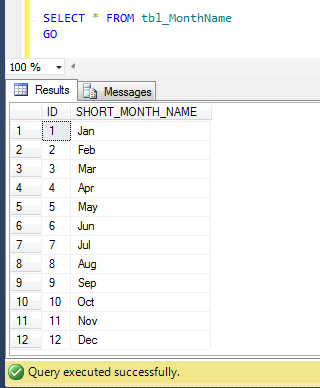
SELECT * FROM tbl_MonthName
GO
--OUTPUT

MonthShortName1.1

Method 1 :
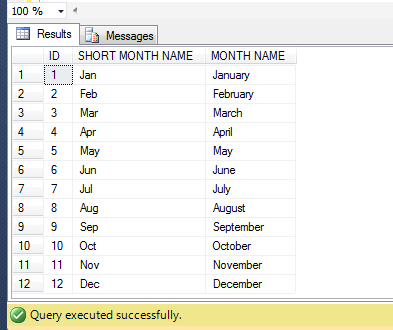
In this method, we will use the old approach. In this approach, we need to manually concatenate day with short month name and year to make a complete date of that particular month using additional single quotes and then get the Month name from this concatenate date using DATENAME function. Given below is the script.

--This script is compatible with SQL Server 2005 and above.
USE tempdb
GO
SELECT
[ID]
,[SHORT_MONTH_NAME] AS [SHORT MONTH NAME]
,DATENAME(MONTH,CONVERT(
DATETIME,'1'+ [SHORT_MONTH_NAME] + '1')) AS [MONTH NAME]
FROM tbl_MonthName
GO
--OUTPUT

MonthShortName1.2

Method 2 :
In this method, we will use the New approach. In this approach, we need to automatically concatenate day with short month name and year to make a complete date of that particular month using CONCAT function (without any single quotes) and then get the Month Name using FORMAT function. Given below is the script.

--This script is compatible with SQL Server 2012 and above.
USE tempdb
GO
SELECT
[ID]
,[SHORT_MONTH_NAME] AS [SHORT MONTH NAME]
,FORMAT(CONVERT(
DATETIME,CONCAT(1,[SHORT_MONTH_NAME],1)),'MMMM') AS [MONTH NAME]
FROM tbl_MonthName
GO
--OUTPUT

MonthShortName1.2

Conclusion :
In both methods, we used different approaches using manual concatenation and automatic concatenation using CONCAT function. I would recommend Method 2 because in my earlier article I found that  CONCAT function is much faster than the normal concatenations.

In my earlier article, I developed a solution How to use multiple values for IN clause using same parameter (SQL Server). Recently, I received a query, inquiring how to pass multiple values through one parameter in a stored procedure.

Given below are the two different Methods :

Method 1 : Using XQuery

In this solution, you need to pass a single comma delimiter string to the stored procedure. Once it is passed, you need to convert the string parameter to xml variable and split it using comma delimiter and then you can query it.
Given below is the script.

--This script is compatible with SQL Server 2005 and above.
USE AdventureWorks2012
GO
CREATE PROCEDURE usp_Employeelist
@Cities NVARCHAR(30)
AS
DECLARE @CitiesXML AS XML
SET @CitiesXML = cast(('<a>'+replace(@Cities,',' ,'</a><a>')
+'</a>') AS XML)

SELECT
BusinessEntityID
, FirstName
, JobTitle
, City
FROM HumanResources.vEmployee
WHERE City IN
(
SELECT
A.value('.', 'varchar(max)')
FROM @CitiesXML.nodes('A') AS FN(A)
)
ORDER BY BusinessEntityID
GO

--Execute the stored procedure using multiple values
--through one parameter in this stored procedure
USE AdventureWorks2012
GO
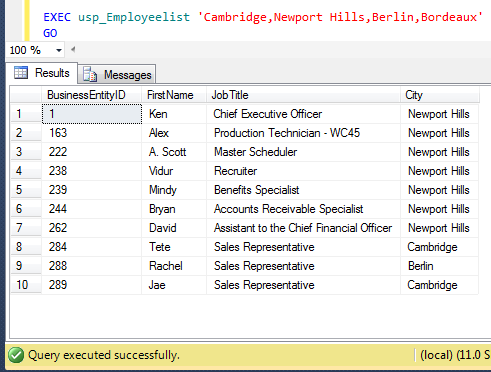
EXEC usp_Employeelist
'Cambridge,Newport Hills,Berlin,Bordeaux'
GO
--OUTPUT

Passingmultiple1.1

Method 2 : Using Dynamic queryhe 

In this solution, you need to pass a single comma delimiter string to the stored procedure. Once it is passed, you need to replace the parameter with single quote and create a dynamic query and execute it.
Given below is the script.

--This script is compatible with SQL Server 2005 and above.
USE AdventureWorks2012
GO
CREATE PROCEDURE usp_Employeelist
@Cities NVARCHAR(30)
AS

DECLARE @Sql VARCHAR(MAX)
SET @Cities = REPLACE(@Cities,',',''',''')

SET @Sql = 'SELECT
BusinessEntityID
, FirstName
, JobTitle
, City
FROM HumanResources.vEmployee
WHERE City IN
(
''' + @Cities + '''
)
ORDER BY BusinessEntityID'

EXEC (@Sql)
GO

--Execute the stored procedure using multiple values
--through one parameter in this stored procedure
USE AdventureWorks2012
GO
EXEC usp_Employeelist
'Cambridge,Newport Hills,Berlin,Bordeaux'
GO
--OUTPUT

Passingmultiple1.1

I came across this problem recently, when I was working on a report and I needed to truncate the date time till seconds. Given below are the two different methods we can use to achieve it.

Method 1 :
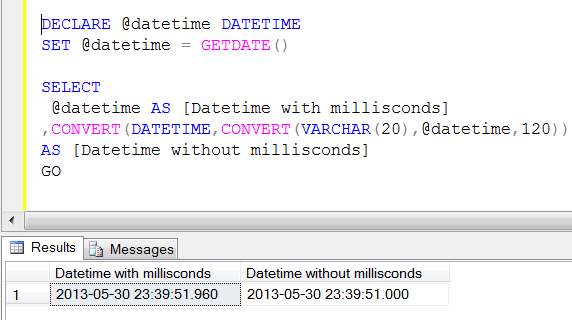
In this method, we will first convert the datetime value to varchar, truncate it and then convert it back to datetime data type using CONVERT function twice.

--This script is compatible with SQL Server 2005 and above.
DECLARE @datetime DATETIME
SET @datetime = GETDATE()

SELECT
@datetime AS [Datetime with millisconds]
,CONVERT(DATETIME,CONVERT(VARCHAR(20),@datetime,120))
AS [Datetime without millisconds]
GO
--OUTPUT

truncatemilliseconds

Method 2 :
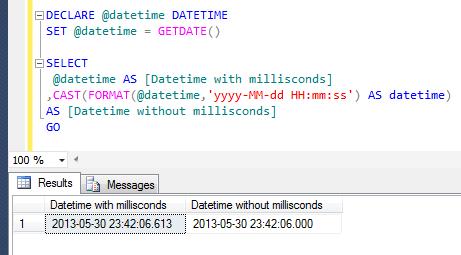
In this method, we will first FORMAT the datetime value to a defined format (truncate milliseconds) and then convert it back to datetime data type using CAST function.

--This script is compatible with SQL Server 2012 and above.
DECLARE @datetime DATETIME
SET @datetime = GETDATE()

SELECT
@datetime AS [Datetime with millisconds]
,CAST(FORMAT(@datetime,'yyyy-MM-dd HH:mm:ss') AS datetime)
AS [Datetime without millisconds]
GO
--OUTPUT

truncatemilliseconds1.1

UNION operator is one of the most frequent operators used in SQL Server scripting. As per MSDN  it is used to combine the results of two or more queries into a single result set that includes all the rows that belong to all queries in the union . But there is an issue with Union operator which prohibits order by for each table separately while using UNION / UNION ALL. It generates an error.

Let me explain this error in detail :

Message Number: 156

Severity : 15

Error Message: Incorrect syntax near the keyword ‘UNION’.

Error Generation:

Let me create a sample to demonstrate this error.

USE tempdb
GO

CREATE TABLE tbl_Sample1
(
 [ID] INT,
 [Grade] VARCHAR(50)
)
GO
CREATE TABLE tbl_Sample2
(
 [ID] INT,
 [Grade] VARCHAR(50)
)

INSERT INTO tbl_Sample1 VALUES (1,'Grade A')
INSERT INTO tbl_Sample1 VALUES (2,'Grade B')
INSERT INTO tbl_Sample1 VALUES (3,'Grade C')
INSERT INTO tbl_Sample1 VALUES (4,'Grade D')
INSERT INTO tbl_Sample1 VALUES (5,'Grade E')
INSERT INTO tbl_Sample1 VALUES (6,'Grade F')
GO
INSERT INTO tbl_Sample2 VALUES (1,'1st')
INSERT INTO tbl_Sample2 VALUES (2,'2nd')
INSERT INTO tbl_Sample2 VALUES (3,'3rd')
INSERT INTO tbl_Sample2 VALUES (4,'4th')
INSERT INTO tbl_Sample2 VALUES (5,'5th')

Once you created the above sample, lets make a UNION ALL query and try to ORDER BY each table separately.

USE tempdb
GO
SELECT [ID],[Grade]
FROM tbl_Sample1
Order By [ID]

UNION ALL

SELECT [ID],[Grade]
FROM tbl_Sample2
Order By [ID]

Msg 156, Level 15, State 1, Line 5
Incorrect syntax near the keyword ‘UNION’.

Ooopps…… I am unable to execute it.

Resolution:
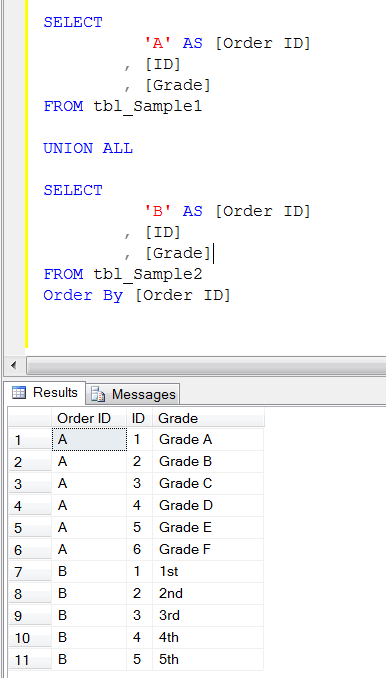
It is very simple to resolve, just add one more column with any sorting number… either 1,2,3 or A,B,C and order on the basis of this column. Let me demonstrate it.

USE tempdb
GO
SELECT
		  'A' AS [Order ID]
		, [ID]
		, [Grade]
FROM tbl_Sample1

UNION ALL

SELECT
		  'B' AS [Order ID]
		, [ID]
		, [Grade]
FROM tbl_Sample2
Order By [Order ID]
--OUTPUT

errormsg156.1.1
Conclusion :

Remember, whenever you use UNION / UNION ALL and have to order by each table separately, just add one more column with any sorting value and order by on the basis of this column.

A few months ago, I wrote an article about THROW a new technique to raise an exception and transfer execution to a CATCH block shipped with SQL Server 2012. I also compared throw with Raiserror in that article partially. Later on I found a lot of differences and found that THROW is much better than RAISERROR. Let me create a sample error message to demonstrate the difference.

EXEC sys.sp_addmessage
@msgnum   = 80000
,@severity = 10
,@msgtext  = N'This is a test message.'
,@lang = 'us_english';
GO

Let me explain the differences:

No

RAISERROR

THROW

1

If you pass any message_id to RAISERROR, the message_id must be available in sys.messages.

Example :

RAISERROR (51000, -- Message id.
10, -- Severity,
1, -- State,
N'This is a test message');

–OUTPUT
Msg 18054, Level 16, State 1, Line 1
Error 51000, severity 10, state 1 was raised, but no message
with that error number was found in sys.messages.
If error is larger than 50000, make sure the user-defined
message is added using sp_addmessage.

If you pass any message_id to THROW, the message_id is not necessary to be available in sys.messages.
Example :

THROW 51000
, 'This is a test message'
, 1
;

–OUTPUT
Msg 51000, Level 16, State 1, Line 1
This is a test message

2

If you pass any message_id to RAISERROR, the message_id range must be between 13000 and 2147483647 and it cannot be 50000.
Example :

RAISERROR (49913, -- Message id.
10, -- Severity,
1, -- State,
N'This is a test message');

–OUTPUT
The server could not load DCOM. Software Usage Metrics cannot be started without DCOM.

If you pass any message_id to THROW, the message_id range must be between 50000 and 2147483647.
Example :

THROW 49913
, N'This is a test message'
, 1
;

–OUTPUT
Msg 35100, Level 16
State 10, Line 1
Error number 49913 in
the THROW statement
is outside the valid range.
Specify an error number
in the valid range of
50000 to 2147483647.

3

If you pass any existing message_id to RAISERROR, it will act upon the same Severity level.

Example :

RAISERROR (80000, -- Message id.
10, -- Severity,
1, -- State,
N'This is a test message');

–OUTPUT
This is a test message.

If you pass any message_id to THROW, whatever the Severity level is, it will always show Severity level 16.
Example :

THROW 80000
, N'This is a test message'
, 1
;

–OUTPUT
Msg 80000, Level 16
State 16, Line 1
This is a test message

4

If you use RAISERROR to trap the bug, it will raise the error but with the incorrect error number.
Example :

BEGIN TRY
DECLARE @VALUE INT
SET @VALUE = 1 / 0
END TRY
BEGIN CATCH

DECLARE @ErrorMessage NVARCHAR(4000);
DECLARE @ErrorSeverity INT;
DECLARE @ErrorState INT;

SELECT
@ErrorMessage = ERROR_MESSAGE(),
@ErrorSeverity = ERROR_SEVERITY(),
@ErrorState = ERROR_STATE();

RAISERROR (
@ErrorMessage, -- Message.
@ErrorSeverity, -- Severity.
@ErrorState -- State.
);
END CATCH;

–OUTPUT
Msg 50000, Level 16
State 1, Line 15
Divide by zero error encountered.

If you try to use THROW to raise the error, it will give you the exact error number.
Example :

BEGIN TRY
DECLARE @VALUE INT
SET @VALUE = 1 / 0
END TRY

BEGIN CATCH
THROW;
END
CATCH

;

–OUTPUT
Msg 8134, Level 16
State 16, Line 4
Divide by zero error encountered.

5

RAISERROR can contain printf formatting styles
Example :

RAISERROR (
N'@@@%*.*s@@@',
10,
1,
0,
30,
N'This is a test message
For SQL Server 2012');
GO

–OUTPUT
@@@This is a test message For SQL@@@

THROW cannot contain printf formatting styles.
Example :

THROW 80000
,N'@@@%*.*s
@@@This is a test message'
, 1

;

–OUTPUT
Msg 80000, Level 16
State 1, Line 1

Conclusion :
As per the above differences THROW function leads over RAISERROR and in my opinion also THROW is better to raise an exception and transfer execution to a CATCH block but again it depends upon the requirements.

A couple of days ago, I developed a tool how to recover the dropped index without backup. In this tool, running total needs to be generated. So I did some research and came across couple of options along with the best option as well.

Given below are the three methods :

Method 1:
In this method, we will use the self join to calculate running total.

--This script will work on SQL Server 2005 and above.
USE AdventureWorks2012
GO
SELECT
A.SalesOrderID AS [SalesOrderID]
, A.SalesOrderDetailID AS [SalesOrderDetailID]
, A.ProductID AS [ProductID]
, A.LineTotal AS [LineTotal]
, SUM(B.lineTotal) AS [Running Total]

FROM SALES.SalesOrderDetail A
INNER JOIN Sales.SalesOrderDetail B
ON A.SalesOrderID =B.SalesOrderID
AND B.SalesOrderDetailID<=A.SalesOrderDetailID
WHERE A.SalesOrderID =43659
GROUP BY
A.SalesOrderID
, A.SalesOrderDetailID
, A.ProductID
, A.LineTotal
ORDER BY
A.SalesOrderID
, A.SalesOrderDetailID
, A.ProductID
, A.LineTotal
GO

Method 2:
In this method, we will use the sub query to calculate running total.

--This script will work on SQL Server 2005 and above
USE AdventureWorks2012
GO
SELECT
A.SalesOrderID AS [SalesOrderID]
, A.SalesOrderDetailID AS [SalesOrderDetailID]
, A.ProductID AS [ProductID]
, A.LineTotal AS [LineTotal]
, (
SELECT SUM(B.lineTotal)
FROM SALES.SalesOrderDetail B
WHERE A.SalesOrderID =B.SalesOrderID
AND B.SalesOrderDetailID<=A.SalesOrderDetailID
) AS [Running Total]
FROM SALES.SalesOrderDetail A
WHERE A.SalesOrderID =43659
GO

Method 3:
In this method, we will use the SUM function to calculate running total.

--This script will work on SQL Server 2008 R2 and above.
USE AdventureWorks2012
GO
SELECT
SalesOrderID
, SalesOrderDetailID
, ProductID
, LineTotal
, SUM(LineTotal)
OVER(PARTITION BY SalesOrderID
ORDER BY SalesOrderID,SalesOrderDetailID)
AS [Running Total]
FROM SALES.SalesOrderDetail
WHERE SalesOrderID =43659
GO

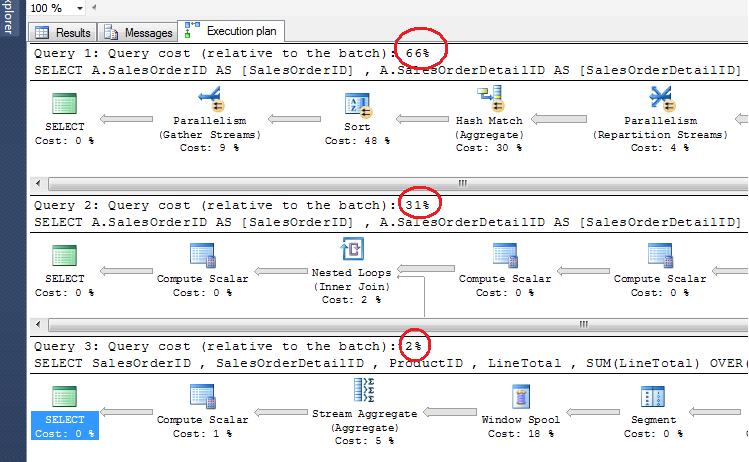
All of the above queries will give you the same result set. However lets view their performance .
runningtotal.1.1

Conclusion :
As you can see, the performance of Method 3 is better than other methods. Also, if you look at the line of code, it is also shorter in Method 3 vis-à-vis other methods. So, I would recommend method 3.