Feeds:
Posts
Comments

It is a common practice that whenever you need to deploy a production database, you need to first delete all the test data and reset almost all the identity values in the entire database. In SQL Server 2012 also, you need to do the same but in addition to this you need to reset the SEQUENCE object as well (if utilized).
Lets do it step by step.

Step 1 :
First of all, you need to check whether the SEQUENCE object exits in your database or not and what its current value is.
Given below is the script.

USE AdventureWorks2012
GO
SELECT
name AS [Sequence Name]
,SCHEMA_NAME(schema_id) AS [Scheme Name]
,[start_value] AS [Start Value]
,[current_value] AS [Current Value]
FROM sys.sequences
GO
--OUTPUT
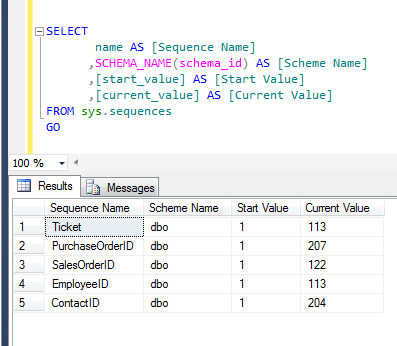
resetsequence1.2

Step 2 :
As you can see, in the above list of sequences, the current value of sequences is not equal to the start value. Lets create the script to reset the sequences.

USE AdventureWorks2012
GO
SELECT
'ALTER SEQUENCE '
+  QUOTENAME(schema_name(schema_id))
+  '.'
+  QUOTENAME(name)
+  ' RESTART WITH '
+  TRY_CONVERT(nvarchar(50),[start_value])
AS [QUERY]
FROM sys.sequences
GO
--OUTPUT
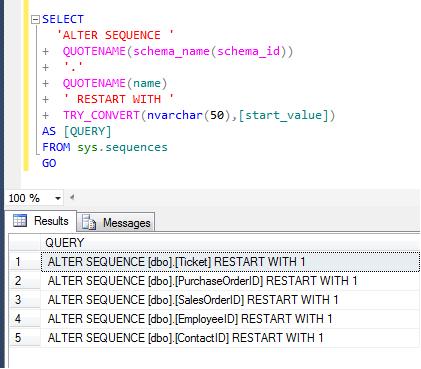
resetsequence1.1

Step 3 :
Once you executed the above query, just copy the result set of the above query and paste it on to a new query window. Make sure you are in a correct database and then execute the result set of above query.

USE AdventureWorks2012
GO
ALTER SEQUENCE [dbo].[Ticket] RESTART WITH 1
ALTER SEQUENCE [dbo].[PurchaseOrderID] RESTART WITH 1
ALTER SEQUENCE [dbo].[SalesOrderID] RESTART WITH 1
ALTER SEQUENCE [dbo].[EmployeeID] RESTART WITH 1
ALTER SEQUENCE [dbo].[ContactID] RESTART WITH 1
GO
--OUTPUT
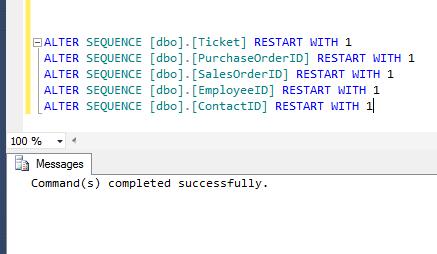
resetsequence1.3

Step 4 :
Once you execute the above reset statements in a new query window, execute the STEP 1 query again to check whether sequences are reset or not.

USE AdventureWorks2012
GO
SELECT
name AS [Sequence Name]
,SCHEMA_NAME(schema_id) AS [Scheme Name]
,[start_value] AS [Start Value]
,[current_value] AS [Current Value]
FROM sys.sequences
GO
--OUTPUT
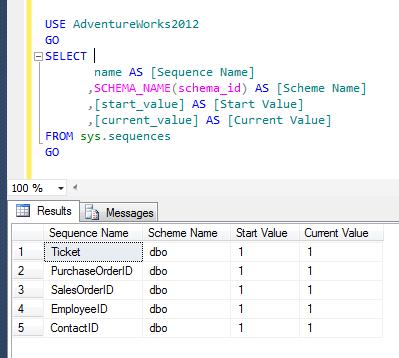
resetsequence1.4

Now, you can see that all the sequence objects have been reset.
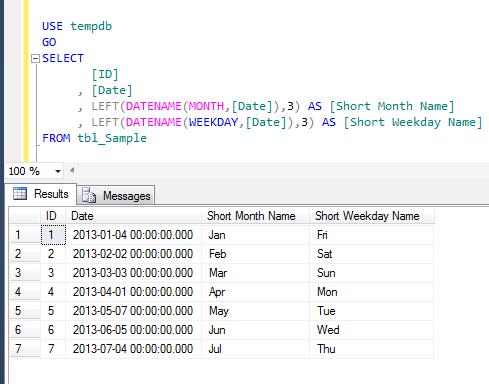
I came across this question on multiple forums and it is being solved using multiple function such as DATENAME and LEFT function functions. However, lets solve it using FORMAT function only.
Let me create an example to explain it.

USE tempdb
GO
CREATE TABLE tbl_Sample
(
[ID] INT,
[Date] DATETIME
)
GO
INSERT INTO tbl_Sample VALUES (1,'2013-01-01')
INSERT INTO tbl_Sample VALUES (2,'2013-02-02')
INSERT INTO tbl_Sample VALUES (3,'2013-03-03')
INSERT INTO tbl_Sample VALUES (4,'2013-04-04')
INSERT INTO tbl_Sample VALUES (5,'2013-05-05')
INSERT INTO tbl_Sample VALUES (6,'2013-06-06')
INSERT INTO tbl_Sample VALUES (7,'2013-07-07')

Method 1 :
In this method, we will use DATENAME & LEFT function to achieve short name of month and weekday.
Given below is the script.

--This script is compatible with SQL Server 2005 and above.
USE tempdb
GO
SELECT
[ID]
, [Date]
, LEFT(DATENAME(MONTH,[Date]),3) AS [Short Month Name]
, LEFT(DATENAME(WEEKDAY,[Date]),3) AS [Short Weekday Name]
FROM tbl_Sample
--OUTPUT

MonthAndWeekdayshortname1.1

Method 2 :
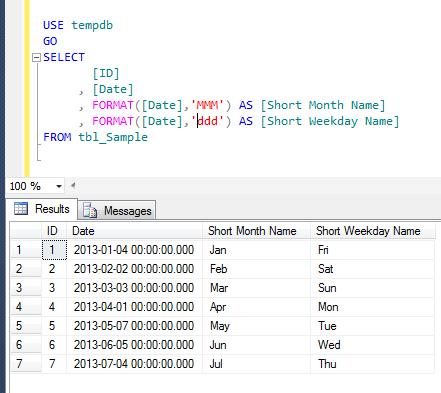
In this method, we will use ONLY FORMAT function (shipped in SQL Server 2012) to achieve short name of month and weekday.
Given below is the script.

--This script is compatible with SQL Server 2012 and above.
USE tempdb
GO
SELECT
[ID]
, [Date]
, FORMAT([Date],'MMM') AS [Short Month Name]
, FORMAT([Date],'ddd') AS [Short Weekday Name]
FROM tbl_Sample
--OUTPUT

MonthAndWeekdayshortname1.2

In my earlier article, I wrote about one of the new system stored procedure sp_describe_undeclared_parameters shipped with SQL Server 2012. This is very handy system stored procedure whenever you need to find undeclared parameters in a SQL query.
I was trying to find undeclared parameters in a query using this system stored procedure and came across with a new error message. I did some research and fixed it.

Let me explain this error in detail :

Message Number: 11508

Severity : 16

Error Message: The undeclared parameter ‘%.*ls’ is used more than once in the batch being analyzed.

Error Generation:

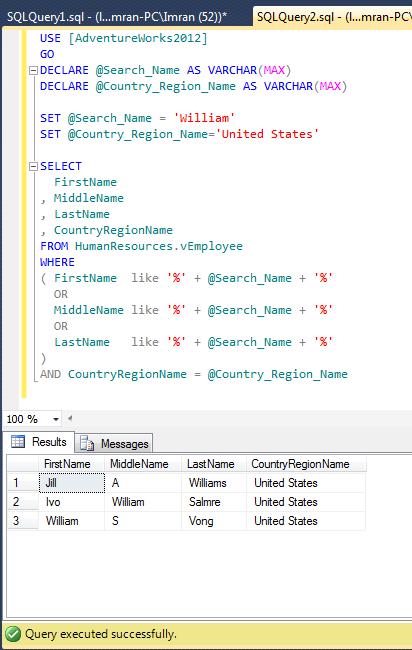
In the given below example, I need to search country region name and a portion of a name in First name, Middle Name & Last Name columns of the employee view. So I wrote a query and it works perfectly. Given below is the script.

USE [AdventureWorks2012]
GO
DECLARE @Search_Name AS VARCHAR(MAX)
DECLARE @Country_Region_Name AS VARCHAR(MAX)

SET @Search_Name = 'William'
SET @Country_Region_Name='United States'

SELECT
FirstName
, MiddleName
, LastName
, CountryRegionName
FROM HumanResources.vEmployee
WHERE
( FirstName  like '%' + @Search_Name + '%'
OR
MiddleName like '%' + @Search_Name + '%'
OR
LastName   like '%' + @Search_Name + '%'
)
AND CountryRegionName = @Country_Region_Name
--OUTPUT

errormsg11508.1

Once the query is executed successfully, lets pass the above query to sp_describe_undeclared_parameters to find undeclared parameters.

USE AdventureWorks2012
GO
sp_describe_undeclared_parameters @tsql =
N'SELECT * FROM HumanResources.vEmployee
WHERE
( FirstName  like ''%'' + @Search_Name + ''%''
OR
MiddleName like ''%'' + @Search_Name + ''%''
OR
LastName   like ''%'' + @Search_Name + ''%''
) AND CountryRegionName = @Country_Region_Name'
--OUTPUT

Msg 11508, Level 16, State 1, Line 5
The undeclared parameter ‘@Search_Name’ is used more than once in the batch being analyzed.

Ooopps…… I am unable to execute it.

Resolution:

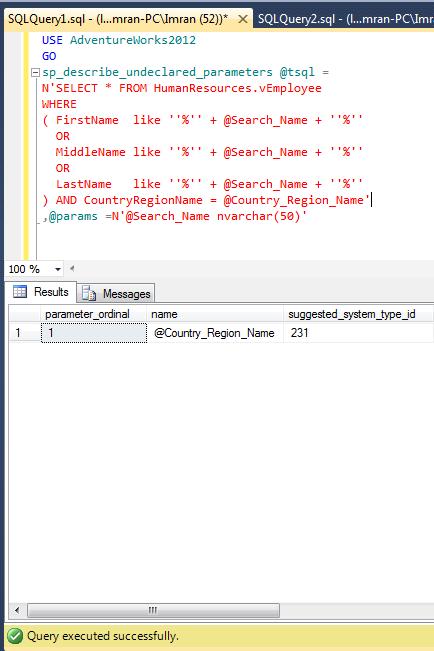
If you look at the ERROR, you will easily realize that @Search_Name is used as a parameter in the query multiple times. But if you remove @Search_Name from the query, the purpose of the query would be dead. So what is the remedy? It is very simple to fix, just pass @Search_Name parameter in the sp_describe_undeclared_parameters as an input parameter, and the error message will be gone. Lets do it.

USE AdventureWorks2012
GO
sp_describe_undeclared_parameters @tsql =
N'SELECT * FROM HumanResources.vEmployee
WHERE
( FirstName  like ''%'' + @Search_Name + ''%''
OR
MiddleName like ''%'' + @Search_Name + ''%''
OR
LastName   like ''%'' + @Search_Name + ''%''
) AND CountryRegionName = @Country_Region_Name'
,@params =N'@Search_Name nvarchar(50)'
--OUTPUT

errormsg11508.2

Conclusion :

Remember, whenever you come across this error message just search for that particular parameter name causing error in the query and pass it into the sp_describe_undeclared_parameters as an input parameter. There is a possibility that multiple parameters can be placed in the query in multiple times. So to fix this error just pass all the parameters mentioned in the error message and run sp_describe_undeclared_parameters again.

In one of my earlier articles I wrote about  How to convert seconds to Day(s), Hour(s), Minute(s), Second(s) . Today I am going to talk about creating a simple script to convert the Minutes to Day(s), Hour(s) & Minute(s). Generally, to achieve this result, you need to perform lots of divisions and remainders and then convert Minutes to Day, Hour, Minute. Given below is the simple script to convert Minutes without doing any divisions and remainders, but using only built-in SQL functions DateAdd, DatePart, DateDiff

--This script will work on SQL Server 2005 and above.
DECLARE @Minutes AS INT
DECLARE @SubtractDate AS DATETIME
--Enter Minutes here
SET @Minutes=2990
SET @SubtractDate=DATEADD(mi,@Minutes,GETDATE()) - GETDATE()

SELECT CONVERT(VARCHAR(10),DATEDIFF(DAY,'1900-01-01',@SubtractDate))
+ ' Day(s) ' +
CONVERT(VARCHAR(10),DATEPART(hh,@SubtractDate))
+ ' Hour(s) ' +
CONVERT(VARCHAR(10),DATEPART(mi,@SubtractDate))
+ ' Minute(s) ' AS [Result]
--OUTPUT

Result
———————————
2 Day(s) 1 Hour(s) 50 Minute(s)

(1 row(s) affected)

LTRIM and RTRIM are very useful functions when it comes to trim the left side or right side of the string spaces respectively but if you need to trim spaces from both sides , you need to create a user defined function. Here is the script of user defined function. I have been using these built-in and user defined functions for a long time. But a  few days ago, when I was migrating the data from legacy system to our new system, I came across with an issue i.e., I had to trim not only the spaces but also the characters as well.

Given below is the solution :

Left Trim :
Given below is the solution that can help you to trim(remove) the spaces and characters from the LEFT side of the string.

CREATE FUNCTION dbo.L_TRIM(@String VARCHAR(MAX), @Char varchar(5))
RETURNS VARCHAR(MAX)
BEGIN
RETURN SUBSTRING(@String,PATINDEX('%[^' + @Char + ' ]%'
,@String),DATALENGTH(@String))
END
GO
--In this example, the user defined function will remove spaces
--and * from the left side of the string
SELECT '  **  THIS IS A TEST STRING  ***  '
AS [String before Left trim]
, dbo.L_TRIM('  **  THIS IS A TEST STRING  ***  ','*')
AS [String After Left trim]
GO
--In this example, the user defined function will remove spaces
--and 0 from the left side of the string
SELECT ' 0001234' AS [String before Left trim]
, dbo.L_TRIM(' 0001234','0')  [String After Left trim]
GO
--OUTPUT

lefttrim1.1

Right Trim :
Given below is the solution that can help you to trim(remove) the spaces and characters from the RIGHT side of the string.

CREATE FUNCTION dbo.R_TRIM(@String VARCHAR(MAX), @Char varchar(5))
RETURNS VARCHAR(MAX)
BEGIN
RETURN REVERSE(SUBSTRING(REVERSE(@String)
,PATINDEX('%[^' + @Char + ' ]%'
,REVERSE(@String)),DATALENGTH(@String)))
END
GO
SELECT '  **  THIS IS A TEST STRING  ***'
AS [String before Right trim]
, dbo.R_TRIM('  **  THIS IS A TEST STRING  ***  ','*')
AS [String after Right trim]
GO
SELECT '12340000 ' AS [String before Right trim]
, dbo.R_TRIM('12340000 ','0') AS [String after Right trim]
GO
--OUTPUT

righttrim1.2

Trim :
Given below is the solution that can help you to trim(remove) the spaces and characters from the BOTH sides of the string.

CREATE FUNCTION dbo.TRIM(@String VARCHAR(MAX), @Char varchar(5))
RETURNS VARCHAR(MAX)
BEGIN
RETURN SUBSTRING(@String,PATINDEX('%[^' + @Char + ' ]%',@String)
,(DATALENGTH(@String)+2 - (PATINDEX('%[^' + @Char + ' ]%'
,REVERSE(@String)) + PATINDEX('%[^' + @Char + ' ]%',@String)
)))
END
GO
SELECT '  **  THIS IS A TEST STRING  ***  '
AS [String before trim]
, dbo.TRIM('  **  THIS IS A TEST STRING  ***  ','*')
AS [String after trim]
GO
SELECT ' 000012340000 ' AS [String before trim]
, dbo.TRIM(' 000012340000 ','0') AS [String after trim]
GO
--OUTPUT

trim1.3

A few days ago, I wrote an article about Multiple ways to convert month number to month name. Recently, I received a query inquiring how to convert Month name to Month number.

Let me create a sample to demonstrate this solution.

USE tempdb
GO
CREATE TABLE tbl_MonthName
(
[ID] INT,
[MONTH_NAME] VARCHAR(50)
)
GO

INSERT INTO tbl_MonthName
SELECT 1, N'January' UNION ALL
SELECT 2, N'February' UNION ALL
SELECT 3, N'March' UNION ALL
SELECT 4, N'April' UNION ALL
SELECT 5, N'May' UNION ALL
SELECT 6, N'June' UNION ALL
SELECT 7, N'July' UNION ALL
SELECT 8, N'August' UNION ALL
SELECT 9, N'September' UNION ALL
SELECT 10, N'October' UNION ALL
SELECT 11, N'November' UNION ALL
SELECT 12, N'December'
GO

SELECT * FROM tbl_MonthName
GO
--OUTPUT

monthnametono1.1

Method 1 :
In this method, we will use the Old approach. In this approach, we need to manually concatenate day with month name and year to make a complete date of that particular month using additional single quotes and then get the Month number from this concatenate date using MONTH function. Given below is the script.

--This script is compatible with SQL Server 2005 and above.
USE tempdb
GO
SELECT
[ID]
,[MONTH_NAME]
,MONTH('1' + [MONTH_NAME] +'00') AS [MONTH_NUMBER]
FROM tbl_MonthName
GO
--OUTPUT

monthnametono1.2

Method 2 :
In this method, we will use the New approach. In this approach, we need to automatically concatenate day with month name and year to make a complete date of that particular month using CONCAT function (without any single quotes) and then get the Month number from this concatenate date using MONTH function. Given below is the script.

--This script is compatible with SQL Server 2012 and above.
USE tempdb
GO
SELECT
[ID]
,[MONTH_NAME]
,MONTH(CONCAT(1,[MONTH_NAME],0)) AS [MONTH_NUMBER]
FROM tbl_MonthName
GO
--OUTPUT

monthnametono1.3

Conclusion :
In both methods, we used different approaches using manual concatenation and automatic concatenation using CONCAT function. I would recommend Method 2 because in my earlier article I found that  CONCAT function is much faster than the normal concatenations.

‘Dynamically order by’ clause of any query result set is an old topic and has been discussed on multiple forums. Mostly the solution is being achieved using CASE statement. But what encourages me to write this article is that we can achieve the same with shorter code using  IIF CHOOSE logical functions shipped with SQL Server 2012.

Method 1 :

In this method we will use the traditional approach and dynamically order by the query result set using CASE statement. Given below is the script.

USE AdventureWorks2012
GO
DECLARE @ORDERBY INT
SET @ORDERBY=3

SELECT
BusinessEntityID
, FirstName
, LastName
, JobTitle
FROM HumanResources.vEmployee
ORDER BY
CASE
WHEN @ORDERBY=1 THEN FirstName
WHEN @ORDERBY=2 THEN LastName
WHEN @ORDERBY=3 THEN JobTitle
END
GO
--OUTPUT

dynamicorderby1.1

Method 2 :
In this method we will use a NEW approach and dynamically order by the query result set using IIF logical function shipped in SQL Server 2012. Given below is the script.

USE AdventureWorks2012
GO
DECLARE @ORDERBY INT
SET @ORDERBY=3

SELECT
BusinessEntityID
, FirstName
, LastName
, JobTitle
FROM HumanResources.vEmployee
ORDER BY
IIF(@ORDERBY=1,FirstName,IIF(@ORDERBY=2,LastName,JobTitle))
--OUTPUT

dynamicorderby1.1

Method 3 :
In this method we will use yet another NEW approach and dynamically order by the query result set using CHOOSE logical function shipped in SQL Server 2012. Given below is the script.

USE AdventureWorks2012
GO
DECLARE @ORDERBY INT
SET @ORDERBY=3

SELECT
BusinessEntityID
, FirstName
, LastName
, JobTitle
FROM HumanResources.vEmployee
ORDER BY
CHOOSE(@ORDERBY,FirstName,LastName,JobTitle)
GO
--OUTPUT

dynamicorderby1.1

Conclusion :
In all of the above methods we used different methods, functions, approaches but the output will remain same and also it will not impact performance. It just reduces the line of code.

I came across this Default FILESTREAM filegroup is not available in database ‘%.*ls’ error today, while I was working on a table using filestream. This error message is part of SQL Server since 2005 version.

Let me explain this error in detail :

Message Number: 1969

Severity : 16

Error Message: Default FILESTREAM filegroup is not available in database ‘%.*ls’.

Error Generation:

Let me create a database and table to demonstrate this error message.

--Create a database
USE master ;
GO
CREATE DATABASE Musicdb
ON
(NAME = Musicdb_dat,
FILENAME = 'C:\Program Files\Microsoft SQL Server\MSSQL11.MSSQLSERVER\MSSQL\DATA\Musicdbdat.mdf')
LOG ON
( NAME = Musicdb_log,
FILENAME = 'C:\Program Files\Microsoft SQL Server\MSSQL11.MSSQLSERVER\MSSQL\DATA\Musicdblog.ldf') ;
GO

--Create a table
USE Musicdb
GO
CREATE TABLE tbl_music
(
[ID] uniqueidentifier not null rowguidcol
constraint PK_music primary key clustered,
[Music_files] varbinary(max) filestream
)
--OUTPUT

Msg 1969, Level 16, State 1, Line 1
Default FILESTREAM filegroup is not available in database ‘Musicdb’.

Ooopps…… I am unable to create the table. Lets fix it.

Resolution:

If you look at the error, it says that there is no default filestream in the filegroup but there is a possibility that even filestream is not available in the filegroup. Lets now resolve this issue step by step.

Step 1 :
In this step, lets check in the Musicdb database if filestream is available in the filegroup or NOT.

SELECT database_id,type_desc,name,physical_name
FROM sys.master_files WHERE database_id=DB_ID('Musicdb')
--OUTPUT

Errormsg1969.1.1

Step 2 :
In step 1, you can see that not a single filestream is available in the filegroup. So first lets create a filestream in filegroup. Given below is the script.
Note : if filestream is already available in the filegroup then do not proceed with Step 2 . Go to Step 3 directly.

USE [master]
GO
ALTER DATABASE Musicdb
ADD FILEGROUP [MyMusicAlbum]
CONTAINS FILESTREAM
GO
ALTER DATABASE Musicdb
ADD FILE
(
NAME = N'Album01',
FILENAME = N'C:\music\Album01.ndf'
)
TO FILEGROUP [MyMusicAlbum]
GO

Step 3 :
In step 1 if filestream is available in filegroup then without going to step 2, just execute the given below script and it will make your filestream as a default filestream in the filegorup.

USE Musicdb
GO
IF NOT EXISTS (SELECT name FROM sys.filegroups WHERE is_default=1 AND name = N'MyMusicAlbum')
ALTER DATABASE Musicdb MODIFY FILEGROUP [MyMusicAlbum] DEFAULT
GO

Step 4 :
Lets create the table again.

--Create a table
USE Musicdb
GO
CREATE TABLE tbl_music
(
[ID] uniqueidentifier not null rowguidcol
constraint PK_music primary key clustered,
[Music_files] varbinary(max) filestream
)
--OUTPUT

Command(s) completed successfully.

Conclusion :
Remember, whenever you come across this error, you just need to either create a filestream in a filegroup or make the existing filestream as a default in filegroup.

In my earlier article, I implemented a lot of excel financial functions including PMT function using CLR  and I found CLR implementation is the effective way to implement excel functions in SQL Server. However you can develop the same functionality in SQL using User Defined Function as well.

Given below is the script of PMT financial function in SQL Server with examples. Basically PMT function not only calculates the future value of any investment on an interest rate, it also calculates the payments for a loan.

CREATE FUNCTION UDF_PMT
(@InterestRate  NUMERIC(18,8), --Rate is the interest rate per period.
@Nper          INT,           --Nper is the total number of payment
--periods in an annuity.
@Pv            NUMERIC(18,4), --Pv is the present value, or the
--lump-sum amount that a series of
--future payments is worth right now.
--If pv is omitted, it is assumed to be
--0 (zero). PV must be entered as a
--negative number.
@Fv            NUMERIC(18,4), --Fv is the future value, or the
--lump-sum amount that a series of
--future payments is worth right now.
--If pv is omitted, it is assumed to
--be 0 (zero). PV must be entered as a
--negative number.
@Type	         BIT            --Type is the number 0 or 1 and
--indicates when payments are due.
--If type is omitted, it is assumed
--to be 0 which represents at the end
--of the period.
--If payments are due at the beginning
--of the period, type should be 1.
)
RETURNS NUMERIC(18,2) --float
AS
BEGIN
DECLARE  @Value NUMERIC(18,2)
SELECT @Value = Case
WHEN @Type=0
THEN Convert(float,@InterestRate / 100)
/(Power(Convert(float,(1 + @InterestRate / 100)),@Nper)-1)
* -(@Pv*Power(Convert(float,(1 + @InterestRate / 100)),@Nper)
+@Fv)

WHEN @Type=1
THEN Convert(float,@InterestRate / 100) /
(Power(Convert(float,(1 + @InterestRate / 100)),@Nper)-1)
* -(@Pv*Power(Convert(float,(1 + @InterestRate / 100)),@Nper)
+@Fv)
/(1 + Convert(float,(@InterestRate / 100)))

END
RETURN @Value
END
GO
SELECT dbo.UDF_PMT(0.625,24,5000,0,0)
--OUTPUT in SQL
--($225.00)
--Equivalent function in excel
--=PMT(7.5%/12, 2*12, 5000, 0, 0)
--OUTPUT in Excel
--($225.00)
GO
SELECT dbo.UDF_PMT(0.11538461,208,8000,0,1)
--OUTPUT in SQL
--($43.23)
--Equivalent function in excel
--=PMT(6%/52, 4*52, 8000, 0, 0)
--OUTPUT in Excel
--($43.23)
GO
SELECT dbo.UDF_PMT(5.25,10,6500,0,0)
--OUTPUT in SQL
--($852.03)
--Equivalent function in excel
--=PMT(5.25%/1, 10*1, 6500, 0, 0)
--OUTPUT in Excel
--($852.03)
GO
SELECT dbo.UDF_PMT(0.666666667,36,5000,-1000,1)
--OUTPUT in SQL
--($131.14)
--Equivalent function in excel
--=PMT(8%/12, 3*12, 5000, -1000, 0)
--OUTPUT in Excel
--($131.14)
GO

Appreciate your valuable feedback about this function.

Reference : Castle
Techonthenet

SQL Server 2012 came up with a lot of new enhancements, breaking changes & behavioral changes. In my earlier article, I had discussed about one of the nice behavior changes in exists function. Today, we will discuss another behavioral change in Sqlcmd Utility when XML mode is on. This utility is one of the handy utilities when you wish to execute transact SQL or any other SQL operations on command prompt.

Given below are sqlcmd utility behavioral changes in earlier version SQL Server vs 2012.

S.No

Behavior in Earlier versions

Behavior in SQL Server 2012

1

If any string data having a single quote will be replaced with the & apos; escape sequence, it will not remain a valid XML and an XML parser will not give the same result.

If any string data having a single quote will not be replaced with & apos; escape sequence, it will remain a valid XML and an XML parser will give the same result.

2

If any column of a table having money data values with no decimal value, it will be converted to integer.

If any column of a table having money data values with no decimal value, it will show the 4 decimal digits.

Let me create an example to demonstrate this behavior changes.

--Create table
CREATE TABLE [dbo].[tbl_Employee]
(
[EmployeeID] [int] IDENTITY(1,1) NOT NULL,
[First Name] [nvarchar](50) NULL,
[Last Name] [nvarchar](50) NULL,
[Salary] [money] NOT NULL
)
GO
--Insert record into table
INSERT INTO dbo.tbl_Employee ([First Name],[Last Name],[Salary])
VALUES ('Reuben','D''sa',5000)
GO
--Browse table
SELECT [Last Name],[Salary] FROM dbo.tbl_Employee
--OUTPUT

Bchange1.1

Lets execute the above query in sqlcmd utility with XML mode on as shown in the given below picture.
Bchange1.3

Reference : MSDN