Feeds:
Posts
Comments

Posts Tagged ‘raresql’

SQL Server new versions always come up with the new performance optimization techniques, enhancements and additions. FORCESEEK table hint enhancement is also one of the new enhancements that came up in SQL Server 2012.

Let me create an index on Purchasing. [PurchaseOrderDetail] table to demonstrate this enhancement.

USE [AdventureWorks2012]
GO
CREATE NONCLUSTERED INDEX [IX_PurchaseOrderDetail_PurchaseOrderID]
ON Purchasing.[PurchaseOrderDetail]
(
[PurchaseOrderID] ASC
) WITH (DROP_EXISTING = OFF) ON [PRIMARY]

FORCESEEK in earier version of SQL :
In the ealier version of SQL Server, FORCESEEK table hint needed only an index on the table and it could optimize your query. But sometimes you may have more than one index and you cannot define those indexes anywhere in the syntax of forceseek (Limitation). Let me script it to elaborate the same.

---This query will work on SQL Server 2008 and above.
USE [AdventureWorks2012]
GO
Select * from Purchasing.PurchaseOrderHeader as h
Inner join Purchasing.PurchaseOrderDetail as d with (forceseek)
On h.PurchaseOrderID =d.PurchaseOrderID
Where h.TotalDue >50

FORCESEEK in SQL Server 2012 :
In SQL Server 2012, you can define index name along with the column in forceseek table hint to further optimize your query. But you can also use the above syntax  and it will not break your code.

Let me explain it with examples :

Example 1 : (Define the index name in forceseek)

---This query will work on SQL Server 2012 and above.
USE [AdventureWorks2012]
GO
Select * from Purchasing.PurchaseOrderHeader as h
Inner join Purchasing.PurchaseOrderDetail as d with
(forceseek,INDEX(IX_PurchaseOrderDetail_PurchaseOrderID))
On h.PurchaseOrderID =d.PurchaseOrderID
Where h.TotalDue >50

Example 2 : (Define the index name along with the column name in forceseek)

---This query will work on SQL Server 2012 and above.
USE [AdventureWorks2012]
GO
Select * from Purchasing.PurchaseOrderHeader as h
Inner join Purchasing.PurchaseOrderDetail as d
with (forceseek(IX_PurchaseOrderDetail_PurchaseOrderID(PurchaseOrderID)))
On h.PurchaseOrderID =d.PurchaseOrderID
Where h.TotalDue >50

Conclusion:

In SQL Server 2012, FORCESEEK  came up with the very nice enhancement that you can define index name along with the column in FORCESEEK, to have further control on query optimization. However, remember this is the last option we should choose at the time of optimization. Finally, this is only recommended for experienced programmers.

Reference : MSDN

Read Full Post »

fn_dblog is one of my favorite undocumented functions; I use it to design multiple recovery solutions. Today, I will discuss its purpose, syntax, parameters and one of the problems that I faced with respect to its parameters.

Purpose :
It gives you the detail view of the transaction log.

Syntax:

fn_dblog (@start,@end)

Parameters:
It accepts two parameters, given below are the details.
@start : Start LSN but it must be in the integer format.
@end : End LSN but it must be in the integer format.

Let me explain it with simple examples :
Example 1: (With default parameters)

Select * from fn_dblog(NULL,NULL)
--OUTPUT

fn_dblog1.1

Example 2: (Passed LSN)
Lets take a current LSN from above example and pass it as a parameter.The purpose to pass a single LSN is to pick up only one transaction log record.

use test
Go
Select * from fn_dblog('000005c9:0000133d:0022','000005c9:0000133d:0022')
--OUTPUT

Msg 9005, Level 16, State 3, Line 1
Either start LSN or end LSN specified in OpenRowset(DBLog, …) is invalid.

Ooops…… I am unable to execute it.

The reason behind the above error message is that I just picked up LSN from above result set and passed it into fn_dblog.
Whereas the correct way to do it is, first convert the LSN to integer and then pass it to fn_dblog.

Given below is the script that will convert your hexa decimal LSN into integer LSN.

Declare @Xml Xml
Declare @String Varchar(Max)
Declare @delimiter Varchar(5)
Set @delimiter=':'
Set @String ='000005c9:0000133d:0022'
SET @Xml = cast(('<a>0x'+replace(@String,@delimiter,'</a><a>0x')+'</a>')
AS XML)

;With CTE as (SELECT A.value('.', 'varchar(max)') as [Column]
from @Xml.nodes('a') AS FN(A) )
Select Stuff((Select ':' +
Convert (varchar(max),Convert(INT,cast('' AS XML).value
('xs:hexBinary(substring(sql:column("[Column]"),3) )', 'varbinary(max)')))
from CTE for xml path('') ),1,1,'') as [Current LSN]
--OUTPUT

1481:4925:34

Lets pass the above output (1481:4925:34) to the fn_dblog and view the result set.

use test
Go
Select * from fn_dblog('1481:4925:34','1481:4925:34')
--OUTPUT

fn_dblog1.2

Now, you can see that fn_dblog filter worked and it picked up only one LSN.

Conclusion :
No doubt fn_dblog is one of the helpful undocumented functions but do not use this function in the production server unless otherwise required. Also, remember to convert the hexa decimal to integer before passing it to fn_dblog as a parameter.

Read Full Post »

Today, I was working on contained database and came across with an issue (will post this issue in my upcoming post), where I had to find a list of uncontained objects (As per MSDN, uncontained objects are basically those objects that cross the database boundaries in a contained database.)

Also, as per MSDN, given below are the objects that usually cross the boundaries of the database:

  • Unknown containment behavior (dynamic SQL or deferred name resolution)
  • DBCC command
  • System stored procedure
  • System scalar function
  • System table valued function
  • System built-in function

But it is quiet difficult, if you search for any of the above objects in the database one by one. SQL Server resolves this issue by releasing a dynamic management view (sys.dm_db_uncontained_entities) that will give you all uncontained objects of any database, in one shot.

Let me create an uncontained objects in a contained database.

--Create a stored procdure by using sys.allobjects
USE AdventureWorks2012
GO
CREATE PROC test_Procedure
AS
SELECT * FROM sys.all_objects
GO

Once you created the above stored procedure, just execute the given below script it will give you the name of above procedure along with other uncontained objects.

Use AdventureWorks2012
GO
SELECT O.name
,O.type_desc
,UCE.class_desc
,UCE.statement_type
,UCE.feature_name
,UCE.feature_type_name
FROM sys.dm_db_uncontained_entities AS UCE
LEFT JOIN sys.objects AS O
ON UCE.major_id = O.object_id
--OUTPUT

dm_db_uncontained_entities1.1-1

Note : If the above query return Nil(or emplty) it means that you donot have any uncontained objects.

Read Full Post »

String manipulation in a different format is one of my favorite activities. Today, I came across a question in a forum, how to get the first letter of each word in a column. Obviously, my primary search was the internet, where I found few solutions, but all of them were loop based. Hence  developed a solution without loop.

Give below is the script :

--Create a Sample
Create Table Student
(
[Student ID] int Identity(1,1),
[Student Name] varchar(50)
)
Go
Insert into Student Values ('Steve Masters Bob')
Insert into Student Values ('David Ortiz')
Insert into Student Values ('Michael Sean Ray')
Insert into Student Values ('Steven SElikoff')
Insert into Student Values ('Carole POLAND')
Insert into Student Values ('Bjorn Rettig')
Insert into Student Values ('Michiko OSAda')
Insert into Student Values ('CarOL Philips')
Insert into Student Values ('Merav Netz')
GO
--Create the procedure to get the first letter of each word.
Create Function dbo.[UDF_FIRST_LETTER_FROM_WORD]
(
@String Varchar(Max) -- Variable for string
)
RETURNS Varchar(Max)
BEGIN
Declare @Xml Xml
Declare @firstletter Varchar(Max)
Declare @delimiter Varchar(5)

SET @delimiter=' '
SET @Xml = cast(('<a>'+replace(@String,@delimiter,'</a><a>')+'</a>') AS XML)

;With CTE AS (SELECT A.value('.', 'varchar(max)') as [Column]
FROM @Xml.nodes('a') AS FN(a) )
SELECT @firstletter =Stuff((SELECT '' + LEFT([Column],1)
FROM CTE
FOR XML PATH('') ),1,0,'')

RETURN (@firstletter)
END
GO

Example 1 :
Given below script will get the first letter of each word from a column of a table.

SELECT [Student Name],
dbo.[UDF_FIRST_LETTER_FROM_WORD] ([Student Name]) as [First Letters]
FROM Student
GO

firstletterfromword1.1

Example 2 :
Given below script will get the first letter of each word from a string.

Declare @String as varchar(100)
Set @String ='My Best Friend'
SELECT @String as [String]
, dbo.[UDF_FIRST_LETTER_FROM_WORD] (@String) as [First Letters]

firstletterfromword1.2

Read Full Post »

Today when I was working on Columnstore index and I came across this error,  CREATE INDEX statement failed. Column ‘%.*ls’has a data type that cannot participate in a columnstore index. Omit column ‘%.*ls’. This is one of the new error messages come in SQL Server 2012. This error message is related to Columnstore index a new database feature shipped with SQL Server 2012.

Let me explain this with a simple example.
Message Number: 35343

Severity : 15

Error Message: CREATE INDEX statement failed. Column ‘%.*ls’has a data type that cannot participate in a columnstore index. Omit column ‘%.*ls’.

Error Generation:

Given below is the script that I tried to execute but it resulted with the following error:

Use AdventureWorks2012
GO
CREATE NONCLUSTERED COLUMNSTORE INDEX [IX_SalesOrderDetail_ColumnStore]
ON [Sales].[SalesOrderDetail]
(
[ProductID],
[OrderQty],
[UnitPrice],
[Rowguid]
)WITH (DROP_EXISTING = OFF) ON [PRIMARY]
GO

Msg 35343, Level 16, State 1, Line 1
CREATE INDEX statement failed. Column ‘rowguid’has a data type that cannot participate in a columnstore index. Omit column ‘rowguid’.

Ooopps…… I am unable to create columnstore index.

Resolution:
To resolve this error, I need to find the  datatypes which are not supported by  Columnstore index . As per MSDN, given below are the datatypes .

  • binary and varbinary
  • ntext , text, and image
  • varchar(max) and nvarchar(max)
  • uniqueidentifier
  • rowversion (and timestamp)
  • sql_variant
  • decimal (and numeric) with precision greater than 18 digits
  • datetimeoffset with scale greater than 2
  • CLR types (hierarchyid and spatial types)
  • xml

Now, just change your script (to create the columnstore index) and remove all non supported datatype. In this example, I will remove [Rowguid] column because its datatype is uniqueidentifier.

CREATE NONCLUSTERED COLUMNSTORE INDEX [IX_SalesOrderDetail_ColumnStore]
ON [Sales].[SalesOrderDetail]
(
[ProductID],
[OrderQty],
[UnitPrice]
)WITH (DROP_EXISTING = OFF) ON [PRIMARY]
GO
--OUTPUT

Command(s) completed successfully.

Conclusion :

Remember, whenever you create the columnstore index, you must not include any column which has datatype that is not supported by columnstore index.

Read Full Post »

Today, I came across this question in a forum – How to convert seconds to Day(s), Hour(s), Minute(s), Second(s)? For this we need to do a lot of divisions and remainders to convert Seconds to Day, Hour, Minute, Seconds. Given below is the simple script to convert it without doing any divisions and remainders, using only built-in SQL functions DateAdd, DatePart, DateDiff

--This script will work on SQL Server 2005 and above.
Declare @Seconds as int
Declare @SubtractDate as datetime
--Enter Number of Seconds here
Set @Seconds=9974501
Set @SubtractDate=DateAdd(s,@Seconds,getdate()) - Getdate()

Select Convert(varchar(10),DateDiff(day,'1900-01-01',@SubtractDate))
+ ' Day(s) ' +
Convert(varchar(10),DatePart(hh,@SubtractDate))
+ ' Hour(s) ' +
Convert(varchar(10),DatePart(mi,@SubtractDate))
+ ' Minute(s) ' +
Convert(varchar(10),DatePart(ss,@SubtractDate))
+ ' Second(s) ' AS [Result]
--OUTPUT

Result
——————————————————————————-
115 Day(s) 10 Hour(s) 41 Minute(s) 41 Second(s)

(1 row(s) affected)

Read Full Post »

File table is one of my favorite features introduced in SQL Server 2012. When I was working with file table, I came across a question how to find all system objects (primary key, default vaule, indexes etc) related to any file table.

We can achieve this by two different methods.

 Method 1:

In this method, we did self-join in the sys.objects to find all system objects related to any file table. This is general script that we normally use to find any child object related to parent object.

--This script will work in SQL Server 2012 and above.
Declare @FileTableName as varchar(50)='dbo.Databank'
-- Enter File table Name Here
Select B.[name] as [File Table Name]
,A.[name] as [Related objects]
from sys.objects A
Inner Join sys.objects B
On A.[parent_object_id] =B.[object_id]
Where B.[type] ='U'
And B.object_id=object_id(@FileTableName)
GO
--OUTPUT

filetablesystemobjects1.1

 Method 2 (Shortcut):

In this method, we used a new system view namely sys.filetable_system_defined_objects (This system view returns all the system objects related to any file table) introduced in SQL Server 2012.
Given below is the script that will give you all system objects related to file table without any self-join.

--This script will work in SQL Server 2012 and above.
Declare @FileTableName as varchar(50)='dbo.Databank'
Select object_name(parent_object_id) as [File Table Name]
,object_name(object_id) as [Related objects]
from sys.filetable_system_defined_objects
Where parent_object_id =object_id(@FileTableName)
GO
--OUTPUT

filetablesystemobjects1.2

Aware of any other shortcut ?

Read Full Post »

Ability to return result sets from triggers is one of the features that is marked as a deprecated feature in SQL Server 2012.
After reading this, few questions flashed my mind, that I would like to share with you.

  • How do we return the result sets from triggers?
  • Why do we need this feature mostly?
  • How can we stop using this feature from earlier versions?
  • How can we get the same functionality without using this feature?

I added first two questions for the beginners to understand this concept.

Lets proceed step by step from the first question.

  • How do we return the result sets from triggers ?

Step 1 :
Lets create a table to demonstrate the use of return the result sets from trigger.

USE tempdb;
GO
CREATE TABLE tbl_Employee(
EmployeeID int identity (1,1),
EmployeeName nvarchar(100) NULL
)
GO

Step 2 :
Create a trigger on this table (tbl_Employee).

CREATE TRIGGER trg_Insert ON tbl_Employee
FOR INSERT
AS
SELECT INSERTED.EmployeeID, INSERTED.EmployeeName FROM inserted;
GO

Step 3 :
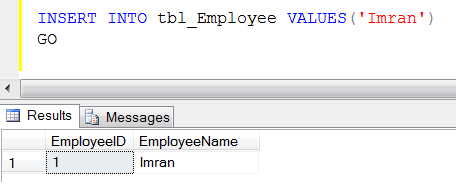
Now, lets insert one record and check if it is working properly.

INSERT INTO tbl_Employee VALUES('Imran')
GO
--OUTPUT

triggerresultset1.1

Woww, it is working, we got the result sets from the trigger 😉

  • Why do we need this feature mostly?

Mostly, we use select statement inside the trigger/ stored procedure to return the result set and the purpose of the result set is to debug (to check what values it returns) the trigger / stored procedure.
(Note : It is a common practice to debug any trigger/stored procedure via result set, but it may break your application and also it is not recommended).

  • How can we stop using this feature from earlier versions?

Step 4 :
We are enabling an advance feature ‘disallow results from triggers’ to 1 to enable this feature in the earlier version of SQL Server and it is also recommended by SQL Server to make it 1.

sp_configure 'disallow results from triggers',1
GO
RECONFIGURE

Step 5 :
Insert one more record in the table after enabling the feature and check that this feature has enabled properly or not.

INSERT INTO tbl_Employee VALUES('Bob')
GO
--OUTPUT

Ooopps…… I am unable to execute it, because I enabled the return result set feature from trigger at instance level not on database level
and it is working fine.
Msg 524, Level 16, State 1, Procedure trg_Insert, Line 4
A trigger returned a resultset and the server option ‘disallow_results_from_triggers’ is true.

  • How can we get the same functionality without using this feature?

Step 6 :
You can easily use the same functionality without using this feature. Let me alter the trigger and make a sample.

ALTER TRIGGER trg_Insert ON tbl_Employee
FOR INSERT
AS

Declare @EmployeeID int
Declare @EmployeeName nvarchar(100)

SELECT @EmployeeID=INSERTED.EmployeeID
, @EmployeeName=INSERTED.EmployeeName FROM inserted;

Print 'EmployeeID ' + Convert (varchar(10),@EmployeeID)
Print 'Employee Name ' + @EmployeeName
GO

Step 7 :
Insert one more record in the table and check the functionality.

INSERT INTO tbl_Employee VALUES('Sandra')
GO
--OUTPUT

EmployeeID 3
Employee Name Sandra

Conclusion :
DO NOT  use SELECT statement to return the result set from a stored procedure / trigger. Always use print command instead, to debug it.

Reference : MSDN

Read Full Post »

Few days ago, I was working on columnstore Index and I came across a problem finding the size of all columnstore Indexes on disk in a particular database.
I have given below the script which can help you find the size of a single columnstore index on disk or all columnstore indexes in a particular database by using
sys.column_store_segments, sys.column_store_dictionaries.

Use AdventureWorks2012
Go
Declare @TableName as nvarchar(Max)
--If you need columnstore index size for one table
--Change the @TableName parameter from NULL to table name
Set @TableName =NULL --'SalesOrderDetail_Sample'

;With CTE AS (
SELECT i.object_id
,i.name as [Index_Name]
,SUM(c.on_disk_size)/(1024.0*1024)
As [Columstore_Index_size_on_disk_size (In MBs)]
FROM sys.indexes AS i
JOIN sys.partitions AS p
ON i.object_id = p.object_id
JOIN sys.column_store_segments AS c
ON c.hobt_id = p.hobt_id
WHERE i.type_desc = 'NONCLUSTERED COLUMNSTORE'
AND ((1=(CASE WHEN @TableName is Null THEN 1 ELSE 0 END)
OR i.object_id = object_id(@TableName)))
GROUP BY i.object_id,i.name

UNION ALL

SELECT i.object_id
,i.name as [Index_Name]
,SUM(c.on_disk_size)/(1024.0*1024)
As [Columstore_Index_size_on_disk_size (In MBs)]
FROM sys.indexes AS i
JOIN sys.partitions AS p
ON i.object_id = p.object_id
JOIN sys.column_store_dictionaries AS c
ON c.hobt_id = p.hobt_id
WHERE i.type_desc = 'NONCLUSTERED COLUMNSTORE'
AND ((1=(CASE WHEN @TableName is Null THEN 1 ELSE 0 END)
OR i.object_id = object_id(@TableName)))
GROUP BY i.object_id,i.name )

Select object_id,object_name(object_id) as [Table_Name]
,[Index_Name]
,SUM([Columstore_Index_size_on_disk_size (In MBs)])
AS [Columstore_Index_size_on_disk_size (In MBs)] from CTE
Group By object_id,[Index_Name]

Columnstoreindexsize1.1

Reference : MSDN

Read Full Post »

The sequence object ‘%.*ls’ has reached its minimum or maximum value. Restart the sequence object to allow new values to be generated is one of the new error messages came in SQL Server 2012. This error message is related to Sequence object, a new database feature shipped with SQL Server 2012.

Let’s discuss this in detail:
Message Number: 11728

Severity : 16

Error Message: The sequence object ‘%.*ls’ has reached its minimum or maximum value. Restart the sequence object to allow new values to be generated.

Error Generation:

Given below is the script that I tried to execute but it resulted with the following error.

Use AdventureWorks2012
GO
CREATE SEQUENCE [dbo].[Ticket]
AS [int]
START WITH 1
INCREMENT BY 1
MINVALUE 1
MAXVALUE 2
NO CACHE
GO
Select NEXT VALUE FOR [Ticket]
GO 3

Msg 11728, Level 16, State 1, Line 2
The sequence object ‘Ticket’ has reached its minimum or maximum value. Restart the sequence object to allow new values to be generated.

Ooopps…… I am unable to execute it.

Resolution:
There are three different methods to resolve this error.

Method 1:
In method 1, you need to RESTART the sequence and it will be resolved but temporarily. Once it reaches to its maximum, it will give you the same error again.

ALTER SEQUENCE [dbo].[Ticket]
RESTART WITH 1
GO

Method 2:
In method 2, you need to INCREASE the sequence object  maximum number (If required by business logic) but again, it will be resolved but temporarily because once it reaches to its maximum, it will give you the same error again.

ALTER SEQUENCE [dbo].[Ticket]
MAXVALUE 10000
GO

Method 3:
In method 3, you need to CYCLE the sequence object (If required by business logic) and it will never give you this error message. But again it depends on your business logic because if you follow method 3 it will duplicate your sequence numbers.

ALTER SEQUENCE [dbo].[Ticket]
CYCLE
GO

Conclusion :
You can fix this error message by using above three different methods but before selecting any method be certain of your business logic.

Read Full Post »

« Newer Posts - Older Posts »