Feeds:
Posts
Comments

Posts Tagged ‘SQL Server 2012’

Developers mostly prefer the shortest possible code and they frequently use it in their applications. I have written a shortest possible code for RAISERROR in this article but unfortunately this shortest code has been discontinued from SQL Server 2012. The most important concern is not that the shortest possible code is discontinued but what is the replacement of that code.

Given below is the shortest possible code, we use in the earlier versions of SQL Server 2005/2008.

--This script is compatible with SQL Server 2005/ 2008.
USE tempdb
GO
RAISERROR 14243 'This is a test message'
GO
--OUTPUT

Msg 14243, Level 16, State 1, Line 1
This is a test message

As you can see that above script is executed successfully. Now lets execute the above script in SQL Server 2012.

--This script is NOT compatible with SQL Server 2012.
USE tempdb
GO
RAISERROR 14243 'This is a test message'
GO
--OUTPUT

Msg 102, Level 15, State 1, Line 1
Incorrect syntax near ‘14243’.

Ooopps…… I am unable to execute it in SQL Server 2012. As per MSDN, we need to rewrite the statement using the current RAISERROR syntax.

Lets rewrite it step by step.

Step 1 :
This step is not mandatory, in case if your error message is already available in sys.messages.
Given below is a script to add error messages in sys.messages.

EXEC sys.sp_addmessage
@msgnum   = 80000
,@severity = 10
,@msgtext  = N'This is a test message.'
,@lang = 'us_english';

Step 2 :
In this step we need to execute the RAISERROR using new syntax.
Given below is the script.

USE tempdb
GO
RAISERROR (80000, -- Message id,
10, -- Severity,
1) -- State
GO
--OUTPUT

This is a test message.

Cleaning :

sp_dropmessage @msgnum = 80000;
GO
Read Full Post »

Few days ago, I was working on a report and came across with an issue regarding conversion of Short month name to Month name and we do not have any built-in function to do it in SQL Server. So I commenced my research and finally found few solutions.

Before proceeding with the solutions, let me create a sample to demonstrate this solution.

USE tempdb
GO
CREATE TABLE tbl_MonthName
(
[ID] INT,
[SHORT_MONTH_NAME] VARCHAR(3)
)
GO

INSERT INTO tbl_MonthName
SELECT 1, N'Jan' UNION ALL
SELECT 2, N'Feb' UNION ALL
SELECT 3, N'Mar' UNION ALL
SELECT 4, N'Apr' UNION ALL
SELECT 5, N'May' UNION ALL
SELECT 6, N'Jun' UNION ALL
SELECT 7, N'Jul' UNION ALL
SELECT 8, N'Aug' UNION ALL
SELECT 9, N'Sep' UNION ALL
SELECT 10, N'Oct' UNION ALL
SELECT 11, N'Nov' UNION ALL
SELECT 12, N'Dec'
GO

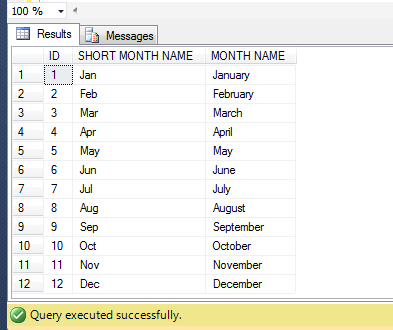
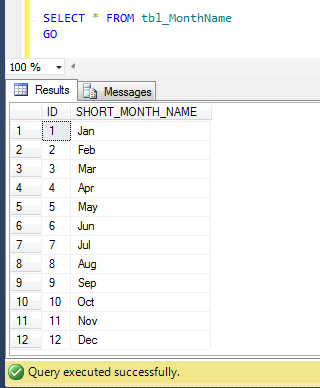
SELECT * FROM tbl_MonthName
GO
--OUTPUT

MonthShortName1.1

Method 1 :
In this method, we will use the old approach. In this approach, we need to manually concatenate day with short month name and year to make a complete date of that particular month using additional single quotes and then get the Month name from this concatenate date using DATENAME function. Given below is the script.

--This script is compatible with SQL Server 2005 and above.
USE tempdb
GO
SELECT
[ID]
,[SHORT_MONTH_NAME] AS [SHORT MONTH NAME]
,DATENAME(MONTH,CONVERT(
DATETIME,'1'+ [SHORT_MONTH_NAME] + '1')) AS [MONTH NAME]
FROM tbl_MonthName
GO
--OUTPUT

MonthShortName1.2

Method 2 :
In this method, we will use the New approach. In this approach, we need to automatically concatenate day with short month name and year to make a complete date of that particular month using CONCAT function (without any single quotes) and then get the Month Name using FORMAT function. Given below is the script.

--This script is compatible with SQL Server 2012 and above.
USE tempdb
GO
SELECT
[ID]
,[SHORT_MONTH_NAME] AS [SHORT MONTH NAME]
,FORMAT(CONVERT(
DATETIME,CONCAT(1,[SHORT_MONTH_NAME],1)),'MMMM') AS [MONTH NAME]
FROM tbl_MonthName
GO
--OUTPUT

MonthShortName1.2

Conclusion :
In both methods, we used different approaches using manual concatenation and automatic concatenation using CONCAT function. I would recommend Method 2 because in my earlier article I found that  CONCAT function is much faster than the normal concatenations.

Read Full Post »

In my earlier article, I developed a solution How to use multiple values for IN clause using same parameter (SQL Server). Recently, I received a query, inquiring how to pass multiple values through one parameter in a stored procedure.

Given below are the two different Methods :

Method 1 : Using XQuery

In this solution, you need to pass a single comma delimiter string to the stored procedure. Once it is passed, you need to convert the string parameter to xml variable and split it using comma delimiter and then you can query it.
Given below is the script.

--This script is compatible with SQL Server 2005 and above.
USE AdventureWorks2012
GO
CREATE PROCEDURE usp_Employeelist
@Cities NVARCHAR(30)
AS
DECLARE @CitiesXML AS XML
SET @CitiesXML = cast(('<a>'+replace(@Cities,',' ,'</a><a>')
+'</a>') AS XML)

SELECT
BusinessEntityID
, FirstName
, JobTitle
, City
FROM HumanResources.vEmployee
WHERE City IN
(
SELECT
A.value('.', 'varchar(max)')
FROM @CitiesXML.nodes('A') AS FN(A)
)
ORDER BY BusinessEntityID
GO

--Execute the stored procedure using multiple values
--through one parameter in this stored procedure
USE AdventureWorks2012
GO
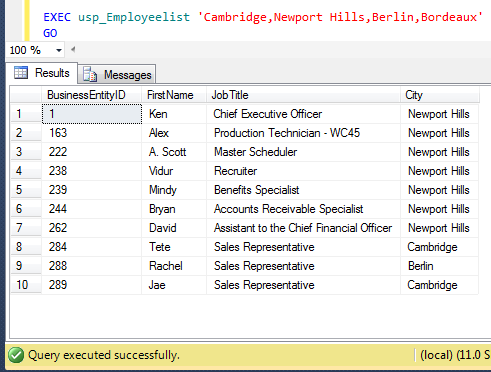
EXEC usp_Employeelist
'Cambridge,Newport Hills,Berlin,Bordeaux'
GO
--OUTPUT

Passingmultiple1.1

Method 2 : Using Dynamic queryhe 

In this solution, you need to pass a single comma delimiter string to the stored procedure. Once it is passed, you need to replace the parameter with single quote and create a dynamic query and execute it.
Given below is the script.

--This script is compatible with SQL Server 2005 and above.
USE AdventureWorks2012
GO
CREATE PROCEDURE usp_Employeelist
@Cities NVARCHAR(30)
AS

DECLARE @Sql VARCHAR(MAX)
SET @Cities = REPLACE(@Cities,',',''',''')

SET @Sql = 'SELECT
BusinessEntityID
, FirstName
, JobTitle
, City
FROM HumanResources.vEmployee
WHERE City IN
(
''' + @Cities + '''
)
ORDER BY BusinessEntityID'

EXEC (@Sql)
GO

--Execute the stored procedure using multiple values
--through one parameter in this stored procedure
USE AdventureWorks2012
GO
EXEC usp_Employeelist
'Cambridge,Newport Hills,Berlin,Bordeaux'
GO
--OUTPUT

Passingmultiple1.1

Read Full Post »

I came across this problem recently, when I was working on a report and I needed to truncate the date time till seconds. Given below are the two different methods we can use to achieve it.

Method 1 :
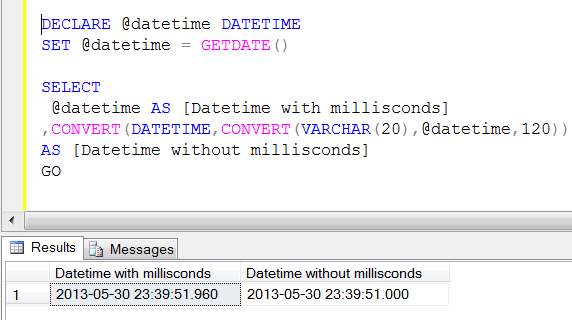
In this method, we will first convert the datetime value to varchar, truncate it and then convert it back to datetime data type using CONVERT function twice.

--This script is compatible with SQL Server 2005 and above.
DECLARE @datetime DATETIME
SET @datetime = GETDATE()

SELECT
@datetime AS [Datetime with millisconds]
,CONVERT(DATETIME,CONVERT(VARCHAR(20),@datetime,120))
AS [Datetime without millisconds]
GO
--OUTPUT

truncatemilliseconds

Method 2 :
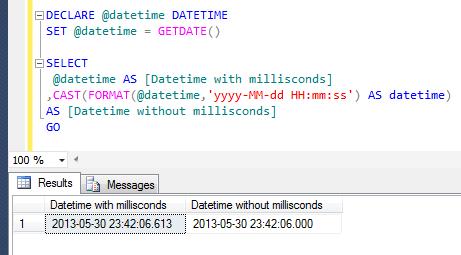
In this method, we will first FORMAT the datetime value to a defined format (truncate milliseconds) and then convert it back to datetime data type using CAST function.

--This script is compatible with SQL Server 2012 and above.
DECLARE @datetime DATETIME
SET @datetime = GETDATE()

SELECT
@datetime AS [Datetime with millisconds]
,CAST(FORMAT(@datetime,'yyyy-MM-dd HH:mm:ss') AS datetime)
AS [Datetime without millisconds]
GO
--OUTPUT

truncatemilliseconds1.1

Read Full Post »

A few months ago, I wrote an article about THROW a new technique to raise an exception and transfer execution to a CATCH block shipped with SQL Server 2012. I also compared throw with Raiserror in that article partially. Later on I found a lot of differences and found that THROW is much better than RAISERROR. Let me create a sample error message to demonstrate the difference.

EXEC sys.sp_addmessage
@msgnum   = 80000
,@severity = 10
,@msgtext  = N'This is a test message.'
,@lang = 'us_english';
GO

Let me explain the differences:

No

RAISERROR

THROW

1

If you pass any message_id to RAISERROR, the message_id must be available in sys.messages.

Example :

RAISERROR (51000, -- Message id.
10, -- Severity,
1, -- State,
N'This is a test message');

–OUTPUT
Msg 18054, Level 16, State 1, Line 1
Error 51000, severity 10, state 1 was raised, but no message
with that error number was found in sys.messages.
If error is larger than 50000, make sure the user-defined
message is added using sp_addmessage.

If you pass any message_id to THROW, the message_id is not necessary to be available in sys.messages.
Example :

THROW 51000
, 'This is a test message'
, 1
;

–OUTPUT
Msg 51000, Level 16, State 1, Line 1
This is a test message

2

If you pass any message_id to RAISERROR, the message_id range must be between 13000 and 2147483647 and it cannot be 50000.
Example :

RAISERROR (49913, -- Message id.
10, -- Severity,
1, -- State,
N'This is a test message');

–OUTPUT
The server could not load DCOM. Software Usage Metrics cannot be started without DCOM.

If you pass any message_id to THROW, the message_id range must be between 50000 and 2147483647.
Example :

THROW 49913
, N'This is a test message'
, 1
;

–OUTPUT
Msg 35100, Level 16
State 10, Line 1
Error number 49913 in
the THROW statement
is outside the valid range.
Specify an error number
in the valid range of
50000 to 2147483647.

3

If you pass any existing message_id to RAISERROR, it will act upon the same Severity level.

Example :

RAISERROR (80000, -- Message id.
10, -- Severity,
1, -- State,
N'This is a test message');

–OUTPUT
This is a test message.

If you pass any message_id to THROW, whatever the Severity level is, it will always show Severity level 16.
Example :

THROW 80000
, N'This is a test message'
, 1
;

–OUTPUT
Msg 80000, Level 16
State 16, Line 1
This is a test message

4

If you use RAISERROR to trap the bug, it will raise the error but with the incorrect error number.
Example :

BEGIN TRY
DECLARE @VALUE INT
SET @VALUE = 1 / 0
END TRY
BEGIN CATCH

DECLARE @ErrorMessage NVARCHAR(4000);
DECLARE @ErrorSeverity INT;
DECLARE @ErrorState INT;

SELECT
@ErrorMessage = ERROR_MESSAGE(),
@ErrorSeverity = ERROR_SEVERITY(),
@ErrorState = ERROR_STATE();

RAISERROR (
@ErrorMessage, -- Message.
@ErrorSeverity, -- Severity.
@ErrorState -- State.
);
END CATCH;

–OUTPUT
Msg 50000, Level 16
State 1, Line 15
Divide by zero error encountered.

If you try to use THROW to raise the error, it will give you the exact error number.
Example :

BEGIN TRY
DECLARE @VALUE INT
SET @VALUE = 1 / 0
END TRY

BEGIN CATCH
THROW;
END
CATCH

;

–OUTPUT
Msg 8134, Level 16
State 16, Line 4
Divide by zero error encountered.

5

RAISERROR can contain printf formatting styles
Example :

RAISERROR (
N'@@@%*.*s@@@',
10,
1,
0,
30,
N'This is a test message
For SQL Server 2012');
GO

–OUTPUT
@@@This is a test message For SQL@@@

THROW cannot contain printf formatting styles.
Example :

THROW 80000
,N'@@@%*.*s
@@@This is a test message'
, 1

;

–OUTPUT
Msg 80000, Level 16
State 1, Line 1

Conclusion :
As per the above differences THROW function leads over RAISERROR and in my opinion also THROW is better to raise an exception and transfer execution to a CATCH block but again it depends upon the requirements.

Read Full Post »

It is a common practice that whenever you need to deploy a production database, you need to first delete all the test data and reset almost all the identity values in the entire database. In SQL Server 2012 also, you need to do the same but in addition to this you need to reset the SEQUENCE object as well (if utilized).
Lets do it step by step.

Step 1 :
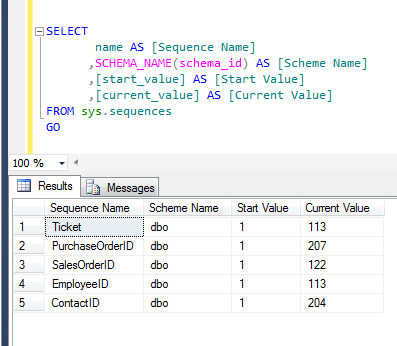
First of all, you need to check whether the SEQUENCE object exits in your database or not and what its current value is.
Given below is the script.

USE AdventureWorks2012
GO
SELECT
name AS [Sequence Name]
,SCHEMA_NAME(schema_id) AS [Scheme Name]
,[start_value] AS [Start Value]
,[current_value] AS [Current Value]
FROM sys.sequences
GO
--OUTPUT

resetsequence1.2

Step 2 :
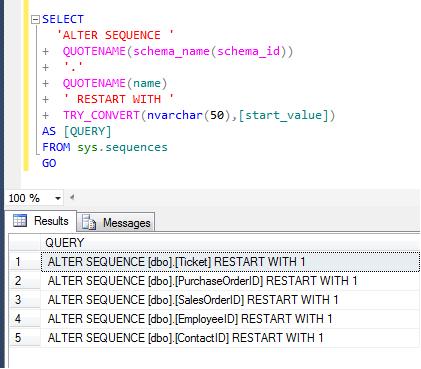
As you can see, in the above list of sequences, the current value of sequences is not equal to the start value. Lets create the script to reset the sequences.

USE AdventureWorks2012
GO
SELECT
'ALTER SEQUENCE '
+  QUOTENAME(schema_name(schema_id))
+  '.'
+  QUOTENAME(name)
+  ' RESTART WITH '
+  TRY_CONVERT(nvarchar(50),[start_value])
AS [QUERY]
FROM sys.sequences
GO
--OUTPUT

resetsequence1.1

Step 3 :
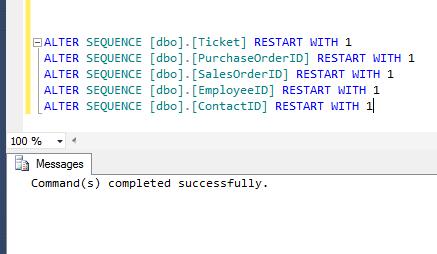
Once you executed the above query, just copy the result set of the above query and paste it on to a new query window. Make sure you are in a correct database and then execute the result set of above query.

USE AdventureWorks2012
GO
ALTER SEQUENCE [dbo].[Ticket] RESTART WITH 1
ALTER SEQUENCE [dbo].[PurchaseOrderID] RESTART WITH 1
ALTER SEQUENCE [dbo].[SalesOrderID] RESTART WITH 1
ALTER SEQUENCE [dbo].[EmployeeID] RESTART WITH 1
ALTER SEQUENCE [dbo].[ContactID] RESTART WITH 1
GO
--OUTPUT

resetsequence1.3

Step 4 :
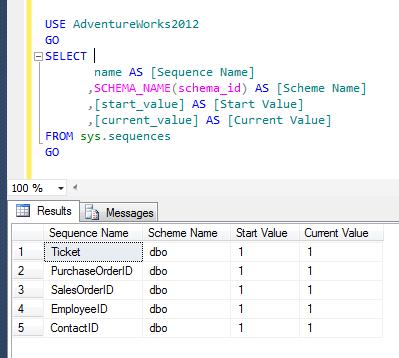
Once you execute the above reset statements in a new query window, execute the STEP 1 query again to check whether sequences are reset or not.

USE AdventureWorks2012
GO
SELECT
name AS [Sequence Name]
,SCHEMA_NAME(schema_id) AS [Scheme Name]
,[start_value] AS [Start Value]
,[current_value] AS [Current Value]
FROM sys.sequences
GO
--OUTPUT

resetsequence1.4

Now, you can see that all the sequence objects have been reset.

Read Full Post »

I came across this question on multiple forums and it is being solved using multiple function such as DATENAME and LEFT function functions. However, lets solve it using FORMAT function only.
Let me create an example to explain it.

USE tempdb
GO
CREATE TABLE tbl_Sample
(
[ID] INT,
[Date] DATETIME
)
GO
INSERT INTO tbl_Sample VALUES (1,'2013-01-01')
INSERT INTO tbl_Sample VALUES (2,'2013-02-02')
INSERT INTO tbl_Sample VALUES (3,'2013-03-03')
INSERT INTO tbl_Sample VALUES (4,'2013-04-04')
INSERT INTO tbl_Sample VALUES (5,'2013-05-05')
INSERT INTO tbl_Sample VALUES (6,'2013-06-06')
INSERT INTO tbl_Sample VALUES (7,'2013-07-07')

Method 1 :
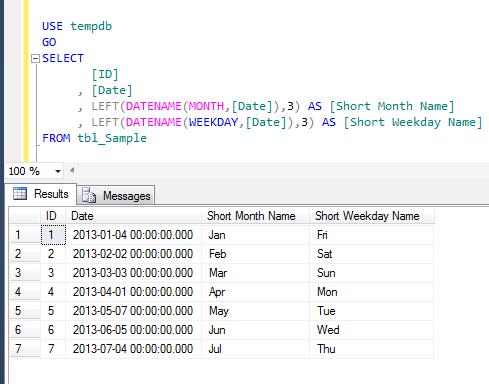
In this method, we will use DATENAME & LEFT function to achieve short name of month and weekday.
Given below is the script.

--This script is compatible with SQL Server 2005 and above.
USE tempdb
GO
SELECT
[ID]
, [Date]
, LEFT(DATENAME(MONTH,[Date]),3) AS [Short Month Name]
, LEFT(DATENAME(WEEKDAY,[Date]),3) AS [Short Weekday Name]
FROM tbl_Sample
--OUTPUT

MonthAndWeekdayshortname1.1

Method 2 :
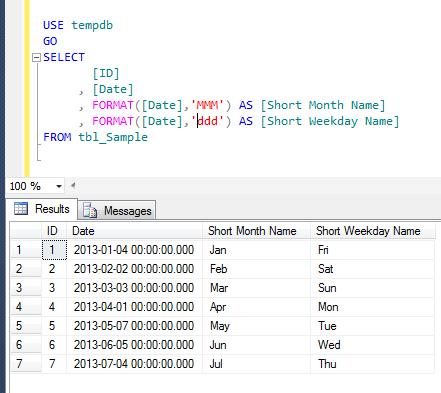
In this method, we will use ONLY FORMAT function (shipped in SQL Server 2012) to achieve short name of month and weekday.
Given below is the script.

--This script is compatible with SQL Server 2012 and above.
USE tempdb
GO
SELECT
[ID]
, [Date]
, FORMAT([Date],'MMM') AS [Short Month Name]
, FORMAT([Date],'ddd') AS [Short Weekday Name]
FROM tbl_Sample
--OUTPUT

MonthAndWeekdayshortname1.2

Read Full Post »

A few days ago, I wrote an article about Multiple ways to convert month number to month name. Recently, I received a query inquiring how to convert Month name to Month number.

Let me create a sample to demonstrate this solution.

USE tempdb
GO
CREATE TABLE tbl_MonthName
(
[ID] INT,
[MONTH_NAME] VARCHAR(50)
)
GO

INSERT INTO tbl_MonthName
SELECT 1, N'January' UNION ALL
SELECT 2, N'February' UNION ALL
SELECT 3, N'March' UNION ALL
SELECT 4, N'April' UNION ALL
SELECT 5, N'May' UNION ALL
SELECT 6, N'June' UNION ALL
SELECT 7, N'July' UNION ALL
SELECT 8, N'August' UNION ALL
SELECT 9, N'September' UNION ALL
SELECT 10, N'October' UNION ALL
SELECT 11, N'November' UNION ALL
SELECT 12, N'December'
GO

SELECT * FROM tbl_MonthName
GO
--OUTPUT

monthnametono1.1

Method 1 :
In this method, we will use the Old approach. In this approach, we need to manually concatenate day with month name and year to make a complete date of that particular month using additional single quotes and then get the Month number from this concatenate date using MONTH function. Given below is the script.

--This script is compatible with SQL Server 2005 and above.
USE tempdb
GO
SELECT
[ID]
,[MONTH_NAME]
,MONTH('1' + [MONTH_NAME] +'00') AS [MONTH_NUMBER]
FROM tbl_MonthName
GO
--OUTPUT

monthnametono1.2

Method 2 :
In this method, we will use the New approach. In this approach, we need to automatically concatenate day with month name and year to make a complete date of that particular month using CONCAT function (without any single quotes) and then get the Month number from this concatenate date using MONTH function. Given below is the script.

--This script is compatible with SQL Server 2012 and above.
USE tempdb
GO
SELECT
[ID]
,[MONTH_NAME]
,MONTH(CONCAT(1,[MONTH_NAME],0)) AS [MONTH_NUMBER]
FROM tbl_MonthName
GO
--OUTPUT

monthnametono1.3

Conclusion :
In both methods, we used different approaches using manual concatenation and automatic concatenation using CONCAT function. I would recommend Method 2 because in my earlier article I found that  CONCAT function is much faster than the normal concatenations.

Read Full Post »

‘Dynamically order by’ clause of any query result set is an old topic and has been discussed on multiple forums. Mostly the solution is being achieved using CASE statement. But what encourages me to write this article is that we can achieve the same with shorter code using  IIF CHOOSE logical functions shipped with SQL Server 2012.

Method 1 :

In this method we will use the traditional approach and dynamically order by the query result set using CASE statement. Given below is the script.

USE AdventureWorks2012
GO
DECLARE @ORDERBY INT
SET @ORDERBY=3

SELECT
BusinessEntityID
, FirstName
, LastName
, JobTitle
FROM HumanResources.vEmployee
ORDER BY
CASE
WHEN @ORDERBY=1 THEN FirstName
WHEN @ORDERBY=2 THEN LastName
WHEN @ORDERBY=3 THEN JobTitle
END
GO
--OUTPUT

dynamicorderby1.1

Method 2 :
In this method we will use a NEW approach and dynamically order by the query result set using IIF logical function shipped in SQL Server 2012. Given below is the script.

USE AdventureWorks2012
GO
DECLARE @ORDERBY INT
SET @ORDERBY=3

SELECT
BusinessEntityID
, FirstName
, LastName
, JobTitle
FROM HumanResources.vEmployee
ORDER BY
IIF(@ORDERBY=1,FirstName,IIF(@ORDERBY=2,LastName,JobTitle))
--OUTPUT

dynamicorderby1.1

Method 3 :
In this method we will use yet another NEW approach and dynamically order by the query result set using CHOOSE logical function shipped in SQL Server 2012. Given below is the script.

USE AdventureWorks2012
GO
DECLARE @ORDERBY INT
SET @ORDERBY=3

SELECT
BusinessEntityID
, FirstName
, LastName
, JobTitle
FROM HumanResources.vEmployee
ORDER BY
CHOOSE(@ORDERBY,FirstName,LastName,JobTitle)
GO
--OUTPUT

dynamicorderby1.1

Conclusion :
In all of the above methods we used different methods, functions, approaches but the output will remain same and also it will not impact performance. It just reduces the line of code.

Read Full Post »

Bit (Boolean) data type keeps result in 1 or 0 form in the SQL Server database. But most of the time we need to display 0 as FALSE and 1 as TRUE in front end applications. Given below is the shortest possible solution using IIF function in SQL Server 2012.

You can also convert it using CASE statement but the syntax will be longer.

Given below are the two methods you can use to convert Boolean(bit) data type into string.

Method 1:
In this method, we will use IIF function to convert boolean(bit) to string. IIF function is a new logical function shipped with SQL Server 2012.

--This script is compatible with SQL Server 2012 and above.
USE AdventureWorks2012
GO
SELECT
[BusinessEntityID]
, [Name]
, [ActiveFlag]
, IIF([ActiveFlag]=1,'TRUE','FALSE') AS [ActiveFlag As String]
FROM [Purchasing].[Vendor]
GO
--OUTPUT

boolean_to_string1.1

Method 2:
In this method, we will use CASE statement to convert boolean(bit) to string.

--This script is compatible with SQL Server 2005 and above.
USE AdventureWorks2012
GO
SELECT
[BusinessEntityID]
, [Name]
, [ActiveFlag]
, CASE WHEN [ActiveFlag]=1 THEN 'TRUE'
WHEN [ActiveFlag]=0 THEN 'FALSE'
END AS  [ActiveFlag As String]
FROM [Purchasing].[Vendor]
GO
--OUTPUT

boolean_to_string1.2

Conclusion :
The only difference between the above two methods is the Syntax. Apart from this, each and every activity, including the performance, will be the same. As per MSDN, IIF is a shorthand form for writing a CASE expression.

Read Full Post »

« Newer Posts - Older Posts »