Feeds:
Posts
Comments

Posts Tagged ‘SQL Server 2012’

I deployed some Sequence objects on production database and after couple of days, I was facing some problem with Sequence objects. It was little difficult to debug all sequence objects at once, so I thought of checking the sequence objects modified dates to find if I modified any Sequence object after deployment.

Given below are the two methods to find the modified dates of Sequence Object.

METHOD 1 : Using sys.sequence
Given below is the script to find the modified date of all sequence object using sys.sequences

USE AdventureWorks2012
GO
SELECT
name As [Sequence Name]
,modify_date
FROM sys.sequences
GO
--OUTPUT

Sequence modified dates

METHOD 2 : Using sys.objects
Given below is the script to find the modified date of all sequence object using sys.objects

USE AdventureWorks2012
GO
SELECT
name As [Sequence Name]
,modify_date
FROM sys.objects
WHERE [type] ='SO'
GO
--OUTPUT

Sequence modified dates

Read Full Post »

Sequence object is one of the new objects shipped with SQL Server 2012. I wrote multiple articles on its features / solutions in earlier articles. One of the major facts that Sequence object is not a table dependent like IDENTITY columns enables you to inset its value manually in any table. I have been asked in a forum whether we can make Sequence as a default value for a column in a table ? The answer is YES & NOYES because we have a work around to make it happen and NO because it is not implemented by default, like identity in a table.

So what is the work around to make SEQUENCE as a default for a column ?

Lets do it step by step.

Step 1 :
In this step, we need to create a sample table and a sequence object to demonstrate it.

-- This script is compatibile with SQL Server 2012 and above.
-- CREATE TABLE
USE tempdb
GO
CREATE TABLE dbo.tbl_sample
( [ID] VARCHAR(8) ,
[Product Name] varchar(50)
)
GO

--CREATE SEQUENCE
USE tempdb
GO
CREATE SEQUENCE dbo.Sample_Seq AS
INT START WITH 1
INCREMENT BY 1 ;
GO

Step 2 :
In this step, we need to create a default constraint on the above created table on [ID] column to make SEQUENCE as DEFAULT value for [ID] column.
Given below is the script.

-- This script is compatibile with SQL Server 2012 and above.
-- CREATE DEFAULT VALUE OF SEQUENCE
USE tempdb
GO
ALTER TABLE dbo.tbl_sample
ADD CONSTRAINT Const_Sample_Seq
DEFAULT (NEXT VALUE FOR dbo.Sample_Seq) FOR [ID];
GO

Step 3 :
Lets insert few records into the table.

-- Insert records into the table
USE tempdb
GO
INSERT INTO dbo.tbl_sample ([Product Name])
VALUES ('SQL SERVER 2005'),('SQL SERVER 2008')
,('SQL SERVER 2012'),('SQL SERVER 2014')
GO

Step 4 :
Once the data has been inserted, you can browse the table and view the [ID] column data to check whether SEQUENCE became the DEFAULT value of this column or not.

--Browse Table
USE tempdb
GO
SELECT * FROM tbl_sample
GO
--OUTPUT

sequence as a default.1.1

Read Full Post »

I developed a utility in SQL Server 2008 and recently upgraded to SQL Server 2012. The job of this utility is to receive the data from external sources, validate the data and insert the data into respective fields of a table for further processing. I used one of the famous SQL functions ISDATE() to validate the date fields in this utility and it was working perfect. Recently, I began to receive some errors. After debugging, I found that ISDATE() is not compatible with datetime2 datatype.

Let me demonstrate the error before heading towards the solution.

--This script is compatible with SQL Server 2008 and above.
DECLARE @Datetime2 AS DATETIME2
SET @Datetime2=GETDATE()

SELECT ISDATE(@Datetime2)  AS [Validate_Date]
GO
--OUTPUT

Msg 8116, Level 16, State 1, Line 4
Argument data type datetime2 is invalid for argument 1 of isdate function.

isdate_with_datetime2.1.1

Opsssssssssssss, I cannot validate the datetime2 datatype using ISDATE() function. So what is the solution ?

SOLUTION :
I developed the given below solution using TRY_CONVERT() (One of the new conversion functions shipped with SQL Server 2012)

Given below is the script.

--This script is compatible with SQL Server 2012 and above.
DECLARE @Datetime2 AS DATETIME2
DECLARE @Varchar AS VARCHAR(10)
SET @Datetime2=GETDATE()
SET @Varchar='raresql'

SELECT
IIF(TRY_CONVERT(DATETIME,@Datetime2) is null ,0,1) AS [Validate_Date]
,IIF(TRY_CONVERT(DATETIME,@Varchar) is null ,0,1) AS [Validate_Date]
GO
--OUTPUT

isdate_with_datetime2.1.2

Do share if you came across this issue and resolved it differently.

Read Full Post »

Sometimes, we need to copy the data from SQL Server result set to any external source (excel, word, notepad etc.) for different purposes. But the problem is when you usually copy (Ctrl+ C or right click >> Copy) and paste it into external source, the column name is not copied and you need to type it manually.

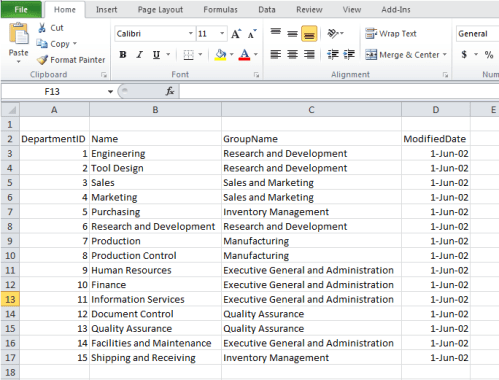
As you can see in the given below images, we copied data from SQL Server and pasted it in the excel but column name did not appear in the excel.

copy column name.1.1

copy column name.1.2

SOLUTION 1 :
The solution is a permanent one, meaning it will copy the column header from the query result set everytime. But, I usually do not recommend this solution because sometimes you do not need the column header and in this case you need to manually delete the column header. Opsssssssssssss.
So what is the solution ? Basically it is a built-in feature in SQL Server.

Let me explain it step by step.

Step 1 :
You need to browse Tools menu and select Options as shown in the image below.

copy column name.1.3

Step 2 :
Once you select Options menu, it will open options dialogue box.
Now you need to select Query results\ SQL Server\Results to Grid from the left hand pane and place the check mark on Include column headers when copying or saving the results in the right hand pane and press OK. Given below is the screen image.

copy column name.1.5

Step 3 :
Now, run query in any window, select the result set (data) then copy (Ctrl+C) and paste it into any external application. This time, it will copy the column header as well.
copy column name.1.4

SOLUTION 2 :
In this solution, you need not go to multiple screens and set any options. In a way, it’s a shortcut to the above solution. The most important benefit using this solution is, if you need the header you can copy it, else copy the data only.

Step 1 :
Run query in any window, select the result set (data) and right click on it as shown in the image below.

copy column name.1.6

Step 2 :
Once you right click on the selected result set, you can either copy without header (Ctrl+C) or copy with header (Ctrl+Shift+C) and paste it into any external application.

copy column name.1.4

Read Full Post »

In my earlier articles I wrote about many new enhancements in SQL Server 2012. Today, I will discuss the new enhancement in the permission area that includes Availability group, Schema, Search property list & Server categories.

The simplest way to query permissions is using sys.fn_builtin_permissions.
Given below is the script.

SELECT * FROM sys.fn_builtin_permissions('');

Above script will give you the complete list of permissions in SQL Server, but I need only the new permissions shipped in SQL Server 2012, so I compared the SQL Server 2008 R2 permissions with SQL Server 2012 and got the given below new permissions shipped with SQL Server 2012.

S. No

Class Description

Permission Name

Covering Permission Name

Parent Class Description

Parent Covering Permission Name

1

AVAILABILITY GROUP

ALTER

CONTROL

SERVER

ALTER ANY AVAILABILITY GROUP

2

AVAILABILITY GROUP

CONTROL


SERVER

CONTROL SERVER

3

AVAILABILITY GROUP

TAKE OWNERSHIP

CONTROL

SERVER

CONTROL SERVER

4

AVAILABILITY GROUP

VIEW DEFINITION

CONTROL

SERVER

VIEW ANY DEFINITION

5

SCHEMA

CREATE SEQUENCE

ALTER

DATABASE

CONTROL

6

SEARCH PROPERTY LIST

ALTER

CONTROL

DATABASE

ALTER ANY FULLTEXT CATALOG

7

SEARCH PROPERTY LIST

CONTROL


DATABASE

CONTROL

8

SEARCH PROPERTY LIST

REFERENCES

CONTROL

DATABASE

REFERENCES

9

SEARCH PROPERTY LIST

TAKE OWNERSHIP

CONTROL

DATABASE

CONTROL

10

SEARCH PROPERTY LIST

VIEW DEFINITION

CONTROL

DATABASE

VIEW DEFINITION

11

SERVER

ALTER ANY AVAILABILITY GROUP

CONTROL SERVER


12

SERVER

ALTER ANY EVENT SESSION

CONTROL SERVER


13

SERVER

ALTER ANY SERVER ROLE

CONTROL SERVER


14

SERVER

CREATE AVAILABILITY GROUP

ALTER ANY AVAILABILITY GROUP


15

SERVER

CREATE SERVER ROLE

ALTER ANY SERVER ROLE


16

SERVER ROLE

ALTER

CONTROL

SERVER

ALTER ANY SERVER ROLE

17

SERVER ROLE

CONTROL


SERVER

CONTROL SERVER

18

SERVER ROLE

TAKE OWNERSHIP

CONTROL

SERVER

CONTROL SERVER

19

SERVER ROLE

VIEW DEFINITION

CONTROL

SERVER

VIEW ANY DEFINITION

I will discuss the above permissions in my future articles in detail.

Read Full Post »

The sp_configure value ‘contained database authentication’ must be set to 1 in order to %S_MSG a contained database. You may need to use RECONFIGURE to set the value_in_use is one of the new error messages come in SQL Server 2012. This error message is related to Contained database, a new database feature shipped with SQL Server 2012.

Let’s discuss this in detail:
Message Number: 12824

Severity : 16

Error Message: The sp_configure value ‘contained database authentication’ must be set to 1 in order to %S_MSG a contained database. You may need to use RECONFIGURE to set the value_in_use.

Error Generation:

Basically, I re-installed my test database server, and I had plenty of database to attach it back to the server. So I was attaching one by one and this process was performing well. Suddenly, in one database it gave me this error. Given below are the error details.

errormessage12824.1.1

Ooopps…… I am unable to attach this database.

Resolution:
Basically, the database I was trying to attach is a contained database and please note that whenever you need to create or attach any contained database, you must enable the contained database authentication in the database server. But how ?
Given below is the script to enable it.

sp_configure 'contained database authentication', 1;
GO
RECONFIGURE;
GO
--OUTPUT

Configuration option ‘contained database authentication’ changed from 0 to 1. Run the RECONFIGURE statement to install.

Once you receive the above output saying  ‘contained database authentication’ has been changed from 0 to 1, you can attach or create any contained database in your database server.

Reference : MSDN

Read Full Post »

Today, I received a query from one of my blog readers asking how to get the current value from a sequence ? He also mentioned to me that he usually uses given below (Database console command) script to get the current value from identity column.

DBCC CHECKIDENT ('Table Name', NORESEED)

So, do we have any DBCC command like this to get the current value from sequence object? Basically we do not have any DBCC command to get the current value from sequence same like identity but we do have work around to find it. Given below are the two methods to get the current value from any sequence object.

METHOD 1 :
In this method, you need to open SQL Server Management Studio and select the particular database and further select the sequence object in which current value is required. Then right click on it and browse its property to view the current value as shown in the image below.

sequence current value.1.1

sequence current value.1.2

METHOD 2 :
In this method, you need to open a NEW query window in SSMS and write the given below script to get the current value of sequence using sys.sequences  (A new system view shipped in SQL Server 2012).

--This script is compatible with SQL Server 2012 and above.
USE AdventureWorks2012
GO
SELECT current_value FROM sys.sequences
WHERE [name]='Seq_sample'
--OUTPUT

sequence current value.1.3

Read Full Post »

Today, I was developing a customer analysis report, basically trying to find out customer’s trend of purchasing. To get the trend I need to get his next row (purchasing) result set in the current row for comparison purposes.  Fortunately, we do have a solution for this problem using self join. But I will share another efficient solution, using LEAD (an analytic function shipped with SQL Server 2012).

Let me create a sample to demonstrate the solution.

USE tempdb
GO
--DROP TABLE tbl_sample
--GO
CREATE TABLE tbl_sample
(
[ID] int,
[Levels] varchar(50)
)
GO

INSERT INTO tbl_sample VALUES (1,'LEVEL 1')
INSERT INTO tbl_sample VALUES (2,'LEVEL 2')
INSERT INTO tbl_sample VALUES (3,'LEVEL 3')
INSERT INTO tbl_sample VALUES (4,'LEVEL 4')
INSERT INTO tbl_sample VALUES (5,'LEVEL 5')
GO
SELECT * FROM tbl_sample
GO
--OUTPUT

get the previous row result.1.1

Let me show you both old and new approaches.

Old Approaches :
Given below is the old approach that we generally develop using self join. This approach you can use in any version of SQL Server.

USE tempdb
GO
SELECT
A.ID
,A.Levels As [Current Level]
,B.Levels AS [Next Level]
FROM tbl_sample A
LEFT JOIN tbl_sample B ON A.ID+1=B.ID
ORDER BY A.ID
GO
--OUTPUT

get value from next row

New Approaches :
In this approach, you do not need to do self join and make it complicated. You just need to use LEAD function and it will calculate the next result row for you automatically. This approach can be used in SQL Server 2012 and above.

USE tempdb
GO
SELECT
A.ID
,A.Levels As [Current Level]
,LEAD(A.levels,1,0) OVER (ORDER BY A.ID) AS [Next Level]
FROM tbl_sample A
GO
--OUTPUT

get value from next row

Conclusion:
In the above approaches, you can see that the result set are same but the new approaches reduce the complexity and increase the performance.

Read Full Post »

I came across this query many times whenever I was working on SEQUENCE object (A new object introduced in SQL Server 2012). Because whenever you need to use any sequence object in any piece of code, make sure it exists.

Given below are the two methods, you can use to check the existence of the sequence object.

METHOD 1 :
This is the preferred method because, it will not only check the existence of the sequence object but also it will give you the details about the sequence object.

--This script is compatible with SQL Server 2012 and above.
USE AdventureWorks2012
GO
--Do not forget to change you sequence object name
--in the below query.
SELECT * FROM sys.sequences
WHERE object_id=object_id('Seq_sample')
GO
--OUTPUT

existance of sequence object.1.1

METHOD 2 :
This is the same method we have been using since the earlier version of SQL Server. In this method, we use one of the renowned systems
object catalog view namely sys.objects. Given below is the script.

--This script is compatible with SQL Server 2012 and above.
USE AdventureWorks2012
GO
--Do not forget to change you sequence object name
--in the below query.
SELECT * FROM sys.objects
WHERE object_id=object_id('Seq_sample')
AND [TYPE]='SO'
--OUTPUT

existance of sequence object.1.2

Read Full Post »

I usually create the samples and test cases on tempdb database. Today, I came a across an issue while working on Sequence object, a new database feature shipped with SQL Server 2012. I tried to use Sequence object from some other database in tempdb database and it gave me given below error message.

Let’s discuss this in detail:

Message Number: 11730

Severity : 16

Error Message: Database name cannot be specified for the sequence object in default constraints.

Error Generation:

In the given below script, I tried to make sequence object (resides in another database (Adventureworks2012)) as a default value of a column in a table. This table resides in tempdb database. Let me create a sample to demonstrate the issue.

--This script is compatible with SQL Server 2012 and above
--Create a sequence object in AdventureWorks2012 database.
USE [AdventureWorks2012]
GO
CREATE SEQUENCE [dbo].[Seq_sample]
AS [int]
START WITH 1
INCREMENT BY 1
GO

USE tempdb
GO
CREATE TABLE dbo.tbl_sample
(
[ID] int,
[Name] varchar(100)
)
GO

ALTER TABLE dbo.tbl_sample
ADD CONSTRAINT Const_tbl_sample DEFAULT
(NEXT VALUE FOR AdventureWorks2012.[dbo].[Seq_Sample])
FOR [ID];
GO
--OUTPUT

Msg 11730, Level 15, State 1, Line 2
Database name cannot be specified for the sequence object in default constraints.

Ooopps…… I am unable to make a sequence as a default value in a table if Sequence already resides in another database.

Resolution:
This is the limitiation of a sequence object, that you cannot make any sequence as a default value of a column if it resides in any other database. But there is a way around that you can use to achieve it. So, how can we do it ? You cannot make it as a default but you can still access the sequence even if it is outside your database boundary, using three part name (AdventureWorks2012.[dbo].[Seq_Sample]
). So, using this three part name, you can insert the sequence value in any database. Given below is the sample.

USE tempdb
GO
CREATE TABLE dbo.tbl_sample
(
[ID] int,
[Name] varchar(100)
)
GO
INSERT INTO tbl_sample
VALUES (NEXT VALUE FOR AdventureWorks2012.[dbo].[Seq_Sample],'raresql')
GO

Read Full Post »

« Newer Posts - Older Posts »