Feeds:
Posts
Comments

Posts Tagged ‘SQL Server 2012’

‘Can you restore SQL Server 2012 backup in earlier versions of SQL Server?’ I came across this question many times from the community and the simple answer is NO. You cannot restore a new version of SQL Server backup in earlier versions. However, there is a way around that can be followed to achieve it. Basically, you can generate the script of all objects along with the data using SQL Server 2012 with any earlier versions compatibility and run those scripts on earlier versions of SQL Server. This is how you can get the complete data with schema from SQL Server 2012 to earlier versions.

Problem :
Before proceeding with the solution, I would like to show you the error, that happens when you restore a higher versions of
SQL Server database backup to an earlier version of SQL Server. Given below is the image.

erromessage33241.1

The media family on device ‘E:\DBBackup\AdventureWorks2012_Backup\AdventureWorks2012_Backup’ is incorrectly formed. SQL Server cannot process this media family.

RESTORE HEADERONLY is terminating abnormally. (Microsoft SQL Server, Error: 3241)

SOLUTION :
Let me proceed with the solution, step by step.

Step 1:
Open SSMS and right click on the database that you want to restore in earlier versions of SQL Server and then select Task and then further click on Generate Script …
Given below is the image.
Restore SQL Server 2012 backup on earlier versions.1.1

Step 2 :
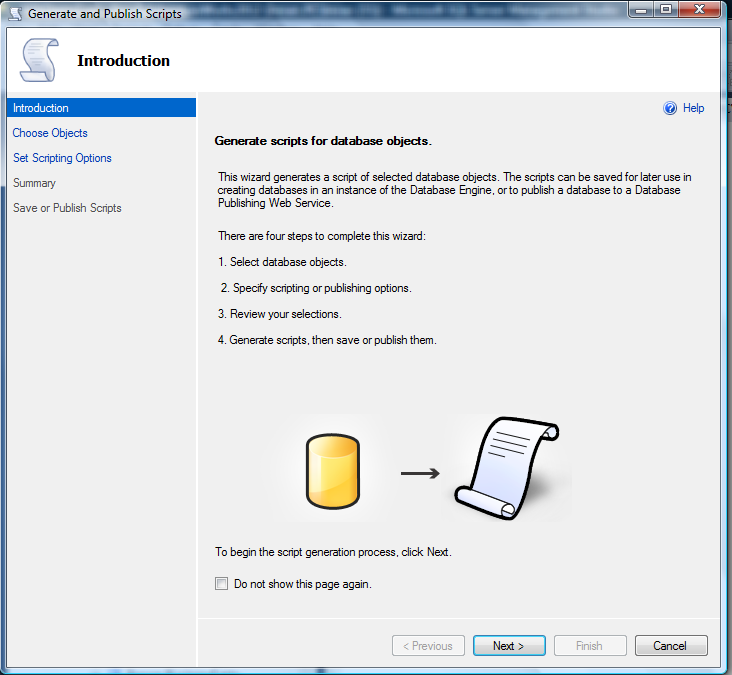
Given below is the informational screen, that will guide you how to generate the scripts along with the steps. Press NEXT button.
Restore SQL Server 2012 backup on earlier versions.1.2

Step 3 :
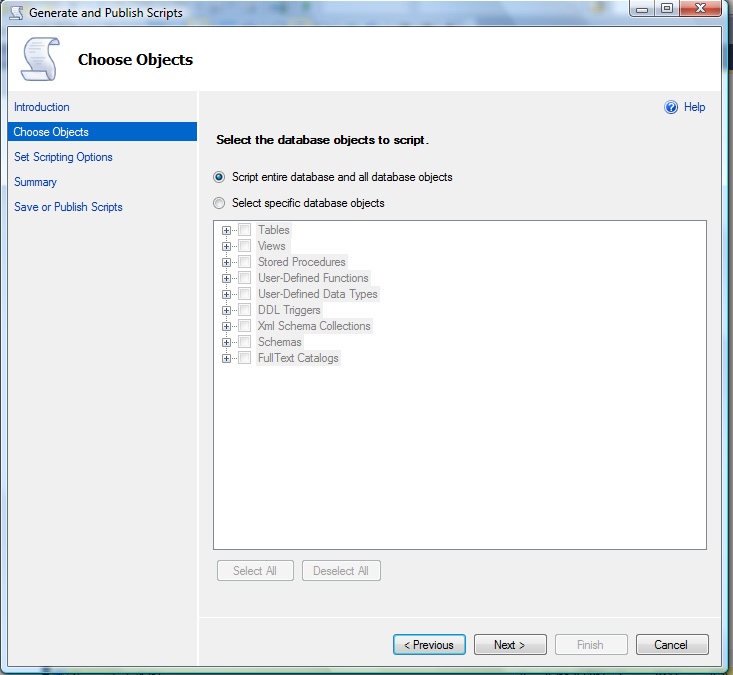
In this step, you will get two options. Given below are the details.

  1. Script entire database and all database objects
  2. Select specific database objects

Option 1 is preferred because you can generate all database objects altogether from it. However if you upgrade any object using any new features of SQL Server 2012, then you should select Option 2 and exclude that particular object and press NEXT button. Given below is the screen image.
Restore SQL Server 2012 backup on earlier versions.1.3-1

Step 4 :
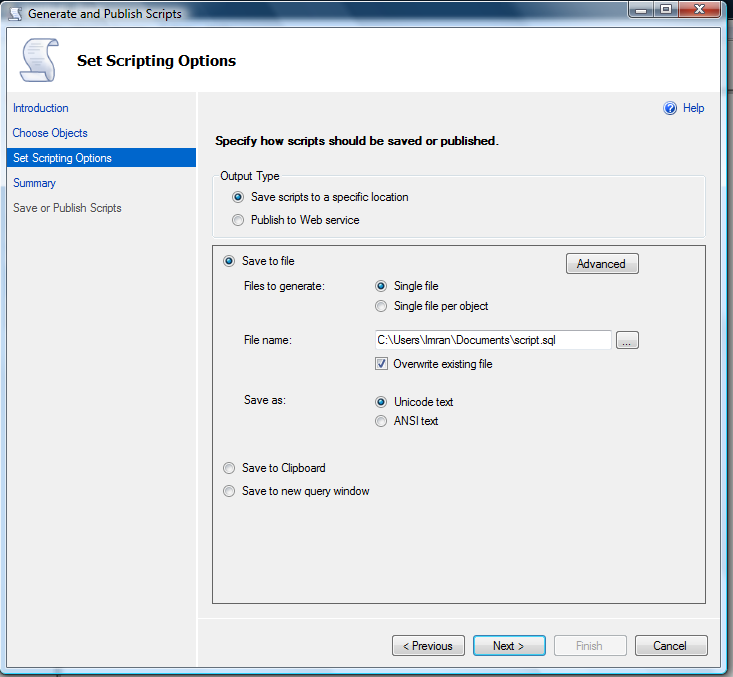
In this option you need to select the script file location to save all the scripts in a particular file. Rest of the options you can leave as default. Once you are done with the file location, you can see an ADVANCE button. Click on this button. It will open the advance option for the scripting.
Restore SQL Server 2012 backup on earlier versions.1.4

Step 5 :
Once you are inside the Advance option, you need to select further two options. Given below are the details.

  1. Script for SQL Server version
  2. Type of data to script.

In the Option 1 make sure that you have selected the right earlier Version of SQL Server, as shown in the image below.

Restore SQL Server 2012 backup on earlier versions.1.5

In the Option 2, make sure that you have selected Schema and data, as shown in the image below.

Restore SQL Server 2012 backup on earlier versions.1.6-1

Once you configure both options, press OK and press Next in the previous screen, as shown below.

Restore SQL Server 2012 backup on earlier versions.1.7

Step 6
Once you press NEXT button, it will take you to the summary screen where you can see all your configuration altogether.
Again press NEXT button to proceed, as show in the image below.

Restore SQL Server 2012 backup on earlier versions.1.8

Step 7
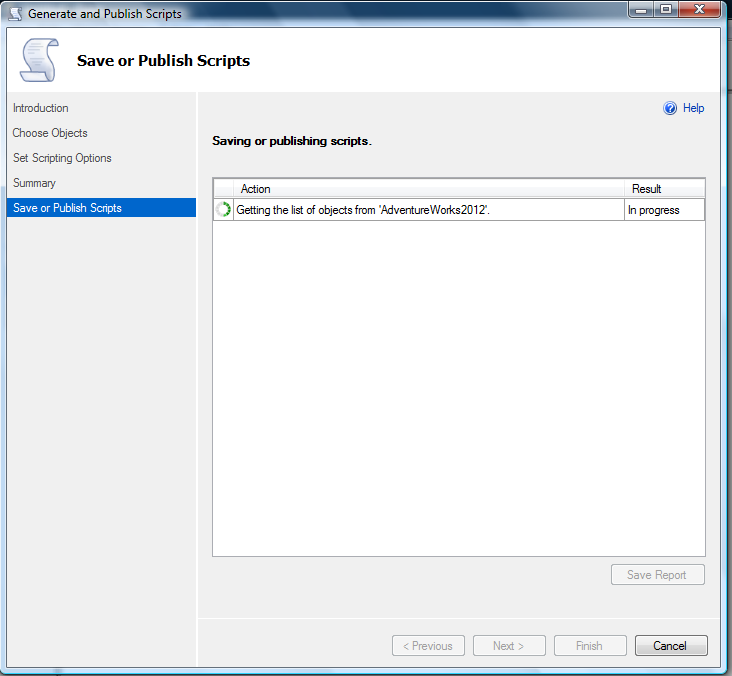
In this step, SQL Server will automatically script all your selected object along with the data. And will give you the status report, as shown in the image below.
Restore SQL Server 2012 backup on earlier versions.1.9

Restore SQL Server 2012 backup on earlier versions.1.10

Step 8 :
Now you need to browse the file you saved in particular location in the Step 4 and Execute it in selected earlier version of SQL Server.

Let me know if you came across this problem and resolved it in a different manner.

Read Full Post »

Recently I came across an issue related to the sequence object (shipped in SQL Server 2012) because usually we generate the next ID from the sequence object without checking whether it has reached its limit and it cannot generate a new ID. Due to this it generates an error as well. Given below are the error details.

Msg 11728, Level 16, State 1, Line 1
The sequence object ‘Seq_Sample1’ has reached its minimum or maximum value. Restart the sequence object to allow new values to be generated. Sequence object maintain its minimum and maximum value by default.

So what is the solution ? But before proceeding with the solution let me create a sample.

SAMPLE :

--This script is compatible with SQL Server 2012 and above.
--Create a sequence object
USE [AdventureWorks2012]
GO
--DROP SEQUENCE [dbo].[Seq_Sample1]
--GO
CREATE SEQUENCE [dbo].[Seq_Sample1]
AS [tinyint]
START WITH 1
INCREMENT BY 1
MINVALUE 1
MAXVALUE 4
GO
--Generate sequence number up to 4 ID
--because it has a maximum limit of 4.
SELECT Next value for [dbo].[Seq_Sample1]
GO 4

SOLUTION 1 : (Not recommended)
In this solution, you need to check the minimum and maximum value of the sequence with the current value and if it matches either of them, it means that sequence has been reached to its minimum or value and you cannot generate a new ID. It is not recommended because it is a lengthy procedure. Given below is the script.

--This script is compatible with SQL Server 2012 and above.
DECLARE @minimum_value As sql_variant
DECLARE @maximum_value As sql_variant
DECLARE @current_value As sql_variant

SELECT
@minimum_value=[minimum_value]
,@maximum_value=[maximum_value]
,@current_value=[current_value]
FROM
sys.sequences AS seq
WHERE name ='Seq_Sample1'

SELECT IIF(@minimum_value=@current_value
OR @maximum_value=@current_value
,'You cannot generate a new ID'
,'You can generate a new ID') AS [Result]
--OUTPUT

sequence limit.1.1

SOLUTION 2 : Using Is_exhausted property (Recommended)
In this solution, we will use a sequence property namely “is_exhausted” and can quickly check whether it reached its limit or not.
Given below is the script.

--This script is compatible with SQL Server 2012 and above.
SELECT IIF((SELECT is_exhausted FROM sys.sequences AS seq
WHERE name ='Seq_Sample1')=1
,'You cannot generate a new ID'
,'You can generate a new ID')
AS [Result]
--OUTPUT

sequence limit.1.1

CONCLUSION :
As you can see, both solutions generate the same output but solution 2 is recommended because we used a property namely “is_exhausted” and reduced the size of the script.

Read Full Post »

I came across this query today, when I was generating some reports and I do not want to show the decimals in the report. I did some research and came up with multiple solutions. Before proceeding with the solution, let me create a sample to demonstrate the solution.

Sample :

USE Tempdb
GO
DROP TABLE tbl_sample
GO
CREATE TABLE tbl_sample
(
[Col_ID] INT,
[Col_Decimal] decimal(18,4)
)
GO
INSERT INTO tbl_sample VALUES (1,12345.9876)
INSERT INTO tbl_sample VALUES (2,-12345.9876)
INSERT INTO tbl_sample VALUES (3,123.45)
INSERT INTO tbl_sample VALUES (4,12.00)
GO

Given below are the solutions.

Solution 1 : (Without any function)

USE Tempdb
GO
SELECT [Col_ID], [Col_Decimal]
, [Col_Decimal] - ([Col_Decimal]%1) As [Col_Number]
FROM tbl_sample
GO
--OUTPUT

get the number before decimals.1.1

Solution 2 : (Using ROUND function)

USE Tempdb
GO
SELECT [Col_ID], [Col_Decimal]
, ROUND([Col_Decimal],0,1) As [Col_Number]
FROM tbl_sample
GO
--OUPUT

get the number before decimals.1.2

Solution 3 : (Using CAST function)

USE Tempdb
GO
SELECT [Col_ID], [Col_Decimal]
, CAST([Col_Decimal] AS INT) As [Col_Number]
FROM tbl_sample
GO
--OUTPUT

get the number before decimals.1.3

Read Full Post »

Today is month end (30 September 2013) and I was checking my general checklist for month end closing procedure. I saw one of my scripts that I had written earlier regarding how to check whether a date is month end date or not. So, I thought of re-writing this script even much shorter & efficient than my earlier script using EOMONTH .

Let me create a sample table to demonstrate.

USE tempdb
GO
--DROP TABLE tbl_Sample
--GO
CREATE TABLE tbl_Sample
(
[ID] INT,
[Date] DATETIME
)
GO
INSERT INTO tbl_Sample VALUES (1,'2013-01-01')
INSERT INTO tbl_Sample VALUES (2,'2013-03-31')
INSERT INTO tbl_Sample VALUES (3,'2013-10-10')
INSERT INTO tbl_Sample VALUES (4,'2013-12-31')
GO

SOLUTION 1 :
Given below is the script that we usually use in SQL Server 2005/2008 to check whether the date is End of month date or not.

--This script is compatible with SQL Server 2005 and above.
USE tempdb
GO
SELECT [ID],[Date],
(CASE WHEN
CONVERT(varchar(11)
,DATEADD(MONTH, DATEDIFF(MONTH, 0, [Date])+1, -1),120)=[Date]
THEN 'Month End' ELSE 'Not a Month End' END) As [Result]
FROM tbl_Sample
GO

isdate is a mont end date.1.1

SOLUTION 2 :
Given below is the script, that I developed using new functions (EOMONTH & IIF) shipped in SQL Server 2012 to check whether the date is End of month date or not. Due to these functions, we can reduce the script size and improve the performance.

--This script is compatible with SQL Server 2012 and above.
USE tempdb
GO
SELECT [ID],[Date],
IIF(EOMONTH([Date])=[Date],'Month End','Not a Month End')
As [Result]
FROM tbl_Sample
GO
--OUTPUT

isdate is a mont end date.1.2

CONCLUSION :
As you can see, both solutions have the same result set but Solution 2 is recommended because it is using only one function to check whether the date is month end date or not, instead of a lot of date functions.

Read Full Post »

I had come across this problem (how to convert varchar to currency) a couple of years ago and fixed this problem. Recently I had a chance to revisit my solutions and I discovered that we can re-script this solution much more efficiently than I did earlier, using FORMAT & TRY_CONVERT (new functions shipped in SQL Server 2012).

Note : It is recommended to do this formatting from the front end of the application.

Let me create a sample to demonstrate the solution :

SAMPLE:

USE [tempdb]
GO
--DROP TABLE [dbo].[tbl_sample]
--GO
CREATE TABLE [dbo].[tbl_sample]
(
[Col_ID] [int] NULL,
[Col_varchar] [varchar](50) NULL
) ON [PRIMARY]

GO
INSERT [dbo].[tbl_sample] ([Col_ID], [Col_varchar])
VALUES (1, N'1000.00')
GO
INSERT [dbo].[tbl_sample] ([Col_ID], [Col_varchar])
VALUES (2, N'-10.21')
GO
INSERT [dbo].[tbl_sample] ([Col_ID], [Col_varchar])
VALUES (3, N'1234.5678')
GO
INSERT [dbo].[tbl_sample] ([Col_ID], [Col_varchar])
VALUES (4, N'123.45')
GO

SOLUTION:
In this solution, first of all, we need to convert the data into money data type then format it into any currency using culture.
Given below is the solution.

SELECT
[Col_ID]
,[Col_varchar]
,FORMAT(TRY_CONVERT(money,[Col_varchar]),'C','en-US')
AS [Varchar_to_currency]
FROM [tbl_sample]
GO

varchar_to_currency.1.1

Read Full Post »

Sequence object is one of the nice features shipped with SQL Server 2012. It gives much more flexibility than identity column. Due to its flexibility, I usually recommend to use it instead of identity. But recently I came across with a so called issue related to sequence object. The issue is that sequence object does not enforce uniqueness by itself.

Let me create a sample to demonstrate the issue step by step.
Step 1:
Create a sample table. Given below is the script.

USE [AdventureWorks2012]
GO
--DROP TABLE [dbo].[tbl_sample]
--GO
--Create a sample Table
CREATE TABLE [dbo].[tbl_sample]
(
[ID] [int] NULL,
[Name] [varchar](100) NULL
) ON [PRIMARY]
GO

Step 2 :
Create a sequence object with CYCLE property.

--Create a sample Sequence object
--DROP SEQUENCE [dbo].[Seq_Sample]
--GO
CREATE SEQUENCE [dbo].[Seq_Sample]
AS [tinyint]
START WITH 1
INCREMENT BY 1
MINVALUE 1
MAXVALUE 2
CYCLE
GO
--

Step 3 :
Insert few records in the above sample table using sequence object.

USE [AdventureWorks2012]
GO
INSERT INTO [tbl_sample] VALUES (NEXT VALUE FOR [Seq_Sample],'TEST-1')
INSERT INTO [tbl_sample] VALUES (NEXT VALUE FOR [Seq_Sample],'TEST-2')
INSERT INTO [tbl_sample] VALUES (NEXT VALUE FOR [Seq_Sample],'TEST-3')
INSERT INTO [tbl_sample] VALUES (NEXT VALUE FOR [Seq_Sample],'TEST-4')
GO

Step 4 :
Browse the table. Given below is the script.

USE [AdventureWorks2012]
GO
SELECT * FROM [tbl_sample]
GO
--OUTPUT

sequence_eniqueness.1.1

As you can see in the above result set, there are duplicate IDs in the ID column. Ooopsss it does not enforce uniqueness by default. So what is the solution ?

SOLUTION :
Let me explain the solution step by step.

Step 1 :
Create a sample table. Given below is the script.

USE [AdventureWorks2012]
GO
--DROP TABLE [dbo].[tbl_sample]
--GO
--Create a sample Table
CREATE TABLE [dbo].[tbl_sample]
(
[ID] [int] NULL,
[Name] [varchar](100) NULL
) ON [PRIMARY]
GO

Step 2 :
Create a unique index on column ID of sample table.

USE [AdventureWorks2012]
GO
CREATE UNIQUE INDEX AK_tbl_sample_ID
ON dbo.tbl_sample (ID)
GO

Step 3 :
Create a sequence object with NO CYCLE property.

USE [AdventureWorks2012]
GO
--Create a sample Sequence object
--DROP SEQUENCE [dbo].[Seq_Sample]
--GO
CREATE SEQUENCE [dbo].[Seq_Sample]
AS [tinyint]
START WITH 1
INCREMENT BY 1
MINVALUE 1
MAXVALUE 4
NO CYCLE
GO
--

Step 4 :
Insert few records in the above sample table using sequence object to check whether the uniqueness is enforced or not.

USE [AdventureWorks2012]
GO
INSERT INTO [tbl_sample] VALUES (NEXT VALUE FOR [Seq_Sample],'TEST-1')
INSERT INTO [tbl_sample] VALUES (NEXT VALUE FOR [Seq_Sample],'TEST-2')
INSERT INTO [tbl_sample] VALUES (NEXT VALUE FOR [Seq_Sample],'TEST-3')
INSERT INTO [tbl_sample] VALUES (NEXT VALUE FOR [Seq_Sample],'TEST-4')
GO
--OUTPUT

Step 5 :
Browse the table again. Given below is the script.

USE [AdventureWorks2012]
GO
SELECT * FROM [tbl_sample]
GO
--OUTPUT

sequence_eniqueness.1.2

Conclusion :
Whenever you need to enforce uniqueness in the table using sequence object, make sure you have a UNIQUE INDEX on that particular column of the table. Also make sure that SEQUENCE object has NO CYCLE property.

Read Full Post »

Calculating median has never been an issue, as we have lots of solutions to calculate medians using CTE, user defined functions etc. But what encourages me to write this post is, I found a shortcut to calculate the median using PERCENTILE_CONT (A new analytic function shipped in SQL Server 2012).

As per the definition : To find the Median, place the numbers you are given in value order and find the middle number. Click here for Reference

Given below is the sample that I will use to demonstrate what is median.

<br />SELECT ProductID,StandardCost FROM<br />[Production].[ProductCostHistory]<br />WHERE ProductID IN (707,708,711,712,713)<br />ORDER BY ProductID<br />GO<br />--OUTPUT<br />

median.1.1

Given below is the script to calculate the median in a shortest way.

<br />Use AdventureWorks2012<br />GO<br />SELECT<br />DISTINCT [ProductID]<br />,PERCENTILE_CONT(0.5)<br />WITHIN GROUP (ORDER BY [StandardCost])<br />OVER (PARTITION BY [ProductID]) AS Median<br />FROM [Production].[ProductCostHistory]<br />WHERE ProductID IN (707,708,711,712,713)<br />ORDER BY [ProductID]<br />GO<br />--OUTPUT<br />

median.1.2

Note : Whenever you calculate median using PERCENTILE_CONT make sure it is PERCENTILE_CONT(0.5).

Read Full Post »

‘How to change the datatype of type Sequence object’ became critical for me when I created a sequence object with a wrong datatype and deployed it on client side and later I tried to change the datatype of the sequence object but I could not 😦

Let me demonstrate the issue and its resolution step by step.

Step 1 :
In this step, we will create a sequence object using smallint data type.

Use AdventureWorks2012
GO
CREATE SEQUENCE [dbo].[Seq_Sample]
AS [SMALLINT]
START WITH 1
INCREMENT BY 1
MINVALUE 1
MAXVALUE 20
NO CACHE
GO

Step 2 :
In this step, we will use 3 sequence IDs. This step is just for demonstration purpose only.

Use AdventureWorks2012
GO
SELECT NEXT VALUE FOR [Seq_Sample]
GO 3

Step 3 :
Let’s try to alter its datatype. This step is just to demonstrate the error only.

Use AdventureWorks2012
GO
ALTER SEQUENCE [dbo].[Seq_Sample] AS INT
GO
--OUTPUT

Msg 11711, Level 15, State 1, Line 1
Argument ‘AS’ cannot be used in an ALTER SEQUENCE statement.

Ooopsss cannot change it. So, what is the solution ?

Step 4:
In this step, we need to get the current value (last value) of the above sequence object. Never skip this step because once you drop the above sequence object, it would be very difficult to get the current value if it is implemented for multiple tables.
Given below is the script.

Use AdventureWorks2012
GO
SELECT current_value FROM SYS.SEQUENCES
WHERE name='Seq_Sample'
--OUTPUT

current_value
————-
3

(1 row(s) affected)

Step 5:
Once you have the current value of the above sequence, it is time to drop the sequence object.

Use AdventureWorks2012
GO
DROP SEQUENCE [dbo].[Seq_Sample]
GO

Step 6:
Now, it is time to re-create the sequence object.  Make sure that you change the datatype of the sequence object. Also you must change the START value of the new sequence object’s to the current value + 1 (we got the current value in step 3).
Given below is the script.

Use AdventureWorks2012
GO
CREATE SEQUENCE [dbo].[Seq_Sample]
AS [INT]
START WITH 4
INCREMENT BY 1
MINVALUE 1
MAXVALUE 20
NO CACHE
GO

Step 7:
Finally, check the next value of the sequence.
Given below is the script.

Use AdventureWorks2012
GO
Select NEXT VALUE FOR [Seq_Sample] AS [Result]
GO
--OUTPUT

Result
———–
4

(1 row(s) affected)

Read Full Post »

In my earlier article, I wrote a solution how to remove milliseconds from datetime. After that I tried to remove the seconds and milliseconds from datetime using same method but it gave me errors. So I went to the drawing board and started doing some research and finally realized that I can use the same methods with little modifications.
Given below are the two methods that we can use to remove milliseconds and seconds from datetime.

METHOD 1 :
In this method, we will use Convert function to convert date time to varchar and then remove the seconds and milliseconds from it and then convert it back to datetime.
Given below is the script.

--This script is compatible with SQL Server 2005 and above.
DECLARE @datetime DATETIME
SET @datetime = GETDATE()

SELECT
@datetime AS [Datetime with seconds and millisconds]
,CONVERT(DATETIME,CONVERT(VARCHAR(13),@datetime,120)+ ':00')
AS [Datetime without seconds & millisconds]
GO
--OUTPUT

remove seconds and milliseconds.1.1

METHOD 2 :
In this method, we will first FORMAT the datetime value to a defined format (truncate seconds and milliseconds) and then convert it back to datetime data type using CAST function.
Given below is the script.

--This script is compatible with SQL Server 2012 and above.
DECLARE @datetime DATETIME
SET @datetime = GETDATE()

SELECT
@datetime AS [Datetime with seconds and millisconds]
,CAST(FORMAT(@datetime,'yyyy-MM-dd HH:0') AS datetime)
AS [Datetime without seconds & millisconds]
GO
--OUTPUT

remove seconds and milliseconds.1.2

Read Full Post »

« Newer Posts - Older Posts »