I came across this Default FILESTREAM filegroup is not available in database ‘%.*ls’ error today, while I was working on a table using filestream. This error message is part of SQL Server since 2005 version.
Let me explain this error in detail :
Message Number: 1969
Severity : 16
Error Message: Default FILESTREAM filegroup is not available in database ‘%.*ls’.
Error Generation:
Let me create a database and table to demonstrate this error message.
--Create a database
USE master ;
GO
CREATE DATABASE Musicdb
ON
(NAME = Musicdb_dat,
FILENAME = 'C:\Program Files\Microsoft SQL Server\MSSQL11.MSSQLSERVER\MSSQL\DATA\Musicdbdat.mdf')
LOG ON
( NAME = Musicdb_log,
FILENAME = 'C:\Program Files\Microsoft SQL Server\MSSQL11.MSSQLSERVER\MSSQL\DATA\Musicdblog.ldf') ;
GO

--Create a table
USE Musicdb
GO
CREATE TABLE tbl_music
(
[ID] uniqueidentifier not null rowguidcol
constraint PK_music primary key clustered,
[Music_files] varbinary(max) filestream
)
--OUTPUT
Msg 1969, Level 16, State 1, Line 1
Default FILESTREAM filegroup is not available in database ‘Musicdb’.
Ooopps…… I am unable to create the table. Lets fix it.
Resolution:
If you look at the error, it says that there is no default filestream in the filegroup but there is a possibility that even filestream is not available in the filegroup. Lets now resolve this issue step by step.
Step 1 :
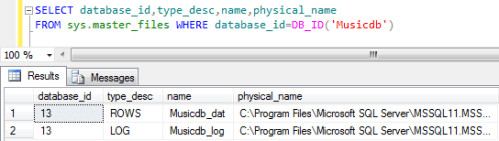
In this step, lets check in the Musicdb database if filestream is available in the filegroup or NOT.
SELECT database_id,type_desc,name,physical_name
FROM sys.master_files WHERE database_id=DB_ID('Musicdb')
--OUTPUT
Step 2 :
In step 1, you can see that not a single filestream is available in the filegroup. So first lets create a filestream in filegroup. Given below is the script.
Note : if filestream is already available in the filegroup then do not proceed with Step 2 . Go to Step 3 directly.
USE [master]
GO
ALTER DATABASE Musicdb
ADD FILEGROUP [MyMusicAlbum]
CONTAINS FILESTREAM
GO
ALTER DATABASE Musicdb
ADD FILE
(
NAME = N'Album01',
FILENAME = N'C:\music\Album01.ndf'
)
TO FILEGROUP [MyMusicAlbum]
GO
Step 3 :
In step 1 if filestream is available in filegroup then without going to step 2, just execute the given below script and it will make your filestream as a default filestream in the filegorup.
USE Musicdb
GO
IF NOT EXISTS (SELECT name FROM sys.filegroups WHERE is_default=1 AND name = N'MyMusicAlbum')
ALTER DATABASE Musicdb MODIFY FILEGROUP [MyMusicAlbum] DEFAULT
GO
Step 4 :
Lets create the table again.
--Create a table
USE Musicdb
GO
CREATE TABLE tbl_music
(
[ID] uniqueidentifier not null rowguidcol
constraint PK_music primary key clustered,
[Music_files] varbinary(max) filestream
)
--OUTPUT
Command(s) completed successfully.
Conclusion :
Remember, whenever you come across this error, you just need to either create a filestream in a filegroup or make the existing filestream as a default in filegroup.
Read Full Post »


 SQL Server Portal