Feeds:
Posts
Comments

Posts Tagged ‘SQL Server’

Whenever you upgrade previous version of SQL Server to SQL Server 2012 you need to take care of few issues. In this article, I will discuss one of the important issues that is Create trigger with append clause. This clause will not stop you to upgrade it to SQL Server 2012 but it will break your scripts. But how ?
Let me explain it Step by Step with the simple examples.
Step 1 :
First create given below table and triggers on any database prior to SQL Server 2012.

CREATE TABLE dbo.Student
([Student_ID] INT,
[Student_Name] VARCHAR(100)
)
GO
CREATE TRIGGER dbo.FirstTrigger
ON dbo.Student
FOR INSERT
AS
BEGIN
PRINT 'First Trigger'
END
GO
CREATE TRIGGER dbo.SecondTrigger
ON dbo.Student
FOR INSERT
WITH APPEND
AS
BEGIN
PRINT 'Second Trigger'
END
GO

Step 2 :
Upgrade the database on SQL Server 2012. Once you upgrade it will not alert you.
Step 3 :
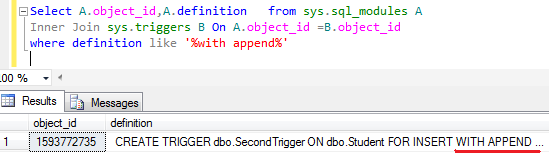
Immediately after upgrade, run the given below query to view if any with append clause is available in the trigger.

Select A.object_id,A.definition from sys.sql_modules A
Inner Join sys.triggers B On A.object_id =B.object_id
where definition like '%with append%'

withappend1.1-1

Step 4 :
In the above example, we have one trigger with append clause, so alter the trigger and remove the with append clause because it is no more required for the triggers in latest versions of SQL Server.

Now, you are ready to use this trigger in the SQL Server 2012.

In case, if you don’t follow step 3 and 4, lets see what may happen.

insert into student values (1,'Imran')
--OUTPUT

First Trigger
Msg 195, Level 15, State 1, Procedure SecondTrigger, Line 5
‘APPEND’ is not a recognized option.

Conclusion :
Remember, whenever you upgrade to SQL Server 2012, check WITH APPEND clause  in the triggers to avoid this error.

Read Full Post »

DBCC SHRINKFILE for FILESTREAM containers requires EMPTYFILE option and does not allow any other options is one of the error messages shipped with SQL Server 2012. It happens due to the new feature File table (File stream) introduced in SQL Server 2012. Lets explore this error message.
Message Number: 2563
Severity : 16
Error Message: DBCC SHRINKFILE for FILESTREAM containers requires EMPTYFILE option and does not allow any other options.

Error Generation:
This error message looks as if something is wrong with the “DBCC SHRINKFILE”. Lets generate this error step by step.
Step 1 :
First of all create a database having File stream.

CREATE DATABASE [MyFileTableDB]
ON PRIMARY
( NAME = N'MyFileTableDB', FILENAME = N'C:\DATA\MyFileTableDB.mdf'),
FILEGROUP MyFileGroup CONTAINS FILESTREAM (NAME = MyFileTableFS,FILENAME='C:\Data\MyFileTable')
LOG ON
( NAME = N'MyFileTableDB_log', FILENAME = N'C:\DATA\MyFileTableDB_log.ldf')
WITH FILESTREAM ( NON_TRANSACTED_ACCESS = FULL, DIRECTORY_NAME = N'MyFileTableDB' )
GO

Step 2 :
Shrink the data file.

-- Shrink the data file
USE My_FileTableDB
GO
DBCC SHRINKFILE (N'MyFileTableDB' , 0, TRUNCATEONLY)

msg25631.1

Step 3 :
Shrink the log file.

-- Shrink the log file
USE My_FileTableDB
GO
DBCC SHRINKFILE (N'MyFileTableDB_log' , 0, TRUNCATEONLY)

msg25631.2

Step 4 :
Shrink the filestream file.

-- Shrink the FileStream file
USE My_FileTableDB
GO
DBCC SHRINKFILE (N'MyFileTableFS' , 0, TRUNCATEONLY)

Oooops……………
Msg 2563, Level 16, State 1, Line 1
DBCC SHRINKFILE for FILESTREAM containers requires EMPTYFILE option and does not allow any other options.

Resolution:
You cannot shrink FileStream files like data file or log file. The correct syntax to shrink file stream is given below :

DBCC SHRINKFILE (N'MyFileTableFS' , EMPTYFILE)

msg25631.3

Conclusion:
Remember, whenever you shrink the FILESTREAM files follow the exact syntax given above to avoid this error.

Read Full Post »

sys.sysprocesses is one of the helpful system views when it comes to query the processes of SQL Server. I have been using this system view for quite a while. But a few days ago I read on MSDN, “This feature will be removed in a future version of Microsoft SQL Server. Avoid using this feature in new development work, and plan to modify applications that currently uses this feature.”

So, I planned to upgrade my query.
Given below is my query that I used to retrieve processes using specified database since SQL Server 2000.

--This query will work fine on SQL Server 2000 and above.
Declare @database_name as varchar(max)
Set @database_name ='AdventureWorks2012'

Select [spid] as [session_id], [last_batch],[status]
,cmd as [Command], hostname as [host_name]
,[program_name], [loginame] as [Login_name]
from sys.sysprocesses
Where dbid = db_id(@database_name)

sysprocesses1.1

Given below is my new query that works on SQL Server 2012 and above, having the same result set as the above.

Declare @database_name as varchar(max)
Set @database_name ='AdventureWorks2012'

Select A.session_id,A.last_request_end_time as [last_batch],A.[status]
, B.[command],A.[host_name]
,A.[program_name],A.[login_name]
from sys.dm_exec_sessions A
Left Join sys.dm_exec_requests B
On A.[session_id]=B.[session_id]
Where A.[database_id]=db_id(@database_name)

sysprocesses1.2

Conclusion :
You can see that both the above queries result set is same but first query (sys.sysprocesses) will not be applicable for future versions of SQL.

Let me know your feedback regarding both queries.

Read Full Post »

sp_spaceused is one of the frequently used stored procedures when it comes to view the number of rows, reserved size, data size, index size, unused space in a table. I myself utilized it many a time.

Given below are the three methods to run sp_spaceused or equivalent for all tables in a database to get number of rows, reserved size, data size, index size, unused space but this time we will measure the performance as well.

Method 1 :
Given below is one line script that can achieve the required result but it will cost you a performance issue because it will loop all the tables in the database one by one and will give you the result set.

EXECUTE sp_MSforeachtable 'EXECUTE sp_spaceused [?]';

Given below is one of the server execution times.
SQL Server Execution Times:
CPU time = 203 ms, elapsed time = 1768 ms.

If you have more tables, it will give you the error message as given below.
The query has exceeded the maximum number of result sets that can be displayed in the results grid. Only the first 100 result sets are displayed in the grid.

Method 2 :
Given below is another method to achieve it but this method will also cost you a performance issue because it will also loop all the tables in the database one by one and will give you the result set. Reference

Set statistics time on
CREATE TABLE ##TempTable
(name nvarchar(128)
,rows char(11)
,reserved varchar(18)
,data varchar(18)
,index_size varchar(18)
,unused varchar(18)
)
declare @UserTableName nvarchar(40)
declare UserTableSize cursor for
select rtrim(name) from dbo.sysobjects
where OBJECTPROPERTY(id, N'IsUserTable') = 1 order by name

open UserTableSize
fetch next from UserTableSize into @UserTableName
while @@fetch_status = 0
begin
Insert ##TempTable
exec sp_spaceused @UserTableName
fetch next from UserTableSize into @UserTableName
end
close UserTableSize
deallocate UserTableSize
Select *  from ##TempTable
--Drop Table ##TempTable
Set statistics time off
GO

Given below is one of the server execution times.
SQL Server Execution Times:
CPU time = 125 ms, elapsed time = 1034 ms.

Method 3 :
This method will not loop all the tables in the database one by one and also you don’t need to insert its result set into a temporary table to utilize it further. The performance of this method is also better than the other two methods also.
Given below is the script.

Set statistics time on
declare @PageSize float
select @PageSize=v.low/1024.0 from master.dbo.spt_values v where v.number=1 and v.type='E'

Select object_Name(i.object_id) as [name]
,p.rows
,Convert(varchar(50),@PageSize * SUM(total_pages)) + ' KB' as [reserved]
,Convert(varchar(50),@PageSize * SUM(CASE WHEN a.type <> 1 THEN a.used_pages WHEN p.index_id < 2 THEN a.data_pages ELSE 0 END)) + ' KB' as [data]
,Convert(varchar(50),@PageSize * SUM(a.used_pages - CASE WHEN a.type <> 1 THEN a.used_pages WHEN p.index_id < 2 THEN a.data_pages ELSE 0 END)) +  ' KB' as [index_size]
,Convert(varchar(50),@PageSize * SUM(total_pages-used_pages)) +  ' KB' as [unused]
FROM sys.indexes as i
JOIN sys.partitions as p ON p.object_id = i.object_id and p.index_id = i.index_id
JOIN sys.allocation_units as a ON a.container_id = p.partition_id
JOIN sys.tables t ON i.object_id=t.object_id
Where i.type<=1 and a.type=1
and
t.type='U' and is_ms_shipped=0
Group By i.object_id,p.rows
GO
Set statistics time off

Given below is the server execution times.

SQL Server Execution Times:
CPU time = 0 ms, elapsed time = 6 ms.

Conclusion :
You can see that all the above methods produce the same result set but the issue is with the performance. I recommend Method 3 because it will take less effort and time to generate the same result set.

Any comments ?

Read Full Post »

Few days ago, I developed two excel functions Future Value of Annuity and
Present Value of Annuity in SQL Server as a User defined function and shared it.

In this article, I will share, how to use common excel financial functions in SQL Server using CLR.
Note : You don’t need to install Excel on the server.
Given below is the list of Excel Financial Functions, we will implement using CLR.

  • FV
  • PV
  • Rate
  • DDB
  • IPMT
  • PPMT
  • SLN
  • SYD

Deployment:
There are two methods to deploy above CLR functions in SQL.
Method -1 : (If you have Visual Studio)
First download the source code from here and extract it.
Open it in the Visual Studio, go to Build, first build the solution then deploy the solution.
It will ask for SQL server name and credentials and will directly deploy it on the SQL Server.
This is simple solution.

Method -2: (If you do not have Visual Studio)
Lets deploy and test it step by step.

Step 1 :
First download DLL from here and rename it to .zip and extract it.

Step 2 :
Copy the above DLL in a specified folder. (eg. C:\CLRExcel_Financial_Functions.DLL)

Step 3 :
Enable CLR in the SQL Server.

sp_configure 'show advanced options', 1;
GO
RECONFIGURE;
GO
sp_configure 'clr enabled', 1;
GO
RECONFIGURE;
GO

Step 4 :
Restart SQL Server.

Step 5 :
Create assembly and CLR functions in SQL Server.

CREATE ASSEMBLY [CLRExcel_Financial_Functions]
AUTHORIZATION
[dbo] from 'c:\CLRExcel_Financial_Functions.dll' WITH PERMISSION_SET = SAFE
GO

CREATE FUNCTION [dbo].[FV](@Rate [float], @NPer [float], @Pmt [float], @PV [float], @Type [bit])
RETURNS [float] WITH EXECUTE AS CALLER
AS
EXTERNAL NAME [CLRExcel_Financial_Functions].[CLRExcel_Financial_Functions.ExcelFunctions].[FV]

GO
CREATE FUNCTION [dbo].[DDB](@Cost [float], @Salvage [float], @Life [float], @Period [float], @Factor [float])
RETURNS [float] WITH EXECUTE AS CALLER
AS
EXTERNAL NAME [CLRExcel_Financial_Functions].[CLRExcel_Financial_Functions.ExcelFunctions].[DDB]
GO

CREATE FUNCTION [dbo].[IPMT](@Rate [float], @NPer [float], @PV [float], @FV [float], @Type [bit])
RETURNS [float] WITH EXECUTE AS CALLER
AS
EXTERNAL NAME [CLRExcel_Financial_Functions].[CLRExcel_Financial_Functions.ExcelFunctions].[IPMT]
GO

CREATE FUNCTION [dbo].[PPMT](@Rate [float], @Per [float], @NPer [float], @PV [float], @FV [float], @Type [bit])
RETURNS [float] WITH EXECUTE AS CALLER
AS
EXTERNAL NAME [CLRExcel_Financial_Functions].[CLRExcel_Financial_Functions.ExcelFunctions].[PPMT]

GO

CREATE FUNCTION [dbo].[PV](@Rate [float], @NPer [float], @Pmt [float], @FV [float], @Type [bit])
RETURNS [float] WITH EXECUTE AS CALLER
AS
EXTERNAL NAME [CLRExcel_Financial_Functions].[CLRExcel_Financial_Functions.ExcelFunctions].[PV]

GO

CREATE FUNCTION [dbo].[Rate](@NPer [float], @Pmt [float], @PV [float], @FV [float], @Type [bit], @Guess [float])
RETURNS [float] WITH EXECUTE AS CALLER
AS
EXTERNAL NAME [CLRExcel_Financial_Functions].[CLRExcel_Financial_Functions.ExcelFunctions].[Rate]

GO

CREATE FUNCTION [dbo].[SLN](@Cost [float], @Salvage [float], @Life [float])
RETURNS [float] WITH EXECUTE AS CALLER
AS
EXTERNAL NAME [CLRExcel_Financial_Functions].[CLRExcel_Financial_Functions.ExcelFunctions].[SLN]

GO

CREATE FUNCTION [dbo].[SYD](@Cost [float], @Salvage [float], @Life [float], @Period [float])
RETURNS [float] WITH EXECUTE AS CALLER
AS
EXTERNAL NAME [CLRExcel_Financial_Functions].[CLRExcel_Financial_Functions.ExcelFunctions].[SYD]
GO

Step 6 :
Now, we are ready to use Excel financial function in SQL.

Given below are some examples of above functions.


Select dbo.FV(0.075/12,24,-250,-5000,0) as [Future Value]
GO
Select dbo.FV(0.06,30,0,-5000,1) as [Future Value]
GO
Select dbo.FV(0.06,30,-1200,0,1) as [Future Value]
GO

SELECT dbo.PV(0.075/12,24,250,0,0) as [Present Value]
GO
SELECT dbo.PV(0.06/52,4*52,50,0,1) as [Present Value]
GO
SELECT dbo.PV(0.0525,10,100,0,0) as [Present Value]
GO

Select dbo.Rate(24,-250,5000,0,0,0.1) as [Rate]
GO
Select dbo.Rate(4*52,-700,8000,0,0,0.1) as [Rate]
GO
Select dbo.Rate(10*1,-1000,6500,0,0,0.1) as [Rate]
GO

Select dbo.DDB(10000, 5000, 5, 1,2.0) as [DDB]
GO
Select dbo.DDB(10000, 5000, 5, 2,2.0) as [DDB]
GO
Select dbo.DDB(10000, 5000, 5, 3,2.0) as [DDB]
GO

Select dbo.IPMT(0.075/12, 8, 2*12, 5000,0) as [IPMT]
GO
Select dbo.IPMT(0.075/12, 8, 2*12, 8000,0) as [IPMT]
GO
Select dbo.IPMT(0.06/12, 8, 2*12, 8000,0) as [IPMT]
GO

Select dbo.PPMT(0.075/12, 5, 2*12, 5000, 0, 1) as [PPMT]
GO
Select dbo.PPMT(0.06/12, 5, 2*12, 5000, 0, 1) as [PPMT]
GO
Select dbo.PPMT(0.06/12, 5, 2*12, 10000, 0, 1) as [PPMT]
GO

Select dbo.SLN(10000, 5000, 5) as [SLN]
GO
Select dbo.SLN(1000, 5000, 5) as [SLN]
GO
Select dbo.SLN(100, 5000, 5) as [SLN]
GO

Select dbo.SYD(10000, 5000, 5, 1) as [SYD]
GO
Select dbo.SYD(10000, 5000, 5, 2) as [SYD]
GO
Select dbo.SYD(10000, 5000, 5, 3) as [SYD]

Cleaning


Drop Function dbo.DDB
Drop Function dbo.FV
Drop Function dbo.IPMT
Drop Function dbo.PPMT
Drop Function dbo.PV
Drop Function dbo.Rate
Drop Function dbo.SLN
Drop Function dbo.SYD
Drop Assembly CLRExcel_Financial_Functions

Let me know your valuable feedback.

Read Full Post »
In my previous article, I explained how to use offset rows and fetch next statement. In this article, I will explain Dont's for Offset Rows and Fetch Next.

Let me explain it with simple examples.

Example 1 : (Fetch clause must be greater than zero)

USE AdventureWorks2012
GO
SELECT * FROM [HumanResources].[vEmployee]
ORDER BY [JobTitle]
OFFSET 10 ROWS
FETCH NEXT 0 ROWS ONLY
--OUTPUT

Msg 10744, Level 15, State 1, Line 4
The number of rows provided for a FETCH clause must be greater then zero.

Example 2 : (Offset clause must have integer only)

USE AdventureWorks2012
GO
SELECT * FROM [HumanResources].[vEmployee]
ORDER BY [JobTitle]
OFFSET 1.1 ROWS
FETCH NEXT 10 ROWS ONLY
--OUTPUT

Msg 10743, Level 15, State 1, Line 3
The number of rows provided for an OFFSET clause must be an integer.

Example 3 : (Offset clause may not be negative)

USE AdventureWorks2012
GO
SELECT * FROM [HumanResources].[vEmployee]
ORDER BY [JobTitle]
OFFSET -10 ROWS
FETCH NEXT 10 ROWS ONLY
--OUTPUT

Msg 10742, Level 15, State 1, Line 3
The offset specified in an OFFSET clause may not be negative.

Example 4 : (A Top cannot be used in the same query or sub query as an offset.)

USE AdventureWorks2012
GO
SELECT Top 5 * FROM [HumanResources].[vEmployee]
ORDER BY [JobTitle]
OFFSET 10 ROWS
FETCH NEXT 10 ROWS ONLY
--OUTPUT

Msg 10741, Level 15, State 2, Line 2
A TOP cannot be used in the same query or sub-query as an OFFSET.

If you know any other Dont’s, do share.

Reference : MSDN

Read Full Post »

It is but a common practice to migrate data from Excel to SQL Server; mostly so, when we implement a new system and the initial data is required from the customer.
I mostly use OPENROWSET to migrate data instead of import/export tool to avoid multiple steps.

Given below is the script to migrate data from Excel 2003:

SELECT * FROM  OPENROWSET('Microsoft.Jet.OLEDB.4.0'
,'Excel 4.0;Database=D:\test.xls','SELECT * FROM [sheet1$]')

But, when the same code is used for Excel 2007 & above, it gives the following error:

SELECT * FROM  OPENROWSET('Microsoft.Jet.OLEDB.4.0'
,'Excel 4.0;Database=D:\test.xlsx','SELECT * FROM [sheet1$]')

Msg 7399, Level 16, State 1, Line 1
The OLE DB provider “Microsoft.Jet.OLEDB.4.0” for linked server “(null)” reported an error. The provider did not give any information about the error.
Msg 7303, Level 16, State 1, Line 1
Cannot initialize the data source object of OLE DB provider “Microsoft.Jet.OLEDB.4.0” for linked server “(null)”.

Lets solve this issue step by step.

Step 1 :
Download Microsoft Access Database Engine 2010

Step 2 :
Install Microsoft Access Database Engine 2010 in your machine.

Step 3 :
Open SQL Server Management Studio. (If already open, close and re-open)

Step 4 :
Enable Ad hoc queries.

sp_configure 'show advanced options', 1;
RECONFIGURE;
sp_configure 'Ad Hoc Distributed Queries', 1;
RECONFIGURE;
GO

Step 5 :
Close the excel sheet that you need to import (if open).

Step 6 :
Give the correct path, file name and excel sheet name with $ sign in the script given below and execute the query.
This information must be correct.

SELECT * FROM OPENROWSET ('Microsoft.ACE.OLEDB.12.0',
'Excel 12.0;Database=E:\test.xlsx;HDR=YES;IMEX=1',
'SELECT * FROM [sheet1$]');

If your first row has a column name then “HDR=YES“, else it should be No.

In case you need this query result in temporary tables, given below is the script to insert Excel records into temp table.

SELECT * into Temp FROM OPENROWSET ('Microsoft.ACE.OLEDB.12.0',
'Excel 12.0;Database=E:\test.xlsx;HDR=YES;IMEX=1',
'SELECT * FROM [sheet1$]');

Note : You can use the same technique for Excel 2003 files as well.

Read Full Post »

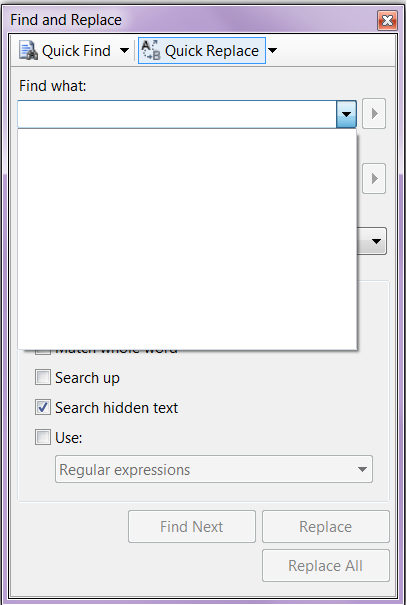
In Find and Replace window, sometimes you find a long history (normally it keeps 20 items at a time) in it and by mistake you may replace with some incorrect word. So I was looking for the solution to clear the Find & Replace window history.

Note : This solution is not recommended for live servers, you can use it in your development and testing machines.

Lets proceed step by step :
Step 1:
First lets go to our Find and Replace window and view the history records. Given below is the Find and Replace window history.

find_and_replace1.1

find_and_replace1.2

Step 2:
Close the SSMS and go to Start >> Run >> type Regedit

Step 3:
Now you need to locate the given below location in registry, where SQL Server keeps its Find and Replace history but it varies with different versions of SQL Server.

For SQL Server 2005 :
HKEY_CURRENT_USER\Software\Microsoft\Microsoft SQL Server\90\Tools\Shell\Find

For SQL Server 2008 :
HKEY_CURRENT_USER\Software\Microsoft\Microsoft SQL Server\100\Tools\Shell\Find

For SQL Server 2012 :
HKEY_CURRENT_USER\Software\Microsoft\SQL Server Management Studio\11.0\Find

Step 4:
Here, you can find keys from Find till Find19 and Replace till Replace19. Now you need to delete these keys to remove it from Find and Replace window.

find_and_replace1.3

find_and_replace1.4

Step 5:
Now that you deleted the keys, lets open SSMS and go to view Find and Replace window history. It is cleared now.
find_and_replace1.5

Read Full Post »

In this article we will discuss about an error message (DROP ASSEMBLY failed because ‘%ls’ is referenced by object ‘%ls’) related to Assembly.

Let’s discuss this in detail:
Message Number: 6590

Severity : 16

Error Message: DROP ASSEMBLY failed because ‘%ls’ is referenced by object ‘%ls’.

Error Generation:
I was working on CLR functions development and implementations in SQL, using Visual Studio 2005. After sometime, I had to go to SSMS to drop assembly to create a new one. So I went to SQL Server and wrote a query.

Drop assembly CLRExcelFV
--OUTPUT

Msg 6590, Level 16, State 1, Line 1
DROP ASSEMBLY failed because ‘CLRExcelFV’ is referenced by object ‘FV’.

Ooopps…… I am unable to drop it.

Resolution:

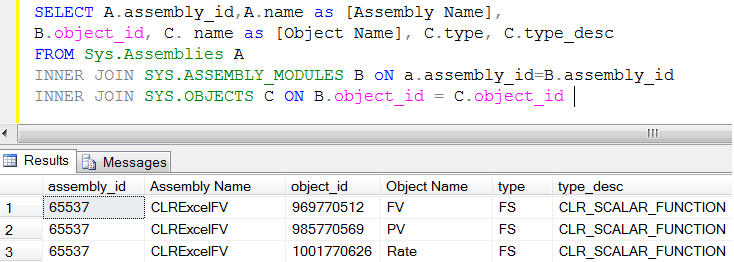
SELECT A.assembly_id,A.name as [Assembly Name],
B.object_id, C. name as [Object Name], C.type, C.type_desc
FROM Sys.Assemblies A
INNER JOIN SYS.ASSEMBLY_MODULES B oN a.assembly_id=B.assembly_id
INNER JOIN SYS.OBJECTS C ON B.object_id = C.object_id
--OUTPUT

dropassembly1.2

Now, in the above result set, you have the assembly name along with its dependent’s objects names (CLR functions).
First lets drop CLR functions and then drop Assembly.

Drop Function FV
Drop Function PV
Drop Function Rate
Drop assembly CLRExcelFV
--OUTPUT

Conclusion :
You cannot drop assembly without dropping its object. Preferably, you should alter the assembly not to drop. But if you need to drop, first drop  all its objects and then you can drop Assembly.

Read Full Post »

« Newer Posts - Older Posts »