Feeds:
Posts
Comments

Posts Tagged ‘SQL Server’

Given below is the function that calculates the weekdays between two dates including the dates provided as input parameter. In some parts of the world weekends are on ‘Fridays’, ‘Saturdays’ and in other parts ‘Saturdays’, ‘Sundays’.
In this function, you can pass your weekend as a parameter.

CREATE FUNCTION dbo.GetWorkingDays
( @StartDate DATETIME,
@EndDate DATETIME ,
@Weekend VARCHAR(50)
)
RETURNS INT
BEGIN

DECLARE @Xml AS XML
DECLARE @WEEKDAYS_DAY AS INT
SET @Xml = cast(('<A>'+replace(@Weekend,',' ,'</A><A>')+'</A>') AS XML)

;WITH N1 (n) AS (SELECT 1 UNION ALL SELECT 1),
N2 (n) AS (SELECT 1 FROM N1 AS X, N1 AS Y),
N3 (n) AS (SELECT 1 FROM N2 AS X, N2 AS Y),
N4 (n) AS (SELECT ROW_NUMBER() OVER(ORDER BY X.n)
FROM N3 AS X, N3 AS Y)

Select @WEEKDAYS_DAY=SUM(1) from n4
Where DateAdd(day,n-1,@startdate)<=@Enddate
And datename(dw,DateAdd(day,n-1,@startdate)) NOT In (
SELECT A.value('.', 'varchar(max)') as [Column] FROM @Xml.nodes('A') AS FN(A)
)

RETURN @WEEKDAYS_DAY
END
GO
SELECT dbo.GetWorkingDays ('02/01/2013', '02/28/2013','Saturday,Sunday')
as [Weekday Days]

GO
SELECT dbo.GetWorkingDays ('02/01/2013', '02/28/2013','Friday,Saturday')
as [Weekday Days]

--OUTPUT
Weekday Days
------------
20

(1 row(s) affected)

Weekday Days
------------
20

(1 row(s) affected)

Read Full Post »

In my earlier articles, I wrote about SQL Server 2012’s new features & enhancements.

In this article, we will discuss the slight modification made in DBCC CHECKIDENT management command in SQL server 2012. This modification is done in the result set area. If you execute DBCC CHECKIDENT command in earlier version, you get the same result set, whether it is “RESEED” or “NORESEED”.  But in SQL Server 2012, you can feel the difference in result set when it is “RESEED” or “NORESEED”.

Lets create a simple example to demonstrate it.

CREATE TABLE [dbo].[Employee](
[Sno] [int] identity(1,1),
[Employee ID] nvarchar(6) Not NULL ,
[Emplloyee name] [varchar](50) NOT NULL
)
GO
Insert into dbo.[Employee] values ('EMP001','Bob')
Insert into dbo.[Employee] values ('EMP002','Alexander')

Select * from dbo.[Employee]
GO

Lets execute the given below code in earlier versions of SQL Server and in SQL Server 2012 as well.

DBCC CHECKIDENT ('dbo.Employee',NORESEED);
GO
DBCC CHECKIDENT ('dbo.Employee',RESEED,2);
GO

dbcc_checkind1.1

Read Full Post »

sys.dm_exec_describe_first_result_set_for_object is one of the dynamic management functions introduced in SQL server 2012. This function also displays the first result set metadata information like “dm_exec_describe_first_result_set”  dynamic management function, but the major difference is“dm_exec_describe_first_result_set” use for SQL queries and “sys.dm_exec_describe_first_result_set_for_object” use for objects like stored procedure, triggers.

Syntax :

sys.dm_exec_describe_first_result_set_for_object
( @object_id , @include_browse_information )

Parameters :
@object_id : Object ID of stored procedure and trigger only. Data type is integer.
@include_browse_information : It can be from 0 to 2. using this parameter, function returns the additional information. Data type is bit.

Purpose :

The purpose of sys.dm_exec_describe_first_result_set_for_object  is to view the metadata information of first result set of any stored procedure or trigger. Lets say, if any procedure or trigger having more than one result set then the meta data information will be displayed for the first result set only.

Note : sys.dm_exec_describe_first_result_set_for_object can not display the meta data of other than “stored procedure or trigger”.

Let me explain it with simple examples :

Example 1 : (View metadata information of first result set of the Stored Procedure) when @include_browse_information=0

Use AdventureWorks2012
GO
Select * from
sys.dm_exec_describe_first_result_set_for_object
(object_id('[dbo].[UDP_Employee]'),0)
--OUTPUT
--Given below are the few columns from the result set. Other than that, there are other important information also available to give you complete details of metadata.
--But if the @include_browse_information=0 then this function will not give you the source data (Source Database, Source Schema, Source Table, Source Column) information.

Example 2 : (View metadata information of first result set of the Stored Procedure) when @include_browse_information=1

Use AdventureWorks2012
GO
Select * from
sys.dm_exec_describe_first_result_set_for_object
(object_id('[dbo].[UDP_Employee]'),1)
--OUTPUT
--If the @include_browse_information=1 then this function will give you the source data (Source database, Source Schema, Source table, Source column) information including the information available in @include_browse_information=0

Example 3 : (View metadata information of first result set of the Stored Procedure having two result set) when @include_browse_information=0
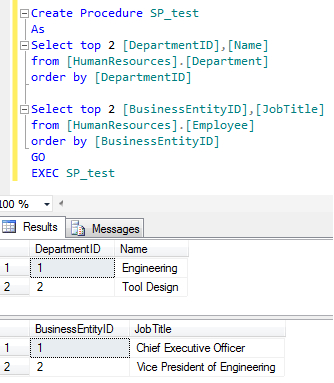
Lets create a stored procedure having two result set.

Create Procedure SP_test
As
Select top 2 [DepartmentID],[Name] from [HumanResources].[Department] order by [DepartmentID]

Select top 2 [BusinessEntityID],[JobTitle] from [HumanResources].[Employee] order by [BusinessEntityID]
GO
EXEC SP_test

Lets view the meta data information of the first result set of “SP_test” stored procedure using “sys.dm_exec_describe_first_result_set_for_object”

Use AdventureWorks2012
GO
Select * from
sys.dm_exec_describe_first_result_set_for_object
(object_id('[dbo].[SP_test]'),0)
--OUTPUT
--Given below are the few columns from the first result set Only.

Example 4 : View metadata information of View
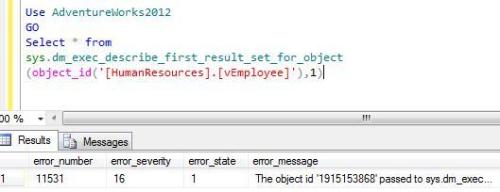
In this example, “sys.dm_exec_describe_first_result_set_for_object” will generate an error because nothing except stored procedure or triggers is allowed.

Use AdventureWorks2012
GO
Select * from
sys.dm_exec_describe_first_result_set_for_object
(object_id('[HumanResources].[vEmployee]'),1)
--OUTPUT
--In this case all values will be NULL expect error information columns in the end of the result set.
--Given below is the screen images of the last columns.

Summary :
sys.dm_exec_describe_first_result_set_for_object gives the meta data information of the first result set of any stored procedure and trigger, but it differs from different @include_browse_information parameter.

  1. This function can filter the meta data column as per the requirement.
  2. This function returns the data in a tabular form, so you can utilize it in any other function or procedure.

Reference : MSDN

Read Full Post »

In my previous article I discussed about “How to split string based on single delimiter”. In this article, we will discuss how to split the string based on multiple delimiters and also remove the spaces around the string.

Given below is the user defined function to achieve this result.

--Create this user deinfed function.
CREATE FUNCTION dbo.[UDF_Split_Based_On_Multiple_Delimiters]
(
@String VARCHAR(MAX),  -- Variable for string
@delimiter VARCHAR(50) -- Delimiter in the string
)
RETURNS @Table TABLE(        --Return type of the function
Splitcolumn VARCHAR(MAX)
)
BEGIN

DECLARE @Xml AS XML
DECLARE @REVISED_STRING VARCHAR(MAX)

;WITH N1 (n) AS (SELECT 1 UNION ALL SELECT 1),
N2 (n) AS (SELECT 1 FROM N1 AS X, N1 AS Y),
N3 (n) AS (SELECT 1 FROM N2 AS X, N2 AS Y),
N4 (n) AS (SELECT ROW_NUMBER() OVER(ORDER BY X.n)
FROM N3 AS X, N3 AS Y)

SELECT @REVISED_STRING=STUFF((SELECT '' + (Case When
PATINDEX('%[' + @delimiter + ']%',SUBSTRING(@String,Nums.n,1)) >0
Then ',' else LTRIM(RTRIM(SUBSTRING(@String,Nums.n,1))) end)
FROM N4 Nums WHERE Nums.n<=LEN(@String)  FOR XML PATH('')),1,0,'')

SET @Xml = cast(('<a>'+replace(@REVISED_STRING,
',','</a><a>')+'</a>') AS XML)

INSERT INTO @Table SELECT A.value('.', 'varchar(max)')
as [Column] FROM @Xml.nodes('a') AS FN(a)

RETURN
END
GO
--Syntax SELECT * FROM dbo.[UDF_Split_Based_On_Multiple_Delimiters] (String , multiple delimiter)
SELECT * FROM dbo.[UDF_Split_Based_On_Multiple_Delimiters]
('abc,def ; ghij ; kl',',;:')
GO
--OUTPUT

Splitcolumn
———–
abc
def
ghij
kl

(4 row(s) affected)

This may not be the best solution. Let me know if you have better solution than this to split it.

Read Full Post »

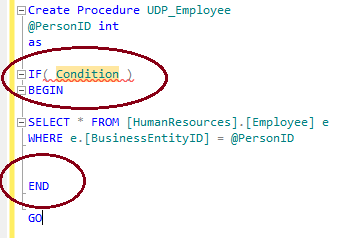
SQL server 2012 introduced a new feature namely “Surrounded With” that can reduce the development time and increase the accuracy level in SQL SERVER.

In the previous version of SQL server (2005 & 2008), if we had to do a customization/development in any procedure/function and add few conditions in it, we had to first insert the condition with BEGIN in a certain place and then had to insert an END at an appropriate place.
If both were placed wrongly, then script would not work properly.

The solution is now available in SQL Server 2012 and it is very simple.
Let me explain it Step by Step.

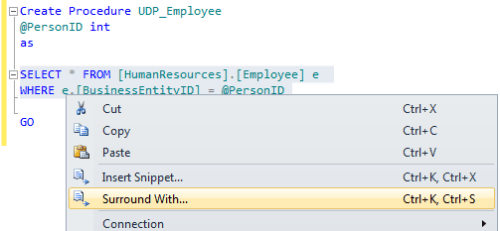
Step 1 :

Write the code where you need to place “If condition , While condition or Begin End” .

Step 2 :

Select the code and right click and select “Surround With”

Step 3 :

Select the appropriate condition either it is “If condition”,“while condition” or “Begin End”.

Step 4 :

SQL server automatically generate the appropriate code in appropriate place, Now just write the condition and run the code.

Let me know if this technique is helpful for you.

Read Full Post »

In my previous article I discussed about CUME_DIST. In this artcile we will discuss another important analytical function introduced in SQL SERVER 2012 and that is similar to CUME_DIST namely PERCENT_RANK. Lets discuss PERCENT_RANK syntax, purpose, return type, simple examples.

Syntax

PERCENT_RANK( )
OVER ( [ partition_by_clause ] order_by_clause )

Purpose
The purpose of this function is to calculate the relative rank of a row within a group of rows. PERCENT_RANK of any set of First row value will be 0. PERCENT_RANK includes NULL values but they are treated as the lowest possible values.

Return Type
The return type is float(53) and the values are always between 0 and 1.

Example 1 :  Simple PERCENT_RANK()

Lets take gold rates as an example to check their relative rank in one week.

Create table [Daily_Gold_Rate]
(
(
[S.No] int,
[Date] datetime,
[Carat] int,
[Gold Rate] numeric(18,2)
)
Insert into [Daily_Gold_Rate] values(1,'2013-01-03',18,155.00)
Insert into [Daily_Gold_Rate] values(4,'2013-01-04',18,153.00)
Insert into [Daily_Gold_Rate] values(7,'2013-01-05',18,152.00)
Insert into [Daily_Gold_Rate] values(10,'2013-01-06',18,154.50)
Insert into [Daily_Gold_Rate] values(13,'2013-01-07',18,154.50)

GO

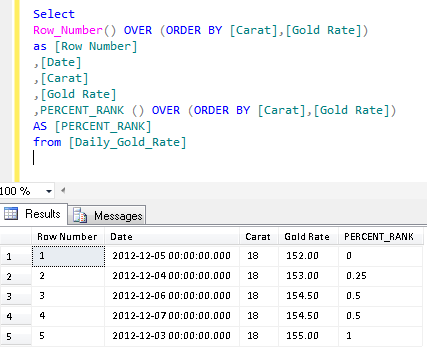
Select
Row_Number() OVER (ORDER BY [Carat],[Gold Rate]) as [Row Number]
,[Date]
,[Carat]
,[Gold Rate]
,PERCENT_RANK () OVER (ORDER BY [Carat],[Gold Rate]) AS [PERCENT_RANK]
from [Daily_Gold_Rate]
Explanation :


If you look at Column E and Column H, Column E is calculated by SQL Server and Column H is calculated manually to understand how it works. To calculate PERCENT_RANK() manually, you need two values.

1. Row Number based on the values (meaning less than or equal to value) (Column F). But first value will always be 0.
2. Total Number of Records – 1 (Column G)

Column G: It is simple; you need to calculate the total number of records and reduce 1 from it.
Column F: You simply need to get the row number based on the values. But first row number will be 0 as well, so you need start counting it from row number 2. You can observe that it is simple row number till row number 2 but in row number 3 & 4 we found the same Gold rate, so it picked up 2 (due to less than or equal to value criteria) as row number.

Finally, you need to divide Column F by Column G to get the PERCENT_RANK() manually. The same functionality PERCENT_RANK() does automatically in SQL.

Example 2 : PERCENT_RANK() with Partition By Clause

Lets insert other Gold rates to proceed with this example.

Insert into [Daily_Gold_Rate] values(2,'2013-01-03',22,190.50)
Insert into [Daily_Gold_Rate] values(3,'2013-01-03',24,202.23)

Insert into [Daily_Gold_Rate] values(5,'2013-01-04',22,191.00)
Insert into [Daily_Gold_Rate] values(6,'2013-01-04',24,202.25)

Insert into [Daily_Gold_Rate] values(8,'2013-01-05',22,190.00)
Insert into [Daily_Gold_Rate] values(9,'2013-01-05',24,203.25)

Insert into [Daily_Gold_Rate] values(11,'2013-01-06',22,189.50)
Insert into [Daily_Gold_Rate] values(12,'2013-01-06',24,201.50)

Insert into [Daily_Gold_Rate] values(14,'2013-01-07',22,189.00)
Insert into [Daily_Gold_Rate] values(15,'2013-01-07',24,201.00)

Select
Row_Number() OVER (Partition by [Carat] ORDER BY [Carat],[Gold Rate])
as [Row Number]
,[Date]
,[Carat]
,[Gold Rate]
,PERCENT_RANK () OVER (Partition by [Carat] ORDER BY [Carat],[Gold Rate])
AS [PERCENT_RANK]
from [Daily_Gold_Rate]

Reference :MSDN

Read Full Post »

I had to migrate data from old system to new system and I found that we have one field called ‘notes’ having duplicated comma separated IDs. The next stage was to remove the duplicated (IDs) from string (notes column).
We can develop this solution via while Loop but I developed it without Loop.

Given below is the solution that can remove duplicate entry from comma, semi colon or any other delimited string .

Create Function dbo.[UDF_Remove_Duplicate_Entry]
(
@Duplicate_String VARCHAR(MAX),
@delimiter VARCHAR(2)
)
RETURNS VARCHAR(MAX)
BEGIN
DECLARE @Xml XML
DECLARE @Removed_Duplicate_String VARCHAR(Max)
SET @Duplicate_String=REPLACE(@Duplicate_String,'&','And')
SET @delimiter=REPLACE(@delimiter,'&','And')

SET @Xml = CAST(('<A>'+REPLACE(@Duplicate_String,@delimiter,'</A><A>')+'</A>') AS XML)

;WITH CTE AS (SELECT A.value('.', 'varchar(max)') AS [Column]
FROM @Xml.nodes('A') AS FN(A))

SELECT @Removed_Duplicate_String =Stuff((SELECT '' + @delimiter + '' + [Column]  FROM CTE GROUP BY [column]
FOR XML PATH('') ),1,1,'')

SET @Removed_Duplicate_String=REPLACE(@Removed_Duplicate_String,'And','&')
RETURN (@Removed_Duplicate_String)
END
GO

--For Example :
SELECT dbo.[UDF_Remove_Duplicate_Entry] ('1,2,2,3,4,1,1,2,3,5',',') AS [Comma Delimited]
GO
SELECT dbo.[UDF_Remove_Duplicate_Entry] ('1;2;2;3;4;1;1;2;3;5',';') AS [Semi Colon Delimited]
GO
--OUTPUT

Comma Delimited
——————
1,2,3,4,5

(1 row(s) affected)

Semi Colon Delimited
——————
1;2;3;4;5

(1 row(s) affected)

Read Full Post »

In my previous article, I discussed about the easiest way to calculate the last date of any month in SQL SERVER 2012.
Today, we will discuss the easiest way to calculate the total number of days in a month in SQL SERVER 2012.
But before that, I would like to discuss how we were calculating the total number of days in a month in the previous versions of SQL SERVER (2005 & 2008)

In SQL Server 2005/2008

For Example :

DECLARE @DATE DATETIME
SET @DATE='2012-12-10'

SELECT DAY(DATEADD(ms,-2,DATEADD(MONTH, DATEDIFF(MONTH,0,@DATE)+1,0)))
AS [Current Month]

--RESULT
Current Month
-------------
29

(1 row(s) affected)

In SQL Server 2012

For Example :

DECLARE @DATE DATETIME
SET @DATE='2012-02-10'

Select Day(EOMONTH(@DATE)) AS [Current Month]
--RESULT
Current Month
-------------
29

(1 row(s) affected)

Read Full Post »

Today, I came across a situation where I needed to parse HTML tags and get plain text from it, and we do not have a built-in function in SQL SERVER to do it. So, I searched the solution over the internet but most of the solutions are designed from the loop.
So, I thought of doing it without loop and with the help of XQuery.
Given below is the user defined function to remove all HTML tags (“< >”) from any HTML string and return plain text.

CREATE FUNCTION dbo.[UDF_Parse_HTML_From_String]
(
@HTML_STRING VARCHAR(MAX) -- Variable for string
)
RETURNS VARCHAR(MAX)
BEGIN

DECLARE @STRING VARCHAR(MAX)
Declare @Xml AS XML
SET @Xml = CAST(('<A>'+ REPLACE(REPLACE(REPLACE(REPLACE(@HTML_STRING
,'<','@*'),'>','!'),'@','</A><A>'),'!','</A><A>') +'</A>') AS XML)

;WITH CTE AS (SELECT A.value('.', 'VARCHAR(MAX)') [A]
FROM @Xml.nodes('A') AS FN(A) WHERE CHARINDEX('*',
A.value('.', 'VARCHAR(MAX)'))=0
AND ISNULL(A.value('.', 'varchar(max)'),'')<>'')

SELECT @STRING=STUFF((SELECT ' ' + [A] FROM CTE FOR XML PATH('')),1,1,'')
RETURN @STRING
END
GO
SELECT dbo.[UDF_Parse_HTML_From_String] ('<b>This is raresql.com</b><h2>HTML Parse User Defined Function</h2><a href="http://raresql.com"></a>') as [Text]
--OUTPUT

Read Full Post »

I had to migrate data from old system to new system and I found that we have one field called ‘comments’ having contact details of the customers. The next stage was to extract the numbers (Contact details) from string (Comments column).

We can develop this solution via cursor as well but I developed it without cursor.

Given below is the solution.

CREATE FUNCTION dbo.[UDF_Extract_Numbers_From_String]
(
@String VARCHAR(MAX)  -- Variable for string
)
RETURNS VARCHAR(MAX)
BEGIN
DECLARE @RETURN_STRING VARCHAR(MAX)

;WITH N1 (n) AS (SELECT 1 UNION ALL SELECT 1),
N2 (n) AS (SELECT 1 FROM N1 AS X, N1 AS Y),
N3 (n) AS (SELECT 1 FROM N2 AS X, N2 AS Y),
N4 (n) AS (SELECT ROW_NUMBER() OVER(ORDER BY X.n)
FROM N3 AS X, N3 AS Y)

SELECT @RETURN_STRING=ISNULL(@RETURN_STRING,'')+ SUBSTRING(@String,Nums.n,1)
FROM N4 Nums
WHERE Nums.n<=LEN(@String) AND  PATINDEX('%[0-9.+-]%',SUBSTRING(@String,Nums.n,1))>0

RETURN @RETURN_STRING
END
GO

SELECT dbo.UDF_Extract_Numbers_From_String
('Mobile No +49 4879 17835 is activated') as [Numbers]
GO
SELECT dbo.UDF_Extract_Numbers_From_String
('New Fax No is +2-213-8764243') as [Numbers]

--RESULT

Read Full Post »

« Newer Posts - Older Posts »