Feeds:
Posts
Comments

Posts Tagged ‘SQL Server’

I was reading a function in Oracle namely “Decode”. It is very handy when it comes to search a variable and return the result based on search. It has been asked on multiple forums, what the EQUIVALENT of DECODE IN SQL SERVER is? Basically, we can achieve the same in SQL Server using Case and IIF statements.

Lets view the decode in Oracle.

Select DECODE(PoleDirection, 'North','N', 'South','S', 'East','E','WEST','W', 'Not Applicable') AS [Poles]
FROM TablePoles

Lets view the Equivalent Code in SQL Server.

Declare @PoleDirection as varchar(10)
Set @PoleDirection= 'North'

SELECT CASE WHEN @PoleDirection = 'North' THEN 'N'
WHEN @PoleDirection = 'South' THEN 'S'
WHEN @PoleDirection = 'East' THEN 'E'
WHEN @PoleDirection = 'WEST' THEN 'W'
ELSE 'Not Applicable' END AS [Poles]

Decode function in SQL server

Given below is the DECODE function in SQL SERVER.

Create FUNCTION [dbo].[DECODE] (
@Expression nvarchar(max),
@String nvarchar(Max))
RETURNS nvarchar(Max)
AS
Begin
Declare @Delimiter as varchar(1)
Declare @ReturnValue as nvarchar(max)
Set @Delimiter=','
Declare @Xml AS XML

Declare @Table TABLE(
[ID] int Identity(1,1),
Splitcolumn VARCHAR(MAX)
)
SET @Xml = cast(('<A>'+replace(@String,@Delimiter,'</A><A>')+'</A>') AS XML)
INSERT INTO @Table SELECT A.value('.', 'varchar(max)') as [Column] FROM @Xml.nodes('A') AS FN(A)

IF (Select Count (*) from @Table A Where @Expression=A.[SplitColumn])=1
Begin
Select top 1 @ReturnValue=B.[Splitcolumn] from @Table A
Left Join @Table B On A.[ID]<B.[ID]
Where @Expression=A.[SplitColumn]
Order By A.[ID]
END
Else
BEGIN
Select top 1 @ReturnValue=A.[Splitcolumn]  from @Table A
Order By A.[ID] DESC
END
RETURN @ReturnValue
End
GO

Syntax :

Decode (expression , search , result [, search , result]... [, default])

Examples 1:

Create table tbl_Sample1
(
[ID] varchar(6),
[Employee Name] varchar(50),
[Performance Evaluation] varchar(10)
)
GO
Insert into tbl_Sample1 values ('STD001','Bob','Excellent')
Insert into tbl_Sample1 values ('STD002','Alexander','Good')
Insert into tbl_Sample1  values ('STD003','Hosanna','Fair')

GO
SELECT [ID],[Employee Name],[Performance Evaluation]
,dbo.Decode( [Performance Evaluation],'Excellent,100,Good,80,Fair,60,Unknown')
as [Performace Index]
from tbl_Sample1
GO

Examples 2:

Create table tbl_Sample2
(
[ID] int ,
[Country] varchar(50),
[Short Name] varchar(3)
)
GO

Insert into tbl_Sample2 Values (1,'PAKISTAN','PAK')
Insert into tbl_Sample2 Values (2,'UNITED STATES OF AMERICA','USA')
Insert into tbl_Sample2 Values (3,'UNITED KINGDOM','UK')
Insert into tbl_Sample2 Values (4,'UNITED ARAB EMIRATES','UAE')
go

SELECT [ID],[Country],[Short Name]
,dbo.Decode([Short Name],'PAK,RS,USA,USD,UK,GBP,UAE,AED,Not Matched')
as [Currency]
from tbl_Sample2
GO

Read Full Post »

Color plays a very important role is our life. I would like to discuss this important role with respect to SQL SERVER MANAGEMENT STUDIO.

Lets do it step by step.

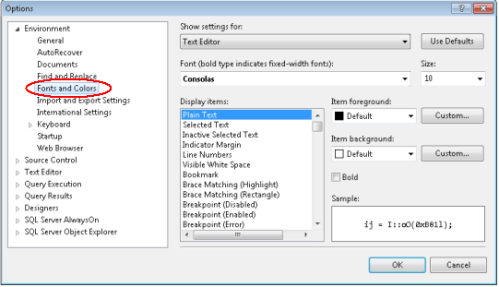
Step 1 :
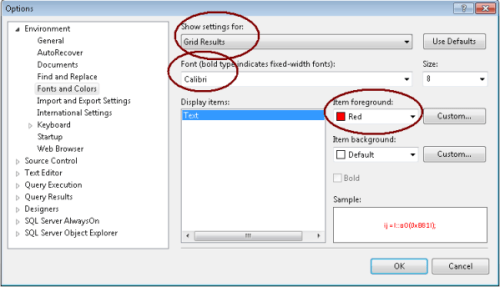
Open your SSMS and go to Tools \ Options \ Environment \ Fonts and Colors.

Step 2 :
First, we will change the color of Gird Results and Font.

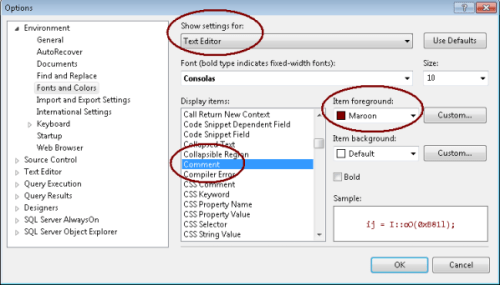
Step 3 :
In this step, we need to change the color of comments.

Step 4 :
Close your SSMS and open it again.

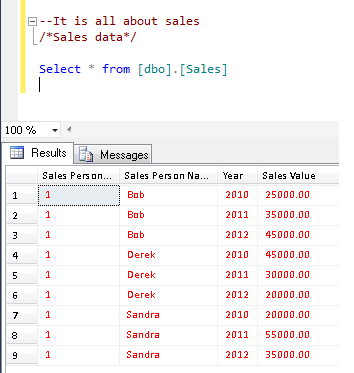
Step 5 :
Lets write the query, comment it and view the difference in results and comments color.

Note : If you would like to reset these changes, press the “Use Defaults” button (on top right).

Read Full Post »

Column identity is something that we come across every now and then. We use it to generate an auto number column in any table.
Today, we will discuss multiple ways to find identity column in the entire user tables.

Method 1 : (sys.columns)

Use Adventureworks
GO

Select Object_Name([object_id]) as [Table Name]
,[name] as [Column Name]
,is_identity
from sys.columns
Where is_identity=1 And Objectproperty(object_id,'IsUserTable')=1

Method 2 : (sys.objects & sys.all_columns)

Use Adventureworks
GO

Select A.[name] as [Table Name]
,B.[name] as [Column Name]
,B.is_identity
from sys.objects A
Inner Join sys.all_columns B
On A.[object_id]=B.[object_id]
Where A.type='U' And is_identity=1

Method 3 : (sys.tables & sys.all_columns)

Use Adventureworks
GO

Select A.[name] as [Table Name]
,B.[name] as [Column Name]
,B.is_identity
from sys.tables A
Inner Join sys.all_columns B
On A.[object_id]=B.[object_id]
Where A.type='U' And is_identity=1

Method 4 : (sys.objects & sys.identity_columns)

Use Adventureworks
GO

Select A.[name] as [Table Name]
,B.[name] as [Column Name]
,B.is_identity
from sys.objects A
Inner Join sys.identity_columns B
On A.[object_id]=B.[object_id]
Where A.type='U'

Method 5 : (sys.tables & sys.identity_columns)

Use Adventureworks
GO

Select A.[name] as [Table Name]
,B.[name] as [Column Name]
,B.is_identity
from sys.tables A
Inner Join sys.identity_columns B
On A.[object_id]=B.[object_id]
Where A.type='U' And is_identity=1

Method 6 : (INFORMATION_SCHEMA.COLUMNS)

Use Adventureworks
GO

;With CTE AS (Select Table_Schema+'.'+Table_Name as [Table_Name],[Column_name] from
INFORMATION_SCHEMA.COLUMNS)
Select Table_Name
,[Column_name]
,COLUMNPROPERTY(OBJECT_ID(Table_Name),[Column_name],'IsIdentity')AS 'IsIdentity'
from CTE Where
COLUMNPROPERTY( OBJECT_ID(Table_Name),[Column_name],'IsIdentity')=1

How SQL Server checks the identity of the table

I opened a table having identity column in the design mode and at the same time opened SQL server profile to view the qurey. Given below is the query.

In this query SQL picks a lot of information but what we need to check is identity column and it is available on line # 4.

select col.name, col.column_id, st.name as DT_name, schema_name(st.schema_id) as DT_schema
, col.max_length, col.precision, col.scale, bt.name as BT_name, col.collation_name
, col.is_nullable, col.is_ansi_padded, col.is_rowguidcol,
col.is_identity
, case when(idc.column_id is null) then null else CONVERT(nvarchar(40)
, idc.seed_value) end, case when(idc.column_id is null) then null else CONVERT(nvarchar(40)
, idc.increment_value) end
, CONVERT(bit, case when(cmc.column_id is null) then 0 else 1 end) as is_computed,
convert(bit, ColumnProperty(col.object_id, col.name, N'IsIdNotForRepl')) as IsIdNotForRepl
, col.is_replicated, col.is_non_sql_subscribed, col.is_merge_published,
col.is_dts_replicated, col.rule_object_id, robj.name as Rul_name
, schema_name(robj.schema_id) as Rul_schema, col.default_object_id
, OBJECTPROPERTY(col.default_object_id, N'IsDefaultCnst') as is_defcnst
, dobj.name as def_name, schema_name(dobj.schema_id) as def_schema
, CONVERT(bit, case when (ftc.column_id is null) then 0 else 1 end) as is_FullTextCol
, col_name(col.object_id, ftc.type_column_id) FT_type_column, ftc.language_id as FT_language_id
, case when(cmc.column_id is null) then null else cmc.definition end as formular
, case when(cmc.column_id is null) then null else cmc.is_persisted end as is_persisted
, defCst.definition, COLUMNPROPERTY(col.object_id, col.name, 'IsDeterministic') as IsDeterministic
, xmlcoll.name as xmlSchema_name, schema_name(xmlcoll.schema_id) as xmlSchema_schema
, col.is_xml_document, col.is_sparse, col.is_column_set
, CONVERT(bit, case when (ISNULL(ftc.statistical_semantics, 0) = 0) then 0 else 1 end)
as is_StatisticalSemantics, col.is_filestream
from sys.columns col
left outer join sys.types st on st.user_type_id = col.user_type_id
left outer join sys.types bt on bt.user_type_id = col.system_type_id
left outer join sys.objects robj on robj.object_id = col.rule_object_id
and robj.type = 'R'
left outer join sys.objects dobj on dobj.object_id = col.default_object_id
and dobj.type = 'D'
left outer join sys.default_constraints defCst on defCst.parent_object_id = col.object_id
and defCst.parent_column_id = col.column_id
left outer join sys.identity_columns idc on idc.object_id = col.object_id
and idc.column_id = col.column_id
left outer join sys.computed_columns cmc on cmc.object_id = col.object_id
and cmc.column_id = col.column_id
left outer join sys.fulltext_index_columns ftc on ftc.object_id = col.object_id
and ftc.column_id = col.column_id
left outer join sys.xml_schema_collections xmlcoll
on xmlcoll.xml_Collection_id = col.xml_Collection_id
where col.object_id =
object_id(N'dbo.tbl_test')
order by col.column_id

Read Full Post »

I need to find maximum between two numbers, So, I was searching for a solution to find maximum number between two numbers and I found few interesting articles by Pinal Dave And Madhivana .

I also would like to add one more solution with the help of new logical function “IIF” in SQL SERVER 2012.

Example 1 :

DECLARE @Value1 DECIMAL(5,2) = 9.22
DECLARE @Value2 DECIMAL(5,2) = 8.34
SELECT IIF(ISNULL(@Value1,0) > ISNULL(@Value2,0) ,@Value1, @Value2) AS MaxColumn
--RESULT
9.22

Example 2 : (With NULL)

DECLARE @Value1 DECIMAL(5,2) = 9.22
DECLARE @Value2 DECIMAL(5,2) = NULL
SELECT IIF(ISNULL(@Value1,0) > ISNULL(@Value2,0) ,@Value1, @Value2) AS MaxColumn
--RESULT
9.22

Example 3 : (With Negative Value)

DECLARE @Value1 DECIMAL(5,2) = -9.22
DECLARE @Value2 DECIMAL(5,2) = 8.34
SELECT IIF(ISNULL(@Value1,0) > ISNULL(@Value2,0) ,@Value1, @Value2) AS MaxColumn
--RESULT
8.34

Read Full Post »

SQL SERVER 2012 :

Given below are the methods you can use to change the compatibility level in SQL Server 2012.

Method 1 :

ALTER DATABASE [AdventureWorks2012] SET COMPATIBILITY_LEVEL = 110
ALTER DATABASE [AdventureWorks2012] SET COMPATIBILITY_LEVEL = 100
ALTER DATABASE [AdventureWorks2012] SET COMPATIBILITY_LEVEL = 90

But you cannot change it to  COMPATIBILITY LEVEL 80 in SQL SERVER 2012.

Lets try to change the compatibility level  to 80 in SQL SERVER 2012.

ALTER DATABASE [AdventureWorks2012] SET COMPATIBILITY_LEVEL = 80
--RESULT

Msg 15048, Level 16, State 1, Line 1
Valid values of the database compatibility level are 90, 100, or 110.

Version of SQL Server with respect to compatibility level.

  • SQL Server 2012 = COMPATIBILITY_LEVEL 110
  • SQL Server 2008 = COMPATIBILITY_LEVEL 100
  • SQL Server 2005 = COMPATIBILITY_LEVEL 90
  • SQL Server 2000 = COMPATIBILITY_LEVEL 80

Method 2 :

EXEC sp_dbcmptlevel [AdventureWorks2012] , 110;

This method will not be supported from the future version of SQL SERVER. So, don’t use this in the future development.


SQL SERVER 2005 / 2008 :
Given below is the method to set the compatibility level in SQL SERVER 2005 and above.

EXEC sp_dbcmptlevel [AdventureWorks] , 90;

Read Full Post »

Today, we will discuss about the Do’s and Don’ts of SQL SERVER- System Stored Procedure -“sp_rename”. This procedure is used to change the name of any object created by user.

Syntax :

sp_rename [ @objname = ] 'object_name' , [ @newname = ] 'new_name'
[ , [ @objtype = ] 'object_type' ]

Do’s for Sp_Name :
Given below are the transactions that you can do via sp_rename.

  • Rename a table
  • Rename a column
  • Rename an index
  • Rename constraints

Don’ts for Sp_Name :
Given below are the transactions that you must not do via sp_rename.

  • Donot Rename a stored procedure
  • Donot Rename a function
  • Donot Rename a view
  • Donot Rename a trigger

Syntax and example of Do’s of Sp_rename are available here.

Lets discuss why we must not rename stored procedure,function,view & trigger via sp_rename.

Lets create a table and view to demonstrate.

Create table tbl_Sample
([Sno] int,
[Dept_Name] varchar(50)
)
Go
Create View vw_Sample
As
Select * from tbl_Sample

Lets run the given below query to check that each and every references are updated.

Select A.[object_id],B.[object_id],A.[name],[Definition]
from sys.Objects  A
Inner Join sys.sql_modules B on A.[object_id]=B.[object_id]
And A.[Type]='V'

You can see that name and definition column matched with respect to name.
Now, lets rename the view.

USE Test
GO
--Syntax sp_rename 'Old View name', 'New view Name'
EXEC sp_rename 'dbo.vw_Sample', 'vw_Sample2';

Lets check again if the references are updated.

Select A.[object_id],B.[object_id],A.[name],[Definition]
from sys.Objects  A
Inner Join sys.sql_modules B on A.[object_id]=B.[object_id]
And A.[Type]='V'

You can see that if you rename view the reference(Definition column of sys.sql_modules) is not updated because of this SQL Server recommends not to rename these objects via sp_rename. Always use drop and create to rename these objects.

Read Full Post »

Today, we will discuss the efficient way to count records of any table. Lets suppose you have millions of records in a table. How will you calculate the record count quickly ?

Let me explain this with simple examples :

Example 1 :
First, lets use the traditional way to count records from the table.

SET STATISTICS TIME ON

Select Count(*) as [Total Records]
from [tbl_Sample]

--Result
SQL Server parse and compile time:
CPU time = 2 ms, elapsed time = 2 ms.

SQL Server Execution Times:
CPU time = 0 ms,  elapsed time = 1 ms.

Total Records
-------------
44040192

(1 row(s) affected)

SQL Server Execution Times:
CPU time = 5046 ms,  elapsed time = 26518 ms.

As per the results, the above query took almost 26 seconds.

Example 2 :
Lets go to SSMS to view how SQL Server calculates the record count.

Right click on the table and go to properties. It will give you a lot of information including record count in a fraction of seconds.

Now, we need to find out what query is running behind these properties. So lets open the SQL Server profiler. A lot of queries were running to calculate different information but I grabbed the query that calculates record count.

Given below is the query that SQL Server uses to calculate the record count of any table.

SET STATISTICS TIME ON

select SUM([rows]) as [Total records] from sys.partitions
where object_id=object_ID('tbl_Sample') And [index_id] =1

SQL Server parse and compile time:
CPU time = 0 ms, elapsed time = 3 ms.

SQL Server Execution Times:
CPU time = 0 ms,  elapsed time = 1 ms.
Total records
--------------------
44040192

(1 row(s) affected)

SQL Server Execution Times:
CPU time = 0 ms,  elapsed time = 1 ms.

Conclusion :
You can view a remarkable difference between both queries.
In Example 1 , the SQL needs to calculate the record count from the table but in Example 2, the Information is already calculated and you just need to query it.

Read Full Post »

“Can you add one column in the middle of the table via script, (if yes) how would you do it ?
The answer to this question is “No”. Either you need to add the column in the end of the table or you need to do it via SSMS.
But the question is why you can do it through Sql Server Management Studio (SSMS) not from the script. So Lets go through SSMS to find out how SSMS can do it.

Lets proceed it step by step :
Step -1
Lets Create a Sample table.

Create Table Test_Table
(
[Customer ID] int,
[Customer Name] varchar(50)
)

Step -2
Now, open the Table in a design mode.

Step -3
Add one column namely “Customer Code” in the middle of the table.

Step -4
Click on “generate change script” button and view the script.

Step -5
Now, we have change script.

In this script, SQL create a new temporary table insert all data in it and then drop the original table and then rename it to the original name.

/* To prevent any potential data loss issues, you should review this script in
detail before running it outside the context of the database designer.*/
BEGIN TRANSACTION
SET QUOTED_IDENTIFIER ON
SET ARITHABORT ON
SET NUMERIC_ROUNDABORT OFF
SET CONCAT_NULL_YIELDS_NULL ON
SET ANSI_NULLS ON
SET ANSI_PADDING ON
SET ANSI_WARNINGS ON
COMMIT
BEGIN TRANSACTION
GO
CREATE TABLE dbo.Tmp_Test_Table
(
[Customer ID] int NULL,
[Customer Code] int NULL,
[Customer Name] varchar(50) NULL
)  ON [PRIMARY]
GO
IF EXISTS(SELECT * FROM dbo.Test_Table)
EXEC('INSERT INTO dbo.Tmp_Test_Table ([Customer ID], [Customer Name])
SELECT [Customer ID], [Customer Name] FROM dbo.Test_Table WITH (HOLDLOCK TABLOCKX)')
GO
DROP TABLE dbo.Test_Table
GO
EXECUTE sp_rename N'dbo.Tmp_Test_Table', N'Test_Table', 'OBJECT'
GO
COMMIT

Conclusion :
In the above script, you can see how SQL added column in the middle of the table, So you can also add the column in the middle of the table via script as well.

Read Full Post »

Today, I received an email from one of my blog readers, who would like to match test and production databases. Here is a basic script to compare two databases.

Given below are the objects, script will compare in source and target databases.

  • Tables
  • Views
  • Stored Procedures
  • User Defined Functions
  • Triggers
  • Primary Keys
  • Indexes
  • Missing column in table or view
  • Mismatch data type in table or view
  • Missing Parameter in the stored procedure
Create Procedure Sp_Compare_two_database_Schema
@Source_DB_Name nvarchar(Max),
@Target_DB_Name varchar(Max)

As
BEGIN
DECLARE @SQL nvarchar(MAX)

SET @Source_DB_Name=QUOTENAME(@Source_DB_Name)
SET @Target_DB_Name=QUOTENAME(@Target_DB_Name)

SET @SQL=''

CREATE TABLE #Result
(
[Main Object Type] nvarchar(max),
[Main Object Name] nvarchar(max),
[Type] varchar(50),
[Sub Object Type] nvarchar(max),
[Sub Object Name] nvarchar(max)
)

--Match Main Objects Like Tables, view, Stored Procedure , triggers.
SET @SQL= 'Insert into #Result Select A.[type_desc] as [Main Object Type],A.[name],''Object Missing'' as [Type]
,A.[type_desc] as [Sub Object Type]
,A.[name] as [Sub Object Name]
from ' + @Source_DB_Name + '.sys.objects A
Where [Parent_object_id]=0 And A.[name] NOT IN(
Select [name] from ' +  @Target_DB_Name + '.sys.objects)
Order By A.[type_desc]'
Print @SQL
EXEC (@SQL)

--Match Sub Objects Like Foreign Keys.
SET @SQL= 'Insert into #Result Select A.[type_desc] as [Main Object Type],A.[name],''Object Missing'' as [Type]
,B.[type_desc] as [Sub Object Type]
,B.[name] as [Sub Object Name]
from ' + @Source_DB_Name + '.sys.objects A
Inner Join ' + @Source_DB_Name + '.sys.objects B
On A.[object_id]=B.[Parent_object_id]
Where B.[name] NOT IN(
Select [name] from ' +  @Target_DB_Name + '.sys.objects)
Order By A.[type_desc]'
Print @SQL
EXEC (@SQL)

--Find if any column is missing in target database.

SET @SQL= ';With CteA AS (Select A.[type_desc] as [Main Object Type],A.[Name] as [Main Object Name],''Column Missing'' as [Type],B.[Name] as [Column Name]
from  ' + @Source_DB_Name + '.sys.objects A
Inner Join  ' + @Source_DB_Name + '.sys.columns B
On A.[object_id] =B.[object_id]
Where A.[Type] In (''U'',''V'')
)
,CteB AS (Select A.[type_desc] as [Main Object Type],A.[Name] as [Main Object Name],''Column Missing'' as [Type],B.[Name] as [Column Name]
from ' +  @Target_DB_Name + '.sys.objects A
Inner Join ' +  @Target_DB_Name + '.sys.columns B
On A.[object_id] =B.[object_id]
Where A.[Type] In (''U'',''V'')
)
Insert into #Result
Select A.[Main Object Type],A.[Main Object Name],A.[Type], ''Column'' as [Sub Object Type],A.[Column Name] from CTEA A
Left Join CTEB B On
A.[Main Object Type]=B.[Main Object Type]
And A.[Main Object Name]=B.[Main Object Name]
And A.[Column Name]=B.[Column Name]
Where (B.[Main Object Name] is NULL OR B.[Column Name] is NULL)
And A.[Main Object Name]  Not In (Select [Main Object Name] from #Result A
Where A.[Type]=''Object Missing'')
Order By A.[Main Object Type],A.[Main Object Name], A.[Column Name]'
Print @SQL
EXEC (@SQL)

--Find if any column data type is not sync with target database.

SET @SQL= ';With CteA AS (Select A.[type_desc] as [Main Object Type],A.[Name] as [Main Object Name]
,''Data Type Difference'' as [Type],B.[Name]  as [Column Name]
,B.[system_type_id]
from ' + @Source_DB_Name + '.sys.objects A
Inner Join ' + @Source_DB_Name + '.sys.columns B
On A.[object_id] =B.[object_id]
Where A.[Type] In (''U'',''V'')
)
,CteB AS (Select A.[type_desc] as [Main Object Type],A.[Name] as [Main Object Name],''Data Type Difference'' as [Type],B.[Name] as [Column Name],B.[system_type_id]
from ' +  @Target_DB_Name + '.sys.objects A
Inner Join ' +  @Target_DB_Name + '.sys.columns B
On A.[object_id] =B.[object_id]
Where A.[Type] In (''U'',''V'')
)

Insert into #Result Select A.[Main Object Type],A.[Main Object Name],A.[Type], ''Column'' as [Sub Object Type], A.[Column Name] from CTEA A
Inner Join CTEB B On
A.[Main Object Type]=B.[Main Object Type]
And A.[Main Object Name]=B.[Main Object Name]
And A.[Column Name]=B.[Column Name]
Where A.[system_type_id]<>B.[system_type_id]
And A.[Main Object Name]  Not In (Select [Main Object Name] from #Result A
Where A.[Type]=''Object Missing'')
Order By A.[Main Object Type],A.[Main Object Name], A.[Column Name]'

Print @SQL
EXEC (@SQL)

--Find if any parameter of the procedure is missing in target database.

SET @SQL= ';With CteA AS (Select A.[type_desc] as [Main Object Type]
,A.[Name] as [Main Object Name],''Parameter Missing'' as [Type],B.[name] as [Parameter Name]
from' + @Source_DB_Name + '.sys.objects  A
Inner Join ' + @Source_DB_Name + '.sys.all_parameters B On A.[object_id] =B.[Object_id]
)
,CteB AS (
Select A.[type_desc] as [Main Object Type]
,A.[Name] as [Main Object Name],''Parameter Missing'' as [Type],B.[name] as [Parameter Name]
from ' +  @Target_DB_Name + '.sys.objects  A
Inner Join ' +  @Target_DB_Name + '.sys.all_parameters B On A.[object_id] =B.[Object_id]
)

Insert into #Result Select A.[Main Object Type],A.[Main Object Name],A.[Type]
, ''Parameter'' as [Sub Object Type]
, A.[Parameter Name] from CTEA A
Left Join CTEB B On
A.[Main Object Type]=B.[Main Object Type]
And A.[Main Object Name]=B.[Main Object Name]
And A.[Parameter Name]=B.[Parameter Name]
Where (B.[Main Object Name] IS NULL OR  B.[Parameter Name] IS NULL)
And A.[Main Object Name]  Not In (Select [Main Object Name] from #Result A
Where A.[Type]=''Object Missing'')
Order By A.[Main Object Type],A.[Main Object Name], A.[Parameter Name]'
Print @SQL
EXEC (@SQL
)
Select * from #Result A Order By A.[Main Object Type] DESC, A.[Main Object Name] ASC ,[Type] DESC
END
GO

--Syntax
--Sp_Compare_two_database_Schema 'Source DatabaseName','Target DatbaseName'

--Example
Sp_Compare_two_database_Schema 'Source_DB','Target_DB'

Read Full Post »

In this article, we will convert text to number in multiple versions of SQL Server and will see the difference. I will use four different Data conversion functions (Convert, Cast, Try_ConvertTry_Cast) to convert Text to Number.

Let me explain this with simple examples.

In SQL Server 2005/2008 :

Example 1 : (Convert Text to integer if text having numeric data only)

Declare @string as varchar(5)
Set @string ='12345'

Select Convert(int,@string) as [Convert Text to Integer]
Select Cast(@string as int) as [Cast Text to Integer]

--RESULT
Convert Text to Integer
-----------------------
12345

(1 row(s) affected)

Cast Text to Integer
--------------------
12345

(1 row(s) affected)

Example 2 : (Convert Text to integer if text having string data)


Declare @string as varchar(7)
Set @string ='raresql'

Select Convert(int,@string) as [Convert Text to Integer]
Select Cast(@string as int) as [Cast Text to Integer]
--RESULT
Convert Text to Integer
-----------------------

Msg 245, Level 16, State 1, Line 4
Conversion failed when converting the varchar value ‘raresql’ to data type int.

In SQL Server 2012 :

Example 3 : (Convert Text to integer if text having numeric data only)

Declare @string as varchar(5)
Set @string ='12345'

Select Try_Convert(int,@string) as [Convert Text to Integer]
Select Try_Cast(@string as int) as [Cast Text to Integer]

--RESULT
Convert Text to Integer
-----------------------
12345

(1 row(s) affected)

Cast Text to Integer
--------------------
12345

(1 row(s) affected)

Example 4 : (Convert Text to integer if text having string data)


Declare @string as varchar(7)
Set @string ='raresql'

Select Try_Convert(int,@string) as [Convert Text to Integer]
Select Try_Cast(@string as int) as [Cast Text to Integer]
--RESULT
Convert Text to Integer
-----------------------
NULL

(1 row(s) affected)

Cast Text to Integer
--------------------
NULL

(1 row(s) affected)

Conclusion :
If we compare Examples 1 & 3, we can easily find out that there is no difference, but we can see that Examples 2 and 4 having much difference because Cast & Convert generates an error if there is a compatibility issue with data type, but Try_Convert & Try_Cast (SQL Server 2012) will return NULL instead of error.

Read Full Post »

« Newer Posts - Older Posts »