Feeds:
Posts
Comments

Archive for 2013

I came across this error message while I was working on one of the file tables (A new table concept came in SQL Server 2012) and tried to create a full text index. Most likely this error is related to semantic search (A new type of search concept came in SQL Server 2012).
Let me explain this error in detail :

Message Number: 41202

Severity : 16
Error Message: The source table ‘%.*ls’ specified in the SEMANTICSIMILARITYTABLE, SEMANTICKEYPHRASETABLE or SEMANTICSIMILARITYDETAILSTABLE function doesn’t have a full-text index that uses the STATISTICAL_SEMANTICS option. A full-text index using the STATISTICAL_SEMANTICS option is required to use this function.

Error Generation:
I tried to create full text index on file table and received given below error message.
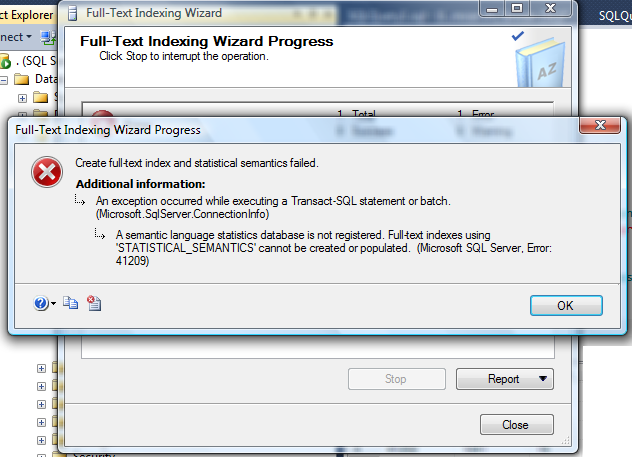
errormessage41202.1.1

Lets resolve this issue step by step :

Step 1 :
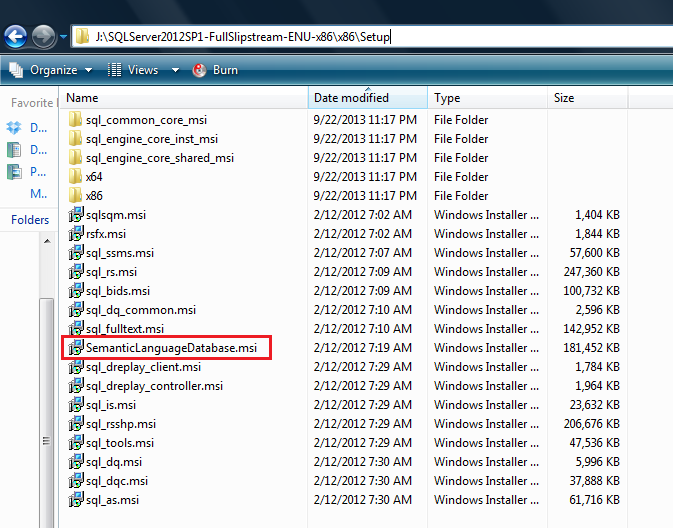
First of all you need to browse the SQL Server installation media and select the given below folder. Here you will find a file namely SemanticLanguageDatabase.msi, just execute this file.
Given below are the different paths for x86 & x64 machines.

• For x86 : …\x86\Setup\SemanticLanguageDatabase.msi
• For x64 : …\x64\Setup\SemanticLanguageDatabase.msi

Given below is the screen image of this folder.
errormessage41202.1.2

Step 2:
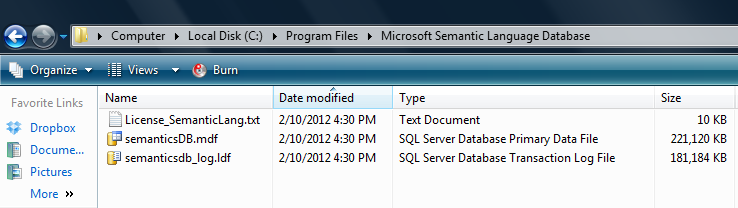
Once you run the above SemanticLanguageDatabase.msi and install it, it will give you two database files (semanticsDB, semanticsdb_log) in a location (C:\Program Files\Microsoft Semantic Language Database), if you install it in the default location.
Given below is the image.
errormessage41202.1.3

Step 3:
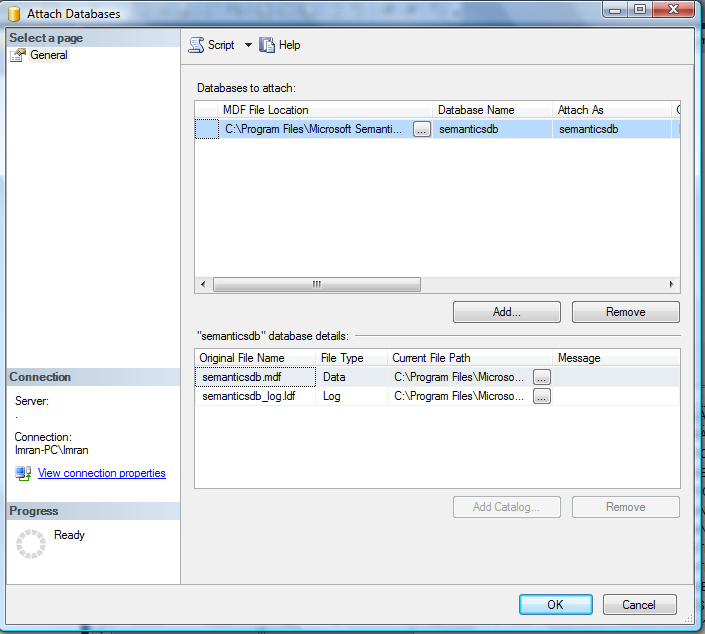
Once we extract the semantic database files (semanticsDB, semanticsdb_log), attach in your database server. Given below is the image.
errormessage41202.1.4

Step 4:
Once you attach the file in your database, just register the semantic database. Given below is the script.

EXEC sp_fulltext_semantic_register_language_statistics_db @dbname = N'semanticsdb'
GO

Now your semantic database has been registered. You can create full text indexes on file tables without any errors.

Read Full Post »

Calculating median has never been an issue, as we have lots of solutions to calculate medians using CTE, user defined functions etc. But what encourages me to write this post is, I found a shortcut to calculate the median using PERCENTILE_CONT (A new analytic function shipped in SQL Server 2012).

As per the definition : To find the Median, place the numbers you are given in value order and find the middle number. Click here for Reference

Given below is the sample that I will use to demonstrate what is median.

<br />SELECT ProductID,StandardCost FROM<br />[Production].[ProductCostHistory]<br />WHERE ProductID IN (707,708,711,712,713)<br />ORDER BY ProductID<br />GO<br />--OUTPUT<br />

median.1.1

Given below is the script to calculate the median in a shortest way.

<br />Use AdventureWorks2012<br />GO<br />SELECT<br />DISTINCT [ProductID]<br />,PERCENTILE_CONT(0.5)<br />WITHIN GROUP (ORDER BY [StandardCost])<br />OVER (PARTITION BY [ProductID]) AS Median<br />FROM [Production].[ProductCostHistory]<br />WHERE ProductID IN (707,708,711,712,713)<br />ORDER BY [ProductID]<br />GO<br />--OUTPUT<br />

median.1.2

Note : Whenever you calculate median using PERCENTILE_CONT make sure it is PERCENTILE_CONT(0.5).

Read Full Post »

‘How to change the datatype of type Sequence object’ became critical for me when I created a sequence object with a wrong datatype and deployed it on client side and later I tried to change the datatype of the sequence object but I could not 😦

Let me demonstrate the issue and its resolution step by step.

Step 1 :
In this step, we will create a sequence object using smallint data type.

Use AdventureWorks2012
GO
CREATE SEQUENCE [dbo].[Seq_Sample]
AS [SMALLINT]
START WITH 1
INCREMENT BY 1
MINVALUE 1
MAXVALUE 20
NO CACHE
GO

Step 2 :
In this step, we will use 3 sequence IDs. This step is just for demonstration purpose only.

Use AdventureWorks2012
GO
SELECT NEXT VALUE FOR [Seq_Sample]
GO 3

Step 3 :
Let’s try to alter its datatype. This step is just to demonstrate the error only.

Use AdventureWorks2012
GO
ALTER SEQUENCE [dbo].[Seq_Sample] AS INT
GO
--OUTPUT

Msg 11711, Level 15, State 1, Line 1
Argument ‘AS’ cannot be used in an ALTER SEQUENCE statement.

Ooopsss cannot change it. So, what is the solution ?

Step 4:
In this step, we need to get the current value (last value) of the above sequence object. Never skip this step because once you drop the above sequence object, it would be very difficult to get the current value if it is implemented for multiple tables.
Given below is the script.

Use AdventureWorks2012
GO
SELECT current_value FROM SYS.SEQUENCES
WHERE name='Seq_Sample'
--OUTPUT

current_value
————-
3

(1 row(s) affected)

Step 5:
Once you have the current value of the above sequence, it is time to drop the sequence object.

Use AdventureWorks2012
GO
DROP SEQUENCE [dbo].[Seq_Sample]
GO

Step 6:
Now, it is time to re-create the sequence object.  Make sure that you change the datatype of the sequence object. Also you must change the START value of the new sequence object’s to the current value + 1 (we got the current value in step 3).
Given below is the script.

Use AdventureWorks2012
GO
CREATE SEQUENCE [dbo].[Seq_Sample]
AS [INT]
START WITH 4
INCREMENT BY 1
MINVALUE 1
MAXVALUE 20
NO CACHE
GO

Step 7:
Finally, check the next value of the sequence.
Given below is the script.

Use AdventureWorks2012
GO
Select NEXT VALUE FOR [Seq_Sample] AS [Result]
GO
--OUTPUT

Result
———–
4

(1 row(s) affected)

Read Full Post »

In my earlier article, I wrote a solution how to remove milliseconds from datetime. After that I tried to remove the seconds and milliseconds from datetime using same method but it gave me errors. So I went to the drawing board and started doing some research and finally realized that I can use the same methods with little modifications.
Given below are the two methods that we can use to remove milliseconds and seconds from datetime.

METHOD 1 :
In this method, we will use Convert function to convert date time to varchar and then remove the seconds and milliseconds from it and then convert it back to datetime.
Given below is the script.

--This script is compatible with SQL Server 2005 and above.
DECLARE @datetime DATETIME
SET @datetime = GETDATE()

SELECT
@datetime AS [Datetime with seconds and millisconds]
,CONVERT(DATETIME,CONVERT(VARCHAR(13),@datetime,120)+ ':00')
AS [Datetime without seconds & millisconds]
GO
--OUTPUT

remove seconds and milliseconds.1.1

METHOD 2 :
In this method, we will first FORMAT the datetime value to a defined format (truncate seconds and milliseconds) and then convert it back to datetime data type using CAST function.
Given below is the script.

--This script is compatible with SQL Server 2012 and above.
DECLARE @datetime DATETIME
SET @datetime = GETDATE()

SELECT
@datetime AS [Datetime with seconds and millisconds]
,CAST(FORMAT(@datetime,'yyyy-MM-dd HH:0') AS datetime)
AS [Datetime without seconds & millisconds]
GO
--OUTPUT

remove seconds and milliseconds.1.2

Read Full Post »

HASH index (NONCLUSTERED) is a new type of index introduced in SQL Server 2014. It is only supported by memory optimized table. Recently, I was working on a memory optimized table and I came across in a situation where I had to find all the hash indexes available in the database. As usual I got it from a system view (sys.indexes). It is nothing new but the story did not end here because I found a shorter way to get the list of non-clustered hash indexes.
Given below is script that can give you the list of all hash indexes available in any particular database.

USE hkNorthwind
GO
SELECT
object_schema_name([object_id]) As [Schema Name]
, object_name([object_id]) As [Table Name]
, [name] As [Index Name]
, [type_desc] As [Index Description]
FROM
sys.hash_indexes
--OUTPUT

list of hash indexes.1.1

Read Full Post »

Recently, I was doing some research on memory optimized table and I came across a situation where I needed to keep some temporary data in the tables. So I thought of creating temporary table. Now I have two choices, either to go for disk based temporary table or to go for memory optimized temporary table.
I decided to create a memory optimized temporary table.

Given below is the script.

USE hkNorthwind
GO
--DROP TABLE #tbl_Product_Master
--GO
CREATE TABLE #tbl_Product_Master
(
[Product ID] INT not null primary key nonclustered hash
with (bucket_count = 1024),
[Product Name] NVARCHAR(100),
[Creation Datetime] datetime
) WITH (MEMORY_OPTIMIZED = ON)
GO
--OUTPUT

Msg 10770, Level 16, State 92, Line 11
The feature ‘temporary tables’ is not supported with memory optimized tables.

Opssssssss error….

If I am not wrong, you cannot create a memory optimized temporary table because this feature is not supported by memory optimized table. So I started my research and tried to find out the work around that can help me create a memory optimized temporary table. Finally I came to know how to create a temporary table in memory optimized table.

Given below is the script.

USE hkNorthwind
GO
--DROP TABLE tbl_Product_Master
--GO
CREATE TABLE tbl_Product_Master
(
[Product ID] INT not null primary key nonclustered hash
with (bucket_count = 1024),
[Product Name] NVARCHAR(100),
[Creation Datetime] datetime
) WITH (MEMORY_OPTIMIZED = ON , DURABILITY = SCHEMA_ONLY)

GO
--OUTPUT

As you can see, I just added one argument (DURABILITY = SCHEMA_ONLY) at the time of memory optimized table and because of this argument, the table is converted to a temporary table.

Let me know if you came across this issue and its solution.

Reference : MSDN

Read Full Post »

Recently, I came across a query where I needed to calculate the first and last day of the year. Fortunately, we do have the solution using DATEADD & DATEDIFF function. But the problem is we need to use these functions multiple times to achieve the first and last day of the year. So I went to the drawing board and started reducing the formula and finally I succeeded. Given below is the script to calculate the first and last day of the year using Format function (shipped with SQL Server 2012).

--This script is compatible with SQL Server 2012 and above.
SELECT DATEADD(YEAR,-1,FORMAT(Getdate(),'yyyy')) As [Result]
, 'First Day of Previous Year' As [Type]

UNION ALL
SELECT DATEADD(ms,-3,FORMAT(GETDATE(),'yyyy'))
, 'Last Day of Previous Year'

UNION ALL
SELECT FORMAT(GETDATE(),'yyyy')
, 'First Day of Current Year'

UNION ALL
SELECT DATEADD(ms,-3,FORMAT(DATEADD(YEAR,1,GETDATE()),'yyyy'))
, 'Last Day of Current Year'

UNION ALL
SELECT DATEADD(YEAR,1,FORMAT(Getdate(),'yyyy'))
, 'First Day of Previous Year'

UNION ALL
SELECT DATEADD(ms,-3,FORMAT(DATEADD(YEAR,2,GETDATE()),'yyyy'))
, 'Last Day of Previous Year'
--OUTPUT

first_day_and_last_day_of_year.1.1

Read Full Post »

A couple of days ago, I came across an issue where I had to get the total number of records in the memory optimized table. Finally, I found the solution but during the research, I came across that you can get the total number of records of any tables, views, indexes using OBJECTPROPERTYEX as well. Basically, in SQL Server 2012, a new property namely Cardinality has been added in the OBJECTPROPERTYEX and the purpose of this property is to return the total number of the records in any object.

Given below is the simple script.

--This script is compatible with SQL Server 2012 and above.
USE AdventureWorks2012
GO
SELECT
OBJECT_SCHEMA_NAME(OBJECT_ID) AS [Schema Name]
,name AS [Table Name]
,OBJECTPROPERTYEX(OBJECT_ID, N'Cardinality')
AS [Total No of Records]
FROM sys.tables
--OUTPUT

Total number of records using objectpropertyex.1.1

Let me know your feedback about this approach.

Read Full Post »

I came across this query many times and most often we need the previous row result in the current row for comparison purposes.  Fortunately, we do have a solution for this problem using self join. But I will share another efficient solution with you using LAG (an analytic function shipped with SQL Server 2012).

Let me create a sample to demonstrate the solution.

USE tempdb
GO
--DROP TABLE tbl_sample
--GO
CREATE TABLE tbl_sample
(
[ID] int,
[Levels] varchar(50)
)
GO

INSERT INTO tbl_sample VALUES (1,'LEVEL 1')
INSERT INTO tbl_sample VALUES (2,'LEVEL 2')
INSERT INTO tbl_sample VALUES (3,'LEVEL 3')
INSERT INTO tbl_sample VALUES (4,'LEVEL 4')
INSERT INTO tbl_sample VALUES (5,'LEVEL 5')
GO
SELECT * FROM tbl_sample
GO
--OUTPUT

get the previous row result.1.1

Let me show you both old and new approaches.

Old Approaches :
Given below is the old approach that we generally develop using self join. This approach you can use in any version of SQL Server.

USE tempdb
GO
SELECT
A.ID
,A.Levels As [Current Level]
,B.Levels AS [Previous Level]
FROM tbl_sample A
LEFT JOIN tbl_sample B ON A.ID=B.ID+1
ORDER BY A.ID
GO
--OUTPUT

get the previous row result.1.2

New Approaches :
In this approach, you do not need to do self join and make it complicated. You just need to use LAG function and it will calculate the previous result row for you automatically. This approach can be used in SQL Server 2012 and above.

USE tempdb
GO
SELECT
A.ID
,A.Levels As [Current Level]
,LAG(A.levels,1,0) OVER (ORDER BY A.ID) AS [Previous Level]
FROM tbl_sample A
GO
--OUTPUT

get the previous row result.1.2

Conclusion:
In the above approaches, you can see that the result set are same but the new approaches reduce the complexity and increase the performance.

Read Full Post »

« Newer Posts - Older Posts »