Feeds:
Posts
Comments

Archive for the ‘SQL SERVER’ Category

Sometimes, you need to construct (n) number of result set from (n) number of inputs using single query and here the dynamic SQL concept comes handy. In some solutions, I really feel that it is very hard to ignore dynamic SQL. (Never ever execute the user input directly using dynamic SQL. Always validate it before execution.) But it has its own rule to construct and you must follow it.

Given below is the list of actions that you must take care while adding variable in the dynamic SQL.

  • If you pass a NULL value of a variable in the dynamic SQL the whole string will be NULL, you must handle NULL variables in the dynamic SQL.
  • If you pass any data type variables other than varchar/ nvarchar, it will generate error. You must convert it into varchar/nvarchar before using it into dynamic SQL.
  • you must use concatenation sign ( + ) to concatenate the dynamic SQL with variables. You cannot place it directly inside the the dynamic SQL.
  • You must be very careful while opening and closing single quotes (‘) in the dynamic SQL. If you forget even a single place you cannot execute dynamic SQL.

Given below are the two approaches. The old approach we usually follow in all versions of SQL Server and the new approach, we can follow in SQL Server 2012 and above. I came across this approach recently, built some dynamic SQL on it and found it very good.

Old Approach :
Given below is the script we usually use to construct dynamic SQL.

--This script is compatible with all versions of SQL Server
DECLARE @SQL as varchar(max)
DECLARE @Datetime as datetime

SET @Datetime='2005-07-01 00:00:00.000'

SET @SQL='SELECT * FROM Sales.SalesOrderHeader
WHERE [OrderDate]=''' + CONVERT(varchar(50),@Datetime) + ''''
PRINT @SQL
EXEC (@SQL)

New Approach :
In the new approach, we need to use the CONCAT FUNCTION (shipped in SQL Server 2012) and it will resolve the above described problems.
Given below is the script.

--This script is compatible with SQL Server 2012 and above.
DECLARE @SQL as varchar(max)
DECLARE @Datetime as datetime

SET @Datetime='2005-07-01 00:00:00.000'

SET @SQL=CONCAT('SELECT * FROM Sales.SalesOrderHeader
WHERE [OrderDate]=','''',@Datetime,'''')
PRINT @SQL
EXEC (@SQL)

Conclusion :
The performance will be same for both approaches but the new approach will be the shortest way to write dynamic SQL because it handles the above dynamic SQL issues internally. Also, it will be easier to debug as well because it will be in parts so you can easily split at the time of debugging.

Let me know your opinion about new approach and its pros and cons.

Read Full Post »

In my earlier article, I wrote the solution Shorter way to convert Seconds to Days, Hours, Minutes, Seconds . Recently, I received a request inquiring how to convert Milliseconds to Days, Hours, Minutes, Seconds & Milliseconds. Given below is the simple script to convert it without doing any divisions and remainders, using only built-in SQL functions DateAddDatePartDateDiff

--This script will work on SQL Server 2005 and above.
Declare @Milliseconds as bigint
Declare @SubtractDate as datetime
--Enter Number of Milliseconds here
Set @Milliseconds=91234567
Set @SubtractDate=DateAdd(ms,@Milliseconds,getdate()) - Getdate()

Select Convert(varchar(10),DateDiff(day,'1900-01-01',@SubtractDate))
+ ' Day(s) ' +
Convert(varchar(10),DatePart(hh,@SubtractDate))
+ ' Hour(s) ' +
Convert(varchar(10),DatePart(mi,@SubtractDate))
+ ' Minute(s) ' +
Convert(varchar(10),DatePart(ss,@SubtractDate))
+ ' Second(s) ' +
Convert(varchar(10),DatePart(ms,@SubtractDate))
+ ' milliseconds(s) '
AS [Result]
--OUTPUT

Result
——————————————————————————————————–
1 Day(s) 1 Hour(s) 20 Minute(s) 34 Second(s) 567 milliseconds(s)

(1 row(s) affected)

Read Full Post »

In my earlier articles, I wrote about THROW statement and its enhanced features that give us more control over the debugging.
I also implemented it with some clients and found it much more effective than raiserror. Given below are the guidelines that must be followed to avoid any error.

  1. We usually do not use (;) semicolon terminator in SQL Server, however it is recommended to use.  But make sure to use it prior to any statement before THROW statement. Given below is the example.
  2. BEGIN TRY
    DECLARE @VALUE INT
    SET @VALUE = 1 / 0
    END TRY
    BEGIN CATCH
    PRINT 'ERROR';--Do not forget to put this semicolon
    --prior to THROW Statement
    THROW
    END CATCH
    

    If you fail to use the semicolon terminator prior to THROW statement, SQL Server will generate given below error message.
    Msg 102, Level 15, State 1, Line 7
    Incorrect syntax near ‘THROW’

  3. Sometimes we pass THROW statement without parameter, so make sure that THROW Statement is inside CATCH block as shown in the above example. If you fail to do it, SQL Server will generate given below error message.Msg 10704, Level 15, State 1, Line 9
    To rethrow an error, a THROW statement must be used inside a CATCH block. Insert the THROW statement inside a CATCH block, or add error parameters to the THROW statement.
  4. We usually pass the customized message_id in the THROW statement, make sure you use message_id between 50000 and 2147483647. Given below is the example.
    EXEC sys.sp_addmessage @msgnum = 80000 ,@severity = 16
    ,@msgtext = N'This is a test message.'
    ,@lang = 'us_english';
    GO
    
    THROW 80000 , N'This is a test message', 1;
    

    if you fail to do it, SQL Server will generate given below error message.
    Msg 35100, Level 16, State 10, Line 9
    Error number 49999 in the THROW statement is outside the valid range. Specify an error number in the valid range of 50000 to 2147483647.

  5. THROW does not allow the substitution parameter, so if you need to use it, always use with the FORMATMESSAGE function. Given below is the example.
    EXEC sys.sp_addmessage
    @msgnum = 90000
    ,@severity = 16
    ,@msgtext = N'This is a %s test message'
    ,@lang = 'us_english';
    GO
    
    DECLARE @msg NVARCHAR(50) =
    FORMATMESSAGE(90000, N'raresql');
    
    THROW 90000, @msg, 1;
    
  6. Cleaning :

    USE master;
    GO
    EXEC sp_dropmessage 80000;
    GO
    EXEC sp_dropmessage 90000;
    GO
    

    Reference : MSDN

Read Full Post »

The operation ‘ALTER TABLE’ is not supported with memory optimized tables is one of the new error messages in SQL Server Hekaton. This error message is related to Memory optimized tables feature, a new type of table shipped with SQL Server Hekaton.

Let’s discuss this in detail:
Message Number: 10770

Severity : 16

Error Message: The %S_MSG ‘%ls’ is not supported with memory optimized tables.

Error Generation:
Let me create a sample memory optimized table to demonstrate this error.

USE Sample_DB
GO
CREATE TABLE tbl_sample
(
[ID] INT NOT NULL PRIMARY KEY NONCLUSTERED HASH
WITH (BUCKET_COUNT = 100000),
[Name] VARCHAR(50) NOT NULL
) WITH (MEMORY_OPTIMIZED = ON, DURABILITY = SCHEMA_AND_DATA)
GO

Given below is the script that I tried to execute but it resulted with the following error :

ALTER TABLE tbl_sample ADD [CreationDateTime] datetime NULL
--OUTPUT

Msg 10770, Level 16, State 102, Line 17
The operation ‘ALTER TABLE’ is not supported with memory optimized tables.

Ooopps…… I am unable to execute it.

Resolution:
Memory optimized tables do not support alter table statement. So, instead of alter, you need to drop and create the memory optimized tables.

Lets rewrite the above statement using drop and create. Given below is the script.

USE Sample_DB
GO
DROP TABLE tbl_sample
GO
CREATE TABLE tbl_sample
(
[ID] INT NOT NULL PRIMARY KEY NONCLUSTERED HASH
WITH (BUCKET_COUNT = 100000),
[Name] VARCHAR(50) NOT NULL,
[CreationDateTime] datetime
) WITH (MEMORY_OPTIMIZED = ON, DURABILITY = SCHEMA_AND_DATA)
GO

Read Full Post »

SEQUENCE object is one of my favorite objects introduced in SQL Server 2012. It is very handy when you need an enhanced functionality in an identity column. Due to its performance & functionality, I use it very frequently, but the issue is, I either need to write the complete script of sequence by myself or I need to use SSMS and then go to database >> Programmability >> Sequence and create a new sequence object as shown in the picture below.

create sequence snippet.1.1

Alternatively, we can create the Sequence object snippet, as shown in the script below.  Just copy the given below script and save as “Create Sequence.snippet” and register it. Once registered, you can use it like any other custom snippet.

<?xml version="1.0" encoding="utf-8" ?>
<CodeSnippets xmlns="http://schemas.microsoft.com/VisualStudio/2005/CodeSnippet">
<_locDefinition xmlns="urn:locstudio">
<_locDefault _loc="locNone" />
<_locTag _loc="locData">Title</_locTag>
<_locTag _loc="locData">Description</_locTag>
<_locTag _loc="locData">Author</_locTag>
<_locTag _loc="locData">ToolTip</_locTag>
</_locDefinition>
<CodeSnippet Format="1.0.0">
<Header>
<Title>Create Sequence</Title>
<Shortcut></Shortcut>
<Description>Creates a sequence.</Description>
<Author>Muhammad Imran</Author>
<SnippetTypes>
<SnippetType>Expansion</SnippetType>
</SnippetTypes>
</Header>
<Snippet>
<Declarations>
<Literal>
<ID>SchemaName</ID>
<ToolTip>Name of the schema</ToolTip>
<Default>dbo</Default>
</Literal>
<Literal>
<ID>Sequencename</ID>
<ToolTip>Name of the Sequence</ToolTip>
<Default>Sample_Sequence</Default>
</Literal>
<Literal>
<ID>datatype</ID>
<ToolTip>Data type of the column</ToolTip>
<Default>int</Default>
</Literal>
<Literal>
<ID>start</ID>
<ToolTip>Start Value</ToolTip>
<Default>1</Default>
</Literal>
<Literal>
<ID>increment</ID>
<ToolTip>Increment Value</ToolTip>
<Default>1</Default>
</Literal>
<Literal>
<ID>minvalue</ID>
<ToolTip>Min Value</ToolTip>
<Default>1</Default>
</Literal>
<Literal>
<ID>maxvalue</ID>
<ToolTip>Max Value</ToolTip>
<Default>100</Default>
</Literal>
<Literal>
<ID>Cache</ID>
<ToolTip>Cache Value</ToolTip>
<Default>2</Default>
</Literal>
</Declarations>
<Code Language="SQL">
<![CDATA[CREATE SEQUENCE [$SchemaName$].[$Sequencename$]
AS [$datatype$]
START WITH $start$
INCREMENT BY $increment$
MINVALUE $minvalue$
MAXVALUE $maxvalue$
CACHE $Cache$
GO
]]>
</Code>
</Snippet>
</CodeSnippet>
</CodeSnippets>

Read Full Post »

Whenever we migrate the database, we need to have some handy tools that can help us to verify our migrated data and can reduce the time needed to verify it. Today, I will share a script that will not only help you with database migration, but also it can help you with routine tasks. I usually use that tool to find if any master table is empty or not in the migrated data.

Given below is the script.

--This script is compatible with SQL Server 2005 and above.
USE AdventureWorks2012
GO
SELECT
OBJECT_SCHEMA_NAME(OBJECT_ID) AS [Schema Name]
, OBJECT_NAME(OBJECT_ID) As [Table Name]
, SUM([rows]) as [Total Records] FROM sys.partitions
WHERE OBJECTPROPERTYEX (OBJECT_ID, N'IsUserTable')=1
--Remove the above where clause,
--if you need to view system objects as well.
AND [index_id] <=1
GROUP BY OBJECT_ID
HAVING SUM([rows])=0
ORDER BY OBJECT_NAME(OBJECT_ID)
--OUTPUT

table_has_no_value.1.1

Read Full Post »

Formatting phone number has never been an issue, the only thing that you need to do is, use few string functions and you can convert it into any format. But what encourages me to write this article is that we can format the phone numbers in any format using only one function, i.e. Format (introduced in SQL Server 2012).

Note : I usually recommend that phone number must be properly maintained inside the database. But sometimes we come across this issue in legacy systems.

Sample :
Let me create a sample to explain it.

USE tempdb
GO
--DROP TABLE tbl_sample
--GO
CREATE TABLE tbl_sample
(
[ID] INT,
[Phone Numbers] INT
)
GO
INSERT INTO tbl_sample VALUES (1,3333333333)
GO
SELECT * FROM tbl_sample
GO
--OUTPUT

ID Phone Numbers
———– ————-
1 3333333333

(1 row(s) affected)

SOLUTION :
In the solution, we will use FORMAT function and provide a custom format of telephone number such that,  the Format function will automatically convert it into custom format.
Given below is the script.

--This script is compatible with SQL Server 2012 and above.
USE tempdb
GO
SELECT
[Phone Numbers]
,FORMAT([Phone Numbers],'###-###-####') AS [Formatted Phone]
FROM tbl_sample
UNION ALL
SELECT
[Phone Numbers]
,FORMAT([Phone Numbers],'(###) ###-####') AS [Formatted Phone]
FROM tbl_sample
GO
--OUTPUT

Format_phone_number.1.1

Read Full Post »

Statistics is very helpful when it comes to performance because query optimizer uses these statistics to create query plans to improve query performance. I recently implemented the statistics on memory optimized table and given below are my findings.

S.No

Disk based tables

Memory Optimized tables

1

Statistics are updated automatically.

Statistics are NOT  updated automatically

2

It uses by default sampled statistics.

It has no default statistics, you must specify fullscan option.

3

It supports sampled statistics & fullscan options.

It supports ONLY fullscan option.

Following are the steps you must be cognizant of while implementing statistics in memory optimized tables :

  1. First of all create memory optimized tables and indexes.
  2. After that, insert (update, delete) data into the memory optimized tables.
  3. Once you are done with the data manipulation, update statistics on the memory optimized tables. (Do not do this step in the peak hour)
  4. The last step is to create natively compiled stored procedures that access the memory tables.

Given below is the script to update memory optimized table statistics.

USE hkNorthwind
GO
UPDATE STATISTICS dbo.tbl_Product_Master WITH FULLSCAN, NORECOMPUTE

Read Full Post »

I came across this error message in SQL Server 2012 using Format function, after that I did some research about this error message and came across that this error was part of SQL Server since 2005 or may be earlier than that. But the method to fix this error is same across the versions. Given below are the details & fixes of this error.

Message Number: 8116

Severity : 16

Error Message: Argument data type %ls is invalid for argument %d of %ls function.

Error Generation:
In the following example, I have date in varchar format and I am trying to format it into ARABIC culture using Format function.
Given below is the script.

USE tempdb
GO
DECLARE @Varchar_Date AS varchar(11)
SET @Varchar_Date='2013-12-12'
SELECT FORMAT (@Varchar_Date,'D','ar-SA') AS [Arabic Culture]
GO
--OUTPUT

Msg 8116, Level 16, State 1, Line 3
Argument data type varchar is invalid for argument 1 of format function.

Ooopps…… I cannot convert the date into Arabic format.

Resolution:
Basically, the reason for this error is not Format function exactly.  You can come across this error in any built-in function which accepts any argument(s). The resolution to this error is that you need to check the syntax of that particular function and see what type of data type it accepts, in which which argument(s). In our case it is Format function, it accepts three arguments and the first argument must be either Number or date time but we passed as varchar. So we need to change this varchar data type to datetime  data type and pass it to Format function.
Given below is the correct script.

USE tempdb
GO
DECLARE @Varchar_Date AS varchar(11)
DECLARE @Date AS datetime
SET @Varchar_Date='2013-12-12'
Set @Date=CONVERT(datetime,@Varchar_Date)
SELECT FORMAT (@Date,'D','ar-SA') AS [Arabic Culture]
GO
--OUTPUT

Arabic Culture
————–
09/صفر/1435

(1 row(s) affected)

Conclusion :
Remember, whenever you come across this error, you must consider the argument(s)’s data types of the function and whatever data types it accepts, you must pass exactly the same data type to that particular function.

Let me know if you came across this error and fixed it in a different way.

Read Full Post »

In my earlier articles, I wrote about how to insert buit-in code snippet in SQL Server script. But sometimes due to the requirements, we need to create our own custom snippet. Once you create the custom snippet(s) , you need to register these snippets, because without registration you cannot use in the SQL Server Query editor.

There are two ways two register the code snippet. Given below are the details.

Method 1 :
In this method, you can add folder having code snippet file(s). The advantage of this method is that you do not need to do one by one code snippet files.
Let me explain it step by step.

Step 1 :
In this step, browse the Tools menu and select the Code Snippet Manager as shown in the picture below.

how_to_register.1.1

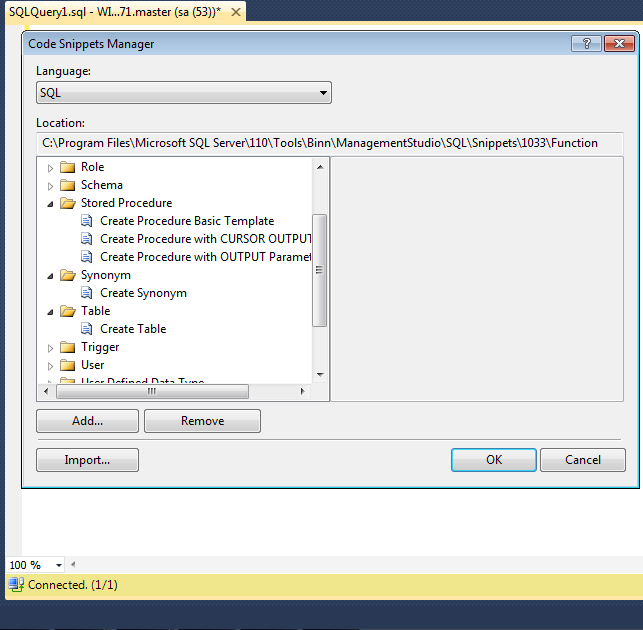
It will open the code snippet manager as shown in the picture below.

how_to_register.1.2

Step 2 :
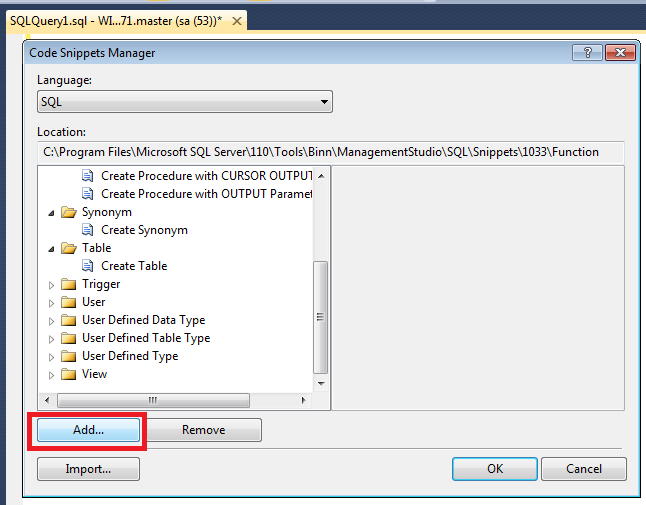
As you can see above, multiple built-in folders and snippet files for standard objects code snippets are available in the Code Snippet Manager. Now, you need to add custom folder and snippet files in the Code snippet Manager. Click on the Add.. button as shown in the picture below.

how_to_register.1.3

Step 3 :
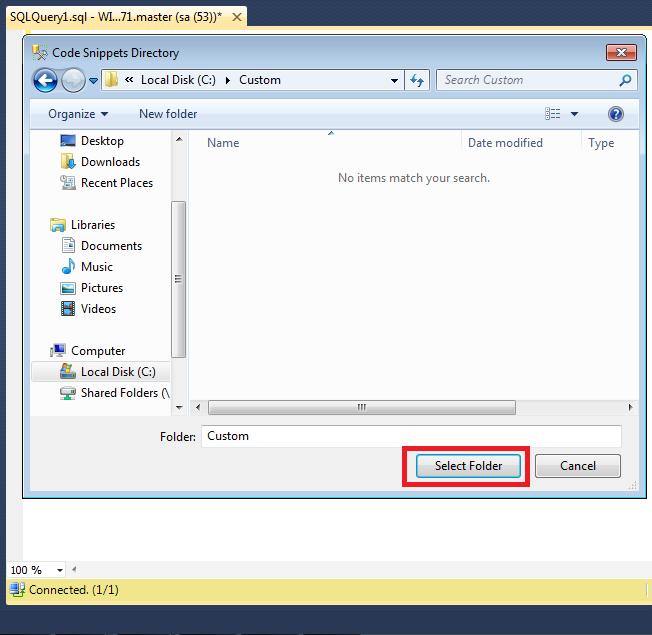
Once you click on the Add.. button, it will open the files explorer, now you need to select the folders having snippet files.You cannot select an individual file using Add.. button. Just to explain this registration, I created one folder namely Custom and placed few code snippet file in it. Once you select the folder click on Select Folder button as shown in the picture below.

how_to_register.1.4

Step 4 :
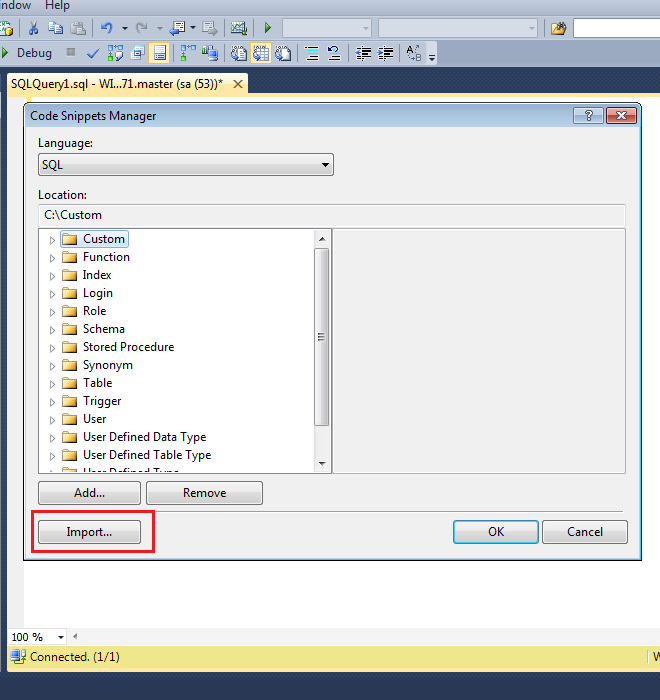
Now, you can see that custom folder and snippet files are registered and added in the Code Snippet Manager as shown in the picture below.

how_to_register.1.5

Method 2 :
In this method you can add multiple files into any custom folders.
Let me explain this method step by step.

Step 1 :
This step will be same as method 1.

Step 2 :
Once you are in the Code Snippet Manager, click on Import button as shown in the picture below.

how_to_register.1.6

Step 3 :
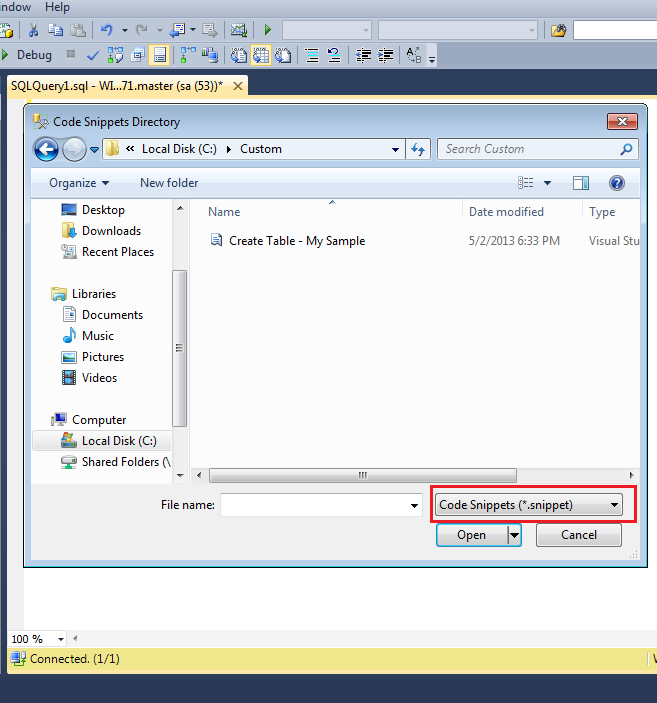
Once you click on Import button, it will open an explorer and allow you to select code snippet file(s).
Once you selected the file(s), click on Open button as shown in the picture below.

how_to_register.1.7

Step 3 :
Once you select the code snippet file(s), it will open an another import window and ask in which custom folder you want to add this file(s) as shown in the picture below.

how_to_register.1.8

Step 4 :
Once you select any custom folder for the code snippet file(s), click Finish button. The snippet file(s) will be available in that custom folder as shown in the image below.

how_to_register.1.9

Reference : MSDN

Read Full Post »

« Newer Posts - Older Posts »