After publishing a solution how to recover the modified / updated records without backup in one of my previous articles, I received lot of queries inquiring how to find who modified / updated and at what time ? So, I started my research and recently developed the solution.
Before proceeding with the solution, let me create a sample to demonstrate the solution.
Given below is the script.
--Create Table
CREATE TABLE [dbo].[Student](
[Sno] [int] NOT NULL,
[Student ID] nvarchar(6) Not NULL ,
[Student name] [varchar](50) NOT NULL,
[Date of Birth]  datetime not null,
[Weight] [int] NULL)
GO
--Inserting data into table

Insert into dbo.[Student] values (1,'STD001','Bob','2003-12-31',40)
Insert into dbo.[Student] values (2,'STD002','Alexander','2004-11-15',35)
GO

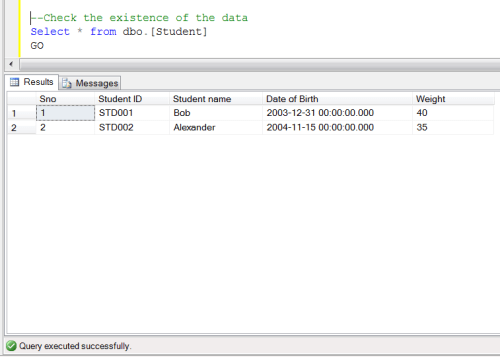
--Check the existence of the data
Select * from dbo.[Student]
GO
--OUTPUT
--Modified the date by mistake without where clause
Update [Student] Set [Student Name]='Bob jerry'
GO

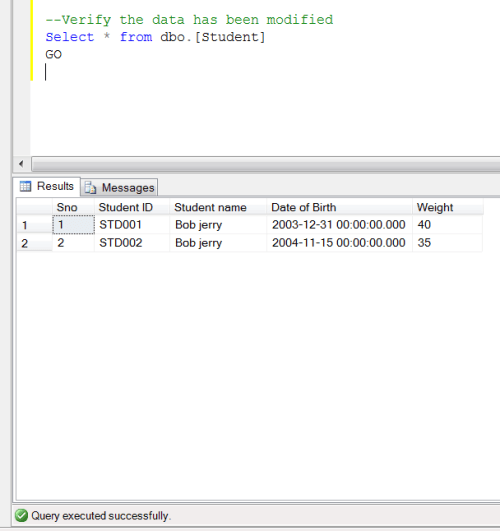
--Verify the data has been modified
Select * from dbo.[Student]

GO
--OUTPUT
Solution :
Given below is the stored procedure that you need to execute in the database having modified records.
--DROP PROCEDURE Recover_Modified_Data_Proc
--GO
Create PROCEDURE Recover_Modified_Data_Proc
@Database_Name NVARCHAR(MAX),
@SchemaName_n_TableName NVARCHAR(MAX),
@Date_From DATETIME='1900/01/01',
@Date_To DATETIME ='9999/12/31'
AS
DECLARE @parms nvarchar(1024)
DECLARE @Fileid INT
DECLARE @Pageid INT
DECLARE @Slotid INT
DECLARE @RowLogContents0 VARBINARY(8000)
DECLARE @RowLogContents1 VARBINARY(8000)
DECLARE @RowLogContents3 VARBINARY(8000)
DECLARE @RowLogContents3_Var VARCHAR(MAX)

DECLARE @RowLogContents4 VARBINARY(8000)
DECLARE @LogRecord VARBINARY(8000)
DECLARE @LogRecord_Var VARCHAR(MAX)

DECLARE @ConsolidatedPageID VARCHAR(MAX)
DECLARE @AllocUnitID BIGINT
DECLARE @TransactionID VARCHAR(MAX)
DECLARE @TrID SYSNAME
DECLARE @Operation VARCHAR(MAX)
DECLARE @DatabaseCollation VARCHAR(MAX)

/*  Pick The actual data
*/
DECLARE @temppagedata TABLE
(
[ParentObject] SYSNAME,
[Object] SYSNAME,
[Field] SYSNAME,
[Value] SYSNAME)

DECLARE @pagedata TABLE
(
[Page ID] SYSNAME,
[AllocUnitId] BIGINT,
[Tr ID] SYSNAME,
[ParentObject] SYSNAME,
[Object] SYSNAME,
[Field] SYSNAME,
[Value] SYSNAME)

DECLARE Page_Data_Cursor CURSOR FOR
/*We need to filter LOP_MODIFY_ROW,LOP_MODIFY_COLUMNS from log for modified records & Get its Slot No, Page ID & AllocUnit ID*/
SELECT [PAGE ID],[Slot ID],[AllocUnitId],[Transaction ID]
FROM    sys.fn_dblog(NULL, NULL)
WHERE
AllocUnitId IN
(SELECT [Allocation_unit_id] FROM sys.allocation_units allocunits
INNER JOIN sys.partitions partitions ON (allocunits.type IN (1, 3)
AND partitions.hobt_id = allocunits.container_id) OR (allocunits.type = 2
AND partitions.partition_id = allocunits.container_id)
WHERE object_id=object_ID('' + @SchemaName_n_TableName + ''))
AND Operation IN ('LOP_MODIFY_ROW','LOP_MODIFY_COLUMNS')  AND [Context] IN ('LCX_HEAP','LCX_CLUSTERED')
/*Use this subquery to filter the date*/

AND [TRANSACTION ID] IN (SELECT DISTINCT [TRANSACTION ID] FROM    sys.fn_dblog(NULL, NULL)
WHERE Context IN ('LCX_NULL') AND Operation IN ('LOP_BEGIN_XACT')
AND [Transaction Name]='UPDATE'
AND  CONVERT(NVARCHAR(11),[Begin Time]) BETWEEN @Date_From AND @Date_To)

/****************************************/

GROUP BY [PAGE ID],[Slot ID],[AllocUnitId],[Transaction ID]
ORDER BY [Slot ID]

OPEN Page_Data_Cursor

FETCH NEXT FROM Page_Data_Cursor INTO @ConsolidatedPageID, @Slotid,@AllocUnitID,@TrID

WHILE @@FETCH_STATUS = 0
BEGIN
DECLARE @hex_pageid AS VARCHAR(Max)
/*Page ID contains File Number and page number It looks like 0001:00000130.
In this example 0001 is file Number &  00000130 is Page Number & These numbers are in Hex format*/
SET @Fileid=SUBSTRING(@ConsolidatedPageID,0,CHARINDEX(':',@ConsolidatedPageID)) -- Seperate File ID from Page ID
SET @hex_pageid ='0x'+ SUBSTRING(@ConsolidatedPageID,CHARINDEX(':',@ConsolidatedPageID)+1,Len(@ConsolidatedPageID))  ---Seperate the page ID

SELECT @Pageid=Convert(INT,cast('' AS XML).value('xs:hexBinary(substring(sql:variable("@hex_pageid"),sql:column("t.pos")) )', 'varbinary(max)')) -- Convert Page ID from hex to integer
FROM (SELECT CASE substring(@hex_pageid, 1, 2) WHEN '0x' THEN 3 ELSE 0 END) AS t(pos)

DELETE @temppagedata
-- Now we need to get the actual data (After modification) from the page
INSERT INTO @temppagedata EXEC( 'DBCC PAGE(' + @DataBase_Name + ', ' + @fileid + ', ' + @pageid + ', 3) with tableresults,no_infomsgs;');
-- Add Page Number and allocUnit ID in data to identity which one page it belongs to.
INSERT INTO @pagedata SELECT @ConsolidatedPageID,@AllocUnitID,@TrID,[ParentObject],[Object],[Field] ,[Value] FROM @temppagedata

FETCH NEXT FROM Page_Data_Cursor INTO  @ConsolidatedPageID, @Slotid,@AllocUnitID,@TrID
END

CLOSE Page_Data_Cursor
DEALLOCATE Page_Data_Cursor

DECLARE @Newhexstring VARCHAR(MAX);

DECLARE @ModifiedRawData TABLE
(
[ID] INT IDENTITY(1,1),
[PAGE ID] VARCHAR(MAX),
[Slot ID] INT,
[AllocUnitId] BIGINT,
[Tr ID] sysname,
[RowLog Contents 0_var] VARCHAR(MAX),
[RowLog Contents 0] VARBINARY(8000)
)
--The modified data is in multiple rows in the page, so we need to convert it into one row as a single hex value.
--This hex value is in string format
INSERT INTO @ModifiedRawData ([PAGE ID],[Slot ID],[AllocUnitId],[Tr ID]
,[RowLog Contents 0_var])
SELECT B.[PAGE ID],A.[Slot ID],A.[AllocUnitId],A.[Transaction ID]
,(
SELECT REPLACE(STUFF((SELECT REPLACE(SUBSTRING([VALUE],CHARINDEX(':',[Value])+1,48),'†','')
FROM @pagedata C  WHERE B.[Page ID]= C.[Page ID] And A.[Slot ID] =LTRIM(RTRIM(SUBSTRING(C.[ParentObject],5,3))) And [Object] Like '%Memory Dump%'
Group By [Value] FOR XML PATH('') ),1,1,'') ,' ','')
) AS [Value]

FROM sys.fn_dblog(NULL, NULL) A
INNER JOIN @pagedata B On A.[PAGE ID]=B.[PAGE ID]
AND A.[AllocUnitId]=B.[AllocUnitId]
AND A.[Slot ID] =LTRIM(RTRIM(Substring(B.[ParentObject],5,3)))
AND B.[Object] Like '%Memory Dump%'
WHERE A.AllocUnitId IN
(SELECT [Allocation_unit_id] FROM sys.allocation_units allocunits
INNER JOIN sys.partitions partitions ON (allocunits.type IN (1, 3)
AND partitions.hobt_id = allocunits.container_id) OR (allocunits.type = 2
AND partitions.partition_id = allocunits.container_id)
Where object_id=object_ID('' + @SchemaName_n_TableName + ''))
AND Operation in ('LOP_MODIFY_ROW','LOP_MODIFY_COLUMNS') AND [Context] IN ('LCX_HEAP','LCX_CLUSTERED')
/*Use this subquery to filter the date*/

AND [TRANSACTION ID] IN (SELECT DISTINCT [TRANSACTION ID] FROM sys.fn_dblog(NULL, NULL)
WHERE Context IN ('LCX_NULL') AND Operation IN ('LOP_BEGIN_XACT')
AND [Transaction Name]='UPDATE'
AND  CONVERT(NVARCHAR(11),[Begin Time]) BETWEEN @Date_From AND @Date_To)

/****************************************/
GROUP BY B.[PAGE ID],A.[Slot ID],A.[AllocUnitId],A.[Transaction ID]
ORDER BY [Slot ID]

-- Convert the hex value data in string, convert it into Hex value as well.
UPDATE @ModifiedRawData  SET [RowLog Contents 0] = cast('' AS XML).value('xs:hexBinary(substring(sql:column("[RowLog Contents 0_var]"), 0) )', 'varbinary(max)')
FROM @ModifiedRawData

---Now we have modifed data plus its slot ID , page ID and allocunit as well.
--After that we need to get the old values before modfication, these datas are in chunks.
DECLARE Page_Data_Cursor CURSOR FOR

SELECT [PAGE ID],[Slot ID],[AllocUnitId],[Transaction ID],[RowLog Contents 0], [RowLog Contents 1],[RowLog Contents 3],[RowLog Contents 4]
,SUBSTRING ([Log Record],[Log Record Fixed Length],([Log Record Length]+1)-([Log Record Fixed Length])) AS [Log Record]
,Operation
FROM    sys.fn_dblog(NULL, NULL)
WHERE   AllocUnitId IN
(SELECT [Allocation_unit_id] FROM sys.allocation_units allocunits
INNER JOIN sys.partitions partitions ON (allocunits.type IN (1, 3)
AND partitions.hobt_id = allocunits.container_id) OR (allocunits.type = 2
AND partitions.partition_id = allocunits.container_id)
WHERE object_id=object_ID('' + @SchemaName_n_TableName + ''))
AND Operation IN ('LOP_MODIFY_ROW','LOP_MODIFY_COLUMNS') AND [Context] IN ('LCX_HEAP','LCX_CLUSTERED')
/*Use this sub query to filter the date*/

AND [TRANSACTION ID] IN (Select DISTINCT [TRANSACTION ID] FROM    sys.fn_dblog(NULL, NULL)
WHERE Context IN ('LCX_NULL') AND Operation IN ('LOP_BEGIN_XACT')
AND [Transaction Name]='UPDATE'
AND  CONVERT(NVARCHAR(11),[Begin Time]) BETWEEN @Date_From AND @Date_To)

/****************************************/
ORDER BY [Slot ID],[Transaction ID] DESC

OPEN Page_Data_Cursor

FETCH NEXT FROM Page_Data_Cursor INTO @ConsolidatedPageID, @Slotid,@AllocUnitID,@TransactionID,@RowLogContents0,@RowLogContents1,@RowLogContents3,@RowLogContents4,@LogRecord,@Operation
WHILE @@FETCH_STATUS = 0
BEGIN
IF @Operation ='LOP_MODIFY_ROW'
BEGIN
/* If it is @Operation Type is 'LOP_MODIFY_ROW' then it is very simple to recover the modified data. The old data is in [RowLog Contents 0] Field and modified data is in [RowLog Contents 1] Field. Simply replace it with the modified data and get the old data.
*/
INSERT INTO @ModifiedRawData ([PAGE ID],[Slot ID],[AllocUnitId],[Tr ID],[RowLog Contents 0_var])
SELECT TOP 1  @ConsolidatedPageID AS [PAGE ID],@Slotid AS [Slot ID],@AllocUnitID AS [AllocUnitId],@TransactionID AS [Tr ID]
,REPLACE (UPPER([RowLog Contents 0_var]),UPPER(CAST('' AS XML).value('xs:hexBinary(sql:variable("@RowLogContents1") )', 'varchar(max)')),UPPER(cast('' AS XML).value('xs:hexBinary(sql:variable("@RowLogContents0") )', 'varchar(max)'))) AS [RowLog Contents 0_var]
FROM  @ModifiedRawData WHERE [PAGE ID]=@ConsolidatedPageID And [Slot ID]=@Slotid And [AllocUnitId]=@AllocUnitID ORDER BY [ID] DESC

--- Convert the old data which is in string format to hex format.
UPDATE @ModifiedRawData  SET [RowLog Contents 0] = cast('' AS XML).value('xs:hexBinary(substring(sql:column("[RowLog Contents 0_var]"), 0) )', 'varbinary(max)')
FROM @ModifiedRawData WHERE [Slot ID]=@SlotID

END
IF @Operation ='LOP_MODIFY_COLUMNS'
BEGIN

/* If it is @Operation Type is 'LOP_MODIFY_ROW' then we need to follow a different procedure to recover modified
.Because this time the data is also in chunks but merge with the data log.
*/
--First, we need to get the [RowLog Contents 3] Because in [Log Record] field the modified data is available after the [RowLog Contents 3] data.
SET @RowLogContents3_Var=cast('' AS XML).value('xs:hexBinary(sql:variable("@RowLogContents3") )', 'varchar(max)')
SET @LogRecord_Var =cast('' AS XML).value('xs:hexBinary(sql:variable("@LogRecord"))', 'varchar(max)')

DECLARE @RowLogData_Var VARCHAR(Max)
DECLARE @RowLogData_Hex VARBINARY(Max)
---First get the modifed data chunks in string format
SET @RowLogData_Var = SUBSTRING(@LogRecord_Var, CHARINDEX(@RowLogContents3_Var,@LogRecord_Var) +LEN(@RowLogContents3_Var) ,LEN(@LogRecord_Var))
--Then convert it into the hex values.
SELECT @RowLogData_Hex=CAST('' AS XML).value('xs:hexBinary( substring(sql:variable("@RowLogData_Var"),0) )', 'varbinary(max)')
FROM (SELECT CASE SUBSTRING(@RowLogData_Var, 1, 2) WHEN '0x' THEN 3 ELSE 0 END) AS t(pos)
DECLARE @TotalFixedLengthData INT
DECLARE @FixedLength_Offset INT
DECLARE @VariableLength_Offset INT
DECLARE @VariableLength_Offset_Start INT
DECLARE @VariableLengthIncrease INT
DECLARE @FixedLengthIncrease INT
DECLARE @OldFixedLengthStartPosition INT
DECLARE @FixedLength_Loc INT
DECLARE @VariableLength_Loc INT
DECLARE @FixedOldValues VARBINARY(MAX)
DECLARE @FixedNewValues VARBINARY(MAX)
DECLARE @VariableOldValues VARBINARY(MAX)
DECLARE @VariableNewValues VARBINARY(MAX)

-- Before recovering the modfied data we need to get the total fixed length data size and start position of the varaible data

SELECT TOP 1 @TotalFixedLengthData=CONVERT(SMALLINT, CONVERT(BINARY(2), REVERSE(SUBSTRING([RowLog Contents 0] , 2 + 1, 2))))
,@VariableLength_Offset_Start=CONVERT(SMALLINT, CONVERT(BINARY(2), REVERSE(SUBSTRING([RowLog Contents 0] , 2 + 1, 2))))+5+CONVERT(INT, ceiling(CONVERT(INT, CONVERT(BINARY(2), REVERSE(SUBSTRING([RowLog Contents 0] , CONVERT(SMALLINT, CONVERT(BINARY(2), REVERSE(SUBSTRING([RowLog Contents 0] , 2 + 1, 2)))) + 1, 2))))/8.0))
FROM @ModifiedRawData
ORDER BY [ID] DESC

SET @FixedLength_Offset= CONVERT(BINARY(2),REVERSE(CONVERT(BINARY(4),(@RowLogContents0))))--)
SET @VariableLength_Offset=CONVERT(int,CONVERT(BINARY(2),REVERSE(@RowLogContents0)))

/* We already have modified data chunks in @RowLogData_Hex but this data is in merge format (modified plus actual data)
So , here we need [Row Log Contents 1] field , because in this field we have the data length both the modified and actual data
so this length will help us to break it into original and modified data chunks.
*/
SET @FixedLength_Loc= CONVERT(INT,SUBSTRING(@RowLogContents1,1,1))
SET @VariableLength_Loc =CONVERT(INT,SUBSTRING(@RowLogContents1,3,1))

/*First , we need to break Fix length data actual with the help of data length  */
SET @OldFixedLengthStartPosition= CHARINDEX(@RowLogContents4,@RowLogData_Hex)
SET @FixedOldValues = SUBSTRING(@RowLogData_Hex,@OldFixedLengthStartPosition,@FixedLength_Loc)
SET @FixedLengthIncrease = (CASE WHEN (Len(@FixedOldValues)%4)=0 THEN 1 ELSE (4-(LEN(@FixedOldValues)%4))  END)
/*After that , we need to break Fix length data modified data with the help of data length  */
SET @FixedNewValues =SUBSTRING(@RowLogData_Hex,@OldFixedLengthStartPosition+@FixedLength_Loc+@FixedLengthIncrease,@FixedLength_Loc)

/*Same we need to break the variable data with the help of data length*/
SET @VariableOldValues =SUBSTRING(@RowLogData_Hex,@OldFixedLengthStartPosition+@FixedLength_Loc+@FixedLengthIncrease+@FixedLength_Loc+(@FixedLengthIncrease),@VariableLength_Loc)
SET @VariableLengthIncrease =  (CASE WHEN (LEN(@VariableOldValues)%4)=0 THEN 1 ELSE (4-(Len(@VariableOldValues)%4))+1  END)
SET @VariableOldValues =(CASE WHEN @VariableLength_Loc =1 THEN  @VariableOldValues+0x00 ELSE @VariableOldValues END)

SET @VariableNewValues =SUBSTRING(SUBSTRING(@RowLogData_Hex,@OldFixedLengthStartPosition+@FixedLength_Loc+@FixedLengthIncrease+@FixedLength_Loc+(@FixedLengthIncrease-1)+@VariableLength_Loc+@VariableLengthIncrease,Len(@RowLogData_Hex)+1),1,Len(@RowLogData_Hex)+1) --LEN(@VariableOldValues)

/*here we need to replace the fixed length &  variable length actaul data with modifed data
*/

SELECT TOP 1 @VariableNewValues=CASE
WHEN CHARINDEX(SUBSTRING(@VariableNewValues,0,LEN(@VariableNewValues)+1),[RowLog Contents 0])<>0 THEN SUBSTRING(@VariableNewValues,0,LEN(@VariableNewValues)+1)
WHEN CHARINDEX(SUBSTRING(@VariableNewValues,0,LEN(@VariableNewValues)),[RowLog Contents 0])<>0 THEN  SUBSTRING(@VariableNewValues,0,LEN(@VariableNewValues))
WHEN CHARINDEX(SUBSTRING(@VariableNewValues,0,LEN(@VariableNewValues)-1),[RowLog Contents 0])<>0 THEN SUBSTRING(@VariableNewValues,0,LEN(@VariableNewValues)-1)--3 --Substring(@VariableNewValues,0,Len(@VariableNewValues)-1)
WHEN CHARINDEX(SUBSTRING(@VariableNewValues,0,LEN(@VariableNewValues)-2),[RowLog Contents 0])<>0 THEN SUBSTRING(@VariableNewValues,0,LEN(@VariableNewValues)-2)
WHEN CHARINDEX(SUBSTRING(@VariableNewValues,0,LEN(@VariableNewValues)-3),[RowLog Contents 0])<>0 THEN SUBSTRING(@VariableNewValues,0,LEN(@VariableNewValues)-3) --5--Substring(@VariableNewValues,0,Len(@VariableNewValues)-3)
END
FROM @ModifiedRawData  WHERE [Slot ID]=@SlotID  ORDER BY [ID] DESC

INSERT INTO @ModifiedRawData ([PAGE ID],[Slot ID],[AllocUnitId],[Tr ID],[RowLog Contents 0_var],[RowLog Contents 0])
SELECT TOP 1  @ConsolidatedPageID AS [PAGE ID],@Slotid AS [Slot ID],@AllocUnitID AS [AllocUnitId],@TransactionID,NULL
,CAST(REPLACE(SUBSTRING([RowLog Contents 0],0,@TotalFixedLengthData+1),@FixedNewValues, @FixedOldValues) AS VARBINARY(max))
+ SUBSTRING([RowLog Contents 0], @TotalFixedLengthData + 1, 2)
+ SUBSTRING([RowLog Contents 0], @TotalFixedLengthData + 3, CONVERT(INT, CEILING(CONVERT(INT, CONVERT(BINARY(2), REVERSE(SUBSTRING([RowLog Contents 0], @TotalFixedLengthData + 1, 2))))/8.0)))
+ SUBSTRING([RowLog Contents 0], @TotalFixedLengthData + 3 + CONVERT(INT, CEILING(CONVERT(INT, CONVERT(BINARY(2), REVERSE(SUBSTRING([RowLog Contents 0], @TotalFixedLengthData + 1, 2))))/8.0)), 2)
+ SUBSTRING([RowLog Contents 0],@VariableLength_Offset_Start,(@VariableLength_Offset-(@VariableLength_Offset_Start-1)))
+ CAST(REPLACE(SUBSTRING([RowLog Contents 0],@VariableLength_Offset+1,LEN(@VariableNewValues))
, @VariableNewValues
, @VariableOldValues) AS VARBINARY)
+ Substring([RowLog Contents 0],@VariableLength_Offset+LEN(@VariableNewValues)+1,LEN([RowLog Contents 0]))
FROM @ModifiedRawData  WHERE [Slot ID]=@SlotID  ORDER BY [ID] DESC

END

FETCH NEXT FROM Page_Data_Cursor INTO   @ConsolidatedPageID, @Slotid,@AllocUnitID,@TransactionID,@RowLogContents0,@RowLogContents1,@RowLogContents3,@RowLogContents4,@LogRecord,@Operation
END

CLOSE Page_Data_Cursor
DEALLOCATE Page_Data_Cursor

DECLARE @RowLogContents VARBINARY(8000)
Declare @AllocUnitName NVARCHAR(Max)
Declare @SQL NVARCHAR(Max)

DECLARE @bitTable TABLE
(
[ID] INT,
[Bitvalue] INT
)
----Create table to set the bit position of one byte.

INSERT INTO @bitTable
SELECT 0,2 UNION ALL
SELECT 1,2 UNION ALL
SELECT 2,4 UNION ALL
SELECT 3,8 UNION ALL
SELECT 4,16 UNION ALL
SELECT 5,32 UNION ALL
SELECT 6,64 UNION ALL
SELECT 7,128

--Create table to collect the row data.
DECLARE @DeletedRecords TABLE
(
[ID] INT IDENTITY(1,1),
[RowLogContents]    VARBINARY(8000),
[AllocUnitID]       BIGINT,
[Tr ID] sysname			  ,
[Transaction ID]    NVARCHAR(Max),
[Slot ID]           INT,
[FixedLengthData]   SMALLINT,
[TotalNoOfCols]     SMALLINT,
[NullBitMapLength]  SMALLINT,
[NullBytes]         VARBINARY(8000),
[TotalNoofVarCols]  SMALLINT,
[ColumnOffsetArray] VARBINARY(8000),
[VarColumnStart]    SMALLINT,
[NullBitMap]        VARCHAR(MAX)
)
--Create a common table expression to get all the row data plus how many bytes we have for each row.
;WITH RowData AS (
SELECT

[RowLog Contents 0] AS [RowLogContents]

,@AllocUnitID AS [AllocUnitID]

,[Tr ID]
,[ID] AS [Transaction ID]

,[Slot ID] as [Slot ID]
--[Fixed Length Data] = Substring (RowLog content 0, Status Bit A+ Status Bit B + 1,2 bytes)
,CONVERT(SMALLINT, CONVERT(BINARY(2), REVERSE(SUBSTRING([RowLog Contents 0], 2 + 1, 2)))) AS [FixedLengthData]  --@FixedLengthData

--[TotalnoOfCols] =  Substring (RowLog content 0, [Fixed Length Data] + 1,2 bytes)
,CONVERT(INT, CONVERT(BINARY(2), REVERSE(SUBSTRING([RowLog Contents 0], CONVERT(SMALLINT, CONVERT(BINARY(2)
,REVERSE(SUBSTRING([RowLog Contents 0], 2 + 1, 2)))) + 1, 2)))) as  [TotalNoOfCols]

--[NullBitMapLength]=ceiling([Total No of Columns] /8.0)
,CONVERT(INT, ceiling(CONVERT(INT, CONVERT(BINARY(2), REVERSE(SUBSTRING([RowLog Contents 0], CONVERT(SMALLINT, CONVERT(BINARY(2)
,REVERSE(SUBSTRING([RowLog Contents 0], 2 + 1, 2)))) + 1, 2))))/8.0)) as [NullBitMapLength]

--[Null Bytes] = Substring (RowLog content 0, Status Bit A+ Status Bit B + [Fixed Length Data] +1, [NullBitMapLength] )
,SUBSTRING([RowLog Contents 0], CONVERT(SMALLINT, CONVERT(BINARY(2), REVERSE(SUBSTRING([RowLog Contents 0], 2 + 1, 2)))) + 3,
CONVERT(INT, ceiling(CONVERT(INT, CONVERT(BINARY(2), REVERSE(SUBSTRING([RowLog Contents 0], CONVERT(SMALLINT, CONVERT(BINARY(2)
,REVERSE(SUBSTRING([RowLog Contents 0], 2 + 1, 2)))) + 1, 2))))/8.0))) as [NullBytes]

--[TotalNoofVarCols] = Substring (RowLog content 0, Status Bit A+ Status Bit B + [Fixed Length Data] +1, [Null Bitmap length] + 2 )
,(CASE WHEN SUBSTRING([RowLog Contents 0], 1, 1) In (0x30,0x70) THEN
CONVERT(INT, CONVERT(BINARY(2), REVERSE(SUBSTRING([RowLog Contents 0],
CONVERT(SMALLINT, CONVERT(BINARY(2), REVERSE(SUBSTRING([RowLog Contents 0], 2 + 1, 2)))) + 3
+ CONVERT(INT, ceiling(CONVERT(INT, CONVERT(BINARY(2), REVERSE(SUBSTRING([RowLog Contents 0], CONVERT(SMALLINT, CONVERT(BINARY(2)
,REVERSE(SUBSTRING([RowLog Contents 0], 2 + 1, 2)))) + 1, 2))))/8.0)), 2))))  ELSE null  END) AS [TotalNoofVarCols]

--[ColumnOffsetArray]= Substring (RowLog content 0, Status Bit A+ Status Bit B + [Fixed Length Data] +1, [Null Bitmap length] + 2 , [TotalNoofVarCols]*2 )
,(CASE WHEN SUBSTRING([RowLog Contents 0], 1, 1) In (0x30,0x70) THEN
SUBSTRING([RowLog Contents 0]
, CONVERT(SMALLINT, CONVERT(BINARY(2), REVERSE(SUBSTRING([RowLog Contents 0], 2 + 1, 2)))) + 3
+ CONVERT(INT, ceiling(CONVERT(INT, CONVERT(BINARY(2), REVERSE(SUBSTRING([RowLog Contents 0], CONVERT(SMALLINT, CONVERT(BINARY(2)
,REVERSE(SUBSTRING([RowLog Contents 0], 2 + 1, 2)))) + 1, 2))))/8.0)) + 2
, (CASE WHEN SUBSTRING([RowLog Contents 0], 1, 1) In (0x30,0x70) THEN
CONVERT(INT, CONVERT(BINARY(2), REVERSE(SUBSTRING([RowLog Contents 0],
CONVERT(SMALLINT, CONVERT(BINARY(2), REVERSE(SUBSTRING([RowLog Contents 0], 2 + 1, 2)))) + 3
+ CONVERT(INT, ceiling(CONVERT(INT, CONVERT(BINARY(2), REVERSE(SUBSTRING([RowLog Contents 0], CONVERT(SMALLINT, CONVERT(BINARY(2)
,REVERSE(SUBSTRING([RowLog Contents 0], 2 + 1, 2)))) + 1, 2))))/8.0)), 2))))  ELSE null  END)
* 2)  ELSE null  END) AS [ColumnOffsetArray]

--  Variable column Start = Status Bit A+ Status Bit B + [Fixed Length Data] + [Null Bitmap length] + 2+([TotalNoofVarCols]*2)
,CASE WHEN SUBSTRING([RowLog Contents 0], 1, 1)In (0x30,0x70)
THEN  (
CONVERT(SMALLINT, CONVERT(BINARY(2), REVERSE(SUBSTRING([RowLog Contents 0], 2 + 1, 2)))) + 4

+ CONVERT(INT, ceiling(CONVERT(INT, CONVERT(BINARY(2), REVERSE(SUBSTRING([RowLog Contents 0], CONVERT(SMALLINT, CONVERT(BINARY(2)
,REVERSE(SUBSTRING([RowLog Contents 0], 2 + 1, 2)))) + 1, 2))))/8.0))

+ ((CASE WHEN SUBSTRING([RowLog Contents 0], 1, 1) In (0x30,0x70) THEN
CONVERT(INT, CONVERT(BINARY(2), REVERSE(SUBSTRING([RowLog Contents 0],
CONVERT(SMALLINT, CONVERT(BINARY(2), REVERSE(SUBSTRING([RowLog Contents 0], 2 + 1, 2)))) + 3
+ CONVERT(INT, ceiling(CONVERT(INT, CONVERT(BINARY(2), REVERSE(SUBSTRING([RowLog Contents 0], CONVERT(SMALLINT, CONVERT(BINARY(2)
,REVERSE(SUBSTRING([RowLog Contents 0], 2 + 1, 2)))) + 1, 2))))/8.0)), 2))))  ELSE null  END) * 2))

ELSE null End AS [VarColumnStart]
From @ModifiedRawData

),

---Use this technique to repeate the row till the no of bytes of the row.
N1 (n) AS (SELECT 1 UNION ALL SELECT 1),
N2 (n) AS (SELECT 1 FROM N1 AS X, N1 AS Y),
N3 (n) AS (SELECT 1 FROM N2 AS X, N2 AS Y),
N4 (n) AS (SELECT ROW_NUMBER() OVER(ORDER BY X.n)
FROM N3 AS X, N3 AS Y)

INSERT INTO @DeletedRecords
SELECT   RowLogContents
,[AllocUnitID]
,[Tr ID]
,[Transaction ID]
,[Slot ID]
,[FixedLengthData]
,[TotalNoOfCols]
,[NullBitMapLength]
,[NullBytes]
,[TotalNoofVarCols]
,[ColumnOffsetArray]
,[VarColumnStart]
--Get the Null value against each column (1 means null zero means not null)
,[NullBitMap]=(REPLACE(STUFF((SELECT ',' +
(CASE WHEN [ID]=0 THEN CONVERT(NVARCHAR(1),(SUBSTRING(NullBytes, n, 1) % 2))  ELSE CONVERT(NVARCHAR(1),((SUBSTRING(NullBytes, n, 1) / [Bitvalue]) % 2)) END) --as [nullBitMap]
FROM
N4 AS Nums
Join RowData AS C ON n<=NullBitMapLength
Cross Join @bitTable WHERE C.[RowLogContents]=D.[RowLogContents] ORDER BY [RowLogContents],n ASC FOR XML PATH('')),1,1,''),',',''))
FROM RowData D

CREATE TABLE [#temp_Data]
(

[FieldName]  VARCHAR(MAX) COLLATE database_default NOT NULL,
[FieldValue] VARCHAR(MAX) COLLATE database_default NULL,
[Rowlogcontents] VARBINARY(8000),
[Transaction ID] VARCHAR(MAX) COLLATE database_default NOT NULL,
[Tr ID] SYSNAME,
[Slot ID] INT,
[NonID] INT
--[System_type_id] int
)
---Create common table expression and join it with the rowdata table
--to get each column details
;With CTE AS (
/*This part is for variable data columns*/
SELECT
A.[ID],
Rowlogcontents,
[Transaction ID],
[Tr ID],
[Slot ID],
NAME ,
cols.leaf_null_bit AS nullbit,
leaf_offset,
ISNULL(syscolumns.length, cols.max_length) AS [length],
cols.system_type_id,
cols.leaf_bit_position AS bitpos,
ISNULL(syscolumns.xprec, cols.precision) AS xprec,
ISNULL(syscolumns.xscale, cols.scale) AS xscale,
SUBSTRING([nullBitMap], cols.leaf_null_bit, 1) AS is_null,
--Calculate the variable column size from the variable column offset array
(CASE WHEN leaf_offset<1 and SUBSTRING([nullBitMap], cols.leaf_null_bit, 1)=0 THEN
CONVERT(SMALLINT, CONVERT(BINARY(2), REVERSE (SUBSTRING ([ColumnOffsetArray], (2 * leaf_offset*-1) - 1, 2)))) ELSE 0 END) AS [Column value Size],

---Calculate the column length
(CASE WHEN leaf_offset<1 and SUBSTRING([nullBitMap], cols.leaf_null_bit, 1)=0 THEN  CONVERT(SMALLINT, CONVERT(BINARY(2), REVERSE (SUBSTRING ([ColumnOffsetArray], (2 * (leaf_offset*-1)) - 1, 2))))
- ISNULL(NULLIF(CONVERT(SMALLINT, CONVERT(BINARY(2), REVERSE (SUBSTRING ([ColumnOffsetArray], (2 * ((leaf_offset*-1) - 1)) - 1, 2)))), 0), [varColumnStart])
ELSE 0 END) AS [Column Length]

--Get the Hexa decimal value from the RowlogContent
--HexValue of the variable column=Substring([Column value Size] - [Column Length] + 1,[Column Length])
--This is the data of your column but in the Hexvalue
,CASE WHEN SUBSTRING([nullBitMap], cols.leaf_null_bit, 1)=1 THEN NULL ELSE
SUBSTRING(Rowlogcontents,((CASE WHEN leaf_offset<1 and SUBSTRING([nullBitMap], cols.leaf_null_bit, 1)=0 THEN CONVERT(SMALLINT, CONVERT(BINARY(2), REVERSE (SUBSTRING ([ColumnOffsetArray], (2 * leaf_offset*-1) - 1, 2)))) ELSE 0 END)
- ((CASE WHEN leaf_offset<1 and SUBSTRING([nullBitMap], cols.leaf_null_bit, 1)=0 THEN  CONVERT(SMALLINT, CONVERT(BINARY(2), REVERSE (SUBSTRING ([ColumnOffsetArray], (2 * (leaf_offset*-1)) - 1, 2))))
- ISNULL(NULLIF(CONVERT(SMALLINT, CONVERT(BINARY(2), REVERSE (SUBSTRING ([ColumnOffsetArray], (2 * ((leaf_offset*-1) - 1)) - 1, 2)))), 0), [varColumnStart])
ELSE 0 END))) + 1,((CASE WHEN leaf_offset<1 and SUBSTRING([nullBitMap], cols.leaf_null_bit, 1)=0 THEN  CONVERT(SMALLINT, CONVERT(BINARY(2), REVERSE (SUBSTRING ([ColumnOffsetArray], (2 * (leaf_offset*-1)) - 1, 2))))
- ISNULL(NULLIF(CONVERT(SMALLINT, CONVERT(BINARY(2), REVERSE (SUBSTRING ([ColumnOffsetArray], (2 * ((leaf_offset*-1) - 1)) - 1, 2)))), 0), [varColumnStart])
ELSE 0 END))) END AS hex_Value

FROM @DeletedRecords A
Inner Join sys.allocation_units allocunits On A.[AllocUnitId]=allocunits.[Allocation_Unit_Id]
INNER JOIN sys.partitions partitions ON (allocunits.type IN (1, 3)
AND partitions.hobt_id = allocunits.container_id) OR (allocunits.type = 2 AND partitions.partition_id = allocunits.container_id)
INNER JOIN sys.system_internals_partition_columns cols ON cols.partition_id = partitions.partition_id
LEFT OUTER JOIN syscolumns ON syscolumns.id = partitions.object_id AND syscolumns.colid = cols.partition_column_id
WHERE leaf_offset<0

UNION
/*This part is for fixed data columns*/
SELECT
A.[ID],
Rowlogcontents,
[Transaction ID],
[Tr ID],
[Slot ID],
NAME ,
cols.leaf_null_bit AS nullbit,
leaf_offset,
ISNULL(syscolumns.length, cols.max_length) AS [length],
cols.system_type_id,
cols.leaf_bit_position AS bitpos,
ISNULL(syscolumns.xprec, cols.precision) AS xprec,
ISNULL(syscolumns.xscale, cols.scale) AS xscale,
SUBSTRING([nullBitMap], cols.leaf_null_bit, 1) AS is_null,
(SELECT TOP 1 ISNULL(SUM(CASE WHEN C.leaf_offset >1 THEN max_length ELSE 0 END),0) FROM
sys.system_internals_partition_columns C WHERE cols.partition_id =C.partition_id And C.leaf_null_bit<cols.leaf_null_bit)+5 AS [Column value Size],
syscolumns.length AS [Column Length]

,CASE WHEN SUBSTRING([nullBitMap], cols.leaf_null_bit, 1)=1 THEN NULL ELSE
SUBSTRING
(
Rowlogcontents,(SELECT TOP 1 ISNULL(SUM(CASE WHEN C.leaf_offset >1 THEN max_length ELSE 0 END),0) FROM
sys.system_internals_partition_columns C where cols.partition_id =C.partition_id And C.leaf_null_bit<cols.leaf_null_bit)+5
,syscolumns.length) END AS hex_Value
FROM @DeletedRecords A
Inner Join sys.allocation_units allocunits ON A.[AllocUnitId]=allocunits.[Allocation_Unit_Id]
INNER JOIN sys.partitions partitions ON (allocunits.type IN (1, 3)
AND partitions.hobt_id = allocunits.container_id) OR (allocunits.type = 2 AND partitions.partition_id = allocunits.container_id)
INNER JOIN sys.system_internals_partition_columns cols ON cols.partition_id = partitions.partition_id
LEFT OUTER JOIN syscolumns ON syscolumns.id = partitions.object_id AND syscolumns.colid = cols.partition_column_id
WHERE leaf_offset>0 )

--Converting data from Hexvalue to its orgional datatype.
--Implemented datatype conversion mechanism for each datatype
--Select * from sys.columns Where [object_id]=object_id('' + @SchemaName_n_TableName + '')
--Select * from CTE

INSERT INTO #temp_Data
SELECT
NAME,
CASE
WHEN system_type_id IN (231, 239) THEN  LTRIM(RTRIM(CONVERT(NVARCHAR(max),hex_Value)))  --NVARCHAR ,NCHAR
WHEN system_type_id IN (167,175) THEN  LTRIM(RTRIM(CONVERT(VARCHAR(max),REPLACE(hex_Value, 0x00, 0x20))))  --VARCHAR,CHAR
WHEN system_type_id = 48 THEN CONVERT(VARCHAR(MAX), CONVERT(TINYINT, CONVERT(BINARY(1), REVERSE (hex_Value)))) --TINY INTEGER
WHEN system_type_id = 52 THEN CONVERT(VARCHAR(MAX), CONVERT(SMALLINT, CONVERT(BINARY(2), REVERSE (hex_Value)))) --SMALL INTEGER
WHEN system_type_id = 56 THEN CONVERT(VARCHAR(MAX), CONVERT(INT, CONVERT(BINARY(4), REVERSE(hex_Value)))) -- INTEGER
WHEN system_type_id = 127 THEN CONVERT(VARCHAR(MAX), CONVERT(BIGINT, CONVERT(BINARY(8), REVERSE(hex_Value))))-- BIG INTEGER
WHEN system_type_id = 61 Then CONVERT(VARCHAR(MAX),CONVERT(DATETIME,CONVERT(VARBINARY(8000),REVERSE (hex_Value))),100) --DATETIME
--WHEN system_type_id IN( 40) Then CONVERT(VARCHAR(MAX),CONVERT(DATE,CONVERT(VARBINARY(8000),(hex_Value))),100) --DATE This datatype only works for SQL Server 2008
WHEN system_type_id =58 Then CONVERT(VARCHAR(MAX),CONVERT(SMALLDATETIME,CONVERT(VARBINARY(8000),REVERSE(hex_Value))),100) --SMALL DATETIME
WHEN system_type_id = 108 THEN CONVERT(VARCHAR(MAX), CAST(CONVERT(NUMERIC(38,30), CONVERT(VARBINARY,CONVERT(VARBINARY,xprec)+CONVERT(VARBINARY,xscale))+CONVERT(VARBINARY(1),0) + hex_Value) as FLOAT)) --- NUMERIC
WHEN system_type_id In(60,122) THEN CONVERT(VARCHAR(MAX),Convert(MONEY,Convert(VARBINARY(8000),Reverse(hex_Value))),2) --MONEY,SMALLMONEY
WHEN system_type_id =106 THEN CONVERT(VARCHAR(MAX), CAST(CONVERT(Decimal(38,34), CONVERT(VARBINARY,Convert(VARBINARY,xprec)+CONVERT(VARBINARY,xscale))+CONVERT(VARBINARY(1),0) + hex_Value) as FLOAT)) --- DECIMAL
WHEN system_type_id = 104 THEN CONVERT(VARCHAR(MAX),CONVERT (BIT,CONVERT(BINARY(1), hex_Value)%2))  -- BIT
WHEN system_type_id =62 THEN  RTRIM(LTRIM(STR(CONVERT(FLOAT,SIGN(CAST(CONVERT(VARBINARY(8000),Reverse(hex_Value)) AS BIGINT)) * (1.0 + (CAST(CONVERT(VARBINARY(8000),Reverse(hex_Value)) AS BIGINT) & 0x000FFFFFFFFFFFFF) * POWER(CAST(2 AS FLOAT), -52)) * POWER(CAST(2 AS FLOAT),((CAST(CONVERT(VARBINARY(8000),Reverse(hex_Value)) AS BIGINT) & 0x7ff0000000000000) / EXP(52 * LOG(2))-1023))),53,LEN(hex_Value)))) --- FLOAT
When system_type_id =59 THEN  Left(LTRIM(STR(CAST(SIGN(CAST(Convert(VARBINARY(8000),REVERSE(hex_Value)) AS BIGINT))* (1.0 + (CAST(CONVERT(VARBINARY(8000),Reverse(hex_Value)) AS BIGINT) & 0x007FFFFF) * POWER(CAST(2 AS Real), -23)) * POWER(CAST(2 AS Real),(((CAST(CONVERT(VARBINARY(8000),Reverse(hex_Value)) AS INT) )& 0x7f800000)/ EXP(23 * LOG(2))-127))AS REAL),23,23)),8) --Real
WHEN system_type_id In (165,173) THEN (CASE WHEN CHARINDEX(0x,cast('' AS XML).value('xs:hexBinary(sql:column("hex_Value"))', 'VARBINARY(8000)')) = 0 THEN '0x' ELSE '' END) +cast('' AS XML).value('xs:hexBinary(sql:column("hex_Value"))', 'varchar(max)') -- BINARY,VARBINARY
WHEN system_type_id =36 THEN CONVERT(VARCHAR(MAX),CONVERT(UNIQUEIDENTIFIER,hex_Value)) --UNIQUEIDENTIFIER
END AS FieldValue
,[Rowlogcontents]
,[Transaction ID]
,[Tr ID]
,[Slot ID]
,[ID]
FROM CTE ORDER BY nullbit

/*Create Update statement*/
/*Now we have the modified and actual data as well*/
/*We need to create the update statement in case of recovery*/

;With CTE AS (SELECT
(CASE
WHEN system_type_id In (167,175,189) THEN QUOTENAME([Name]) + '=' + ISNULL(+ '''' + [A].[FieldValue]+ '''','NULL')+ ' ,'+' '
WHEN system_type_id In (231,239) THEN  QUOTENAME([Name]) + '='  + ISNULL(+ 'N''' +[A].[FieldValue]+ '''','NULL')+ ' ,'+''
WHEN system_type_id In (58,40,61,36) THEN QUOTENAME([Name]) + '='  + ISNULL(+  ''''+[A].[FieldValue]+ '''','NULL') + '  ,'+' '
WHEN system_type_id In (48,52,56,59,60,62,104,106,108,122,127) THEN QUOTENAME([Name]) + '='  + ISNULL([A].[FieldValue],'NULL')+ ' ,'+' '
END) as [Field]
,A.[Slot ID]
,A.[Transaction ID] as [Transaction ID]
,A.[tr ID]
,'D' AS [Type]
,[A].Rowlogcontents
,[A].[NonID]
FROM #temp_Data AS [A]
INNER JOIN #temp_Data AS [B] ON [A].[FieldName]=[B].[FieldName]
AND [A].[Slot ID]=[B].[Slot ID]
--And [A].[Transaction ID]=[B].[Transaction ID]+1
AND [B].[Transaction ID]=  (SELECT Min(Cast([Transaction ID] as int)) as [Transaction ID]  FROM #temp_Data AS [C]
WHERE [A].[Slot ID]=[C].[Slot ID]
GROUP BY [Slot ID])
INNER JOIN sys.columns [D] On  [object_id]=object_id('' + @SchemaName_n_TableName + '')
AND A.[Fieldname] = D.[name]
WHERE ISNULL([A].[FieldValue],'')<>ISNULL([B].[FieldValue],'')
UNION ALL

SELECT(CASE
WHEN system_type_id In (167,175,189) THEN QUOTENAME([Name]) + '=' + ISNULL(+ '''' + [A].[FieldValue]+ '''','NULL')+ ' AND '+''
WHEN system_type_id In (231,239) THEN  QUOTENAME([Name]) + '='+ ISNULL(+ 'N''' +[A].[FieldValue]+ '''','NULL')+ ' AND '+''
WHEN system_type_id In (58,40,61,36) THEN QUOTENAME([Name]) + '=' + ISNULL(+  ''''+[A].[FieldValue]+ '''','NULL') + ' AND '+''
WHEN system_type_id In (48,52,56,59,60,62,104,106,108,122,127) THEN QUOTENAME([Name]) + '='  + ISNULL([A].[FieldValue],'NULL') + ' AND '+''
END) AS [Field]
,A.[Slot ID]
,A.[Transaction ID] AS [Transaction ID]
,A.[tr ID]
,'S' AS [Type]
,[A].Rowlogcontents
,[A].[NonID]
FROM #temp_Data AS [A]
INNER JOIN #temp_Data AS [B] ON [A].[FieldName]=[B].[FieldName]
AND [A].[Slot ID]=[B].[Slot ID]
--And [A].[Transaction ID]=[B].[Transaction ID]+1
AND [B].[Transaction ID]=  (SELECT Min(Cast([Transaction ID] as int)) as [Transaction ID] FROM #temp_Data AS [C]
WHERE [A].[Slot ID]=[C].[Slot ID]
GROUP BY [Slot ID])
INNER JOIN sys.columns [D] ON  [object_id]=object_id('' + @SchemaName_n_TableName + '')
AND [A].[Fieldname]=D.[name]
WHERE ISNULL([A].[FieldValue],'')=ISNULL([B].[FieldValue],'')
AND A.[Transaction ID] NOT IN (SELECT Min(Cast([Transaction ID] as int)) as [Transaction ID] FROM #temp_Data AS [C]
WHERE [A].[Slot ID]=[C].[Slot ID]
GROUP BY [Slot ID])
)

,CTEUpdateQuery AS (SELECT 'UPDATE ' +  @SchemaName_n_TableName +  ' SET ' + LEFT(
STUFF((SELECT ' ' + ISNULL([Field],'')+ ' ' FROM CTE B
WHERE A.[Slot ID]=B.[Slot ID] AND A.[Transaction ID]=B.[Transaction ID] And B.[Type]='D' FOR XML PATH('') ),1,1,''),

LEN(STUFF((SELECT ' ' +ISNULL([Field],'')+ ' ' FROM CTE B
WHERE A.[Slot ID]=B.[Slot ID] AND A.[Transaction ID]=B.[Transaction ID] And B.[Type]='D' FOR XML PATH('') ),1,1,'') )-2)

+ '  WHERE  ' +

LEFT(STUFF((SELECT ' ' +ISNULL([Field],'')+ ' ' FROM CTE C
WHERE A.[Slot ID]=C.[Slot ID] AND A.[Transaction ID]=C.[Transaction ID] And C.[Type]='S' FOR XML PATH('') ),1,1,'') ,

LEN(STUFF((SELECT ' ' +ISNULL([Field],'')+ ' ' FROM CTE C
WHERE A.[Slot ID]=C.[Slot ID] AND A.[Transaction ID]=C.[Transaction ID] And C.[Type]='S' FOR XML PATH('') ),1,1,''))-4)
AS [Update Statement],
[Slot ID]
,[Transaction ID]
,A.[tr ID]
,Rowlogcontents
,[A].[NonID]
FROM CTE A
GROUP BY [Slot ID]
,[Transaction ID]
,A.[tr ID]
,Rowlogcontents
,[A].[NonID] )

INSERT INTO #temp_Data
SELECT 'Update Statement',ISNULL(A.[Update Statement],''),A.[Rowlogcontents],A.[Transaction ID],A.[tr ID],A.[Slot ID],A.[NonID] FROM CTEUpdateQuery A

INSERT INTO #temp_Data
Select 'Modified User Name',C.[name],A.[RowLogcontents],A.[Transaction ID],A.[Tr ID],A.[Slot ID], A.[NonID] from #temp_Data A
Inner Join fn_dblog(NULL,NULL) B On A.[tr ID]= B.[Transaction ID]
And B.[Operation]='LOP_BEGIN_XACT' And B.[Context]='LCX_NULL' And B.[Transaction Name]='UPDATE'
Inner Join sys.sysusers  C On B.[Transaction SID]=C.[Sid]
Where [FieldName]='Update Statement'
Group By C.[name],A.[RowLogcontents],A.[Transaction ID],A.[Tr ID],A.[Slot ID], A.[NonID]
Union ALL
Select 'Modified Date Time',B.[Begin Time],A.[RowLogcontents],A.[Transaction ID],A.[Tr ID],A.[Slot ID], A.[NonID] from #temp_Data A
Inner Join fn_dblog(NULL,NULL) B On A.[tr ID]= B.[Transaction ID]
And B.[Operation]='LOP_BEGIN_XACT' And B.[Context]='LCX_NULL' And B.[Transaction Name]='UPDATE'
Where [FieldName]='Update Statement'
Group By B.[Begin Time],A.[RowLogcontents],A.[Transaction ID],A.[Tr ID],A.[Slot ID], A.[NonID]

/**************************/
--Create the column name in the same order to do pivot table.
DECLARE @FieldName VARCHAR(max)
SET @FieldName = STUFF(
(
SELECT ',' + CAST(QUOTENAME([Name]) AS VARCHAR(MAX)) FROM syscolumns WHERE id=object_id('' + @SchemaName_n_TableName + '')

FOR XML PATH('')
), 1, 1, '')

Print @FieldName
--Finally did pivot table and got the data back in the same format.
--The [Update Statement] column will give you the query that you can execute in case of recovery.
SET @sql = 'SELECT ' + @FieldName  + ',[Update Statement],[Modified User Name],[Modified Date Time] FROM #temp_Data
PIVOT (Min([FieldValue]) FOR FieldName IN (' + @FieldName  + ',[Update Statement],[Modified User Name],[Modified Date Time])) AS pvt
Where [Transaction ID] NOT In (Select Min(Cast([Transaction ID] as int)) as [Transaction ID] from #temp_Data
Group By [Slot ID]) ORDER BY Convert(int,[Slot ID]),Convert(int,[Transaction ID])'
Print @sql
EXEC sp_executesql @sql

GO
--Execute the procedure like
--Recover_Modified_Data_Proc 'Database name''Schema.table name','Date from' ,'Date to'

----EXAMPLE #1 : FOR ALL MODIFIED RECORDS
EXEC Recover_Modified_Data_Proc 'test','dbo.Student'
GO
--EXAMPLE #2 : FOR ANY SPECIFIC DATE RANGE
EXEC Recover_Modified_Data_Proc  'test','dbo.Student','2000/01/01','9999/12/31'
--It will give you the result of all modified records.
--OUTPUT

Read Full Post »





 SQL Server Portal