Feeds:
Posts
Comments

Archive for the ‘Solutions’ Category

This is a very common issue, when you work on long running queries or procedures, and the PROBLEM is that you need to check the stored procedure from time to time whether it has been executed successfully or failed or it is still running. Sometimes you are busy with some other stuff and you forget to check the status. I came across this scenario many times specially, when I am working on parallel projects and each of them taking time specially if it is a migration and the database size is too big.

Let me demonstrate step by step, how I resolved the issue and made my life easier.

Step 1 :
First of all you need to configure the database mail in each SQL Server using this article and make sure that is working.

Step 2 :
You need to alter your stored procedure and add few additional scripts. These additional lines of script are basically the TRY…CATCH block and sp_send_dbmail to send Email in case of success or failure. Whenever, the procedure will come across any error or if it is executed successfully, it will generate an email and notify the admin. In addition you can format the email and add any additional information that can help you to trace the error.

Given below is the sample script in which I created a table and inserted records using stored procedure and generated an email whether it has been executed successfully or failed.
This script may take few minutes to execute.

--This script is compatible with SQL Server 2005 and above.
USE tempdb
GO
DROP TABLE tbl_sample
GO
--Create Sample table
CREATE TABLE tbl_sample
(
[ID] INT IDENTITY(1,1),
[Name] varchar(10)
)
GO

--DROP PROCEDURE usp_test
--GO
--Create sample stored procedure
CREATE PROCEDURE usp_test
AS
BEGIN TRANSACTION;
BEGIN TRY
DECLARE @int INT
SET @int = 1
WHILE (@int <=400000)
BEGIN
INSERT INTO tbl_sample VALUES ('Test')
SET @int = @int + 1
END
END TRY
BEGIN CATCH
IF @@TRANCOUNT > 0
BEGIN
DECLARE @ErrorMessage NVARCHAR(4000);
DECLARE @ErrorSeverity INT;
DECLARE @ErrorState INT;

SET @ErrorMessage = 'Dear Admin,<BR><BR>Due to some error
, your procedure ''usp_test'' at Server ' + @@Servername +
' has been rollback.<BR>'
+ 'Given below is the error message.
<BR><BR> ErrorMessage : ' +  ERROR_MESSAGE()

ROLLBACK TRANSACTION;
EXEC msdb.dbo.sp_send_dbmail @profile_name='My Profile',
@recipients='admin@raresql.com',
@subject='Procedure Failed & Rollback',
@body= @ErrorMessage,
@body_format = 'HTML',
@execute_query_database = 'tempdb'
END
END CATCH;

IF @@TRANCOUNT > 0
BEGIN
COMMIT TRANSACTION;
EXEC msdb.dbo.sp_send_dbmail @profile_name='My Profile',
@recipients='admin@raresql.com',
@subject='Procedure Executed Successfully',
@execute_query_database = 'tempdb'
END
GO

--Execute the Stored Procedure
EXEC usp_test
GO

I found it very handy, let me know if you come across this issue and its resolution.

Read Full Post »

In my earlier article, I explained the importance of sp_refreshview and its implementation with examples. Recently I was working on a project where I used sp_refreshview quite frequently in view of the bulk customization in the database structure. But I needed to customize the standard script to refresh multiple views simultaneously due to the scenarios given below:

  1. If one table has been modified, then all the views related to that particular table should be refreshed.
  2. If multiple tables have been modified, then all views related to those tables should be refreshed.

Let me demonstrate the solution for both issues.

1. If one table has been modified, then all the views related to that particular table should be refreshed.

When I came across this scenario, I thought of finding all views related to the modified table and refresh it one by one but it is obviously time consuming. So alternatively I designed the given below script to accommodate this scenario.

--This script is compatible with SQL Server 2005 and above.
USE tempdb --Change the database name
GO
SELECT DISTINCT 'EXEC sp_refreshview ''' + name + ''''  As [Text]
FROM sys.objects AS A
INNER JOIN sys.sql_expression_dependencies AS B
ON A.object_id = B.referencing_id
WHERE A.type = 'V'
AND B.referenced_id = OBJECT_ID('tbl_A') --Change the table name
GO

Sp_refreshview_1_1

Once you have the above result set, just execute it in a new query window then all the views related to the above table would be refreshed.

2. If multiple tables have been modified, then all views related to those tables should be refreshed.

This is also very common scenario when you modify multiple tables and you need to refresh all views related to these tables. The standard script of standard script cannot accommodate this scenario, so I designed another script that fits this scenario. You just need to pass the table modification date and it picks all the views related to those tables and refreshes it. Given below is the script.

--This script is compatible with SQL Server 2005 and above.
USE tempdb --Change the database name
GO
DECLARE @Date AS DATETIME
SET @Date='2014-06-15'
--Change the table modification date

SELECT 'EXEC sp_refreshview ''' + name + ''''  As [Text]
FROM sys.objects AS A
INNER JOIN sys.sql_expression_dependencies AS B
ON A.object_id = B.referencing_id
WHERE A.type = 'V'
AND B.referenced_id IN (
SELECT object_id FROM sys.tables
WHERE CONVERT(varchar(11),modify_date)=@Date)
GO

Sp_refreshview_1_2

Once you have the above result set, just execute it in a new query window then all the views related to the modified tables would be refreshed.

Let me know if you come across any scenario like this and its solution.

Read Full Post »

In my earlier article, I have explained that creating a directory / sub directory in any file table is same like creating a directory / sub directory in windows itself. However, sometimes you need to create these directories and sub directories via T-SQL. I came across a case recently where I had to create a series of sub directories inside a directly using T-SQL.

Prerequisite :
I strongly recommend that you read the given below articles to have a clear understanding about FileTables.

  1. FileTables – Prerequisites
  2. FileTables – Data Definition Language (DDL)
  3. FileTables – Data Manipulation Language (DML)

Let me explain the solution step by step.

Step 1 :
First of all you need to create a sequence (A new object shipped with SQL Server 2012) to generate a series of IDs. However you can use any other techniques to create these series.

--This script is compatible with SQL Server 2012 and above.
--DROP SEQUENCE [dbo].[NewID]
--GO
CREATE SEQUENCE [dbo].[NewID]
AS [bigint]
START WITH 100000000
INCREMENT BY 1
CACHE
GO

Step 2 :
In this step, you need to create the given below procedure that can generate a new ID for your sub directory. Remember that filetable maintains directory and sub directory IDs in a hierarchy ID datatype. So you must get the parent folder ID (directory hierarchy ID) in order to create a child folder (sub directory). You can get further detail about hierarchy ID here. This stored procedure is self explanatory.

--This script is compatible with SQL Server 2012 and above.
--DROP PROCEDURE dbo.GetNewPathLocator
--GO
CREATE PROCEDURE dbo.GetNewPathLocator
@MainFolderID HIERARCHYID,
@SubDirectoryPath VARCHAR(MAX) OUTPUT

AS
BEGIN

DECLARE @FirstSeqNum sql_variant,
@LastSeqNum  sql_variant

EXEC sys.sp_sequence_get_range
@sequence_name = N'dbo.NewID'
, @range_size = 3
, @range_first_value = @FirstSeqNum OUTPUT
, @range_last_value = @LastSeqNum OUTPUT

SELECT @SubDirectoryPath = CONCAT(COALESCE(@MainFolderID.ToString(),'/'),
CONVERT(VARCHAR(20),@FirstSeqNum) ,'.',
CONVERT(VARCHAR(20),Convert(BIGINT,@FirstSeqNum)+1) ,'.',
CONVERT(VARCHAR(20),@LastSeqNum) ,'/')

END
GO

Step 3 :
Now, it is time to create a sub directory in any directory using T-SQL. I already created a directory inside a filetable as shown below.

creating sub directory in filetable

Let us create a sub directory inside that directory.

--This script is compatible with SQL Server 2012 and above.
DECLARE @MainFolderPath AS HIERARCHYID
--You must have the given below file table (dbo.DataBank)
--and directory (IT) inside file table in the existing database.
SELECT @MainFolderPath=path_locator FROM dbo.DataBank
WHERE [name]='IT'

DECLARE @SubDirectoryPath varchar(max)
EXEC dbo.GetNewPathLocator
@MainFolderID=@MainFolderPath
, @SubDirectoryPath = @SubDirectoryPath OUTPUT

--SELECT @SubDirectoryPath

INSERT INTO dbo.DataBank (name,path_locator,is_directory,is_archive)
VALUES ('sub directory', @SubDirectoryPath, 1, 0);
GO

Given below is the new sub directory created inside IT folder via T-SQL.

creating sub directory in filetable 2

Conclusion :
Remember, filetable keeps directory and sub directory IDs in Hierarchy ID datatype. So you must go through this concept. In addition, the whole process is self explanatory.

Let me know if you came across this situation and how you handled it.

Read Full Post »

Whenever we try to take an exclusive access to a database in order to perform any activity like backup restore, it usually fails if any process is still using the database. I received the given below error from my test database while I was restoring the database on it.

kill process.1.1

Opsssss, fortunately, we do have solution by killing the running process to take a lock and perform any activity using a management command namely KILL & a system view sys.sysprocesses. However, what encourages me to write this solution is that sys.sysprocesses will be removed from the future version of SQL Server. So what is the NEW solution ?

Given below is the script, that I developed using sys.dm_exec_sessions.

USE master
GO
DECLARE @SQL_String VARCHAR(MAX)
DECLARE @Database_id INT

--DO NOT forget to change database name in give below statement
SET @Database_id=DB_ID('AdventureWorks2012')
SET @SQL_String=''

SELECT @SQL_String=@SQL_String + 'KILL '
+ COALESCE(CONVERT(VARCHAR(5),[session_id])+ '; ','')
FROM sys.dm_exec_sessions
WHERE database_id =@Database_id

--PRINT @SQL_String
EXEC (@SQL_String)

The above statement kills all the process running on a specific database. But do not forget to CHANGE the database name.
Once the above statement executed successfully, you can perform any activity.

Read Full Post »

Columnstore index is one of the new features shipped with SQL Server 2012. I have written few articles about this type of index and described how it boosts in the performance. Recently, I worked on a huge table having table partitions residing in different file groups. And it seems that it is already optimized using Table partition. However, I tried to create a columnstore Index to further boost its performance and I did succeed.

Let me demonstrate it step by step.

Step 1 :
First of all, you need to create a partition function as shown below. If you already have partition function please SKIP this step.

USE AdventureWorks2012
GO
CREATE PARTITION FUNCTION [PFByDueDate](datetime) AS RANGE RIGHT
FOR VALUES
(
N'2005-05-31T00:00:00', N'2006-05-31T00:00:00' ,
N'2007-05-31T00:00:00', N'2008-05-31T00:00:00' ,
N'2009-05-31T00:00:00'
)
GO

Step 2 :
Secondly, you need to create a partition scheme on the above partition function as shown below. If you already have partition scheme please SKIP this step.

USE AdventureWorks2012
GO
CREATE PARTITION SCHEME [PSDueDateByMonthRange]
AS PARTITION [PFByDueDate]
ALL TO ([PRIMARY])
GO

Step 3 :
Now, it is time to create a table using above created partition scheme to partition the data accordingly as shown below. If you already created a table using partition scheme please SKIP this step.

USE AdventureWorks2012
GO
CREATE TABLE dbo.[PurchaseOrderDetail_Sample]
(
[PurchaseOrderID] [int] NOT NULL,
[PurchaseOrderDetailID] [int] NOT NULL,
[DueDate] [datetime] NOT NULL,
[OrderQty] [smallint] NOT NULL,
[ProductID] [int] NOT NULL,
[UnitPrice] [money] NOT NULL,
[LineTotal] numeric(18,2),
[ReceivedQty] [decimal](8, 2) NOT NULL,
[RejectedQty] [decimal](8, 2) NOT NULL,
[StockedQty] Numeric(18,2),
[ModifiedDate] [datetime] NOT NULL
) ON [PSDueDateByMonthRange]([DueDate]);
GO

Step 4 :
Lets insert some data to test the performance.

--This query may take 2 to 10 minutes depends upon the server.
USE AdventureWorks2012
GO
INSERT INTO dbo.[PurchaseOrderDetail_Sample] WITH(TABLOCK)
SELECT * FROM [Purchasing].[PurchaseOrderDetail]
GO 100

Step 5 :
Once you insert the data, lets build the columnstore index. Remember, once you build the columnstore index you cannot modify the data in the table.

USE AdventureWorks2012
GO
CREATE NONCLUSTERED COLUMNSTORE INDEX
[IX_PurchaseOrderDetail_Sample_ColumnStore]
ON [PurchaseOrderDetail_Sample]
(
UnitPrice,
OrderQty,
ReceivedQty,
ProductID)
GO

Step 6 :
Once you build the columnstore index, lets execute the query and view the result set WITHOUT columnstore index.

--This query will ignore columnstore index
--By using table's option namely IGNORE_NONCLUSTERED_COLUMNSTORE_INDEX
--and will return the result set.
USE AdventureWorks2012
GO
SET STATISTICS TIME ON
SET STATISTICS IO ON
GO
SELECT
ProductID as [Product ID]
, AVG(UnitPrice) as [Average Unit Price]
, SUM(OrderQty) as [Purchase Order Qty]
, AVG(ReceivedQty) as [Received Qty]
FROM [dbo].[PurchaseOrderDetail_Sample]
WHERE [DueDate] Between '2007-01-01' And '2008-12-31'
GROUP BY ProductID
ORDER BY ProductID
OPTION (IGNORE_NONCLUSTERED_COLUMNSTORE_INDEX)
GO
--OUTPUT

SQL Server parse and compile time:
CPU time = 15 ms, elapsed time = 69 ms.

(265 row(s) affected)
Table ‘Worktable’. Scan count 0, logical reads 0, physical reads 0, read-ahead reads 0, lob logical reads 0, lob physical reads 0, lob read-ahead reads 0.
Table ‘PurchaseOrderDetail_Sample’. Scan count 3, logical reads 4100, physical reads 0, read-ahead reads 0, lob logical reads 0, lob physical reads 0, lob read-ahead reads 0.

SQL Server Execution Times:
CPU time = 983 ms, elapsed time = 1158 ms.

Step 7 :
Lets execute the query and view the result set WITH the columnstore index.

USE AdventureWorks2012
GO
SET STATISTICS TIME ON
SET STATISTICS IO ON
GO
SELECT
ProductID as [Product ID]
, AVG(UnitPrice) as [Average Unit Price]
, SUM(OrderQty) as [Purchase Order Qty]
, AVG(ReceivedQty) as [Received Qty]
FROM [dbo].[PurchaseOrderDetail_Sample]
WHERE [DueDate] Between '2007-01-01' And '2008-12-31'
GROUP BY ProductID
ORDER BY ProductID
GO
--OUTPUT

SQL Server parse and compile time:
CPU time = 16 ms, elapsed time = 57 ms.

(271 row(s) affected)
Table ‘Worktable’. Scan count 0, logical reads 0, physical reads 0, read-ahead reads 0, lob logical reads 0, lob physical reads 0, lob read-ahead reads 0.
Table ‘PurchaseOrderDetail_Sample’. Scan count 1, logical reads 242, physical reads 0, read-ahead reads 0, lob logical reads 0, lob physical reads 0, lob read-ahead reads 0.

SQL Server Execution Times:
CPU time = 717 ms, elapsed time = 782 ms.

Conclusion :
As you can observe, there is huge difference between both queries (with and without columnstore index) performance. However, you need to test it in your scenario and implement it accordingly. In addition, kindly read the restrictions & limitation about columnstore index as well.

Read Full Post »

Full-Text Search is one of the best features shipped with SQL Server 2005. It has all the capabilities that we need for the complex searching scenarios. However, Full- Text Search keep getting the new features in each version of SQL Server. In SQL Server 2012, Full-Text search came up with a brilliant feature called Custom proximity search. Given below are the capabilities of the search.

  1. You can define the maximum number of non search terms or maximum distance between first and last search term
  2. You can also define that search must follow the specific order.

Before I embark on the example, I would like to create a sample to demonstrate this excellent feature.
Sample :

USE AdventureWorks2012
GO
--DROP TABLE [dbo].[tbl_Comments]
--GO
CREATE TABLE [dbo].[tbl_Comments]
(
[ID] [int] NOT NULL CONSTRAINT [PK_tbl_comments] PRIMARY KEY CLUSTERED ,
[Comments] [varchar](1000) NULL
)
GO
INSERT INTO [dbo].[tbl_Comments]
VALUES (1,'This is a demonstration of custom proximity term in Full-Text Search at raresql.com')
GO
--OUTPUT

Please note that once you create the sample, you have to create a Full-Text Index for column “Comments” in the above mentioned table. This article will help you to create Full-Text Index.

Example 1 : (Core functionality)
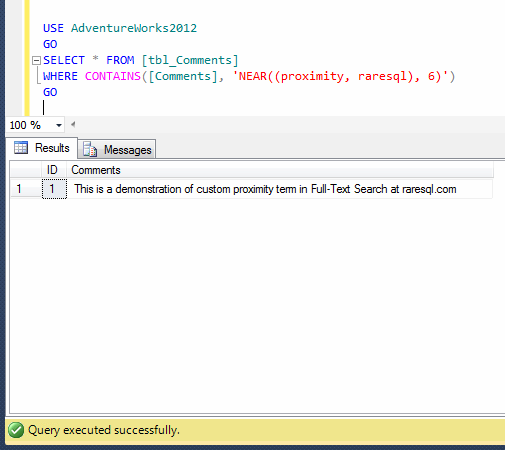
In this example, we will search two words (proximity and raresql) in the comments column in the sample table. The distance between both words is 6. However, we will increase and decrease the distance between words and observe the output.

--First of all, lets put the the distance 6 and observe the output.
USE AdventureWorks2012
GO
SELECT * FROM [tbl_Comments]
WHERE CONTAINS([Comments], 'NEAR((proximity, raresql), 6)')
--OUTPUT

custom proximity.1.1

--lets reduce the the distance from 6 to 5 words and observe the output.
USE AdventureWorks2012
GO
SELECT * FROM [tbl_Comments]
WHERE CONTAINS([Comments], 'NEAR((proximity, raresql), 5)')
--OUTPUT

custom proximity.1.2

As you can see that once you made the distance less than the actual, it is unable to search. Make sure that you provide whether actual distance or more.

Example 2 : (Implement Order)
In this example, we will search again two words (proximity and raresql) in the comments column.
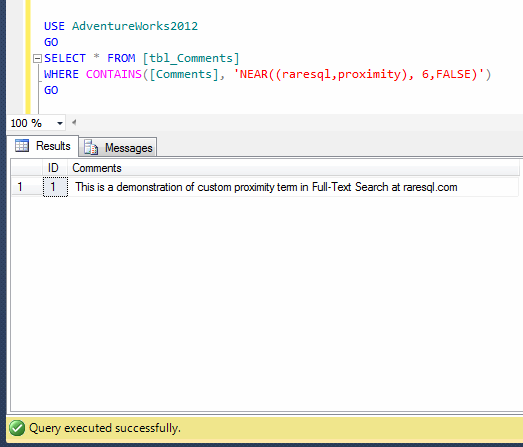
However, we change the order, but it will not affect the result set until unless you will not forcefully implement the order. By default, it does not implement the order in the search.

--First of all, lets put the the distance 6 and reverse the search words.
--However make the sort order to FALSE (By default, it is false, it is optional to write in the code).
USE AdventureWorks2012
GO
SELECT * FROM [tbl_Comments]
WHERE CONTAINS([Comments], 'NEAR((raresql,proximity), 6,FALSE)')
--OUTPUT

custom proximity.1.3

--Lets put the the distance between the word is 6 and reverse the search words.
--However make the order to TRUE.
USE AdventureWorks2012
GO
SELECT * FROM [tbl_Comments]
WHERE CONTAINS([Comments], 'NEAR((raresql,Search), 6,TRUE)')
--OUTPUT

custom proximity.1.4

As you can see that, first of all, I did not implement the ORDER and made it false. In this case it returned the result set because ORDER did not affect the query. However, once I implemented the search order, it did not return the record because the words are in the opposite order in the comments column of the table. Please make a note that some languages follow left to right direction and vice versa. Custom proximity implement the sort search in the same direction.

Example 3 : (Implement Operator)
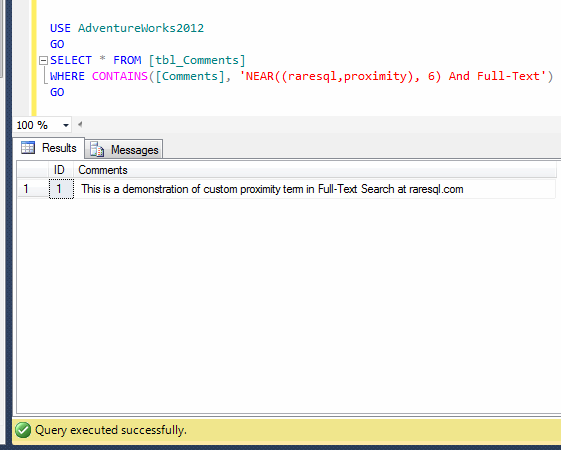
In custom proximity search, you have limited numbers of operators like AND, OR & AND NOT operator. However, you can use the combination of any of them. Given below are the samples.

--First of all, let try the AND operator.
USE AdventureWorks2012
GO
SELECT * FROM [tbl_Comments]
WHERE CONTAINS([Comments], 'NEAR((raresql,proximity), 6) And Full-Text')
GO
--OUTPUT

custom proximity.1.5

--Lets try OR operator
USE AdventureWorks2012
GO
SELECT * FROM [tbl_Comments]
WHERE CONTAINS([Comments], 'NEAR((raresql,proximity), 5) OR Full-Text')
GO
--OUTPUT

custom proximity.1.7

--Lets implement AND NOT operator.
USE AdventureWorks2012
GO
SELECT * FROM [tbl_Comments]
WHERE CONTAINS([Comments], 'NEAR((raresql,proximity), 6) AND NOT sample')
GO
--OUTPUT

custom proximity.1.6

As you can see, I implemented three different operators and it works accordingly. However you can use any number of combinations according to your business requirements.

Let me know if you have implemented Custom proximity search in the real world.

Read Full Post »

Filetable is one of the best features shipped with SQL Server 2012. It makes our life easier when you need to manage your files and folders via SQL Server when it actually resides in the file system of windows. However, you can easily access them using windows application and SQL Server as well.

Pre-requisites :

Problem :
Sometimes, you execute a select statement against a filetable using SQL Server Management Studio (SSMS) and it becomes inaccessible and even after spending so much time, the query does not return the result set. However, you can still access it via windows file system. In normal scenario, filetable returns result set in less than few seconds (depending upon the size of filetable). Now what to do ?

Solution :
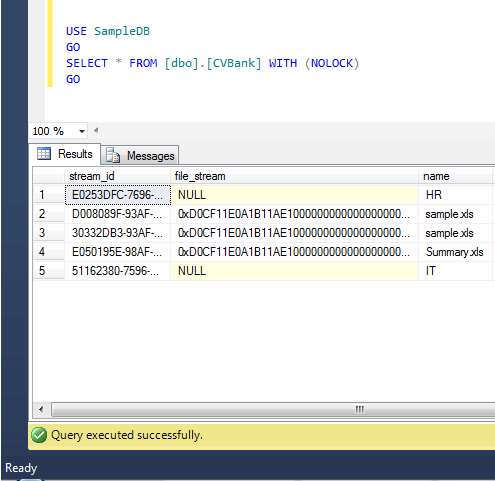
First of all, I cancelled the query that kept on running for hours. It seemed to me that this filetable had been locked because of some transaction. Just to test this scenario, I executed the same query with no lock table hint and it returned the result set as shown below.

USE SampleDB
GO
SELECT * FROM [dbo].[CVBank] WITH (NOLOCK)
GO
--OUTPUT

indentify filetable lock.1.1

Wow, so the file table was indeed locked. So half of the problem is solved. Now, in order to fix this issue, I need to identify which file(s) is/are being used and due to which, the filetable has been apparently locked.
Given below is the script that will give you the file(s) name being used and due to which, the filetable has been locked. I found this script on MSDN.

USE SampleDB
GO
SELECT opened_file_name
FROM sys.dm_filestream_non_transacted_handles
WHERE fcb_id IN
( SELECT request_owner_id FROM sys.dm_tran_locks );
GO
--OUTPUT

indentify filetable lock.1.2

As mentioned above, I identified the lock held by the filetables and in order to avoid this issue, you can take necessary action to close this file.

Let me know if you come across this situation in real world.

Read Full Post »

Earlier, I have written an article about how to take a backup automatically in place of manual backup. I received very good feedback about this post.

Pre-requisite :

Problem :

The problem is, once automatic backup would be scheduled, it will start piling up the back up in the storage and soon, you will be out of space. In this case, you delete the backup manually or automatically ? I prefer automatically. But how to configure it ?

Solution :
Let me explain the solution step by step :

Step 1 :
It would be the best, if you select the “Maintenance Cleanup Task” in Step 6 in the Pre-requisite article. However if you did not do it there, you can modify the same maintenance plan and do it.
First of all you need to select the same Maintenance plan that you have created in the earlier article and right click on it, in order to modify it, as shown below.

cleanup task.1.1

Step 2 :
Once you select modify, SQL Server Management Studio (SSMS) will take you to the design screen of the maintenance plan. Now you need to select “Maintenance Cleanup Task” from the toolbar available in the left hand and drag and drop it on the right hand design window as shown below.

cleanup task.1.2

Step 3 :
Once you drag and drop the “Maintenance Cleanup Task” in the design window of the maintenance screen on the right hand side, you need to select the backup up task. Once you select it, it will show a green arrow in the bottom. Just drag that green arrow and drop it at the head of “Maintenance Cleanup Task” as shown below. The reason behind to drag and drop the green arrow is, to develop a link between both task. In addition to this, this link will define the sequence as well, so that the backup process will be taken first and then cleanup task, in order to remove the old backup.

cleanup task.1.3

Step 4 :
It seems that configuration is done. However, I can see a red cross sign on “Maintenance Cleanup Task” and the reason behind it that we did not configure the “Maintenance Cleanup Task”.
So lets configure it. In order to configure it, you need to double click on “Maintenance Cleanup Task”, you will get “Maintenance Cleanup Task” property window. Here most of the stuff is self explanatory. However, bear in mind that extension must NOT be with “dot”. Generally it is “bak”, in order to delete backup files ONLY as shown below.

cleanup task.1.4

Step 5 :
Now, you are done with the configuration, just save the maintenance plan and close it. Now it will automatically take the backup and delete the older files defined in step 4.

Let me know, how you clean your older backup files.

Read Full Post »

In my earlier article, I wrote about how to generate a serial number by using the sequence object for a result set . However, sometimes you need to generate a negative serial number for any result set and you can easily achieve it by adjusting few properties in the sequence object.

Let me explain it step by step to demonstrate the solution.

Step 1 :
First of all, you need to create a sequence object along with some specific negative parameters as shown below.

USE AdventureWorks2012
GO
--DROP SEQUENCE dbo.Seq_Sample
--GO
CREATE SEQUENCE dbo.Seq_Sample
AS int
START WITH -1
INCREMENT BY -1
MINVALUE -3000
MAXVALUE -1
CYCLE ;
GO
--OUTPUT

Step 2 :
In this step, you are ready to use the above sequence object to generate a negative serial number as shown below.

USE AdventureWorks2012
GO
SELECT
NEXT VALUE FOR Seq_Sample AS [Sno], Name
FROM sys.all_objects ;
GO
--OUTPUT

Negative serial number - Sequence.1.1

Step 3 :
In this step, you need to reset the sequence number in order to start the sequence number from -1 each time. Given below is the script.

USE AdventureWorks2012
GO
ALTER SEQUENCE dbo.Seq_Sample
RESTART WITH -1 ;
GO
--OUTPUT

Let me know if you came across this situation and how you fixed it.

Read Full Post »

How to alter an existing computed column in a table is usually a trouble making statement because in computed column case we also try to implement a normal alter statement as shown below and end up with the error message. However, it is a usual perception that you can alter any computed column with the help of SQL Server management Studio (SSMS) without dropping it.

ALTER TABLE dbo.Products
ALTER COLUMN InventoryValue As (QtyAvailable * UnitPrice)
--OUTPUT

Msg 156, Level 15, State 1, Line 2
Incorrect syntax near the keyword ‘As’.

Frankly speaking there is no way you can alter any computed column without dropping it. Given below are the two methods to alter the computer column. In addition to this, I will discuss, why you do not need to drop computed column if you alter it through SSMS. Before I embark on the solution, I would like to create a sample to demonstrate the solution.

Sample :

USE tempdb
GO
DROP TABLE dbo.Products
GO
CREATE TABLE dbo.Products
(
ProductID int IDENTITY (1,1) NOT NULL
, QtyAvailable smallint
, UnitPrice money
, InventoryValue AS QtyAvailable --* UnitPrice
);

-- Insert values into the table.
INSERT INTO dbo.Products (QtyAvailable, UnitPrice)
VALUES (25, 2.00), (10, 1.5);

-- Display the rows in the table.
SELECT ProductID, QtyAvailable, UnitPrice, InventoryValue
FROM dbo.Products;

--OUTPUT

alter computed column.1.1
As you can see, I deliberately made a mistake in the formula of computed column. Lets correct it using given below methods.

METHOD 1 : USING T-SQL
In this method, we need to first drop the computed column and then add it as a new column to accommodate the altered computed column in any table. Given below is the script.

USE tempdb
GO
ALTER TABLE dbo.Products
DROP COLUMN InventoryValue

ALTER TABLE dbo.Products
ADD InventoryValue AS QtyAvailable * UnitPrice

Once you drop and recreate the computed column, lets browse and check it again.

USE tempdb
GO
-- Display the rows in the table.
SELECT ProductID, QtyAvailable, UnitPrice, InventoryValue
FROM dbo.Products;
--OUTPUT

alter computed column.1.2

METHOD 2 : USING SQL SERVER MANAGEMENT STUDIO
As I mentioned above, it is a general perception that if you alter computed column from SSMS, you do not need to drop it, it alters computed column automatically. In this article, I will show you how it works, step by step.

Step 1 :
Browse the table and select the computed column you need to modify using SSMS and right click on it and further select modify as shown below.

alter computed column.1.3

Step 2 :
Once you select modify, SSMS will open the table in the design view. Now you need to go to the column properties (that will be available at the bottom right) and edit the formula as shown below.

alter computed column.1.4

Step 3 :
Now, it seems that we just need to press the save button and SSMS will alter the computed column without dropping it. But hang on a second, instead of pressing the save button, press the generate script button to see what changes SSMS will implement in case of pressing save button. However, once you press generate script button it will pop up save change script window to show you the changes as shown below.

alter computed column.1.5

Given below is the complete script I copied from the generate script window for your reference that will be implemented once you press the save button. As you can see, SSMS  will create a temporary table with the correct computed column formula, then migrate all the data and drop the old table and rename the temporary table to the old table name. And in this case, it drops the computed column and table as well.

/* To prevent any potential data loss issues, you should review this script in detail before running it outside the context of the database designer.*/
BEGIN TRANSACTION
SET QUOTED_IDENTIFIER ON
SET ARITHABORT ON
SET NUMERIC_ROUNDABORT OFF
SET CONCAT_NULL_YIELDS_NULL ON
SET ANSI_NULLS ON
SET ANSI_PADDING ON
SET ANSI_WARNINGS ON
COMMIT
BEGIN TRANSACTION
GO
CREATE TABLE dbo.Tmp_Products
(
ProductID int NOT NULL IDENTITY (1, 1),
QtyAvailable smallint NULL,
UnitPrice money NULL,
InventoryValue  AS ([QtyAvailable]* [UnitPrice])
)  ON [PRIMARY]
GO
ALTER TABLE dbo.Tmp_Products SET (LOCK_ESCALATION = TABLE)
GO
SET IDENTITY_INSERT dbo.Tmp_Products ON
GO
IF EXISTS(SELECT * FROM dbo.Products)
EXEC('INSERT INTO dbo.Tmp_Products (ProductID, QtyAvailable, UnitPrice)
SELECT ProductID, QtyAvailable, UnitPrice FROM dbo.Products WITH (HOLDLOCK TABLOCKX)')
GO
SET IDENTITY_INSERT dbo.Tmp_Products OFF
GO
DROP TABLE dbo.Products
GO
EXECUTE sp_rename N'dbo.Tmp_Products', N'Products', 'OBJECT'
GO
COMMIT

Conclusion :
As you can see in both methods, you need to drop and recreate the computed column in order to alter it. In addition to this, the perception that “if you alter the computed column via SSMS, it alters it without dropping it” was proved wrong.

Read Full Post »

« Newer Posts - Older Posts »