Feeds:
Posts
Comments

Archive for the ‘Solutions’ Category

It is a very common scenario when you need to match a source table and a target table to find the missing (mismatch) rows across the result sets. We usually do it for multiple purposes specially at the time of audit or data migration etc.

Problem :
We usually use logical operators (NOT IN, Exists) to find the difference between two result sets. However, if you need to match each row by each row & each column by each column, it would be very difficult to achieve it via above mentioned logical operators.

Sample :
Let me create a sample to demonstrate the problem and solution.

--This script is compatible with SQL Server 2005
USE [AdventureWorks2012]
GO
--Create a sample table
CREATE TABLE [HumanResources].[Department_Sample](
[DepartmentID] [smallint] NOT NULL,
[Name] [dbo].[Name] NOT NULL,
[GroupName] [dbo].[Name] NOT NULL,
[ModifiedDate] [datetime] NOT NULL,
) ON [PRIMARY]
GO

--Insert records into the sample table from actual table
INSERT INTO [HumanResources].[Department_Sample]
SELECT * FROM [HumanResources].[Department]
GO

--Update a single record in the sample table
--to differentiate it from actual
UPDATE [HumanResources].[Department_Sample]
SET [Name] = 'Business Development'
WHERE DepartmentID=2

--Insert a record in the original table
INSERT INTO [HumanResources].[Department]
([Name]
,[GroupName]
,[ModifiedDate])
VALUES
('IT'
,'Executive General and Administration'
,GETDATE())
GO
--Delete a record from the sample table
DELETE FROM [HumanResources].[Department_Sample]
WHERE [DepartmentID]=11
GO
SELECT * FROM [HumanResources].[Department]
GO
--OUTPUT

find missing result set.1.1

Solution :
As mentioned above, I created a sample table, copied data from original table in it and then modified & inserted the data in the sample table & original table respectively. Now, in order to find the the missing (mismatched) records across the result set, we need to use EXCEPT operator. Given below is the script that will ONLY show the missing rows in the sample table (Target Table).

--This script is compatible with SQL Server 2005
USE AdventureWorks2012
GO
--Source Table
SELECT * FROM [HumanResources].[Department]
EXCEPT
--Target table
SELECT * FROM [HumanResources].[Department_Sample]
GO
--OUTPUT

find missing result set.1.2

Conclusion :
Whenever you need to find the missing (mismatch) row across the result sets, always use EXCEPT operator to make your life easier.

Read Full Post »

Sequence object is one of the handy objects when we need to maintain one serial number across the tables. I have written few articles on Sequence object earlier in my post.

PROBLEM :
Today, I will share an issue that I came across while dropping sequence object. I created few tables and made a single sequence object as a default serial number in one of the columns in these tables. But once I drop this sequence object it gave me error due to dependency. It seems that I need to go one by one and search each dependency of this sequence object and drop all of them before dropping Sequence Object.

Let me create an example to demonstrate the solution.

-- This script is compatibile with SQL Server 2012 and above.
-- CREATE TABLE
USE tempdb
GO
CREATE TABLE dbo.tbl_sample
( [ID] VARCHAR(8) ,
[Product Name] varchar(50)
)
GO

--CREATE SEQUENCE
USE tempdb
GO
CREATE SEQUENCE dbo.Sample_Seq AS
INT START WITH 1
INCREMENT BY 1 ;
GO

-- CREATE DEFAULT VALUE OF SEQUENCE
USE tempdb
GO
ALTER TABLE dbo.tbl_sample
ADD CONSTRAINT Const_Sample_Seq
DEFAULT (NEXT VALUE FOR dbo.Sample_Seq) FOR [ID];
GO
--TRY TO DROP SEQUENCE OBJECT
DROP SEQUENCE Sample_Seq
GO
--OUTPUT

Msg 3729, Level 16, State 1, Line 1
Cannot DROP SEQUENCE ‘Sample_Seq’ because it is being referenced by object ‘Const_Sample_Seq’.

SOLUTION :
As mentioned above, I created a default constraint to a table using sequence object. The problem started when I tried to drop the sequence. Due to dependency, if one sequence object has been used in multiple tables as a default value, then you need to search each dependency of that sequence object and as usual drop all dependent objects before dropping the sequence object.
You can do it, one finding and dropping one object by one object, simple but hectic solution.
Alternative, you can use give below solution. This solution will prepare script to drop all dependent objects of the any sequence object.

-- This script is compatibile with SQL Server 2012 and above.
USE tempdb
GO
SELECT
'ALTER TABLE '
+ object_name(parent_object_id)
+ ' DROP CONSTRAINT '
+ referencing_entity_name AS [Text]
FROM sys.dm_sql_referencing_entities ('dbo.Sample_Seq', 'OBJECT') re
INNER JOIN sys.default_constraints dc
ON re.referencing_id=dc.object_id
GO
--OUTPUT

drop contraint.1.1

Just copy the above result set and execute it as mentioned below and it will drop all your dependent objects related to sequence object. Given below is the script.

-- This script is compatibile with SQL Server 2012 and above.
USE tempdb
GO
ALTER TABLE tbl_sample DROP CONSTRAINT Const_Sample_Seq
GO
--OUTPUT

Once you drop the constraint, you can easily drop the sequence, you will not get the above error.

-- This script is compatibile with SQL Server 2012 and above.
DROP SEQUENCE Sample_Seq
--OUTPUT

Command(s) completed successfully.

Let me know if you came across such issues and its solutions.

Read Full Post »

Last day of the last year, I came across a situation where I was stuck for a while even though we had backups. However later on found a solution and felt so excited ;).
Note : Please do not use this script for any negative purpose.

Problem :
As I mentioned earlier that last year on 31st Dec 2013, we were busy helping our client for yearend closing and suddenly we got an error from year closing procedure. Given below are the details.
Msg 208, Level 16, State 1, Line 1
Invalid object name ‘tbl_Yeartodate_Value’.

Now, the problem is this table gets updated every evening and we do not why it is not available in the database. We do have each and everyday backup. However, we do not know when it was dropped and who dropped it. We started looking for the solution because it is not possible to restore all backups and check one by one.

Solution :
Some of our support engineers proposed the third party solution to recover the table directly because we do not know in which backup this table exists. I bought some time from the client and started doing my development for recovery and after few hours, I developed a script that could give the dropped object name along with the dropped date and dropped by name as well. However, I made sure that the client will not take any action against the person who dropped it.

Let me create few objects and drop it to demonstrate the solution.

--This script is compatible with SQL Server 2005 and above.
USE tempdb
GO
--Create Schema
CREATE SCHEMA HumanResources
GO

--Create Table
CREATE TABLE HumanResources.[tbl_Employee](
[Sno] [int] NOT NULL,
[ID] nvarchar(6) Not NULL ,
[name] [varchar](50) NOT NULL,
[Date of Birth]  datetime not null,
[Weight] [int] NULL)

GO

--Create View
Create View HumanResources.[vw_Employee]
as
Select * from HumanResources.[tbl_Employee]
GO

--Create Procedure
Create Procedure HumanResources.[usp_Employee]
@EmployeeID nvarchar(6)
as
Select * from HumanResources.[tbl_Employee] Where [ID] =@EmployeeID
GO

--Create function
Create FUNCTION HumanResources.[fn_Employee](@EmployeeID nvarchar(6))
RETURNS int
AS
Begin
Declare @Weight int
Select  @Weight = [Weight]
from HumanResources.[tbl_Employee] Where ID =@EmployeeID
Return  @Weight
End
GO

--Create Trigger
CREATE TRIGGER HumanResources.trg_Employee
ON [tbl_Employee]
FOR INSERT
AS RAISERROR (50009, 16, 10)
GO

--Drop all objects
DROP TRIGGER HumanResources.trg_Employee
DROP VIEW HumanResources.[vw_Employee]
DROP PROCEDURE HumanResources.[usp_Employee]
DROP FUNCTION HumanResources.[Fn_Employee]
DROP TABLE HumanResources.[tbl_Employee]
GO

Once you dropped all object, you need to create the given below script to recover who dropped what object at what time.

--This script is compatible with SQL Server 2005 and above.
USE tempdb
GO
--DROP PROCEDURE Recover_Dropped_Objects_Detail_Proc
--GO
CREATE PROCEDURE Recover_Dropped_Objects_Detail_Proc
@Date_From DATETIME='1900/01/01',
@Date_To DATETIME ='9999/12/31'
AS

;WITH CTE AS (Select B.name AS [Schema Name]
,REPLACE(SUBSTRING(A.[RowLog Contents 0],14,LEN(A.[RowLog Contents 0])),0x00,0x) AS [Object Name]
,[Transaction ID]
,A.[RowLog Contents 0]
FROM fn_dblog(NULL,NULL) A
LEFT JOIN sys.schemas B
ON CONVERT(INT,SUBSTRING([RowLog Contents 0],2,2))= B.schema_id
WHERE A.[AllocUnitName] ='sys.sysschobjs.nc1'AND
A.[Transaction ID] IN (
SELECT DISTINCT [TRANSACTION ID] FROM  sys.fn_dblog(NULL, NULL)
WHERE Context IN ('LCX_NULL') AND Operation IN ('LOP_BEGIN_XACT')
AND [Transaction Name] LIKE '%DROP%'
AND CONVERT(NVARCHAR(11),[Begin Time]) BETWEEN @Date_From AND @Date_To))

SELECT
[Schema Name]
,[Object Name]
,B.[Begin Time]  AS [Dropped Date & Time]
,C.[name] AS [Dropped By User Name]
FROM CTE A
INNER JOIN fn_dblog(NULL,NULL) B
ON A.[Transaction ID] =B.[Transaction ID]
AND Context IN ('LCX_NULL') AND Operation IN ('LOP_BEGIN_XACT')
AND [Transaction Name]LIKE '%DROP%'
INNER JOIN sys.sysusers  C ON B.[Transaction SID]=C.[Sid]
GO

Once you created the above stored procedure, lets execute it and get all the object names dropped during a particular interval, along with its dropped date and dropped by name.
Example :

--This script is compatible with SQL Server 2005 and above.
USE tempdb
GO
EXEC Recover_Dropped_Objects_Detail_Proc  '2014/02/26','2014/02/26'
GO
--OUTPUT

who_dropped_what_object_at_what_time.1.1

Let me know if you came across this issue and its solution as well.

Read Full Post »

Taking & maintaining back up is one of the core responsibilities of any Database Administrator. However, I came across some DBA’s that usually take the backup but not on a regular basis because it is a manual process. I strongly recommend that you start taking the backup even from day one after your deployment at the client site. Today, I handed over a SQL Server to the client after installation and immediately scheduled an automated backup as well. So thought of sharing this solution.

Let me schedule an automated backup to demonstrate step by step.

STEP 1 :
First of all, open the SQL Server Management Studio (SSMS) and check if SQL Server Agent is running or not. In my case it is not running due to this, it is showing red color sign in the icon of SQL Server Agent. Just right click on SQL Server Agent and select Start as shown in the image below.

schedule autobackup.1.1

Once you start, SQL Server Agent icon will be changed to green as shown below.

schedule autobackup.1.2

STEP 2 :
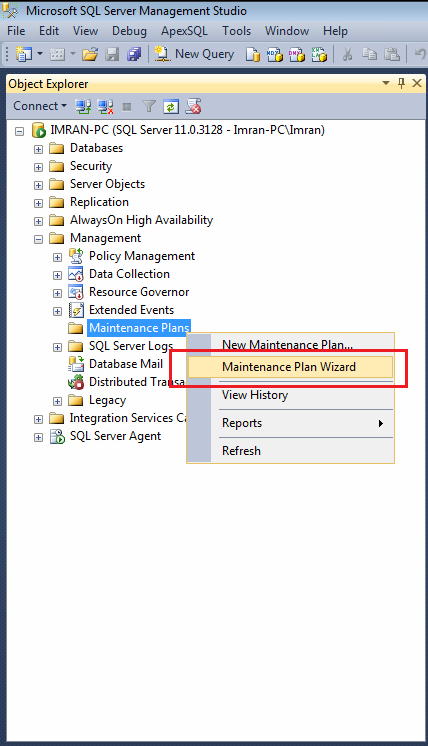
Remain in the SSMS, drill down Management and select Maintenance Plans, further right click on Maintenance Plans and select Maintenance Plan Wizard as shown in the image below.

schedule autobackup.1.3

STEP 3 :
Once you click on Maintenance Plan Wizard, it will pop up an information dialogue box. Click Next Button as shown below.

schedule autobackup.1.4

STEP 4 :
Once you click on Next Button, Plan Properties screen will open as shown below. Enter the maintenance plan name and press Change Button as shown in the image below.

schedule autobackup.1.5

STEP 5 :
Once you press Change Button, it will open a New Job Schedule Window, where you need to define the frequency, schedule date/ time & start date/ end date (no end date) as shown in the image below. Once you are done with the job schedule window press OK button and Next Button respectively.
Note : Always select the off peak time (after office working hours) for scheduler.

schedule autobackup.1.6

STEP 6 :
Now, you are at maintenance task window, here you need to select what type of maintenance you need to do. In our case we need to schedule a FULL database backup. Select the Back Up Database (Full) and press Next button as shown in the image below.

schedule autobackup.1.7

STEP 7 :
It is task order screen but you only select one task (Back Up Database (Full)). There is no need to do any thing in this screen. Just press Next button as shown below.

schedule autobackup.1.8

STEP 8 :
In this step you need to define the parameters of back up; mainly selection of database, location of database & verify integrity of database and press Next button as shown below.

schedule autobackup.1.9

STEP 9 :
Now, you are at report option that you probably need to view the results of this scheduler. This option is very helpful when it comes to debugging as shown below. Press Next Button.

schedule autobackup.1.10

STEP 10 :
Once you press Next button, the summary window will pop up and displays the summary of all configurations as shown below.

schedule autobackup.1.11

Once you press Finish Button, it will process your maintenance plan and will give you the status as shown below.

schedule autobackup.1.12

In addition to this, you can find your maintenance plan on your left hand side as shown below.

schedule autobackup.1.13

STEP 11 :
It seems that your maintenance plan has been done. Only one last step and that is, you need to rename the job. Just select SQL Server Agent and browse jobs, you will find one Backup.Maintenance.Subplan_1, right click on it and select properties as shown below.

schedule autobackup.1.14

STEP 12 :
You are in the job property window, you just need to rename your job name and press OK button as shown below.

schedule autobackup.1.15

Once you are done with all 12 steps you will find a daily backup at the defined time in a dedicated folder. In fact, it took me 5 minutes to configure but eventually it will make my life easier. Let me know how you guys are handling back ups.

Read Full Post »

Last Sunday, my support team received a backup from one of our customers and customer requested some activities for their backup. Once we saved the backup it was named testing backup.  The problem was, we deployed lots of databases for different applications at this client and we did not know that which database backup is he referring to. First of all it is not a best practice to name a backup like this, it must be proper naming conversion. However if you come across situation like this, there is a workaround to find the details about the backup without restoring it. But how ?

Given below is the script that will give you the details about the backup without restoring it to any database.

--This script is compatible with SQL Server 2005 and above.
USE master
GO
RESTORE FILELISTONLY
FROM DISK = N'C:\data\Testing Backup.bak'
GO

metadata of backup.1.1

In addition to the above information, if you need further details about the backup without restoring, you can use RESTORE HEADERONLY & RESTORE LABELONLY

Reference : MSDN

Read Full Post »

Today, I was searching for some script from my library and I came across this script (How do I find all the tables that do not have a primary key?) . I usually use this script, once I complete my deployment on any SQL Server to check if I missed to create primary key on any table.  There are multiple ways to achieve it. However, I will discuss three of them in this article.

METHOD 1 :
This is the shortest method to find all the tables that do not have a primary key. In this method, we need to use OBJECTPROPERTY to check each table property and filter it.

--This script is compatible with SQL Server 2005 and above.
USE AdventureWorks2012
GO
SELECT
SCHEMA_NAME(schema_id) AS [Schema name]
, name AS [Table name]
FROM sys.tables
WHERE
OBJECTPROPERTY(object_id,'TableHasPrimaryKey') = 0
GO
--OUPUT

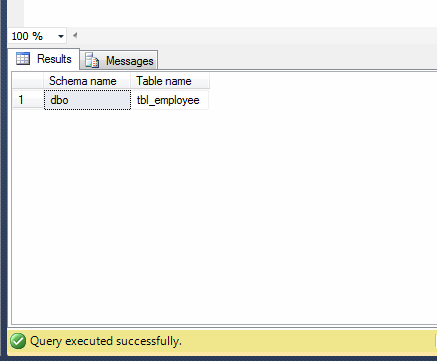
donot have primary key.1.1

METHOD 2 :
This is one of my favorite methods because I do not need to remember any other view name, I can browse all the data from sys.objects.

--This script is compatible with SQL Server 2005 and above.
USE AdventureWorks2012
GO
SELECT
SCHEMA_NAME(schema_id) AS [Schema name]
, name AS [Table name]
FROM
sys.objects
WHERE [type]='U' AND object_id
NOT IN (
SELECT parent_object_id FROM sys.objects
WHERE [type]='PK'
)
GO
--OUPUT

donot have primary key.1.1

METHOD 3 :
In this method, we need to use two system views (sys.tables & sys.key_constraints) to achieve it.

--This script is compatible with SQL Server 2005 and above.
USE AdventureWorks2012
GO
SELECT
SCHEMA_NAME(schema_id) AS [Schema name]
, name AS [Table name]
FROM sys.tables
WHERE object_id NOT IN
(
SELECT parent_object_id
FROM sys.key_constraints
WHERE type = 'PK'
);
GO
--OUPUT

donot have primary key.1.1

Read Full Post »

In my earlier articles, I wrote how to insert files inside the file table and this is more than enough if you maintain few files inside one filetable. But once a filetable is crowded you should maintain the files inside the folders to manage it properly. But how to create a folder inside a filetable ?

Note : I strongly recommend that you should read given below articles to have a clear understanding about FileTables.

  1. FileTables – Prerequisites
  2. FileTables – Data Definition Language (DDL)
  3. FileTables – Data Manipulation Language (DML)

There are two methods to create a folder inside file table. Given below are the details.

  • Using SQL Server Management Studio (SSMS)
  • Using T-SQL

Let me explain each method in detail.

  • Using SQL Server Management Studio (SSMS)

This is the easiest way to create a folder inside filetable. In order to follow this method we need to achieve it step by step.

Step 1 :
First of all you should select the respective filetable in which you need to create a folder and right click on it and select “Explore filetable directory” as shown in the image below.

create_folder_inside_filetable.1.1

Step 2 :
Once you select “Explore filetable directory”, it will open that particular filetable directory folder. You can create folder here, just like in windows, as shown below.

create_folder_inside_filetable.1.2

create_folder_inside_filetable.1.3

  • Using T-SQL

This method we usually use when we need to create a folder dynamically using T-SQL. Given below is the script.

--This script is compatible with SQL Server 2012 and above.
USE SampleDB
GO
INSERT INTO dbo.CVBank
(name,is_directory) VALUES ('New folder', 1);

Read Full Post »

Today, I came across a situation, where I had to perform an activity similar to temporary table cleaning in more than one database. So I started thinking about the shortest possible solution. After some research, I found two possible solutions and one of them was sp_MSforeachdb. It is basically an undocumented stored procedure in SQL Server and it is very handy when you need to perform / achieve some tasks in different databases at a time. However, I need to perform the above mentioed task NOT IN all databases but few of them only. So I started doing some testing to see how to achieve database filter in the sp_MSforeachdb. After couple of testings, I finally found the way to execute a set of commands on specific databases using sp_MSforeachdb.
Given below is the script.

--This Script is compatible with SQL Server 2005 and above.
EXEC sp_MSforeachdb
@command1='IF ''?''
IN (''AdventureWorks2012'',''AdventureWorks2012_test'')
BEGIN
SELECT name,object_id,modify_date
FROM ?.sys.tables WHERE [name]=''Person''
END'
--OUTPUT

sp_MSforeachdb.1.1

Let me know if you came across these situations and what was the solution ?

Note : It is not recommended to use sp_MSforeachdb on production databases.

Read Full Post »

I came across this query from one of my SQL Server developers while he was doing some  R&D in SQL Server and suddenly the SQL Server started giving him fixed number of result sets (5 rows of each table/views) as shown in the picture below.

Setrowcount.1.1png

First of all he tried all the way to fix it including the restart of development SQL Server. It seems, he had to re-install his SQL Server ;). He called me, if I can help him to fix it. I asked him few queries and started doing the troubleshooting and finally fixed the issue. Let me reproduce the same issue and fix it step by step.

Step 1 :
Open SSMS (SQL Server Management Studio) and go to Tools >> Options menu as shown in the image below.

Setrowcount.1.3

Step 2 :
Once you select options menu, an options dialogue box will pop up. Now you need to select “Query Execution” from left hand pane and make SET ROWCOUNT =0 as shown in the image below. By mistake my developer put 5 in the SET ROWCOUNT and it returns 5 number of rows in each result sets for each table and view. Once you are done press OK button.

Setrowcount.1.2

Step 3 :
Now open a new query window and execute the same queries. This time, it will give you the exact result set instead of 5 rows.

Setrowcount.1.44

Let me know if you guys came across this issue and how did you fix it ?

Read Full Post »

« Newer Posts - Older Posts »