Feeds:
Posts
Comments

Archive for the ‘Solutions’ Category

Sometimes, when you create a new object using SSMS (SQL Server Management Studio) and try to use that newly created object, it shows a red line underneath that object and if you move your mouse cursor on that object, it says the object does not exist, but on the other hand it manipulates the query too, as shown in the picture below.

refresh_cache.1.1

When I came across this issue earlier I thought it could be a bug. But actually it is not, so what is wrong with SQL Server ? Basically once you create a new SQL Server object, your newly created object does not get updated in the IntelliSence Local Cache and due to this, it shows red line underneath that object. So you just need to refresh SSMS IntelliSence Local Cache and once you refresh it, IntelliSence will automatically add newly created object in the cache and the red line will disappear. Now, the question is how to update it ? You can achieve in two different ways. Given below are the details.

  • Shortcut

In this method, you need to open SSMS and just need to press “Ctrl+Shift+R” and Intellisence Local Cache will be updated automatically.

  • Via Menu

In this method, you need to open SSMS then go to Edit menu and point IntelliSence and select Refresh Local Cache and once you select Refresh Local Cache, your Intellisence Local Cache will be updated automatically as shown in the picture below.

refresh_cache.1.2

Let me know, what you guys did, when you came across it first time 😉 ?

Read Full Post »

Data presentation is one of the aspects that is much more important when you need to present a report to end user. Usually, I recommend that you should do it at the presentation layer (front end). However, sometimes we need to do all the formatting at database level itself and just present it at presentation level. One of the most frequently formattings we usually come across is datetime data type formatting and to format datetime we need to convert it into varchar data type.

Given below are the solutions.

Solution 1 :
In this solution, we need to use the Traditional method using CONVERT function.

USE AdventureWorks2012
GO

SELECT PurchaseOrderID
, OrderDate
, CONVERT(VARCHAR(11),OrderDate,113)
AS [OrderDate Using Convert]
FROM Purchasing.PurchaseOrderHeader
GO
--OUTPUT

datetimetovarchar.1.1

Solution 2 :
In this solution, we need to use one of the new conversion functions shipped with SQL Server 2012 namely TRY_CONVERT function.

USE AdventureWorks2012
GO

SELECT PurchaseOrderID
, OrderDate
, TRY_CONVERT(VARCHAR(11),OrderDate,113)
AS [OrderDate Using Try_Convert]
FROM Purchasing.PurchaseOrderHeader
GO
--OUTPUT

datetimetovarchar.1.2

Solution 3 :
In this solution, we need to use one of the new formatting functions shipped with SQL Server 2012 namely FORMAT function.
I usually recommend this method because it gives you variety for formatting.

USE AdventureWorks2012
GO

SELECT PurchaseOrderID
, OrderDate
, FORMAT(OrderDate,'dd MMM yyyy')
AS [OrderDate Using Format]
FROM Purchasing.PurchaseOrderHeader
GO
--OUTPUT

datetimetovarchar.1.3

Read Full Post »

Statistics usually helps us to analyse any object and this is the same for SQL Server as well. We should monitor SQL Server statistics on and off to make sure that it is up and running. To achieve this, each DBA has its own tool to analyse different components of SQL Server. Most of them, write their own Transact SQL and use them against the database and return values. But there is a shortcut that SQL Server provides to give you a number of statistics about the database at your finger tips. So what is that shortcut ? Basically, these are standard reports shipped with SQL Server and provide detailed statistics about the database with graphical interface as well.

Let me show you how to reach standard reports.

Step 1 :
Open the SQL Server Management Studio (SSMS) and select the particular database that statistics you need to view and then right click on it and select REPORTS and STANDARD REPORTS as well, as shown in the picture below.

standard reports.1.1

Step 2 :
Once you select the standard reports, you can view a series of statistical reports shipped with SQL Server, as shown in the picture below.

standard reports.1.2

Step 3 :
Let me open a “Disk Usage” report to demonstrate, how it works as shown in the picture below.

standard reports.1.3

Read Full Post »

Recently, I came across a query in a blog, ‘How to remove leading zeros after a decimal point’. I then started developing the shortest possible solution and thought of sharing with my blog readers. Let me create a sample to demonstrate the solution.

DECLARE @tbl_sample AS TABLE
(
[ID] INT,
[Col_Varchar] VARCHAR(50)
)

INSERT INTO @tbl_sample VALUES (1,'2013.0000000001')
INSERT INTO @tbl_sample VALUES (2,'2014.0000000002')
INSERT INTO @tbl_sample VALUES (3,'2015.0000000003')
INSERT INTO @tbl_sample VALUES (4,'2016.0000000044')
INSERT INTO @tbl_sample VALUES (5,'2017.0000000555')

SELECT * FROM @tbl_sample
--OUTPUT

remove leading zero.1.1

SOLUTION 1 :
Given below is the solution using PARSENAME & CONCAT function.

--This script is compatible with SQL Server 2012 and above.
SELECT [ID]
,CONCAT(PARSENAME([Col_Varchar],2)
,'.',CONVERT(INT,PARSENAME([Col_Varchar],1)))
AS [Col_Varchar]
FROM @tbl_sample
--OUTPUT

remove leading zero.1.2

SOLUTION 2 :
Given below is the solution using PARSENAME & CONVERT function.

--This script is compatible with SQL Server 2005 and above.
SELECT
[ID]
,CONVERT(VARCHAR(5),PARSENAME([Col_Varchar],2))
+ '.'
+ CONVERT(VARCHAR(5),CONVERT(INT,PARSENAME([Col_Varchar],1)))
AS [Col_Varchar]
FROM @tbl_sample
--OUTPUT

remove leading zero.1.3

Read Full Post »

In my earlier articles, I wrote about sys.dm_exec_describe_first_result_set
(A new dynamic management view shipped with SQL Server 2012), it is very handy when you need to know the metadata of the first possible result set of any Transact SQL. Today, I came across an issue when I tried to get the metadata of a stored procedure in earlier version of SQL Server and wanted to use the list of columns for further manipulations. However, I could not find a proper solution like sys.dm_exec_describe_first_result_set in the earlier version of SQL Server. So I started developing the solution.

Given below are the solution.

SOLUTION 1 : For SQL Server 2012 and above using sys.dm_exec_describe_first_result_set

USE AdventureWorks2012;
GO
SELECT *  FROM sys.dm_exec_describe_first_result_set
(N'[dbo].[uspGetManagerEmployees] 16', null, 0) ;
--OUTPUT

metadata of stored procedure.1.1

SOLUTION 2 : For SQL Server 2005 and above using OPENROWSET

USE AdventureWorks2012
GO
--DROP TABLE #temp1
GO
SELECT * INTO  #temp1
FROM OPENROWSET('SQLNCLI', 'Server=(local);uid=sa;pwd=test',
'EXEC AdventureWorks2012.[dbo].[uspGetManagerEmployees] 16');
GO

SELECT * FROM tempdb.sys.columns
WHERE object_id=object_id('tempdb..#temp1')
GO
--View the column name / metadata of the
--above created temporary table.
--OUTPUT

metadata of stored procedure.1.2

Read Full Post »

In legacy data, it is very common that you find a lot of unnecessary NULL values and you need to do massage to present this data, whether it is a report or an email. Generally, we use few techniques to avoid NULL and replace it with any characters or numbers.
Before proceeding with the solution, I would like to create a sample to demonstrate the solution.

SAMPLE :

DECLARE @tbl_sample TABLE
(
[ID] INT,
[Name] VARCHAR(50),
[Code] INT
)

INSERT INTO @tbl_sample VALUES(1,'Bob',1234)
INSERT INTO @tbl_sample VALUES(2,'Sandra',NULL)
INSERT INTO @tbl_sample VALUES(3,'Mike',NULL)

SELECT
*
FROM
@tbl_sample
--OUTPUT

return_result_0.1.1

METHOD 1 :
Given below is the script to replace NULL using ISNULL (a SQL Server built-in function).

SELECT
[ID]
,[Name]
,ISNULL([Code],0) AS [Code]
FROM @tbl_sample
--OUTPUT

return_result_0.1.2

METHOD 2 :
Given below is the script to replace NULL using COALESCE (a SQL Server built-in function).

SELECT
[ID]
,[Name]
,COALESCE([Code],0) AS [Code]
FROM @tbl_sample
--OUTPUT

return_result_0.1.2

METHOD 3 :
Given below is the script to replace NULL using CASE STATEMENT (a SQL Server expression).

SELECT
[ID]
,[Name]
,CASE WHEN [Code] is NULL THEN 0 ELSE [Code] END
As [Code]
FROM @tbl_sample
--OUTPUT

return_result_0.1.2

Read Full Post »

Mostly companies develop several environments from development stage till production like Development environment, Integration environment, Validation environment, Quality Assurance environment, User Acceptance environment and Production environment to enhance quality of the product for the customer. But once we have different environments, there is a very common issue called inconsistency in database between these environments. Sometimes, script manager may miss out some scripts to deploy, and due to this one or all of the environments can create serious problems and may crashes also. And if this is user acceptance / production environment, it may create a cumbersome image about your product. Sometimes, we use user defined functions and stored procedures to compare two databases like this. However, I felt that these solutions are good, it can help you how to fix, but it is not a smart solution (can automatically fix the issues).
Recently, I came across an issue where we have many environments and in all different environments it was generating different database inconsistency errors. So I started doing my research, and came across a tool namely ApexSQL Diff, a schema comparison tool. I tested this tool and I synced all environments in a very few minutes with just a few clicks. My customer was damn happy and was inquiring how I managed to do it in few minutes as it seems, it takes few weeks to sort out. I recommended this solution to the customer & exclaimed,”it is money’s worth”. I approached APEX team to purchase this product for my customers & get some discount, so thought of getting same discount for my blog reader. And finally I got it :). You can use coupon Code ApexSQLDiffPro25 to get 25% discount on APEXSQL Diff.

Note : There is a FREE community version of ApexSQL Diff for SQL Express and Windows Azure SQL Databases.

Let me explain step by step how it works.

STEP 1:
Once you open ApexSQL Diff, click on New button, it asks about source and destination of your SQL server database (Backup, Script folder, Snapshot, Source control) to compare as shown in the image below.

apexsqldiff.1.1

STEP 2:
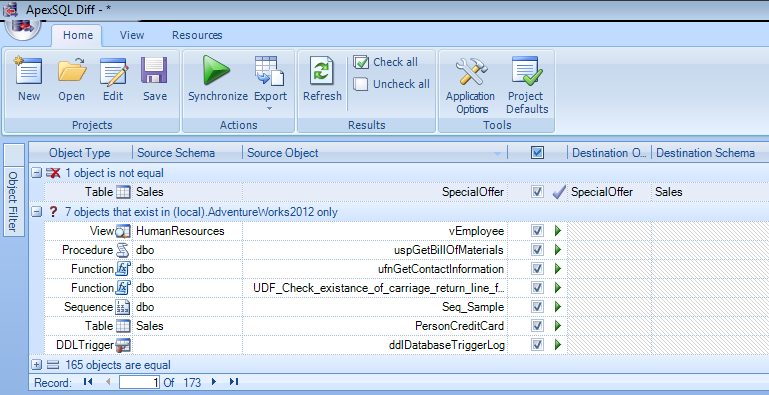
Once you select source and destination databases to compare, just press Compare button at the bottom of the screen. It takes a while and it will give you all schema differences between both databases. It supports new object shipped with SQL Server 2012 as well, as shown in the image below.
apexsqldiff.1.2

It also provides additional sorting, formatting (alignment & grouping) and filter options like object filter, difference filter & script difference view to give you full control over differences, as shown in the image below.

apexsqldiff.1.2.1

STEP 3:
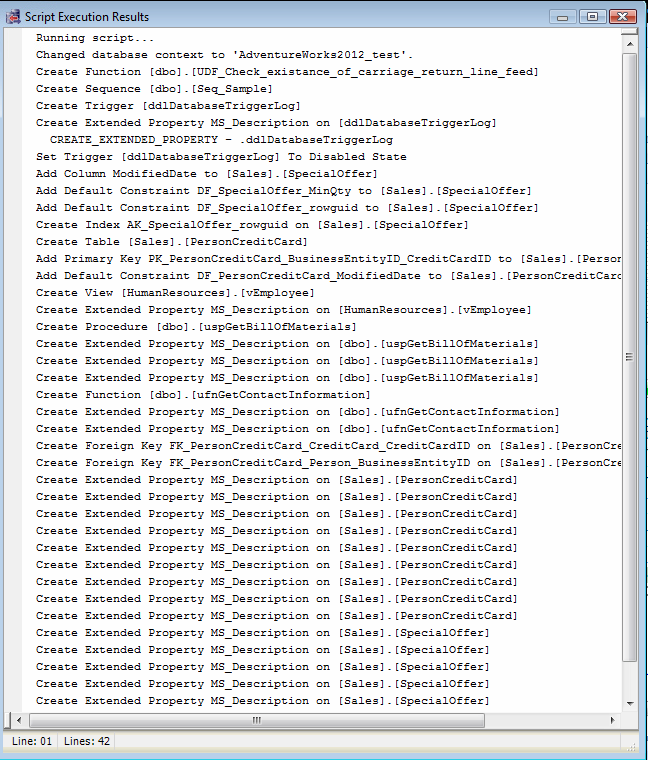
Once you have the differences, just press Sync button and it can sync both databases and can give you the script also (in case you want to deploy by yourself), as shown in the picture below.
apexsqldiff.1.3

Last but not least, it does not stop working here, it syncs again to check if you missed to upgrade/update any scripts and gives you the difference (if any).
I like this product and I also recommend that you should try and view its results by yourself. Its trial version is available here.
You can get further details about the product from http://blog.apexsql.com/category/apexsql-diff/.  Let me know your opinions whether positive or not.

Read Full Post »

How to view the definition of a module, is one of the activities that we need very frequently whether it is customization or debugging in SQL Server. Today, I was debugging one of the stored procedures, so thought of writing this article.

There are multiple ways to view the definition of a module. I will mention two of them here and you can choose either of them.

METHOD 1 :
Given below is the solution using OBJECT_DEFINITION (One of the built-In metadata functions in SQL Server).

USE AdventureWorks2012 -- Donot forget to change database name here
GO
SELECT OBJECT_DEFINITION (OBJECT_ID('[HumanResources].[vEmployee]'))
-- Donot forget to change schema and table name
-- as highlighed above in blue color.
AS ObjectDefinition;
GO
--OUTPUT

definition of modules.1.1

METHOD 2 :
Given below is the solution using sys.sql_modules (One of the object catalog views in SQL Server).

USE AdventureWorks2012 -- Donot forget to change database name here
GO
SELECT definition
FROM sys.sql_modules
WHERE object_id = OBJECT_ID('HumanResources.dEmployee');
-- Donot forget to change schema and table name
-- as highlighed above in blue color.
GO
--OUTPUT

definition of modules.1.1

CONCLUSION :
As you can see, both methods give you the same result set. However, I personally use Method 1 due its less number of codes. Let me know which method you prefer ?

Read Full Post »

I came across this query when I was automating one of my services for a customer and it had to run on first Sunday of every month. I already had this solution earlier and utilized it in many places, but as my customer is using SQL Server 2012, I would like to write this script in a different way with less no of codes. So I started scripting and finally developed it using EOMONTH function. (A new function shipped with SQL Server 2012).

Let me create a sample to demonstrate the solution.

USE tempdb
GO
--DROP TABLE tbl_Sample
--GO
CREATE TABLE tbl_Sample
(
[ID] INT,
[Date] DATETIME
)
GO
INSERT INTO tbl_Sample VALUES (1,'2013-01-05')
INSERT INTO tbl_Sample VALUES (2,'2013-02-01')
INSERT INTO tbl_Sample VALUES (3,'2013-05-05')
INSERT INTO tbl_Sample VALUES (4,'2013-07-20')
INSERT INTO tbl_Sample VALUES (5,'2013-08-28')

GO

SOLUTION 1 : Using EOMONTH
Given below is the script.

USE tempdb
GO
SELECT DATEADD(DAY,8-
DATEPART(WEEKDAY,DATEADD(DAY,1,EOMONTH([Date])))
,EOMONTH([Date])) AS [First Sunday of the next month]
FROM tbl_Sample
GO
--OUTPUT

firstsundayofthemonth.1.1

SOLUTION 2 : Using Traditional Method
Given below is the script.

USE tempdb
GO
SELECT CONVERT(DATE,DATEADD(DAY,8-
DATEPART(WEEKDAY,DATEADD(MONTH,DATEDIFF(MONTH, 0, [Date])+1,0))
,DATEADD(MONTH,DATEDIFF(MONTH, 0, [Date])+1, -1)))
AS [First Sunday of the next month]
FROM tbl_Sample
GO
--OUTPUT

firstsundayofthemonth.1.1

Read Full Post »

In one of the my earlier articles related to triggers, I had written about how to get the list of triggers along with its different properties using sys.triggers & OBJECTPROPERTY. It was quite a big script to get these details. Recently, when I was working on some system level stored procedures, I got a shortcut to achieve list of triggers along with its schema using sp_MSforeachtable & sp_helptrigger

Given below is the script.

--This script is compatible with SQL Server 2005 and above.
USE AdventureWorks2012
GO
EXEC sp_MSforeachtable
@command1 = 'sp_helptrigger ''?'''
,@whereand = 'And Object_id In (Select parent_id From sys.triggers)';
--OUTPUT

listoftrigger.1.1

Read Full Post »

« Newer Posts - Older Posts »