Feeds:
Posts
Comments

Union [ALL] operator is one of the frequently used operators in the SQL Server scripting. We usually use it to combine multiple query result set together. But it has one of the limitations that all the queries column must be equal. But there are multiple ways to by pass this limit.

Let’s discuss this in detail:

Message Number: 205

Severity : 16

Error Message: All queries combined using a UNION, INTERSECT or EXCEPT operator must have an equal number of expressions in their target lists.

Error Generation:
Let me create two sample tables & insert some sample data in it to demonstrate this error and its solutions.

USE tempdb
GO
--Create first table
CREATE TABLE tbl_sample_1
(
 [ID] int,
 [Name] varchar(50),
 [Modified Date] datetime
)
GO
--Insert few records in first table
INSERT INTO tbl_sample_1 VALUES (1,'SQL Server 2005','2005-01-01')
INSERT INTO tbl_sample_1 VALUES (2,'SQL Server 2008','2008-01-01')
GO
--Create second table
CREATE TABLE tbl_sample_2
(
 [ID] int,
 [Name] varchar(50),
)
GO
--Insert few records in second table
INSERT INTO tbl_sample_2 VALUES (1,'SQL Server 2012')
INSERT INTO tbl_sample_2 VALUES (2,'SQL Server 2014')
GO

Let me apply union operator on both tables. Given below is the script :

USE tempdb
GO
SELECT [ID],[Name],[Modified Date]
FROM tbl_sample_1
UNION ALL
SELECT [ID],[Name]
FROM tbl_sample_2
--OUTPUT

Msg 205, Level 16, State 1, Line 1
All queries combined using a UNION, INTERSECT or EXCEPT operator must have an equal number of expressions in their target lists.

Ooopps…… I am unable to apply union operator on above tables and the reason behind this is that both table’s have different number of columns.

Resolution:
Given below are the three different resolutions that I usually use to fix this error.

Solution 1 :
In this solution you can remove the additional column from the query. This additional column can be in any query. In our sample query we have additional column [Modified Date] in query 1. So lets remove it.

USE tempdb
GO
SELECT [ID],[Name]
FROM tbl_sample_1
UNION ALL
SELECT [ID],[Name]
FROM tbl_sample_2
--OUTPUT

unionallerror205.1.1

Solution 2 :
In this solution you can leave the additional column in the query but add the same addtional column in query 2 with the value of NULL. Given below is the script.

USE tempdb
GO
SELECT [ID],[Name],[Modified Date]
FROM tbl_sample_1
UNION ALL
SELECT [ID],[Name],NULL As [Modified Date]
FROM tbl_sample_2
--OUTPUT

unionallerror205.1.2

Solution 3 :
In this solution you can leave the additional column in the query but add the same additional column in query 2 with the DEFAULT value. Be sure that the DEFAULT value is compatible with the additional column. Given below is the script.

USE tempdb
GO
SELECT [ID],[Name],[Modified Date]
FROM tbl_sample_1
UNION ALL
SELECT [ID],[Name],GETDATE() As [Modified Date]
FROM tbl_sample_2
--OUTPUT

unionallerror205.1.3

In my earlier article, I wrote a solution to create memory optimized table in a new database. But the question is how to create memory optimized table in an existing database. Let me explain it step by step.

Step 1 :
In this step we need to create a simple database to demonstrate. Skip this step if you already have a database but make sure its compatibility level is 110.

USE master;
GO
CREATE DATABASE test
ON
( NAME = Sales_dat,
FILENAME = 'C:\DATA\test.mdf',
SIZE = 10,
MAXSIZE = 50,
FILEGROWTH = 5 )
LOG ON
( NAME = Sales_log,
FILENAME = 'C:\DATA\test_log.ldf',
SIZE = 5MB,
MAXSIZE = 25MB,
FILEGROWTH = 5MB ) ;
GO
--OUTPUT

Step 2 :
Create a memory optimized table.

USE Test
GO
CREATE TABLE tbl_sample_Memory_table
(
[ID] integer not null primary key nonclustered hash
with (bucket_count = 1024),
[Name] varchar(200) not null,
) WITH (MEMORY_OPTIMIZED = ON)
GO
--OUTPUT

Msg 41337, Level 16, State 0, Line 3
The MEMORY_OPTIMIZED_DATA filegroup does not exist or is empty. Memory optimized tables cannot be created for database until it has one MEMORY_OPTIMIZED_DATA filegroup that is not empty.

Ooopps…… I am unable to create memory optimized table in TEST database (existing database).

So, what’s the remedy for it ?

Step 3 :
Create a file group, add file in it containing memory optimized data option. Given below is the script.
Do not forget to change the path in the script.

USE [master]
GO
ALTER DATABASE [test] ADD  FILEGROUP [test_fg]
CONTAINS MEMORY_OPTIMIZED_DATA
GO
ALTER DATABASE [test] ADD FILE
( NAME = N'test_fg', FILENAME = N'C:\DATA\test_fg.ndf')
TO FILEGROUP [test_fg]
GO
USE [test]
GO
IF NOT EXISTS (SELECT name FROM sys.filegroups
WHERE is_default=1 AND name = N'test_fg')
ALTER DATABASE [test] MODIFY FILEGROUP [test_fg] DEFAULT
GO
--OUTPUT

Step 4 :
Once the file group is created, just create the memory optimized table and this time it will be created successfully.

USE Test
GO
CREATE TABLE tbl_sample_Memory_table
(
[ID] integer not null primary key nonclustered hash
with (bucket_count = 1024),
[Name] varchar(200) not null,
) WITH (MEMORY_OPTIMIZED = ON)
GO
--OUTPUT

Command(s) completed successfully.

Step 5 :
Now, browse the table and check whether it is created or not.

USE Test
GO
SELECT * FROM tbl_sample_Memory_table
--OUTPUT

memoryoptimizedtables_exisiting1.1

Conclusion :
Whenever you create a memory optimized table, you must consider two things before creating it.
1- The database must have the compatibility level 110
2- Database must have a file group having CONTAINS MEMORY_OPTIMIZED_DATA

How to find first/last occurrence of any character/ word in the string is one of the most frequent problems that we usually come across whenever we are dealing with the string manipulation in SQL Server.
Given below are the solutions :

  • Find First occurrence of any character/ word in the string :

In the given below example, we need to search for the first occurrence of word ‘the’ in the sentence.

DECLARE @String AS VARCHAR(100)
DECLARE @Search_String AS VARCHAR(100)

SET @String ='The SQL SERVER is one of the best applications of Microsoft'
SET @Search_String='the'

--Find First occurrence of any character/word in the string
SELECT CHARINDEX(@Search_String,@String) As [First occurrence]
--OUTPUT

First occurrence
—————-
1

  • Find Last occurrence of any character/ word in the string :

In the example given below, we need to search for the last occurrence of word ‘the’ in the sentence.

DECLARE @String AS VARCHAR(100)
DECLARE @Search_String AS VARCHAR(100)

SET @String ='The SQL SERVER is one of the best applications of Microsoft'
SET @Search_String='the'

--Find Last occurrence of any character/word in the string
SELECT DATALENGTH(@String)-CHARINDEX(REVERSE(@Search_String)
,REVERSE(@String))-1 As [Last occurrence]

Last occurrence
—————
26

In my earlier article, I had discussed about how to implement identity column in the Memory optimized table. Now, lets try to create a BLOB data type column in memory optimized table.

Given below is the script that we usually use to implement BLOB data type columns in the disk based table (normal table). Lets try the same script for memory optimized table.

USE hkNorthwind
GO
CREATE TABLE tbl_sample
(
[ID] integer not null primary key nonclustered hash
with (bucket_count = 1024),
[Name] varchar(200) not null,
[Address] varchar(Max)
) WITH (MEMORY_OPTIMIZED = ON)
GO
--OUTPUT

Msg 10770, Level 16, State 94, Line 3
The type ‘varchar(max)’ is not supported with memory optimized tables.

Oh no.. I am unable to create a BLOB data type column in memory optimized table and as we know, BLOB data types are one of the most commonly used data types in the database.

So what is the solution?

The solution is very simple. What you need to do is, actually split the above table into two tables and one as memory optimized table and 2nd one should be disk based table. And the logic behind this is, we will keep all the data types columns except BLOB in memory optimized table and will put all the BLOB data types column in disk based tables. But do not forget to keep the same ID in both tables.
Given below is the script.

USE hkNorthwind
GO
CREATE TABLE tbl_sample_Memory_table
(
[ID] integer not null primary key nonclustered hash
with (bucket_count = 1024),
[Name] varchar(200) not null,
) WITH (MEMORY_OPTIMIZED = ON)
GO

CREATE TABLE tbl_sample_Normal_Table
(
[ID] integer not null,
[Address] varchar(Max)
)
GO
--OUTPUT

Command(s) completed successfully.

As you can see that, both tables are created successfully.

Note : You can download the hkNorthwind database from here.

Reference : MSDN

In my earlier article, I had discussed about a new feature name introduced in SQL Server 2012, Cycle Clipboard Ring. This feature is very handy when it comes to bulk copy & paste.

In this article, we will discuss another issue with copy & paste and at times it can get irritable too, but SQL Server has provided the solution for this problem as well. Let me describe the problem/solution step by step.

Step 1 :
Copy any line of code from the query window.

Step 2 :
Go to any blank line and instead of paste (Ctl+V) just copy (Ctl+C) that line. This step usually happens by mistake.

Step 3 :
Now, try to paste (Ctl+V) on the same line. Ooopsss.. It pasted the blank lines, meaning whatever you copied, is lost.

Basically, you copied the blank line in the step 2 by mistake and as many times you pasted after that, it will paste the blank line.
Now what is the solution?

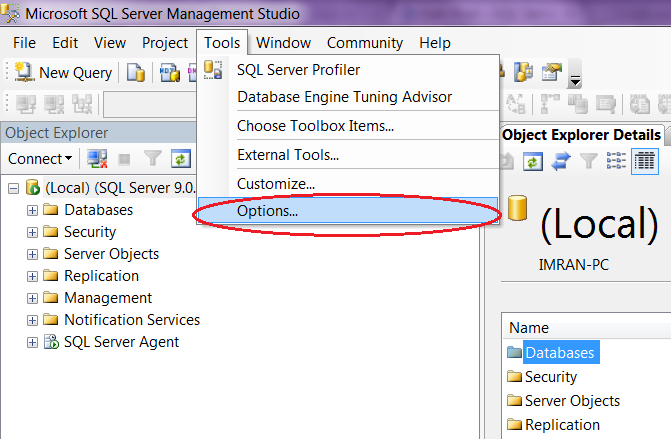
The solution is very simple. Just Select Tools >> Options >> Text Editor >> Plain text >> General >> and uncheck the Apply Cut or Copy commands to blank lines when there is no selection.

As shown in the pictures below.

copy blank lines1.2

copy blank lines1.1

Now, you can again proceed with the above three steps and it will not copy the blank line even if you do it by mistake.

Let me know if you face this problem in real world and its solution.

Reports are the backbone for each and every application and most of the reports are designed using SQL Server Reporting or crystal report in dot net applications. But most of these reports are usually exported by end users in excel for further processing and in most cases we spend a lot of time to design and develop those reports in SSRS or Crystal. So is there a short cut ?

Certainly. You can populate the data in excel directly from SQL Server and prepare the same report in few minutes.

Lets do it step by step.

Step 1 :
In the first step you need to create a table or view, that you will be using in the excel for reporting.
For this demonstration, we will use an already created view namely “vEmployee” in the AdventureWorks2012.
You can download this AdventureWorks2012 database from here.

Step 2 :
Open excel 2010 and select Data tab and then click on From Other Sources and select From SQL Server, as shown in the picture below.

SQL excel connectivity1.1

Step 3 :
Once you click on From SQL Server, it will open a Data Connection wizard. In this wizard, you need to enter SQL Server credentials and click NEXT, as shown in the picture below.

SQL excel connectivity1.2

Step 4 :
Now, you are in the database and table/view selection window. Just select the appropriate database and table or view and click NEXT, as shown in the picture below.

SQL excel connectivity1.3

Step 5 :
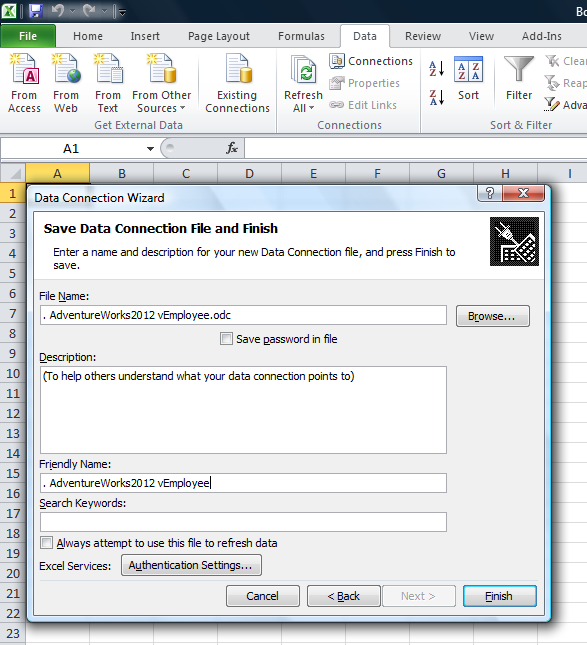
This is the last window of Data connection wizard, where you need to save the connection and click FINISH.

SQL excel connectivity1.4

Step 6 :
After that you need to select format (Table, Pivot Table Report, Pivot Chart and Pivot Table Report) of data in excel and where (Existing sheet, new worksheet) to place the data. Lets select a table and the existing sheet from the options.

SQL excel connectivity1.5

Step 7 :
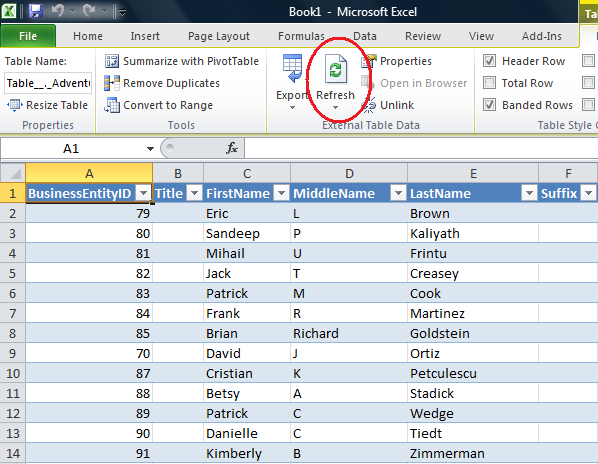
Now, we have the data and beauty is that, whenever you press refresh button, excel refreshes the data from SQL Server and displays the up to date data in excel. Now, you can do pivot and other reporting stuff with this data in few minutes.

SQL excel connectivity1.6

Conclusion :

This tool usually saves a lot of time in developing complex reports. I usually recommend people to prepare some templates of these reports and whenever there is a requirement, just refresh the data and send it to end users.

Let me know if you have implemented this technique in real world.

The %S_MSG ‘%ls’ is not supported with memory optimized tables. is one of the new error messages in SQL Server Hekaton. This error message is related to Memory optimized tables feature, a new type of table shipped with SQL Server Hekaton.

Let’s discuss this in detail:
Message Number: 10770

Severity : 16

Error Message: The %S_MSG ‘%ls’ is not supported with memory optimized tables.

Error Generation:
Let me create a sample memory optimized table and insert few records in it to demonstrate this error.

USE Sample_DB
GO
CREATE TABLE tbl_sample
(
[ID] INT NOT NULL PRIMARY KEY NONCLUSTERED HASH
WITH (BUCKET_COUNT = 100000),
[Name] VARCHAR(50) NOT NULL
) WITH (MEMORY_OPTIMIZED = ON, DURABILITY = SCHEMA_AND_DATA)
GO

INSERT INTO tbl_sample ([ID],[Name]) VALUES (1,'raresql-1')
GO
INSERT INTO tbl_sample ([ID],[Name]) VALUES (2,'raresql-2')
--OUTPUT

Given below is the script that I tried to execute but it resulted with the following error :

TRUNCATE TABLE tbl_sample
--OUTPUT

Msg 10770, Level 16, State 102, Line 17
The statement ‘TRUNCATE TABLE’ is not supported with memory optimized tables.

Ooopps…… I am unable to execute it.

Resolution:
Memory optimized tables does not support truncate statement, So, instead of truncate you can use delete statement for memory optimized tables.

Lets rewrite the above statement using delete. Given below is the script.

USE Sample_DB
GO
DELETE FROM tbl_sample
--OUTPUT

(2 row(s) affected)

Lets browse the table and view either the records are deleted or not.

USE Sample_DB
GO
SELECT * FROM tbl_sample
--OUTPUT

truncate memory optimized table 1.1

Memory optimized table is a new feature introduced in SQL Server Hekaton.  As it is new for all of us, I am doing my research with different aspects of memory optimized table. In this article, we will create an identity field in the memory optimized table.

Given below is the script that we usually use to implement identity in the disk based table (normal table). Lets try the same script for memory optimized table.

USE hkNorthwind
GO
CREATE TABLE tbl_sample
(
[ID] integer identity(1,1) not null primary key nonclustered hash
with (bucket_count = 1024),
[Name] varchar(200) not null
) WITH (MEMORY_OPTIMIZED = ON)
GO
--OUTPUT

Msg 10771, Level 16, State 8, Line 3
The feature ‘identity column’ is not yet implemented with memory optimized tables.

Oooops.. I am unable to create identity column in memory optimized table.

So, how can we create an identity column in memory optimized table ? Here comes the SEQUENCE object solution to the rescue.

Let me create an identity column in memory optimized table in sequential steps.

Step 1 :
First of all, you need to create a memory optimized table without any identity column.
Given below is the script.

USE hkNorthwind
GO
CREATE TABLE tbl_sample
(
[ID] integer not null primary key nonclustered hash
with (bucket_count = 1024),
[Name] varchar(200) not null
) WITH (MEMORY_OPTIMIZED = ON)
GO
--OUTPUT

Step 2 :
Once you have created the memory optimized table, create a Sequence object.

USE hkNorthwind
GO
CREATE SEQUENCE [Seq_Sample]
AS [int]
START WITH 1
INCREMENT BY 1
MINVALUE 1
MAXVALUE 1000
GO

Step 3 :
Insert the records using sequence in the memory optimized table.
Given below is the script.

USE hkNorthwind
GO
INSERT INTO tbl_sample ([ID],[Name])
VALUES (NEXT VALUE FOR [Seq_Sample],'raresql-1')
GO
INSERT INTO tbl_sample ([ID],[Name])
VALUES (NEXT VALUE FOR [Seq_Sample],'raresql-2')
GO

Step 4 :
Just browse the table and check whether identity is implemented or not.

USE hkNorthwind
GO
SELECT * FROM tbl_sample
GO
--OUTPUT

identity_field_for_memory_optimized_table.1.1

Note : You can download the hkNorthwind database from here.

Reference : MSDN

Recently, I was working on a legacy database and I came across an issue where I had a full file path of a document but the file name was not separated / isolated from the file path.

Let me create a sample to demonstrate it.

USE Tempdb
GO
CREATE TABLE tbl_Sample
(
[ID] INT,
[File Path] VARCHAR(200)
)
GO
INSERT INTO tbl_Sample ([ID],[File Path])
VALUES (1,'C:\Users\imran\Documents\worksheet.xlsx')

INSERT INTO tbl_Sample ([ID],[File Path])
VALUES (2,'C:\Users\imran\image.png')

INSERT INTO tbl_Sample ([ID],[File Path])
VALUES (3,'C:\Users\imran\Documents\Document.doc')
GO

Given below is a script that separates file name from file path.

SELECT
[ID]
,[File Path]
,SUBSTRING([File Path],LEN([File Path])
- CHARINDEX('\',REVERSE([File Path]))+2,LEN([File Path]))
AS [File Name]
FROM tbl_Sample
GO
--OUTPUT

extractfilename.1.1

In my earlier article, I explained how to create memory optimized table. However, once I created memory optimized tables, I came across a problem segregating the disk based tables, file tables & memory optimized tables.

SQL Server Hekaton comes to the rescue with an addition of a field(column) namely is_memory_optimized in sys.tables (system table) which facilitates segregation. Given below is the script.

USE hkNorthwind
GO
SELECT
object_id
, name  As [Table Name]
,(CASE WHEN is_filetable=0 AND is_memory_optimized=0
THEN 'DISK BASED TABLE'
WHEN is_filetable=1
THEN 'FILE TABLE'
WHEN is_memory_optimized=1
THEN 'MEMORY OPTIMIZED TABLE' END)
AS [Table Type]
FROM sys.tables
--OUTPUT

memoryoptimizedtables1.1

Note : You can download the hkNorthwind database from here.

Let me know if you know a better solution.