Feeds:
Posts
Comments

In my previous article, I wrote a script to disable all index of any particular database or you can disable any particular category (NONCLUSTERED COLUMNSTORE INDEXES ,HEAP, CLUSTERED INDEX, NONCLUSTERED INDEX, XML INDEX, SPATIAL INDEX) index as well. Given below is the script that can rebuild (enable) all indexes of any particular database or can rebuild (enable) any particular category index as well.

CREATE PROCEDURE dbo.[REBUILD_ALL_INDEXES_PROC]
@Type int
AS
BEGIN
DECLARE @Schema_TableName nvarchar(max)
DECLARE @Index_Type int
DECLARE @String varchar(max)
DECLARE @Fillfactor VARCHAR(3)
SET @Fillfactor=80

DECLARE IndexCursor CURSOR FOR

Select scma.[name] + '.'
+ Quotename(tbl.name) as [Schema_TableName]
,i.type
from sys.tables AS tbl
INNER JOIN sys.indexes AS i
ON (i.index_id > 0 AND i.is_hypothetical = 0)
AND (i.object_id=tbl.object_id)
INNER JOIN sys.schemas AS scma
ON tbl.schema_id=scma.schema_id
Where tbl.type='U' AND ((1=(CASE
WHEN @Type is Null THEN 1 ELSE 0 END)
OR i.type = @Type))
Order By scma.[name] + '.' + tbl.name

OPEN IndexCursor
FETCH NEXT FROM IndexCursor INTO @Schema_TableName,@Index_Type

WHILE @@FETCH_STATUS = 0
BEGIN
IF @Index_Type=6
BEGIN
--To rebuild columnstore index only
SET @String = 'ALTER INDEX ALL ON ' + @Schema_TableName +
' REBUILD;'
END
ELSE
BEGIN
--To rebuild other indexes
SET @String = 'ALTER INDEX ALL ON ' + @Schema_TableName +
' REBUILD WITH (FILLFACTOR = ' + @Fillfactor + '
, SORT_IN_TEMPDB = ON, STATISTICS_NORECOMPUTE = ON);'
END
Print @String
EXEC (@String)
FETCH NEXT FROM IndexCursor INTO @Schema_TableName,@Index_Type
END
CLOSE IndexCursor
DEALLOCATE IndexCursor
END
GO
--SYNTAX
--EXEC dbo.[REBUILD_ALL_INDEXES_PROC] Index type

--TO REBUILD NONCLUSTERED COLUMNSTORE INDEXES ONLY
USE AdventureWorks2012
GO
EXEC dbo.[REBUILD_ALL_INDEXES_PROC] 6

-- TO REBUILD HEAP ONLY
USE AdventureWorks2012
GO
EXEC dbo.[REBUILD_ALL_INDEXES_PROC] 0
GO
-- TO REBUILD CLUSTERED INDEX ONLY
USE AdventureWorks2012
GO
EXEC dbo.[REBUILD_ALL_INDEXES_PROC] 1
GO
-- TO REBUILD NONCLUSTERED INDEX ONLY
USE AdventureWorks2012
GO
EXEC dbo.[REBUILD_ALL_INDEXES_PROC] 2
GO
-- TO REBUILD XML INDEX ONLY
USE AdventureWorks2012
GO
EXEC dbo.[REBUILD_ALL_INDEXES_PROC] 3
GO
-- TO REBUILD SPATIAL INDEX ONLY
USE AdventureWorks2012
GO
EXEC dbo.[REBUILD_ALL_INDEXES_PROC] 4
GO
--TO REBUILD ALL INDEXES
USE AdventureWorks2012
GO
EXEC dbo.[REBUILD_ALL_INDEXES_PROC] NULL
GO

If you would like to post any most frequent DML (Data manipulation language) transaction except Select statement in any Columnstore Index owned table, it will generate an error. (I shall post the error details in my upcoming post). You must therefore disable/ drop columnstore index before posting any DML (Data manipulation language). Given below is the script that disables all indexes with respect to category (NONCLUSTERED COLUMNSTORE, HEAP, CLUSTERED INDEX, NONCLUSTERED INDEX, XML INDEX, SPATIAL INDEX). Also, it can disable ALL indexes of any particular databases.

CREATE PROCEDURE dbo.[Disable_ALL_INDEXES_PROC]
@Type int
AS
BEGIN
DECLARE @Schema_TableName nvarchar(max)
DECLARE @String varchar(max)
DECLARE IndexCursor CURSOR FOR

Select scma.[name] + '.'
+ Quotename(tbl.name) as [Schema_TableName]
from sys.tables AS tbl
INNER JOIN sys.indexes AS i
ON (i.index_id > 0 AND i.is_hypothetical = 0)
AND (i.object_id=tbl.object_id)
INNER JOIN sys.schemas AS scma
ON tbl.schema_id=scma.schema_id
Where tbl.type='U' AND ((1=(CASE
WHEN @Type is Null THEN 1 ELSE 0 END)
OR i.type = @Type))
Order By scma.[name] + '.' + tbl.name

OPEN IndexCursor
FETCH NEXT FROM IndexCursor INTO @Schema_TableName

WHILE @@FETCH_STATUS = 0
BEGIN
SET @String = 'ALTER INDEX ALL ON ' + @Schema_TableName + ' DISABLE;'
Print @String
EXEC (@String)
FETCH NEXT FROM IndexCursor INTO @Schema_TableName
END
CLOSE IndexCursor
DEALLOCATE IndexCursor
END
GO
--SYNTAX
--EXEC dbo.[Disable_ALL_INDEXES_PROC] Index type

--TO DISABLE NONCLUSTERED COLUMNSTORE INDEXES ONLY
USE AdventureWorks2012
GO
EXEC dbo.[Disable_ALL_INDEXES_PROC] 6

-- TO DISABLE HEAP ONLY
USE AdventureWorks2012
GO
EXEC dbo.[Disable_ALL_INDEXES_PROC] 0
GO
-- TO DISABLE CLUSTERED INDEX ONLY
USE AdventureWorks2012
GO
EXEC dbo.[Disable_ALL_INDEXES_PROC] 1
GO
-- TO DISABLE NONCLUSTERED INDEX ONLY
USE AdventureWorks2012
GO
EXEC dbo.[Disable_ALL_INDEXES_PROC] 2
GO
-- TO DISABLE XML INDEX ONLY
USE AdventureWorks2012
GO
EXEC dbo.[Disable_ALL_INDEXES_PROC] 3
GO
-- TO DISABLE SPATIAL INDEX ONLY
USE AdventureWorks2012
GO
EXEC dbo.[Disable_ALL_INDEXES_PROC] 4
GO
--TO DISABLE ALL INDEXES
USE AdventureWorks2012
GO
EXEC dbo.[Disable_ALL_INDEXES_PROC] NULL
GO

Few days ago, I was working on a client database and faced some issues with ColumnStore index and to fix those issue I had to develop certain tools. Given below is the list of tools I developed :

  1. How to find all columnstore indexes with column name and datatype in a particular database ?
  2. How to disable all columnstore indexes in a particular database ?
  3. How to rebuild all columnstore indexes in a particular database ?
  4. How to drop all columnstore indexes in a particular database ?

Given below is the script of  “How to find all columnstore indexes with column name and datatype in a particular database? ”  This script not only works for columnstore indexes but also gives the list of all indexes of any particular database as well.

CREATE PROCEDURE dbo.[SEARCH_LIST_OF_ALL_INDEXES_PROC]
@Type int
AS
BEGIN
;WITH CTE AS (
SELECT TBL.object_id AS [Object ID]
, schema_name(schema_id) AS [Schema Name]
, tbl.name AS [Table Name]
, i.name AS [Index Name]
, i.type AS [Index type]
, i.type_desc AS [Index Desc]
, clmns.name AS [Column Name]
, styps.name AS [Type Name]
FROM
sys.tables AS tbl
INNER JOIN sys.indexes AS i
ON (i.index_id > 0 and i.is_hypothetical = 0)
AND (i.object_id=tbl.object_id)
INNER JOIN sys.index_columns AS ic
ON (ic.column_id > 0 and (ic.key_ordinal > 0
OR ic.partition_ordinal = 0
OR ic.is_included_column != 0))
AND (ic.index_id=CAST(i.index_id AS int)
AND ic.object_id=i.object_id)
INNER JOIN sys.columns AS clmns
ON clmns.object_id = ic.object_id
AND clmns.column_id = ic.column_id
INNER JOIN sys.systypes AS styps
ON clmns.system_type_id=styps.type
WHERE ((1=(CASE WHEN @Type is Null THEN 1 ELSE 0 END)
OR i.type = @Type)))
--To convert all datatypes into one row
SELECT [Object ID]
, [Schema Name]
, [Table Name]
, [Index Name]
, [Index Desc]
, STUFF((SELECT ', ' + [Column Name] + '(' + [Type Name] + ')'
FROM CTE AS CTE1
WHERE CTE1.[Object ID]= CTE2. [Object ID]
FOR XML PATH('')),1,1,'') as [Column Name with datatype]
FROM CTE AS CTE2
GROUP BY
[Object ID]
,[Schema Name]
,[Table Name]
,[Index Name]
,[Index Desc]
ORDER BY [Object ID],[Schema Name],[Table Name]
END
GO
-- LIST OF NONCLUSTERED COLUMNSTORE INDEX
USE AdventureWorks2012
GO
EXEC dbo.[SEARCH_LIST_OF_ALL_INDEXES_PROC] 6
GO
-- LIST OF HEAP
USE AdventureWorks2012
GO
EXEC dbo.[SEARCH_LIST_OF_ALL_INDEXES_PROC] 0
GO
-- LIST OF CLUSTERED INDEX
USE AdventureWorks2012
GO
EXEC dbo.[SEARCH_LIST_OF_ALL_INDEXES_PROC] 1
GO
-- LIST OF NONCLUSTERED INDEX
USE AdventureWorks2012
GO
EXEC dbo.[SEARCH_LIST_OF_ALL_INDEXES_PROC] 2
GO
-- LIST OF XML INDEX
USE AdventureWorks2012
GO
EXEC dbo.[SEARCH_LIST_OF_ALL_INDEXES_PROC] 3
GO
-- LIST OF SPATIAL INDEX
USE AdventureWorks2012
GO
EXEC dbo.[SEARCH_LIST_OF_ALL_INDEXES_PROC] 4
GO
-- LIST OF ALL INDEX
USE AdventureWorks2012
GO
EXEC dbo.[SEARCH_LIST_OF_ALL_INDEXES_PROC] NULL
GO

Result : List of all index
listofallindex1.2

Result : List of all NON-CLUSTERED COLUMNSTORE INDEX
listofallindex1.3

Shall post other related tools (how to disable, rebuild and drop columnstore indexes) in my upcoming posts.

EXECUTE statement failed because its WITH RESULT SETS clause specified %d result set(s), but the statement only sent %d result set(s) at run time is one of the new error messages seen in SQL Server 2012. This error message is due to the invalid use of new feature EXEC WITH RESULT SETS.

Let’s discuss this in detail:
Message Number: 11536

Severity : 16

Error Message: EXECUTE statement failed because its WITH RESULT SETS clause specified %d result set(s), but the statement only sent %d result set(s) at run time.

Error Generation:

Let me create a sample stored procedure to generate this error.

Create Procedure UDP_Resultset
As
Select 'A' as [First Letter]
Select 'B' as [Second Letter]
GO
EXEC UDP_Resultset

exec resultset1.1

You can see that the above stored procedure is executed successfully and it has two result sets.
Lets try to execute it with WITH RESULT SETS clause.

EXEC UDP_Resultset
WITH RESULT SETS
(([1st Letter] varchar(50)
)
,([2nd Letter] varchar(50)
)
,([3rd Letter] varchar(50)
)
);
--OUTPUT
Msg 11536, Level 16, State 1, Line 1
EXECUTE statement failed because its WITH RESULT SETS clause specified 3 result set(s), but the statement only sent 2 result set(s) at run time.

Ooops…… I am unable to execute it properly. It returned the two result sets and the error message.

errormsg11536.1.1

Resolution:
Why this error ? Because, the above stored procedure returns two result sets but we defined WITH RESULT SETS clause for three result sets. Lets rewrite the script and define two result sets (The same number of result sets returned by stored procedure) to avoid this error.

EXEC UDP_Resultset
WITH RESULT SETS
(([1st Letter] varchar(50)
)
,([2nd Letter] varchar(50)
));
--OUTPUT

exec resultset1.3

Conclusion :
Remember, whenever you use any stored procedure WITH RESULT SETS clause, make sure you use exactly the same number of result set returned by stored procedure to avoid such errors.

How to calculate the number of days in a year ? Was a question I came across and began with my usual research for the solution. Given below are few methods.

Method 1 :
In this method, I calculated the no of days in a year using the days difference between 1 Jan of the current year and the next year.
Given below are the scripts.

--This method will work on SQL Server 2005 and above.
DECLARE @year AS INT
SET @year=2012
Select DATEDIFF(DAY,DATEADD(YEAR,@year-1900,0)
,DATEADD(YEAR,@year-1900+1,0)) AS [TOTAL NO OF DAYS]
GO
--This technique is same as above but using new datefromparts
--function introduced in SQL Server 2012.
--This technique will work in SQL Server 2012 and above.

DECLARE @Year INT =2012
SELECT DATEDIFF(DAY,DATEFROMPARTS(@Year,1,1)
, DATEFROMPARTS(@year+1,1,1)) AS [TOTAL NO OF DAYS]
GO

Method 2 :
In this method, I checked whether February had 28 days or 29. Obviously, if 29 days it means total no of days in a year is 366 else 365.
Given below are the scripts.

--This method will work on SQL Server 2005 and above.
DECLARE @year AS INT
SET @year=2012
SELECT (Case When Day(DATEADD(YEAR,@year-1900,0)+59)=29
Then 366 else 365 end) AS [TOTAL NO OF DAYS]
GO
--This technique is same as above but using new datefromparts and
--EOMONTH functions introduced in SQL Server 2012.
--This technique will work in SQL Server 2012 and above.
DECLARE @year AS INT
SET @year=2012
SELECT (Case When  DAY(EOMONTH(DATEFROMPARTS(@Year,2,1)))=29
Then 366 else 365 end) AS [TOTAL NO OF DAYS]

Method 3 :
In this method, I checked the day of last date of the year e.g 31st Dec 2012.

--This method will work on SQL server 2005 and above.
DECLARE @year AS INT
SET @year=2012
Select DATEPART(dy,(DATEADD(YEAR,@year-1899,0)-1))
AS [TOTAL NO OF DAYS]

--This technique is same as above but using new datefromparts
--functions introduced in SQL Server 2012.
--This technique will work in SQL Server 2012 and above.
DECLARE @year AS INT
SET @year=2012
Select DATEPART(dy,DATEFROMPARTS(@Year,12,31))
AS [TOTAL NO OF DAYS]

Conclusion :
We have multiple ways to calculate the number of days but I recommend to use the Method 3, as it has shortest way to calculate the number of days in a year.

Let me know if you have a better way to achieve it.

I have been using sys.dm_exec_requests for quite a long time and I have developed some tools to store certain request information using this dynamic management view. In the SQL Server 2012, sys.dm_exec_requests has a breaking change, which I realized once I deployed my tools in SQL Server 2012 and I was unsuccessful. Let me explain why and how did I fixed it.
Given below is the script taken from one of the tools that is developed using sys.dm_exec_requests.

Let me explain it step by step.
Step 1 :
Lets create a table (On SQL Server 2008 and 2012) to demonstrate it.

use tempdb
GO
CREATE TABLE [dbo].[dm_exec_requests_temp](
[session_id] [smallint] NOT NULL,
[status] [nvarchar](30) NOT NULL,
[blocking_session_id] [smallint] NULL,
[command] [nvarchar](16) NOT NULL,
[wait_type] [nvarchar](60) NULL,
[wait_time] [int] NOT NULL,
[wait_resource] [nvarchar](256) NOT NULL,
[transaction_id] [bigint] NOT NULL
) ON [PRIMARY]
GO
--OUTPUT

Command(s) completed successfully.

Step 2 :
Insert / Select records in the above temporary table in SQL Server 2005/2008.

Insert into dm_exec_requests_temp
SELECT session_id ,status ,blocking_session_id, command
,wait_type ,wait_time ,wait_resource
,transaction_id
FROM sys.dm_exec_requests
GO
Select * from dm_exec_requests_temp
--OUTPUT

sys.dm_exec_requests1.1

Step 3 :
Insert / Select records in the above temporary table in SQL Server 2012.

Insert into dm_exec_requests_temp
SELECT session_id ,status ,blocking_session_id, command
,wait_type ,wait_time ,wait_resource
,transaction_id
FROM sys.dm_exec_requests
GO
Select * from dm_exec_requests_temp
--OUTPUT

Msg 8152, Level 16, State 13, Line 1
String or binary data would be truncated.
The statement has been terminated.

Oooops……………
It generated an error.

Step 4:
The above script executed successfully in SQL Server 2005/2008 but failed in SQL Server 2012. The reason behind above error is sys.dm_exec_requests has a column namely command. In SQL Server 2005/2008 the data type of command column was nvarchar(16) but it has been changed to nvarchar(32) in SQL Server 2012. As you can see, I created the column command in temporary table with nvarchar(16) datatype.

Step 5:
To resolve above error, you need to change the data type of command column in temporary table (Step 1) from nvarchar(16) to nvarchar(32) and insert records again.

Alter table dbo.dm_exec_requests_temp Alter column [command] nvarchar(32)

Conclusion :
In SQL Server 2012, sys.dm_exec_requests has changed the data type of column “Command” from nvarchar(16) to nvarchar(32). Remember to implement this data type change effects to avoid such errors.

Reference : MSDN

There are various methods to find table across the database but I was keen on a solution to find a table across the database and if the table is not available in any database then the script must mention so.

Given below is the solution designed with the help of a sys.tables(system table).
Note : This solution is compatible with SQL SERVER 2005 and above.

Create Procedure Search_Table_Across_Databases_Proc
-- Script Name : Sp_Search_Table_Across_Databases
-- Script Type : Search Tables Across all SQL Server databases.
-- Developed By  : Muhammad Imran
-- Date Created: 25 Mar 2013
@TableName nvarchar(Max)
As
BEGIN
DECLARE @SQL nvarchar(MAX)     --Declare variable to store dynamic query result
DECLARE @DB_NAME nvarchar(200) --Declare variable to store Database name

SET @SQL=''

--Create table to store the result of each database
CREATE TABLE #SearchResult
(
[DB_Name] nvarchar(max),
[Table Name] nvarchar(max),
[Status] varchar(50)
)

--Declare cusrsor to loop across all databases
DECLARE DB_Cursor CURSOR FOR
--Pick the list of all database
SELECT QUOTENAME([name]) from sys.databases order by [name]

OPEN DB_Cursor
FETCH NEXT FROM DB_Cursor INTO @DB_NAME

WHILE @@FETCH_STATUS = 0
BEGIN
--In this dynamic query, two select statements are built because
--one statement will check the unavailability and the
--second statement will check the availability of the
--tables in the database and insert the result in the #SearchResult table

SET @SQL= 'Insert into #SearchResult
SELECT ''' + @DB_NAME + ''' as [Database Name],'''',''Not Available''
from ' + @DB_NAME + '. sys.tables
Where [name] =''' + @TableName + ''' Having Count(*)=0
UNION ALL
SELECT ''' + @DB_NAME + ''' as [Database Name],[name],''Available''
from ' + @DB_NAME + '.sys.tables
Where [name] =''' + @TableName + ''' Group By [name]
Having Count(*)>0'

EXEC(@SQL)

FETCH NEXT FROM DB_Cursor INTO @DB_NAME
END
CLOSE DB_Cursor
DEALLOCATE DB_Cursor
--We can browse the table to view the results
Select * from #SearchResult Order by [DB_Name],[Table Name]
END
GO
--Syntax
--EXEC Search_Table_Across_Databases_Proc 'Table Name'
--Example
EXEC Search_Table_Across_Databases_Proc 'employee'
--OUTPUT

searchtables1.1-1

Backup and restore are two major parts of any DBA’s job and this part should be done efficiently. In order to do it efficiently, DBA’s should take backups in such a way that makes their life easier in case of any failure. But we need to remember that we have different types of backup (Full, Differential, Log) and at the time of failure we must use a correct path (Sequence) to restore all data successfully.

Before SQL Server 2012, DBA’s should manually control all these aspects for restore. But in SQL Server 2012, a solution came namely “Recovery Adviser”, which can show you the timeline graphically and advise you how to restore it efficiently and also you can define your own best possible path of restore as well.

Lets discuss Recovery Adviser step by step in detail.

Step 1 :
Lets create table and insert few records in it to test.

use test_db
Go
Create table test
(
[ID] int,
[Name] nvarchar(50)
)
Go
Insert into test Values(1,'Imran')

Step 2 :
Take a full backup of test_db database.

BACKUP DATABASE [Test_DB] TO DISK = N'G:\DBBackup\test_DB_Full'
WITH NOFORMAT, NOINIT, NAME = N'Test_DB-Full Database Backup'
, SKIP, NOREWIND, NOUNLOAD, STATS = 10
GO

Step 3 :
Insert one more record and take a differential backup of test_db database.

use Test_DB
GO
insert into test values(2,'Bob')


BACKUP DATABASE [Test_DB] TO DISK = N'G:\DBBackup\test_DB_Differential'
WITH DIFFERENTIAL , NOFORMAT, NOINIT,
NAME = N'Test_DB-Differential Database Backup'
, SKIP, NOREWIND, NOUNLOAD, STATS = 10

Step 4 :
Insert one more record and take a transaction log backup of test_db database.

use Test_DB
GO
insert into test values(3,'John')


BACKUP LOG [Test_DB] TO DISK = N'G:\DBBackup\test_DB_Log'
WITH NOFORMAT, NOINIT, NAME = N'Test_DB-Transaction Log Backup'
, SKIP, NOREWIND, NOUNLOAD, STATS = 10

Step 5 :
We took three different types (Full, Differential, Transaction) of backup and now we can recover the database in case of any failure but how ? In earlier version we need to keep a track of backups as to which backup we took, at what time, in what sequence etc etc. But SQL Server 2012 “Recovery adviser”, absorbs all such worries and will handle it efficiently. Lets go to restore window to see what is inside this “Recovery adviser”.

In the restore screen, you can find a new button namely “Timeline” and the list of backups that we took earlier in the same sequence with lots of additional information that can help you recover your database.

DRA1.1

Step 6 :
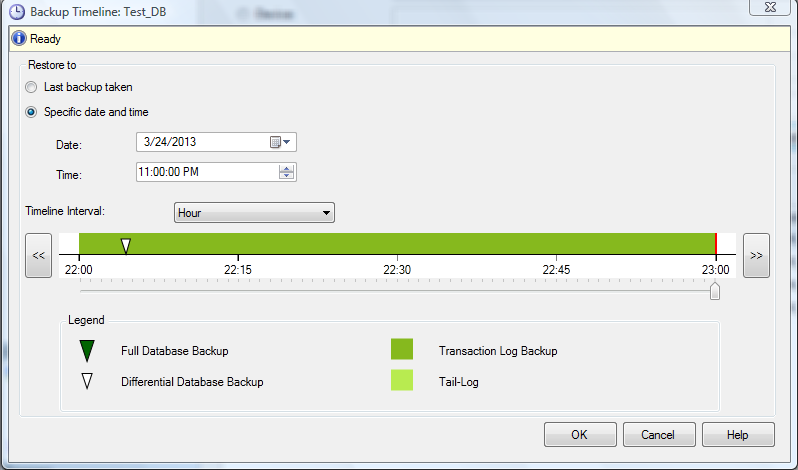
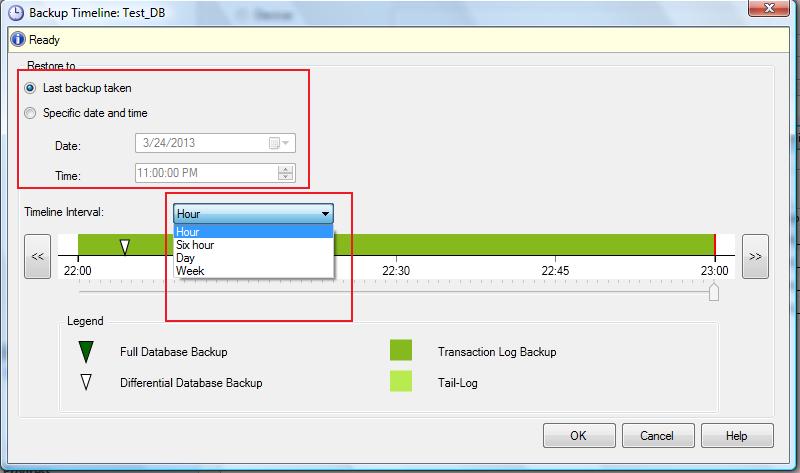
Click on the timeline button and you will be more than impressed to view the new timeline (on the basis of Hour, Six Hour, Day, Week) of backup. In this screen you have two options to restore the backup.

  • Last backup taken
  • Specific date and time

From the first option, you can restore on the basis of last backup. But sometime if you need to recover any particular transaction, you can restore at any point of time from option 2 as well.
DRA1.3

DRA1.2

Conclusion :
Database recovery adviser is a very handy tool shipped with SQL Server 2012. It helps you to restore your backup at any point of time with the graphical representation such as when and what type of backup you took and how can you restore it efficiently in case of any failure. This will resolve a lot of backup handling issues, for example, to maintain a sequence and to restore in a best possible path as well.

The culture parameter ‘%.*ls’ provided in the function call is not supported is one of the new error messages shipped with SQL Server 2012. This error message is some how related to Culture & Format, a new string function shipped with SQL Server 2012 as well.

Let’s discuss this in detail:
Message Number: 9818

Severity : 16

Error Message: The culture parameter ‘%.*ls’ provided in the function call is not supported.

Error Generation:

Given below is the script that I tried to execute but it gave me this error.

SELECT FORMAT (Getdate() ,'dddd, MMMM dd, yyyy hh:mm:ss tt','e-US')
AS [English Culture]

Msg 9818, Level 16, State 1, Line 3
The culture parameter ‘e-US’ provided in the function call is not supported.
Ooopps…… I am unable to execute it.

errormsg9818.1.1

Resolution:
Sometimes, the error is either due to typo or lack of knowledge of exact name of the culture. Make sure whenever culture Info is being used, correct culture name is used.
Given below is the script that works fine because the exact culture name of “English – United States” is en-US NOT  e-US.

SELECT FORMAT (Getdate() ,'dddd, MMMM dd, yyyy hh:mm:ss tt','en-US')
AS [English Culture]
--OUTPUT

English Culture
———————————–
Friday, March 22, 2013 12:30:35 AM

(1 row(s) affected)

errormsg9818.1.2
Conclusion :

Remember, whenever you use culture name , make sure you are using exact/correct culture name.

I have been using exist() function for a long time. This is very handy when we need to check the existence of any data in the xml document. There is also a bug related to this function when it comes to NULL but this bug is fixed in SQL Server 2012.

Let me explain it with examples.
Example 1 :
Create the given below script in ealier version of SQL Server (2005 & 2008)

DECLARE @xmltest XML;
SET @xmltest = null;
SELECT COUNT(*) as [T_Count] WHERE @xmltest.exist('/raresql') = 0;
--OUTPUT

T_Count
———–
1

(1 row(s) affected)

Ooopps…… The expected result is 0 because ‘/raresql’ doesn’t exist in the @xmltest but it returned 1 .

Example 2 :
Lets create the same sample in SQL Server 2012 and view the output.

DECLARE @xmltest XML;
SET @xmltest = null;
SELECT COUNT(*) as [T_Count] WHERE @xmltest.exist('/raresql') = 0;
--OUTPUT

T_Count
———–
0

(1 row(s) affected)

The expected result is 0 because ‘/raresql’ doesn’t exist in the @xmltest and as expected the query returned 0 as well.

Conclusion :
The behavior issue with exist() function on xml datatype is fixed in SQL Server 2012. If the SQL Server is upgraded from earlier version to 2012 and if some scripting is added to correct this behavior in the earlier version, then these scripts should be removed.

Reference : MSDN