Feeds:
Posts
Comments

Posts Tagged ‘SQL Server 2012’

In my earlier articles, I wrote about how to insert buit-in code snippet in SQL Server script. But sometimes due to the requirements, we need to create our own custom snippet. Once you create the custom snippet(s) , you need to register these snippets, because without registration you cannot use in the SQL Server Query editor.

There are two ways two register the code snippet. Given below are the details.

Method 1 :
In this method, you can add folder having code snippet file(s). The advantage of this method is that you do not need to do one by one code snippet files.
Let me explain it step by step.

Step 1 :
In this step, browse the Tools menu and select the Code Snippet Manager as shown in the picture below.

how_to_register.1.1

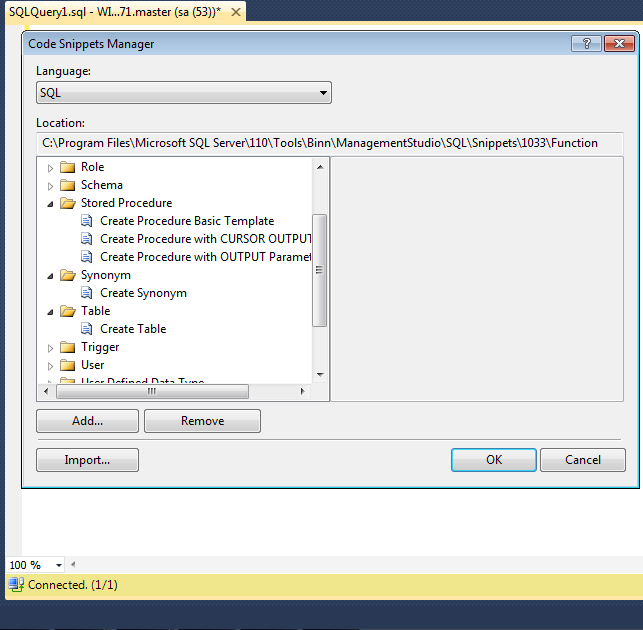
It will open the code snippet manager as shown in the picture below.
how_to_register.1.2

Step 2 :
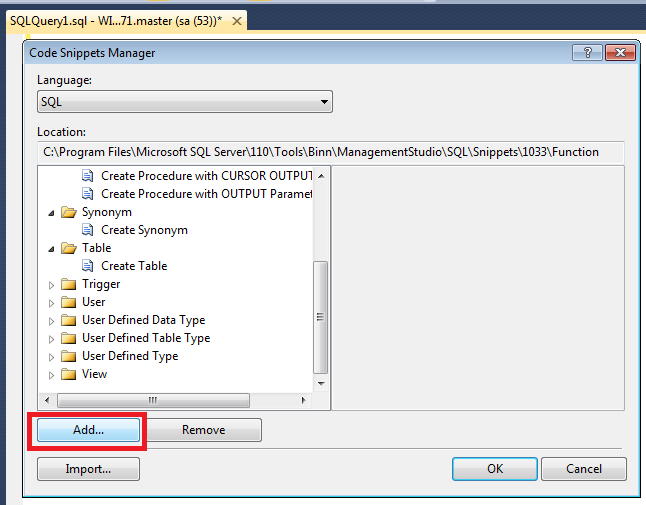
As you can see above, multiple built-in folders and snippet files for standard objects code snippets are available in the Code Snippet Manager. Now, you need to add custom folder and snippet files in the Code snippet Manager. Click on the Add.. button as shown in the picture below.
how_to_register.1.3

Step 3 :
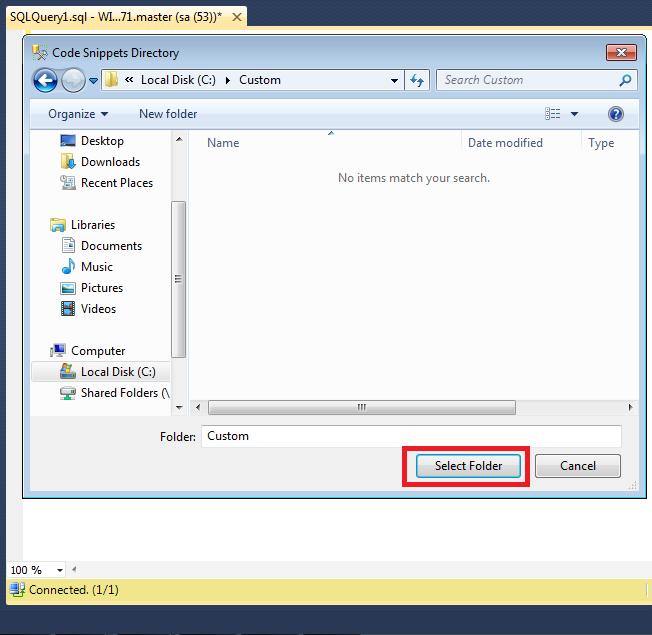
Once you click on the Add.. button, it will open the files explorer, now you need to select the folders having snippet files.You cannot select an individual file using Add.. button. Just to explain this registration, I created one folder namely Custom and placed few code snippet file in it. Once you select the folder click on Select Folder button as shown in the picture below.
how_to_register.1.4

Step 4 :
Now, you can see that custom folder and snippet files are registered and added in the Code Snippet Manager as shown in the picture below.

how_to_register.1.5

Method 2 :
In this method you can add multiple files into any custom folders.
Let me explain this method step by step.

Step 1 :
This step will be same as method 1.

Step 2 :
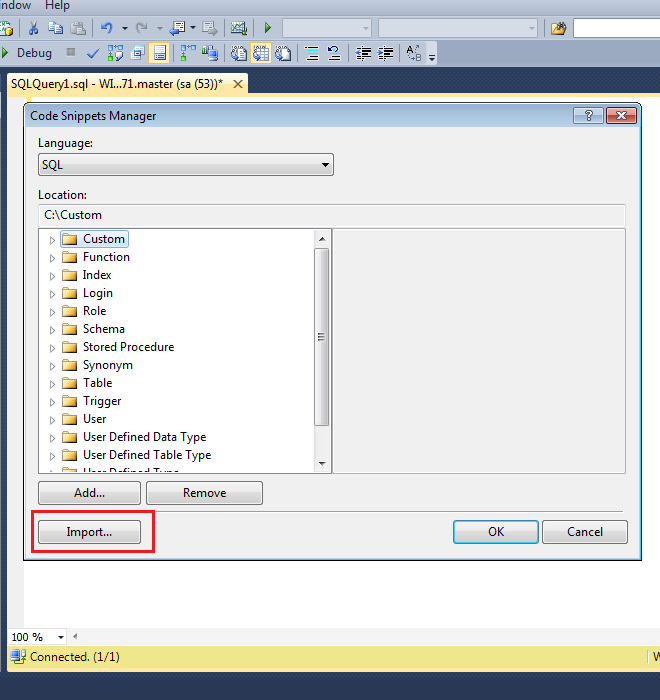
Once you are in the Code Snippet Manager, click on Import button as shown in the picture below.
how_to_register.1.6

Step 3 :
Once you click on Import button, it will open an explorer and allow you to select code snippet file(s).
Once you selected the file(s), click on Open button as shown in the picture below.
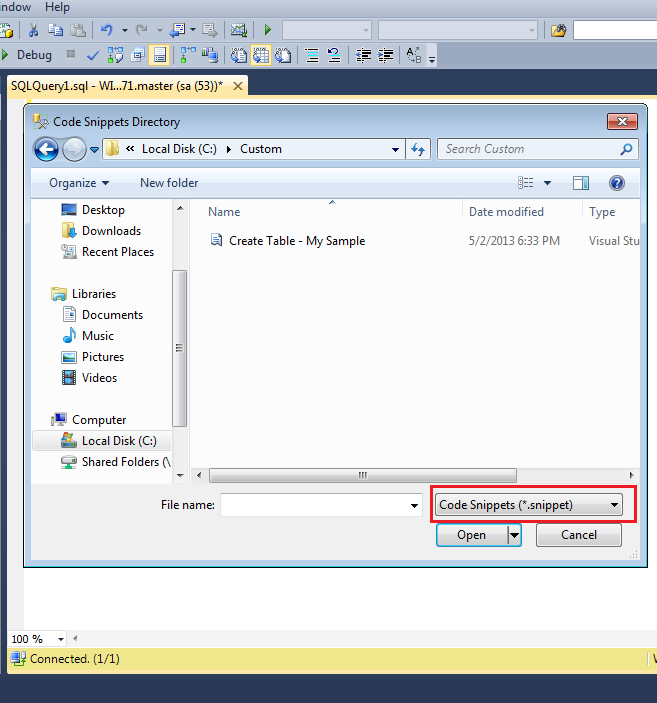
how_to_register.1.7

Step 3 :
Once you select the code snippet file(s), it will open an another import window and ask in which custom folder you want to add this file(s) as shown in the picture below.

how_to_register.1.8

Step 4 :
Once you select any custom folder for the code snippet file(s), click Finish button. The snippet file(s) will be available in that custom folder as shown in the image below.

how_to_register.1.9

Reference : MSDN

Read Full Post »

Whenever you work on legacy data, you usually expect some sort of data in incorrect data types, but of course with the compatibility. Recently, I migrated one of my client’s data from legacy system to SQL Server 2012 and I came across an issue where the client had a date in varchar field and the data had been placed in dd/mm/yyyy format in that field. The data type had to be changed from varchar to datetime. Lets try to convert it from dd/mm/yyyy (varchar) to datetime.

Given below is the script.

DECLARE @Varchar_Date varchar(11)
SET @Varchar_Date='31/12/2012'
SELECT CONVERT(datetime,@Varchar_Date)
--OUTPUT

Msg 242, Level 16, State 3, Line 3
The conversion of a char data type to a datetime data type resulted in an out-of-range datetime value.

Ooopsss, you cannot convert it directly. I continued with my research. Finally resolved it. Given below is the solution.

Solution :
In this solution, we will use TRY_PARSE function introduced in SQL Server 2012. Given below is the script.

--This script is compatible with SQL Server 2012 and above.
DECLARE @Varchar_Date as varchar(11)
SET @Varchar_Date='31/12/2013'
SELECT TRY_PARSE(@Varchar_Date AS DATETIME USING 'en-GB')
As [Result]
--OUTPUT

Result
———————–
2013-12-31 00:00:00.000

(1 row(s) affected)

Let me know if you came across this issue and resolved it in a better way.
Note : For the earlier versions of SQL Servers, you can convert it like this.

Read Full Post »

Stored procedure is one of the frequently used objects in the SQL Server. The error message we are about to discuss in this article is linked with stored procedure and its parameters. Let me explain the error message and its solution.

Message Number: 119

Severity : 15

Error Message: Must pass parameter number %d and subsequent parameters as ‘@name = value’. After the form ‘@name = value’ has been used, all subsequent parameters must be passed in the form ‘@name = value’.

Error Generation:
Let me execute a stored procedure and pass its parameter values.

USE AdventureWorks2012
GO
sp_describe_first_result_set @tsql =N'
SELECT object_id,name,type_desc
FROM sys.tables
WHERE object_id=@objectid'
,N'@objectid int'
--OUTPUT

Msg 119, Level 15, State 1, Line 1
Must pass parameter number 2 and subsequent parameters as ‘@name = value’. After the form ‘@name = value’ has been used, all subsequent parameters must be passed in the form ‘@name = value’.

Ooopps…… I am unable to execute a simple stored procedure.

Resolution:
The reason behind this error is, we passed first parameter with the parameter name and its value (@tsql) but we did not pass second parameter with parameter name & its value. Instead, we just passed the second parameter value in the stored procedure. So what is the solution ?
Given below are two methods.

Method 1 :
In this method, you must pass all parameter name(s) along with the value(s). I generally recommend this method because it helps you debug any error (misplacement of parameters & its values) in the parameters quickly.
Given below is the script.

USE AdventureWorks2012
GO
sp_describe_first_result_set @tsql =N'
SELECT object_id,name,type_desc
FROM sys.tables
WHERE object_id=@objectid'
, @params =N'@objectid int'
--OUTPUT

errormessage119.1.1

Method 2 :
In this method you should not pass any parameter name along with the value. Just pass the parameter values separated by comma. I do not recommend this method because it puts you in trouble if you have a lot of parameters in a stored procedure and you need to debug any error in the parameters.
Given below is the script.

USE AdventureWorks2012
GO
sp_describe_first_result_set N'
SELECT object_id,name,type_desc
FROM sys.tables
WHERE object_id=@objectid'
, N'@objectid int'
--OUTPUT

errormessage119.1.1

Conclusion :
Remember, whenever you pass parameter(s) to any stored procedure, make sure that you pass the parameter name along with the values.

Read Full Post »

A couple of month ago, I migrated one of my client’s data from SQL Server earlier versions to SQL Server 2012. The most important part was, I changed all the identity columns of the tables from identity to sequence in the entire database, here is the solution. But another important aspect that I did not discuss is that, whenever you migrate or create a new sequence column make sure that it is not be changeable like identity columns. In the identity column it is implemented by default but in sequence column, you must implement it. But how ?

First of all let me update an identity column of a table to show how identity columns are prevented from being changed (by default). Given below is the script.

--This script is compatible with SQL Server 2005 and above.
USE AdventureWorks2012
GO
UPDATE HumanResources.Department
SET [DepartmentID]=17
WHERE [DepartmentID]=16
--OUTPUT

Msg 8102, Level 16, State 1, Line 1
Cannot update identity column ‘DepartmentID’.

Solution :

By default, sequence columns are not prevented from being changed, you need to manually control this aspect. Let me show you the solution step by step.

Step 1 :
Let me create a table to demonstrate the solution.

USE tempdb
GO
--DROP TABLE tbl_sample_Seq
--GO
CREATE TABLE tbl_sample_Seq
(
[ID] int,
[Name] varchar(50)
)
GO

Step 2 :
Once you created the table, create a sequence object to insert [ID]s in the table.

USE tempdb
GO
--DROP SEQUENCE [dbo].[Seq_Student]
--GO
CREATE SEQUENCE [dbo].[Seq_Student]
AS [int]
START WITH 1
INCREMENT BY 1
MINVALUE 1
MAXVALUE 1000
GO

Step 3 :
Once you created the sequence object, insert few records using sequence object in the table. Given below is the script.

USE tempdb
GO
INSERT INTO tbl_sample_Seq VALUES (NEXT VALUE FOR [Seq_Student],'Imran')
INSERT INTO tbl_sample_Seq VALUES (NEXT VALUE FOR [Seq_Student],'Bob')
INSERT INTO tbl_sample_Seq VALUES (NEXT VALUE FOR [Seq_Student],'Alexander')
INSERT INTO tbl_sample_Seq VALUES (NEXT VALUE FOR [Seq_Student],'Hosanna')
INSERT INTO tbl_sample_Seq VALUES (NEXT VALUE FOR [Seq_Student],'William')
GO

Step 4 :
Let me browse the table and show the records that have been inserted successfully.

USE tempdb
GO
SELECT * FROM tbl_sample_Seq
GO
--OUTPUT

prevent sequence1.1

Step 5 :
Lets update the sequence column. Do not DO this step in your production database. This step is just to demonstrate the issue.

USE tempdb
GO
UPDATE tbl_sample_Seq SET [ID]=33 WHERE [ID]=3
GO
--OUTPUT

(1 row(s) affected)

Step 6 :
Ooops….in the above step the [ID] column of the table got modified. Let me create an update trigger on the [ID] column of the table, so that we can prevent sequence values from being changed. This is the most important step while implementing sequence object in a table. Do not skip it.

USE tempdb
GO
CREATE TRIGGER trg_update
ON tbl_sample_Seq
AFTER UPDATE
AS
BEGIN
SET NOCOUNT ON;

DECLARE @OldID int
DECLARE @NewID int

SELECT @OldID =[ID] FROM deleted
SELECT @NewID =[ID] FROM inserted

--Print @OldID
--Print @NewID

IF @OldID <> @NewID
BEGIN
RAISERROR('Failed', 16, 1);
ROLLBACK TRANSACTION
END
END
GO

Step 7 :
Once the update trigger has been created, lets update the sequence column ([ID]) again.

USE tempdb
GO
UPDATE tbl_sample_Seq SET [ID]=33 WHERE [ID]=3
GO
--OUTPUT

Msg 50000, Level 16, State 1, Procedure trg_update, Line 19
Failed
Msg 3609, Level 16, State 1, Line 1
The transaction ended in the trigger. The batch has been aborted.

Conclusion :
Whenever you implement sequence object in any table, make sure you create the trigger to prevent sequence values from being changed.

Let me know if you came across this issue and its solutions.

Read Full Post »

Sometimes, date formatting becomes much critical when you know that the format is not supported by the application but to gain the client’s satisfaction, you need to format as per the requirement. I recently came across a date format where I had to add st, nd, rd & th to the dates. Fortunately my client is using SQL Server 2012. So I thought of developing the solution using new functions introduced in SQL Server 2012 to reduce the code and improve the performance.
Let me create a sample to demonstrate the solution.

USE [tempdb]
GO
--DROP TABLE [dbo].[tbl_sample]
--GO
--Create a sample table
CREATE TABLE [dbo].[tbl_sample](
[ID] [int] NULL,
[Date] [date] NULL
)
GO
--Insert records in the table
INSERT INTO dbo.[tbl_sample]
SELECT 1 AS [ID] ,N'2013-08-01' AS [Date] UNION ALL
SELECT 2 AS [ID] ,N'2013-08-02' AS [Date] UNION ALL
SELECT 3 AS [ID] ,N'2013-08-03' AS [Date] UNION ALL
SELECT 4 AS [ID] ,N'2013-08-04' AS [Date] UNION ALL
SELECT 5 AS [ID] ,N'2013-08-05' AS [Date] UNION ALL
SELECT 6 AS [ID] ,N'2013-08-06' AS [Date] UNION ALL
SELECT 7 AS [ID] ,N'2013-08-07' AS [Date] UNION ALL
SELECT 8 AS [ID] ,N'2013-08-08' AS [Date] UNION ALL
SELECT 9 AS [ID] ,N'2013-08-09' AS [Date] UNION ALL
SELECT 10 AS [ID] ,N'2013-08-10' AS [Date] UNION ALL
SELECT 11 AS [ID] ,N'2013-08-11' AS [Date] UNION ALL
SELECT 12 AS [ID] ,N'2013-08-12' AS [Date] UNION ALL
SELECT 13 AS [ID] ,N'2013-08-13' AS [Date] UNION ALL
SELECT 14 AS [ID] ,N'2013-08-14' AS [Date] UNION ALL
SELECT 15 AS [ID] ,N'2013-08-15' AS [Date] UNION ALL
SELECT 16 AS [ID] ,N'2013-08-16' AS [Date] UNION ALL
SELECT 17 AS [ID] ,N'2013-08-17' AS [Date] UNION ALL
SELECT 18 AS [ID] ,N'2013-08-18' AS [Date] UNION ALL
SELECT 19 AS [ID] ,N'2013-08-19' AS [Date] UNION ALL
SELECT 20 AS [ID] ,N'2013-08-20' AS [Date] UNION ALL
SELECT 21 AS [ID] ,N'2013-08-21' AS [Date] UNION ALL
SELECT 22 AS [ID] ,N'2013-08-22' AS [Date] UNION ALL
SELECT 23 AS [ID] ,N'2013-08-23' AS [Date] UNION ALL
SELECT 24 AS [ID] ,N'2013-08-24' AS [Date] UNION ALL
SELECT 25 AS [ID] ,N'2013-08-25' AS [Date] UNION ALL
SELECT 26 AS [ID] ,N'2013-08-26' AS [Date] UNION ALL
SELECT 27 AS [ID] ,N'2013-08-27' AS [Date] UNION ALL
SELECT 28 AS [ID] ,N'2013-08-28' AS [Date] UNION ALL
SELECT 29 AS [ID] ,N'2013-08-29' AS [Date] UNION ALL
SELECT 30 AS [ID] ,N'2013-08-30' AS [Date] UNION ALL
SELECT 31 AS [ID] ,N'2013-08-31' AS [Date]

Solution :
In this solution, I used IIF & Format function introduced in SQL Server 2012.
Given below is the script.

--This script is compatible with SQL Server 2012 and above.
USE [tempdb]
GO
SELECT [ID],[Date],FORMAT([Date],'d'
+IIF(DAY([Date]) IN (1,21,31),'''st'''
,IIF(DAY([Date]) IN (2,22),'''nd'''
,IIF(DAY([Date]) IN (3,23),'''rd''','''th''')))
+' MMMM yyyy') As [Formatted Date]
FROM tbl_sample
--OUTPUT

date format to st_rd_th.1.1

Let me know if you come across such issues and the proposed solution.

Read Full Post »

In SQL Server, we usually come across a situation where we need to format values as a percentage. Usually, developers format the values as a percentage manually. But in this article, I will share a shortcut to format values as a percentage.
Before proceeding with the solution, I would like to create a sample table and data to demonstrate the formatting.

USE tempdb
GO
--DROP TABLE [dbo].[Student]
--GO
CREATE TABLE [dbo].[Student]
(
[Student ID] int,
[Student Name] [varchar](50) NOT NULL,
[Percentage] numeric(18,2)
)
GO
Insert into dbo.[Student] values (1,'Bob', 0.10)
Insert into dbo.[Student] values (2,'Alexander',0.50)
Insert into dbo.[Student] values (3,'Hosanna',0.85)
Insert into dbo.[Student] values (4,'William',0.11)
Insert into dbo.[Student] values (5,'Hulda',1.20)
Insert into dbo.[Student] values (6,'Jacoba',1.15)
GO

Solution 1 :
In this solution, we need to manually calculate the percentage and then format it. Given below is the script.

--This script is compatible with SQL Server 2000 and above.
USE tempdb
GO
SELECT [Student ID]
,[Student Name]
,[Percentage]
,CONVERT(VARCHAR(50),[Percentage]*100)+' %' AS [%] FROM dbo.Student
GO

Formatvalues1.1

Solution 2 :
In this solution, we will use a new function shipped with SQL Server 2012 namely Format. You just need to pass the values in this function and it will format values as a percentage (without any hurdles of calculations).
Given below is the script.

--This script is compatible with SQL Server 2012 and above.
SELECT [Student ID]
,[Student Name]
,[Percentage]
,FORMAT([Percentage],'p') AS [%] FROM dbo.Student
GO

Formatvalues1.1

Read Full Post »

Concatenate int and varchar is a usual problem that we face in SQL scripting and the solution is easily available over the web. But what encourages me to write this article is, we can resolve this issue using a built in function in SQL Server 2012.
Let me show you the issue that we generally face when we concatenate int and varchar. Given below is the script.

Use AdventureWorks2012
GO
SELECT [DepartmentID] + ' ' + [Name] AS [Department ID & Name]
FROM [HumanResources].[Department]
GO
--OUTPUT

Msg 245, Level 16, State 1, Line 1
Conversion failed when converting the nvarchar value ‘Document Control’ to data type smallint.

Solution 1:
In the earlier version of SQL Server, we usually use CONVERT function to convert int into varchar and then concatenate it.
Given below is the script.

Use AdventureWorks2012
GO
SELECT CONVERT(VARCHAR(5),[DepartmentID]) + ' ' + [Name]
AS [Department ID & Name]
FROM [HumanResources].[Department]
--OUTPUT

conactenate int to varchar1.1

Solution 2:
In this solution, we will use CONCAT function (a newly shipped function in SQL Server 2012) to convert int into varchar then concatenate it.
Given below is the script.

Use AdventureWorks2012
GO
SELECT CONCAT([DepartmentID] , ' ' , [Name] )
AS [Department ID & Name]
FROM [HumanResources].[Department]
--OUTPUT

conactenate int to varchar1.1

Conclusion :
I generally recommend solution 2 because as you can see that there is no difference in output between solution 1 and solution 2 but there is a remarkable difference between both solutions in performance. You can get the performance details from here.

Read Full Post »

Adding multiple files in a single filestream filegroup was a very nice & helpful feature shipped with SQL Server 2012. Now, you can easily organize your data under multiple files in the same filestream filegroup. Also, it is not necessary that you place all of them in the same location. You can place them in multiple locations to divide the load as well.

Let me create a sample database to demonstrate. Given below is the script.
Note : Before executing the below script, kindly create a Data folder in C: drive.

USE [master]
GO
CREATE DATABASE [Sample_DB]
CONTAINMENT = NONE
ON PRIMARY
(
NAME = N'Sample_DB',
FILENAME = N'C:\Data\Sample_DB.mdf',
SIZE = 500MB,
MAXSIZE = UNLIMITED,
FILEGROWTH = 10MB
),
FILEGROUP [FS] CONTAINS FILESTREAM DEFAULT
(
NAME = N'Filestream1',
FILENAME = N'C:\Data\FileStream1',
MAXSIZE = UNLIMITED
)
LOG ON
(NAME = N'Sample_DB_log'
,FILENAME = N'C:\Data\Sample_DB_log.ldf',
SIZE = 500MB,
MAXSIZE = 1GB,
FILEGROWTH = 10MB
)
GO

Let me add an additional file to the same filegroup. Given below is the script.

ALTER DATABASE [Sample_DB]
ADD FILE
(
NAME = N'Filestream2',
FILENAME = N'C:\Data\Filestream2',
MAXSIZE = 100MB
)TO FILEGROUP [FS]
GO

Lets check if the file has been created or not. Given below is the script.

Select * from sys.master_files where database_id =db_id('Sample_DB')
GO

multiplefilestream1.1

Let me know if you have done this in real world and what was the solution.

Read Full Post »

Invalid data type %.*ls in function %.*ls. is one of the new error messages in SQL Server 2012. This error message is related to PARSE function, a new conversion function shipped with SQL Server 2012.

Let’s discuss this in detail:
Message Number: 10761 

Severity : 15

Error Message: Invalid data type %.*ls in function %.*ls.

Error Generation:

Given below is the script that I tried to execute but it resulted with the following error :

SELECT PARSE(GETDATE() AS varchar(11)  USING 'en-US') AS Result;
--OUTPUT

Msg 10761, Level 15, State 2, Line 1
Invalid data type varchar in function PARSE.

Ooopps…… I am unable to execute it.

Resolution:
In the above example, I tried to parse a datetime into a varchar. First of all, I checked the syntax of PARSE function but the syntax is perfectly fine but the problem is, I used the wrong data type and that datatype is not compatible with the PARSE function.

Here is the list of compatible data types (Numeric & datetime data types) that you can use with this function.

Lets rewrite the above statement with the compatible data types using PARSE function. Given below is the script.

SELECT PARSE('2013-07-12' AS datetime USING 'en-US') AS Result;
--OUTPUT

Result
———————–
2013-07-12 00:00:00.000

(1 row(s) affected)

Conclusion :
Whenever you use PARSE function, make sure that you are using the compatible data type (Numeric & datetime data types) in it.

Read Full Post »

An invalid value was specified for argument ‘%.*ls’ for the given data type  is one of the new error messages in SQL Server 2012. This error message is related to Sequence object, a new database feature shipped with SQL Server 2012.

Lets discuss this in detail:
Message Number: 11708

Severity : 16

Error Message: An invalid value was specified for argument ‘%.*ls’ for the given data type.

Error Generation:

Given below is the script that I tried to execute but it resulted with the following error.

Use AdventureWorks2012
GO
CREATE SEQUENCE [dbo].[Seq_sample]
AS [tinyint]
START WITH 1
INCREMENT BY 1
MINVALUE 1
MAXVALUE 256
NO CACHE
GO

Msg 11708, Level 16, State 1, Line 1
An invalid value was specified for argument ‘MAXVALUE’ for the given data type.

Ooopps…… I am unable to execute it.

Resolution:
The issue is quite simple. I created the sequence object using tinyint data type and range of tinyint data type is from 0 to 255 as per MSDN. But if you observe carefully, in my above example, the maximum value of sequence object is 256 and that is more than the tinyint data type maximum range (255).

Lets rewrite the script and correct the maximum value range. It must be less than or equal to the defined data type range.

Use AdventureWorks2012
GO
CREATE SEQUENCE [dbo].[Seq_sample]
AS [tinyint]
START WITH 1
INCREMENT BY 1
MINVALUE 1
MAXVALUE 255
NO CACHE
GO

Conclusion :
Remember, whenever you create the sequence object always keep the minimum and maximum value within the range of the data type.

Let me know if you have a better solution.

Read Full Post »

« Newer Posts - Older Posts »