Feeds:
Posts
Comments

Posts Tagged ‘SQL Server 2012’

IF… ELSE clause is very handy and whenever you need to perform any conditional operation, you can achieve your results using it. But there are some limitations in IF… ELSE,  and one of the limitations is that you cannot use it in WHERE clause.

Let me demonstrate the limitations.

USE AdventureWorks2012
GO
DECLARE @City AS VARCHAR(50)
SELECT
BusinessEntityID
, FirstName
, LastName
, City
FROM [HumanResources].[vEmployee]
WHERE
IF @City IS NULL
City='Renton'
ELSE
City=@City
--OUTPUT

Msg 156, Level 15, State 1, Line 9
Incorrect syntax near the keyword ‘IF’.
Msg 102, Level 15, State 1, Line 10
Incorrect syntax near ‘City’.

Nevertheless, there are solutions which are given below:

SOLUTION 1 :
You can use CASE statement instead of IF..ELSE clause to do conditional where clause.
Given below is the script.

--This script is compatible with SQL Server 2005 and above.
USE AdventureWorks2012
GO
DECLARE @City AS VARCHAR(50)
SELECT
BusinessEntityID
, FirstName
, LastName
, City
FROM [HumanResources].[vEmployee]
WHERE City =
(CASE WHEN @City IS NULL THEN 'Renton' ELSE @City END)
ORDER BY BusinessEntityID
--OUTPUT

ifelse1.1

SOLUTION 2 :
In this solution, you can use IIF clause instead of IF..ELSE  to do conditional where clause.
Given below is the script.

--This script is compatible with SQL Server 2012 and above
USE AdventureWorks2012
GO
DECLARE @City AS VARCHAR(50)
SELECT
BusinessEntityID
, FirstName
, LastName
, City
FROM [HumanResources].[vEmployee]
WHERE City = IIF (@City IS NULL, 'Renton', @City)
ORDER BY BusinessEntityID
--OUTPUT

ifelse1.1

Read Full Post »

Problem :
Most of the time, I find developers surrounded by hundreds of scripts and frantically looking for the required file amongst the open documents.

Given blew is the screen shots :

reusedoc1.1

And also, it is near impossible that you are using all the documents at once. So, how to avoid this issue ?

Solution :
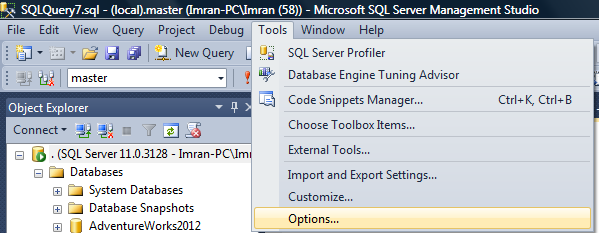
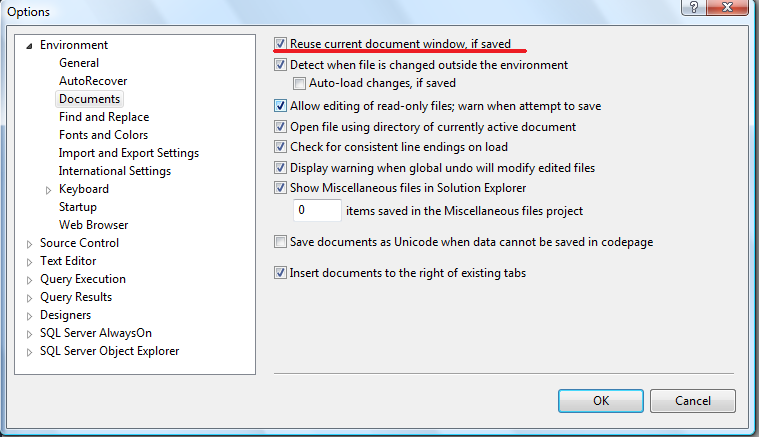
You just need to enable a very nice feature in SQL Server “Reuse current document window, if saved”. You can find this option in
Tools >> Options >> Environment >> Documents, as shown in the given below screen shot.

reusedoc1.2

reusedoc1.3

How it works :
You just need to enable this option and once it is enabled, just save the script which you have finished editing, and click on new query. So it will close the saved script (document) and open a new query in the same place.

Note : All the above screen shots are taken from SQL Server 2012.

Read Full Post »

Sequence object is one of the new additions in SQL Server 2012. It has lot of functionality plus identity column functionality as well. However, there are certain limitations and one of the limitations is, you can only create sequence object in number datatype. Given below is the screen image.

varcharsequence1.1

So, how can we create a sequence object with varchar datatype ?
Lets do it step by step.

Step 1 :
In this step, we need to create a sample table and a sequence to demonstrate it.

-- This script is compatibile with SQL Server 2012 and above.
-- CREATE TABLE
USE tempdb
GO
CREATE TABLE dbo.tbl_sample
( [ID] VARCHAR(8) ,
[Name] varchar(50)
CONSTRAINT PK_Employee_EmployeeID
PRIMARY KEY CLUSTERED ([ID] ASC) )
GO

--CREATE SEQUENCE
USE tempdb
GO
CREATE SEQUENCE dbo.Sample_Seq AS
INT START WITH 1
INCREMENT BY 1 ;
GO

Step 2 :
In this step, we need to create a default value for the [ID] column of the above table, and the default value of the [ID] column should be SEQUENCE and add a custom script to make it varchar.

Given below is the script.

-- This script is compatibile with SQL Server 2012 and above.
-- CREATE DEFAULT VALUE OF SEQUENCE
USE tempdb
GO
ALTER TABLE dbo.tbl_sample
ADD CONSTRAINT Const_Sample_Seq
DEFAULT FORMAT((NEXT VALUE FOR dbo.Sample_Seq),'CUS0000#') FOR [ID];
GO

Step 3 :
Lets insert few records into the table.

-- This script is compatibile with SQL Server 2012 and above.
-- Insert records into the table
USE tempdb
GO
INSERT INTO dbo.tbl_sample ([Name])
VALUES ('Imran'),('Bob'),('Sandra')
GO

Step 4 :
Once the data has been inserted, you can browse the table and view the [ID] column data that it is either a number or varchar only.

--Browse Table
USE tempdb
GO
SELECT * FROM tbl_sample
GO
--OUTPUT

varcharsequence1.2

Conclusion :
As you can see, the [ID] column has varchar data instead of number. Remember, whenever you need to do generate sequence in varchar format, you must format the sequence object.

Read Full Post »

SQL Server 2012 came up with lots of new exciting features along with great enhancements as well. One of the enhancements available in SQL SERVER 2012 is its audit features.

Given below are the details of the enhancements:

  • Database level auditing is available in Developer, Enterprise & Evaluation editions but its support is available in all editions of SQL Server. So, now you can take the benefit of database audit in every edition.
  • Another major issue is resolved using this new enhancement. Lets say if you setup a target directory over the network and due to any reason (e.g network failure) the target is not available, you usually lose the data in the earlier version. But in SQL Server 2012, it will automatically recover once the connection is restored.
  • Now, you can restrict the number of files to be created for audit. This will stop creating unnecessary files in the audit folder. But there’s one more option to make it unlimited. (Note: be careful when you use this option, it requires proper maintenance).
  • This feature is basically helpful for the database developers because now it gives the additional information of audit log and you can even trace whether the SQL Query is passed through application directly or via stored procedures.
  • Now you can also write audited events in the audit log using a new stored procedure (sp_audit_write) introduced in SQL Server 2012.
  •  Using user-defined audit event, now applications can write custom audit information in the log as well.
  • To keep a track of user defined events, SQL Server has provided the new catalog views (sys.server_audits, sys.server_file_audits) .
  • It is also very easy to filter the audit events before it is written into the audit files. So you can customize the type of events you would like to capture. Otherwise you need to capture unnecessary events.
  • As we discussed contained database features in my earlier article, now you can monitor contained database users & its activity as well.
  • And the last but not the least, the dialogue boxes are now available in SQL Server management studio. So not only from script but also you can get much more control than earlier version through SSMS as well.

Read Full Post »

Datetime conversion from one format to another format is sometimes very critical. You should be very careful while doing it, since even a single digit can mess up everything. Recently, I was working on a Report and I needed to convert datetime to a short date format in SQL Server. Given below are three different methods we can use to achieve it.

Method 1 :
In this method, we will convert the datetime value to short date format, using CONVERT function. Here goes the script.

--This script is compatible with SQL Server 2005 and above.
DECLARE @datetime DATETIME
SET @datetime = GETDATE()

SELECT @datetime AS [DATE TIME],
CONVERT(VARCHAR(11), @datetime, 100) AS [SHORT DATE TIME]
GO
--OUTPUT

date2shortdate

Method 2 :
In this method, we will convert the datetime to short date format using CAST function. Script given below.

--This script is compatible with SQL Server 2005 and above.
DECLARE @datetime DATETIME
SET @datetime = GETDATE()

SELECT @datetime AS [DATE TIME],
CAST(@datetime AS VARCHAR(11)) AS [SHORT DATE TIME]
GO
--OUTPUT

date2shortdate

Method 3 :
In this method, we will convert the datetime to short date format using FORMAT function. Script as follows:

--This script is compatible with SQL Server 2012 and above.
DECLARE @datetime DATETIME
SET @datetime = GETDATE()

SELECT @datetime AS [DATE TIME],
FORMAT(@datetime, 'MMM dd yyyy') AS [SHORT DATE TIME]
GO
--OUTPUT

date2shortdate

Conclusion :
As you can see, we used three different methods (CONVERT, CAST & FORMAT functions)  to convert datetime to short date format and all of them gave the same result set. Nonetheless, I usually use Method 1 (CONVERT function) because it is compatible with different versions of SQL SERVER and also the performance is better than other two.

What do you prefer? Do write to me.

Read Full Post »

Scalability and performance is one of the core areas of SQL Server that we should take care of. Today, I was searching for something on MSDN and came across an exciting page (Scalability and Performance Enhancements). In this page, I found few Scalability and Performance Enhancements shipped with SQL Server 2012. The exciting topic was flashing & encouraging me to test was FILESTREAM Filegroups Can Contain Multiple Files
The purpose of this enhancement is to increase the performance of your database because now you can place multiple files in multiple drives under one file group.

Let me create a sample to explain how you can contain multiple files in a single file group.

CREATE DATABASE [Personal_DB]
CONTAINMENT = NONE
ON PRIMARY
(
NAME = N'Personal_DB',
FILENAME = N'C:\Data\Personal_DB.mdf',
SIZE = 100MB,
MAXSIZE = UNLIMITED,
FILEGROWTH = 1MB
),
FILEGROUP [FS] CONTAINS FILESTREAM DEFAULT
(
NAME = N'Music',
FILENAME = N'C:\Data\Music',
MAXSIZE = UNLIMITED
),
(
NAME = N'Videos',
FILENAME = N'C:\Data\Videos',
MAXSIZE = 100MB
)
LOG ON
(
NAME = N'Personal_DB_log',
FILENAME = N'C:\Data\Personal_DB_log.ldf',
SIZE = 100MB,
MAXSIZE = 1GB,
FILEGROWTH = 1MB
)
GO

Do share with me if you implemented this enhancement in the real world.

Read Full Post »

Debugger plays an important role in any development platform. As much stronger the debugger is, as less consumption of debugging time. SQL Server 2012 came with the strong debugging techniques that will reduce your time and efforts as well. But how ?

Before proceeding with the explanation of debugger, let me create an example to demonstrate debugger features.

Example :

USE AdventureWorks2012
GO
DECLARE @BusinessEntityID INT,
@FirstName VARCHAR(50),
@SalesQuota NUMERIC(18,2)

DECLARE Database_Cursor CURSOR FOR

Select top 4 BusinessEntityID,FirstName,SalesQuota
from [Sales].[vSalesPerson]

OPEN Database_Cursor

FETCH NEXT FROM Database_Cursor
INTO @BusinessEntityID, @FirstName, @SalesQuota

WHILE @@FETCH_STATUS = 0
BEGIN
PRINT CONCAT(@BusinessEntityID,' '
, @FirstName,' ' ,@SalesQuota)

FETCH NEXT FROM Database_Cursor
INTO @BusinessEntityID, @FirstName, @SalesQuota
END
CLOSE Database_Cursor
DEALLOCATE Database_Cursor
GO
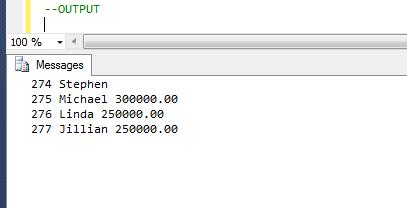
sqldebugger1.1

How to start debugger :
Before proceeding with the features, let me tell you how to run the debugger.
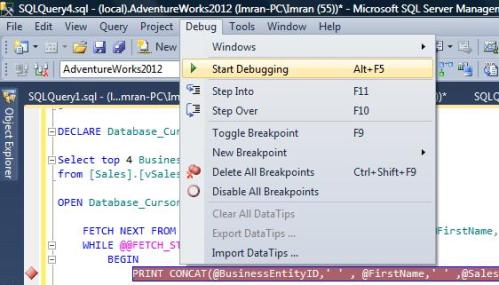
Go to Debug menu and select Start Debugging or Press (Alt +F5) as shown in the picture.
sqldebugger1.9

Let me explain the feature of debugger in detail.

Feature 1 : (Cannot put the breakpoint in any invalid location)
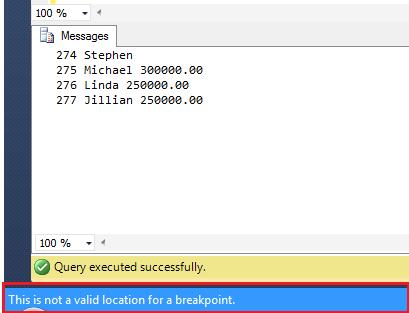
This is one of the nicest features in debugger that will stop you putting unnecessary breakpoints on INVALID location.
Given below is the screen image :
sqldebugger1.2

Feature 2 : (Define Condition)
In the earlier version of SQL Server, we could place the breakpoint but we could not put any condition inside the breakpoint.
In SQL Server 2012, you can easily put the condition inside the breakpoint, so even if there is a breakpoint and if it does not meet the criteria, it will not stop the debugger.

Let me show you step by step, how to put the breakpoint condition.

Step 1 :
First of all, place your cursor, where you need to place the breakpoint in the query editor window and PRESS F9.

Step 2 :
Right click on the breakpoint and select Condition as shown in the picture below.
sqldebugger1.4

Step 3 :
Once you get in the condition window just define the condition and PRESS OK.
Now the debugger will not stop at each and every row. It will only stop once debugger meets the criteria (@BusinessEntityID=275).
sqldebugger1.3

Feature 3 : (Delete/Disable Breakpoint)
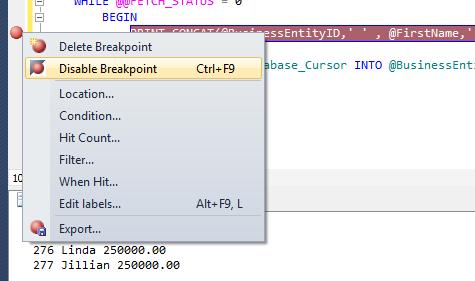
Sometime, we partially finish the debugging, so we usually delete the breakpoint from line of code we already debugged. In my recommendation, until unless you finish the debugging do not delete the breakpoint, just disable it. Both disable and delete breakpoint options are available on right click of the breakpoint, as shown in the picture below.
sqldebugger1.5

Note : You can also disable / delete all breakpoints altogether from DEBUG menu as shown in the picture below.

sqldebugger1.6

Feature 4 : (Hit Count)
Sometimes we place the condition in the breakpoint (as explained in feature 2) but we do not want to stop whenever the condition meets. Instead we want to stop debugger if breakpoint criteria meets with certain number of times. (This feature is very handy whenever you are dealing with large data.)

Let me show you step by step, how to put the hit count condition.

Step 1 :
First of all, put a breakpoint.

Step 2 :
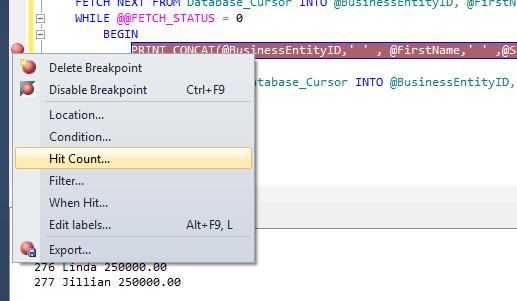
Right click on breakpoint and select Hit Count as shown in the picture below.

sqldebugger1.7

Step 3 :
Once you get inside the Hit Count window, by default it is break always but you can change it to any condition as shown in the picture below.

sqldebugger1.8

Read Full Post »

Few days ago, I was working on a report and I came across an issue wherein I had a varchar [ID] column with alphanumeric data in it but I had to display only number from this column (no strings). I provided this solution long back and you can use it here as well. But given below is the better solution to accommodate this issue.

Let me create an example to demonstrate it.

USE tempdb
GO
CREATE TABLE tbl_sample
(
[ID] INT,
[String] varchar(50)
)
GO
INSERT INTO tbl_sample VALUES (1,'RCP0001')
INSERT INTO tbl_sample VALUES (2,'TEMP0231')
INSERT INTO tbl_sample VALUES (3,'PO0999')
INSERT INTO tbl_sample VALUES (4,'SO0341')
INSERT INTO tbl_sample VALUES (5,'SUP12')
INSERT INTO tbl_sample VALUES (6,'CUST76')
INSERT INTO tbl_sample VALUES (7,'241')
INSERT INTO tbl_sample VALUES (8,'0000')
GO
SELECT * FROM tbl_sample
GO
--OUTPUT

extractnumbers1.1

Solution :
You need to use PATINDEX to get the first non numeric character location and then you can use SUBSTRING to get the all numeric values.
Given below is the script.

USE tempdb
GO
SELECT
[ID]
, [String]
, SUBSTRING([String],PatIndex('%[0-9]%',[String])
,DATALENGTH([String])) AS [Numbers]
FROM tbl_sample
GO
--OUTPUT

extractnumbers1.2

Read Full Post »

Recently, I was developing a report in a legacy application. In that application we had used SQL Server 2005 and later on migrated to SQL Server 2012. The problem I came across while developing the report was I needed the ‘year’ in two digit format. Normally the year is in four digits like 2013 but it should be in two digits only like 13 to match with the saved data in the tables.

Given below are the two different methods.
Method 1 :
In this method, we will use TWO functions (RIGHT & YEAR) to achieve it.

--This script is compatible with SQL Server 2005 and above.
DECLARE @datetime DATETIME
SET @datetime = GETDATE()
SELECT RIGHT(YEAR(@datetime),2) AS [Two digit year]
--OUTPUT

Two digit year
————–
13

(1 row(s) affected)

Method 2 :
In the second method, we will use only ONE function (FORMAT) to achieve it.

--This script is compatible with SQL Server 2012 and above.
DECLARE @datetime DATETIME
SET @datetime = GETDATE()
SELECT FORMAT(@datetime,'yy') AS [Two digit year]
--OUTPUT

Two digit year
————–
13

(1 row(s) affected)

Read Full Post »

« Newer Posts - Older Posts »