Feeds:
Posts
Comments

Posts Tagged ‘SQL Server’

SQL Server 2014 was announced a couple of weeks ago during TechEd North America Conference 2013. So, I started research about its features and I found few features very exciting to me. Given below are the details of the few features available in SQL Server 2014.

  • In-Memory OLTP : It improves the performance of database applications about 50x as compared to the normal database application. It can achieve significant performance. 
  • Enhanced In-Memory ColumnStore : Now, you can update the columnstore index (woww) , also you can apply a new option called COLUMNSTORE_ARCHIVE for higher compression and storage space savings of as much as 90 per cent in columnstore index.
  • Buffer pool extension to SDD (solid-state drives)SQL Server improved the query performance by allowing the use of non-volatile devices (e.g solid-state drives (SSDs)) to reduce usage of SQL Server memory with no risk of data loss.
  • Enhanced Query Processing : SQL queries became much faster due to the enhancement of query processing and one of the reasons why querying process became faster is, it separates querying into two steps, decision-making and execution. 
  • Enhanced Always On : Now it can support up to 8 secondaries.
  • Backup to Azure : SQL Server can take backup and restore directly to the Windows Azure Blob service.

  • Resource Governor Enhancements

    Resource Governor can provide better control and performance for different types of workloads in SQL Server applications.

  • SQL Server Audit Enhancements : Auditing became more easier because it is enabled by default and it will record each and every database activities, including database reads, with minimal impact on performance.

Let me know if I missed out any important features.

For further details, you can download given below sources:

Read Full Post »

How to insert a string value with an apostrophe (single quote) in a column is a general problem? Mostly, it happens when you insert any name with apostrophe. One of my colleagues faced this issue this morning. He had to upload a list of customers and some of the customers had apostrophe in the name and he was getting error during insertion. After a while, he emailed me stating he fixed it. So  I inquired him how he did it and I received a very interesting reply, he said he copied the name then opened the table and pasted it ;). Opsssssssss. Never try this method.

Lets now resolve it step by step.

Step 1 :
Create a sample table.

USE tempdb
GO
CREATE TABLE tbl_sample
(
[ID] INT,
[Name] VARCHAR(50)
)
GO

Step 2 :
Insert the name with apostrophe. This step is just to demonstrate the error.

USE tempdb
GO
INSERT INTO tbl_sample VALUES (1,'Irwin D'Mello')
GO
--OUTPUT

Msg 102, Level 15, State 1, Line 1
Incorrect syntax near ‘Mello’.
Msg 105, Level 15, State 1, Line 1
Unclosed quotation mark after the character string ‘)
‘.
Ooopps…… I am unable to insert it.

Step 3 :
Just replace the single apostrophe with double apostrophe and insert the record again.

USE tempdb
GO
INSERT INTO tbl_sample VALUES (1,'Irwin D''Mello')
GO
--OUTPUT

(1 row(s) affected)

Step 4 :
Lets check if the data is inserted or not.

USE tempdb
GO
SELECT * FROM tbl_sample
GO
--OUTPUT

singlequotes1.1

You can now see the name in the right format.

Conclusion :
Remember, whenever you come across such cases, just replace apostrophe (single quote) with double apostrophe (double quotes) and it works fine.

Read Full Post »

Scalability and performance is one of the core areas of SQL Server that we should take care of. Today, I was searching for something on MSDN and came across an exciting page (Scalability and Performance Enhancements). In this page, I found few Scalability and Performance Enhancements shipped with SQL Server 2012. The exciting topic was flashing & encouraging me to test was FILESTREAM Filegroups Can Contain Multiple Files
The purpose of this enhancement is to increase the performance of your database because now you can place multiple files in multiple drives under one file group.

Let me create a sample to explain how you can contain multiple files in a single file group.

CREATE DATABASE [Personal_DB]
CONTAINMENT = NONE
ON PRIMARY
(
NAME = N'Personal_DB',
FILENAME = N'C:\Data\Personal_DB.mdf',
SIZE = 100MB,
MAXSIZE = UNLIMITED,
FILEGROWTH = 1MB
),
FILEGROUP [FS] CONTAINS FILESTREAM DEFAULT
(
NAME = N'Music',
FILENAME = N'C:\Data\Music',
MAXSIZE = UNLIMITED
),
(
NAME = N'Videos',
FILENAME = N'C:\Data\Videos',
MAXSIZE = 100MB
)
LOG ON
(
NAME = N'Personal_DB_log',
FILENAME = N'C:\Data\Personal_DB_log.ldf',
SIZE = 100MB,
MAXSIZE = 1GB,
FILEGROWTH = 1MB
)
GO

Do share with me if you implemented this enhancement in the real world.

Read Full Post »

I came across with a new issue related to the legacy system. The situation is that, I have a varchar column in a table having numeric data with the currency and I need to segregate the numeric data and currency symbol. I spent sometime to figure it out and finally did it.

Before proceeding with the solution, let me create a sample to demonstrate the issue.

USE tempdb
GO
CREATE TABLE tbl_sample
(
[ID] INT,
[Curreny] VARCHAR(10)
)
GO
INSERT INTO tbl_sample VALUES (1,'£ 12.95')
INSERT INTO tbl_sample VALUES (2,'$ 20.38')
INSERT INTO tbl_sample VALUES (3,'Rs176.34')
INSERT INTO tbl_sample VALUES (4,'€58')
INSERT INTO tbl_sample VALUES (5,'¥ 33.3')
INSERT INTO tbl_sample VALUES (6,'97800')
GO
SELECT * FROM tbl_sample
GO
--OUTPUT

extractsymbols1.1

Now, lets segregate the numbers and symbols. Given below is the solution.

USE tempdb
GO
SELECT
[ID]
, [Curreny]
, LEFT([Curreny],PATINDEX('%[0-9]%',[Curreny])-1)
AS [Currency Symbol]
, SUBSTRING([Curreny],PATINDEX('%[0-9]%',[Curreny]),LEN([Curreny]))
AS [Numbers]
FROM tbl_sample
--OUTPUT

extractsymbols1.2

Read Full Post »

Sequence is one of the nice features shipped with SQL Server 2012 and it enhances a lot of identity column features and provides hands on a lot of things that identity does not support. But on the other hand it has its own limitations as well. Today, I was working on one of the user defined functions in my application using SEQUENCE and I came across an error.

Let me explain this error in detail :

Message Number: 11724

Severity : 15

Error Message: An expression that contains a NEXT VALUE FOR function cannot be passed as an argument to a table-valued function.

Error Generation:

Let me create a User defined function and a Sequence to demonstrate this error.

USE tempdb
GO

--Create a sequence
CREATE SEQUENCE [dbo].[Seq_Sequence]
AS [int]
START WITH 1
GO

--Create a user defined function
CREATE FUNCTION [dbo].[fn_Sample]
(
@SequenceID INT
)
RETURNS TABLE AS RETURN
(
SELECT 'RCP' + TRY_Convert(varchar(10),@SequenceID) AS [ID]
, GETDATE() AS [CREATION DATETIME]
)
GO

The purpose to create the Sequence object and the user defined function is basically I want to get the new ID from sequence and pass it to the user defined function to FORMAT and return it with creation date time.
It seems very simple, lets do it.

USE tempdb
GO
SELECT * FROM [dbo].[fn_Sample]
(
NEXT VALUE FOR [Seq_Sequence]
)
--OUTPUT

Msg 11724, Level 15, State 1, Line 1
An expression that contains a NEXT VALUE FOR function cannot be passed as an argument to a table-valued function

Ooopps…… I am unable to execute it.

Resolution:

The resolution is very simple, NEVER pass the NEXT VALUE of sequence directly to table value user defined function. Just introduce a variable, store the NEXT VALUE in it and pass the variable into the user defined function.
Lets do it.

USE tempdb
GO
DECLARE @ID AS BIGINT = NEXT VALUE FOR [Seq_Sequence]
SELECT * FROM [dbo].[fn_Sample](@ID)
--OUTPUT

errormsg11724.1

Conclusion :

Remember, whenever you use SEQUENCE object with any other object always be careful about the limitations of sequence object.

Read Full Post »

Debugger plays an important role in any development platform. As much stronger the debugger is, as less consumption of debugging time. SQL Server 2012 came with the strong debugging techniques that will reduce your time and efforts as well. But how ?

Before proceeding with the explanation of debugger, let me create an example to demonstrate debugger features.

Example :

USE AdventureWorks2012
GO
DECLARE @BusinessEntityID INT,
@FirstName VARCHAR(50),
@SalesQuota NUMERIC(18,2)

DECLARE Database_Cursor CURSOR FOR

Select top 4 BusinessEntityID,FirstName,SalesQuota
from [Sales].[vSalesPerson]

OPEN Database_Cursor

FETCH NEXT FROM Database_Cursor
INTO @BusinessEntityID, @FirstName, @SalesQuota

WHILE @@FETCH_STATUS = 0
BEGIN
PRINT CONCAT(@BusinessEntityID,' '
, @FirstName,' ' ,@SalesQuota)

FETCH NEXT FROM Database_Cursor
INTO @BusinessEntityID, @FirstName, @SalesQuota
END
CLOSE Database_Cursor
DEALLOCATE Database_Cursor
GO

sqldebugger1.1

How to start debugger :
Before proceeding with the features, let me tell you how to run the debugger.
Go to Debug menu and select Start Debugging or Press (Alt +F5) as shown in the picture.

sqldebugger1.9

Let me explain the feature of debugger in detail.

Feature 1 : (Cannot put the breakpoint in any invalid location)
This is one of the nicest features in debugger that will stop you putting unnecessary breakpoints on INVALID location.
Given below is the screen image :

sqldebugger1.2

Feature 2 : (Define Condition)
In the earlier version of SQL Server, we could place the breakpoint but we could not put any condition inside the breakpoint.
In SQL Server 2012, you can easily put the condition inside the breakpoint, so even if there is a breakpoint and if it does not meet the criteria, it will not stop the debugger.

Let me show you step by step, how to put the breakpoint condition.

Step 1 :
First of all, place your cursor, where you need to place the breakpoint in the query editor window and PRESS F9.

Step 2 :
Right click on the breakpoint and select Condition as shown in the picture below.
sqldebugger1.4

Step 3 :
Once you get in the condition window just define the condition and PRESS OK.
Now the debugger will not stop at each and every row. It will only stop once debugger meets the criteria (@BusinessEntityID=275).
sqldebugger1.3

Feature 3 : (Delete/Disable Breakpoint)
Sometime, we partially finish the debugging, so we usually delete the breakpoint from line of code we already debugged. In my recommendation, until unless you finish the debugging do not delete the breakpoint, just disable it. Both disable and delete breakpoint options are available on right click of the breakpoint, as shown in the picture below.

sqldebugger1.5

Note : You can also disable / delete all breakpoints altogether from DEBUG menu as shown in the picture below.

sqldebugger1.6

Feature 4 : (Hit Count)
Sometimes we place the condition in the breakpoint (as explained in feature 2) but we do not want to stop whenever the condition meets. Instead we want to stop debugger if breakpoint criteria meets with certain number of times. (This feature is very handy whenever you are dealing with large data.)

Let me show you step by step, how to put the hit count condition.

Step 1 :
First of all, put a breakpoint.

Step 2 :
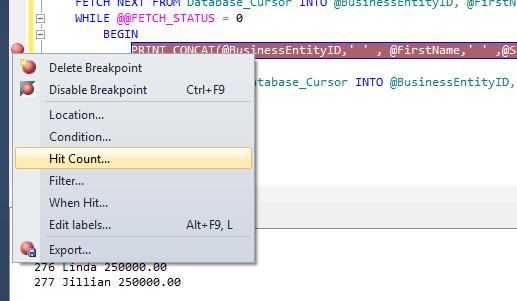
Right click on breakpoint and select Hit Count as shown in the picture below.

sqldebugger1.7

Step 3 :
Once you get inside the Hit Count window, by default it is break always but you can change it to any condition as shown in the picture below.

sqldebugger1.8

Read Full Post »

Recently, I was developing a report in a legacy application. In that application we had used SQL Server 2005 and later on migrated to SQL Server 2012. The problem I came across while developing the report was I needed the ‘year’ in two digit format. Normally the year is in four digits like 2013 but it should be in two digits only like 13 to match with the saved data in the tables.

Given below are the two different methods.
Method 1 :
In this method, we will use TWO functions (RIGHT & YEAR) to achieve it.

--This script is compatible with SQL Server 2005 and above.
DECLARE @datetime DATETIME
SET @datetime = GETDATE()
SELECT RIGHT(YEAR(@datetime),2) AS [Two digit year]
--OUTPUT

Two digit year
————–
13

(1 row(s) affected)

Method 2 :
In the second method, we will use only ONE function (FORMAT) to achieve it.

--This script is compatible with SQL Server 2012 and above.
DECLARE @datetime DATETIME
SET @datetime = GETDATE()
SELECT FORMAT(@datetime,'yy') AS [Two digit year]
--OUTPUT

Two digit year
————–
13

(1 row(s) affected)

Read Full Post »

We usually see this kind of problem in a legacy system wherein the datatype of a table’s column is something but the data stored in it belongs to some different datatypes. And most of the time these datatypes are compatible with each other so it does not create any issues at the time of insertion. But, when it comes to data manipulation you feel handicapped. However, you can resolve these issues using some scripting. But you must remember that before doing any manipulation you must know the actual data is in which datatype (small integer, integer, bigint, numeric, decimal, money, float) and according to that, you need to convert and then manipulate it.

Lets resolve this issue step by step :

Step 1 :
Let me create a table to demonstrate the solution.

USE tempdb
GO
CREATE TABLE tbl_sample
(
[ID] INT,
[Column_varchar] VARCHAR(10)
)
GO

Step 2 :
Insert some dummy data to perform aggregate SUM on column ([Column_varchar]). Given below is the script.

USE tempdb
GO
INSERT INTO tbl_sample VALUES (1,12345)
INSERT INTO tbl_sample VALUES (2,1.234)
INSERT INTO tbl_sample VALUES (3,'a64')
INSERT INTO tbl_sample VALUES (4,'1,200')

Step 3 :
Browse the data from the table and check the datatypes. Given below is the script.

USE tempdb
GO
SELECT * FROM tbl_sample

sumvarcharcolumn1.1

Step 4 :
As you can see there is a ‘,’ (Comma) in ID no 4 in the table. If you find cases like this, you need to use money datatype to convert.
Given below is the script to convert it.

USE tempdb
GO
SELECT
(CASE WHEN ISNUMERIC([Column_varchar])=1
THEN CONVERT(MONEY
,[Column_varchar]) ELSE 0 END)
AS [Converted to Numeric]
FROM tbl_sample
GO

sumvarcharcolumn1.3

Step 5 :
Once you convert it into any number datatype after that just perform any aggregate function on it. Lets SUM the column ([column varchar]) in the table (tbl_sample).
Given below is the script.

SELECT
SUM((CASE WHEN ISNUMERIC([Column_varchar])=1
THEN CONVERT(MONEY,[Column_varchar]) ELSE 0 END)
)
AS [Converted to Numeric]
FROM tbl_sample
GO

sumvarcharcolumn1.2

Read Full Post »

I received an inquiry from one of my blog readers “Mr. Arun” and he wanted to store more than 8,000 characters in a column. Generally the length of  a varchar(Max) data type consider it as a 8000 characters and above. So I suggested him to use VARCHAR(MAX). But even if you use VARCHAR(MAX), you should be careful while working on more than 8000 characters.
Let me explain the solution step by step.

Step 1 :
Let me create a table to demonstrate the solution.

USE tempdb
GO
CREATE TABLE tbl_sample
(
[ID] INT,
[Column_varchar] VARCHAR(MAX)
)
GO

Step 2 :
Insert 10,000 characters in the column ([Column_varchar]). Given below is the script.

USE tempdb
GO
INSERT INTO tbl_sample VALUES (1, REPLICATE('A',10000))

Step 3 :
Check the length of column ([Column_varchar]) to see if 10,000 characters are inserted or not. Given below is the script.

USE tempdb
GO
SELECT DATALENGTH([Column_varchar]) AS [Column Length]
FROM tbl_sample
--OUTPUT

morethan80001.1

Step 4 :
Ooopps…… It only inserted 8000 characters even though I passed 10,000. Basically the solution is that you need to cast the characters as VARCHAR(MAX) before insertion and insert it again.

USE tempdb
GO
INSERT INTO tbl_sample VALUES
(2, REPLICATE(CAST('A' AS VARCHAR(MAX)),10000))

Step 5 :
Check the length of column ([Column_varchar]) AGAIN and see whether 10,000 characters are inserted or not. Given below is the script.

USE tempdb
GO
SELECT DATALENGTH([Column_varchar]) AS [Column Length]
FROM tbl_sample
--OUTPUT

morethan80001.2

As you can see, this time it has inserted more than 8000 characters.

Conclusion :
Remember, whenever you are planning to insert more than 8000 characters to any varchar column, you must cast it as varchar(max) before insertion.

Read Full Post »

« Newer Posts - Older Posts »