Feeds:
Posts
Comments

Posts Tagged ‘SQL Server’

sp_describe_first_result_set cannot be invoked when SET STATISTICS XML or SET STATISTICS PROFILE is on is one of the new error messages shipped with SQL Server 2012. This error message is related to sp_describe_first_result_set , a new system stored procedure shipped with SQL Server 2012 as well.

Let’s discuss this in detail:
Message Number: 11541

Severity : 16

Error Message: sp_describe_first_result_set cannot be invoked when SET STATISTICS XML or SET STATISTICS PROFILE is on

Error Generation:

Given below is the script that I tried to execute but it gave me this error.

Use AdventureWorks2012
GO
Set Statistics XML ON
Set Statistics Profile ON

EXEC sp_describe_first_result_set
@tsql =N'SELECT * FROM [HumanResources].[vEmployeeDepartment];'
,@params=NULL,@browse_information_mode=0
GO

Msg 11541, Level 16, State 1, Procedure sp_describe_first_result_set, Line 1
sp_describe_first_result_set cannot be invoked when SET STATISTICS XML or SET STATISTICS PROFILE is on.

Ooopps…… I am unable to execute it.

Msg 11541.1.1

Resolution:
Sometimes , you don’t even see given below two lines but may be you turn it ON  for another query and forget to turn it OFF.

Set Statistics XML ON
Set Statistics Profile ON

What all you need to do is just switch off XML and profile statistics. Given below is the script.

Use AdventureWorks2012
GO
Set Statistics XML OFF
Set Statistics Profile OFF
EXEC sp_describe_first_result_set
@tsql =N'SELECT * FROM [HumanResources].[vEmployeeDepartment];'
,@params=NULL,@browse_information_mode=0
GO
--OUTPUT

Msg 11541.1.2

Conclusion :
Remember, whenever you use sp_describe_first_result_set, make sure XML and profile statistics is turned OFF.

Read Full Post »

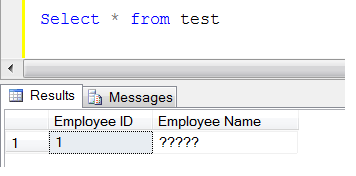
I am writing this article in response to one of my junior database developer’s questions, how to insert Arabic data in SQL table, as he had inserted few Arabic names in the table. However, once he selected the data after insertion he found ????? instead of Arabic text in the field. This is a general problem with developers when they work for multi lingual (other than English) environment.

Lets generate this issue step by step.
Step 1 :
First create a table to demonstrate it.

Create table test
(
[Employee ID] int identity(1,1),
[Employee Name] varchar(50)
)

Step 2 :
Insert Arabic text (any non-English text) into the table.

Insert into test ([Employee Name]) values('عمران')

Step 3 :
Browse the data from table.

Select * from test
--OUTPUT

insertarabictext1.1
Oooops, it became garbage (?????) 

Resolution :
Lets resolve it step by step.

Step 1 :
As you can see, the [Employee Name] (Column) has a data type of varchar, so you need to change it to nvarchar data type. Given below is the script to change it.

Alter table dbo.test Alter column [Employee Name] nvarchar(50)

Step 2 :
Insert the same record again with additional N before name.

Insert into test ([Employee Name]) values(N'عمران')
--OUTPUT

insertarabictext1.2

Step 3 :
Browse the data from table.

Select * from test
--OUTPUT

insertarabictext1.3

Conclusion :
Whenever you insert any language (other than English) text into SQL table you must check two things :

  • Data type of the field must be nvarchar.
  • Insert N before the text.

Read Full Post »

DATABASEPROPERTY (metadata function) is being discontinued since the emerge of SQL Server 2012 and it is replaced by another metadata function namely DATABASEPROPERTYEX. Both functions take parameters (database name, property name) and return property value on the basis of input parameters. But the major difference between both functions is the return type. DATABASEPROPERTY returns only int datatype while DATABASEPROPERTYEX returns the sql_variant datatype. In simple words, you cannot expect any other data type than int from DATABASEPROPERTY.
I did some research and found some additional difference that I would like to share.

Given below are the scripts, that is written for DATABASEPROPERTYEX & DATABASEPROPERTY to compare both meta data functions.

--Code for DATABASEPROPERTYEX
SELECT DATABASEPROPERTYEX('AdventureWorks2012','Collation')
AS [Collation],
DATABASEPROPERTYEX('AdventureWorks2012','ComparisonStyle')
AS [ComparisonStyle],
DATABASEPROPERTYEX('AdventureWorks2012','IsAnsiNullDefault')
AS [IsAnsiNullDefault],
DATABASEPROPERTYEX('AdventureWorks2012','IsAnsiNullsEnabled')
AS [IsAnsiNullsEnabled],
DATABASEPROPERTYEX('AdventureWorks2012','IsAnsiPaddingEnabled')
AS [IsAnsiPaddingEnabled],
DATABASEPROPERTYEX('AdventureWorks2012','IsAnsiWarningsEnabled')
AS [IsAnsiWarningsEnabled],
DATABASEPROPERTYEX('AdventureWorks2012','IsArithmeticAbortEnabled')
AS [IsArithmeticAbortEnabled],
DATABASEPROPERTYEX('AdventureWorks2012','IsAutoClose')
AS [IsAutoClose],
DATABASEPROPERTYEX('AdventureWorks2012','IsAutoCreateStatistics')
AS [IsAutoCreateStatistics],
DATABASEPROPERTYEX('AdventureWorks2012','IsAutoShrink')
AS [IsAutoShrink],
DATABASEPROPERTYEX('AdventureWorks2012','IsAutoUpdateStatistics')
AS [IsAutoUpdateStatistics],
DATABASEPROPERTYEX('AdventureWorks2012','IsCloseCursorsOnCommitEnabled')
AS [IsCloseCursorsOnCommitEnabled],
DATABASEPROPERTYEX('AdventureWorks2012','IsFulltextEnabled')
AS [IsFulltextEnabled],
DATABASEPROPERTYEX('AdventureWorks2012','IsInStandBy')
AS [IsInStandBy],
DATABASEPROPERTYEX('AdventureWorks2012','IsLocalCursorsDefault')
AS [IsLocalCursorsDefault],
DATABASEPROPERTYEX('AdventureWorks2012','IsMergePublished')
AS [IsMergePublished],
DATABASEPROPERTYEX('AdventureWorks2012','IsNullConcat')
AS [IsNullConcat],
DATABASEPROPERTYEX('AdventureWorks2012','IsNumericRoundAbortEnabled')
AS [IsNumericRoundAbortEnabled],
DATABASEPROPERTYEX('AdventureWorks2012','IsParameterizationForced')
AS [IsParameterizationForced],
DATABASEPROPERTYEX('AdventureWorks2012','IsQuotedIdentifiersEnabled')
AS [IsQuotedIdentifiersEnabled],
DATABASEPROPERTYEX('AdventureWorks2012','IsPublished')
AS [IsPublished],
DATABASEPROPERTYEX('AdventureWorks2012','IsRecursiveTriggersEnabled')
AS [IsRecursiveTriggersEnabled],
DATABASEPROPERTYEX('AdventureWorks2012','IsSubscribed')
AS [IsSubscribed],
DATABASEPROPERTYEX('AdventureWorks2012','IsSyncWithBackup')
AS [IsSyncWithBackup],
DATABASEPROPERTYEX('AdventureWorks2012','IsTornPageDetectionEnabled')
AS [IsTornPageDetectionEnabled],
DATABASEPROPERTYEX('AdventureWorks2012','LCID')
AS [LCID],
DATABASEPROPERTYEX('AdventureWorks2012','Recovery')
AS [Recovery],
DATABASEPROPERTYEX('AdventureWorks2012','SQLSortOrder')
AS [SQLSortOrder],
DATABASEPROPERTYEX('AdventureWorks2012','Status')
AS [Status],
DATABASEPROPERTYEX('AdventureWorks2012','Updateability')
AS [Updateability],
DATABASEPROPERTYEX('AdventureWorks2012','UserAccess')
AS [UserAccess],
DATABASEPROPERTYEX('AdventureWorks2012','Version')
AS [Version]
--Code for DATABASEPROPERTY
SELECT DATABASEPROPERTY('AdventureWorks2012','Collation')
AS [Collation],
DATABASEPROPERTY('AdventureWorks2012','ComparisonStyle')
AS [ComparisonStyle],
DATABASEPROPERTY('AdventureWorks2012','IsAnsiNullDefault')
AS [IsAnsiNullDefault],
DATABASEPROPERTY('AdventureWorks2012','IsAnsiNullsEnabled')
AS [IsAnsiNullsEnabled],
DATABASEPROPERTY('AdventureWorks2012','IsAnsiPaddingEnabled')
AS [IsAnsiPaddingEnabled],
DATABASEPROPERTY('AdventureWorks2012','IsAnsiWarningsEnabled')
AS [IsAnsiWarningsEnabled],
DATABASEPROPERTY('AdventureWorks2012','IsArithmeticAbortEnabled')
AS [IsArithmeticAbortEnabled],
DATABASEPROPERTY('AdventureWorks2012','IsAutoClose')
AS [IsAutoClose],
DATABASEPROPERTY('AdventureWorks2012','IsAutoCreateStatistics')
AS [IsAutoCreateStatistics],
DATABASEPROPERTY('AdventureWorks2012','IsAutoShrink')
AS [IsAutoShrink],
DATABASEPROPERTY('AdventureWorks2012','IsAutoUpdateStatistics')
AS [[IsAutoUpdateStatistics]],
DATABASEPROPERTY('AdventureWorks2012','IsCloseCursorsOnCommitEnabled')
AS [IsCloseCursorsOnCommitEnabled],
DATABASEPROPERTY('AdventureWorks2012','IsFulltextEnabled')
AS [IsFulltextEnabled],
DATABASEPROPERTY('AdventureWorks2012','IsInStandBy')
AS [IsInStandBy],
DATABASEPROPERTY('AdventureWorks2012','IsLocalCursorsDefault')
AS [IsLocalCursorsDefault],
DATABASEPROPERTY('AdventureWorks2012','IsMergePublished')
AS [IsMergePublished],
DATABASEPROPERTY('AdventureWorks2012','IsNullConcat')
AS [IsNullConcat],
DATABASEPROPERTY('AdventureWorks2012','IsNumericRoundAbortEnabled')
AS [IsNumericRoundAbortEnabled],
DATABASEPROPERTY('AdventureWorks2012','IsParameterizationForced')
AS [IsParameterizationForced],
DATABASEPROPERTY('AdventureWorks2012','IsQuotedIdentifiersEnabled')
AS [IsQuotedIdentifiersEnabled],
DATABASEPROPERTY('AdventureWorks2012','IsPublished')
AS [IsPublished],
DATABASEPROPERTY('AdventureWorks2012','IsRecursiveTriggersEnabled')
AS [IsRecursiveTriggersEnabled],
DATABASEPROPERTY('AdventureWorks2012','IsSubscribed')
AS [IsSubscribed],
DATABASEPROPERTY('AdventureWorks2012','IsSyncWithBackup')
AS [IsSyncWithBackup],
DATABASEPROPERTY('AdventureWorks2012','IsTornPageDetectionEnabled')
AS [IsTornPageDetectionEnabled],
DATABASEPROPERTY('AdventureWorks2012','LCID')
AS [LCID],
DATABASEPROPERTY('AdventureWorks2012','Recovery')
AS [Recovery],
DATABASEPROPERTY('AdventureWorks2012','SQLSortOrder')
AS [SQLSortOrder],
DATABASEPROPERTY('AdventureWorks2012','Status')
AS [Status],
DATABASEPROPERTY('AdventureWorks2012','Updateability')
AS [Updateability],
DATABASEPROPERTY('AdventureWorks2012','UserAccess')
AS [UserAccess],
DATABASEPROPERTY('AdventureWorks2012','Version')
AS [Version]

Given below is the output of both meta data functions and you can see that DATABASEPROPERTY will reveal the correct result whenever the return type of property value is int but on the other hand DATABASEPROPERTYEX will give you the result of any property value because its return type is sql_variant.
DatabaseProperty

Conclusion:
DATABASEPROPERTYEX is one of the handy metadata functions when we need to retrieve the property value on the basis of property and database name.
It also provides an additional info than DATABASEPROPERTY. Remember, DATABASEPROPERTY is discontinued in SQL Server 2012, so don’t use it in further developments. Also if you upgrade SQL Server earlier version to SQL Server 2012, change DATABASEPROPERTY to DATABASEPROPERTYEX in the script.

MSDN : Reference

Read Full Post »

In my earlier article, I wrote about different aspect of Concat function introduced in SQL Server 2012. In this article, we will compare the Concat function with the traditional concatenation techniques and analyze the performance.

Method 1 : Using ISNULL With + (String Concatenation)

Use AdventureWorks2012
GO
Select
ISNULL([firstName],'')
+ ' '
+ ISNULL([MiddleName],'')
+ ' '
+ ISNULL([LastName],'') from [HumanResources].[vEmployee]

Method 2 : Using COALESCE With + (String Concatenation)

Use AdventureWorks2012
GO
Select
COALESCE([firstName],'')
+ ' '
+ COALESCE([MiddleName],'')
+ ' '
+ COALESCE([LastName],'')
from [HumanResources].[vEmployee]

Method 3 : Using Concat function of SQL Server 2012

Use AdventureWorks2012
GO

Select
CONCAT (
[firstName]
, ' '
, [MiddleName]
, ' '
, [LastName]) from [HumanResources].[vEmployee]

All of the above methods will give you the same result sets but lets view their performance given below.

Method

Concatenation expression

CPU Time

Elapsed Time

1

ISNULL([firstName],”) + ‘ ‘+ ISNULL([MiddleName],”) + ‘ ‘ + ISNULL([LastName],”)

141 ms

2234 ms

2

COALESCE([firstName],”) + ‘ ‘ + COALESCE([MiddleName],”)  + ‘ ‘ + COALESCE([LastName],”)

187 ms

3185 ms

3

CONCAT( [firstName], ‘ ‘, [MiddleName], ‘ ‘, [LastName])

94 ms

1821 ms

Conclusion :
It is needless to stress that Concat function is much faster than the other methods.

Note : The above queries have been tested on ~100K records.

Read Full Post »

I had to migrate data from legacy system to new system and I found that we have some fields having alphanumeric data along with special character. The target was to extract the alpha numeric data from string. So, I started with web research and found few solutions but most of them are cursor based but I would like to develop it without cursor to improve the performance.

Given below is the solution.

CREATE FUNCTION dbo.[UDF_Extract_Alphanumeric_From_String]
(
@String VARCHAR(MAX) -- Variable for string
)
RETURNS VARCHAR(MAX)
BEGIN
DECLARE @RETURN_STRING VARCHAR(MAX)

; WITH  N1 (n) AS (SELECT 1 UNION ALL SELECT 1),
N2(n) AS (SELECT 1 FROM N1 AS X, N1 AS Y),
N3(n) AS (SELECT 1 FROM N2 AS X, N2 AS Y),
N4(n) AS (SELECT ROW_NUMBER() OVER(ORDER BY X.n)
FROM N3 AS X, N3 AS Y)

SELECT @RETURN_STRING=ISNULL(@RETURN_STRING,'')+ SUBSTRING(@String,Nums.n,1)
FROM N4 Nums
WHERE Nums.n<=LEN(@String) AND PATINDEX('%[0-9A-Za-z ]%',SUBSTRING(@String,Nums.n,1))>0

RETURN @RETURN_STRING
END

GO
SELECT dbo.[UDF_Extract_Alphanumeric_From_String] ('This! is a t_est s/tring a_t ra.re:s;ql') as [Result]
--OUTPUT

Result
————————————-
This is a test string at raresql

(1 row(s) affected)

Read Full Post »

LOG function is used to calculate the natural logarithm of a specified float expression and it is part of SQL Server since earlier versions of SQL Server. But in SQL Server 2012, this function is being modified and became more flexible. In the earlier versions of SQL Server, the base of log function was approximately 2.718281828 or EXP(1) and it is the default value (not editable). But in SQL Server 2012, you are allowed to set your own base value. Lets discuss its syntax and examples.

Syntax

--In SQL Server earlier versions
LOG ( float_expression )

--In SQL Server 2012
LOG ( float_expression [, base ] )

Let me explain it with simple examples :

Example 1 :
In the example 1, use LOG function with default base value.

DECLARE @variable float;
SET @variable = 10;
SELECT LOG(@variable) as [LOG with Default base value]
GO
--OUTPUT

LOG with Default base value
—————————
2.30258509299405

(1 row(s) affected)

Example 2 :
In example 2, lets provide an input base and see the results.

DECLARE @variable float;
SET @variable = 10;
SELECT LOG(@variable,EXP(1)) as [LOG with defined base value]
GO
--OUTPUT

LOG with defined base value
—————————
2.30258509299405

(1 row(s) affected)

If you observe examples 1 & 2, the result is same in both examples because by default the base value of LOG function is EXP(1).

Example 3 :
In example 3, lets pass any other value than the EXP(1) (Default value of base) and observe the result.

DECLARE @variable float;
SET @variable = 10;
SELECT LOG(@variable,EXP(2)) as [LOG with defined base value]
GO
--OUTPUT

LOG with defined base value
—————————
1.15129254649702

(1 row(s) affected

Conclusion:
In SQL Server 2012, LOG function is more flexible and gives you more control on base value but still base value is optional. So if you don’t pass base value it takes the default value (EXP(1) or approximately 2.718281828)

Read Full Post »

EXECUTE statement failed because its WITH RESULT SETS clause specified %d result set(s), and the statement tried to send more result sets than this is one of the new error messages introduced in SQL Server 2012. This error message is due to the invalid use of new feature EXEC WITH RESULT SETS.

Let’s discuss this in detail:
Message Number: 11535

Severity : 16

Error Message: EXECUTE statement failed because its WITH RESULT SETS clause specified %d result set(s), and the statement tried to send more result sets than this.

Error Generation:

Let me create a sample stored procedure to generate this error.

Create Procedure UDP_Resultset
As
Select 'A' as [First Letter]
Select 'B' as [Second Letter]
GO
EXEC UDP_Resultset

exec resultset1.1

You can view that the above stored procedure is executed successfully, and it has two result sets.

Lets try to execute it with WITH RESULT SETS clause.

EXEC UDP_Resultset
WITH RESULT SETS
(([1st Letter] varchar(50)
));
--OUTPUT

Msg 11535, Level 16, State 1, Procedure UDP_Resultset, Line 5
EXECUTE statement failed because its WITH RESULT SETS
clause specified 1 result set(s), and the statement tried
to send more result sets than this.
Ooopps…… I am unable to execute it properly. It returned the first result set and the error message.

exec resultset1.2

Resolution:
Why this error ? Because, the above stored procedure returns two result sets but we defined WITH RESULT SETS clause for only one result set. Lets rewrite the script and define two result sets (The same number of result sets returned by stored procedure) to avoid this error.

EXEC UDP_Resultset
WITH RESULT SETS
(([1st Letter] varchar(50)
)
,([2nd Letter] varchar(50)
));
--OUTPUT

exec resultset1.3

Conclusion :
Remember, whenever you use any stored procedure WITH RESULT SETS clause, make sure you use exactly the same number of result set returned by stored procedure to avoid such errors.

Read Full Post »

Mostly, there are multiple ways to write a script to perform a single task. It varies from Developers to Developers, who normally try to follow the best practice. But sometimes some standards discard from time to time (version to version). In this article, I will go through some standard formats that we used in the prior version of SQL server but does not work in SQL Server 2012. It may break your script.

Let me create a sample in SQL Server 2005/ 2008 to explain it.

USE [test]
GO
CREATE TABLE [dbo].[t_Student](
[Student ID] [int] IDENTITY(1,1) NOT NULL,
[Student Name] [nvarchar](50) NULL
)

After creating the sample table lets alter this table. But there are three different formats that you can use to alter the table in earlier version of SQL server (2005/2008)


Method 1 :
In method 1, the format to alter the table will be .Database Name.Schema.Table Name

Alter table .[test].dbo.[t_Student] Add [Contact Details] varchar(50) NULL
--OUTPUT

Command(s) completed successfully

Method 2 :
In method 2, the format to alter the table will be ..Schema.Table Name

use test
GO
Alter table ..dbo.[t_Student] Add [Date of Birth] Datetime NULL
--OUTPUT

Command(s) completed successfully

Method 3 :
In method 3, the format to alter the table will be Schema.Table Name

use test
GO
Alter table dbo.[t_Student] Add [Date of Admission] Datetime NULL
--OUTPUT

Command(s) completed successfully

All of the above methods executed successfully in SQL Server 2005/ 2008.

Lets browse the table.

Select * from t_Student

alter table 1.1

Now, lets do the same exercise in SQL Server 2012.

Method 1 :
In method 1, the format to alter the table will be .Database Name.Schema.Table Name

Alter table .[test].dbo.[t_Student] Add [Contact Details] varchar(50) NULL
--OUTPUT

Msg 117, Level 15, State 1, Line 1
The object name ‘.test.dbo.t_Student’ contains more than the maximum number of prefixes. The maximum is 2.

Method 2 :
In method 2, the format to alter the table will be ..Schema.Table Name

use test
GO
Alter table ..dbo.[t_Student] Add [Date of Birth] Datetime NULL
--OUTPUT

Msg 117, Level 15, State 1, Line 1
The object name ‘..dbo.t_Student’ contains more than the maximum number of prefixes. The maximum is 2.

Method 3 :
In method 3, the format to alter the table will be Schema.Table Name

use test
GO
Alter table dbo.[t_Student] Add [Date of Admission] Datetime NULL
--OUTPUT

Command(s) completed successfully

Conclusion :
If you are planning to upgrade your SQL Server earlier version to SQL Server 2012 or you are using SQL Server 2012, remember, it will not allow you to use methods 1 & 2. In case your are using above methods 1 & 2 in Dynamic SQL or Static SQL, it may break your script.

Reference : MSDN

Read Full Post »

I have been using Database email for a long time. This is very nice features introduced in SQL Server 2005. But when it comes to HTML formatting, you need to know a little bit HTML to format it and it takes a quite a while to format it. In this article, I will share a tip that can make your life easy and you can format even a complex HTML formatted email in few minutes.

Lets process it step by step.

Step 1 :
Mostly we receive the email format in word documents. First of all, you need to open the word document in MS word.
Sample attached Test Document 1.1.
SQL email1.1

Step 2 :
Then Go to File menu>>Save as and save it as html document.
SQL email1.2

Step 3 :
Open the saved html document, right click on it and go to view source.
SQL email1.3

Step 4 :
It will open a new window. Now you need to search for the tags namely Body and /Body and whatever text lies between both tags, just copy and paste it in the SQL query window.
SQL email1.4

Step 5 :
Now, you need to replace one single quote (‘) to two single quotes (”) in SQL query window and add single quote (‘) in the beginning and end of the text. Rest of the format will remain same.

Use msdb
GO
EXEC sp_send_dbmail @profile_name='My profile',
@recipients='mimran18@gmail.com',
@subject='Test Message with Formatted HTML',
@body_format = 'HTML' ,
@body='</pre>
<div class="WordSection1"><s>This is a TEST email</s>

<i><span style="text-decoration: underline;">This
is a TEST email</span></i>

This is a TEST email

This is a TEST
<table class="MsoTableLightListAccent1" border="1" cellspacing="0" cellpadding="0">
<tbody>
<tr>
<td valign="top" width="97"><span class="SpellE"><b>S.No</b></span><b></b></td>
<td valign="top" width="375"><b>SQL Server Versions</b></td>
</tr>
<tr>
<td valign="top" width="97"><b>1</b></td>
<td valign="top" width="375">SQL Server 2005</td>
</tr>
<tr>
<td valign="top" width="97"><b>2</b></td>
<td valign="top" width="375">SQL Server 2008</td>
</tr>
<tr>
<td valign="top" width="97"><b>3</b></td>
<td valign="top" width="375">SQL Server 2012</td>
</tr>
</tbody>
</table>
</div>
<pre>
'

Step 6 :
Now, just execute it and it will send a nice formatted HTML email.

Read Full Post »

In this article,  we will discuss how to convert user defined objects to system objects and the reason to convert. Sometimes you develop general database procedures and functions that help you perform your daily operation quickly. But the issue is you need to create all these procedures and functions in the databases and after finishing the task you need to remove it also. A few days ago during my research I found a solution and with the help of this solution you don’t need to create / remove the script again and again in all databases. The solution is an undocumented stored procedure namely sp_ms_marksystemobject . But how it works, lets discuss stepwise.

Step 1 :
Given below is the script that can give you the column name (along with comma and brackets [ ]) of any table in a particular database and later on you can use it to insert, update or select statements.

Use AdventureWorks2012
GO
Create Procedure SP_ColumnNames
@object_name nvarchar(Max)
as
Select (Case when [column_id] = 1 then ' ' else ',' end)
+ QuoteName([name]) As [Column Name]
from sys.columns
where object_id=Object_id(@Object_name)
GO

Step 2 :
Now, you need to use the same database to execute the above stored procedure.

Use AdventureWorks2012
Go
SP_ColumnNames 'Sales'

systemobjects1.1

Step 3 :
If you try to use the same procedure in another database it will not work until unless you create the same procedure there. Lets see.

Use test
GO
SP_ColumnNames 'Student'

systemobjects1.2

If you look at the above error, it says you must deploy the above stored procedure in all databases wherever you need to use it. But this is a common tool and I need to deploy it once and need to use it in all the databases at the server. The solution is available in Step 4.

Step 4 :
Simply create your user defined stored procedure in master database and convert it to system stored procedure using sp_ms_marksystemobject.

Use master
GO
Create Procedure SP_ColumnNames
@object_name nvarchar(Max)
as
Select (Case when [column_id] = 1 then ' ' else ',' end)
+ QuoteName([name]) As [Column Name]
from sys.columns
where object_id=Object_id(@Object_name)
GO
sp_ms_marksystemobject  'SP_ColumnNames'

Step 5 :
Now, you can use this stored procedure in any database in the same server without creating it in all databases.
Lets try.

Use AdventureWorks2012
Go
SP_ColumnNames 'dbo.sales'
GO
Use test
Go
SP_ColumnNames 'Student'

sytemobject1.4

Conclusion :
You can deploy your general stored procedure and function once in the master database to perform daily operations and as many times as you can use it, in as many as databases you wish, without creating the stored procedure and functions time and again.

Note : This solution is not recommended for live database servers, you can use it in the development and testing server to expedite your development and testing.

Read Full Post »

« Newer Posts - Older Posts »