Feeds:
Posts
Comments

Posts Tagged ‘SQL Server’

SQL Server assigns each object (tables, view, stored procedure, functions etc) a unique ID and that ID we call as an Object_ID. In simple words, we can say that it creates uniqueness between two objects.
In this article, we will learn how it works, what is the next counter, etc.

What will be the first object_ID in the new database ?
If you create a new object in the database, the first ID will always be 2073058421 in SQL SERVER 2005 and 245575913 in SQL SERVER 2012.
The difference between both versions is due to some new internal tables introduced in SQL SERVER 2012 and got the new ID 2073058421 (filestream_tombstone_2073058421) once you create a database in 2012.

How to get this Object_ID from SQL ?
You just need to use a function OBJECT_ID, to retrieve object ID of any object. For example :

Select Object_ID('test_table');

What will be the object_ID increment counter for user defined objects ?
It will add 16000057 + Last user defined object_ID and will give you a new ID.

What will be the object_ID increment counter for system objects ?
It varies from 1 onwards.

If we drop an object and create the same object, does SQL assign the same object_ID ?
No, SQL will assign a new ID every time.

Why some object IDs are in negative and some IDs are in positive ?

select * from sys.all_objects

If you execute above query, you can see Some IDs are in positive and some are in negative. All user defined objects are assigned a positive object ID plus system tables. Apart from these objects, the rest of the system objects are assigned negative object IDs.

All the above facts and figures can vary in different versions of SQL. If you know something new about Object_ID do share with me.

Read Full Post »

Recently, I came across with a nice question in a forum, how to mass/bulk rename sql tables. The issue was, some tables were imported from some sources but their names were not as per the database standards. Therefore standardization was required.

Let me explain this with an example :

Given below are the table names after imports :

  1. dbo.test_Item
  2. dbo.test_Purchase
  3. dbo.test_Inventory
  4. dbo.test_Sales etc.

But the table name should be like this :

  1. dbo.Item
  2. dbo.Purchase
  3. dbo.Inventory
  4. dbo.Sales etc.

SOLUTION :
Given below is the solution that will dynamically make sql statements to rename the tables. And if you execute the result set of the below query it will rename all your tables having “_” in the name.
You can use replace “_” with any other character as per the requirement.

Declare @char varchar(1)
Set @char='_'
SELECT 'EXEC sp_rename ''' + NAME +  ''', ' + ''''
+ Substring(name ,CharIndex(@char,name)+1,LEN(name)) + ''''
As [Script]
FROM dbo.sysobjects
WHERE xtype = 'U' And CharIndex(@char,name)>0
Order By [Name]
--OUTPUT

sp_rename1.1

Let me know if you have better solution.

Read Full Post »

In this article we will discuss a new error message (Window frame with ROWS or RANGE must have an ORDER BY clause) introduced in SQL SERVER 2012.

Let’s discuss it in detail:

Message Number: 10756

Severity : 15

Error Message: “Window frame with ROWS or RANGE must have an ORDER BY clause.”

Error Generation:
Let me create an example to generate this error:

USE AdventureWorks2012
GO
SELECT SalesOrderID, ProductID, OrderQty
,SUM(OrderQty) OVER (PARTITION BY SalesOrderID
--ORDER BY SalesOrderID, ProductID
ROWS BETWEEN UNBOUNDED PRECEDING AND CURRENT ROW
) AS 'total'
FROM Sales.SalesOrderDetail
Where SalesOrderID IN(43659,43664)
Order By SalesOrderID

--OUTPUT

Msg 10756, Level 15, State 1, Line 2
Window frame with ROWS or RANGE must have an ORDER BY clause.

Resolution:
In the above example, you can see, I used Window frame with ROWS in the OVER clause but forgot to provide order by clause. Remember, whenever you use Window frame with rows or range, make sure you use it along with order by clause to avoid this error.

Please let me know if you have other samples to regenerate such error.

Read Full Post »

DATETIMEOFFSETFROMPARTS is one of the important sql server functions required when we need to make date and time from offset and precision.

Let me explain its syntax, parameters, purpose and examples in detail.

Syntax :

DATETIMEOFFSETFROMPARTS ( year, month, day, hour, minute, seconds, fractions, hour_offset, minute_offset, precision )

Parameters :
@Year : A valid integer for year.
@Month : A valid integer for month range from 1-12.
@Day : A valid integer for day range from 1-31. (Depends upon the total number of days in a month)
@Hour : A valid integer for Hour range from 0-23.
@Minutes : A valid integer for Minutes range from 0-59.
@Seconds: A valid integer for Seconds range from 0-59.
@Fractions : A valid integer for Fractions range from 0-9999999.
@hour_offset : A valid integer for hour portion of the offset range from -14 – +14.
@minute_offset : A valid integer for minute portion of the offset should be 0 or 30
@Precision : A valid integer for Precision range from 0-7.

Purpose :
This function requires year, month, day, hour, minute, seconds, fractions,hour portion of offset, minute portion of offset & precision as a parameter (All parameters are mandatory) and returns a valid datetimeoffset as a result. If we pass any invalid date, time or offset parts, it will generate an error. Also if we pass NULL values to any of its parameters except Precision parameter, it returns NULL value.
Let me explain this with simple examples.

Example-1 : DATETIMEOFFSETFROMPARTS – With valid offset Parts

Declare @Year as smallint=2012
Declare @Month as smallint = 12
Declare @Day as smallint =31
Declare @Hour as int=23
Declare @Minute as int=59
Declare @Second as int=59
Declare @Fraction as int=50
Declare @Hour_offset as int=12
Declare @Minute_offset as int=00

Select DATETIMEOFFSETFROMPARTS( @Year,@Month,@Day,@Hour,@Minute,@Second,@Fraction,@Hour_offset,@Minute_offset,2)
as [RESULT]
--RESULT
2012-12-31 23:59:59.50 +12:00

datetimeoffset1.1

Example-2 : DATETIMEOFFSETFROMPARTS – With Invalid offset Parts
It will generate an error because only valid offset parts are allowed as a parameter.

Declare @Year as smallint=2012
Declare @Month as smallint = 12
Declare @Day as smallint =31
Declare @Hour as int=23
Declare @Minute as int=59
Declare @Second as int=59
Declare @Fraction as int=50
Declare @Hour_offset as int=15 -- Invalid Hour offset
Declare @Minute_offset as int=00

Select DATETIMEOFFSETFROMPARTS( @Year,@Month,@Day,@Hour,@Minute,@Second,@Fraction,@Hour_offset,@Minute_offset,2)
as [RESULT]
--RESULT

Msg 289, Level 16, State 6, Line 12
Cannot construct data type datetimeoffset, some of the arguments have values which are not valid.

datetimeoffset1.2
Example-3 : DATETIMEOFFSETFROMPARTS- With NULL offset parts
If we pass NULL value to any of its parameter except Precision parameter, it will return NULL value

Declare @Year as smallint=2012
Declare @Month as smallint = 12
Declare @Day as smallint =31
Declare @Hour as int=23
Declare @Minute as int=59
Declare @Second as int=59
Declare @Fraction as int=50
Declare @Hour_offset as int=NULL -- Hour offset as NULL
Declare @Minute_offset as int=00

Select DATETIMEOFFSETFROMPARTS( @Year,@Month,@Day,@Hour,@Minute,@Second,@Fraction,@Hour_offset,@Minute_offset,2)
as [RESULT]
--RESULT

NULL

datetimeoffset1.3
Reference : MSDN

Read Full Post »

“How to view the column information of table or view without executing any query ?” One of my colleagues questioned me and it became more interesting when he declared that I need to show all the column name of a table including its data type, without using any t-sql or object explorer either.

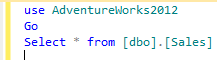
Given below is the query :

use AdventureWorks2012
Go
Select * from [dbo].[Sales]

sqlserverblog_83_1.1

Answer :

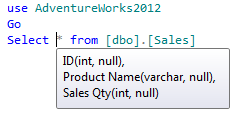
The answer is very simple, you just need to move your mouse and keep it over * and the SQL SERVER will display the column name along with data type shown in the picture below.
Note : This solution will work on sql server 2008 and above.

sqlserverblog_83_1.2

Have a better solution?

Read Full Post »

sys.dm_db_database_page_allocations is one of the dynamic management functions shipped with SQL Server 2012. As its name implies, it does the same; it gives the information as to how objects keep data in different pages and its allocation in the databases.

This function is somehow same as undocumented DBCC IND command but it provides much more information than DBCC IND that we will discuss later in this article.

Syntax :

sys.dm_db_database_page_allocations
(@DatabaseId , @TableId , @IndexId , @PartionID , @Mode)

Parameters :
@DatabaseId :You need to pass the required database ID. This parameter is mandatory and data type of this argument is small integer.
@TableId:You need to pass the required table ID. This parameter is optional and data type of this argument is integer.
@IndexId:You need to pass the required Index ID. This parameter is optional and data type of this argument is integer.
@PartionID:You need to pass the required Partion ID. This parameter is optional and data type of this argument is integer.
@Mode:You need to pass the required Mode. This parameter is mandatory and data type of this argument is nvarchar(64). In this argument we must pass only ‘DETAILED’ OR ‘LIMITED’.

Purpose :

As we know that SQL Server stores data in the pages and whenever we need to view this information in earlier versions (2005, 2008) of SQL Server we need to invoke an undocumented command DBCC IND to get the info. The problem with this command is that if you want to further manipulate its result set you need to insert its record set in a temporary table and it also has a limited level of information.
In SQL SERVER 2012, sys.dm_db_database_page_allocations came as a replacement for the DBCC IND command and it gives more information about the internal storage of the data.

Given below are the major differences between sys.dm_db_database_page_allocations and DBCC IND.

S.No sys.dm_db_database_page_allocations DBCC IND
1 It is an in line function, so you can easily manipulate its result set without using any temporary table. You need temporary table to manipulate its result set.
2 It gives you the information about unallocated pages of the object as well. It gives you the information about allocated pages of the object only.
3 It gives you the complete details of internal storage including allocated unit details. It does not give you the complete details of internal storage including allocated unit details.
4 You can query all the database objects allocation at a time. You can query only one object at a time.

Given are column comparisons between sys.dm_db_database_page_allocations and DBCC IND command.  Also highlighted are the new fields introduced in this function.

dm_db_database_page_allocation

Let me explain few examples to explain this function :

Example 1 :
In this example, this function will give you the page allocation of “Sales” table only.

Select * from sys.dm_db_database_page_allocations(DB_ID(), object_id('Sales'),NULL,NULL,'DETAILED')

Example 2 :
In this example, this function will give you the page allocation for all objects including system objects.

Select * from sys.dm_db_database_page_allocations(DB_ID(), NULL ,NULL,NULL,'DETAILED')

Reference : CONNECT

Read Full Post »

I was working on statistical reports and I had to display whether the given year was leap year or not in a field. So, I developed few ways using SQL SERVER 2012 functions to detect whether leap year or not.

Given below are the multiple ways to detect leap year:

Method 1 :
In method 1, I made a date (2012-02-28) using DATEFROMPARTS function then used EOMONTH function to find the last date (2012-02-29) of February. Then to find the last day (29), used DAY function and after that used IIF to check whether it is 29 or not, to detect if its a leap year or not.

DECLARE @Year INT =2012
SELECT IIF(DAY(EOMONTH(DATEFROMPARTS(@Year,2,28)))=29 ,'YES','NO') AS [LEAP YEAR]
--RESULT

LEAP YEAR
———
YES

(1 row(s) affected)
Method 2 :
In method 2, I simply made 2 dates using DATEFROMPARTS function. First is the 1st date of the year and 2nd date is the last date of the year and then used DATEDIFF function to find total no of days in a year and finally used IIF function to check if it is 366 or 365 days. If 366, then leap year and if 365 then it is not.

DECLARE @Year INT =2012
SELECT IIF(DATEDIFF(DAY,DATEFROMPARTS(@Year,1,1), DATEFROMPARTS(@year,12,31))+1=366 ,'YES','NO') AS [LEAP YEAR]
--RESULT

LEAP YEAR
———
YES

(1 row(s) affected)
Method 3 :
In method 3, I first made a date(2012-02-28) using DATEFROMPARTS function then added one day to it. After addition I took the day and checked it using IIF function. If it is 29, then leap year, else, it is not.

DECLARE @Year INT =2012
SELECT IIF(DAY(DATEADD(DAY,1,DATEFROMPARTS(@Year,2,28)))=29 ,'YES','NO') AS [LEAP YEAR]
--RESULT

LEAP YEAR
———
YES

(1 row(s) affected)

Method 4 :
In method 4, I made 2 dates (2012-02-28, 2012-03-01) using DATEFROMPARTS function and then found the date difference using DATEDIFF function, and finally used IIF function to check the difference. If it is 2 days, means the year is leap, else not.

DECLARE @Year INT =2012
SELECT IIF(DATEDIFF(DAY,DATEFROMPARTS(@Year,2,28), DATEFROMPARTS(@year,3,01))=2 ,'YES','NO') AS [LEAP YEAR]
--RESULT

LEAP YEAR
———
YES

(1 row(s) affected)

Note : Try @Year as 2013 and all the result set will return that 2013 is not a leap year using any above methods.

Let me know if you know a better method to detect leap year.

Read Full Post »

Web browser has been launched in sql server since SQL Server 2005. And it is available in Menu (View >> Other windows >> Web Browser). And this sql server browser uses the same internet explorer setting on windows server except home page. Whatever home page you setup in windows internet explorer, it will not impact in SQL server web browser settings.

This functionality is same in all sql server from SQL server 2005 and above. In addition to this, SQL Server 2012 provided a functionality to set up internet explorer setting from SQL Server as well and you can setup separate home page for SQL SERVER browser also.

Given below is the path to configure this setting in SQL Server 2012.
Tools >> Options >> Environment >> Web browser

ie_settings1.1

Read Full Post »

sp_sequence_get_range System stored procedure is shipped with SQL SERVER 2012 and it is one of the handy system stored procedures when it comes to fetch range of IDs from SQL Server.
Note : Sequence is a prerequisite for this article.

Syntax :

sp_sequence_get_range [ @sequence_name = ] N''
, [ @range_size = ] range_size
, [ @range_first_value = ] range_first_value OUTPUT
[, [ @range_last_value = ] range_last_value OUTPUT ]
[, [ @range_cycle_count = ] range_cycle_count OUTPUT ]
[, [ @sequence_increment = ] sequence_increment OUTPUT ]
[, [ @sequence_min_value = ] sequence_min_value OUTPUT ]
[, [ @sequence_max_value = ] sequence_max_value OUTPUT ]
[ ; ]

Explanation :
Lets proceed step by step :

Step 1:

Lets create a sequence.

CREATE SEQUENCE [dbo].[Invoice]
AS [int]
START WITH 1
INCREMENT BY 1
MINVALUE 1
MAXVALUE 1000
CYCLE
CACHE
GO

Step 2:

Lets pick up a new ID from this sequence.

SELECT NEXT VALUE FOR dbo.[Invoice] as [New ID]
--OUTPUT

New ID
1

(1 row(s) affected)

Step 3:

Lets fetch the new IDs via sp_sequence_get_range and see the difference.

Example:

DECLARE @range_first_value sql_variant
, @range_first_value_output sql_variant
, @range_last_value_output sql_variant

EXEC sp_sequence_get_range
@sequence_name = N'dbo.Invoice'
, @range_size = 4
, @range_first_value = @range_first_value_output OUTPUT
, @range_last_value = @range_last_value_output OUTPUT

SELECT @range_first_value_output AS [First ID]
,@range_last_value_output as [Last ID]
--OUTPUT

First ID       Last ID
2                5

(1 row(s) affected)

In the above example, you can see that this stored procedure returns a range from 2-5 IDs (First Value – Last Value),  so can use all four IDs (2, 3,4, 5) in your application.

If you execute the same script, 2nd time it will give you the range from 6-9 IDs and it will carry on till it reaches its maximum ID.

sp_sequence_get_range is not limited to return First & Last ID only. It will return other info related to sequence as well.

Step 4:

In Step 2 & Step 3, you can see both techniques are used to get new ID (s), but the difference between both of them is the requirement.

Whenever you need only one new ID you need to use NEXT VALUE & and if you need to get a range of new IDs from sequence you need to use sp_sequence_get_range.

Step 5:
Lets create another example to return all possible result sets from sp_sequence_get_range.

Example:

DECLARE @First_Value sql_variant
, @Last_Value sql_variant
, @Cycle_Count int
, @Sequence_Increament sql_variant
, @Sequence_Min_Value sql_variant
, @Sequence_Max_Value sql_variant ;

EXEC sys.sp_sequence_get_range
@sequence_name = N'dbo.Invoice'
, @range_size = 5
, @range_first_value = @First_value OUTPUT
, @range_last_value = @Last_Value OUTPUT
, @range_cycle_count = @Cycle_Count OUTPUT
, @sequence_increment = @Sequence_Increament OUTPUT
, @sequence_min_value = @Sequence_Min_Value OUTPUT
, @sequence_max_value = @Sequence_Max_Value OUTPUT ;

SELECT
@First_value AS FirstVal
, @Last_Value AS LastVal
, @Cycle_Count AS CycleCount
, @Sequence_Increament AS SeqIncrement
, @Sequence_Min_Value AS MinSeq
, @Sequence_Max_Value AS MaxSeq ;

Real world example :

I recently developed a billing system for one of my clients and the major requirement was to open 4 different invoices before saving the previous invoices.

And the problem was that I could not get a new ID without saving the previous invoice. So, I used this technique and it was successful.

Reference : MSDN

Read Full Post »

SQL Server 2012 is equipped with many new features and functions. The same ways it is equipped with its new error messages as well. In this article we will discuss one of the new error messages (Cannot construct data type %ls, some of the arguments have values which are not valid) introduced in SQL SERVER 2012.

Let’s discuss it in detail:

Error Number: 289

Error Message: “Cannot construct data type %ls, some of the arguments have values which are not valid.”

Error Generation:
Let me create few examples to generate this error:

Declare @Year as int=2012
Declare @Month as int = 12
Declare @Day as int =32 --Invalid Day
Declare @Hour as int=25 --Invalid Hour
Declare @Minute as int=59
Declare @Second as int=59
Declare @Fraction as int=50

Example 1:

Select DATEFROMPARTS(@Year,@Month,@Day) as [Result]
--OUTPUT

Msg 289, Level 16, State 1, Line 9
Cannot construct data type date, some of the arguments have values which are not valid.

Example 2:

Select TIMEFROMPARTS(@Hour,@Minute,@Second,@Fraction,2) as [Result]
--OUTPUT

Msg 289, Level 16, State 2, Line 15
Cannot construct data type time, some of the arguments have values which are not valid.

Example 3:

Select SMALLDATETIMEFROMPARTS(@Year,@Month,@Day,@hour,@Minute) AS [RESULT]
--OUTPUT

Msg 289, Level 16, State 4, Line 21
Cannot construct data type smalldatetime, some of the arguments have values which are not valid.

Example 4:

Select DATETIME2FROMPARTS( @Year,@Month,@Day,@Hour,@Minute,@Second,@Fraction,2) as [RESULT]
--OUTPUT

Msg 289, Level 16, State 5, Line 27
Cannot construct data type datetime2, some of the arguments have values which are not valid.

Resolution:
In the above examples, you can see, I passed an invalid argument (day cannot be 32 in a month & hour cannot be 25 in a day) to above functions. So the constructor of this function cannot create a date from these arguments, so it generates the error.

Whenever you come across this error, please check the arguments passed in the function. The arguments must be valid to avoid this error.

Please let me know if you have other samples to regenerate such error.

Read Full Post »

« Newer Posts - Older Posts »