Feeds:
Posts
Comments

Archive for the ‘Functions’ Category

Date data type plays an important role in the database and when its subject comes, we cannot skip its formatting as well. Today, we will discuss how to do formatting of date data type without using a single function like Convert, Cast, Substring, DateName, Replace etc.
In SQL Server 2012, we can use one functionFORMAT to format date instead of multiple functions.
Let me explain it with simple examples to convert date into different formats using Format:

Declare @Date as Date =Getdate()
Select @Date --2012-10-13

Select Format(@Date,'yy.MM.dd') as [yy.MM.dd] --12.10.13

Select Format(@Date,'yyyy.MM.dd') as [yyyy.MM.dd] --2012.10.13

Select Format(@Date,'dd.MM.yyyy') as [dd.MM.yyyy] --13.10.2012

Select Format(@Date,'MM/dd/yy') as [MM/dd/yy] --10/13/12

Select Format(@Date,'MM/dd/yyyy') as [MM/dd/yyyy] --10/13/2012

Select Format(@Date,'dd/MM/yyyy') as [dd/MM/yyyy] --13/10/2012

Select Format(@Date,'dd-MM-yyyy') as [dd-MM-yyyy] --13-10-2012

Select Format(@Date,'dd MMM yyyy') as [dd MMM yyyy] --13 Oct 2012

Select Format(@Date,'MMM dd, yyyy') as [MMM dd, yyyy] --Oct 13, 2012

Select Format(@Date,'MM-dd-yy') as [MM-dd-yy] --10-13-12

Select Format(@Date,'MM-dd-yyyy') as [MM-dd-yyyy] --10-13-2012

Select Format(@Date,'yy/MM/dd') as [yy/MM/dd] --12/10/13

Select Format(@Date,'yyyy/MM/dd') as [yyyy/MM/dd] --2012/10/13

Select Format(@Date,'yyMMdd') as [yyMMdd] --121013

Select Format(@Date,'yyyyMMdd') as [yyyyMMdd] --20121013

Select Format(@Date,'yy-MM-dd') as [yy-MM-dd] --12-10-13

Select Format(@Date,'yyyy-MM-dd') as [yyyy-MM-dd] --2012-10-13

Select Format(@Date,'MM/yy') as [MM/yy] --10/12

Select Format(@Date,'MM/yyyy') as [MM/yyyy] --10/2012

Select Format(@Date,'yy/MM') as [yy/MM] --12/10

Select Format(@Date,'yyyy/MM') as [yyyy/MM] --2012/10

Select Format(@Date,'MMMM dd,yyyy') as [MMMM dd,yyyy] --October 13,2012

Select Format(@Date,'MMM yyyy') as [MMM yyyy] --Oct 2012

Select Format(@Date,'MMMM yyyy') as [MMMM yyyy] --October 2012

Select Format(@Date,'dd MMMM') as [dd MMMM] --13 October

Select Format(@Date,'MMMM dd') as [MMMM dd] --October 13

Select Format(@Date,'dd MMMM yy') as [dd MMMM yy] --13 October 12

Select Format(@Date,'dd MMMM yyyy') as [dd MMMM yyyy] --13 October 2012

Select Format(@Date,'MM-yy') as [MM-yy] --10-12

Select Format(@Date,'MM-yyyy') as [MM-yyyy] --10-2012

Select Format(@Date,'yy-MM') as [yy-MM] --12-10

Select Format(@Date,'yyyy-MM') as [yyyy-MM] --2012-10

Select Format(@Date,'MMddyy') as [MMddyy] --131012

Select Format(@Date,'MMddyyyy') as [MMddyyyy] --10132012

Select Format(@Date,'ddMMyy') as [ddMMyy] --131012

Select Format(@Date,'ddMMyyyy') as [ddMMyyyy] --13102012

Select Format(@Date,'MMM-yy') as [MMM-yy] --Oct-12

Select Format(@Date,'MMM-yyyy') as [MMM-yyyy] --Oct-2012

Select Format(@Date,'dd-MMM-yy') as [dd-MMM-yy] --13-Oct-12

Select Format(@Date,'dd-MMM-yyyy') as [dd-MMM-yyyy] --13-Oct-2012

Read Full Post »

Format function is one the important functions in SQL Server 2012. This function is very useful to format data in a specified format.

Today, we will discuss each and every aspect of this function. Also we will discuss the need/importance of this function in SQL server.

By using this function, we do not need to do a lot of scripting to format the data.

Let me explain its syntax, parameters, purpose and examples in detail.
Syntax :

FORMAT ( value, format [, culture ] )

Parameters :

@value : Data to be converted in other format. (Mandatory)
@format : To define a format in nvarchar datatype. (Mandatory)
@culture : To define a culture. By default, it picks up culture from session. (Optional)

Purpose :
This function converts value from one format to another format by using culture. If culture is not available it will pick up the culture from the session. It will return value either in nvarchar data type or NULL.

Let me explain this with simple examples.

Example-1 : FORMAT – DATE WITH DEFAULT CULTURE

DECLARE @Date AS datetime=Getdate()

Select @Date AS [DATE]
SELECT FORMAT (@Date, 'dd/MM/yyyy') as [Result (dd/MM/yyyy)]
SELECT FORMAT (@Date, 'MM/dd/yyyy') as [Result (MM/dd/yyyy)]
SELECT FORMAT (@Date, 'yyyy/MM/dd') as [Result (yyyy/MM/dd)]

Example-2 : FORMAT – TIME WITH DEFAULT CULTURE

DECLARE @TIME AS DATETIME=Getdate()

Select @TIME AS [TIME]
SELECT FORMAT (@TIME, 'h:mm:ss tt') as [Result (h:mm:ss tt)]
SELECT FORMAT (@TIME, 'hh:mm:ss tt') as [Result (hh:mm:ss tt)]
SELECT FORMAT (@TIME, 'h:mm:ss') as [Result (h:mm:ss)]
SELECT FORMAT (@TIME, 'hh:mm:ss') as [Result (hh:mm:ss)]

Example-3 : FORMAT – NUMBER WITH DEFAULT CULTURE

DECLARE @NUMBER AS NUMERIC(18,4)=12345.789

Select @NUMBER as [NUMBER]
SELECT FORMAT (@NUMBER, '####0.00') as [Result (####0.00)]
SELECT FORMAT (@NUMBER, '####0.000') as [Result (####0.000)]
SELECT FORMAT (@NUMBER, '##,##0.00') as [Result (##,##0.00)]
SELECT FORMAT (@NUMBER, '#') as [Result (#)]

Example-4 : FORMAT – CURRENCY WITH DEFAULT CULTURE

DECLARE @CURRENCY MONEY = '24500.50';
SELECT FORMAT (@CURRENCY, 'C') AS  [RESULT]

Example-5 : FORMAT – DATE & TIME WITH MULTIPLE CULTURE

DECLARE @Date AS datetime=Getdate()

Select @Date as [DATE]
SELECT FORMAT ( @Date,'dddd, MMMM dd, yyyy hh:mm:ss tt','en-US')
AS [English Culture]

SELECT FORMAT ( @Date,'dddd, MMMM dd, yyyy hh:mm:ss tt','de-DE')
AS [German Culture]

SELECT FORMAT ( @Date,'dddd, MMMM dd, yyyy hh:mm:ss tt','ja-JP')
AS [Japanese Culture]

SELECT FORMAT ( @Date,'dddd, MMMM dd, yyyy hh:mm:ss tt','ar-SA')
AS [Arabic Culture]

SELECT FORMAT ( @Date,'dddd, MMMM dd, yyyy hh:mm:ss tt','ur-PK')
AS [Urdu Culture]

Example-6 : FORMAT – CURRENCY WITH MULTIPLE CULTURE

DECLARE @CURRENCY MONEY = '24500.50';
SELECT FORMAT (@CURRENCY, 'C','en-US' ) AS [English Culture]
SELECT FORMAT (@CURRENCY, 'C','de-DE' ) AS [German Culture]
SELECT FORMAT (@CURRENCY, 'C','ja-JP' ) AS [Japanese Culture]
SELECT FORMAT (@CURRENCY, 'C','ar-SA' ) AS [Arabic Culture]
SELECT FORMAT (@CURRENCY, 'C', 'ur-PK' ) AS [Urdu Culture]

Example-7 : FORMAT – VALUE BY USING LANGUAGE INSTEAD OF CULTURE

SET LANGUAGE 'ENGLISH'

SELECT FORMAT (245000, 'C') AS [Currency]
SELECT FORMAT (GETDATE(),'D') AS [DATE]
SELECT FORMAT (24500.282, '#,###,###0.00') AS [Currency]

Reference : MSDN

Read Full Post »

SQL Server 2012 has introduced a new string function namely “CONCAT”. It is a very handy & important function to deal with the string concatenation.

Let me explain its syntax, parameters, purpose and examples in detail.
Syntax :

CONCAT ( string_value1, string_value2 [, string_valueN ] )

Parameters :
@string_value1 : First string value to concatenate with other strings.
@string_value2 : Second string value to concatenate with other strings.
It will go up to (n) Numbers of strings.

Purpose :
It concatenates two or more than two strings and returns as a single string value. Minimum we need to pass two strings to concatenate otherwise it will generate an error. It implicitly converts parameters to string. If The parameters are NULL it treats it as empty string of varchar(1).

Let me explain this with simple examples.

Example-1 : CONCAT – String values

Select Concat('SQL Server ','2012') as [Result]

Result
---------------
SQL Server 2012

(1 row(s) affected)

Example-2 : CONCAT – Integer values
In this example, “CONCAT” function will implicitly convert integer data type to string data type and concatenate it.

Select CONCAT(1,2) as [Result]

Result
------------------------
12

(1 row(s) affected)

Example-3 : CONCAT – Numeric values
In this example, “CONCAT” function will implicitly convert numeric data type to string data type and concatenate it.

Select CONCAT(12.34,56.78) as [Result]

Result
----------------------------------------------------------------------------------
12.3456.78

(1 row(s) affected)

Example-4 : CONCAT – Less than 2 strings

Select Concat('SQL Server ') as [Result]

Msg 189, Level 15, State 1, Line 1
The concat function requires 2 to 254 arguments.

Example-5 : CONCAT – Passed NULL as parameter
It converts NULL to empty string of varchar(1) and return it.

Select Concat('SQL Server ',NULL) as [Result]

Result
---------------
SQL Server

(1 row(s) affected)

Example-6 : CONCAT – Passed NULL Values from Database
Before in SQL server 2012, we had to use ISNULL to convert NULL to empty string & concatenate.
But this function resolves this issue. It automatically converts NULL to empty string. Lets use Adventure database to test it.

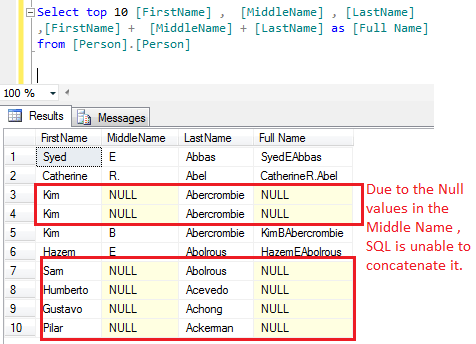
Select top 10 [FirstName] ,  [MiddleName] , [LastName]
,[FirstName] +  [MiddleName] + [LastName] as [Full Name]
from [Person].[Person]

In the above example, due to the NULL values in the middle name column SQL failed to concatenate it and return NULL as [Full Name]

Lets try to do the same with “CONCAT” function.

Select top 10 [FirstName] ,  [MiddleName] , [LastName]
,Concat([FirstName] , [MiddleName] , [LastName]) as [Full Name]
from [Person].[Person]

In the above example, CONCAT function replaced NULL with emprty string and concatenates the FULL Name successfully.

Reference : MSDN

Read Full Post »

“How to calculate the last date of the current, previous & next month” ? I have seen this question many times in different blogs and there are multiple approaches that we have been following to find it.
For Example :

--SQL Server 2005/2008
DECLARE @DATE DATETIME
SET @DATE='2012-09-10'

--Last date of the Previous Month
SELECT CONVERT(VARCHAR(10),DATEADD(ms,-2,DATEADD(MONTH, DATEDIFF(MONTH,0,@DATE),0)),120) AS [Previous Month]

--Last date of the Current Month
SELECT CONVERT(VARCHAR(10),DATEADD(ms,-2,DATEADD(MONTH, DATEDIFF(MONTH,0,@DATE)+1,0)),120) AS [Current Month]

--Last date of the Next Month
SELECT CONVERT(VARCHAR(10),DATEADD(ms,-2,DATEADD(MONTH, DATEDIFF(MONTH,0,@DATE)+2,0)),120) AS [Next Month]

Previous Month
--------------
2012-08-31

(1 row(s) affected)

Current Month
-------------
2012-09-30

(1 row(s) affected)

Next Month
-----------
2012-10-31

(1 row(s) affected)

In SQL Server 2012, the solution came as a new built in function namely EOMONTH. Lets discuss this function syntax, parameters, purpose and examples in detail.

Syntax :

EOMONTH ( start_date [, month_to_add ] )

Parameters :
@start_date : A valid Date in varchar or date time data type (Mandatory)
@month_to_add : A valid integer for month range from 0-9999 (Optional). By default it is zero.

Purpose :
This function requires a valid date (Either in Datetime or varchar data type) as a parameter and returns last date of that month. There is an optional parameter called “@month_to_add”. By using this optional parameter, we can get the last date of other months also. It could be previous, next or any month.

Let me explain this with simple examples.

Example-1 : EOMONTH – valid start date as Date data type

Declare @Date as Date ='2012-09-01'

--Last date of the Previous Month
Select EOMONTH (@Date,-1) as [Previous Month]

--Last date of the current Month
Select EOMONTH (@Date) as [Current Month]

--Last date of the Next Month
Select EOMONTH (@Date,1) as [Next Month]

Previous Month
--------------
2012-08-31

(1 row(s) affected)

Current Month
-------------
2012-09-30

(1 row(s) affected)

Next Month
----------
2012-10-31

(1 row(s) affected)

Example-2 : EOMONTH – valid start date as varchar data type

Declare @Date as varchar(10) ='2012-09-01'

--Last date of the current Month
Select EOMONTH (@Date) as [Current Month]

Current Month
-------------
2012-09-30

(1 row(s) affected)

Example-3 : EOMONTH – Last Date of each month in the Current Year

Declare @Date as Date ='2012-01-01'

--Last date of the Jan Month
Select EOMONTH (@Date) as [Jan]

--Last date of the Feb Month
Select EOMONTH (@Date,1) as [Feb]

--Last date of the Mar Month
Select EOMONTH (@Date,2) as [Mar]

--Last date of the Apr Month
Select EOMONTH (@Date,3) as [Apr]

--Last date of the May Month
Select EOMONTH (@Date,4) as [May]

--Last date of the Jun Month
Select EOMONTH (@Date,5) as [Jun]

--Last date of the Jul Month
Select EOMONTH (@Date,6) as [Jul]

--Last date of the Aug Month
Select EOMONTH (@Date,7) as [Aug]

--Last date of the Sep Month
Select EOMONTH (@Date,8) as [Sep]

--Last date of the Oct Month
Select EOMONTH (@Date,9) as [Oct]

--Last date of the Nov Month
Select EOMONTH (@Date,10) as [Nov]

--Last date of the Dec Month
Select EOMONTH (@Date,11) as [Dec]

Jan
----------
2012-01-31

(1 row(s) affected)

Feb
----------
2012-02-29

(1 row(s) affected)

Mar
----------
2012-03-31

(1 row(s) affected)

Apr
----------
2012-04-30

(1 row(s) affected)

May
----------
2012-05-31

(1 row(s) affected)

Jun
----------
2012-06-30

(1 row(s) affected)

Jul
----------
2012-07-31

(1 row(s) affected)

Aug
----------
2012-08-31

(1 row(s) affected)

Sep
----------
2012-09-30

(1 row(s) affected)

Oct
----------
2012-10-31

(1 row(s) affected)

Nov
----------
2012-11-30

(1 row(s) affected)

Dec
----------
2012-12-31

(1 row(s) affected)

Reference : MSDN

Read Full Post »

In my previous Posts, I discussed about DATETIMEFROMPARTS. Today, we will discuss one more function introduced in SQL SERVER 2012 namely “DATETIME2FROMPARTS“.

Let me explain its syntax, parameters, purpose and examples in detail.

Syntax :

DATETIME2FROMPARTS ( year, month, day, hour, minute, seconds, fractions, precision )

Parameters :
@Year : A valid integer for year.
@Month : A valid integer for month range from 1-12.
@Day : A valid integer for day range from 1-31. (Depends upon the total number of days in a month)
@Hour : A valid integer for Hour range from 0-23.
@Minutes : A valid integer for Minutes range from 0-59.
@Seconds: A valid integer for Seconds range from 0-59.
@Fractions : A valid integer for Fractions range from 0-9999999.
@Precision : A valid integer for Precision range from 0-7.

Purpose :
This function requires year, month, day, hour, minute, seconds, fractions & precision as a parameter (All parameters are mandatory) and returns a valid datetime2 as a result. If we pass any invalid date and time parts, it will generate an error. Also if we pass NULL values to any of its parameters except Precision parameter, it returns NULL value. If we pass NULL value to Precision parameter it will generate an error.
Let me explain this with simple examples.

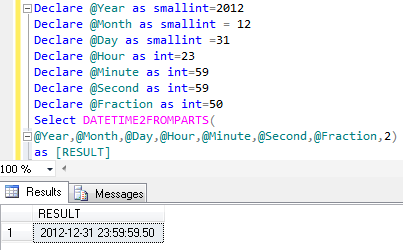
Example-1 : DATETIME2FROMPARTS

Declare @Year as smallint=2012
Declare @Month as smallint = 12
Declare @Day as smallint =31
Declare @Hour as int=23
Declare @Minute as int=59
Declare @Second as int=59
Declare @Fraction as int=50
Select DATETIME2FROMPARTS( @Year,@Month,@Day,@Hour,@Minute,@Second,@Fraction,2)
as [RESULT]
--RESULT
2012-12-31 23:59:59.50

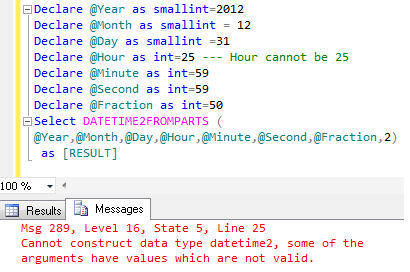
Example-2 : DATETIME2FROMPARTS- With Invalid Date and Time Parts
It will generate an error because only valid date and time parts are allowed as a parameter.

Declare @Year as smallint=2012
Declare @Month as smallint = 12
Declare @Day as smallint =31
Declare @Hour as int=25 --- Hour cannot be 25
Declare @Minute as int=59
Declare @Second as int=59
Declare @Fraction as int=50
Select DATETIME2FROMPARTS (@Year,@Month,@Day,@Hour,@Minute,@Second,@Fraction,2)
as [RESULT]
--RESULT

Msg 289, Level 16, State 5, Line 23
Cannot construct data type datetime2, some of the arguments have values which are not valid.

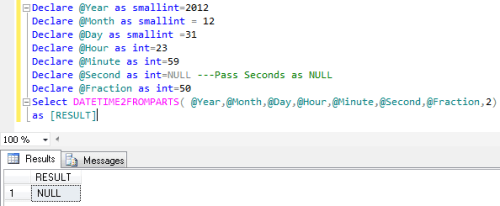
Example-3 : DATETIME2FROMPARTS- With NULL Date and Time Parts except Precision parameter
If we pass NULL value to any of its parameter except Precision parameter, it will return NULL value

Declare @Year as smallint=2012
Declare @Month as smallint = 12
Declare @Day as smallint =31
Declare @Hour as int=23
Declare @Minute as int=59
Declare @Second as int=NULL ---Pass Seconds as NULL
Declare @Fraction as int=50
Select DATETIME2FROMPARTS( @Year,@Month,@Day,@Hour,@Minute,@Second,@Fraction,2)
as [RESULT]
--RESULT

Example-4 : DATETIME2FROMPARTS- @Precision as NULL value
If we pass NULL value to precision parameter of this function, it will generate an error.

Declare @Year as smallint=2012
Declare @Month as smallint = 12
Declare @Day as smallint =31
Declare @Hour as int=23
Declare @Minute as int=59
Declare @Second as int=50
Declare @Fraction as int=50
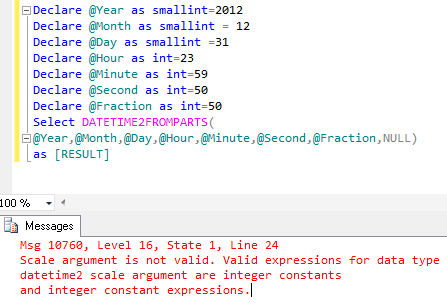
Select DATETIME2FROMPARTS( @Year,@Month,@Day,@Hour,@Minute,@Second,@Fraction,NULL)
as [RESULT]
--Result

Msg 10760, Level 16, State 1, Line 23
Scale argument is not valid. Valid expressions for data type datetime2 scale argument are integer constants and integer constant expressions.

Example-5 : DATETIME2FROMPARTS- With Null and Invalid parameters
If we pass NULL and Invalid value to its parameter, it will return NULL as a result.

Declare @Year as smallint=2012
Declare @Month as smallint = 12
Declare @Day as smallint =31
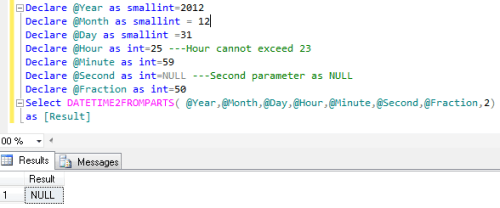
Declare @Hour as int=25 ---Hour cannot exceed 23
Declare @Minute as int=59
Declare @Second as int=NULL ---Second parameter as NULL
Declare @Fraction as int=50
Select DATETIME2FROMPARTS( @Year,@Month,@Day,@Hour,@Minute,@Second,@Fraction,2)
as [Result]
--Result
NULL

Example-6: DATETIME2FROMPARTS- With missing Fraction if precision is defined
If precision is zero , we cannot define the fraction as well. It should be zero.

Declare @Year as smallint=2012
Declare @Month as smallint = 12
Declare @Day as smallint =31
Declare @Hour as int=23
Declare @Minute as int=59
Declare @Second as int=59
Declare @Fraction as int=50
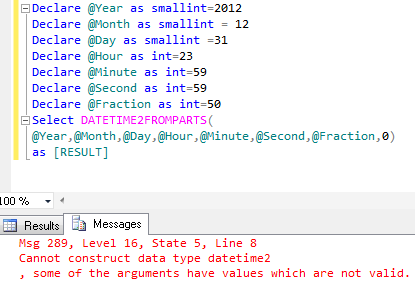
Select DATETIME2FROMPARTS( @Year,@Month,@Day,@Hour,@Minute,@Second,@Fraction,0) as [RESULT]
as [Result]
--Result

Msg 289, Level 16, State 5, Line 8
Cannot construct data type datetime2, some of the arguments have values which are not valid.

Reference : MSDN

Read Full Post »

In my previous Posts, I discussed about DATETIMEFROMPARTS function in SQL SERVER 2012. Today we will discuss one more important function introduced in SQL SERVER 2012 namely “SMALLDATETIMEFROMPARTS“.

Let me explain its syntax, parameters, purpose and examples in detail.

Syntax :

SMALLDATETIMEFROMPARTS ( year, month, day, hour, minute )

Parameters :
@Year : A valid integer for year.
@Month : A valid integer for month range from 1-12.
@Day : A valid integer for day range from 1-31. (Depends upon the total number of days in a month)
@hour : A valid integer for the hour range from 0-23
@Minute : A valid integer for the minute range from 0-59
Purpose :
This function requires year, month, day, hour, minute as a parameter (All parameters are mandatory) and return small date & time as a result. If we pass any invalid date and time parts, it will generate an error. Also if we pass NULL date and time parts to this function it will return NULL value.
Let me explain this with simple examples.

Example-1 : SMALLDATETIMEFROMPARTS

Declare @Year as smallint=2012
Declare @Month as smallint = 12
Declare @Day as smallint =31
Declare @hour as smallint = 23
Declare @Minute as smallint =58
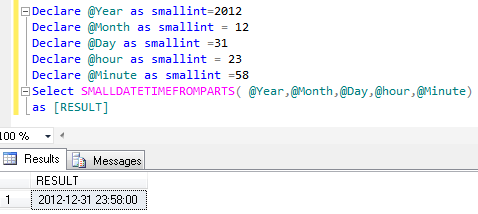
Select SMALLDATETIMEFROMPARTS( @Year,@Month,@Day,@hour,@Minute)
as [RESULT]
--RESULT
2012-12-31 23:58:00

Example-2 : SMALLDATETIMEFROMPARTS- With Invalid Date and Time Parts
It will generate an error because only valid date and time parts are allowed as a parameter.

Declare @Year as smallint=2012
Declare @Month as smallint = 12
Declare @Day as smallint =31
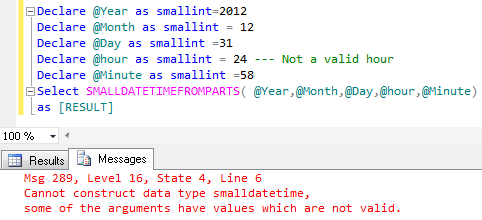
Declare @hour as smallint = 24 --- Not a valid hour
Declare @Minute as smallint =58
Select SMALLDATETIMEFROMPARTS( @Year,@Month,@Day,@hour,@Minute)
as [RESULT]
--RESULT

Msg 289, Level 16, State 4, Line 6
Cannot construct data type smalldatetime, some of the arguments have values which are not valid.

Example-3 : SMALLDATETIMEFROMPARTS- With NULL Date and Time Parts
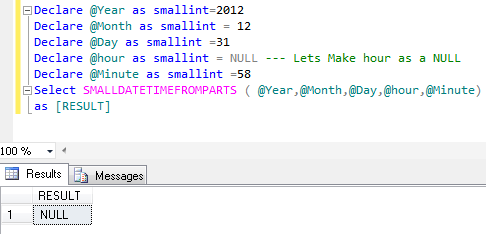
It will return NULL even if only one part is NULL.

Declare @Year as smallint=2012
Declare @Month as smallint = 12
Declare @Day as smallint =31
Declare @hour as smallint = NULL --- Lets Make hour as a NULL
Declare @Minute as smallint =58
Select SMALLDATETIMEFROMPARTS ( @Year,@Month,@Day,@hour,@Minute)
as [RESULT]
--RESULT

Reference : MSDN

Read Full Post »

In my previous Posts, I discussed about DATEFROMPARTS and TIMEFROMPARTS function in SQL SERVER 2012. Today we will discuss one more function introduced in SQL SERVER 2012 namely “DATETIMEFROMPARTS“.

Let me explain its syntax, parameters, purpose and examples in detail.

Syntax :

DATETIMEFROMPARTS ( year, month, day, hour, minute, seconds, milliseconds )

Parameters :
@Year : A valid integer for year.
@Month : A valid integer for month range from 1-12.
@Day : A valid integer for day range from 1-31. (Depends upon the total number of days in a month)
@hour : A valid integer for the hour range from 0-23
@Minutes : A valid integer for the minute range from 0-59
@Seconds : A valid integer for the second range from 0-59
@milliseconds : A valid integer for the millisecond range from 0-999.

Purpose :
This function requires year, month, day, hour, minute, seconds & milliseconds as a parameter (All parameters are mandatory) and return date and time as a result. If we pass any invalid date and time parts, it will generate an error. Also if we pass NULL date and time parts to this function it will return NULL value.
Let me explain this with simple examples.

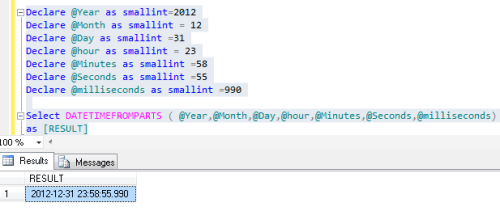
Example-1 : DATETIMEFROMPARTS

Declare @Year as smallint=2012
Declare @Month as smallint = 12
Declare @Day as smallint =31
Declare @hour as smallint = 23
Declare @Minutes as smallint =58
Declare @Seconds as smallint =55
Declare @milliseconds as smallint =990
Select DATETIMEFROMPARTS ( @Year,@Month,@Day,@hour,@Minutes,@Seconds,@milliseconds)
as [RESULT]
--RESULT
2012-12-31 23:58:55.990

Example-2 : DATETIMEFROMPARTS – With Invalid Date and Time Parts
It will generate an error becuase only valid date and time parts are allowed as a parameter.

Declare @Year as smallint=2012
Declare @Month as smallint = 12
Declare @Day as smallint =31
Declare @hour as smallint = 24 --- Not a valid hour
Declare @Minutes as smallint =58
Declare @Seconds as smallint =55
Declare @milliseconds as smallint =990
Select DATETIMEFROMPARTS ( @Year,@Month,@Day,@hour,@Minutes,@Seconds,@milliseconds) as [RESULT]
--RESULT

Msg 289, Level 16, State 3, Line 26
Cannot construct data type datetime, some of the arguments have values which are not valid.

Example-3 : DATETIMEFROMPARTS – With NULL Date and Time Parts
It will return NULL even if only one part is NULL.

Declare @Year as smallint=2012
Declare @Month as smallint = 12
Declare @Day as smallint =31
Declare @hour as smallint = NULL --- Lets Make hour as a NULL
Declare @Minutes as smallint =58
Declare @Seconds as smallint =55
Declare @milliseconds as smallint =990
Select DATETIMEFROMPARTS ( @Year,@Month,@Day,@hour,@Minutes,@Seconds,@milliseconds)
as [RESULT]
--RESULT

Reference : MSDN

Read Full Post »

In my previous post, I discussed about DATEFROMPARTS. Today we will discuss TIMEFROMPARTS(). In earlier version of SQL SERVER, there was no built in function to convert time parts (hours, minutes & seconds) to time. Lets have a look, how we were doing in earlier version of SQL server.

For Example :

--SQL Server 2008
Declare @Hour as int=4
Declare @Minute as int=20
Declare @Second as int=30
Declare @Fraction as int=55

Select Convert(time,Convert(varchar(4), @Hour)
+ ':' +
Convert(varchar(2), @Minute)
+ ':' +
Convert(varchar(2), @Second)
+ ':' +
Convert(varchar(2), @Fraction))
--Result
--04:20:30.0550000

But in SQL Server 2012, the solution came as a new built in function namely TIMEFROMPARTS().
Lets discuss this function syntax, parameters, purpose and examples in detail.

Syntax :

TIMEFROMPARTS ( hour, minute, seconds, fractions, precision )

Parameters :
@Hour : A valid integer for Hour range from 0-23.
@Minutes : A valid integer for Minutes range from 0-59.
@Seconds: A valid integer for Seconds range from 0-59.
@Fractions : A valid integer for Fractions range from 0-9999999.
@Precision : A valid integer for Precision range from 0-7.

Purpose :
This function requires a valid hour, minute, seconds, fractions & precision as a parameter and returns a valid time. If we pass any invalid time parts to this function it will return an error. Also if we pass NULL values to any of its parameters except Precision parameter, it returns NULL value . If we pass NULL value to Precision parameter it will generate an error.

Let me explain this with simple examples.

Example-1 : TIMEFROMPARTS – With Valid time parts

Declare @Hour as int=23
Declare @Minute as int=59
Declare @Second as int=59
Declare @Fraction as int=50
Select TIMEFROMPARTS(@Hour,@Minute,@Second,@Fraction,2) as [Result]
--Result
23:59:59.50

Example-2 : TIMEFROMPARTS – With Valid & Invalid precision

Declare @Hour as int=23, @Minute as int=59, @Second as int=59,@Fraction as int
Set @Fraction=2 -- If fractions is 2 and precision is 1
--, It means the fractions will be 2/10 of a second.
Select TIMEFROMPARTS(@Hour,@Minute,@Second,@Fraction,1) as [Result]

Set @Fraction=20 -- If fractions is 20 and precision is 2
--, It means the fractions will be 20/100 of a second.
Select TIMEFROMPARTS(@Hour,@Minute,@Second,@Fraction,2) as [Result]

Set @Fraction=200 -- If fractions is 200 and precision is 3
--, It means the fractions will be 200/1000 of a second.
Select TIMEFROMPARTS(@Hour,@Minute,@Second,@Fraction,3) as [Result]

Set @Fraction=2000 -- If fractions is 2000 and precision is 4
--, It means the fractions will be 2000/10000 of a second.
Select TIMEFROMPARTS(@Hour,@Minute,@Second,@Fraction,4) as [Result]

Set @Fraction=20000 -- If fractions is 20000 and precision is 5
--, It means the fractions will be 20000/100000 of a second.
Select TIMEFROMPARTS(@Hour,@Minute,@Second,@Fraction,5) as [Result]

Set @Fraction=200000 -- If fractions is 200000 and precision is 6
--, It means the fractions will be 200000/1000000 of a second.
Select TIMEFROMPARTS(@Hour,@Minute,@Second,@Fraction,6) as [Result]

Set @Fraction=2000000
-- If fractions is 2000000 and precision is 7
--, It means the fractions will be 2000000/10000000 of a second.
Select TIMEFROMPARTS(@Hour,@Minute,@Second,@Fraction,7) as [Result]

Set @Fraction=2000000
--It will generate an error because precision can be 7 maximum
--, It means the fractions will be 2000000/10000000 of a second.
--Select TIMEFROMPARTS(@Hour,@Minute,@Second,@Fraction,8) as [Result]
--Result
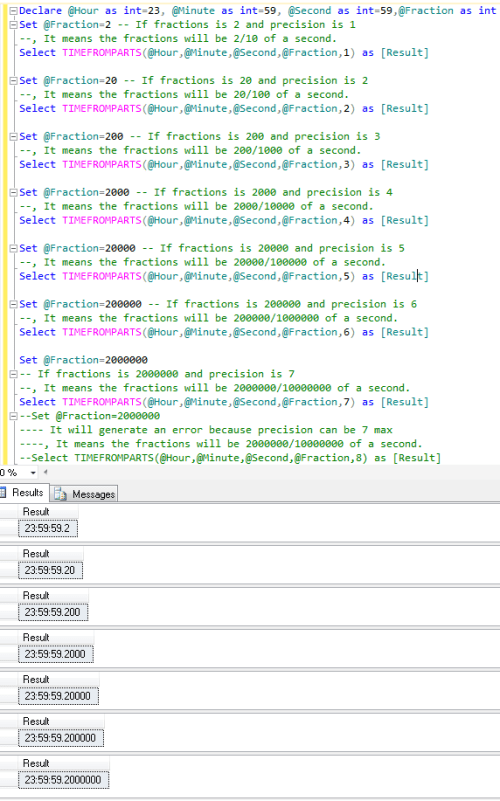
If precision is 8 then it will generate this error.

Msg 1002, Level 16, State 2, Line 33
Line 33: Specified scale 8 is invalid.

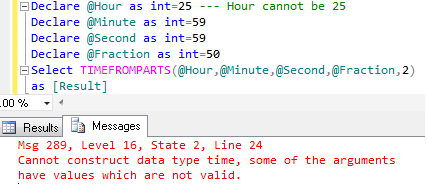
Example-3 : TIMEFROMPARTS – With Invalid time parts
If we provide an invalid time part to this function, it will generate an error because only valid time parts are allowed as a parameter.

Declare @Hour as int=25 --- Hour cannot be 25
Declare @Minute as int=59
Declare @Second as int=59
Declare @Fraction as int=50

Select TIMEFROMPARTS(@Hour,@Minute,@Second,@Fraction,2) as [Result]
--Result

Msg 289, Level 16, State 2, Line 24
Cannot construct data type time, some of the arguments have values which are not valid.
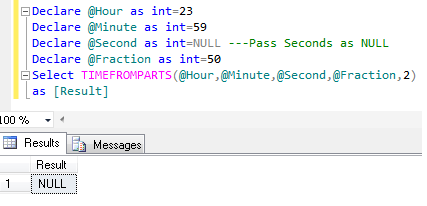
Example-4 : TIMEFROMPARTS- NULL as a parameter except Precision parameter
If we pass NULL value to any of its parameter except Precision parameter, It will return NULL value .

Declare @Hour as int=23
Declare @Minute as int=59
Declare @Second as int=NULL ---Pass Seconds as NULL
Declare @Fraction as int=50
Select TIMEFROMPARTS(@Hour,@Minute,@Second,@Fraction,2) as [Result]
--Result
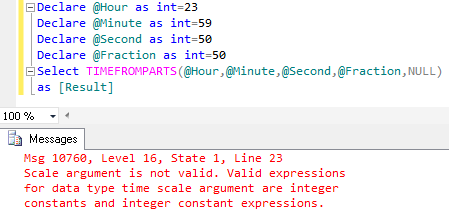
Example-5 : TIMEFROMPARTS- @Precision as NULL value
If we pass NULL value to precision parameter of this function, It will generate an error.

Declare @Hour as int=23
Declare @Minute as int=59
Declare @Second as int=50
Declare @Fraction as int=50
Select TIMEFROMPARTS(@Hour,@Minute,@Second,@Fraction,NULL) as [Result]
--Result

Msg 10760, Level 16, State 1, Line 23
Scale argument is not valid. Valid expressions for data type time scale argument are integer constants and integer constant expressions.
Example-6 : TIMEFROMPARTS- With Null and Invalid parameters
If we pass NULL and Invalid value to its parameter, It will return NULL as a result.

Declare @Hour as int=25 ---Hour cannot exceed 23
Declare @Minute as int=59
Declare @Second as int=NULL ---Second parameter as NULL
Declare @Fraction as int=50
Select TIMEFROMPARTS(@Hour,@Minute,@Second,@Fraction,2)
as [Result]
--Result
NULL

Example-7: TIMEFROMPARTS- With missing Fraction if precision is defined
If precision is zero , we cannot define the fraction as well. It should be zero.

Declare @Hour as int=23
Declare @Minute as int=59
Declare @Second as int=59
Declare @Fraction as int=50
Select TIMEFROMPARTS(@Hour,@Minute,@Second,@Fraction,0)
as [Result]
--Result

Msg 289, Level 16, State 2, Line 24
Cannot construct data type time, some of the arguments have values which are not valid.
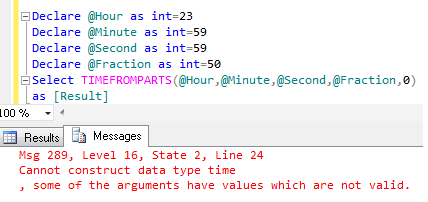
Example-8: TIMEFROMPARTS- With missing parameters
As I have mentioned above, all parameters(5) are mandatory for TIMEFROMPARTS function. Lets try to pass less than 5 parameters.

Declare @Hour as int=23
Declare @Minute as int=59
Declare @Second as int=59
Declare @Fraction as int=50
Select TIMEFROMPARTS(@Hour,@Minute,@Fraction,2) as [Result]
--Result

Msg 10760, Level 16, State 1, Line 23
The timefromparts function requires 5 argument(s).

Reference : MSDN

Read Full Post »

Before SQL SERVER 2012, If we have a scenario that Year, Month & day are given to us and we need to convert it into date and return it. In this case we need to do a lot of conversion and then we can get our desired results.

For Example :

--SQL Server 2008
Declare @Year as int=2012
Declare @Month as int=12
Declare @Day as int=31

Select Convert(Date,Convert(varchar(4), @Year)
+
Convert(varchar(2), @Month)
+
Convert(varchar(2), @Day))
--Result
2012-12-31

But In SQL Server 2012, the solution came as a new built in function namely DATEFROMPARTS().
Lets discuss this function syntax, parameters, purpose and examples in detail.

Syntax :

DATEFROMPARTS ( year, month, day )

Parameters :
@Year : A valid integer for year.
@Month : A valid integer for month range from 1-12.
@Day : A valid integer for day range from 1-31 (depends upon the total number of days in a month)

Purpose :
This function requires a valid Year, Month & day as a parameter and returns  a valid date. If we pass any invalid date part to this function it will return an error. Also if we pass NULL to any of its parameter, it returns NULL value.

Let me explain this with simple examples.

Example-1 : DATEFROMPARTS – With valid date parts

Declare @Year as int=2012
Declare @Month as int = 12
Declare @Day as int =31

Select DATEFROMPARTS(@Year,@Month,@Day) as [Result]
--Result

Example-2 : DATEFROMPARTS – With Invalid date parts
If we provide an invalid date part to this function, it will generate an error because only valid date parts are allowed as a parameter.

Declare @Year as int=2012
Declare @Month as int = 13 -- 13 is not a Valid month
Declare @Day as int =31

Select DATEFROMPARTS(@Year,@Month,@Day) as [Result]
--Result

Msg 289, Level 16, State 1, Line 5
Cannot construct data type date, some of the arguments have values which are not valid.

Example-3 : DATEFROMPARTS – With NULL Date Parts
If we pass NULL value to any parameter of this function, It will return NULL value.

Declare @Year as int=2012
Declare @Month as int = NULL -- Passed NULL as a Month
Declare @Day as int =31

Select DATEFROMPARTS(@Year,@Month,@Day) as [Result]
--Result

Example-4 : DATEFROMPARTS – With missing parameters
As I have mentioned above that all parameters(3) are mandatory for DATEFROMPARTS function. Lets try to pass less than 3 parameters.

Declare @Year as int=2012
Declare @Month as int = 12
Declare @Day as int =31

Select DATEFROMPARTS(@Year,@Month) as [Result]
--Result

Reference : MSDN

Read Full Post »

In my previous Post, I discussed about FIRST_VALUE.Today, we will discuss another important analytical function namely “LAST_VALUE”. We can also say this is the reverse of FIRST_VALUE analytical function.

Lets discuss this function syntax, purpose and examples in detail.

Syntax :

LAST_VALUE ( [scalar_expression ) OVER ( [ partition_by_clause ] order_by_clause rows_range_clause )

Purpose :
It returns the Last value from a list in a specified order. Also we can define partition & rows range parameter in this function, but these are optional parameters. By default Row range is between unbounded preceding and current row or range unbounded preceding.
It is better to define “row range” parameter in the LAST_Value function. Later in this article, we will also discuss the importance of “row range” parameter in LAST_VALUE.

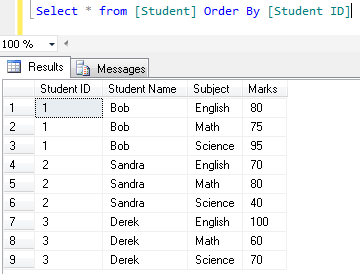
Lets create a student table and insert few records in it to demonstrate LAST_VALUE.

Create Table [Student]
(
[Student ID] int,
[Student Name] varchar(50),
[Subject] varchar(50),
[Marks] int
)
GO

Insert into [Student] values (3,'Derek','English',100)
Insert into [Student] values (3,'Derek','Math',60)
Insert into [Student] values (3,'Derek','Science',90)

Insert into [Student] values (1,'Bob','English',80)
Insert into [Student] values (1,'Bob','Math',75)
Insert into [Student] values (1,'Bob','Science',60)

Insert into [Student] values (2,'Sandra','English',70)
Insert into [Student] values (2,'Sandra','Math',80)
Insert into [Student] values (2,'Sandra','Science',40)
Select * from [Student] Order By [Student ID]

Example-1 :
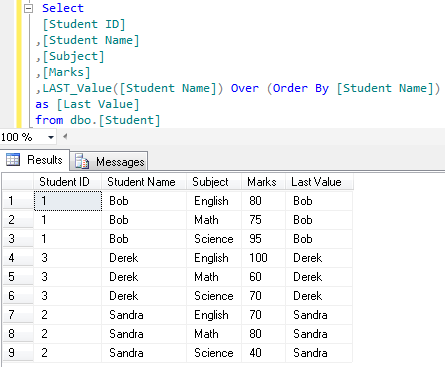
In this example, LAST_VALUE returns the Last Name of the student in the class (In alphabetical order) . And the expected result is “Sandra”.

Select
[Student ID]
,[Student Name]
,[Subject]
,[Marks]
,LAST_Value([Student Name]) Over (Order By [Student Name])
as [Last Value]
from dbo.[Student]
--Result

But Unfortunately, this is not our expected result, It is the same row value in Last Value &  student name column.

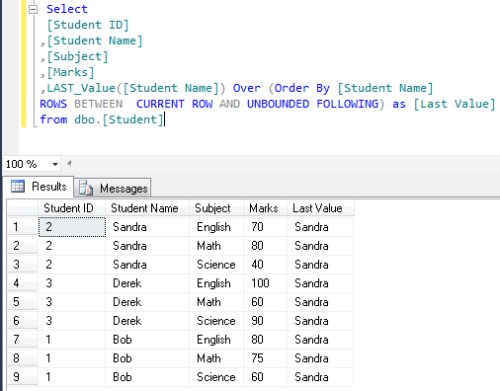
Here “row range ” optional parameters of LAST_VALUE comes to solve this problem. Now, we need to change the “row range” value from default to CURRENT ROW AND UNBOUNDED FOLLOWING.

Lets make another example with row range CURRENT ROW AND UNBOUNDED FOLLOWING.

Select
[Student ID]
,[Student Name]
,[Subject]
,[Marks]
,LAST_Value([Student Name]) Over (Order By [Student Name]
ROWS BETWEEN  CURRENT ROW AND UNBOUNDED FOLLOWING) as [Last Value]
from dbo.[Student]
--Result

Now, we got our expected result by defining “row range”.

Example-2 :
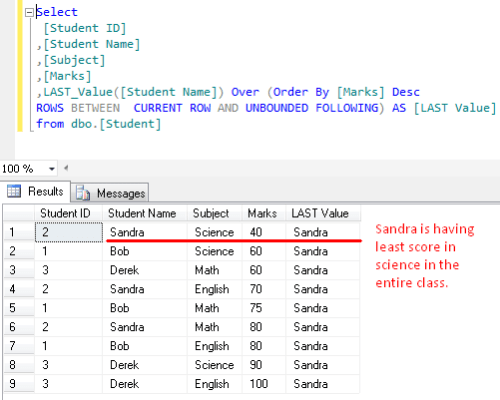
In this example, LAST_VALUE returns the student name having least score in the class. Expected result is : “Sandra”. Because she is having least score (40) in science in the entire class.

Select
[Student ID]
,[Student Name]
,[Subject]
,[Marks]
,LAST_Value([Student Name]) Over (Order By [Marks] Desc
ROWS BETWEEN  CURRENT ROW AND UNBOUNDED FOLLOWING) AS [LAST Value]
from dbo.[Student]
--Result

Example-3 :
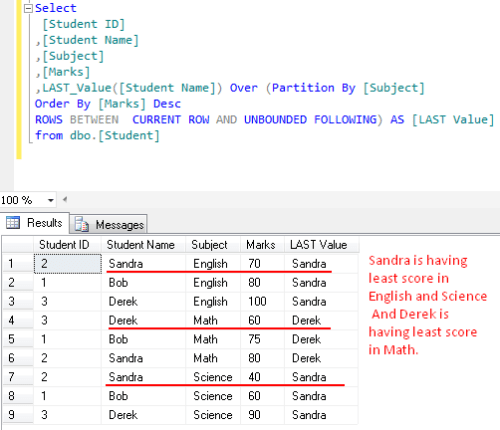
In this example, LAST_VALUE returns the student name having least score in each subject in the class. Expected result is : Sandra in “English & Science” & Derek in “Maths”.

Select
[Student ID]
,[Student Name]
,[Subject]
,[Marks]
,LAST_Value([Student Name]) Over (Partition By [Subject]
Order By [Marks] Desc
ROWS BETWEEN  CURRENT ROW AND UNBOUNDED FOLLOWING) AS [LAST Value]
from dbo.[Student]
--Result

Reference : MSDN

Read Full Post »

« Newer Posts - Older Posts »