Feeds:
Posts
Comments

Posts Tagged ‘SQL Server’

I came across a question in the Forum, how to calculate the growth of all databases in a server.
So, I set out with my research for the best solution.

Given below are the two methods to calculate the growth of all databases in the server:

  • Via sp_MSforeachdb
  • Via sys.master_files

Given below is the workout that will help you understand the best way to calculate.

  • sp_MSforeachdb

Lets execute sp_MSforeachdb and view the statistics time.

SET STATISTICS TIME ON
exec sp_MSforeachdb 'use [?]; EXEC sp_helpfile'
--OUTPUT

autogrowthsettings1.1

After executing the above statement, I saw few server executions of sp_MSforeachdb. Given below is one of the server executions.
SQL Server Execution Times:
CPU time = 343 ms, elapsed time = 10050 ms.

  • sys.master_files

Given below is the query that  I copied from MS SQL Server profiler & modified it. (Just view growth from SSMS; you can find this query in the profiler)

SELECT
S.[name] AS [Logical Name]
,S.[file_id] AS [File ID]
, S.[physical_name] AS [File Name]
,CAST(CAST(G.name AS VARBINARY(256)) AS sysname) AS [FileGroup_Name]
,CONVERT (varchar(10),(S.[size]*8)) + ' KB' AS [Size]
,CASE WHEN S.[max_size]=-1 THEN 'Unlimited' ELSE CONVERT(VARCHAR(10),CONVERT(bigint,S.[max_size])*8) +' KB' END AS [Max Size]
,CASE s.is_percent_growth WHEN 1 THEN CONVERT(VARCHAR(10),S.growth) +'%' ELSE Convert(VARCHAR(10),S.growth*8) +' KB' END AS [Growth]
,Case WHEN S.[type]=0 THEN 'Data Only'
WHEN S.[type]=1 THEN 'Log Only'
WHEN S.[type]=2 THEN 'FILESTREAM Only'
WHEN S.[type]=3 THEN 'Informational purposes Only'
WHEN S.[type]=4 THEN 'Full-text '
END AS [usage]
,DB_name(S.database_id) AS [Database Name]
FROM sys.master_files AS S
LEFT JOIN sys.filegroups AS G ON ((S.type = 2 OR S.type = 0)
AND (S.drop_lsn IS NULL)) AND (S.data_space_id=G.data_space_id)
--OUTPUT

autogrowthsettings1.2
After executing the above query, I saw server execution of sys.master_files and I was really impressed.

SQL Server Execution Times:
CPU time = 0 ms, elapsed time = 3 ms.

Conclusion :
Why there is a vast difference between two methods even though the output is almost the same ? Because sp_MSforeachdb runs sp_help against each database but on the other hand sys.master_files has all the data and you just need to present it.
The second difference between both is, if you need to modify sp_MSforeachdb result set, you need to insert it into temporary table and use it but in sys.master_files result set, you can do whatever you want without using any temporary table.

Let me know if you know other sound method to check auto growth settings of all databases.

Read Full Post »

Auto Recovery Scripts is also one of the helpful features introduced in SQL SERVER 2012. It is GOOD NEWS for those who generally forget to save the scripts in SQL Server Management Studio (SSMS) or for some reason could not save the script or close the SSMS abnormally with scripts. By default in SQL SERVER 2012 (SSMS), this feature is turned on with default settings.

Location of Auto Recovery Option in SSMS :
This option is available in Tools >> Options >> Environment >> AutoRecover

Settings available in Auto Recovery :
Given below are the settings available in Auto Recovery.

  • Save Recovery Information :
    • You can set after how many minutes your script should be saved automatically. By default it is after 5 minutes.
  • Keep auto recovered information :
    • You can also set for how many days SSMS should keep those files. By default it is 7 days.

autorecovery 1.1

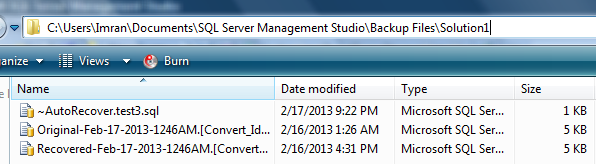
You can find the recovery files here :C:\Users\windows user\Documents\SQL Server Management Studio\Backup Files\Solution1

Given below are the images of recovered files :

autorecovery 1.3

autorecovery 1.4

Read Full Post »

In this article we will discuss about a new error message (A TOP cannot be used in the same query or sub-query as an OFFSET) introduced in SQL SERVER 2012.

Let’s discuss it in detail:

Message Number: 10741

Severity : 15

Error Message: “A TOP cannot be used in the same query or sub-query as an OFFSET.”

Error Generation:
Let me create an example to generate this error:

USE AdventureWorks2012
GO
Select top 5 BusinessEntityID,[FirstName]
, [LastName],[JobTitle] as [JT]
from HumanResources.vEmployee A
Order By [JobTitle]
OFFSET 10 ROWS
FETCH NEXT 10 ROWS ONLY
--OUTPUT

Msg 10741, Level 15, State 2, Line 4
A TOP cannot be used in the same query or sub-query as an OFFSET.

Resolution:

In the above example, you can see, I upgraded my query from sql server 2008 to 2012 and used new data paging technique introduced in SQL Server 2012, but I did not (deliberately) remove TOP Keyword from the query. Remember, whenever you use data paging  (OFFSET ROWS), make sure you don’t use TOP keyword in the query to avoid this error. According to MSDN : TOP cannot be combined with OFFSET and FETCH in the same query expression (in the same query scope).

Reference : MSDN

Read Full Post »

In my last article, I had discussed how to convert a table from identity to sequence (manually). In this article, I would be sharing a script that I developed for one of my customers, to convert identity to sequence automatically. I presume that identity column belongs to integer data type family (small int, int, big int).
Note: Please test the script first on test database.

Given below is the example that we need to create, to understand the conversion:

Create table dbo.[Student]
(
[StudentID] int identity(1,1),
[StudentName] varchar(50)
CONSTRAINT PK_Student_StudentID PRIMARY KEY CLUSTERED
([StudentID] ASC)
)
GO
Insert into dbo.Student values ('Imran'),('Bob'),('Sandra')
GO
Select * from dbo.Student

identity_2_sequence1.1

Now, create the given below stored procedure to convert it automatically.

CREATE PROCEDURE Convert_Identity_To_Sequence_Proc
@Scheme_And_TableName nvarchar(Max)
AS

DECLARE @SQL AS NVARCHAR(MAX)
DECLARE @OBJECTID AS BIGINT
DECLARE @IDENTITY_COLUMN_NAME AS NVARCHAR(MAX)
DECLARE @DATA_TYPE_NAME AS SYSNAME
DECLARE @CONSTRAINT_NAME AS NVARCHAR(MAX)
DECLARE @Max_identity_ID AS BIGINT
DECLARE @ParmDefinition AS NVARCHAR(MAX)
DECLARE @TABLE_NAME AS NVARCHAR(MAX)

--Pick up object ID of the table
SELECT @OBJECTID=OBJECT_ID(@Scheme_And_TableName)
--Seperate Table name from the schema
SET @TABLE_NAME =SUBSTRING(@Scheme_And_TableName,CHARINDEX('.',@Scheme_And_TableName)+1,LEN(@Scheme_And_TableName))
Print @TABLE_NAME

--Check if the table has an identity table
If (Select Count(*) from sys.identity_columns where object_id =@OBJECTID)=0
BEGIN
RAISERROR('Could not found the identity column in this table',16,1)
RETURN
END
Print @OBJECTID

-- Pick identity column name , contraint name and data type name from the table.
SELECT @IDENTITY_COLUMN_NAME=A.name,@CONSTRAINT_NAME=B.name, @DATA_TYPE_NAME=D.name FROM sys.columns A
INNER JOIN sys.types D ON A.system_type_id =D.system_type_id
LEFT JOIN sys.indexes B ON A.object_id =B.object_id
LEFT JOIN sys.index_columns C ON B.object_id =C.object_id
AND B.index_id =C.index_id
AND A.column_id =C.column_id
WHERE A.is_identity =1 And A.object_id =@OBJECTID

Print @IDENTITY_COLUMN_NAME
Print @CONSTRAINT_NAME
Print @DATA_TYPE_NAME

-- Add a new column in the table that does not have the IDENTITY property with the same data type
SET @SQL ='ALTER TABLE ' + @Scheme_And_TableName +' ADD ' +@IDENTITY_COLUMN_NAME + 'New ' + @DATA_TYPE_NAME + ' NULL'
Print @SQL
EXEC (@SQL)

-- Copy values from the old column and update into the new column
SET @SQL ='UPDATE ' + @Scheme_And_TableName +' SET ' + @IDENTITY_COLUMN_NAME + 'New' + ' =' + @IDENTITY_COLUMN_NAME
Print @SQL
EXEC (@SQL)

-- Drop the primary key constraint from the old identity column
SET @SQL ='ALTER TABLE ' + @Scheme_And_TableName + ' DROP CONSTRAINT ' + @CONSTRAINT_NAME
Print @SQL
EXEC (@SQL)

-- Drop the old identity column
SET @SQL =' ALTER TABLE ' + @Scheme_And_TableName + ' DROP COLUMN ' + @IDENTITY_COLUMN_NAME
Print @SQL
EXEC (@SQL)

-- Rename the new column to the old columns name
SET @SQL ='EXEC sp_rename ' + ''''+ @Scheme_And_TableName + '.'+ @IDENTITY_COLUMN_NAME+'New' + '''' + ',' + ''''+ @IDENTITY_COLUMN_NAME + '''' + ',' + '''COLUMN'''
Print @SQL
EXEC (@SQL)

-- Change the new column to NOT NULL
SET @SQL ='ALTER TABLE ' + @Scheme_And_TableName + ' ALTER COLUMN ' + @IDENTITY_COLUMN_NAME + ' ' + @DATA_TYPE_NAME + +' NOT NULL'
Print @SQL
EXEC (@SQL)

-- Add the unique primary key constraint again with the same name
IF @CONSTRAINT_NAME IS NOT NULL
BEGIN
SET @SQL ='ALTER TABLE ' + @Scheme_And_TableName + ' ADD CONSTRAINT ' + @CONSTRAINT_NAME +' PRIMARY KEY CLUSTERED (' + @IDENTITY_COLUMN_NAME +' ASC)'
Print @SQL
EXEC (@SQL)
END
ELSE
BEGIN
PRINT 'NO CONSTRAINT'
END
-- Get the highest current value from the column
-- to use it for sequence creation.
SET @SQL ='SELECT @Max_ID=MAX(' + @IDENTITY_COLUMN_NAME + ') FROM ' + @Scheme_And_TableName
SET @ParmDefinition = N'@Max_ID ' + @DATA_TYPE_NAME + ' OUTPUT'
Print @SQL
Print @ParmDefinition
EXECUTE sp_executesql @SQL, @ParmDefinition,@Max_ID=@Max_identity_ID OUTPUT;
Print @Max_identity_ID

-- Use the next Identity value as the START WITH VALUE;
SET @SQL ='CREATE SEQUENCE ' + @Scheme_And_TableName + 'Seq' +
' AS ' + @DATA_TYPE_NAME +
' START WITH ' + try_Convert(varchar(max),@Max_identity_ID+1) +
' INCREMENT BY 1 ' ;
Print @SQL
EXEC (@SQL)

-- Add a default value of sequence to the column
SET @SQL ='ALTER TABLE ' + @Scheme_And_TableName + ' ADD CONSTRAINT Def' + @TABLE_NAME + ' DEFAULT (NEXT VALUE FOR ' + @Scheme_And_TableName + 'Seq)
FOR ' + @IDENTITY_COLUMN_NAME;
Print @SQL
EXEC (@SQL)

GO
--Execute the stored procedure and provide schema and table name as a parameter.
EXEC Convert_Identity_To_Sequence_Proc 'dbo.Student'

Insert few records and check whether the table is properly converted from identity to sequence or not.

Insert into Student (StudentName) Values ('Mark')
Insert into Student (StudentName) Values ('Peter')
Select * from dbo.Student
--OUTPUT

identity_2_sequence1.2

Reference : MSDN

Read Full Post »

In my earlier article, I wrote about sequence. In this article, we will learn how to convert an identity column to sequence, step by step. Original script is available here (MSDN)
Given below is the example that we need to create, to understand the steps :

Create table dbo.[Student]
(
[StudentID] int identity(1,1),
[StudentName] varchar(50)
CONSTRAINT PK_Student_StudentID PRIMARY KEY CLUSTERED
([StudentID] ASC)
)
GO
Insert into dbo.Student values ('Imran'),('Bob'),('Sandra')
GO
Select * from dbo.Student

identity_2_sequence1.1

Step :1
First of all, we need to add another column in the table with the same data type as identity column.

ALTER TABLE dbo.Student ADD StudentIDNew int NULL
GO

Step :2
Update the IDs from identity column to the newly added column.

UPDATE dbo.Student
SET [StudentIDNew] = [StudentID]
GO

Step :3
Drop the primary key constraint from the identity column of the table.

ALTER TABLE dbo.Student
DROP CONSTRAINT PK_Student_StudentID;
GO

Step :4
Drop the identity column from the column.

ALTER TABLE dbo.Student
DROP COLUMN [StudentID] ;
GO

Step :5
Rename the new column name to the old identity column name.

EXEC sp_rename 'dbo.Student.StudentIDNew',
'StudentID', 'COLUMN';
GO

Step :6
Change the new identity column to NOT NULL.

ALTER TABLE dbo.Student ALTER COLUMN [StudentID] int NOT NULL ;
GO

Step :7
Add primary key constraint back to the table.

ALTER TABLE dbo.Student
ADD CONSTRAINT PK_Student_StudentID PRIMARY KEY CLUSTERED
([StudentID] ASC) ;
GO

Step :8
Now, we need to create the sequence but before sequence creation, we need to know the last ID of the identity column.

SELECT MAX(StudentID) FROM dbo.Student ;
GO

Step :9
Create the sequence using the maximum ID +1 and the same data type of the identity column.

CREATE SEQUENCE dbo.StudentSeq
AS int
START WITH 4
INCREMENT BY 1 ;
GO

Step :10
Make the sequence as a default value of the column.

ALTER TABLE dbo.Student
ADD CONSTRAINT Const_StudentSeq DEFAULT (NEXT VALUE FOR dbo.StudentSeq)
FOR StudentID;
GO

Step :11
Insert few records and check whether the table is properly converted from identity to sequence or not.

Insert into Student (StudentName) Values ('Mark')
Insert into Student (StudentName) Values ('Peter')
Select * from dbo.Student
--OUTPUT

identity_2_sequence1.2

Shall discuss how to change a table from identity to sequence automatically in my next post.

Read Full Post »

SQL Server profiler is a very handy tool when it comes to tracing queries and trouble shooting etc. But if you run the sql server profiler with default settings, it will show you all the tracing going on in the SQL Server.Then you need to further filter it to achieve whatever you are exactly looking for with different filters.
Today, I will share a shortcut that can help you to trace query that you are doing with your session. Because mostly SQL developers / QA are interested to debug their own activities (in their own sessions) via SQL Server Profiler.
Note : This feature is available in SQL SERVER 2008 and above.

Lets do it step by step :

Step 1 :
Open a new query window and right click on it.

Step 2 :
Click on the Trace Query in SQL Server Profiler or press Ctrl+Alt+P.

sql server profiler1.1

Step 3 :
It will open SQL Server Profiler.

Step 4 :
Now, whatever you will perform in this query window it will show you in this profiler. But if you open a new query window it will not trace it in this profiler. This is very handy for short term tracing or trouble shooting.

sql server profiler1.2

Reason
The reason behind this is if you open the property window (File menu \ properties …) of this sql server query profiler, and go to events selection and the click on column filters button, you can see that it automatically filters your sessions. So whatever you do in your session only that will be traced.

sql server profiler1.3

sql server profiler1.4

Will post how filters work in SQL Server profiler in my upcoming post.

Read Full Post »

In this article, we will discuss another important analytical function introduced in SQL SERVER 2012 namely PERCENTILE_CONT. Lets discuss PERCENTILE_CONT syntax, purpose, return type with simple examples.

Syntax

PERCENTILE_CONT ( numeric_literal )
WITHIN GROUP ( ORDER BY order_by_expression [ ASC | DESC ] )
OVER ( [ <partition_by_clause> ] )

Purpose
The purpose of this function is to calculate the percentile based on a continuous distribution of the field. In other words you can say that it also calculates the median but just to base it on the median, is not correct.

Return Type
The return type is float(53) and the value of percentile should be between 0 and 1.

Formula
Given below is the formula that will help you to understand how it works.
If (CRN = FRN = RN) then the result is
(value of expression from row at RN)
Otherwise the result is
(CRN – RN) * (value of expression for row at FRN) +
(RN – FRN) * (value of expression for row at CRN)

Where
RN = Row number
CRN = Ceiling of RN
FRN = Floor of RN

Lets implement this formula in the examples :
Example 1 : When PERCENTILE_CONT is 0.5
Lets take gold rate as an example to check their percentile based on a continuous distribution of the gold rate in one week.

Create table [Daily_Gold_Rate]
(
[S.No] int,
[Date] datetime,
[Carat] int,
[Gold Rate] numeric(18,2)
)

Insert into [Daily_Gold_Rate] values(1,'2013-01-03',18,155.00)
Insert into [Daily_Gold_Rate] values(2,'2013-01-03',22,190.50)
Insert into [Daily_Gold_Rate] values(3,'2013-01-03',24,202.23)

Insert into [Daily_Gold_Rate] values(4,'2013-01-04',18,153.00)
Insert into [Daily_Gold_Rate] values(5,'2013-01-04',22,191.00)
Insert into [Daily_Gold_Rate] values(6,'2013-01-04',24,202.25)

Insert into [Daily_Gold_Rate] values(7,'2013-01-05',18,150.00)
Insert into [Daily_Gold_Rate] values(8,'2013-01-05',22,190.00)
Insert into [Daily_Gold_Rate] values(9,'2013-01-05',24,203.25)

Insert into [Daily_Gold_Rate] values(10,'2013-01-06',18,158.00)
Insert into [Daily_Gold_Rate] values(11,'2013-01-06',22,189.50)
Insert into [Daily_Gold_Rate] values(12,'2013-01-06',24,201.50)

Select
[Date]
,[Carat]
,[Gold Rate]
,PERCENTILE_CONT(0.5) WITHIN GROUP (ORDER BY [Gold rate])
OVER (PARTITION BY [Carat]) AS MedianCont
from [Daily_Gold_Rate]

percent_cont1.1

Lets calculate the formula in excel and view the results.
if Percentile is 0.5 then RN is not equal to CRN and is not equal to FRN. Therefore the formula will be
(CRN – RN) * (value of expression for row at FRN) +
(RN – FRN) * (value of expression for row at CRN)

percent_cont_excel1.1

Example 2 : When PERCENTILE_CONT is 1

Select
[Date]
,[Carat]
,[Gold Rate]
,PERCENTILE_CONT(1) WITHIN GROUP (ORDER BY [Gold rate])
OVER (PARTITION BY [Carat]) AS MedianCont
from [Daily_Gold_Rate]

percent_cont1.3-1

Lets calculate the formula in excel and view the results.
if Percentile is 1 then RN=CRN=FRN and the formula will be
If (CRN = FRN = RN) then the result is
(value of expression from row at RN)

percent_cont_excel1.2

Reference :MSDN

Read Full Post »

I need to count the words from one of the fields in the table and its data type is varchar (max). This is a very simple task, but the problem is, varchar field has unnecessary White Spaces, Tabs, Carriage Returns and Line Feeds as well. I searched it over the internet and found a solution but it works when it is a simple sentence without any hurdles or otherwise with loop. So, I thought of developing this solution without loop.

First of all, I found which character control has what char value. Given below are the details :

  • Tab                             char(9)
  • Line feed                    char(10)
  • Carriage return          char(13)
  • White space               char(32)

Solution : (Word count for complex paragraphs having unnecessary White Spaces, Tabs, Carriage Returns and Line Feeds)

CREATE FUNCTION dbo.[UDF_Word_Count_From_String]
(
@STRING VARCHAR(MAX) -- Variable for string
)
RETURNS VARCHAR(MAX)
BEGIN

DECLARE @RETURNSTRING AS VARCHAR(MAX)

Set @STRING=REPLACE(REPLACE(REPLACE(REPLACE(REPLACE(REPLACE(@STRING
,CHAR(9),CHAR(32))
,CHAR(13),CHAR(32))
,CHAR(10),CHAR(32))
,CHAR(32),'øù')
,'ùø','')
,'øù',CHAR(32))
SELECT @RETURNSTRING =LEN(@String) - LEN(REPLACE(@String,' ', '')) + 1
RETURN @RETURNSTRING
END
GO
Select dbo.[UDF_Word_Count_From_String]('How many
word		do   you
have in this sentence?') as [Word Count]
--OUTPUT

Word Count
——————–
9

(1 row(s) affected)

Let me know if you know a better solution.

Read Full Post »

In this article we will discuss a new error message (The batch could not be analyzed because of compile errors) that appears in SQL SERVER 2012.

Let’s discuss it in detail:

Message Number: 11501

Severity : 16

Error Message: “The batch could not be analyzed because of compile errors”

Error Generation:

In my previous article, I discussed about sp_describe_undeclared_parameters, this error message is somehow related to sp_describe_undeclared_parameters (because of the batch processing).  But it can also be generated wherever batch processing is involved.

Let me create an example to generate this error:

USE AdventureWorks2012
GO
sp_describe_undeclared_parameters @tSQL=
N'SELECT @BusinessID=[BusinessEntityID]
from [HumanResources].[vEmployee] Where [FirstName]=@FName'
,@params =N'@FName nvarchar(50),, @BusinessID INT OUTPUT'
--OUTPUT

Msg 102, Level 15, State 1, Line 1
Incorrect syntax near ‘,’.
Msg 11501, Level 16, State 2, Line 1
The batch could not be analyzed because of compile errors.

errormsg11501.1.

Resolution:

The reason behind this error is whenever you pass any incorrect input parameter to process any batch and if there is any error in the input parameter, it will generate this error with the combination of actual error. In the above example, I placed two commas instead of one in the parameter and then it generated two errors 1st one to notify actual error Incorrect syntax near ‘,’  also  it notifies that  The batch could not be analyzed because of compile errors. Whenever you are using any batch processing command, make sure that the input parameters are correct.

Please let me know if you have other samples to regenerate such error.

Read Full Post »

Cycle Clipboard Ring is one the nice features available in SQL Server 2012. This feature is available in Edit >> Cycle Clipboard Ring.

cycleclipboardring1.1

Let me explain this feature with an example.

If you copy different stuff in SQL server (SSMS) and paste it, it pastes only whatever stuff you copied Last.
For example :
There are three characters given below:

  1. A
  2. B
  3. C

If you copy/cut all of the above one by one, then paste it in SQL Server (SSMS), it will paste only C because, SQL Server keeps only the last copied item in the clipboard and pastes it.

Now, I have a situation where I need to copy all of the above one by one and paste it also one by one. You can easily do it with the help of Cycle Clipboard Ring

Let me explain it step by step :

Step 1 :
First of all, copy/cut all of the above characters one by one in the same sequence.

Step 2 :
Now, wherever you want to paste, go to to the destination, click on the place.

Step 3 :
Now,

  • if you need to paste C (last character) press and Hold Ctl+Shift and press V one time. Or you can click on Edit menu \Cycle Clipboard Ring just once
  • if you need to paste B (2nd last character) press and Hold Ctl+Shift and press V two times. Or you can click on Edit menu \Cycle Clipboard Ring two times
  • if you need to paste A (1st character) press and Hold Ctl+Shift and press V three times.Or you can click on Edit menu \Cycle Clipboard Ring three times

cycleclipboardring1.2-1

I liked this feature. Let me know how helpful it is for you.

Read Full Post »

« Newer Posts - Older Posts »