Feeds:
Posts
Comments

Posts Tagged ‘SQL’

In the earlier versions of SQL Server, whenever you need to rebuild an index (pass DDL statement for an online index), you sometimes end up with deadlock situation. Given below is the script that we use to rebuild an online index in the earlier version of SQL Server.

USE AdventureWorks2012
GO
ALTER INDEX ALL ON Production.Product
REBUILD WITH (FILLFACTOR = 80, SORT_IN_TEMPDB = ON,
STATISTICS_NORECOMPUTE = ON);

In SQL Server Hekaton, a solution to this problem has been introduced namely WAIT_AT_LOW_PRIORITY . It allows DBA to control the locking mechanism that is required to rebuild an online index and causing deadlock situations.
Given below is the script :

USE AdventureWorks2012
GO
ALTER INDEX ALL ON Production.Product
REBUILD WITH
(
FILLFACTOR = 80,
SORT_IN_TEMPDB = ON,
STATISTICS_NORECOMPUTE = ON,
ONLINE = ON ( WAIT_AT_LOW_PRIORITY
( MAX_DURATION = 4 MINUTES, ABORT_AFTER_WAIT = BLOCKERS ) ),
DATA_COMPRESSION = ROW
)
;

In the above script, you can see two arguments MAX_DURATION and ABORT_AFTER_WAIT. Given below are the details.

MAX_DURATION :
It describes the waiting time in minutes, but you can just pass the integer number and MINUTES can be removed from the syntax.

ABORT_AFTER_WAIT:
ABORT_AFTER_WAIT came up with three nice options. It basically provides you the hands on the different locking mechanism. Given below are the details :

NONE : It implements no locking on the online index rebuild operation,it performs operation like a normal scenario.
Given below is the script if you would like to implement NONE in ABORT_AFTER_WAIT.

USE AdventureWorks2012
GO
ALTER INDEX ALL ON Production.Product
REBUILD WITH
(
FILLFACTOR = 80,
SORT_IN_TEMPDB = ON,
STATISTICS_NORECOMPUTE = ON,
ONLINE = ON ( WAIT_AT_LOW_PRIORITY
( MAX_DURATION = 0 MINUTES, ABORT_AFTER_WAIT = NONE ) ),
DATA_COMPRESSION = ROW
)
;

SELF: It aborts the online index rebuild operation by using normal priority. It gives priority to the user operation instead of rebuilding index.
Given below is the script if you intend to implement SELF.

USE AdventureWorks2012
GO
ALTER INDEX ALL ON Production.Product
REBUILD WITH
(
FILLFACTOR = 80,
SORT_IN_TEMPDB = ON,
STATISTICS_NORECOMPUTE = ON,
ONLINE = ON ( WAIT_AT_LOW_PRIORITY
( MAX_DURATION = 4 MINUTES, ABORT_AFTER_WAIT = SELF) ),
DATA_COMPRESSION = ROW
)
;

BLOCKERS: It kills all the user transactions that usually block the online index rebuilding, so that you can rebuild index easily. This is not recommended if you are using at the peak hours.
Given below is the script if you would like to implement BLOCKERS.

USE AdventureWorks2012
GO
ALTER INDEX ALL ON Production.Product
REBUILD WITH
(
FILLFACTOR = 80,
SORT_IN_TEMPDB = ON,
STATISTICS_NORECOMPUTE = ON,
ONLINE = ON ( WAIT_AT_LOW_PRIORITY
( MAX_DURATION = 4 MINUTES, ABORT_AFTER_WAIT = BLOCKERS) ),
DATA_COMPRESSION = ROW
)
;

Let me know if you implement it in CTP 1 and find any issues.

Read Full Post »

Whenever new technology steps in, we usually run for its sample database to test it features, functionality & enhancement, etc. When I started testing SQL Server Hekaton, I was looking for some sample databases. Finally, I grabbed it from msdn but there, it is script only. So you need to copy and execute it but if you need a downloadable version, you can download it from here (Northwind database).

Note : Make sure you have data folder in c: drive (C:\data)

Read Full Post »

Recently, I was working on SQL Server 2014 CTP 1 and doing my usual research, and came across the new system objects shipped with CTP 1.

Given below is the list of new system objects :

S.No

 Object Name

Object Type

1

 sp_set_cardinality_estimation_model_110

EXTENDED STORED PROCEDURE

2

 plan_persist_query_text

INTERNAL TABLE

3

 plan_persist_query

INTERNAL TABLE

4

 plan_persist_plan

INTERNAL TABLE

5

 plan_persist_runtime_stats

INTERNAL TABLE

6

 plan_persist_runtime_stats_interval

INTERNAL TABLE

7

 plan_persist_context_settings

INTERNAL TABLE

8

 fn_dump_dblog_xtp

INLINE TABLE VALUED FUNCTION

9

 fn_dblog_xtp

INLINE TABLE VALUED FUNCTION

10

 fn_hadr_is_primary_replica

SCALAR FUNCTION

11

 sp_MSalreadyhavegeneration

STORED PROCEDURE

12

 sp_xtp_merge_checkpoint_files

STORED PROCEDURE

13

 sp_db_enable_clustered_columnstores

STORED PROCEDURE

14

 sp_cci_tuple_mover

STORED PROCEDURE

15

 syscsrowgroups

SYSTEM TABLE

16

 dm_resource_governor_resource_pool_volumes

VIEW

17

 dm_xtp_transaction_stats

VIEW

18

 dm_xe_database_session_event_actions

VIEW

19

 dm_xtp_gc_stats

VIEW

20

 dm_db_xtp_index_stats

VIEW

21

 dm_xe_database_session_object_columns

VIEW

22

 dm_os_buffer_pool_extension_configuration

VIEW

23

 dm_db_xtp_object_stats

VIEW

24

 dm_db_xtp_table_memory_stats

VIEW

25

 dm_xtp_consumer_memory_usage

VIEW

26

 dm_io_cluster_shared_volumes

VIEW

27

 dm_db_xtp_memory_consumers

VIEW

28

 dm_db_xtp_checkpoint

VIEW

29

 dm_xtp_threads

VIEW

30

 dm_db_merge_requests

VIEW

31

 dm_xtp_transaction_recent_rows

VIEW

32

 dm_db_xtp_checkpoint_files

VIEW

33

 dm_xtp_system_memory_consumers

VIEW

34

 dm_xe_database_session_events

VIEW

35

 dm_xtp_memory_stats

VIEW

36

 dm_db_xtp_hash_index_stats

VIEW

37

 dm_xe_database_sessions

VIEW

38

 dm_xe_database_session_targets

VIEW

39

 dm_db_xtp_gc_cycle_stats

VIEW

40

 dm_xtp_gc_queue_stats

VIEW

41

 dm_db_xtp_transactions

VIEW

42

 column_store_row_groups

VIEW

43

 hash_indexes

VIEW

44

 event_sessions

VIEW

45

 event_session_targets

VIEW

46

 event_session_fields

VIEW

47

 event_session_events

VIEW

48

 event_session_actions

VIEW

Read Full Post »

Columnstore index is one of the nice features introduced in SQL Server 2012. It improves the performance more times than the normal query but on the other hand it has some limitations as well, and one of the limitation is that you cannot create a CLUSTERED Columnstore index.

Let me demonstrate it in SQL Server 2012.

USE tempdb
GO
CREATE TABLE tbl_Product_Master
(
[Product ID] INT,
[Product Name] NVARCHAR(100),
[Model] INT
)
GO
CREATE CLUSTERED COLUMNSTORE INDEX
[IX_tbl_Product_Master_ColumnStore]
ON [tbl_Product_Master] ([Product ID])
GO
--OUTPUT

Msg 35338, Level 15, State 1, Line 3
Clustered columnstore index is not supported.

Ooopps…… I am unable to create it in SQL Server 2012.

The above limitation has been eliminated in SQL Server 2014 and you can add the CLUSTERED COLUMNSTORE INDEX in the table.

Let me demonstrate the same example in SQL Server 2014.


USE tempdb
GO
CREATE TABLE tbl_Product_Master
(
[Product ID] INT,
[Product Name] NVARCHAR(100),
[Model] INT
)
GO

CREATE CLUSTERED COLUMNSTORE INDEX
[IX_tbl_Product_Master_ColumnStore]
ON [tbl_Product_Master]
GO
--OUTPUT

Command(s) completed successfully.

Lets check whether the index has been created successfully or not.

columnstoreindexcusteredindex1.1

The result is evident above, in SQL 2014.

Let me know if you explore the other nice enhancements of SQL Server 2014.

Read Full Post »

An invalid value was specified for argument ‘%.*ls’ for the given data type  is one of the new error messages in SQL Server 2012. This error message is related to Sequence object, a new database feature shipped with SQL Server 2012.

Lets discuss this in detail:
Message Number: 11708

Severity : 16

Error Message: An invalid value was specified for argument ‘%.*ls’ for the given data type.

Error Generation:

Given below is the script that I tried to execute but it resulted with the following error.

Use AdventureWorks2012
GO
CREATE SEQUENCE [dbo].[Seq_sample]
AS [tinyint]
START WITH 1
INCREMENT BY 1
MINVALUE 1
MAXVALUE 256
NO CACHE
GO

Msg 11708, Level 16, State 1, Line 1
An invalid value was specified for argument ‘MAXVALUE’ for the given data type.

Ooopps…… I am unable to execute it.

Resolution:
The issue is quite simple. I created the sequence object using tinyint data type and range of tinyint data type is from 0 to 255 as per MSDN. But if you observe carefully, in my above example, the maximum value of sequence object is 256 and that is more than the tinyint data type maximum range (255).

Lets rewrite the script and correct the maximum value range. It must be less than or equal to the defined data type range.

Use AdventureWorks2012
GO
CREATE SEQUENCE [dbo].[Seq_sample]
AS [tinyint]
START WITH 1
INCREMENT BY 1
MINVALUE 1
MAXVALUE 255
NO CACHE
GO

Conclusion :
Remember, whenever you create the sequence object always keep the minimum and maximum value within the range of the data type.

Let me know if you have a better solution.

Read Full Post »

In my earlier article, I had discussed about new features of SQL Server 2014. Those features are very exciting and I was waiting for the CTP. Now, CTP 1 is available for download.

Given below are the few instructions that you should follow to install CTP 1.

  • The machine should not have any earlier versions of SQL Server.
  • There is no upgrade / side by side installation available in this CTP.
  • This CTP is only available for X64 architecture.

System requirement for SQL Server 2014 is available here.

Let me know if you face any issues with the installation.

Read Full Post »

In my earlier article, I had discussed about the omitted leading zeros in excel and I received a very nice solution from Mr. Harsh, one of my blog readers. (This solution works in Excel 2010 and above).

Let me explain his solution step by step.

Step A :
Let me create a sample to demonstrate the error.

USE tempdb
GO
CREATE TABLE [dbo].[tbl_Employee](
[Employee ID] [varchar](5) NULL,
[Employee Name] [varchar](50) NOT NULL
) ON [PRIMARY]

GO
INSERT [dbo].[tbl_Employee] ([Employee ID], [Employee Name])
VALUES (N'00001', N'A. Scott')

INSERT [dbo].[tbl_Employee] ([Employee ID], [Employee Name])
VALUES (N'00002', N'Alan')

INSERT [dbo].[tbl_Employee] ([Employee ID], [Employee Name])
VALUES (N'00003', N'Alejandro')

INSERT [dbo].[tbl_Employee] ([Employee ID], [Employee Name])
VALUES (N'00004', N'Alex')

INSERT [dbo].[tbl_Employee] ([Employee ID], [Employee Name])
VALUES (N'00005', N'Alice')
GO
SELECT [Employee ID], [Employee Name] FROM [tbl_Employee]
GO
--OUTPUT

Remove_zeros_in_excel.1.1

Step B :
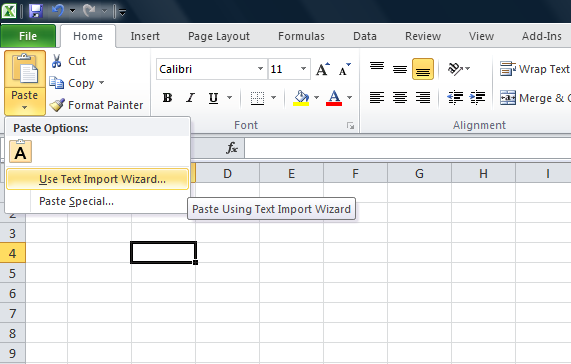
Copy the data from SQL Server, open an excel sheet, click on Paste Button and select Use Text Import Wizard (as shown in the picture below).

omittingleadingzeros1.1

Step C :
It then takes you to 3 steps of Text Import Wizard. Under Text Import Wizard – Step 1 of 3, you need to determine the data type. Select Delimited and press Next (as shown in the picture below).

omittingleadingzeros1.2

Step D :
Text Import Wizard – Step 2 of 3 lets you to set the delimiters your data contains. Select Tab and press Next (as shown in the picture below).
omittingleadingzeros1.3

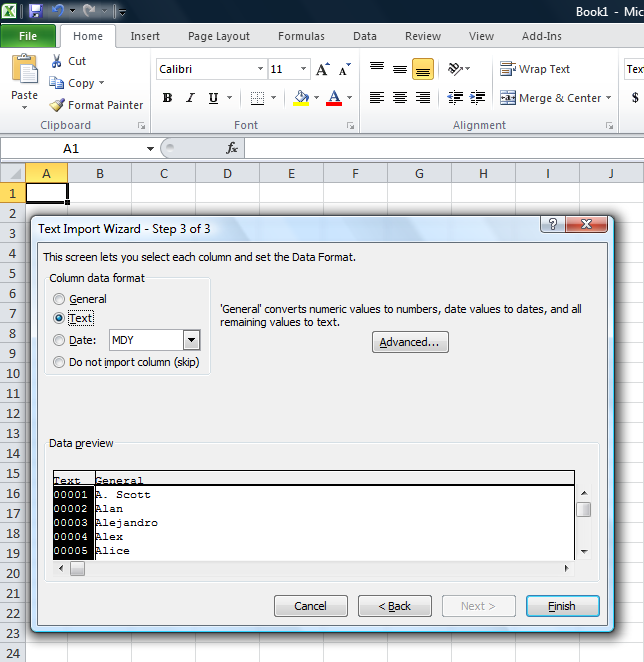
Step E :
Text Import Wizard – Step 3 of 3 lets you set the column data format. Select Text and press Finish (as shown in the picture below).

omittingleadingzeros1.6

Step F :
Once finished, the data would be pasted in the required format, meaning along with the zeros as shown in the picture below.

omittingleadingzeros1.5

Let me know if you know any better solution.

Read Full Post »

IF… ELSE clause is very handy and whenever you need to perform any conditional operation, you can achieve your results using it. But there are some limitations in IF… ELSE,  and one of the limitations is that you cannot use it in WHERE clause.

Let me demonstrate the limitations.

USE AdventureWorks2012
GO
DECLARE @City AS VARCHAR(50)
SELECT
BusinessEntityID
, FirstName
, LastName
, City
FROM [HumanResources].[vEmployee]
WHERE
IF @City IS NULL
City='Renton'
ELSE
City=@City
--OUTPUT

Msg 156, Level 15, State 1, Line 9
Incorrect syntax near the keyword ‘IF’.
Msg 102, Level 15, State 1, Line 10
Incorrect syntax near ‘City’.

Nevertheless, there are solutions which are given below:

SOLUTION 1 :
You can use CASE statement instead of IF..ELSE clause to do conditional where clause.
Given below is the script.

--This script is compatible with SQL Server 2005 and above.
USE AdventureWorks2012
GO
DECLARE @City AS VARCHAR(50)
SELECT
BusinessEntityID
, FirstName
, LastName
, City
FROM [HumanResources].[vEmployee]
WHERE City =
(CASE WHEN @City IS NULL THEN 'Renton' ELSE @City END)
ORDER BY BusinessEntityID
--OUTPUT

ifelse1.1

SOLUTION 2 :
In this solution, you can use IIF clause instead of IF..ELSE  to do conditional where clause.
Given below is the script.

--This script is compatible with SQL Server 2012 and above
USE AdventureWorks2012
GO
DECLARE @City AS VARCHAR(50)
SELECT
BusinessEntityID
, FirstName
, LastName
, City
FROM [HumanResources].[vEmployee]
WHERE City = IIF (@City IS NULL, 'Renton', @City)
ORDER BY BusinessEntityID
--OUTPUT

ifelse1.1

Read Full Post »

In my earlier article, I had discussed about how to sort month names in month order instead of alphabetical order . In that article, we had given the date and we had to convert into month and sort it. But, in today’s case we have month & year in the table and we need to sort it in month & year order instead of alphabetical order. To achieve this, we usually use lots of case statements and sort it.

Let me create an example to demonstrate it.

USE tempdb
GO
CREATE TABLE tbl_MonthName
(
[ID] INT,
[MONTH_NAME] VARCHAR(50),
[YEAR] VARCHAR(4)
)
GO

INSERT INTO tbl_MonthName
SELECT 1, N'January',2014 UNION ALL
SELECT 2, N'July',2013 UNION ALL
SELECT 3, N'February',2014 UNION ALL
SELECT 4, N'September',2013 UNION ALL
SELECT 5, N'March',2014 UNION ALL
SELECT 6, N'April',2014 UNION ALL
SELECT 7, N'November',2013 UNION ALL
SELECT 8, N'May',2014 UNION ALL
SELECT 9, N'June',2014 UNION ALL
SELECT 10, N'August',2013 UNION ALL
SELECT 11, N'October',2013 UNION ALL
SELECT 12, N'December',2013
GO

SELECT * FROM tbl_MonthName
GO
--OUTPUT

Monthnameandyear1.1

As you can see, the above result set is not sorted properly.

Given below is a simple solution to sort data in month and year order.

--This script is compatible with SQL Server 2005 and above
USE tempdb
GO
SELECT * FROM tbl_MonthName
ORDER BY [YEAR],MONTH('1' + [MONTH_NAME] +'00')
--OUTPUT

Monthnameandyear1.2

Read Full Post »

In most of the applications, we create some multipurpose stored procedure that we use for multiple forms, reports, exports, etc. The challenge we usually face with this kind of stored procedure is that whatever columns are available in the result set, stored procedure will return the same number of columns as an output and not the selected/required information.

Let me take a sample stored procedure from AdventureWorks2012 database and view its result set.

USE AdventureWorks2012
GO
EXEC [dbo].[uspGetManagerEmployees] 16
GO
--OUTPUT

selectcolumn1.1

As you can see that a number of columns are available in the above stored procedure result set but I need to select [BusinessEntityID], [FirstName], [LastName] ONLY.

Given below are the two methods to achieve it.

Method 1 :
In this method, we need to follow three steps :

Step 1:
Create a temporary table according to the number of columns in the result set of the stored procedure.

USE AdventureWorks2012
GO
CREATE TABLE #TEMP
(
[RecursionLevel] INT
, [OrganizationNode] VARCHAR(50)
, [ManagerFirstName] NVARCHAR(50)
, [ManagerLastName]  NVARCHAR(50)
, [BusinessEntityID] INT
, [FirstName] NVARCHAR(50)
, [LastName] NVARCHAR(50)
)
GO

Step 2:
Insert the complete result set of the stored procedure in the table.

USE AdventureWorks2012
GO
INSERT INTO #TEMP EXEC [dbo].[uspGetManagerEmployees] 16
GO

Step 3:
Select the required columns from the temporary table.

USE AdventureWorks2012
GO
SELECT
[BusinessEntityID]
, [FirstName]
, [LastName]
FROM #TEMP
GO
--OUTPUT

selectcolumn1.2

Method 2 :
In this method, we need to use OPENROWSET and can select the column of the stored procedure result set directly.

SELECT
[BusinessEntityID]
, [FirstName]
, [LastName]
FROM OPENROWSET('SQLNCLI', 'Server=(local);uid=test;pwd=test',
'EXEC AdventureWorks2012.[dbo].[uspGetManagerEmployees] 16') ;
GO
--OUTPUT

selectcolumn1.3

Read Full Post »

« Newer Posts - Older Posts »